azure workshop
5 TopicsHow ARM Tracks Work That Takes Hours
By Arav Goyal, Joy Shah, Michael Cheng, Manik Sikka, Jenny Hunter, Johnson Shi Introduction When a user creates, updates, or deletes a resource in Azure, the request flows through Azure Resource Manager (ARM) before reaching the service that actually owns the resource. For operations that complete in milliseconds, the request and response fit cleanly into a single synchronous HTTP exchange. For operations that take seconds, minutes, or hours, this is not possible: HTTP connections cannot be held open that long, and the user's client needs a way to track the work asynchronously. ARM and Azure's resource providers (RPs) implement this through a standard long-running operation (LRO) protocol built on the Azure-AsyncOperation and Location HTTP headers, status URLs, and provisioning states. This post describes that protocol end-to-end and traces a request from the Portal or CLI all the way through to terminal completion. Key Takeaways All Azure control plane traffic (Portal, CLI, PowerShell, SDKs, REST API) is routed through ARM, which forwards requests to the appropriate resource provider. Operations that cannot complete inside a single HTTP request are returned as long-running operations, marked by an HTTP 201 or 202 response and a status URL the caller polls until completion. The two primary LRO patterns use the Azure-AsyncOperation header (returns operation status) and the Location header (returns the resource itself once complete). Both are guided by a Retry-After value when the resource provider supplies one. Clients should prefer the Azure-AsyncOperation URL when it is present, because the structured status response is more informative than the implicit "still 202" signal from polling Location alone. Many Azure resources also expose a provisioningState property that reaches a terminal value when the operation completes, providing a secondary signal in addition to the async operation status URL. Background: ARM as the Control Plane Azure Resource Manager is the deployment and management service for Azure. When a user issues a control plane request through any Azure interface (the Portal, the Azure CLI, PowerShell, an SDK, or a direct REST API call), the request reaches ARM at management.azure.com. ARM authenticates the request, authorizes it against the appropriate role assignments and policies, and then forwards it to the resource provider that owns the resource type in question. Resource providers are the Azure services that actually implement specific resource types. Microsoft.Compute provides virtual machines, Microsoft.Storage provides storage accounts, Microsoft.ContainerService provides managed Kubernetes clusters, and so on. Because every control plane request flows through this same path, the behavior described in this post applies regardless of which client the user is using. az group deployment create, a Bicep deployment from the Portal, and a direct PUT to management.azure.com all enter the system the same way. Synchronous and Asynchronous Operations Many control plane operations complete quickly enough to be handled synchronously. A GET request that reads the current state of a resource, for example, can usually return inline in tens of milliseconds. The user's client makes one request, receives one response with the requested data, and the interaction is finished. Other operations cannot complete this way. Provisioning a managed Kubernetes cluster, deploying a multi-resource template, or tearing down a private endpoint with downstream cleanup may take seconds, minutes, or hours of actual work on the resource provider's side. There are several reasons ARM cannot just hold a synchronous HTTP connection open for the duration of this work: Intermediate proxies and load balancers typically time out long-lived connections. Clients may go offline (a laptop closes, a network drops) while waiting. Holding a TCP connection open for an extended period consumes server resources for no useful purpose; the actual work happens elsewhere. To handle these cases, ARM and the resource providers implement a standard long-running operation protocol. The initial request returns immediately with a status code indicating the work has been accepted but is not yet done, along with one or more headers that tell the client where to check for status. The client then polls that status endpoint until the operation reaches a terminal state. The Long-Running Operation Protocol When a resource provider receives a request that will take longer than a synchronous response can accommodate, it returns an HTTP 201 Created or 202 Accepted response. The response includes one or both of two key headers that direct the caller to a status endpoint. The Azure-AsyncOperation header Azure-AsyncOperation contains a URL. When the client polls that URL, the response body is a structured representation of the operation's current state, including a status field. The status takes one of several values: An in-progress value such as InProgress or a resource-provider-specific equivalent. A terminal value: Succeeded, Failed, or Canceled. The client continues polling until the status field reaches a terminal value. Failed and canceled responses typically include an error field with structured detail about what went wrong. The Location header Location also contains a URL, but the semantics are different. While the operation is in progress, polling the Location URL returns another 202 Accepted response, often with a refreshed Retry-After value. Once the operation completes, polling the Location URL returns 200 OK with a terminal payload: the resource itself for a successful create or update (a PUT), or the action's result for a POST operation such as starting, stopping, or restarting a resource. Other terminal status codes are possible depending on the operation's outcome. Not every long-running operation returns an Azure-AsyncOperation header; some expose only Location. When both are present, clients should prefer the Azure-AsyncOperation URL, because the structured status response is more informative than the implicit "still 202" signal from Location-only polling. The Retry-After header Both patterns may be accompanied by a Retry-After header, an integer giving the resource provider's suggested interval (in seconds) before the next poll. Well-behaved clients honor this value. Ignoring it and polling faster than the resource provider has asked can trigger server-side throttling, at which point the client is no better off (and often worse off) than if it had waited. When Retry-After is absent, the client falls back to a default polling cadence determined by its own configuration. Provisioning State In addition to the operation-level status returned by the LRO protocol, many Azure resources expose a provisioningState property in their own resource manifest. When a client issues a GET on the resource itself (not the operation status URL), the response body contains the resource's current configuration along with a provisioningState field. The provisioning state moves through a predictable lifecycle: A transitional state during work: commonly Creating, Updating, or Deleting, sometimes with resource-provider-specific values. A terminal state once work completes: Succeeded, Failed, or Canceled. Where provisioningState is available, clients have two distinct ways to determine completion. They can poll the async operation URL, or they can poll the resource itself and watch for provisioningState to reach a terminal value. The async operation URL is the authoritative signal in either case; the resource manifest's provisioningState is a secondary observation point that can be useful when a client is already reading the resource for other reasons. The End-to-End Polling Chain Putting the pieces together, the lifecycle of a long-running operation from the client's perspective looks like this: User runs a command such as az aks create. The CLI sends a PUT request to management.azure.com/.../Microsoft.ContainerService/managedClusters/{name}. ARM authenticates and authorizes the request, then forwards it to the Microsoft.ContainerService resource provider. The resource provider accepts the work and returns 202 Accepted with Azure-AsyncOperation and/or Location headers, plus a Retry-After value. ARM forwards this response to the CLI. The CLI begins polling the status URL on the suggested interval. Each poll returns the current status, in progress or terminal. The resource provider continues its work in the background. Eventually the operation reaches a terminal state (Succeeded, Failed, or Canceled). The next poll after that returns the terminal status along with any final response body. The CLI reports completion to the user. Two ways to observe completion The sequence above shows the client polling the async operation status URL, which is the primary and authoritative completion signal. Where a resource also exposes provisioningState, the client has a second option. The two differ only in what the client polls and what comes back: Polling the async operation URL (Azure-AsyncOperation or Location) returns operation-level status directly. This is the path the LRO headers point to and the one to prefer. Polling the resource's provisioningState means issuing a GET on the resource itself and watching the provisioningState field reach a terminal value. This is useful when the client is already reading the resource for other reasons. Both observe the same underlying operation. They are not different operations or different code paths on the resource provider's side; they are two different endpoints a client can watch to learn the same thing. Closing The long-running operation protocol is one of those pieces of infrastructure that is invisible when it works. A user runs a command, waits, and eventually sees a result. Underneath, that simple experience rests on a well-defined contract: a 201 or 202 with a status URL, a set of headers that tell the client where and how often to check, a predictable set of terminal states, and an optional second signal through provisioningState. The contract is simple enough to describe in a single post and robust enough to handle everything from an eight-second deployment to a multi-hour cluster provision. The one part of the protocol that this post has treated as a given is the polling cadence: how often the client checks the status URL when no Retry-After value pins it. That cadence is more consequential than it looks. Every in-flight operation across the platform is being checked on repeatedly, and the interval between those checks determines how much work goes into useful status retrieval versus into repeatedly asking an operation that is not done yet whether it is done. Getting that cadence right, across a workload where some operations finish in seconds and others run for hours, is a genuinely interesting problem, and one worth a closer look another time.72Views0likes0CommentsRun Playwright Tests on Cloud Browsers using Playwright Workspaces
This post walks through setting up and running Playwright UI and API tests on Azure Playwright Testing Service (Preview). It covers workspace setup, project configuration, remote browser execution, and viewing test reports and traces using Visual Studio or VS Code.1.9KViews1like0CommentsAzure Kubernetes Service Baseline - The Hard Way
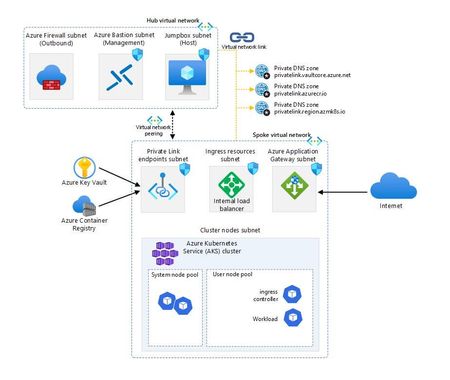
Are you ready to tackle Kubernetes on Azure like a pro? Embark on the “AKS Baseline - The Hard Way” and prepare for a journey that’s likely to be a mix of command line, detective work and revelations. This is a serious endeavour that will equip you with deep insights and substantial knowledge. As you navigate through the intricacies of Azure, you’ll not only face challenges but also accumulate a wealth of learning that will sharpen your skills and broaden your understanding of cloud infrastructure. Get set for an enriching experience that’s all about mastering the ins and outs of Azure Kubernetes Service!44KViews8likes6CommentsAccelerate Your Java Modernization Journey with the Azure Immersion Workshop
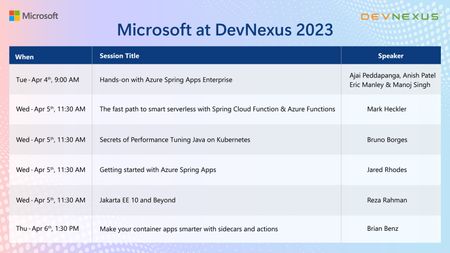
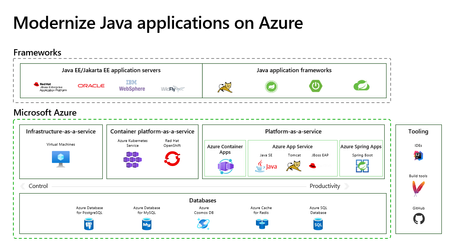
Join us for the latest version of the Azure Immersion Workshop - Modernize Java Apps. Get a comprehensive overview of Azure destinations for Java applications and a hands-on experience with Azure Spring Apps Enterprise.174KViews0likes0Comments