azure stream analytics
55 Topics
Simplifying Migration to Fabric Real-Time Intelligence for Power BI Real Time Reports
Power BI with real-time streaming has been the preferred solution for users to visualize streaming data. Real-Time streaming in PowerBI is being retired. We recommend users to start planning the migration of their data processing pipeline to Fabric Real-Time Intelligence.8.4KViews2likes1CommentArchitecting the Next-Generation Customer Tiering System
Authors Sailing Ni*, Joy Yu*, Peng Yang*, Richard Sie*, Yifei Wang* *These authors contributed equally. Affiliation Master of Science in Business Analytics (MSBA), UCLA Anderson School of Management, Los Angeles, California 90095, United States (Conducted December 2025) Acknowledgment This research was conducted as part of a Microsoft-sponsored Capstone Project, led by Juhi Singh and Bonnie Ao from the Microsoft MCAPS AI Transformation Office. Microsoft’s global B2B software business classifies customers into four tiers to guide coverage, investment, and sales strategy. However, the legacy tiering framework mixes historical rules with manual heuristics, causing several issues: Tiers do not consistently reflect customer potential or revenue importance. Statistical coherence and business KPIs (TPA, TCI, SFI) are not optimized or enforced. Tier distributions are imbalanced due to legacy ±1 movement and capacity rules. Sales coverage planning depends on a tier structure not grounded in data. To address these limitations, we, UCLA Anderson MSBA class of Dec'25, designed a next-generation KPI-driven tiering architecture. Our objective was to move from a heuristic, static system toward a scalable, transparent, and business-aligned framework. Our redesigned tiering system follows five complementary analytical layers, each addressing a specific gap in the legacy process: Natural Segmentation (Unsupervised Baseline): Identify the intrinsic structure of the customer base using clustering to understand how customers naturally group Pure KPI-Based Tiering (Upper-Bound Benchmark): Show what tiers would look like if aligned only to business KPIs, quantifying the maximum potential lift and exposing trade-offs. Hybrid KPI-Aware Segmentation (Our Contribution): Integrate clustering geometry with KPI optimization and business constraints to produce a realistic, interpretable, and deployable tiering system. Dynamic Tiering (Longitudinal Diagnostics): Analyze historical patterns to understand how companies evolve over time, separating structural tier drift from noise. Optimization & Resource Allocation (Proof of Concept): Demonstrate how the new tiers could feed into downstream coverage and whitespace prioritization through MIP- and heuristic-based approaches. Together, these components answer a core strategic question: “How should Microsoft tier its global customer base so that investment, coverage, and growth strategy directly reflect business value?” Our final architecture transforms tiering from a static classification exercise into a KPI-driven, interpretable, and operationally grounded decision framework suitable for Microsoft’s future AI and data strategy. Solution Architecture Diagram 1. Success Metrics Definition Before designing any segmentation system, the first step is to establish success metrics that define what “good” looks like. Without these metrics, models can easily produce clusters that are statistically neat but misaligned with business needs. A clear KPI framework ensures that every model—regardless of method or complexity—is evaluated consistently on both analytical quality and real business impact. We define success across two complementary dimensions: 1.1 Alignment & Segmentation Quality: These metrics evaluate whether the segmentation meaningfully separates customers based on business potential. 1.1.1 Tier Potential Alignment (TPA) Measures how well assigned tiers follow the rank order of PI_acct, our composite indicator of future growth potential. Implemented as a Spearman rank correlation, TPA tests whether higher-potential accounts systematically land in higher tiers. Step 1 - Formula for PI_acct (Potential Index per Account) Step 2 - Formula for TPA (Tier Potential Alignment) 𝜌_𝑠 = Spearman rank correlation Tier Rank = ordinal tier number (Tier A = highest → Tier D = lowest) Interpretation: TPA=1 ⇒ Perfect alignment (higher potential → higher tier) TPA=0 ⇒ No statistical relationship TPA<0 ⇒ Misalignment (tiers contradict potential) 1.1.2 Tier Compactness Index (TCI) Measures how homogeneous each tier is. Low within-tier variance on PI_acct or Revenue indicates that customers grouped together truly share similar characteristics, improving interpretability and resource planning. (1) Potential-based Compactness - TCI_PI (2) Revenue-based Compactness - TCI_REV TCI=1 ⇒ tiers are tight and well-separated TCI=0 ⇒ tiers are random or overlapping TCI<0 ⇒ within-tier variance exceeds total variance (poor grouping) 1.2 Business Impact These metrics test whether the segmentation supports strategic goals, not just statistical structure. 1.2.1 Strategic Focus Index (SFI) Quantifies how much revenue comes from the company’s most strategically important tiers. High SFI means segmentation helps focus investments—sales coverage, specialist time, programs—on the customers that matter most. Under the Tier Policy framework, the definition of “strategic” automatically adapts to the number of tiers K - for example, taking the top L tiers (e.g., top 2) or top x % of tiers ranked by mean potential or revenue. High SFI: strong emphasis on top strategic segments (potentially efficient but watch concentration risk). Moderate SFI: balanced focus across tiers. Low SFI: diffuse portfolio, limited emphasis on priority segment 2. Static Segmentation 2.1 Pure Unsupervised Clustering 2.1.1 Model Conclusions at a Glance Across all unsupervised models evaluated—Ward, Weighted Ward, K-Medoids, K-Means / K-Means++, and HDBSCAN — only the Ward model (K=4, Policy v2) provides a segmentation that is simultaneously: statistically coherent, business-aligned (high SFI), geometrically stable (clean Silhouette), and operationally interpretable. All alternative models either distort cluster geometry, collapse SFI, or produce unstable/illogical tier structures. Final Recommendation: Use Ward (K=4, Policy v2) as the natural segmentation baseline. 2.1.2 High-Level Algorithm Comparison Table 1. Algorithm Comparison Model Algorithm Summary Strengths Weaknesses Business Use Ward Variance-minimizing hierarchical merges Best balance of TPA/TCI/SFI; stable geometry Sensitive to correlated features Primary model for segmentation Weighted Ward Distance reweighted by PI + revenue Higher TPA Silhouette collapse; unstable Not recommended K-Medoids Medoid-based dissimilarity minimization Robust to outliers Cluster compression; weak SFI Diagnostic only K-Means / K-Means++ Squared-distance minimization Fast baseline SFI collapse; over-tight clusters Numeric benchmark only HDBSCAN Density-based clustering with noise Good for anomaly detection TPA collapse; noisy tiers; broken PI ordering Not suitable for tiering 2.1.3 Modeling Results Table 2. Unsupervised Clustering Model Results Metric FY26 Baseline (Legacy A+B) Ward K=4 (Policy v2) Weighted Ward2-B (α=4, β=0.8, s=0.7, K=5) Unweighted Ward (Policy v2, K=4) Unweighted Ward (Policy v2, K=3) K-Medoids B4 Behavior-only (K=3) K-means K=4 (Policy v2) K-means++ K=4 (Policy v2) HDBSCAN (baseline settings) TPA 0.260 0.260 0.860 0.260 0.300 0.520 0.310 0.310 0.040 TCI_PI 0.222 0.461 0.772 0.461 0.405 0.173 0.476 0.476 0.004 TCI_REV 0.469 0.801 0.640 0.801 0.672 0.002 0.831 0.831 0.062 SFI 0.807 0.868 0.817 0.868 0.960 0.656 0.332 0.332 0.719 Silhouette nan 0.560 0.145 0.560 0.604 0.466 0.523 0.523 0.186 Ward (K=4, Policy v2) remains the strongest performer: SFI ≈ 0.87, Silhouette ≈ 0.56, stable geometric structure. Weighted Ward raises TPA/PI slightly but Silhouette collapses (~0.15) → structural instability → not viable. K-Medoids consistently compresses clusters; TPA/TCI gain is offset by TCI_REV collapse and low SFI. K-Means / K-Means++ tighten numeric clusters but SFI drops to ~0.33 → tiers lose strategic meaning. HDBSCAN generates large noisy segments; TPA = 0.044, TCI_PI = 0.004, Silhouette = 0.186, and Tier A/B contain negative PI → fundamentally unsuitable. Conclusion: Only Ward (K=4) produces segmentation with both statistical integrity and business relevance. 2.1.4 Implications, Limitations, Next Steps Implications Our current unsupervised segmentation delivers statistically coherent and operationally usable tiers, but several structural findings emerged: Unsupervised methods reveal the data’s natural shape, not business priorities: Ward/K-means/HDBSCAN can discover separations in the feature space but cannot move clusters toward preferred PI or revenue patterns. Cluster outcomes cannot guarantee business-desired constraints. For example: If Tier A’s PI mean is too low, the model cannot raise it. If Tier C becomes too large, clustering cannot rebalance it. If the business wants stronger SFI, clustering alone cannot optimize that objective Some business-critical metrics are only evaluated after clustering, not optimized within clustering: Tier size distributions, average PI per tier, and revenue share are structurally important but not part of the unsupervised objective. Hence, Unsupervised clustering provides a statistically coherent view of the data’s natural structure, but it cannot guarantee business-preferred tier outcomes. The models cannot enforce hard constraints (e.g., desired A/B/C distribution, monotonic PI means, revenue share targets), nor can they adjust tiers when PI is too low or clusters become imbalanced. Additionally, key tier-level KPIs—such as average PI per tier, tier size stability, and revenue distribution—are only evaluated after clustering rather than optimized during it, limiting their influence on the final tier design. To overcome these structural limitations, the next stage of the system must incorporate semi-supervised guidance and policy-based optimization, where business KPIs directly shape tier boundaries and ranking. Future iterations will expand the policy beyond PI and revenue to include behavioral and market signals and bring tier-level metrics into the objective function to better align the segmentation with real-world operational priorities. 2.2 Semi-supervised KPI-Driven Learning Composite Score — KPI-Driven Objective for Tiering To guide our semi-supervised and hybrid methods, we define a Composite Score that unifies Microsoft’s key business KPIs into a single optimization target. It ensures that all modeling layers—Pure KPI-Based Tiering and Hybrid KPI-Aware Segmentation—optimize toward the same business priorities. Unsupervised clustering cannot optimize business outcomes. A composite objective is needed to consistently evaluate and improve tiering performance across: Potential uplift (TPA) Stability of tier structure (SFI) Within-tier improvement (TCI_PI) Revenue scale (TCI_REV) To align tiering with business priorities, we summarize four key KPIs—TPA, SFI, TCI_PI, and TCI_REV—into one normalized measure: Composite Score = 0.35×TPA + 0.35×SFI + 0.30×(TCI_PI + TCI_REV) This score provides a single benchmark for comparing methods and serves as the optimization target in our semi-supervised and hybrid approaches. How It Is Used Benchmarking: Compare all methods on a unified scale. Optimization: Serves as the objective in constrained local search (Method 3). Rule Learning: Guides the decision-tree logic extracted after optimization. Why It Matters The Composite Score centers the analysis around a single question: “Which tiering structure creates the strongest balance of growth potential, stability, and revenue impact?” 2.3 Pure KPI-Based Tiering 2.3.1 Model Conclusions at a Glance Pure KPI-based tiering shows what the tiers would look like if Microsoft prioritized business KPIs above all else. It achieves the largest KPI improvements, but causes major distribution shifts and violates movement rules, making it operationally unrealistic. Final takeaway: Pure KPI tiering is a valuable benchmark for understanding KPI potential, but cannot be operationalized. 2.3.2 High-Level Algorithm Summary Table 3. Methods of KPI-Based Tiering Method Algorithm Summary Strengths Weaknesses Business Use New_Tier_Direct (PI ranking only) Rank accounts by PI/KPI score and assign tiers directly Highest KPI gains; preserves overall tier distribution Moves ~20–40% companies; violates ±1 rule; disrupts continuity KPI upper-bound benchmark Tier_PI_Constrained (PI ranking + ±1 rule) Same as above but restrict movement to adjacent tiers KPI lift + respects movement constraint Still moves ~20–40%; breaks tier distribution (Tier C inflation) Diagnostic only 2.3.3 Modeling Results Table 4. Modeling Results for KPI-Based Tiering KPI FY26 Baseline New_Tier_Direct Tier_PI_Constrained Composite Score 0.5804 0.8105 0.763 TPA 0.2590 0.8300 0.721 TCI_PI 0.2220 0.5360 0.492 TCI_REV 0.4690 0.3970 0.452 SFI 0.8070 0.6860 0.650 New_Tier_Direct Composite Score: 0.5804 → 0.8105 TPA increases sharply (0.259 → 0.830) Violates ±1 rule; major reassignments (~20%–40%) Tier_PI_Constrained Respects ±1 movement KPI still improves (Composite 0.763) But tier distribution collapses (Tier C over-expands) Still ~20–40% movement → not feasible Hence: No PI-only method balances KPI lift with operational feasibility. 2.3.4 Limitations & Next Steps Pure KPI tiering cannot simultaneously: preserve tier distribution, respect ±1 movement rule, and deliver consistent KPI improvements. This creates the need for a hybrid model that combines clustering structure with KPI-aligned tier ordering. 2.4 Hybrid KPI-Aware Segmentation (Our Contribution) 2.4.1 Model Conclusions at a Glance Our hybrid method blends clustering geometry with KPI-driven optimization, achieving a practical balance between: statistical structure, business constraints, and KPI improvement. Final Recommendation: This is the segmentation framework we recommend Microsoft to adopt. ➔ It produces the most deployable segmentation by balancing KPI lift with stability and interpretability. ➔ Delivers meaningful KPI improvement while changing only ~5% of accounts, compared to Model B’s 20–40%. 2.4.2 High-Level Algorithm Summary Table 5. Algorithm Comparison Component Purpose Strengths Notes Constrained Local Search Optimize composite KPI score starting from FY26 tiers KPI uplift with strict constraints Only small movements allowed (~5%) Tier Movement Constraint (+1/–1) Ensure realistic transitions Guarantees business rules; keeps structure stable Limits improvement ceiling Decision Tree Learn interpretable rules from optimized tiers Deployable, explainable, reusable Accuracy ~80%; tunable with weighting Closed Loop Optimization Improve both rules and allocation iteratively Stable + interpretable Future extension 2.4.3 Modeling Results Table 6. Modeling Results for Hybrid Segmentation KPI FY26 Baseline New_Tier_Direct Tier_PI_Constrained ImprovedTier Composite Score 0.5804 0.8105 0.763 0.6512 TPA 0.2590 0.8300 0.721 0.2990 TCI_PI 0.2220 0.5360 0.492 0.3450 TCI_REV 0.4690 0.3970 0.452 0.5250 SFI 0.8070 0.6860 0.650 0.8160 Interpretation of Hybrid Model (Improved Tier) Composite Score: 0.5804 → 0.6512 TPA improvement (0.259 → 0.299) TCI_PI and TCI_REV both rise SFI improves compared to constrained PI method Only ~5% of companies move tiers, versus Method 2’s 20–40% This makes Method 3 the only method that simultaneously satisfies: KPI improvement original tier distribution ±1 movement rule low operational disruption interpretability (via decision tree) 2.4.4 Conclusion Model C offers a pragmatic middle ground: KPI lift close to pure PI tiering, operational impact close to clustering, and full interpretability. For Microsoft, this hybrid framework is the most realistic and sustainable segmentation approach 3. Dynamic Tier Progression 3.1 Model Conclusions at a Glance Our benchmarking shows that CatBoost and XGBoost consistently deliver the strongest overall performance, achieving the highest macro-F1 (~0.76) across all tested methods. However, despite these gains, the underlying business pattern remains dominant: tier changes are extremely rare (≈5.4%), and Microsoft’s one-step movement rule severely limits model learnability. Dynamic tiering is far more valuable as a diagnostic signal generator than a strict forecasting engine. While models cannot reliably predict future tier transitions, they can surface atypical account patterns, signals of risk, and emerging opportunities that support earlier sales intervention and more proactive account planning. 3.2 Models To predict future model upgrades and downgrades, we tested the following models: Table 7. Models Used for Dynamic Prediction Model Strengths Weaknesses When to Use MLR Simple; interpretable; fast baseline Weak on imbalanced data When transparency and explainability are needed Neural Network Captures nonlinear patterns; stronger recall than MLR Requires tuning; sensitive to imbalance data When exploring richer behavioral signals CatBoost (baseline, weighted, oversampled) Strongest overall balance; robust with categorical data; best macro-F1 Still limited by rarity of tier changes; weighted/oversampled versions risk overfitting Default diagnostic model for surfacing atypical account patterns XGBoost (baseline, weighted) High performance; scalable; production-ready Limited by structural imbalance; weighted versions increase false positives When deploying a stable scoring layer to sales teams Performance was then measured using accuracy, but more importantly, macro recall, precision, and F1, since upgrades and downgrades are much rarer and require balanced evaluation. 3.3 Model Results Across all models, overall accuracy appears high (0.95–0.97), but this metric is dominated by the fact that Tier transitions are extremely rare — only 808 of 15,000 cases (5.4%) moved tiers, while 95% stayed unchanged. According to macro metrics such as recall, precision, and F1, every model struggles to reliably detect upgrades and downgrades. CatBoost and XGBoost deliver the strongest balanced results, achieving the highest macro F1 scores (~0.76). However, even these advanced methods only capture half or fewer of the true upgrade and downgrade events. This reinforces that the challenge is not algorithmic performance, but the underlying business pattern: tier movements are infrequent, policy-driven, and weakly connected to observable account features. Table 8. Results for Dynamic Prediction Model Accuracy Macro Recall Precision F1 Score MLR 0.95 0.36 0.70 0.37 Neural Network 0.95 0.58 0.71 0.63 CatBoost 0.97 0.94 0.67 0.76 CatBoost (Weighted) 0.82 0.49 0.82 0.54 CatBoost (Oversampling) 0.69 0.42 0.75 0.42 XGBoost 0.97 0.93 0.67 0.76 XGBoost (Weighted) 0.97 0.85 0.70 0.76 3.4 Dynamic Tiering Implications Based on the results, our dynamic tiering will have the following implications to Microsoft: Tier changes are not reliably forecastable under current rules. Year-over-year stability is so dominant that even strong ML models cannot surface consistent upgrade or downgrade signals. This suggests that transitions are driven more by sales judgment and tier policy than by measurable account behavior. The dynamic model is still valuable: just not as a predictor of future tiers. Rather than serving as a forecasting engine, this pipeline should be viewed as a diagnostic tool that helps identify accounts with unusual patterns, emerging risks, or outlier behavior worth reviewing. Dynamic progression complements, rather than replaces, the core segmentation. It provides an additional layer of insight alongside clustering and KPI-optimized segmentation, helping Microsoft maintain both structural clarity (static segmentation) and forward-looking awareness (dynamic progression). 4. Optimization in Practice To understand how segmentation could support downstream coverage planning, we developed a small optimization proof-of-concept using Microsoft’s seller–tier capacity guidelines (e.g., max accounts per role × tier, geo-entity restrictions, in-person vs remote coverage rules). 4.1 What We Explored Using our final hybrid segmentation (Method 3), we tested a simplified workflow: Formulate a coverage optimization problem ○ Assign sellers to accounts under constraints such as: role × tier capacity limits, single-geo assignment, ±1 tier movement rules, domain restrictions for Tier C/D. ○ This naturally forms a mixed-integer optimization problem (MIP). Prototype with standard optimization tools ○ Linear and integer programming formulations using Gurobi, OR-Tools, and Pyomo. ○ Heuristic solvers (e.g., local search, greedy reallocation, hill climbing) as faster alternatives. Simulate coverage scenarios ○ Estimate changes in workload balance and whitespace prioritization under different seller–tier mixes. ○ Validate feasibility of the optimization with respect to Microsoft’s operational rules. 4.2 What We Learned Due to limited operational metrics (detailed whitespace values, upgrade probabilities, territory boundaries) and time constraints, we did not build a fully deployable engine. However, the PoC confirmed that: The segmentation integrates cleanly into a prescriptive segmentation → optimization → coverage pipeline. A full solver could feasibly allocate sellers under realistic business constraints. Gurobi-style MIP formulations and simulation-based heuristics are both valid paths for future development. In short: the optimization layer is technically viable and aligns naturally with our segmentation design, but its full implementation exceeds the scope of this capstone. 5. AI & LLM Integration To make segmentation accessible to a broad set of stakeholders like sales leaders, strategists, and business analysts, we built a conversational tiering assistant powered by LLM-based interpretation of strategic priorities. The assistant allows users to describe their intended segmentation direction in natural language, which the system translates into numerical weights and a refreshed set of tier assignments. 5.1 LLM Workflow Architecture The following flowchart demonstrates how the LLM work: Users communicate their goals using intuitive, high-level language (e.g. “prioritize runway growth”, “reward high-potential emerging accounts”). Front end collects the user’s tiering preference through a chat interface. The frontend sends this prompt to our cloud FastAPI service on Render. The LLM interprets the prompt and infers the relative strategic weights and which clustering method to use (KPI-based or Hybrid Approach). The server applies these weights in the tiering code to generate updated tiers based on the selected approach. The server returns a refreshed CSV with new tier assignments which can be exported through the chat interface. 5.2 Why LLMs Matter LLMs enhanced the project in three ways: Interpretation Layer: Helps business users articulate strategy in plain English and convert it to quantifiable modeling inputs. Explainability Layer: Surfaces cluster drivers, feature differences, and trade-offs across segments in natural language. Acceleration Layer: Enables real-time exploration of “what-if” tiering scenarios without engineering support. This integration transforms segmentation from a static analytical artifact into a dynamic, interactive decision-support tool, aligned with how Microsoft teams actually work. 5.3 Backend Architecture and LLM Integration Pipeline The conversational tiering system is supported by a cloud-based backend designed to translate natural-language instructions into structured model parameters. The service is deployed on Render and implemented with FastAPI, providing a lightweight, high-performance gateway for managing requests, validating inputs, and coordinating LLM interactions. FastAPI as the Orchestration Layer - User instructions are submitted through the chat interface and delivered to a FastAPI endpoint as JSON. FastAPI validates this payload using Pydantic, ensuring the request is well-formed before any processing occurs. The framework manages routing, serialization, and error handling, isolating request management from the downstream LLM and computation layers. LLM Invocation Through the OpenAI API - Once a validated prompt is received, the backend invokes the OpenAI API using a structured system prompt engineered to enforce strict JSON output. The LLM returns four normalized weights reflecting the user’s strategic intent, along with metadata used to determine whether the user explicitly prefers a KPI-based method or the default Hybrid approach. If no method is specified, the system automatically defaults to Hybrid. Low-temperature decoding is used to minimize stochastic variation and ensure repeatability across identical user prompts. All OpenAI keys are securely stored as Render environment variables. Schema Enforcement and Robust Parsing -To maintain reliability, the backend enforces strict schema validation on LLM responses. The service checks both JSON structure and numeric constraints, ensuring values fall within valid ranges and sum to one. If parsing fails or constraints are violated, the backend automatically reissues a constrained correction prompt. This design prevents malformed outputs and guards against conversational drift. Render Hosting and Operational Considerations - The backend runs in a stateless containerized environment on Render, which handles service orchestration, HTTPS termination, and environment-variable management. Data required for computation is loaded into memory at startup to reduce latency, and the lightweight tiering pipeline ensures that the system remains responsive even under shared compute resources. Response Assembly and Delivery - After LLM interpretation and schema validation, the backend applies the resulting weights and streams the recalculated results back to the user as a downloadable CSV. FastAPI’s Streaming Response enables direct transmission from memory without temporary filesystem storage, supporting rapid interactive workflows. Together, these components form a tightly integrated, cloud-native pipeline: FastAPI handles orchestration, the LLM provides semantic interpretation, Render ensures secure and reliable hosting, and the default Hybrid method ensures consistent behavior unless the user explicitly requests the KPI approach. DEMO: Microsoft x UCLA Anderson MSBA - AI-Driven KPI Segmentation Project (LLM demo) 6. Conclusion Our work delivers a strategic, KPI-driven tiering architecture that resolves the limitations of Microsoft’s legacy system and sets a scalable foundation for future segmentation and coverage strategy. Across all analyses, five differentiators stand out: Clear separation of natural structure vs. business intent: We diagnose where the legacy system diverges from true customer potential and revenue—establishing the analytical ground truth Microsoft never previously had. A precise map of strategic trade-offs: By comparing unsupervised, KPI-only, and hybrid approaches, we reveal the operational and business implications behind every tiering philosophy—making the framework decision-ready for leadership. A business-aligned segmentation ready for deployment: Our hybrid KPI-aware model uniquely satisfies KPI lift, distribution stability, ±1 movement rules, and interpretability—providing a reliable go-forward tiering backbone. A future-proof architecture that extends beyond static tiers: Dynamic progression modeling and optimization PoC show how tiering can evolve into forecasting, prioritization, whitespace planning, and resource optimization. A blueprint for Microsoft’s next-generation tiering ecosystem: The system integrates data science, business KPIs, optimization, and LLM interpretability into one cohesive workflow—positioning Microsoft for an AI-enabled tiering strategy. In essence, this work transforms customer tiering into a strategic, explainable, and scalable system—ready to support Microsoft’s growth ambitions and future AI initiatives.832Views2likes0Comments
Automating Data Vault processes on Microsoft Fabric with VaultSpeed
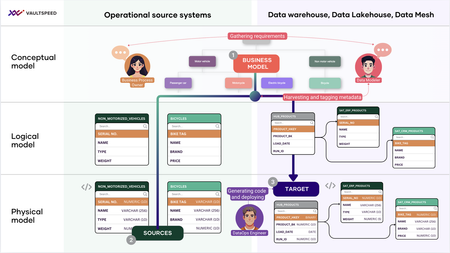
This Article is Authored By Jonas De Keuster from VaultSpeed and Co-authored with Michael Olschimke, co-founder and CEO at Scalefree International GmbH & Trung Ta is a senior BI consultant at Scalefree International GmbH. The Technical Review is done by Ian Clarke, Naveed Hussain – GBBs (Cloud Scale Analytics) for EMEA at Microsoft Businesses often struggle to align their understanding of processes and products across disparate systems in corporate operations. In our previous blogs in this series, we explored the advantages of Data Vault as a methodology and why it is increasingly recognized due to its automation-friendly approach to modern data warehousing. Data Vault’s modular structure, scalability, and flexibility address the challenges of integrating diverse and evolving data sources. However, the key to successfully implementing a Data Vault lies in automation. Data Vault’s pattern-based modeling - organized around hubs, links, and satellites - provides a standardized framework well-suited to integrate data from horizontally scattered operational source systems. Automation tools like VaultSpeed enhance this methodology by simplifying the generation of Data Vault structures, streamlining workflows, and enabling rapid delivery of analytics-ready data solutions. By leveraging the strengths of Data Vault and VaultSpeed’s automation capabilities, organizations can overcome inefficiencies in traditional ETL processes, enabling scalable and adaptable data integration. Examples of such operational systems include Microsoft Dynamics 365 for CRM and ERP, SAP for enterprise resource planning, or Salesforce for customer data. Attempts to harmonize this complexity historically relied on pre-built industry data models. However, these models often fell short, requiring significant customization and failing to accommodate unique business processes. Different approaches to Data Integration Industry data models offer a standardized way to structure data, providing a head start for organizations with well-aligned business processes. They work well in stable, regulated environments where consistency is key. However, for organizations dealing with diverse sources and fast-changing requirements, Data Vault offers greater flexibility. Its modular, scalable approach supports evolving data landscapes without the need to reshape existing models. Both approaches aim to streamline integration. Data Vault simply offers more adaptability when complexity and change are the norm. So it depends on the use cases when it comes to choosing the right approach. Tackling data complexity with automation Integrating data from horizontally distributed sources is one of the biggest challenges data engineers face. VaultSpeed addresses this by connecting the physical metadata from source systems with the business's conceptual data model and creating a "town plan" for building a Data Vault model. This "town plan" for Data Vault model construction serves as the bedrock for automating various data pipeline stages. By aligning data's technical and business perspectives, VaultSpeed enables the automated generation of logical and physical data models. This automation streamlines the design process and ensures consistency between the data's conceptual understanding and physical implementation. Furthermore, VaultSpeed's automation extends to the generation of transformation code. This code converts data from its source format into the structure defined by the Data Vault model. Automating this process reduces the potential for errors and accelerates the development of the data integration pipeline. In addition to data models and transformation code, VaultSpeed also automates workflow orchestration. This involves defining and managing the tasks required to extract, transform, and load data into the Data Vault. By automating this orchestration, VaultSpeed ensures that the data integration process is executed reliably and efficiently. How VaultSpeed automates integration The following section will examine the detailed steps involved in the VaultSpeed workflow. We will examine how it combines metadata-driven and data-driven modeling approaches to streamline data integration and automate various data pipeline stages. Harvest metadata: VaultSpeed collects metadata from source systems such as OneLake, AzureSQL, SAP, and Dynamics 365, capturing schema details, relationships, and dependencies. Align with conceptual models: Using a business’s conceptual data model as a guiding framework, VaultSpeed ensures that physical source metadata is mapped consistently to the target Data Vault structure. Generate logical and physical models: VaultSpeed leverages its metadata repository and automation templates to produce fully defined logical and physical Data Vault models, including hubs, links, and satellites. Automate code creation: Once the models are defined, VaultSpeed generates the necessary transformation and workflow code using templates with embedded standards and conventions for Data Vault implementation. This ensures seamless data ingestion, integration, and consistent population of the Data Vault model. By automating these steps, VaultSpeed eliminates the manual effort required for traditional data modeling and integration, reducing errors and addressing the inefficiencies of data integration using traditional ETL. Due to the model driven approach, the code is always in sync with the data model. Unified integration with Microsoft Fabric Microsoft Fabric offers a robust data ingestion, storage, and analytics ecosystem. VaultSpeed seamlessly embeds within this ecosystem to ensure an efficient and automated data pipeline. Here’s how the process works: Ingestion (Extract and Load): Tools like ADF, Fivetran, or OneLake replication bring data from various sources into Fabric. These tools handle the extraction and replication of raw data from operational systems. Microsoft Fabric also supports mirrored databases, enabling real-time data replication from sources like CosmosDB, Azure SQL, or application data into the Fabric environment. This ensures data remains synchronized across the ecosystem, providing a consistent foundation for downstream modeling and analytics. Data Repository or Platform: Microsoft Fabric is the data platform providing the infrastructure for storing, managing, and securing the ingested data. Fabric uniquely supports warehouse and lakehouse experiences, bringing them together under a unified data architecture. This means organizations can combine structured, transactional data with unstructured or semi-structured data in a single platform, eliminating silos and enabling broader analytics use cases. Modeling and Transformation: VaultSpeed takes over at this stage, leveraging its advanced automation to model and transform data into a Data Vault structure. This includes creating hubs, links, and satellites while ensuring alignment with business taxonomies. Unlike traditional ETL tools, VaultSpeed is not involved in the runtime execution of transformations. Instead, it generates code that runs within Microsoft Fabric. This approach ensures better performance, reduces vendor lock-in, and enhances security since no data flows through VaultSpeed itself. By focusing exclusively on model-driven automation, VaultSpeed enables organizations to maintain full control over their data processing while benefiting from automation efficiencies. Additionally, Fabric's VertiPaq engine manages the transformation workloads automatically, ensuring optimal performance without requiring extensive manual tuning, a key capability in a Data Vault context where performance is critical for handling large volumes of data and complex transformations. This simplifies operations for data engineers and ensures that query performance remains efficient, even as data volumes and complexity grow. Consume: The integrated data layer within Microsoft Fabric serves multiple consumption paths. While tools like Power BI enable actionable insights through analytics dashboards, the same data foundation can also drive AI use cases, such as machine learning models or intelligent applications. By connecting ingestion tools, a unified data platform, and analytics or AI solutions, VaultSpeed ensures a streamlined and integrated workflow that maximizes the value of the Microsoft Fabric ecosystem. Loading at multiple speeds: real-time Data Vaults with Fabric Loading data into a Data Vault often requires balancing traditional batch processes with the demands of real-time ingestion within a unified model. Microsoft Fabric’s event-driven tools, such as Data Activator, empower organizations to process data streams in real-time while supporting traditional batch loads. VaultSpeed complements these capabilities by ensuring that both modes of ingestion feed seamlessly into the same Data Vault model, eliminating the need for separate architectures like the Lambda pattern. Key capabilities for real time Data Vault include: Event-driven updates: Automatically trigger incremental loads into the Data Vault when changes occur in CosmosDB, OneLake, or other sources. Automated workflow orchestration: VaultSpeed’s Flow Management Control (FMC) automates the entire data ingestion, transformation, and loading workflow. This includes handling delta detection, incremental updates, and batch processes, ensuring optimal efficiency regardless of the speed of data arrival. FMC integrates natively with Azure Data Factory (ADF) for seamless orchestration within the Microsoft ecosystem. For more complex or distributed workflows, FMC also supports Apache Airflow, enabling flexibility in managing a wide range of data pipelines. Seamless integration: Maintain synchronized pipelines for historical and real-time data within the Fabric environment. The FMC intelligently manages multiple data streams, dynamically adjusting to workload demands to support high-volume batch loads and real-time event-driven updates. These capabilities ensure analytics dashboards reflect the latest data, delivering immediate value to decision-makers. Automating the gold layer and delivering data products at scale Power BI is a cornerstone of Microsoft Fabric, and VaultSpeed makes it easier for data modelers to connect the dots. By automating the creation of the gold layer, VaultSpeed enables seamless integration between Data Vaults and Power BI. Benefits for data teams: Automated gold layer: VaultSpeed automates the creation of the gold layer, including templates for star schemas, One Big Table (OBT), and other analytics-ready structures. These automated templates allow businesses to generate consistent and scalable presentation layers without manual intervention. Accelerated time to insight: By reducing manual preparation steps, VaultSpeed enables teams to deliver dashboards and reports quickly, ensuring faster access to actionable insights. Deliver data products: The ability to automate and standardize star schemas and other presentation models empowers organizations to deliver analytics-ready data products at scale, efficiently meeting the needs of multiple business domains. Improved data governance: VaultSpeed’s lineage tracking ensures compliance and transparency, providing full traceability from raw data to the presentation layer. No-code automation: Eliminate the need for custom scripting, freeing up time to focus on innovation and higher-value tasks. Conclusion Integrating VaultSpeed and Microsoft Fabric redefines how data modelers and engineers approach Data Vault 2.0. This partnership unlocks the full potential of modern data ecosystems by automating workflows, enabling real-time insights, and streamlining analytics. If you’re ready to transform your data workflows, VaultSpeed and Microsoft Fabric provide the tools you need to succeed. The following article will focus on the DataOps part of automation. Further reading Automating common understanding: Integrating different data source views into one comprehensive perspective Why Data Vault is the best model for data warehouse automation: Read the eBook The Elephant in the Fridge by John Giles: A great reference on conceptual data modeling for Data Vault About VaultSpeed VaultSpeed empowers enterprises to deliver data products at scale through advanced automation for modern data ecosystems, including data lakehouse, data mesh, and fabric architectures. The no-code platform eliminates nearly all traditional ETL tasks, delivering significant improvements in automation across areas like data modeling, engineering, testing, and deployment. With seamless integration to platforms like Microsoft Fabric or Databricks, VaultSpeed enables organizations to automate the entire software development lifecycle for data products, accelerating delivery from design to deployment. VaultSpeed addresses inefficiencies in traditional data processes, transforming how data engineers and business users collaborate to build flexible, scalable data foundations for AI and analytics. About the Authors Jonas De Keuster is VP Product at VaultSpeed. He had close to 10 years of experience as a DWH consultant in various industries like banking, insurance, healthcare, and HR services, before joining the data automation vendor. This background allows him to help understand current customer needs and engage in conversations with members of the data industry. Michael Olschimke is co-founder and CEO of Scalefree International GmbH, a European Big Data consulting firm. The firm empowers clients across all industries to use Data Vault 2.0 and similar Big Data solutions. Michael has trained thousands of industry data warehousing professionals, taught academic classes, and published regularly on these topics. Trung Ta is a senior BI consultant at Scalefree International GmbH. With over 7 years of experience in data warehousing and BI, he has advised Scalefree’s clients in different industries (banking, insurance, government, etc.) and of various sizes in establishing and maintaining their data architectures. Trung’s expertise lies within Data Vault 2.0 architecture, modeling, and implementation, specifically focusing on data automation tools. <<< Back to Blog Series Title Page1.5KViews1like0CommentsDelivering Information with Azure Synapse and Data Vault 2.0
Data Vault has been designed to integrate data from multiple data sources, creatively destruct the data into its fundamental components, and store and organize it so that any target structure can be derived quickly. This article focused on generating information models, often dimensional models, using virtual entities. They are used in the data architecture to deliver information. After all, dimensional models are easier to consume by dashboarding solutions, and business users know how to use dimensions and facts to aggregate their measures. However, PIT and bridge tables are usually needed to maintain the desired performance level. They also simplify the implementation of dimension and fact entities and, for those reasons, are frequently found in Data Vault-based data platforms. This article completes the information delivery. The following articles will focus on the automation aspects of Data Vault modeling and implementation.1KViews0likes1CommentAzure Stream Analytics Virtual Network Integration Goes GA!
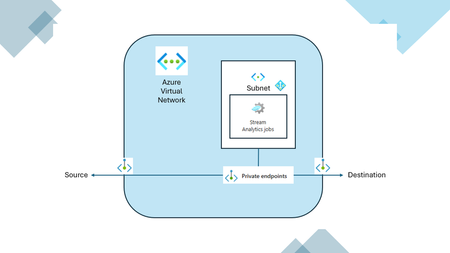
We are thrilled to announce that the highly anticipated capability of running your Azure Stream Analytics (ASA) job in an Azure Virtual Network (VNET) is now generally available (GA)! This feature, which has been in public preview, is set to revolutionize how you secure and manage your ASA jobs by leveraging the power of virtual networks. What Does This Mean for You? With VNET integration, you can now lock down access to your ASA jobs within your virtual network infrastructure. This provides enhanced security through network isolation, ensuring that your data remains protected and accessible only within your private network. By deploying a containerized instance of your ASA job inside your VNET, you can privately access your resources using: Private Endpoints: These allow you to connect your VNET-injected ASA job to your data sources privately via Azure Private Link. This means that your data traffic remains within the Azure backbone network, reducing exposure to the public internet and enhancing security. Service Endpoints: These enable you to connect your data sources directly to your VNET-injected ASA job. This simplifies the network architecture by providing direct connectivity. Service Tags: These allow you to manage network security by defining rules that allow or deny traffic to Azure Stream Analytics. This helps in maintaining a secure environment by controlling which services can communicate with your ASA jobs. Overall, VNET integration enhances the security of your ASA jobs by leveraging Azure's robust networking features. Expanded Regional Availability We are also excited to announce that this capability is now available in additional regions! Along with the existing regions (West US, Central Canada, East US, East US 2, Central US, West Europe, and North Europe), you can now enable VNET integration in the following regions: Australia East France Central North-Central US Southeast Asia Brazil South Japan East UK South Central India These regions were added in response to customer feedback. If you have suggestions for additional regions, please complete this form: https://forms.office.com/r/NFKdb3W6ti?origin=lprLink This expansion ensures that more customers around the globe can benefit from the enhanced security and network isolation provided by VNET integration. Getting Started To get started with VNET integration for your ASA jobs, follow these steps: Set Up Your VNET: Create or use an existing Azure Virtual Network. Create a Subnet: Add a dedicated subnet for your ASA job within the VNET. Set Up Azure NAT Gateway or disable outbound connectivity: Enhance security and reliability by setting up an Azure NAT Gateway or disable default outbound connectivity. Associate a Storage Account: Ensure you have a General Purpose V2 (GPV2) Storage account linked to your ASA job. Configure Your ASA Job: Azure Portal: Go to Networking and select "Run this job in virtual network." Follow the prompts to configure and save. Visual Studio Code: In the 'JobConfig.json' file, set up the 'VirtualNetworkConfiguration' to reference the subnet. Check Permissions: Make sure you have the necessary Role-based access control permissions on the subnet or higher. For detailed instructions and requirements, refer to the official documentation Run your Stream Analytics in Azure virtual network - Azure Stream Analytics | Microsoft Learn. Join the Revolution Stay tuned for more updates and exciting features as we continue to innovate and improve Azure Stream Analytics. Our other Ignite releases include Azure Stream Analytics Kafka Connectors is Now Generally Available! If you have any questions or need assistance, feel free to reach out to us at askasa@microsoft.com. Happy streaming!520Views0likes0CommentsAzure Stream Analytics Kafka Connectors is Now Generally Available!
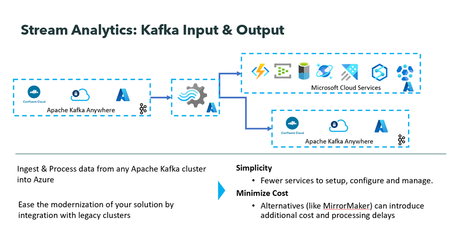
We are excited to announce that Kafka Input and Output with Azure Stream Analytics is now generally available! This marks a major milestone in our commitment to empowering our users with robust and innovative solutions. With Stream Analytics Kafka Connectors, users can natively read and write data to and from Kafka topics. This enables users to fully leverage Stream Analytics' rich capabilities and features even when the data resides outside of Azure. Azure Stream Analytics is a job service, so you do not have to spend time managing clusters, and downtime concerns are alleviated with a 99.99% SLA (Service Level Agreement) at the job level. Key Benefits: Stream Analytics job can ingest Kafka events from anywhere, process them and output them to any number of Azure services as well as to other Kafka clusters. No need to use workarounds such as MirrorMaker or Kafka extensions with Azure function to process data in Kafka with azure stream analytics. The solution is low code and entirely managed by the Azure Stream Analytics team at Microsoft. Getting Started: To get started with Stream Analytics Kafka input and output connector please refer to these links provided below: Stream data from Kafka into Azure Stream Analytics Kafka output from Azure Stream Analytics You can add Kafka input or output to a new or an existing Stream Analytics job in a few simple clicks. To add Kafka input, go to input under job topology, click Add input, and select Kafka. For Kafka output, go to output under job topology, click Add output, and select Kafka. Next, you will be presented with Kafka connection configuration. Once filled you will be able to test the connection with Kafka cluster. VNET Integration: You can connect to Kafka cluster from Azure Stream Analytics whether it is on cloud or on prem with a public endpoint. You can also securely connect to Kafka cluster inside a virtual network with Azure Stream Analytics. Visit the Run your Azure Stream Analytics job in an Azure Virtual Network documentation for more information. Automated deployment with ARM template ARM templates allow for quick and automated deployment of Stream Analytics jobs. To deploy a stream analytics job with Kafka Input or Output quickly and automatically, users can include the following sample snippet in their Stream Analytics job ARM template. "type": "Kafka", "properties": { "consumerGroupId": "string", "bootstrapServers": "string", "topicName": "string", "securityProtocol": "string", "securityProtocolKeyVaultName": "string", "sasl": { "mechanism": "string", "username": "string", "password": "string" }, "tls": { "keystoreKey": "string", "keystoreCertificateChain": "string", "keyPassword": "string", "truststoreCertificates": "string" } } We can’t wait to see what you’ll build with Azure Stream Analytics Kafka input and output connectors. Try it out today and let us know your feedback. Stay tuned for more updates as we continue to innovate and enhance this feature. Call to Action: For direct help with using the Azure Stream Analytics Kafka input, please reach out to askasa@microsoft.com. To learn more about Azure Stream Analytics click here464Views2likes0CommentsGenerally Available:Protocol Buffers (Protobuf) with Azure Stream Analytics
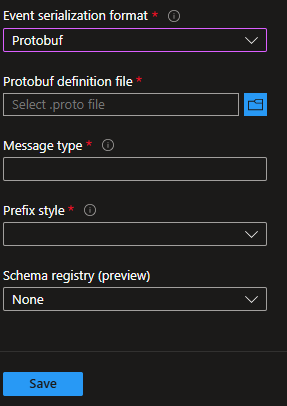
We are excited to announce that Azure Stream Analytics built-in Protobuf deserializer is now generally available! With the built-in deserializer, Azure Stream Analytics supports an out-of-the-box feature to align with the other file formats we support, including JSON and AVRO. Using Protobuf, you can handle data streams in a compact binary format, making it ideal for high-throughput, low-latency applications. Protobuf Protocol Buffers (Protobuf) is a language-neutral, platform-neutral mechanism for serializing structured data, developed by Google. It is widely used for communication between services or for saving data in a compact and efficient format. Configure your Stream Analytics job. Using the Protobuf deserializer is simple to configure. When setting up your Stream Analytics input, select the file format as Protobuf and then upload the Protobuf definition file (.proto file). Complete your configuration by specifying the message type and prefix style. Steps to configure a Stream Analytics job To set up your Stream Analytics job to deserialize events in Protobuf: After creating your job, go to Inputs. Click Add input and choose the desired input to configure. Under Event serialization format, select Protobuf from the dropdown list. Protobuf definition file A file that specifies the structure and data types of your Protobuf event Message type When you define a .proto schema, each message represents a data structure with specific fields. Add the message type that you want to deserialize Prefix style The setting that determines how long a message is, to deserialize Protobuf events correctly We can’t wait to see what you’ll build with Azure Stream Analytics built in Protobuf deserializer. Try it out today and let us know your feedback. Stay tuned for more updates as we continue to innovate and enhance this feature. Call to Action: For direct help with using the Azure Stream Analytics Kafka input, please reach out to askasa@microsoft.com. To learn more about Azure Stream Analytics click here To learn more about Azure Stream Analytics Protobuf deserializer click here450Views0likes0Comments
What Causes 🅠🅤🅘🅒🅚🅑🅞🅞🅚🅢 Online Error Code 101 and How Can It Be Fixed?
🅠🅤🅘🅒🅚🅑🅞🅞🅚🅢 Online Error Code 101 typically occurs due to a problem connecting to your bank account. Causes include incorrect bank login credentials, outdated browser settings, or connectivity issues. To fix it: Verify Login Information: Ensure your bank login credentials are correct. Update Browser: Use the latest version of your web browser. Clear Cache and Cookies: Clear your browser's cache and cookies. Check Bank's Website: Verify there are no issues with the bank's website. Reconnect Account: Disconnect and reconnect your bank account in 🅠🅤🅘🅒🅚🅑🅞🅞🅚🅢. If the issue persists, contact 🅠🅤🅘🅒🅚🅑🅞🅞🅚🅢 support.1.9KViews0likes1Comment
Simplicity meets Power - Integrate Azure Stream Analytics with Delta Lake
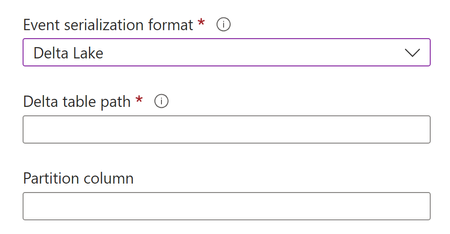
The native support of Delta Lake in Azure Stream Analytics is general available now. Explore where simplicity meets power in real-time data processing to unlock the potential of your data-driven decisions. Join us today to discover new possibilities for data-driven decision-making.2.6KViews0likes0Comments