azure stack
62 Topics
How to Fix Azure Event Grid Entra Authentication issue for ACS and Dynamics 365 integrated Webhooks
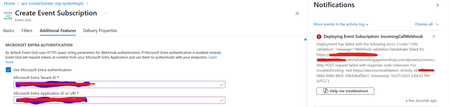
Introduction: Azure Event Grid is a powerful event routing service that enables event-driven architectures in Azure. When delivering events to webhook endpoints, security becomes paramount. Microsoft provides a secure webhook delivery mechanism using Microsoft Entra ID (formerly Azure Active Directory) authentication through the AzureEventGridSecureWebhookSubscriber role. Problem Statement: When integrating Azure Communication Services with Dynamics 365 Contact Center using Microsoft Entra ID-authenticated Event Grid webhooks, the Event Grid subscription deployment fails with an error: "HTTP POST request failed with unknown error code" with empty HTTP status and code. For example: Important Note: Before moving forward, please verify that you have the Owner role assigned on app to create event subscription. Refer to the Microsoft guidelines below to validate the required prerequisites before proceeding: Set up incoming calls, call recording, and SMS services | Microsoft Learn Why This Happens: This happens because AzureEventGridSecureWebhookSubscriber role is NOT properly configured on Microsoft EventGrid SP (Service Principal) and event subscription entra ID or application who is trying to create event grid subscription. What is AzureEventGridSecureWebhookSubscriber Role: The AzureEventGridSecureWebhookSubscriber is an Azure Entra application role that: Enables your application to verify the identity of event senders Allows specific users/applications to create event subscriptions Authorizes Event Grid to deliver events to your webhook How It Works: Role Creation: You create this app role in your destination webhook application's Azure Entra registration Role Assignment: You assign this role to: Microsoft Event Grid service principal (so it can deliver events) Either Entra ID / Entra User or Event subscription creator applications (so they can create event grid subscriptions) Token Validation: When Event Grid delivers events, it includes an Azure Entra token with this role claim Authorization Check: Your webhook validates the token and checks for the role Key Participants: Webhook Application (Your App) Purpose: Receives and processes events App Registration: Created in Azure Entra Contains: The AzureEventGridSecureWebhookSubscriber app role Validates: Incoming tokens from Event Grid Microsoft Event Grid Service Principal Purpose: Delivers events to webhooks App ID: Different per Azure cloud (Public, Government, etc.) Public Azure: 4962773b-9cdb-44cf-a8bf-237846a00ab7 Needs: AzureEventGridSecureWebhookSubscriber role assigned Event Subscription Creator Entra or Application Purpose: Creates event subscriptions Could be: You, Your deployment pipeline, admin tool, or another application Needs: AzureEventGridSecureWebhookSubscriber role assigned Although the full PowerShell script is documented in the below Event Grid documentation, it may be complex to interpret and troubleshoot. Azure PowerShell - Secure WebHook delivery with Microsoft Entra Application in Azure Event Grid - Azure Event Grid | Microsoft Learn To improve accessibility, the following section provides a simplified step-by-step tested solution along with verification steps suitable for all users including non-technical: Steps: STEP 1: Verify/Create Microsoft.EventGrid Service Principal Azure Portal → Microsoft Entra ID → Enterprise applications Change filter to Application type: Microsoft Applications Search for: Microsoft.EventGrid Ideally, your Azure subscription should include this application ID, which is common across all Azure subscriptions: 4962773b-9cdb-44cf-a8bf-237846a00ab7. If this application ID is not present, please contact your Azure Cloud Administrator. STEP 2: Create the App Role "AzureEventGridSecureWebhookSubscriber" Using Azure Portal: Navigate to your Webhook App Registration: Azure Portal → Microsoft Entra ID → App registrations Click All applications Find your app by searching OR use the Object ID you have Click on your app Create the App Role: Display name: AzureEventGridSecureWebhookSubscriber Allowed member types: Both (Users/Groups + Applications) Value: AzureEventGridSecureWebhookSubscriber Description: Azure Event Grid Role Do you want to enable this app role?: Yes In left menu, click App roles Click + Create app role Fill in the form: Click Apply STEP 3: Assign YOUR USER to the Role Using Azure Portal: Switch to Enterprise Application view: Azure Portal → Microsoft Entra ID → Enterprise applications Search for your webhook app (by name) Click on it Assign yourself: In left menu, click Users and groups Click + Add user/group Under Users, click None Selected Search for your user account (use your email) Select yourself Click Select Under Select a role, click None Selected Select AzureEventGridSecureWebhookSubscriber Click Select Click Assign STEP 4: Assign Microsoft.EventGrid Service Principal to the Role This step MUST be done via PowerShell or Azure CLI (Portal doesn't support this directly as we have seen) so PowerShell is recommended You will need to execute this step with the help of your Entra admin. # Connect to Microsoft Graph Connect-MgGraph -Scopes "AppRoleAssignment.ReadWrite.All" # Replace this with your webhook app's Application (client) ID $webhookAppId = "YOUR-WEBHOOK-APP-ID-HERE" #starting with c5 # Get your webhook app's service principal $webhookSP = Get-MgServicePrincipal -Filter "appId eq '$webhookAppId'" Write-Host " Found webhook app: $($webhookSP.DisplayName)" # Get Event Grid service principal $eventGridSP = Get-MgServicePrincipal -Filter "appId eq '4962773b-9cdb-44cf-a8bf-237846a00ab7'" Write-Host " Found Event Grid service principal" # Get the app role $appRole = $webhookSP.AppRoles | Where-Object {$_.Value -eq "AzureEventGridSecureWebhookSubscriber"} Write-Host " Found app role: $($appRole.DisplayName)" # Create the assignment New-MgServicePrincipalAppRoleAssignment ` -ServicePrincipalId $eventGridSP.Id ` -PrincipalId $eventGridSP.Id ` -ResourceId $webhookSP.Id ` -AppRoleId $appRole.Id Write-Host "Successfully assigned Event Grid to your webhook app!" Verification Steps: Verify the App Role was created: Your App Registration → App roles You should see: AzureEventGridSecureWebhookSubscriber Verify your user assignment: Enterprise application (your webhook app) → Users and groups You should see your user with role AzureEventGridSecureWebhookSubscriber Verify Event Grid assignment: Same location → Users and groups You should see Microsoft.EventGrid with role AzureEventGridSecureWebhookSubscriber Sample Flow: Analogy For Simplification: Lets think it similar to the construction site bulding where you are the owner of the building. Building = Azure Entra app (webhook app) Building (Azure Entra App Registration for Webhook) ├─ Building Name: "MyWebhook-App" ├─ Building Address: Application ID ├─ Building Owner: You ├─ Security System: App Roles (the security badges you create) └─ Security Team: Azure Entra and your actual webhook auth code (which validates tokens) like doorman Step 1: Creat the badge (App role) You (the building owner) create a special badge: - Badge name: "AzureEventGridSecureWebhookSubscriber" - Badge color: Let's say it's GOLD - Who can have it: Companies (Applications) and People (Users) This badge is stored in your building's system (Webhook App Registration) Step 2: Give badge to the Event Grid Service: Event Grid: "Hey, I need to deliver messages to your building" You: "Okay, here's a GOLD badge for your SP" Event Grid: *wears the badge* Now Event Grid can: - Show the badge to Azure Entra - Get tokens that say "I have the GOLD badge" - Deliver messages to your webhook Step 3: Give badge to yourself (or your deployment tool) You also need a GOLD badge because: - You want to create event grid event subscriptions - Entra checks: "Does this person have a GOLD badge?" - If yes: You can create subscriptions - If no: "Access denied" Your deployment pipeline also gets a GOLD badge: - So it can automatically set up event subscriptions during CI/CD deployments Disclaimer: The sample scripts provided in this article are provided AS IS without warranty of any kind. The author is not responsible for any issues, damages, or problems that may arise from using these scripts. Users should thoroughly test any implementation in their environment before deploying to production. Azure services and APIs may change over time, which could affect the functionality of the provided scripts. Always refer to the latest Azure documentation for the most up-to-date information. Thanks for reading this blog! I hope you found it helpful and informative for this specific integration use case 😀778Views4likes1CommentHow to Learn Microsoft Azure in 2020
How to Learn Microsoft Azure in 2020 🎉☁🎓 The year 2019 is almost over, and usually, we take the time to look back at the year and also to find some New Year’s resolutions for the new year. Why not take all that energy and prepare for the cloud computing era and advance your career by learning Microsoft Azure. In this post, I try to give you a quick look at how you can get started to learn Microsoft Azure in 2020. You can read more here: https://www.thomasmaurer.ch/2019/12/how-to-learn-microsoft-azure-in-2020/2KViews3likes0CommentsManaging and Working with Azure Network Security Groups (NSG)
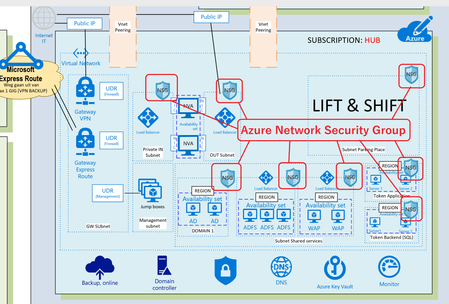
When you are implementing your Microsoft Azure Design like a HUB-Spoke model you have to deal with security of your Azure environment (Virtual Datacenter). One of them are Network Security Groups to protect your Virtual networks and make communication between Azure subnets possible in a Secure Azure Virtual Datacenter. You really have to plan your Azure Virtual networks and implement it by Architectural Design. Now I’m writing about Azure Network Security Groups which is important, but there are more items to deal with like : Naming Conventions in your Azure Virtual Datacenter Azure Subscriptions ( who is Owner, Contributor, or Reader? ) Azure Regions ( Where is my Datacenter in the world? ) Azure VNET and Sub-Nets ( IP-addresses ) Security of your Virtual Networks ( Traffic filtering, Routing ) Azure Connectivity ( VNET Peering between Azure Subscriptions, VPN Gateway ) Permissions (RBAC) Azure Policy ( Working with Blue prints ) How to Manage Microsoft Azure Network Security Groups (NSG) ? Read more on my blog about Infrastructure as Code (IaC) here with Azure DevOps and Visual Studio6.6KViews2likes0CommentsMicrosoft System Center DPM 2019 and Azure Backup Services
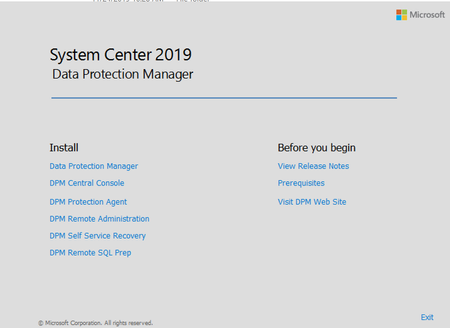
Microsoft System Center Data Protection Manager 2019 In a Earlier blogpost I wrote about Backup – Restore – DR Strategy in a fast changing world Microsoft Products for Backup – Restore -DR, we have: Microsoft System Center Data Protection Manager Microsoft Azure Backup Microsoft Azure Site Recovery (DR) 1. Microsoft System Center Data Protection Manager (DPM) You can install Microsoft SCDPM on different solutions, like: As a physical standalone server As a Hyper-V virtual machine As a Windows virtual machine in VMWare As an Azure virtual machine If you don’t want to manage hardware like a physical Server, you can virtualize your DPM Server on-Premises on Hyper-V or VMware but you can also install DPM into the Cloud as an Azure VM. Here you can read What’s New in System Center DPM 2019 Before you begin you should know what Microsoft System Center Data Protection Manager support and can protect by Backup. Here you find the highlights. 2. Microsoft Azure Backup Use Azure Backup to protect the data for on-premises servers, virtual machines, virtualized workloads, SQL server, SharePoint server, and more. Because this is a Microsoft Cloud Service, you don’t have to buy expensive hardware like Physical Servers, Storage, Tape Library, you just pay for what you are using in Azure, Here you find the Microsoft Azure Calculator to calculate your Backup costs. Read the complete Blogpost on System Center DPM 2019 and Azure Backup here5.2KViews2likes4CommentsCopy Files to Azure VM using PowerShell Remoting
There are a couple of different cases you want to copy files to Azure virtual machines. To copy files to Azure VM, you can use PowerShell Remoting. This works with Windows and Linux virtual machines using Windows PowerShell 5.1 (Windows only) or PowerShell 6 (Windows and Linux). Check out my blog post at the ITOpsTalk.com about copying files from Windows to Linux using PowerShell Remoting. If you want to know more about how to copy Files to Azure VM using PowerShell Remoting, check out my post.9.1KViews1like0Comments
Comparision on Azure Cloud Sync and Traditional Entra connect Sync.
Introduction In the evolving landscape of identity management, organizations face a critical decision when integrating their on-premises Active Directory (AD) with Microsoft Entra ID (formerly Azure AD). Two primary tools are available for this synchronization: Traditional Entra Connect Sync (formerly Azure AD Connect) Azure Cloud Sync While both serve the same fundamental purpose, bridging on-prem AD with cloud identity, they differ significantly in architecture, capabilities, and ideal use cases. Architecture & Setup Entra Connect Sync is a heavyweight solution. It installs a full synchronization engine on a Windows Server, often backed by SQL Server. This setup gives administrators deep control over sync rules, attribute flows, and filtering. Azure Cloud Sync, on the other hand, is lightweight. It uses a cloud-managed agent installed on-premises, removing the need for SQL Server or complex infrastructure. The agent communicates with Microsoft Entra ID, and most configurations are handled in the cloud portal. For organizations with complex hybrid setups (e.g., Exchange hybrid, device management), is Cloud Sync too limited?1.2KViews1like2Comments
Azure NSG Challenge : When NIC and Subnet Rules Collide
Imagine this real-world scenario: 🔹 A VM needs to connect outbound via RDP (TCP 3389) to an external server for management. 🔹 The NIC-level NSG allows outbound RDP, ensuring the VM can initiate connections. 🔹 However, the Subnet-level NSG has an inbound deny rule specifically for RDP. 💭 Question for IT Pros: 👉 Would the outbound RDP session succeed or be blocked due to the subnet-level NSG? 👉 How do you design NSG rules to prevent misconfigurations while maintaining security? ####################################################### Great challenge! Let's break it down: 🚦 Would the outbound RDP session succeed or be blocked? The outbound RDP session would succeed because the subnet-level NSG applies to inbound traffic coming into the subnet, not traffic leaving the VM. Since outbound RDP is explicitly allowed at the NIC level, the VM can initiate connections without issue. However, if the external server tries to respond back, the inbound deny rule at the subnet level would block the return traffic. This effectively disrupts the session, making it seem like the connection failed. 🔒 How to design NSG rules effectively? To prevent misconfigurations while maintaining security: 1- Understand NSG processing – Rules are evaluated independently at the NIC and Subnet levels, but both must allow the required traffic. 2- Use least privilege principles – Only allow necessary traffic and explicitly deny everything else. 3- Be careful with inbound rules at the subnet level – Blocking inbound traffic here can unintentionally interfere with legitimate outbound sessions. 4- Log traffic flows with NSG Flow Logs – Use diagnostic settings to capture insights for troubleshooting. 5- Consider Application Security Groups (ASGs) – These simplify NSG management by grouping resources dynamically.349Views1like4CommentsThe year in review: Hybrid applications for developers
As 2018 comes to an end, we look at the technology landscape. We look at the kinds of hybrid scenarios our customers are developing. For example, we see Airbus transforming aerospace with Microsoft Azure Stack and I realize that this year has been amazing for developers that design, develop, and maintain cloud-based apps. Azure Stack has improved support for DevOps practices. You can use Kubernetes containers. You can use API Profiles with Azure Resource Manager and the code of your choice. You can review walkthroughs and tutorials on getting up and running with a development practice using a continuous integration pipeline. With Azure Stack, your apps can be developed in the cloud. You can code once and deploy to environments in Azure or in your local data center. We are now seeing some of your favorite services from Azure arrive on Azure Stack. The Azure Stack team is also excited to come together with other members of the Azure Edge family, which include Data Box Edge, IoT Edge, and Azure Sphere. If you didn’t get a chance to attend Ignite 2018’s session on the Intellgent Edge check out the “Delivering Intelligent Edge and Microsoft Azure Stack and Data Box” session. The Edge closes the gap between on-premises solutions and the cloud. You can write applications based on a consistent Azure model. You can deploy different parts of your apps to different locations that make the most sense for each solution. Read about it in the Azure blog.1.3KViews1like0CommentsUsing Azure Update Management on Azure Stack
At Microsoft Ignite 2018, Microsoft announced the integration of Azure Update and Configuration Management on Azure Stack. This is a perfect example how Azure services from the public cloud can be extended into your datacenter using Azure Stack. Azure Update and Configuration Management brings Azure Update Management, Change Tracking and Inventory to your Azure Stack VMs. In the case of Azure Stack, the backend services and orchestrator like Azure Automation and Log Analytics, will remain to run in Azure, but it lets you connect your VMs running on Azure Stack. Learn more here: https://www.thomasmaurer.ch/2018/12/azure-update-management-azure-stack/2.4KViews1like3CommentsConsiderations for deploying apps and services on Azure Stack
I work with a couple of customers on different Azure Stack projects. One of the main topics that always comes up, is what are the differences between Azure and Azure Stack when deploying applications and services. Obviously there are the high level differences, which I have written about it here: Microsoft Azure Stack – Azure Extension in your Datacenter. However, there are also small differences in features and services between Azure and Azure Stack. These differences can block customers form deploying and automating workloads. I tried to summarize the most common differences and considerations you should know, in a single blog post. Check out my blog here: https://www.thomasmaurer.ch/2018/12/considerations-using-azure-stack/1.2KViews1like0Comments