azure sql db
92 TopicsSeconds of Downtime, Hours of Confusion: Handling Transient Azure SQL Disconnects
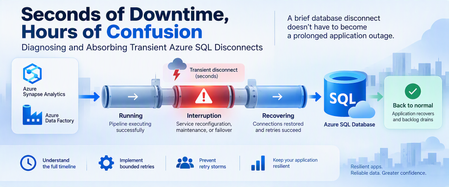
A database can recover in seconds while an application remains unavailable for much longer. Brief connectivity interruptions are expected failure modes that cloud applications should be designed to tolerate. With Azure SQL Database, transient connectivity errors can occur during short-lived service reconfiguration events. Microsoft notes that many such reconfiguration events complete in less than 60 seconds and recommends that applications implement retry logic rather than immediately surfacing transient failures to users. But the database interruption is only part of the story. An application might continue experiencing problems because of: Failed connections. Lost in-flight operations. Retry behavior. Connection-pool recovery. Authentication or token issues. Queued requests. Application instances retrying simultaneously. Backlogs that must drain after connectivity returns. This leads to an important troubleshooting principle: Database recovery and application recovery are separate milestones. Understanding that difference can turn a confusing availability incident into a defensible timeline and, more importantly, a more resilient application design. 1. Transient Does Not Mean Harmless A transient interruption is temporary, but its application impact doesn't have to be. Consider a simplified timeline: Time Event T0 Application healthy T1 Database connectivity is interrupted T2 Database connectivity becomes available again T3 Applications reconnect T4 Request backlog begins draining T5 Application returns to normal The actual database connectivity event is: T1 → T2 But users might experience impact across: T1 → T5 Calling the entire T1-to-T5 period a continuous database outage would be inaccurate unless evidence proves that the database itself remained unavailable. Instead, investigate the periods separately. 2. Build a Three-Layer Timeline A good post-incident investigation should correlate three timelines. Layer 1: Database/connectivity behavior Capture: Connection failures. Successful reconnections. Relevant Azure monitoring signals. Azure Service Health information when applicable. Database resource behavior. Layer 2: Client connectivity Capture: SQL exception number. Exception timestamp in UTC. Connection timeout. Retry attempts. Retry delays. Authentication failures. Network errors. Azure SQL troubleshooting guidance recommends logging failure timestamps and notes that SQL Database can return tracing information helpful during connectivity investigations. Layer 3: Application recovery Capture: Application health. Request failures. Queue depth. Retry volume. Connection-pool recovery. Backlog drain time. Time when users actually recovered. The timelines might reveal: Database connectivity restored │ ▼ Applications reconnect │ ▼ Backlog continues │ ▼ Application fully recovered That distinction is essential. 3. Classify the Failure Before Retrying It Not every SQL connectivity error means the same thing. Classify the symptom into categories such as: Transient availability/connectivity failure. Authentication failure. Token-related failure. Network-path problem. DNS problem. Firewall/configuration issue. Resource-governance condition. Application timeout. Long application recovery after SQL connectivity returns. Azure SQL Database documents multiple connectivity failure categories, including transient fault errors such as 40197 and 40613, authentication failures such as 18456, network termination conditions, firewall issues, and connection timeouts. The classification matters because: Not every failure should be retried in the same way. 4. Use Azure SQL Connectivity History Carefully Azure SQL Database exposes connectivity-event information through system views in the logical server's master database. One useful view is: sys.database_connection_stats It provides aggregated connection success and failure information in five-minute intervals. Connect to the logical server's master database and run: DECLARE @StartTime datetime2 = DATEADD(HOUR, -2, SYSUTCDATETIME()); SELECT database_name, start_time, end_time, success_count, total_failure_count, connection_failure_count FROM sys.database_connection_stats WHERE start_time >= @StartTime ORDER BY start_time DESC; This can help answer: Did connection failures occur? Which database was affected? In which five-minute interval? Were successful connections also occurring? But there's an important limitation. This is aggregated historical information, not a second-by-second outage trace. The data can also arrive later, with Microsoft documenting that it can take up to 24 hours for all information to appear. Therefore, don't use one five-minute bucket containing failures to claim: "The database was unavailable for five minutes." The evidence only tells you connection failures were recorded during that interval. 5. Look Deeper With sys.event_log For additional connectivity-event information, Azure SQL Database exposes: sys.event_log This view records successful database connections and connection failures and is intended to help track and troubleshoot Azure SQL Database connectivity activity. Again, connect to master. DECLARE @StartTime datetime2 = DATEADD(HOUR, -2, SYSUTCDATETIME()); SELECT database_name, start_time, end_time, event_category, event_type, event_subtype, event_subtype_desc, severity, event_count, description FROM sys.event_log WHERE start_time >= @StartTime AND event_category = N'connectivity' ORDER BY start_time DESC; Useful columns include: start_time end_time event_category event_type event_subtype_desc severity event_count description Microsoft cautions that querying sys.event_log can consume significant resources on logical servers with many databases or high login volumes, so keep the time range and other filters appropriately narrow. 6. Correlate SQL Evidence With Application Errors Now correlate the Azure SQL evidence with client telemetry. For every important application-side SQL exception, capture: UTC timestamp. SQL error number. Error message. Application instance. Operation. Retry attempt. Retry delay. Final outcome. Correlation or request ID when available. For example: UTC Layer Observation 10:00:02 Application SQL connection exception 10:00:04 Application Retry 1 fails 10:00:08 Application Retry 2 fails 10:00:15 SQL Connectivity succeeds 10:00:18 Application New connection succeeds 10:01:30 Application Queue still processing 10:05:00 Application Normal service restored Now you can separate: Connectivity interruption. Reconnection period. Application recovery period. That's substantially more useful than describing the full period as: "SQL was down." 7. Understand Connectivity and Reconfiguration Applications connect to the Azure SQL Database gateway, after which traffic is handled according to the effective connection policy and directed to the appropriate database environment. In a managed database service, applications must be designed for transient connectivity interruption. Microsoft specifically describes transient faults as conditions whose underlying cause resolves itself and notes that service reconfiguration can temporarily affect database connectivity. The application therefore shouldn't depend on one connection remaining valid indefinitely. Design for: Connections occasionally being terminated. New connection attempts occasionally failing. In-flight work requiring recovery. DNS and network paths needing to remain correctly configured. Authentication credentials or tokens remaining valid. Retry behavior that allows the system time to recover. Avoid guessing at undocumented platform internals when investigating an event. If evidence establishes only: "Connections failed briefly." Don't convert that into an unsupported explanation of why the platform changed state. 8. Retry Smartly, Not Aggressively Retry logic is essential for cloud applications that connect to Azure SQL Database. Microsoft explicitly recommends retry logic for transient connection failures. But a retry strategy needs boundaries. A good strategy considers: Number of attempts. Delay between attempts. Increasing delay. Random jitter. Maximum interval. Total retry budget. Whether the operation can safely be repeated. A bad strategy looks like: Failure ↓ Retry immediately ↓ Failure ↓ Retry immediately ↓ Failure ↓ Retry immediately... Across hundreds of application instances, this behavior can make recovery harder. A better pattern is: Failure ↓ Wait + jitter ↓ Retry ↓ Longer wait + jitter ↓ Retry ↓ Stop after bounded attempts 9. Use Microsoft.Data.SqlClient Retry Logic For .NET applications using Microsoft.Data.SqlClient, configurable retry logic is available in version 3.0 and later. Microsoft documents providers for configuring connection and command retries. A connection retry provider can be configured like this: var options = new SqlRetryLogicOption() { NumberOfTries = 5, DeltaTime = TimeSpan.FromSeconds(1), MaxTimeInterval = TimeSpan.FromSeconds(20) }; SqlRetryLogicBaseProvider provider = SqlConfigurableRetryFactory.CreateExponentialRetryProvider(options); using var connection = new SqlConnection(connectionString); connection.RetryLogicProvider = provider; connection.Open(); With this configuration: NumberOfTries = 5 Allows one initial attempt and up to four retries. DeltaTime Influences the delay between attempts. MaxTimeInterval Caps an individual retry delay. The exponential provider adds randomized jitter to retry intervals. The actual values should be tested against your application's: Latency requirements. Failure budget. Traffic volume. Concurrency. User experience. They're not universal service recommendations. 10. Connection Retry and Command Retry Are Different This is one of the most important resiliency distinctions. Suppose this fails: connection.Open(); Retrying the connection after an appropriate delay is generally straightforward for a transient connection condition. But suppose this fails: UPDATE dbo.Orders SET ProcessingStatus = N'Completed' WHERE OrderID = @OrderID; The application now has a harder question: Did the UPDATE execute before the connection was lost? Blindly repeating the command isn't always safe. Microsoft's Azure SQL guidance recommends establishing a fresh connection after a transient command failure before retrying, and retry logic must correctly account for the transaction's outcome. 11. Idempotency Matters Different operations require different retry treatment. Read-only operation For example: SELECT OrderID, ProcessingStatus FROM dbo.Orders WHERE OrderID = @OrderID; Repeating a read is often relatively straightforward, subject to your application's consistency requirements. Update operation For example: UPDATE dbo.Orders SET ProcessingStatus = N'Completed' WHERE OrderID = @OrderID; The client must determine whether repeating this operation is safe. Insert operation Consider: INSERT dbo.PaymentRequests ( RequestID, AccountID, Amount ) VALUES ( @RequestID, @AccountID, @Amount ); If the connection disappears after the server commits but before the client receives confirmation, an unconditional retry could create duplicate business activity unless the application and schema provide an idempotency mechanism. For example, a unique request identifier can make duplicate detection possible. The important principle is: Retryability is a business-operation property, not simply a SQL error property. 12. Transactions Need Special Treatment Be particularly careful with multi-statement transactions. Consider: BEGIN TRANSACTION; UPDATE dbo.Inventory SET Quantity = Quantity - @Quantity WHERE ProductID = @ProductID; INSERT dbo.ShipmentQueue ( RequestID, ProductID, Quantity ) VALUES ( @RequestID, @ProductID, @Quantity ); COMMIT TRANSACTION; If connectivity is interrupted, don't simply reconnect and retry the last statement. Your application needs a strategy that protects the integrity of the entire unit of work. Microsoft's retry documentation specifically cautions that if a transient failure invalidates an active transaction, the application should retry the entire transaction rather than only the failed statement. 13. Prevent the Retry Storm Imagine 500 application instances lose connectivity simultaneously. If every instance retries immediately: 500 requests fail ↓ 500 immediately retry ↓ Another synchronized wave ↓ Another synchronized wave Recovery traffic itself can become disruptive. Exponential backoff with jitter helps spread retries across time instead of concentrating them into synchronized bursts. The configurable retry provider in Microsoft.Data.SqlClient supports exponential retry behavior with randomized jitter. Also consider application-level resilience mechanisms such as: Circuit breakers. Back-pressure. Queueing. Controlled concurrency. Connection-pool recovery. Rate limiting. Load shedding where appropriate. The objective isn't: "Retry until SQL succeeds." It's: Recover gracefully without creating a second problem. 14. Don't Ignore the Network Path Not every SQL connection failure originates from the database. Azure SQL Database connectivity includes several components between the application and database, with connection behavior also influenced by the configured connection policy. Troubleshooting may need to include: DNS. Firewall configuration. Private endpoints. Network security rules. Client outbound connectivity. Connection policy. Authentication. Application host health. Azure SQL supports Redirect, Proxy, and Default connection-policy configurations depending on the environment and configuration. In Redirect mode, clients establish connections directly to the node hosting the database after the initial gateway interaction, which requires appropriate network access. This is another reason not to classify every connection exception as: "Azure SQL outage." 15. Test Resiliency Before an Incident Don't wait for a real platform event to discover whether your application's recovery logic works. Test controlled failure scenarios involving: New connections. Existing connections. Read-only requests. Writes. Multi-statement transactions. Multiple application instances. Queued workloads. Connection pools. Measure: Time to detect failure. First retry delay. Number of attempts. Time to establish a new connection. Failed user requests. Queue growth. Queue drain time. Full application recovery. The real success metric isn't merely: "Can I connect to the database again?" It's: "How quickly can the application return to normal service without compromising correctness?" 16. Write a Defensible Post-Incident Report A strong post-incident report separates facts, inferences, and unknowns. Confirmed facts Examples: Client connection failures were recorded during a specific UTC interval. Successful connections later resumed. Certain client instances continued failing after initial connectivity returned. Application backlog persisted beyond the connectivity event. Retry activity increased during recovery. Supported inference Example: Aggressive retry behavior likely contributed to slower application recovery. Use this classification only when application telemetry supports the relationship. Unknowns Examples: The exact internal platform operation responsible for a transient event. Whether an unrelated network event contributed. Whether a capacity change affected recovery. Don't fill gaps in telemetry with assumptions. 17. A Practical Decision Tree When an application reports an Azure SQL connectivity incident: 1. Is the database reachable now? No Check current Azure status and application connectivity. Validate networking, DNS, firewall, authentication, and Azure SQL availability. Yes Continue reconstructing the historical incident. 2. Did Azure SQL record connection failures? Yes Correlate: sys.event_log. sys.database_connection_stats. Application timestamps. Azure monitoring evidence. No or evidence isn't yet available Continue investigating application and network telemetry. Remember that historical connectivity data can arrive later. 3. Did the application retry? No Implement a bounded transient-fault handling strategy. Yes Evaluate: Retry count. Delay. Backoff. Jitter. Error classification. 4. Did many instances retry simultaneously? Yes Investigate: Retry synchronization. Circuit breaking. Back-pressure. Queue recovery. Connection pools. 5. Were writes or transactions interrupted? Yes Validate: Transaction outcome. Idempotency. Duplicate prevention. Whole-transaction retry behavior. 6. Did the application remain unhealthy after connections succeeded? Yes Measure application recovery separately from the original database connectivity event. Final Takeaway The hardest part of a transient Azure SQL event isn't always the interruption itself. Sometimes it's the application's response. A resilient architecture recognizes three separate timelines: Connectivity interruption Database/connectivity recovery Application recovery Azure SQL Database is designed as a cloud service where applications should expect and tolerate transient connectivity conditions. Microsoft recommends implementing retry logic rather than exposing appropriate transient failures directly to users. But resilient retry logic must be: Bounded. Delayed. Appropriately randomized. Error-aware. Transaction-aware. Idempotency-aware. Observable. And post-incident analysis should distinguish: What is confirmed. What is inferred. What remains unknown. Because: A brief database disconnect doesn't have to become a prolonged application outage. The objective isn't to design an application that never experiences a disconnected connection. The objective is to design an application that absorbs the interruption, recovers safely, and returns to normal operation predictably. Further reading Working with Transient Errors in Azure SQL Database Troubleshoot Common Connection Issues in Azure SQL Configure Retry Logic in Microsoft.Data.SqlClient Azure SQL Database Connectivity Architecture sys.event_log for Azure SQL Database sys.database_connection_stats for Azure SQL DatabaseLessons Learned #558: What an Execution Plan XML Can Tell Us in Azure SQL Database
During a performance investigation in Azure SQL Database, we requested the execution plan to understand what the query was doing. While reviewing the evidence, the customer asked a broader question: when you open the XML of an execution plan, what do you usually look for? It was a useful question. The graphical plan helps us follow the flow of data, but the XML contains details about parameters, statistics, warnings and execution that can explain why the query behaved as it did. I do not read every attribute. I start with a few checks that help connect the customer symptom to the work performed by the query. In this article, I will walk through those checks: the type of plan, parameter values, estimated versus actual rows and statistics, missing indexes and implicit conversions, and reasons for a serial plan. The XML fragments below are simplified examples that use invented values or are adapted from examples discussed in previous articles in the Lessons Learned troubleshooting series. First check whether the plan contains execution evidence Plan What we can inspect Estimated plan Optimizer choices and estimates; the query has not executed Actual plan Plan plus available counters and warnings from that execution Cached or Query Store plan Compiled plan; normally no operator actuals for the incident For the checks involving actual rows, I request an actual execution plan. In SSMS, use Include Actual Execution Plan, or capture it using SET STATISTICS XML. Choose one method. The latter executes the query and returns its plan. The account needs the permissions to run the statement and SHOWPLAN permission. SET STATISTICS IO ON; SET STATISTICS TIME ON; SET STATISTICS XML ON; -- Execute the SELECT being investigated here. SET STATISTICS XML OFF; SET STATISTICS TIME OFF; SET STATISTICS IO OFF; Save the plan as a .sqlplan file and keep the Messages output. Record when it was captured, the parameters and the reported symptom. An execution captured later may not represent the incident. Review query literals, parameter values and object names before sharing the file. Check the right statement and its parameters A procedure or batch may contain several statements. I locate the relevant StmtSimple and its QueryPlan before interpreting a warning. StatementId and operator NodeId help keep the observations attached to the correct statement and operator; NodeId is not a stable identifier across different compilations. Next, I look at ParameterList. When available, it shows both the value used when the plan was compiled and the value used during the captured execution. <ParameterList> <ColumnReference Column="@CustomerId" ParameterDataType="int" ParameterCompiledValue="(42)" ParameterRuntimeValue="(900)" /> </ParameterList> Here, the plan was compiled with CustomerId 42 and executed with CustomerId 900. If one customer has a few orders and another has thousands, I would compare their data distribution and actual plans. Different values are a reason to investigate parameter sensitivity; they do not prove that plan reuse caused the problem. A missing runtime value means this capture did not provide it. It does not mean the runtime value was the same as the compiled value. Also, eligible queries can intentionally use different plan variants through Parameter Sensitive Plan optimization. Make the comparison match the application If the query is slow in the application but fast in SSMS, I compare the SQL text, parameter types and values, database context and session options. StatementSetOptions records options associated with compilation. <StatementSetOptions ARITHABORT="true" ANSI_WARNINGS="true" ANSI_NULLS="true" QUOTED_IDENTIFIER="true" ANSI_PADDING="true" CONCAT_NULL_YIELDS_NULL="true" NUMERIC_ROUNDABORT="false" /> A difference in context can help explain why the application and SSMS use different cached plans. I capture both rather than assuming that a fast SSMS execution represents the application. The difference itself still needs to be connected to the measured performance. Compare estimated and actual rows then inspect statistics I follow the rows through the plan and look for the first useful difference between what the optimizer expected and what the operator actually processed. <RelOp NodeId="3" PhysicalOp="Index Seek" LogicalOp="Index Seek" EstimateRows="100"> <RunTimeInformation> <RunTimeCountersPerThread Thread="0" ActualRows="20000" ActualRowsRead="80000" ActualExecutions="1" /> </RunTimeInformation> <!-- Access details omitted --> </RelOp> In this single-execution example, the operator estimated 100 rows and returned 20,000: a 200-fold underestimate. It also read 80,000 rows. I would ask why the estimate was inaccurate, and why the operator read substantially more rows than it returned. These are separate questions. For repeated or parallel operators, account for executions and threads before comparing totals. Do not add the rows from every operator to calculate the query result size. The next question is often whether the statistics were out of date. OptimizerStatsUsage identifies statistics consulted during compilation, where that information is exposed. <OptimizerStatsUsage> <StatisticsInfo Schema="[PlanXmlLab]" Table="[Orders]" Statistics="[IX_Orders_CustomerId]" LastUpdate="2026-10-10T07:00:00" SamplingPercent="20" ModificationCount="15000" /> </OptimizerStatsUsage> I check the relevant statistics object, its LastUpdate, SamplingPercent and ModificationCount together. An old timestamp or a low sampling percentage alone does not prove that it caused the estimate. Updated statistics cannot explain every discrepancy; parameter values, predicates and data distribution also matter. The XML describes the statistics consulted at compilation. To check their current state, I use sys.dm_db_stats_properties, as shown next. A subsequent update does not rewrite the evidence in an already saved plan. Check when the statistics were last updated -- Run in the affected database and set the actual table name. SELECT st.name AS statistics_name, sp.last_updated, sp.rows, sp.rows_sampled, sp.modification_counter FROM sys.stats AS st OUTER APPLY sys.dm_db_stats_properties( st.object_id, st.stats_id) AS sp WHERE st.object_id = OBJECT_ID(N'PlanXmlLab.Orders'); last_updated identifies the latest statistics update; rows and rows_sampled describe the population and sample at that update. modification_counter counts modifications to the leading statistics column since the update. Metadata visibility and permissions can affect the output. Compare this information with the same statistics object in the plan. Timestamps alone do not tell us whether the update was automatic or manual. If an update is justified, validate it in a controlled comparison using the same query and representative parameters, and capture a newly compiled plan. Read the access path alongside the row counts An Index Seek can still read many rows. I inspect SeekPredicates, any residual Predicate and ActualRowsRead where available. A broad seek range followed by filtering can explain why the rows read greatly exceed the rows returned. Likewise, a Key Lookup may be inexpensive once but expensive when repeated for thousands of rows. A scan can be the right choice when a large part of the table qualifies. The operator name is a starting point; the amount of work tells us more. For the customer, the useful explanation is concrete: this operator returned many more rows than expected, these were the statistics used, and this is the next comparison that will help establish why. That is more informative than recommending a statistics update from the timestamp alone. Read missing indexes and conversion warnings as clues Missing-index messages are easy to notice. I inspect the suggestion, but I also check whether it fits the query and the existing indexes. <MissingIndexes> <MissingIndexGroup Impact="85.0"> <MissingIndex Schema="[PlanXmlLab]" Table="[Orders]"> <ColumnGroup Usage="EQUALITY"> <Column Name="[CustomerId]" ColumnId="2" /> </ColumnGroup> <ColumnGroup Usage="INCLUDE"> <Column Name="[Amount]" ColumnId="3" /> </ColumnGroup> </MissingIndex> </MissingIndexGroup> </MissingIndexes> This example suggests a key on CustomerId with Amount included for coverage. EQUALITY and INEQUALITY describe predicate columns, while INCLUDE describes covering columns. The suggestion does not settle every detail of index design. Impact is an estimated reduction in optimizer cost. A value of 85 does not promise an 85% reduction in elapsed time. The XML may contain more suggestions than the graphical plan displays. Review existing indexes and write overhead, then measure the candidate change. Check which side of the predicate is converted <Warnings> <PlanAffectingConvert ConvertIssue="Seek Plan" Expression="CONVERT_IMPLICIT(nvarchar(50),[dbo].[Customers].[Code],0)" /> </Warnings> In this separate example, I would inspect the Code column type and the application parameter declaration. A varchar column compared with an nvarchar parameter can introduce a conversion on the column side because nvarchar has higher type precedence. The warning identifies something that may affect the plan, not a measured root cause. Whether a conversion prevents an efficient seek depends on the types, collation and expression. Test an appropriate parameter declaration while preserving required character semantics, and compare results, reads and CPU. A conversion in the projection is different from one in a search predicate. Look for an explicit reason when the plan is serial Customers sometimes ask why a query does not run in parallel when the database has multiple vCores. I look for NonParallelPlanReason in QueryPlan before assuming that more resources or a higher MAXDOP will change the result. <QueryPlan DegreeOfParallelism="0" NonParallelPlanReason="TSQLUserDefinedFunctionsNotParallelizable"> <!-- Other properties omitted --> </QueryPlan> Reason What I inspect next MaxDOPSetToOne Effective MAXDOP setting or query hint TSQLUserDefinedFunctionsNotParallelizable Scalar UDF and its inlining behavior NonParallelizableIntrinsicFunction The specific intrinsic function referenced A serial plan can be appropriate. The attribute can identify a restriction, but its absence does not fully explain the optimizer decision. Scalar UDF inlining can remove a restriction without guaranteeing parallel execution. DegreeOfParallelism="1" does not demonstrate parallel work. In Azure SQL Database, check database-scoped MAXDOP and query hints. More vCores do not override every restriction or guarantee selection of a parallel plan. Lessons learned The answer to the customer was a reading process: identify the statement and capture type, inspect parameters, compare estimated and actual work, and investigate the relevant statistics and warnings. Each observation should help us ask a better question and select a useful test. For a before-and-after comparison, preserve the query, parameters, data and relevant settings. Compare returned results, logical reads, CPU and duration. A plan describes one compilation or execution; Query Store can help establish whether the behavior changed over time. A short checklist Confirm that the plan belongs to the affected statement and execution. Check parameter values and the application context. Compare estimated and actual rows, accounting for repeated work. Inspect compilation statistics and their current update metadata. Review missing indexes, implicit conversions and serial-plan reasons. Validate the explanation with a measured comparison.
Automating Azure SQL DB index and statistics maintenance using Elastic Jobs.
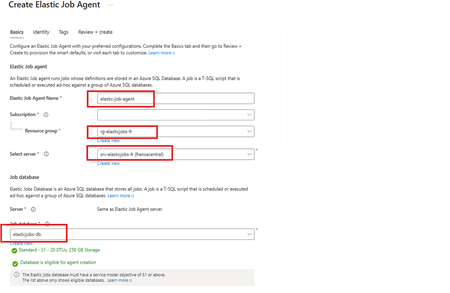
Using as a reference of this article. Automating Azure SQL DB index and statistics maintenance using Azure Automation | Microsoft Community Hub To provide complete solution to maintain you Azure SQL DB statistics and maintenance we provide our maintenance script here What's an elastic job? Create and schedule elastic jobs that periodically run against one or many Azure SQL databases. The jobs run Transact-SQL (T-SQL) queries and perform maintenance tasks. What's required? Create an empty Azure SQL Database with the S1 tier or higher. The Elastic Job Agent will use this database to store job information, job definitions, and other related data. The database must be created on the same Azure SQL Server as the Elastic Job Agent. During the Elastic Job Agent setup, this database is used as the job database. Microsoft Entra authentication with a user-assigned managed identity (UMI) (recommended). The elastic job must be able to log in to each target server or database. Create an elastic job agent. It’s a managed service that lets you run and schedule jobs across Azure SQL databases. Creating the Azure SQL database and UMI should be fairly straightforward, but I’ve included the code below in case you’d like to follow along. # This is sample code, so feel free to replace the names and location with the values that suit your environment. # Resource Group New-AzResourceGroup -Name "rg-elasticjobs-fr" -Location "FranceCentral" # Azure SQL Database - Elastic Jobs New-AzSqlServer -ResourceGroupName "rg-elasticjobs-fr" -ServerName "srv-elasticjobs-fr" -Location "FranceCentral" -ExternalAdminName "XXXXXXXXX@msft.com" -EnableActiveDirectoryOnlyAuthentication New-AzSqlDatabase -ResourceGroupName "rg-elasticjobs-fr" -ServerName "srv-elasticjobs-fr" -DatabaseName "elasticjobs-db" -Edition "Standard" -RequestedServiceObjectiveName "S1" # Azure SQL Database - Target New-AzSqlServer -ResourceGroupName "rg-elasticjobs-fr" -ServerName "srv-target-fr" -Location "FranceCentral" -ExternalAdminName "XXXXXXXXX@msft.com" -EnableActiveDirectoryOnlyAuthentication New-AzSqlDatabase -ResourceGroupName "rg-elasticjobs-fr" -ServerName "srv-target-fr" -DatabaseName "target-db" -Edition "Standard" -RequestedServiceObjectiveName "S0" -SampleName "AdventureWorksLT" # User Managed Identity New-AzUserAssignedIdentity -ResourceGroupName "rg-elasticjobs-fr" -Name "umi_fr_user" -Location "francecentral" In the search box at the top, type Elastic Job Agent, then select it and create a new Elastic Job Agent. On the identity tab, select the UMI and then click on Review + Create Now, let's create a target group (The set of servers, pools, and databases to run a job against.) and add targets for the jobs. Elastic Jobs Agent - Jobs - Target Groups - Create, once created, then click on the name, create again and add a Target Group Member. On each of the target databases, create the required objects for the maintenance script, create a contained user linked to the UMI, and grant the user the permissions needed to run the job scripts. Note: This is sample code. Please adjust the permissions based on your requirements and apply least privilege. Next, let’s schedule a job! For an Elastic Job that runs once every week, the ISO 8601 repeating interval is: P1W Add steps to each elastic job. A target group must be chosen for each job step. If you would like to see the current status of the jobs, head to Jobs, Job Executions. If further information is required, connect to the elasticjobs-db database and run the following query: SELECT TOP (10) * FROM jobs.job_executions WHERE lifecycle <> 'Succeeded' ORDER BY create_time DESC; References: Automation in Azure SQL overview - Azure SQL Database & Azure SQL Managed Instance & Azure Synapse Analytics | Microsoft Learn Elastic Jobs Overview - Azure SQL Database | Microsoft Learn Create, configure, and manage elastic jobs - Azure SQL Database | Microsoft Learn Disclaimer Please note that products and options presented in this article are subject to change. This article reflects for Azure SQL Database in September 2026. I hope this article was helpful for you, please feel free to share your feedback in the comments section.450Views1like1CommentLessons Learned #553: Before Troubleshooting SQL Server, Find Out Who Generated the Error
Recently, I reviewed a customer case where an application intermittently reported: com.microsoft.sqlserver.jdbc.SQLServerException: The statement did not return a result set. The issue occurred during a specific period and was no longer reproducible. Instead of starting troubleshooting from the database side, my first objective was to answer a simpler question: Who is actually generating this error: SQL Server Engine or the JDBC driver? Step 1 – Is this a SQL Server Engine error? A useful first check is sys.messages. SQL Server exposes its system-defined error messages through this catalog view, so I can search for the reported text: SELECT message_id, severity, text FROM sys.messages WHERE text LIKE '%did not return a result set%'; The sys.messages catalog view contains the system error messages available in SQL Server. If I find the error there, I have a good reason to continue investigating the SQL Server Engine error number, severity, conditions, and associated diagnostics. In this case, however, the message led me in another direction. An important caveat: not finding a message in sys.messages does not by itself prove that SQL Server or Azure SQL Database cannot be involved. Errors can also originate from drivers, operating systems, network libraries, gateways, application frameworks, or custom code. However, it is a very useful way to reduce the troubleshooting scope. Step 2 – Follow the component mentioned in the exception The exception class itself provided the next clue: com.microsoft.sqlserver.jdbc.SQLServerException. This pointed directly to the Microsoft JDBC Driver for SQL Server, so instead of continuing with database-side diagnostics, I decided to inspect the driver implementation. The driver is open source and its code is available in the Microsoft GitHub repository: microsoft/mssql-jdbc The Java source code is located under: src/main/java/com/microsoft/sqlserver/jdbc/. This directory contains the implementation of the JDBC driver, including connection handling, statements, prepared statements, result sets, exceptions, and resource messages. Step 3 – Search for the exact error text I searched the source code for: The statement did not return a result set. The message is defined in: src/main/java/com/microsoft/sqlserver/jdbc/SQLServerResource.java as: {"R_noResultset", "The statement did not return a result set."} This was already an important finding. The exact message is defined inside the JDBC driver. Step 4 – Search for R_noResultset The next step was to search for the resource identifier: R_noResultset This led to: src/main/java/com/microsoft/sqlserver/jdbc/SQLServerPreparedStatement.java where the driver contains the following logic: if (EXECUTE_QUERY == executeMethod && null == resultSet) { SQLServerException.makeFromDriverError( connection, this, SQLServerException.getErrString("R_noResultset"), null, true); } Now the meaning of the customer's error becomes much clearer. The application executed the statement using an operation equivalent to: executeQuery() but after processing the response: resultSet == null Therefore, the JDBC driver raises this exception when executeQuery() is used but, after processing the response, no ResultSet is available (resultSet == null). Step 5 – Now investigate the database execution Only at this point would I move deeper into the SQL execution. The question is no longer: Why did SQL Server fail? It becomes: Why did this execution not return the ResultSet that the JDBC application expected? For example: IF Condition = 1 BEGIN SELECT ... END One execution might produce: Condition = TRUE -> SELECT -> ResultSet -> executeQuery() succeeds while another could produce: Condition = FALSE -> No SELECT -> No ResultSet -> JDBC raises the exception This could also explain why the customer's issue was intermittent. At that stage I would investigate the stored procedure, parameters, conditional branches, DML operations, multiple result sets, and the application's use of executeQuery(), executeUpdate(), or execute(). The troubleshooting lesson The most useful part of this case was not only understanding this particular exception. It was the troubleshooting process: Customer error -> Who generated it? -> Search sys.messages -> Engine error? YES -> SQL Server troubleshooting NO / unclear -> Identify client component -> Search its source code -> Locate exact message -> Find where it is raised -> Understand the condition -> Return to SQL Server with a focused hypothesis When the client component is open source, its source code can become another diagnostic tool. Instead of collecting large amounts of database telemetry, we can first determine which component generated the error and why. One final consideration: always check the JDBC driver version used by the customer and, when possible, inspect the corresponding GitHub release or tag rather than relying exclusively on the current main branch. Sometimes a few lines of source code can significantly reduce hours of troubleshooting.323Views0likes0CommentsLessons Learned #552:10 Lines in an SSMS MSAL Trace That Tell You Almost Everything You Need to Know
In one of our support cases, a customer reported higher-than-expected connection times when connecting from SQL Server Management Studio (SSMS) to Azure SQL Database using Microsoft Entra authentication. The behavior was also not completely consistent. Sometimes the connection required interaction with the account selection experience. Other times, subsequent connections were noticeably faster. At first, there were several possible areas to investigate: Was Azure SQL taking too long to authenticate the user? Was there a networking, proxy, or firewall issue? Was access to login.microsoftonline.com being delayed or denied? Was Microsoft Entra authentication itself taking the time? Was Conditional Access or MFA involved? Was SSMS using the expected Microsoft Entra account? Was the delay happening before or after the access token was obtained? The important question became: Where exactly was the connection time being spent? Instead of treating the SSMS connection as a single operation, I enabled verbose MSAL tracing in SSMS and started following the authentication process. SSMS exposes the MSAL Output Window Trace Level under Tools → Options → Azure Services. The same options page exposes the Microsoft Entra authority, Azure SQL Database service principal name, and Web Account Manager settings. The resulting trace was large—hundreds of lines. But while analyzing it, I realized something useful: I didn't need to understand every line in the MSAL trace. A small number of search strings were enough to reconstruct almost the entire authentication story. These are the 10 things I learned to look for. 1. CorrelationId — First, make sure I am following the same authentication request One of the first things I learned was not to read the trace only by timestamp. MSAL performs several related operations: GetAccounts. AcquireTokenSilent. ReadAccountById AcquireTokenInteractive Broker operations Token cache operations Some can happen almost at the same time, and they don't necessarily share the same correlation ID. For example, in one reproduction, the silent authentication attempt had one correlation ID, while the subsequent interactive request used another one. So my first search became: CorrelationId I learned not to calculate latency by simply subtracting two nearby timestamps. First I identify: Operation + CorrelationId + Start / End and only then interpret the timing. This becomes particularly valuable if the logs later need to be correlated with identity-service investigations. MSAL exposes the correlation ID specifically to piece together an authentication flow. 2. ApiId — Was SSMS trying silent or interactive authentication? My second search became: ApiId In the first connection attempt I found: ApiId - AcquireTokenSilent That immediately told me that SSMS was not initially trying to display an authentication UI. It first attempted to obtain the token silently. But later in the same reproduction I found: ApiId - AcquireTokenInteractive Now the flow was becoming clearer: SSMS ->AcquireTokenSilent -> Silent authentication cannot continue -> AcquireTokenInteractive This was my first important lesson from the case: An SSMS Microsoft Entra connection isn't necessarily interactive from the beginning. MSAL can first try silent authentication and only switch to an interactive mechanism if necessary. Microsoft documents MsalUiRequiredException precisely for situations in which a non-interactive acquisition cannot continue without user interaction—for example because sign-in, MFA, consent, or another requirement must be satisfied. 3. Authority — Where was the authentication request actually going? The next thing I wanted to know was whether the delay could be associated with reaching Microsoft Entra. I searched for: Authority - The trace showed: Authority - https://login.microsoftonline.com/<tenant-id>/ This single line gives us two very important pieces of information: https://login.microsoftonline.com/ -> Microsoft Entra tenant -> Identity authority That means that before blaming Azure SQL, I can establish which identity endpoint SSMS/MSAL is using. This is also where a frequently reported problem such as: "It looks like access to login.microsoftonline.com is denied." can be investigated much more precisely. If I see something such as: MsalServiceException StatusCode: 403 AADSTS.... then I need to inspect the Microsoft Entra response and its error code. If I see a DNS, TLS, proxy, connection timeout, or similar exception, the network path to the identity endpoint becomes much more relevant. Those are very different problems. MSAL distinguishes client/library errors (MsalClientException), token-provider/service responses (MsalServiceException), and scenarios requiring interaction (MsalUiRequiredException). Network failures that MSAL doesn't handle are propagated to the application. One thing I would not conclude from a 403 alone is: "The firewall is blocking login.microsoftonline.com." The ErrorCode, AADSTS code, StatusCode, and ResponseBody together are much more useful than the HTTP status alone. 4. Scopes — Which resource was SSMS requesting the token for? Another line that became essential was: Scopes - Our trace showed: Scopes - https://database.windows.net//.default This helped me separate two parts of the connection that are easy to mix together: Microsoft Entra Authority login.microsoftonline.com -> issues / obtains identity token Token requested for database.windows.net -> Azure SQL The Authority tells me where authentication is being performed. The scope tells me for which resource the token is being requested. SSMS documents https://database.windows.net/ as the Azure SQL Database service principal name used when obtaining a Microsoft Entra token. That gave me another troubleshooting rule: Don't treat a Microsoft Entra token acquisition problem and an Azure SQL authorization problem as the same thing. 5. LoginHint — What identity did SSMS suggest? The next search gave us one of the most interesting findings of the investigation: LoginHint In one reproduction we had: LoginHint provided: True and later: LoginHint - user@contoso.com In another reproduction, a different login hint was supplied, and MSAL eventually returned: MsalUiRequiredException ErrorCode: no_account_for_login_hint with the explanation that no account in the token cache matched that login hint. At first sight, it is tempting to interpret: no_account_for_login_hint as: Incorrect username But the other traces showed me that this interpretation is too simplistic. LoginHint is better understood as: "Try to locate or preselect this identity" It doesn't necessarily mean: "This is already the resolved MSAL account" . That distinction turned out to be very important. 6. Account provided and GetAllAccounts — LoginHint and Account are not the same thing This became perhaps my favorite finding from the investigation. I started searching for: GetAllAccounts and: Account provided In one trace we had: GetAllAccounts ... found 1 accounts but: LoginHint provided: True Account provided: false MSAL nevertheless ended with: no_account_for_login_hint This originally looked contradictory. There was an account in the cache, but MSAL said there was no account for the login hint. It isn't contradictory. What I learned was: An account exists ≠ An account matching this LoginHint exists Then I captured another scenario: LoginHint provided: False Account provided: Account username: user@contoso.com Now SSMS/MSAL wasn't trying to resolve a textual login hint. It already had a concrete account. I started thinking of the two cases like this: LoginHint -> "Try this identity" Account provided -> "Use this resolved identity" This distinction can be especially useful when investigating aliases, UPNs, multiple Windows accounts, cached identities, or cross-tenant accounts. The same error can also have another explanation Another reproduction made the lesson even clearer. This time the trace started with: GetAllAccounts ... found 0 accounts Found 0 RTs and 0 accounts SSMS attempted: LoginHint provided: True Account provided: false and again received: ErrorCode: no_account_for_login_hint But this time the UPN itself was valid. The cache simply contained no suitable account. So another important lesson was: Never diagnose no_account_for_login_hint from the error text alone. Check GetAllAccounts, LoginHint, and Account provided together. 7. ErrorCode, AADSTS, StatusCode — The error tells me where to investigate next At this point I realized that one of the fastest troubleshooting searches was simply: ErrorCode together with: AADSTS StatusCode ResponseBody MsalUiRequiredException MsalServiceException MsalClientException For example: MsalUiRequiredException ErrorCode: no_account_for_login_hint immediately tells me that I am still dealing with token acquisition/account resolution. I haven't reached the point where Azure SQL database permissions would explain this particular failure. This became my mental decision table: Evidence in the trace Where I would investigate first no_account_for_login_hint LoginHint / cached account / account resolution MsalUiRequiredException Why silent authentication requires interaction authentication_canceled Interactive UI / broker / user cancellation AADSTSxxxxx Microsoft Entra authentication or policy MsalServiceException Token provider/service response MsalClientException Client/library/device side DNS/TLS/proxy exception Connectivity to identity service Access token obtained successfully Move the investigation beyond token acquisition 8. Broker, WAM, authorization_type — Who was really authenticating me? This was another part that changed how I read SSMS authentication traces. I searched for: Broker WAM RuntimeBroker auth_flow authorization_type and found: Broker is configured followed by: Using Windows account picker and: Calling SignInInteractivelyAsync The telemetry then reported: auth_flow: Broker authorization_type: Interactive So the authentication path was more accurately represented as: SSMS -> MSAL -> Windows Web Account Manager -> Account / authentication broker -> Microsoft Entra WAM is a Windows component that MSAL can use as an authentication broker. It can integrate with accounts already known to Windows and provide SSO and account-selection capabilities. But another trace showed: authorization_type: WindowsIntegratedAuth during a silent acquisition. That taught me something else: The same SSMS connection target does not necessarily follow the same identity path every time. Account state, cache state, WAM, tenant, identity configuration, MFA, Conditional Access, and whether interaction is required can all affect the path. 9. AccessToken returned — This is the line that changes the investigation Eventually, I found the line that I consider one of the most useful in the entire trace: AccessToken returned: True In our successful authentication we also had: AccessToken Type: Bearer and later: === Token Acquisition finished successfully source: Broker This became a very useful troubleshooting boundary for me: Identity troubleshooting: Account LoginHint MSAL WAM MFA / CA Authority Token acquisition -> AccessToken returned: True -> Azure SQL Token validation Principal resolution Database authentication Authorization Permissions If the token has been successfully obtained, asking: "Why can't MSAL authenticate?" is probably no longer the most useful question. Now I want to know: "What happens when this token is presented to Azure SQL?" That doesn't prove that the complete SQL connection will succeed, but it gives us a very useful point at which to change troubleshooting direction. 10. DurationTotalInMs — Finally, I could see where the connection time was going This was the original reason for the support investigation. The customer reported high connection times. So eventually the most important searches became: DurationTotalInMs DurationInHttpInMs DurationInCacheInMs request_duration time_in_queue_ms Microsoft defines DurationTotalInMs as the total time spent by MSAL acquiring a token, including network and cache operations. DurationInHttpInMs represents time spent in HTTP calls made by MSAL to the identity provider, and DurationInCacheInMs measures cache activity. And now we finally had evidence from our reproduction. The first token acquisition reported: DurationTotalInMs: 2185 DurationInCacheInMs: 0 DurationInHttpInMs: 0 But the broker telemetry contained another very interesting metric: time_in_queue_ms: 2152 and request_duration: 2183 That changed the quality of the diagnosis completely. Instead of saying: "SSMS authentication seems to take around two seconds." I could say: The captured token acquisition took approximately 2.18 seconds, and approximately 2.15 seconds were represented as broker queue time in the MSAL/WAM telemetry. That is actionable evidence. Putting the 10 searches together By the end of the investigation, this became the sequence I would use when somebody sends me an SSMS MSAL trace: Search for What I want to know CorrelationId Am I following the same authentication operation? ApiId Silent or interactive token acquisition? Authority Which Microsoft Entra endpoint and tenant? Scopes Which resource is the token intended for? LoginHint Which identity did SSMS suggest? Account provided / GetAllAccounts Is an identity already resolved or cached? ErrorCode / AADSTS Why did the authentication step fail? Broker / WAM / authorization_type Which authentication mechanism actually handled the request? AccessToken returned / source: Was a usable token obtained, and from where? DurationTotalInMs and related metrics Where was the authentication time spent? With those ten searches, a trace containing hundreds of lines becomes much easier to read. Appendix – Sanitized MSAL Trace Sample The following extract is a sanitized and condensed version of the MSAL trace used in this investigation. User names, tenant IDs, correlation IDs, account identifiers, and other PII have been replaced with placeholders. The goal is to provide a practical sample where you can apply the 10 searches described in this article. First connection ==== GetAccounts started ==== GetAllAccounts ... found 0 accounts Found 0 RTs and 0 accounts in MSAL cache === AcquireTokenSilent Parameters === LoginHint provided: True Account provided: false Authority - https://login.microsoftonline.com/<tenant-id>/ Scopes - https://database.windows.net//.default ApiId - AcquireTokenSilent CorrelationId - <correlation-id-1> === Token Acquisition (SilentRequest) started === MsalUiRequiredException ErrorCode: no_account_for_login_hint No account was found in the token cache having this login hint. MSAL then moved to interactive authentication: === InteractiveParameters Data === LoginHint provided: True Prompt: select_account Authority - https://login.microsoftonline.com/<tenant-id>/ Scopes - https://database.windows.net//.default ApiId - AcquireTokenInteractive LoginHint - user@contoso.com CorrelationId - <correlation-id-2> Broker is configured Using Windows account picker Calling SignInInteractivelyAsync The broker successfully obtained the token: auth_flow: Broker authorization_type: Interactive time_in_queue_ms: 2152 request_duration: 2183 WAM response status success Successfully retrieved token AccessToken returned: True AccessToken Type: Bearer === Token Acquisition finished successfully === source: Broker DurationTotalInMs: 2185 DurationInCacheInMs: 0 DurationInHttpInMs: 0 Second connection A few seconds later, the account was already available: GetAllAccounts ... found 1 accounts Returning 1 accounts === AcquireTokenSilent Parameters === LoginHint provided: False Account provided: Account username: user@contoso.com Authority - https://login.microsoftonline.com/<tenant-id>/ Scopes - https://database.windows.net//.default ApiId - AcquireTokenSilent CorrelationId - <correlation-id-3> This time the broker completed the request silently: Acquiring token silently authorization_type: WindowsIntegratedAuth auth_flow: AT request_duration: 2 WAM response status success Successfully retrieved token AccessToken returned: True === Token Acquisition finished successfully === source: Broker DurationTotalInMs: 13 DurationInCacheInMs: 0 DurationInHttpInMs: 0 What changed? First connection No account → LoginHint → AcquireTokenSilent → no_account_for_login_hint → Interactive / WAM → Token → 2185 ms Second connection Resolved Account → AcquireTokenSilent → WAM → Token → 13 ms These extracts contain the main strings I now look for when reviewing an SSMS MSAL trace: CorrelationId ApiId Authority Scopes LoginHint Account provided / GetAllAccounts ErrorCode / AADSTS Broker / WAM AccessToken returned DurationTotalInMs406Views0likes0CommentsLessons Learned #550: From a Support Case to Reusable Knowledge
Reaching Lessons Learned #550 is an important milestone for me. However, the value of this series is not only the number of articles published. Each article started with a technical question, an unexpected behavior, a support investigation, or a scenario that required additional testing and analysis. Some cases resulted in a configuration change. Others required a query, a script, a workaround, a product clarification, or a different troubleshooting approach. Over time, I have learned that resolving the immediate issue is only one part of the work. A support case becomes even more valuable when the knowledge gained during the investigation can help another engineer or customer facing a similar situation. Every support case may contain a lesson. The challenge is to identify it, validate it, and make it reusable. Identify the Reusable Lesson Not every detail from a support case needs to become an article. The first step is to identify the part of the investigation that may be useful outside the original scenario. This could be: an unexpected product behavior; a common misunderstanding; a diagnostic query; a troubleshooting method; a configuration requirement; a limitation that may not be immediately visible; a way to interpret a metric or error message; a test that helped confirm the technical explanation. For example, the specific customer environment may be unique, but the method used to distinguish CPU pressure from Data IO pressure may be useful in many other investigations. Similarly, the original application architecture may be complex, but the test used to isolate a network path may be simple and reusable. The objective is not to reproduce the complete support case. The objective is to extract the lesson that may help others. Explain the Symptom Clearly A useful technical article should begin with a behavior that readers can recognize. For example: Connections fail only from one application instance. Query duration increases after a service-tier migration. CPU reaches a high percentage, but the workload remains constrained by another resource. A failover restores normal operation without fully explaining the original cause. A monitoring result appears different from what was initially expected. A reader should be able to determine quickly whether the scenario resembles a problem they are investigating. Describe How the Conclusion Was Reached A solution is more useful when the reader understands how it was validated. For that reason, I normally try to explain: what was initially observed; which evidence was reviewed; which possibilities were considered; which tests were performed; what result supported the conclusion; which limitations remained. The objective is to provide enough context for the reader to understand why the conclusion is reasonable and under which conditions it applies. Separate Mitigation from Explanation A mitigation may restore service without fully explaining the technical cause. For example: restarting an application may reset the connection pool; a failover may disconnect blocking sessions; scaling may increase several resource limits simultaneously; recompiling a query may temporarily produce a better execution plan; reverting a deployment may remove the immediate impact. These actions can be valid and necessary. However, when converting the case into reusable knowledge, it is important to distinguish between: what restored normal operation; what was confirmed as the contributing condition; what remained unconfirmed. This distinction helps prevent a successful recovery action from being interpreted as a complete root-cause explanation. Include Something Practical The most useful articles normally provide something the reader can apply. This may be: a query; a script; a checklist; a sequence of tests; a monitoring recommendation; a comparison table; a list of questions to ask; an example of the expected and unexpected results. Even a short article can be valuable if it gives the reader a practical next step. For example, a troubleshooting article may suggest comparing: affected and unaffected periods; successful and unsuccessful connections; current and previous execution plans; CPU, Data IO, and log write utilization; the original and alternative network paths; behavior before and after one controlled change. The practical element is what transforms an explanation into a reusable resource. Document the Boundaries of the Conclusion A technical conclusion is more reliable when its limitations are clearly described. During a support investigation, the available evidence may not allow us to determine every detail. For example: the historical telemetry may be limited; the behavior may not be reproducible; the exact application request may not be identifiable; the test environment may differ from production; an internal implementation detail may not be externally visible. In these situations, it is useful to explain both what was confirmed and what could not be confirmed. For example: The behavior was reproduced only through the affected network path. The same endpoint and authentication method worked successfully through an alternative path. The tests confirmed that the network path was a relevant condition, although the available evidence did not identify the specific component responsible. This type of conclusion is precise, useful, and transparent. A Simple Model I Normally Follow When deciding whether a support investigation can become reusable knowledge, I normally consider the following sequence: Observe: What behavior was reported or measured? Clarify: What was the exact scope and impact? Investigate: Which evidence was relevant? Reproduce: Could the behavior be tested under controlled conditions? Validate: Which result supported or challenged the explanation? Mitigate: What action reduced the immediate impact? Conclude: What did the available evidence allow us to confirm? Share: Which part of the investigation may help someone else? Not every case follows these steps in the same order, and not every investigation provides a complete answer. However, this approach helps transform an individual technical experience into something that can be understood and reused. Questions That Help Identify a Lessons Learned Article Before writing an article, I normally consider questions such as: Was the behavior unexpected or difficult to interpret? Could the same question affect other Azure SQL users? Was there an important difference between the initial assumption and the final conclusion? Did the investigation produce a useful query, script, or test? Is there a limitation or condition that should be better understood? Can the scenario be explained without customer-specific information? What should another engineer or customer do when facing the same behavior? If the investigation provides a useful answer to one or more of these questions, it may contain a lesson worth sharing. Conclusion After 550 Lessons Learned articles, the most important lesson may be that technical support knowledge should not remain only inside an individual service request. A support case starts with an immediate need: understand the behavior, reduce the impact, and identify the appropriate next action. However, once the investigation is complete, we have an opportunity to go one step further. We can extract the reusable part of the experience, explain how the conclusion was reached, document its limitations, and provide something practical for the next person facing a similar situation. That is how an individual support case can become shared technical knowledge. Resolving a case helps one specific situation. Sharing the validated lesson may help many others avoid starting the same investigation from zero.204Views0likes0CommentsAzure SQL Data Sync Retirement: Migration Insights and Modern Alternatives
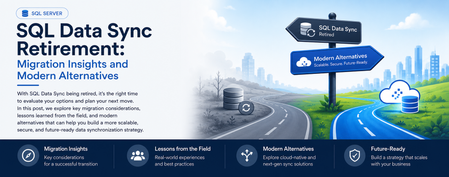
What started as a routine customer discussion quickly evolved into a strategic modernization conversation. A service that had quietly synchronized business-critical data for years was approaching retirement, prompting an important question: What should organizations do next? Every service retirement is an opportunity to reassess architecture, reduce technical debt, and build for the future. When a Retirement Notification Becomes a Business Conversation Recently, while working with a customer, we reviewed their Azure SQL Database architecture and discovered a critical dependency on SQL Data Sync For years, the service had reliably synchronized data across multiple databases, enabling applications, reporting workloads, and distributed business processes. Like many organizations, the customer viewed Data Sync as infrastructure that simply worked in the background. However, the discussion took a different turn when we reviewed Microsoft's retirement announcement: Azure SQL Data Sync will be retired on September 30, 2027. What initially appeared to be a migration challenge quickly became an opportunity to modernize the customer's data movement architecture and align with Microsoft's future investments in data integration, analytics, and cloud-native services. Understanding SQL Data Sync Azure SQL Data Sync was designed to synchronize selected data between Azure SQL Databases and, in some cases, between Azure and on-premises databases. Organizations have commonly used Data Sync for: Hybrid data synchronization Distributed application architectures Globally distributed applications Bi-directional data synchronization While the service has served customers well, organizations should begin evaluating alternative solutions now to ensure sufficient planning, testing, and adoption time before retirement. Because both databases were already in Azure, the discussion quickly moved toward identifying strategic alternatives. Customer's Setup This particular customer had a simple, familiar layout: one Azure SQL Database feeding another, both fully in Azure, connected by SQL Data Sync. No on-premises leg, no complicated topology — just two cloud databases that needed to stay aligned. Their requirements were equally straightforward, and honestly, the kind every team asks for: Reliable, dependable synchronization Low operational overhead — nobody wanted a new system to babysit Something with a real future, not another service on a retirement countdown Room to scale as data volumes grow An Azure-native fit, not a bolt-on third-party tool Because both databases already lived in Azure, the conversation moved quickly toward the platform's own native tooling — starting with the option that ended up being the strongest fit. Option 1: Azure Data Factory (Recommended Strategy) For customers running Azure SQL Database to Azure SQL Database synchronization, Azure Data Factory (ADF) emerged as the strongest strategic recommendation. Why ADF? Azure Data Factory provides: Fully managed Azure-native data movement Enterprise-grade monitoring Flexible orchestration Scalability from development through production environments Long-term Microsoft investment and support The migration pattern we typically recommend looks like: Phase1 :Initial Full Load Before anything can stay in sync, both sides need to start from the same place. Phase 1 is a one-time bulk copy: Azure Data Factory reads everything from the source database and writes it into the target, establishing a clean baseline. Phase2 :Incremental Synchronization Once both databases match, you don't need to keep copying everything — just what's changed. This is where Change Tracking (CT) or Change Data Capture (CDC) comes in: SQL Server-native features that flag which rows were inserted, updated, or deleted since the last run. ADF's incremental pipeline reads only those deltas and applies them downstream, on whatever schedule the business needs — minutes, hours, or daily. Phase 3: Scheduling and Monitoring Once both phases are live, ADF takes over the operational side: scheduling pipeline runs, monitoring their health, retrying failures automatically, and alerting your team when something needs attention. That's a level of visibility SQL Data Sync's built-in sync groups never really offered ADF handles: Scheduling Pipeline execution Monitoring Retry mechanisms Alerting This model often delivers greater visibility and operational control than traditional SQL Data Sync implementations. When You Don't Need Synchronization — You Need a Copy Partway through the engagement, one question reframed the whole discussion: do we actually need two-way synchronization, or do we just need a readable copy of the database somewhere else? That distinction matters more than it sounds, and it points to three other options worth knowing. Option 1: Active Geo-Replication If the goal is disaster recovery, serving read traffic closer to users, or keeping the business running through a regional outage, Active Geo-Replication is usually a better fit than rebuilding sync logic from scratch. It gives you a continuously updated, readable secondary — not a bi-directional sync target. Best fit Disaster recovery scenarios Read-intensive applications Global user distribution Secondary readable databases Less ideal for Complex data transformations Bi-directional updates Option 2: Database Copies and Read Replicas Some organizations do not require continuous synchronization at all. In those cases: Read Replicas Database Copy Good Use Cases Reporting databases Analytics environments Refreshable staging systems Read-only workloads This approach significantly reduces architectural complexity while still meeting many business requirements. Option 3: Microsoft Fabric Mirrored Databases As Microsoft Fabric adoption grows, another interesting alternative is Fabric Mirrored Databases. This option is particularly attractive for organizations already investing in: Microsoft Fabric OneLake Real-time analytics AI and data platform modernization Benefits include: Near real-time data availability Simplified analytics architecture Integration with Fabric workloads Reduced data silos For customers modernizing both operational and analytical platforms, this can be an excellent opportunity to rethink data architecture beyond simple synchronization. Option 4: Azure Functions for Event-Driven Synchronization Not every customer requires a large orchestration platform. For lightweight or application-specific synchronization logic, Azure Functions may offer a more agile approach. Example Use Cases Event-driven updates Custom business rules Microservices architectures Low-volume synchronization requirements The tradeoff is that customers assume additional development and operational responsibilities Lessons Learned from the Customer Engagement This engagement reinforced several important lessons: Don't Wait Until 2027 Although retirement is over a year away, large organizations often require significant planning, testing, governance approvals, and deployment cycles. Starting early reduces risk. There Is No Universal Replacement The right solution depends on: Latency requirements Read versus write workloads Synchronization direction Operational complexity DR requirements Budget limitation Different use cases require different migration paths. 3. Migration Is an Opportunity Rather than simply replacing SQL Data Sync, organizations should evaluate: Data architecture modernization Observability improvements Operational simplification Fabric adoption opportunities Long-term cloud strategy Final Recommendations For most customers currently using Azure SQL Database → Azure SQL Database synchronization: Requirement Recommended Solution Ongoing synchronization Azure Data Factory + CDC/Change Tracking Read-only replica Active Geo-Replication Simple duplication Database Copy or Read Replica Analytics modernization Fabric Mirrored Databases Event-driven custom logic Azure Functions In my customer's use case, Azure Data Factory with incremental changes (CDC) emerged as the preferred strategic path because it was Azure-native, scalable, supported long-term, and aligned with Microsoft's future direction for data movement and integration. Closing Thoughts Technology retirements often create urgency, but they also create opportunity. retirement of SQL Data Sync is not merely a migration project. It is an opportunity to reassess data movement architecture, improve resiliency, reduce technical debt, and embrace modern Azure-native services. If your organization is currently using SQL Data Sync, now is the right time to inventory your sync groups, identify dependencies, and begin evaluating alternative architectures before September 30, 2027. References SQL Data Sync Retirement Migration Guide What is SQL Data Sync for Azure SQL Database? SQL Data Sync retirement: Migrate to alternative solutionsLessons Learned #547:Some SQL DB Statistics Remain Outdated While Others Are Automatically Updated
During the analysis of a SQL Server performance case, we observed an interesting statistics update pattern on a large table. Several statistics had recently been updated at different times, while a group of automatically created _WA_Sys_ statistics still showed: An older last_updated date. A high modification_counter. A row count significantly lower than the current number of rows in the table. At first glance, this could suggest that AUTO_UPDATE_STATISTICS was not working correctly. However, a closer review showed that this pattern can be completely consistent with the expected behavior of SQL Server. 1. Types of statistics in SQL Server SQL Server can maintain several types of statistics. Automatically created column statistics When AUTO_CREATE_STATISTICS is enabled, SQL Server can automatically create a single-column statistic when the Query Optimizer needs cardinality information for a column used in a query predicate. These statistics normally use names such as: _WA_Sys_00000002_47A6D5E5 The name can be interpreted as: _WA_Sys_<column_id in hexadecimal>_<object_id in hexadecimal> For example: 00000002 hexadecimal = column_id 2 47A6D5E5 hexadecimal = table object_id The most reliable way to identify the associated column is not to decode the name manually, but to query the SQL Server catalog views: DECLARE @TableName sysname = N'dbo.CustomerTransactions'; SELECT s.stats_id, s.name AS statistics_name, sc.stats_column_id, c.column_id, c.name AS column_name, s.auto_created, s.user_created, s.no_recompute FROM sys.stats AS s INNER JOIN sys.stats_columns AS sc ON sc.object_id = s.object_id AND sc.stats_id = s.stats_id INNER JOIN sys.columns AS c ON c.object_id = sc.object_id AND c.column_id = sc.column_id WHERE s.object_id = OBJECT_ID(@TableName) AND s.name = N'_WA_Sys_00000002_47A6D5E5' ORDER BY sc.stats_column_id; Statistics associated with indexes When SQL Server creates an index, it also creates a statistics object associated with the index. For example: CREATE INDEX IX_CustomerTransactions_ClientId ON dbo.CustomerTransactions(ClientId) this creates an index statistics object normally named: IX_CustomerTransactions_ClientId when a statistics object corresponds to an index, its stats_id matches the index's index_id. User-created statistics Statistics can also be created explicitly: CREATE STATISTICS ST_CustomerTransactions_ClientId_Status ON dbo.CustomerTransactions ( ClientId, StatusId ); This object is identified in sys.stats with: user_created = 1 auto_created = 0 and AUTO_UPDATE_STATISTICS applies to index statistics, automatically created single-column statistics, manually created statistics and filtered statistics. 2. Statistics are not updated together Assume that a table has these statistics: _WA_Sys_00000002_xxxxxxxx for ClientId _WA_Sys_00000003_xxxxxxxx for StatusId IX_CustomerTransactions_CreatedDate for CreatedDate PK_CustomerTransactions and TransactionId After a large data load, several or all of them could become eligible for an automatic update. However, SQL Server does not immediately update all eligible statistics. Before compiling a query, the Query Optimizer identifies the statistics that could be relevant to the query predicates and checks whether those statistics are outdated. Consider this query: SELECT TransactionId, ClientId, Amount FROM dbo.CustomerTransactions WHERE ClientId = 100; The optimizer might need a histogram on ClientId. If the corresponding statistics object is outdated and has crossed its update threshold, SQL Server may update that specific statistics object. It does not need to update unrelated statistics on: StatusId CreatedDate As a result, statistics on the same table can legitimately have different update times: PK_CustomerTransactions 2026-07-22 10:53 IX_CustomerTransactions_ClientId 2026-07-22 10:50 IX_CustomerTransactions_CreatedDate 2026-07-22 10:13 _WA_Sys_00000003_47A6D5E5 2026-07-19 10:00 This pattern can be evidence of demand-driven automatic updates rather than evidence of a malfunction. 3. What does modification_counter represent? The modification_counter returned by sys.dm_db_stats_properties represents the number of modifications made to the leading statistics column since that statistics object was last updated. This definition is especially important for multicolumn statistics. For example: CREATE INDEX IX_CustomerTransactions_ClientId_Status ON dbo.CustomerTransactions ( ClientId, StatusId ); The associated statistics object contains: Histogram: ClientId Density information: ClientId ClientId, StatusId The histogram and modification_counter are based on the leading column, ClientId. If only StatusId is modified: UPDATE dbo.CustomerTransactions SET StatusId = 2 WHERE TransactionId = 100; this does not have the same statistics impact as changing ClientId, because ClientId is the leading histogram column. SQL Server statistics contain only one histogram, built on the first key column. Multicolumn statistics additionally contain density information for column prefixes. 4. Why do multiple statistics sometimes have similar modification counters? This commonly happens after an insert operation. For example: INSERT INTO dbo.CustomerTransactions ( TransactionId, ClientId, StatusId, Amount, CreatedDate ) SELECT TransactionId, ClientId, StatusId, Amount, CreatedDate FROM dbo.StagingCustomerTransactions; Each inserted row introduces a value for every populated column. Consequently, multiple single-column statistics may show similar increases in their modification counters. This is particularly visible after a large ETL operation: Table rows before the load: 487,673 Rows inserted by the ETL: 515,244 Current approximate row count: 1,002,917 Several statistics could then show modification counters close to the number of inserted rows. That does not mean SQL Server must update all those statistics immediately. They become candidates for updating, but an update is normally triggered when query optimization requires them. 5. Does automatic updating apply only to _WA_Sys_ statistics? AUTO_UPDATE_STATISTICS applies to: Automatically created _WA_Sys statistics Index statistics Primary-key index statistics User-created statistics Each statistics object is evaluated independently. Therefore, SQL Server might update: PK_CustomerTransactions while leaving this object unchanged: _WA_Sys_00000003_47A6D5E5 The reverse is also possible. The behavior depends on which statistics are considered relevant during compilation or cached-plan validation. 6. What happens when a _WA_Sys_ statistic and an index statistic cover the same column? This is one of the most interesting scenarios. Assume SQL Server originally created: _WA_Sys_00000002_xxxxxxxx for ClientId. Later, someone creates this index: CREATE INDEX IX_CustomerTransactions_ClientId ON dbo.CustomerTransactions(ClientId); The table now has two statistics objects with histograms on ClientId: _WA_Sys_00000002_xxxxxxxx and IX_CustomerTransactions_ClientId Conceptually: _WA_Sys statistic Histogram on ClientId Index statistic Histogram on ClientId For a query such as: SELECT * FROM dbo.CustomerTransactions WHERE ClientId = @ClientId; the optimizer can have more than one potentially relevant statistics object. It may rely on the index statistics object rather than the older _WA_Sys_ object. In that case: IX_CustomerTransactions_ClientId Updated recently _WA_Sys_00000002_xxxxxxxx Old last_updated value High modification_counter This does not necessarily mean that automatic statistics updating has failed. It can mean that the _WA_Sys_ statistic has become redundant and has not been required by recent compilations. However, this should be presented carefully: The Query Optimizer is not publicly documented as always preferring an index statistic over an equivalent _WA_Sys_ statistic. The statistics selected can depend on: Query. Predicates. Available indexes. Filtered versus unfiltered statistics. Statistics freshness. Sampling quality. Multicolumn density information. Cardinality Estimator behavior. Existing cached plans. The correct conclusion is that the scenario is possible and plausible, but the execution plan should be inspected before claiming that a specific statistics object was used. As we wrote down in multiple articles in our blog (below), identify redudant statistics is part of DBA work to avoid this situation, also, in other situations, I saw that the maintenance plan is taking too much time because we are updating statistics that we are not using or migth be duplicated. The following script identifies statistics whose leading columns overlap: DECLARE @TableName sysname = N'dbo.CustomerTransactions'; ;WITH LeadingStatisticsColumns AS ( SELECT s.object_id, s.stats_id, s.name AS statistics_name, s.auto_created, s.user_created, s.no_recompute, s.has_filter, s.filter_definition, sc.column_id, c.name AS leading_column, i.index_id, i.name AS index_name FROM sys.stats AS s INNER JOIN sys.stats_columns AS sc ON sc.object_id = s.object_id AND sc.stats_id = s.stats_id AND sc.stats_column_id = 1 INNER JOIN sys.columns AS c ON c.object_id = sc.object_id AND c.column_id = sc.column_id LEFT JOIN sys.indexes AS i ON i.object_id = s.object_id AND i.index_id = s.stats_id WHERE s.object_id = OBJECT_ID(@TableName) ) SELECT leading_column, statistics_name, CASE WHEN index_id IS NOT NULL THEN N'INDEX STATISTICS' WHEN auto_created = 1 THEN N'AUTO-CREATED _WA_SYS' WHEN user_created = 1 THEN N'USER-CREATED STATISTICS' ELSE N'OTHER' END AS statistics_type, index_name, has_filter, filter_definition, no_recompute, COUNT(*) OVER ( PARTITION BY column_id ) AS statistics_on_same_leading_column FROM LeadingStatisticsColumns ORDER BY leading_column, statistics_type, statistics_name; This does not automatically mean that one object should be deleted. It only identifies an overlap. 7. Script The following example demonstrates how an automatically created statistic can coexist with a later index statistic. DROP TABLE IF EXISTS dbo.CustomerTransactions; GO CREATE TABLE dbo.CustomerTransactions ( TransactionId int NOT NULL, ClientId int NOT NULL, StatusId tinyint NOT NULL, Amount decimal(12,2) NOT NULL, CreatedDate datetime2(0) NOT NULL, CONSTRAINT PK_CustomerTransactions PRIMARY KEY CLUSTERED (TransactionId) ); GO Insert sample data ;WITH Numbers AS ( SELECT TOP (200000) ROW_NUMBER() OVER ( ORDER BY (SELECT NULL) ) AS n FROM sys.all_objects AS a CROSS JOIN sys.all_objects AS b ) INSERT INTO dbo.CustomerTransactions ( TransactionId, ClientId, StatusId, Amount, CreatedDate ) SELECT n, n % 5000, n % 5, CONVERT(decimal(12,2), n % 10000), DATEADD ( minute, -(n % 100000), SYSUTCDATETIME() ) FROM Numbers; GO Ensure that automatic statistics creation and updating are enable ALTER DATABASE CURRENT SET AUTO_CREATE_STATISTICS ON; GO ALTER DATABASE CURRENT SET AUTO_UPDATE_STATISTICS ON; GO Trigger automatic statistics creation on ClientId SELECT COUNT_BIG(*) FROM dbo.CustomerTransactions WHERE ClientId = 100 OPTION (RECOMPILE); GO Check the statistics created for ClientId SELECT s.stats_id, s.name AS statistics_name, s.auto_created, s.user_created, c.name AS column_name FROM sys.stats AS s INNER JOIN sys.stats_columns AS sc ON sc.object_id = s.object_id AND sc.stats_id = s.stats_id INNER JOIN sys.columns AS c ON c.object_id = sc.object_id AND c.column_id = sc.column_id WHERE s.object_id = OBJECT_ID(N'dbo.CustomerTransactions') AND c.name = N'ClientId' ORDER BY s.stats_id; Create an index on the same column CREATE INDEX IX_CustomerTransactions_ClientId ON dbo.CustomerTransactions(ClientId); The table can now have: Modify the data significantly UPDATE dbo.CustomerTransactions SET ClientId = ClientId + 10000 WHERE TransactionId <= 100000; Review the counters again SELECT s.name AS statistics_name, sp.last_updated, sp.rows, sp.rows_sampled, sp.modification_counter FROM sys.stats AS s OUTER APPLY sys.dm_db_stats_properties ( s.object_id, s.stats_id ) AS sp WHERE s.object_id = OBJECT_ID(N'dbo.CustomerTransactions') ORDER BY s.stats_id Force a new compilation using ClientId SET STATISTICS XML ON; GO SELECT COUNT_BIG(*) FROM dbo.CustomerTransactions WHERE ClientId = 10100 OPTION (RECOMPILE); GO SET STATISTICS XML OFF; GO After the query, review: The actual execution plan XML. The StatisticsInfo elements. last_updated. modification_counter. The exact object updated is an optimizer decision and can vary by SQL Server version, build, compatibility level and query shape. The test should therefore be used to observe the behavior rather than to assume a fixed preference. Finally, as you could see SQL Server choose _WA_Sys_00000002_151102AD instead of IX_CustomerTransactions_ClientId to update. In some situations, depending on execution plan, SQL Server might choose IX_CustomerTransactions_ClientId to update instead of _WA_Sys_00000002_151102AD and for this reason, doesn't mean that SQL Server is not updating the statistics it is depending that it is choosing one of them that the column is involved. My lessons learned, a statistic can be outdated without being relevant, and it can be relevant without being the only available source of cardinality information. Before interpreting an old last_updated value as an automatic statistics failure, identify the leading column, look for overlapping statistics, inspect the execution plan and determine whether there is a real estimation or performance problem. Articles: Lesson Learned #482: Identifying Potential Duplicate Statistics | Microsoft Community Hub Lesson Learned #324: Query Recompilation in Azure SQL | Microsoft Community Hub Lessons Learned #537: Copilot Prompts for Troubleshooting on Azure SQL Database | Microsoft Community Hub Lesson Learned #498:Understanding the Role of STATMAN in SQL Server and Its Resource Consumption | Microsoft Community Hub Disclaimer: The scripts included in this article are provided for demonstration and educational purposes only. They create a sample table, insert a significant number of rows, create indexes and statistics, modify data, and change automatic statistics settings in the current database. Run the complete demonstration only in a test or non-production environment. Review and adapt the database name, object names, row volume, and statements before execution. The results may vary depending on the SQL Server version, database compatibility level, existing configuration, data distribution, and workload. Always test the scripts in a representative environment before applying any conclusion or change to a production system.328Views0likes0CommentsLessons Learned #546: Maintaining a Local Azure Resource Inventory
I worked on a service request that our customer has an application works repeatedly with the same Azure resources. I guess that it may be useful to maintain our own persistent inventory instead of retrieving and validating every resource individually during each execution. In this example, a PowerShell script maintains an inventory of Azure SQL logical servers in a local JSON file. The idea is: Load the local JSON inventory -> Query Azure Resource Graph -> Compare both inventories -> Validate only detected changes -> Update the JSON file. Azure Resource Graph provides the current list of Microsoft.Sql/servers resources. The result is compared with the inventory stored by the application. If a server exists in both inventories, it is marked as: Observed: No additional request is required. NewValidatedByPointGet:If a new server is detected, it is validated individually with Get-AzSqlServer before being added If a previously known server is missing from the current result, the script also validates it individually. The possible results are: RecoveredByPointGet: the server still exists and remains in the inventory. Deleted: the individual request returns ResourceNotFound, so the server is removed. UnknownRetainedFromCache: the validation is inconclusive, so the previous inventory entry is preserved. The JSON file therefore represents the application’s active resource inventory and remains available between executions. I think this approach reduces repeated API requests because individual validation is performed only when a resource is new, missing, or has changed. I would like to share the PowerShell Script. Set-StrictMode -Version Latest $ErrorActionPreference = "Stop" # ------------------------------------------------------------ # Configuration # ------------------------------------------------------------ $tenantId = "<tenant-id>" $subscriptionId = "<subscription-id>" $resourceGroup = "<resource-group>" $cacheFile = ".\sql-server-inventory.json" # Required modules: # Install-Module Az.ResourceGraph -Scope CurrentUser # Install-Module Az.Sql -Scope CurrentUser # Connect-AzAccount -Tenant $tenantId Set-AzContext ` -Tenant $tenantId ` -Subscription $subscriptionId ` -ErrorAction Stop | Out-Null # ------------------------------------------------------------ # Helper functions # ------------------------------------------------------------ function ConvertTo-NormalizedResourceId { param( [Parameter(Mandatory)] [string]$ResourceId ) return $ResourceId.Trim().TrimEnd("/").ToLowerInvariant() } function Test-IsResourceNotFound { param( [Parameter(Mandatory)] [System.Management.Automation.ErrorRecord]$ErrorRecord ) $errorText = @( $ErrorRecord.Exception.Message $ErrorRecord.ErrorDetails.Message $ErrorRecord.FullyQualifiedErrorId $ErrorRecord.ToString() ) -join " " return ( $errorText -match "(?i)(\b404\b|ResourceNotFound|ServerNotInSubscriptionResourceGroup)" ) } function New-InventoryItem { param( [Parameter(Mandatory)] [string]$ResourceId, [Parameter(Mandatory)] [string]$Name, [string]$Location, [Parameter(Mandatory)] [string]$ValidationStatus ) return [pscustomobject]@{ id = $ResourceId name = $Name location = $Location validationStatus = $ValidationStatus } } # ------------------------------------------------------------ # 1. Load the persistent inventory # ------------------------------------------------------------ if (Test-Path -LiteralPath $cacheFile) { $jsonContent = Get-Content ` -LiteralPath $cacheFile ` -Raw ` -ErrorAction Stop if ([string]::IsNullOrWhiteSpace($jsonContent)) { $cachedServers = @() } else { $cachedServers = @( $jsonContent | ConvertFrom-Json ` -ErrorAction Stop ) } } else { $cachedServers = @() } $cachedServersById = @{} foreach ($cachedServer in $cachedServers) { $resourceId = [string]$cachedServer.id if ([string]::IsNullOrWhiteSpace($resourceId)) { continue } $normalizedId = ConvertTo-NormalizedResourceId ` -ResourceId $resourceId $cachedServersById[$normalizedId] = $cachedServer } Write-Host "Stored inventory: $($cachedServersById.Count) server(s)" # ------------------------------------------------------------ # 2. Discover the current resources # ------------------------------------------------------------ $query = @" Resources | where subscriptionId =~ '$subscriptionId' | where resourceGroup =~ '$resourceGroup' | where type =~ 'microsoft.sql/servers' | project id = tostring(id), name = tostring(name), location = tostring(location) "@ try { $argResponse = Search-AzGraph ` -Query $query ` -Subscription $subscriptionId ` -First 1000 ` -ErrorAction Stop } catch { throw ( "Azure Resource Graph query failed. " + "The existing inventory has not been modified. " + "Error: $($_.Exception.Message)" ) } if ( $null -ne $argResponse -and $argResponse.PSObject.Properties.Name -contains "Data" ) { $currentServers = @($argResponse.Data) } else { $currentServers = @($argResponse) } $currentServersById = @{} foreach ($currentServer in $currentServers) { $resourceId = [string]$currentServer.id $serverName = [string]$currentServer.name if ( [string]::IsNullOrWhiteSpace($resourceId) -or [string]::IsNullOrWhiteSpace($serverName) ) { continue } $normalizedId = ConvertTo-NormalizedResourceId ` -ResourceId $resourceId $currentServersById[$normalizedId] = $currentServer } Write-Host "Current observation: $($currentServersById.Count) server(s)" # ------------------------------------------------------------ # 3. Build the synchronized active inventory # ------------------------------------------------------------ $activeInventoryById = @() $activeInventoryIndex = @{} $deletedServers = @() foreach ($normalizedId in $currentServersById.Keys) { $currentServer = $currentServersById[$normalizedId] $resourceId = [string]$currentServer.id $serverName = [string]$currentServer.name $location = [string]$currentServer.location if ($cachedServersById.ContainsKey($normalizedId)) { # The resource is present in both inventories. $item = New-InventoryItem ` -ResourceId $resourceId ` -Name $serverName ` -Location $location ` -ValidationStatus "Observed" $activeInventoryIndex[$normalizedId] = $item continue } # The resource is new. Validate it individually. Write-Host "Validating new server '$serverName'..." try { $validatedServer = Get-AzSqlServer ` -ResourceGroupName $resourceGroup ` -ServerName $serverName ` -ErrorAction Stop $item = New-InventoryItem ` -ResourceId $resourceId ` -Name ([string]$validatedServer.ServerName) ` -Location ([string]$validatedServer.Location) ` -ValidationStatus "NewValidatedByPointGet" $activeInventoryIndex[$normalizedId] = $item } catch { Write-Warning ( "New server '$serverName' could not be validated " + "and was not added to the inventory. " + "Error: $($_.Exception.Message)" ) } } # ------------------------------------------------------------ # 4. Validate previously known resources missing from discovery # ------------------------------------------------------------ foreach ($normalizedId in $cachedServersById.Keys) { if ($currentServersById.ContainsKey($normalizedId)) { continue } $cachedServer = $cachedServersById[$normalizedId] $resourceId = [string]$cachedServer.id $serverName = [string]$cachedServer.name $location = [string]$cachedServer.location Write-Host ( "Server '$serverName' is missing from the current " + "observation. Running individual validation..." ) try { $validatedServer = Get-AzSqlServer ` -ResourceGroupName $resourceGroup ` -ServerName $serverName ` -ErrorAction Stop $item = New-InventoryItem ` -ResourceId $resourceId ` -Name ([string]$validatedServer.ServerName) ` -Location ([string]$validatedServer.Location) ` -ValidationStatus "RecoveredByPointGet" $activeInventoryIndex[$normalizedId] = $item Write-Warning ( "Server '$serverName' was not returned by discovery, " + "but individual validation confirmed that it still exists." ) } catch { if (Test-IsResourceNotFound -ErrorRecord $_) { $deletedServers += [pscustomobject]@{ id = $resourceId name = $serverName location = $location validationStatus = "Deleted" } Write-Warning ( "Deleted server detected: '$serverName'. " + "It will be removed from the active inventory." ) } else { # The result is inconclusive. Preserve the previous entry. $item = New-InventoryItem ` -ResourceId $resourceId ` -Name $serverName ` -Location $location ` -ValidationStatus "UnknownRetainedFromCache" $activeInventoryIndex[$normalizedId] = $item Write-Warning ( "The status of server '$serverName' could not be " + "confirmed. The previous inventory entry was retained. " + "Error: $($_.Exception.Message)" ) } } } # ------------------------------------------------------------ # 5. Save the updated active inventory # ------------------------------------------------------------ $activeInventory = @( $activeInventoryIndex.Values | Sort-Object name ) $jsonOutput = ConvertTo-Json ` -InputObject $activeInventory ` -Depth 10 $temporaryFile = "$cacheFile.tmp" Set-Content ` -LiteralPath $temporaryFile ` -Value $jsonOutput ` -Encoding utf8 ` -Force Move-Item ` -LiteralPath $temporaryFile ` -Destination $cacheFile ` -Force # ------------------------------------------------------------ # 6. Report the synchronization result # ------------------------------------------------------------ Write-Host "" Write-Host "Active inventory: $($activeInventory.Count) server(s)" $activeInventory | Format-Table ` name, location, validationStatus ` -AutoSize if ($deletedServers.Count -gt 0) { Write-Host "" Write-Warning "Confirmed deleted servers:" $deletedServers | Format-Table ` name, location, validationStatus ` -AutoSize } Disclaimer This PowerShell script is provided as a simplified proof of concept to illustrate a persistent resource inventory pattern. It should be reviewed, tested, and adapted before being used in a production environment. Authentication, permissions, error handling, retry policies, concurrency, logging, inventory storage, and operational requirements may differ between environments. The local JSON file is suitable for demonstration purposes and small automation scenarios.267Views0likes0CommentsLessons Learned #544: How to Detect INT Identity Exhaustion Before Inserts Fail.
Recently, I worked on a support case involving an Azure SQL Database table where the customer had reached the maximum value supported by the INT data type. The table used an INT IDENTITY(1,1) column as its primary key. Over time, the generated identity value approached the maximum value supported by INT. Once the available range was exhausted, the application was no longer able to insert new rows. At that point, the column needed to be changed from INT to BIGINT. However, performing this type of migration on a very large table can be a complex and time-consuming operation. The situation is that an INT column uses 4 bytes and supports values from: -2,147,483,648 to: 2,147,483,647. To prevent similar problems in the future, I suggested using the following query to review the current status of all INT IDENTITY columns in the database. The query uses the sys.identity_columns catalog view: SELECT s.name AS SchemaName, t.name AS TableName, c.name AS ColumnName, CONVERT(bigint, c.last_value) AS CurrentIdentityValue, CONVERT(bigint, 2147483647) AS MaximumIntValue, CONVERT(bigint, 2147483647) - ISNULL(CONVERT(bigint, c.last_value), 0) AS RemainingValues, CAST( ISNULL(CONVERT(decimal(20,2), c.last_value), 0) / 2147483647 * 100 AS decimal(6,2) ) AS PercentUsed FROM sys.identity_columns AS c INNER JOIN sys.tables AS t ON c.object_id = t.object_id INNER JOIN sys.schemas AS s ON t.schema_id = s.schema_id WHERE TYPE_NAME(c.system_type_id) = 'int' ORDER BY PercentUsed DESC; I prefer using this query instead of relying on: SELECT COUNT(*) FROM dbo.TableName. The number of rows in a table does not necessarily match the current identity value. Rows might have been deleted, transactions might have been rolled back, and identity values might contain gaps. For this reason, the current identity value is a better indicator of the remaining capacity. Adding this query as a regular preventive check can help identify identity columns that are approaching their limits before they cause application failures. I would like to share with you an example creates a table with an identity seed close to the maximum value supported by INT: DROP TABLE IF EXISTS dbo.IdentityCapacityDemo2; CREATE TABLE dbo.IdentityCapacityDemo2 ( Id INT IDENTITY(2147483600,1) NOT NULL, CreatedDate datetime2(0) NOT NULL CONSTRAINT DF_IdentityCapacityDemo2_CreatedDate DEFAULT SYSUTCDATETIME(), CONSTRAINT PK_IdentityCapacityDemo2 PRIMARY KEY CLUSTERED (Id) ) Insert 20 rows using this command: insert into IdentityCapacityDemo2(CreatedDate) values(SYSUTCDATETIME()) Example of returns: I think runnning this preventive check can help detect identity exhaustion before it affects the application.