azure speech
11 Topics
Introducing Dragon HD Omni: Azure Speech New Voice Type Now in Preview via Microsoft Foundry
Dragon HD Omni is Microsoft Azure Speech’s newest text‑to‑speech generation, delivering over 700 high‑quality voices with enhanced expressiveness, multi‑lingual fluency, and multi‑style control — all through a unified model built in Microsoft Foundry. It removes common developer pain points such as unnatural voice prosody, limited language coverage, and heavy SSML tuning effort. The result is a powerful value proposition: faster integration, richer user experiences, and production‑ready voice output with minimal effort. Azure speech offers a broad range of unique voices for applications like virtual agents, audiobooks, podcasts, and speech-to-speech tasks. Demo video 700+ prebuilt voices Dragon HD Omni offers a range of prebuilt voices with distinct personas and emotions, supporting diverse use cases from agent-based applications to content creation. These voices unlock endless possibilities, empowering users to enhance end-to-end applications. Full update for previous generation voices Dragon HD Omni merges a wide range of prebuilt voices into one, improving contextual adaptation, prosody, expression, and keeping each voice's unique character. This technology delivers more accurate, flexible, and lifelike speech for a variety of uses. Dragon HD Omni raises the standard for natural AI voices across customer service, accessibility, and creative projects, advancing human-computer interaction. You can explore some voices from voice list, such as: "en-US-Ava:DragonHDOmniLatestNeural" "en-US-Andrew:DragonHDOmniLatestNeural" "en-US-Dana:DragonHDOmniLatestNeural" "en-US-Caleb:DragonHDOmniLatestNeural" "zh-CN-Xiaoyue:DragonHDOmniLatestNeural" "zh-CN-Yunqi:DragonHDOmniLatestNeural" "en-US-Phoebe:DragonHDOmniLatestNeural" "en-US-Lewis:DragonHDOmniLatestNeural" They will be available to try directly via Speech Playground - Microsoft Foundry Or, you can use this voice name format by adding the suffix `:DragonHDOmniLatestNeural` to try the Omni version of the given voice via direct SSML call. For example: Previous neural voice Omni version voice name de-DE-ConradNeural de-DE-Conrad:DragonHDOmniLatestNeural AI-Generated Voices Dragon HD Omni now features nearly 300 brand‑new AI‑generated voices, carefully designed to deliver an unprecedented range of vocal diversity. These voices aren’t just more of the same — they’re built to give you choice, flexibility, and creative control. With variations across: Gender – male, female, and non‑binary options Age – youthful, mature, and senior tones Pitch & tone – from warm and friendly to authoritative and professional This expanded library means you can: Personalize experiences for different audiences, whether you’re building an educational app, a customer support bot, or a storytelling platform. Strengthen brand identity by selecting voices that reflect your company’s personality and values. Increase inclusivity with diverse vocal styles that resonate across cultures and communities. Unlock creativity by experimenting with unique voice personalities for podcasts, games, or immersive experiences. Speaker name – Description Sample en-us-graphiterhodium - A bold and dramatic male voice en-us-olivepoivre - An adult female voice that is calm and soothing. Check the full Dragon HD Omni voice list at here. Styles control Standard Azure voices have limited styles due to extensive tuning requirements. The Dragon HD Omni introduces automatic style prediction using natural language descriptions, enabling advanced customization, broader style support, reduced cost, and improved expressiveness. In the initial release, styles will launch for en-US-Ava and en-US-Andrew. Supported styles angry, chill surfer, confused, curious, determined, disgusted, embarrassed, emo teenager, empathetic, encouraging, excited, fearful, friendly, grateful, joyful, mad scientist, meditative, narration, neutral, new yorker, news, reflective, regretful, relieved, sad, santa, shy, soft voice, surprised Note that style result will be strongly influenced by the input content. SSML example <speak version="1.0" xmlns="http://www.w3.org/2001/10/synthesis" xmlns:mstts="http://www.w3.org/2001/mstts" xml:lang="en-US"> <voice name="en-us-ava:DragonHDOmniLatestNeural"> <mstts:express-as style="cheerful"> Wow! What an amazing day! I feel so full of energy, and everything around me seems brighter. My voice is bubbling with excitement, and I can’t stop smiling. I’m ready to take on anything that comes my way—let’s celebrate this wonderful moment together! </mstts:express-as> </voice> </speak> Multilingual and Accents All Dragon HD Omni voices support multiple languages, with the capability that can automatically predicting and generating output based on the input text. Additionally, you may utilize the tag to adjust speaking languages and accents, such as fr-FR for French, de-DE for German, etc. For a comprehensive list of supported languages and their associated syntax and attributes, please refer to the lang element. SSML example <speak version="1.0" xmlns="http://www.w3.org/2001/10/synthesis" xmlns:mstts="http://www.w3.org/2001/mstts" xml:lang="en-US"><voice name="en-us-ava:Dragon HD OmniLatestNeural"><lang xml:lang="fr-FR"> Bonjour ! Ce matin, j’ai pris un café au jardin du Luxembourg. Il faisait frais, mais très agréable. Ensuite, j’ai acheté une baguette et quelques macarons. Paris est vraiment charmant.</lang> </voice> </speak> Word Boundary Event Support Dragon HD Omni supports the word boundary event, which allows developers to track the precise timing of each word as it is spoken. This feature is essential for applications requiring word-level synchronization, such as karaoke, real-time captioning, or interactive voice experiences. When the event fires, it provides: Text: The word spoken AudioOffset: The time offset in the audio stream (milliseconds) TextOffset: The position of the word in the input text Example: Python Sample Using Wordboundary Event in Azure Speech SDK import azure.cognitiveservices.speech as speechsdk def word_boundary_cb(evt): print(f"Word: '{evt.text}', AudioOffset: {evt.audio_offset / 10000}ms, TextOffset: {evt.text_offset}") speech_config = speechsdk.SpeechConfig(subscription="YourSubscriptionKey", region="YourServiceRegion") synthesizer = speechsdk.SpeechSynthesizer(speech_config=speech_config) synthesizer.synthesis_word_boundary.connect(word_boundary_cb) ssml = """ <speak version="1.0" xmlns="http://www.w3.org/2001/10/synthesis" xmlns:mstts="http://www.w3.org/2001/mstts" xml:lang="en-US"> <voice name="en-us-ava:DragonHDOmniLatestNeural"> Hello Azure, welcome to Dragon HD Omni! </voice> </speak> """ result = synthesizer.speak_ssml_async(ssml).get() Sample Output: Word: 'Hello', AudioOffset: 110.0ms, TextOffset: 182 Word: 'Azure', AudioOffset: 590.0ms, TextOffset: 188 Word: ',', AudioOffset: 1110.0ms, TextOffset: 193 Word: 'welcome', AudioOffset: 1270.0ms, TextOffset: 195 Word: 'to', AudioOffset: 1750.0ms, TextOffset: 203 Word: 'Dragon HD Omni', AudioOffset: 1910.0ms, TextOffset: 206 Word: '!', AudioOffset: 2750.0ms, TextOffset: 216 Parameters Dragon HD Omni supports advanced parameter tuning to help you customize voice output for different scenarios. This guide explains each parameter in simple terms and provides recommendations for adjusting them based on your goals. Overview Parameter Default Range Purpose temperature 0.7 0.3 – 1.0 Controls creativity vs. stability top_p 0.7 0.3 – 1.0 Filters output for diversity top_k 22 1 – 50 Limits number of options considered cfg_scale 1.4 1.0 – 2.0 Adjusts relevance and speech speed Tuning for Expressiveness vs. Stability Higher values for temperature, top_p, and top_k result in more expressive, emotionally varied speech. Lower values produce more stable and predictable output. Recommendation: To increase expressiveness, raise all three parameters together. Keep top_p equal to temperature for best results. Tuning for Speed and Contextual Relevance cfg_scale affects how quickly the voice speaks and how well it aligns with the context. Higher values (e.g., 1.8–2.0): faster speech, stronger contextual relevance. Lower values (e.g., 1.0–1.2): slower speech, less contextual alignment. Suggested Tuning Strategies Goal Suggested Adjustment More expressive Increase temperature, top_p, and top_k together More stable Lower temperature first, then adjust top_p if needed Faster & relevant Increase cfg_scale Slower & neutral Decrease cfg_scale The following table describes the usage of the parameters above: Single parameter: <speak version="1.0" xmlns="http://www.w3.org/2001/10/synthesis" xmlns:mstts="http://www.w3.org/2001/mstts" xml:lang="en-US"> <voice name="en-us-ava:Dragon HD OmniLatestNeural" parameters="top_p=0.8"> Hello Azure! </voice> </speak> Multiple parameters: <speak version="1.0" xmlns="http://www.w3.org/2001/10/synthesis" xmlns:mstts="http://www.w3.org/2001/mstts" xml:lang="en-US"> <voice name="en-us-ava:Dragon HD OmniLatestNeural" parameters="top_p=0.8;top_k=22;temperature=0.7;cfg_scale=1.2"> Hello Azure! Hello Azure! </voice> </speak> Get Started In our ongoing journey to enhance multilingual capabilities in text to speech (TTS) technology, we strive to deliver the best voices to empower your applications. Our voices are designed to be incredibly adaptive, seamlessly switching between languages based on the text input. They deliver natural-sounding speech with precise pronunciation and prosody, making them invaluable for applications like language learning, travel guidance, and international business communication. Microsoft offers an extensive portfolio of over 600 neural voices, covering more than 150 languages and locales. These TTS voices can quickly add read-aloud functionality for a more accessible app design or provide a voice to chatbots, elevating the conversational experience for users. With the Custom Neural Voice capability, businesses can also create unique and distinctive brand voices effortlessly. With these advancements, we continue to push the boundaries of what’s possible in TTS technology, ensuring that our users have access to the most versatile, high-quality voices for their needs. For more information Try our demo to listen to existing neural voices Add Text to speech to your apps today Apply for access to Custom Neural Voice Join Discord to collaborate and share feedback Contact us ttsvoicefeedback@microsoft.com4.9KViews0likes1CommentVoice agents in Foundry Agent Service: architecture, trust boundaries, and real-audio latency
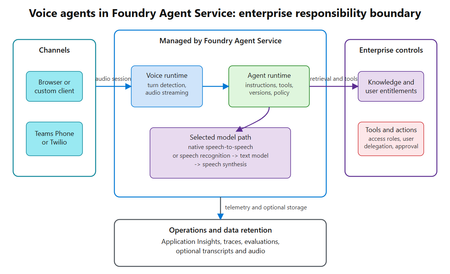
Assess where voice agents in Foundry Agent Service simplify the runtime, where enterprise trust boundaries remain, and what a 300-turn real-audio benchmark reveals about latency across six configurations.445Views0likes0CommentsChoosing a real-time voice architecture on Microsoft Foundry: three enterprise patterns
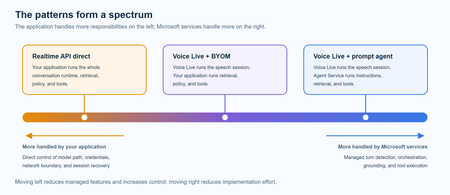
A practical comparison of three real-time voice architectures on Microsoft Foundry, including implementation tradeoffs and four enterprise release gates for residency, networking, retrieval authorization, and tool credentials.960Views2likes0CommentsIntroducing GPT-transcribe and GPT-live-transcribe in Microsoft Foundry
A transcription model hears “account number 8-4-7-2” but returns “account number eighty-four seventy-two.” A single error can break a downstream automation workflow. Developers building voice applications need transcription models that can handle real-world audio conditions, natural speech patterns, and business-critical details, including codes, dates, addresses, account numbers, mixed-language conversations, specialized terminology, and quiet or low-volume speech. GPT-transcribe and GPT-live-transcribe do just that and are available in Microsoft Foundry today. Two updates to the audio model family designed to improve automatic speech recognition across asynchronous transcription and live streaming scenarios. Built for More Accurate Transcription in Real-World Audio GPT-transcribe is the highest accuracy ASR model from Open AI, designed for asynchronous speech-to-text transcription of completed audio files and batch workloads. It accepts audio input and returns text output, making it a strong fit for workflows that process recorded, uploaded, or submitted audio, including meeting recordings, voicemails, and media files. GPT-live-transcribe is designed for low-latency streaming transcription through the Realtime API. It supports real-time audio input and text output, helping developers build live experiences where speech needs to be transcribed continuously as audio arrives. This model also introduces “tunable latency” where developers can adjust the latency/accuracy trade-off for streaming. It is a strong fit for live captions, voice assistants, contact center workflows, accessibility experiences, field service applications, real-time intake, and monitoring systems. Together, these models give developers transcription options in Microsoft Foundry for stored audio and live voice interactions. Their text output can support downstream workflows such as search, summarization, routing, analytics, automation, and quality review. What’s New in Both Models The features of the new transcription models focus on improving transcription quality in real-world audio environments where speech can be brief, noisy, accented, quiet, domain-specific, or mixed across languages. Key capabilities include: Background noise: Helps isolate speech in noisy environments so transcription quality can remain more reliable when audio conditions are not controlled. Short utterances: Improves recognition of brief commands, confirmations, interruptions, and clipped speech that can be difficult to capture accurately. Alphanumeric perception: Strengthens transcription of IDs, codes, phone numbers, dates, addresses, account numbers, and mixed letter-number sequences. Domain terminology understanding: Improves recognition of specialized vocabulary used in product, workflow, industry, and business-process contexts. Codemix: Improves understanding when speakers switch between languages within a conversation or utterance. Context awareness: Uses topic hints and past conversation context to improve transcription accuracy and help maintain consistency. Accent robustness: Improves handling of regional accents, non-native accents, dialects, and varied speaking styles. Whispering: Improves recognition of quiet or low-volume speech, including whispered commands and private dictation. Live captioning and accessibility experiences: Generate real-time captions for meetings, events, media experiences, and assistive applications. Contact center and voice workflows: Capture spoken details as conversations happen, supporting routing, quality review, summarization, and downstream automation. Monitoring, analytics, and compliance workflows: Provide text visibility into ongoing spoken input so teams can analyze, review, and act on conversation data. Also Available: GPT-realtime-2.1 and GPT-realtime-mini-2.1 gpt-realtime-2.1 and gpt-realtime-mini-2.1 are also available in Microsoft Foundry for developers building speech-to-speech applications. Unlike GPT-transcribe and GPT-live-transcribe, which return text, these models accept audio and generate audio for low-latency conversational experiences over the Realtime API. gpt-realtime-2.1 focuses on interaction quality and robustness, while gpt-realtime-mini-2.1 provides a smaller, faster, and more cost-efficient option for high-volume deployments. Together with GPT-transcribe and GPT-live-transcribe, these realtime audio updates give developers more flexibility to build voice applications that need both accurate transcription and responsive spoken interaction, whether the experience is centered on capturing speech as text, responding with audio, or combining both patterns in a single workflow. Use Cases by Model GPT-transcribe Use GPT-transcribe when the application needs accurate text transcripts from recorded, uploaded, or submitted audio. It is a strong fit for meeting and call transcription, media transcription, customer support intake, voicemail and message processing, quality review, compliance workflows, and domain-specific transcription where short utterances, structured alphanumeric details, specialized terminology, accents, background noise, code-mixed speech, or quiet audio can affect downstream accuracy. GPT-live-transcribe Use GPT-live-transcribe when the application needs live streaming transcription with low latency. It is designed for real-time captions, accessibility experiences, contact center transcription, voice-enabled workflows, live monitoring, operational dashboards, and agent-assist scenarios where spoken input needs to become text continuously as the interaction unfolds. Pricing The following pricing example shows Global Standard rates by model and modality. Rates for GPT-realtime-2.1 and GPT-realtime-mini-2.1 are listed per 1 million tokens. GPT-transcribe and GPT-live-transcribe are listed per audio hour. Model Deployment Modality Input Cached Input Output GPT-realtime-2.1 Global Standard Audio $32.00 $0.40 $64.00 Text $4.00 $0.40 $24.00 Image $5.00 $0.50 -- GPT-realtime-mini-2.1 Global Standard Audio $10.00 $0.30 $20.00 Text $0.60 $0.06 $2.40 Image $0.80 $0.08 -- GPT-live-transcribe Global Standard Audio -- -- $1.02/hour GPT-transcribe Global Standard Audio -- -- $0.27/hour Getting Started Choose GPT-transcribe when your application processes complete audio files asynchronously, or GPT-live-transcribe when it needs text continuously as speech arrives. Try the models in Microsoft Foundry, then use the resources below to explore the Realtime API, follow the audio quickstart, compare available models, and review Azure OpenAI in Foundry Models documentation. For asynchronous transcription, submit a complete audio file to GPT-transcribe and process the returned transcript after the request completes. This pattern works well for recordings, voicemails, and uploaded media. For streaming transcription, open a Realtime API session with GPT-live-transcribe, send audio as it is captured, and handle incremental transcript events. This pattern supports live captioning and agent-assist experiences that need text during an active interaction. Refer to the linked quickstart and Realtime API documentation for current SDK setup, authentication, request schemas, and supported audio formats. Explore Microsoft Learn documentation to learn more: Use GPT Realtime API for speech and audio with Azure OpenAI in Foundry Models GPT Realtime audio quickstart Azure OpenAI in Foundry Models overview3.8KViews0likes0CommentsPost-Stream Refinement is now generally available in Microsoft Foundry
When we introduced Post-Stream Refinement in public preview earlier this year, it closed the oldest trade-off in real-time speech: you could finally keep instant streaming results and get a highly accurate final transcript, with no penalty to first-token latency. A second recognition pass runs in parallel with streaming and replaces each final segment with a more accurate version once the utterance completes. Today, Post-Stream Refinement reaches general availability for Azure AI Speech in Microsoft Foundry, backed by a production SLA. Just as important, it now ships with the capabilities production transcription actually depends on: diarization to preserve who said what, phrase lists for your product names and domain vocabulary, and a much wider footprint of 19 locales across 22 Azure regions. Everything you already know about Post-Stream Refinement still applies. The real-time contract is unchanged, your partial results stream exactly as before, and you enable refinement by setting a single property on your existing SpeechConfig. What changes at GA is that the refined transcript is now production-grade and speaker-aware. 📖 Read the Documentation What's new at general availability If you have already used Post-Stream Refinement in preview, here is exactly what changes at GA, and what stays the same. The streaming path and SDK contract are untouched; the refinement pass is now production-ready and gains speaker and vocabulary features. How Post-Stream Refinement works Real-time and final results serve different needs. Partial results must appear quickly so captions, voice interfaces, and agent turn-taking stay responsive. Final results need enough context to support storage, search, summarization, and business workflows. Post-Stream Refinement runs both at once: a fast streaming pass and a deeper refinement pass over the same audio, in parallel. Because the two passes share one input stream, enabling refinement does not require a second transcription job or a separate client pipeline. Your existing recognition events and partial-result handling stay exactly as they are. Speaker attribution with diarization New at GA, diarization is supported on the Post-Stream Refinement path, so the refined final transcript keeps its speaker labels. That makes the release a strong fit for meetings, contact centers, interviews, and any workflow where the transcript needs to identify who spoke, not just what was said. The refinement pass improves the wording, including proper nouns and named entities, while every utterance stays attributed to the right speaker. Phrase lists for your vocabulary Phrase lists let the recognizer prioritize the names and terms that matter to your application: product catalogs, medical and technical vocabulary, organization names, and acronyms that general speech models might not recognize consistently. At GA you can pair phrase lists with refinement so the second pass has both broad audio context and your domain vocabulary to draw on, which is where the largest accuracy gains on named entities show up. Quality impact In internal testing and partner evaluations across supported locales, Post-Stream Refinement reduced final-transcript word error rate by double-digit relative percentages compared with standard real-time transcription, with the largest gains on the hardest content: long utterances, proper nouns, and domain-specific speech. Pairing phrase lists with refinement improves named-entity accuracy further. Partial-result latency is unchanged; only the final transcript is refined. The refined final result may add a small amount of latency to the final segment because refinement happens after the segment audio is received. Partial results are unaffected. Supported languages and regions General availability supports 19 locales. You declare one locale per session, so the service is tuned to the language you expect. Alongside the Tier-1 languages, GA adds Indic locales, including Bengali, Marathi, Punjabi, and Telugu. Post-Stream Refinement is generally available in 22 Azure regions across the Americas, Europe, and Asia Pacific. Proven at Microsoft scale The technology behind Post-Stream Refinement already powers meeting transcription and Microsoft 365 Copilot experiences in Microsoft Teams, serving millions of users across meetings, webinars, and live events every day. General availability brings the same quality bar to every Azure AI Speech customer through a supported SDK integration, not a research prototype. Preview customers across industries, including automotive, consumer electronics, and aviation, reported positive gains in transcription quality, with the clearest improvements on the hardest content: proper nouns, long-form speech, and domain-specific audio. Several are now moving those workloads into production on the GA release. Get started Enabling Post-Stream Refinement is a small configuration change on your existing SpeechConfig. You will need: Speech SDK 1.50 or later. Earlier versions do not support the refinement path. A Speech resource in one of the supported regions listed above. The session locale you expect, set on the recognizer. Set the post-processing option to PostRefinement. The example below also shows the optional phrase list for your domain vocabulary. import azure.cognitiveservices.speech as speechsdk speech_config = speechsdk.SpeechConfig( subscription="YourSpeechKey", region="YourSpeechRegion") # Declare one locale for the session speech_config.speech_recognition_language = "en-US" # 1) Refine the final transcript (Post-Stream Refinement) speech_config.set_property( speechsdk.PropertyId.SpeechServiceResponse_PostProcessingOption, "PostRefinement") audio_config = speechsdk.AudioConfig(use_default_microphone=True) recognizer = speechsdk.SpeechRecognizer( speech_config=speech_config, audio_config=audio_config) # 2) (Optional) Phrase list for names, acronyms, and domain terms phrase_list = speechsdk.PhraseListGrammar.from_recognizer(recognizer) for term in ["Contoso", "Fabrikam", "Foundry", "OAuth"]: phrase_list.addPhrase(term) Your existing recognition events and partial-result handling remain unchanged. For speaker attribution, enable diarization through the established real-time diarization path; refinement applies to the final transcript while speaker labels are preserved. Choose the right release for your workload Post-Stream Refinement now has two paths. They are the same product family with a different feature boundary, so match the path to what your customer needs. Monolingual PSR — generally available Multilingual PSR — public preview Language selection One locale declared per session Automatic detection and code-switching in a single stream (open-range, no locale declared) Supported locales 19 locales, including Indic bn / mr / pa / te 25 languages / 29 locales, auto-detected Azure regions 22 Azure regions across the Americas, Europe, and Asia Pacific 6 Azure regions Phrase lists & diarization Supported Only diarization is supported Working across languages? If a single stream needs to handle multiple languages or code-switching without a declared locale, use Multilingual Post-Stream Refinement, now in public preview. For a known session locale with phrase lists and diarization, monolingual GA is the right path. Try Post-Stream Refinement Today Turn on higher-accuracy, language-aware transcription in your Azure AI Speech applications with a single configuration change. 📖 Read the Documentation We would love your feedback. Try Post-Stream Refinement in your applications and tell us how it improves your transcription quality.872Views0likes0CommentsIntroducing MAI-Transcribe-1, MAI-Voice-1, and MAI-Image-2 in Microsoft Foundry
Another Step Towards a Complete AI Platform Since inception, our goal with Microsoft Foundry has been to deliver the most complete AI and app agent factory; giving developers access to the latest frontier models, tools, infrastructure, security, and reliability to confidently build and scale their AI solutions. Today, we're taking another step towards that vision by announcing the public preview of three new models from Microsoft AI in Microsoft Foundry: MAI-Transcribe-1: Our first-generation speech recognition model, delivering enterprise-grade accuracy across 25 languages at approximately 50% lower GPU cost than leading alternatives. MAI-Voice-1: A high-fidelity speech generation model capable of producing 60 seconds of expressive audio in under one second on a single GPU. MAI-Image-2: Our highest-capability text-to-image model, which debuted on #3 on the Arena.ai leaderboard for image model families. These are the same models already powering our own products such as Copilot, Bing, PowerPoint, and Azure Speech, and now they're available exclusively on Foundry for developers to use. We can't wait to see what you create with these new multimedia AI models in public preview. Read on for a deeper look at each model's capabilities and how to start building with them in Foundry! MAI-Transcribe-1 & Voice-1: End-To-End Voice Experiences Voice and speech are rapidly becoming the primary interface for the next generation of AI agents, and building great voice experiences requires models that can both speak and listen with precision. With MAI-Voice-1 and MAI-Transcribe-1, Microsoft is delivering exactly that: a comprehensive, first-party audio AI stack purpose-built for developers. MAI-Voice-1 is a lightning-fast speech generation model capable of producing a full minute of audio in under a second on a single GPU; making it one of the most efficient speech systems available today. On the listening side, MAI-Transcribe-1 supports up to 25 languages and is engineered for enterprise-grade reliability across accents, languages, and real-world audio conditions. But what truly sets it apart is its efficiency: when benchmarked against leading transcription models, MAI-Transcribe-1 delivers competitive accuracy at nearly half the GPU cost; an advantage that translates directly into more predictable, scalable pricing for enterprises 1 . Use cases for MAI-Transcribe-1 and MAI-Voice-1 MAI-Voice-1 and MAI-Transcribe-1 are designed for production use across a broad set of real-world scenarios: Conversational AI & Agent Assist: Enable real‑time transcription for IVR systems, virtual assistants, and call‑center workflows to power voice‑driven interfaces, live agent assist, and post‑call summarization. Live Captioning & Accessibility: Deliver real‑time captions for large events, enterprise meetings, and digital communications to improve accessibility and inclusivity across spoken experiences. Media, Subtitling & Archiving: Automate video subtitling, dialogue indexing, and transcription to support scalable content production, searchability, and long‑term media archiving. Education & Training Platforms: Transcribe lectures, learning modules, and certification programs to enhance discoverability, reviewability, and knowledge retention in e‑learning environments. Customer & Market Insights: Convert spoken interactions across research interviews, focus groups, and support channels into structured data for downstream analytics and business intelligence. We're also applying these model capabilities inside Microsoft's own products. MAI-Voice-1 powers the expressive voice experiences in Copilot's Audio Expressions and podcast features. MAI-Transcribe-1 drives Copilot's Voice Mode transcriptions and the new dictation feature, connecting natural voice input with the generative power of Copilot's language models. Both models are available through Azure Speech, where developers can tap into first-party MAI model quality alongside the enterprise-grade reliability, scalability, and 700+ voice gallery of the Azure Speech ecosystem. Try MAI-Transcribe-1 & Voice-1 Today MAI-Transcribe-1 and Voice-1 are available now through Azure Speech. Here's how to get started: Experiment in MAI Playground: Speak, record, or upload audio to see the models in action at the MAI playground. Build in Foundry: deploy MAI-Transcribe-1 and MAI-Voice-1 in Azure Speech. MAI-Transcribe-1 starts at $0.36 USD per hour, while MAI-Voice-1 pricing starts at $22 USD per 1M characters. Developers looking to create custom voices using MAI-Voice-1 can do so through the Personal Voice feature in Azure Speech — including the ability to clone a voice from a short 10-second audio sample. Note that custom voice creation requires an approval process consistent with Microsoft's responsible AI policies. MAI-Image-2: Limitless Creativity For Every Builder Images are at the center of how developers build compelling AI-powered creative experiences; from marketing tools to content platforms to multimodal agents. MAI-Image-2 is Microsoft's answer to that demand. This model has been developed in close collaboration with photographers, designers, and visual storytellers and debuted in the top-3 text-to-image model families on the Arena.ai leaderboard. It raises the bar across the capabilities that matter most in real creative workflows; more natural, photorealistic image generation, stronger in-image text rendering for infographics and diagrams, and greater precision on complex layouts, detailed scenes, and cinematic visuals. Use cases for MAI-Image-2 Developers can integrate MAI-Image-2 across a range of high-impact workflows: Media & Creative Ideation: Designers, illustrators, and creative teams use text‑to‑image generation to explore visual directions, styles, and compositions early in the creative process—moving from concept to exploration faster. Enterprise Communications & Internal Branding: Organizations create custom visuals for internal campaigns, training materials, and executive communications directly from text, ensuring clarity, polish, and brand alignment without relying on stock imagery. UX & Product Concept Visualization: Product teams visualize interfaces, workflows, environments, and conceptual product scenarios from text descriptions, helping teams communicate ideas and align early—before engineering or design resources are engaged. WPP, one of the world's largest marketing and communications groups, is among the first enterprise partners building with MAI-Image-2 at scale, using it to power creative production workflows that previously required significant manual effort. "MAI-Image-2 is a genuine game-changer. It's a platform that not only responds to the intricate nuance of creative direction, but deeply respects the sheer craft involved in generating real-world, campaign-ready images. WPP has some of the best creative talent in the world and MAI-Image-2 is making them even better." -Rob Reilly, Global Chief Creative Officer, WPP We’re also implementing MAI-Image-2 to power image generation within Microsoft’s own products, including Copilot, Bing Image Creator, and PowerPoint, and now you have access to this powerful, cost effective model for your own apps. Try MAI-Image-2 Today Experiment in the MAI Playground: Preview MAI-Image-2 at MAI playground and share feedback directly with the team. Build in Foundry: deploy MAI-Image-2 via the API and start building your apps and agents! MAI-Image-2 starts at $5 USD per 1M tokens for text input and $33 USD per 1M tokens for image output. We look forward to your feedback on these models in Foundry. References: 1 1 st on overall WER on the FLEURS benchmark. Out of the top 25 global languages, MAI-Transcribe-1 ranks 1st by FLEURS in 11 core languages. It wins against Whisper-large-v3 on the remaining 14 and Gemini 3.1 Flash on 11 of those 14.22KViews1like1CommentEvaluate before you ship: introducing the Voice Live Evaluation Harness
You've built a voice agent on Azure Voice Live. It demos beautifully. Then a teammate asks the question that keeps every voice-agent team up at night: "How do we know it's actually good — across 200 customer calls, not the three we just listened to?" Until today, the honest answer was: put on headphones. Manual listening. Subjective scoring in a spreadsheet. No baseline, no regression signal, no way to defend a model swap with data. We're releasing the Voice Live Evaluation Harness to change that. It's an open-source, deployable evaluation pipeline that runs pre-recorded multi-turn audio through your Voice Live agent and scores every turn with the same evaluators built into Microsoft Foundry — automatically, repeatably, and in parallel. TL;DR Two flavors, one repo. Run the CLI harness locally against a Foundry project for fast iteration, or deploy the evaluation agent into your Azure subscription with the Azure Developer CLI (azd) for a fully-hosted evaluation backend. 13 built-in evaluators score every turn — intent resolution, task adherence, task completion, response completeness, tool-call accuracy, groundedness, and more — viewable per-turn and in aggregate inside the Foundry portal. Supports the three Voice Live modes you actually ship in — Semantic VAD, Push-to-Talk, and Foundry Agent mode — including multi-turn conversations with tool calls and grounding. Grows with your agent. Start with the sample datasets, then layer in audio collected from user testing and production traffic so your evaluation set matures alongside the agent. 🔗 Repo: microsoft-foundry/voicelive-evaluation · Docs: Evaluate Voice Live agents (preview) Why systematic evaluation matters for voice agents Text agents have a mature evaluation story. Voice agents don't — and the gaps actually matter more, because every voice failure happens in real time, in front of a customer, on a phone line you can't easily replay. The Voice Live Evaluation Harness closes that gap with four concrete capabilities: Establish a quality baseline. Run a representative audio dataset through your agent and get scores you can publish as your launch bar. Compare configurations side-by-side. Swap the underlying model (GPT-Realtime 1.5, Azure-Realtime, MAI-Transcribe-1.5), change the voice, tune VAD thresholds — and see exactly which knobs moved which scores. Catch regressions before users do. Wire it into CI and fail the build when intent resolution drops below your threshold. Optimize with data, not vibes. When task-completion drops, drill into the per-turn scores to see whether the agent failed to call the right tool, misunderstood intent, or generated an incomplete response. Keep iterating as production data rolls in. Start with the sample datasets, then grow your evaluation set with audio captured from internal testing, pilot users, and real production traffic. Re-run after every prompt tweak or model swap so the harness becomes a continuous quality signal — not a one-time launch checklist. How it works The pipeline is a five-stage loop: Audio Dataset. Multi-turn audio + expected behaviors in a simple JSONL schema. Four sample datasets ship in the repo (travel planning, complex data analytics, tool-calling tests, batch multi-conversation) so you can run end-to-end on day one. Voice Live API. Pick your Voice Live mode (Semantic VAD, PTT, or Foundry Agent), model, voice, and turn-detection settings via a JSON config file, then stream each turn of audio through the API — locally with the CLI harness, or, if you've deployed the evaluation agent, via the hosted Container App for long-running batches in your own subscription. Transcript + Response. Every turn produces an agent transcript, the model's response, and any tool calls it made — captured automatically for scoring. Foundry Evaluators. 13 built-in evaluators — powered by the same Foundry evaluator models (GPT-4.1-mini and o4-mini) used across Microsoft Foundry — judge every turn on intent resolution, task adherence, tool-call accuracy, groundedness, and more. Quality Scores. Per-turn and aggregate scores land in the Microsoft Foundry portal under your project's Evaluation tab — sortable, filterable, comparable across runs. Then loop. Audio captured from internal testing, pilots, and production traffic feeds back into the dataset — each pass makes the next evaluation more representative of what users actually do. What gets measured The accelerator ships 13 built-in evaluators out of the box, covering the dimensions that matter most for production voice agents: Category Evaluators Intent & task quality Intent Resolution · Task Adherence · Task Completion · Response Completeness Tool calling Tool Call Accuracy · Tool Call Parameter Validity · Tool Result Usage · Tool Call Success Content quality Groundedness · Relevance · Fluency · Coherence Conversational dynamics Turn-taking quality Every evaluator runs against the same Foundry evaluator models (GPT-4.1-mini and o4-mini) that power evaluation across the rest of Microsoft Foundry — so your voice-agent scores are directly comparable to your text-agent scores. Run the CLI locally against your existing Voice Live endpoint If you already have a Voice Live agent deployed and just want fast iteration on a laptop: git clone https://github.com/microsoft-foundry/voicelive-evaluation.git cd voicelive-evaluation/evaluation_harness python -m venv .venv && source .venv/bin/activate pip install -r requirements.txt cp .sample_env .env # Edit .env with your AZURE_VOICELIVE_ENDPOINT python voice_agent_evaluation.py \ --config configs/sample_vad_realtime.json The full walkthrough — dataset schema, configuration reference, score interpretation, and troubleshooting — is in the documentation. Get started Repo: microsoft-foundry/voicelive-evaluation Docs: How to evaluate Voice Live agents (preview) We'd love your feedback — try it, file issues, and tell us which evaluators you wish you had.577Views0likes0CommentsBuilding Knowledge-Grounded Conversational AI Agents with Azure Speech Photo Avatars
From Chat to Presence: The Next Step in Conversational AI Chat agents are now embedded across nearly every industry, from customer support on websites to direct integrations inside business applications designed to boost efficiency and productivity. As these agents become more capable and more visible, user expectations are also rising: conversations should feel natural, trustworthy, and engaging. While text‑only chat agents work well for many scenarios, voice‑enabled agents take a meaningful step forward by introducing a clearer persona and a stronger sense of presence, making interactions feel more human and intuitive (see healow Genie success story). In domains such as Retail, Healthcare, Education, and Corporate Training, adding a visual dimension through AI avatars further elevates the experience. Pairing voice with a lifelike visual representation improves inclusiveness, reduces interaction friction, and helps users better contextualize conversations—especially in scenarios that rely on trust, guidance, or repeated engagement. To support these experiences, Microsoft offers two AI avatar options through Azure Speech: Video Avatars, which are generally available and provide full‑ or partial‑body immersive representations, and Photo Avatars, currently in public preview, which deliver a headshot‑style visual well suited for web‑based agents and digital twin scenarios. Both options support custom avatars, enabling organizations to reflect their brand identity rather than relying solely on generic representations (see W2M custom video avatar). Choosing between Video Avatars and Photo Avatars is less about preference and more about intent. Video Avatars offer higher visual fidelity and immersion but require more extensive onboarding, such as high-quality recorded video of an avatar talent. Photo Avatars, by contrast, can be created from a single image, enabling a lighter‑weight onboarding process while still delivering a human‑centered experience. The right choice depends on the desired interaction style, visual presence, and target deployment scenario. What this solution demonstrates In this post, I walk through how to integrate Azure Speech Photo Avatars — powered by Microsoft Research's VASA-1 model — into a knowledge‑grounded conversational AI agent built on Azure AI Search. The goal is to show how voice, visuals, and retrieval‑augmented generation (RAG) can come together to create a more natural and engaging agent experience. The solution exposes a web‑based interface where users can speak naturally to the AI agent using their voice. The agent responds in real time using synthesized speech, while live transcriptions of the conversation are displayed in the UI to improve clarity and accessibility. To help compare different interaction patterns, the sample application supports three modes: 1) Photo Avatar mode, which adds a lifelike visual presence. 2) Video Avatar mode, which provides a more immersive, full‑motion experience. 3) Voice‑only mode, which focuses purely on speech‑to‑speech interaction. Key architectural components An end‑to‑end architecture for the solution is shown in the diagram below. The solution is composed of the following core services and building blocks: Microsoft Foundry — provides the platform for deploying, managing, and accessing the foundation models used by the application. Azure OpenAI — provides the Realtime API for speech‑to‑speech interaction in the voice‑only mode and the Chat Completions API used by backend services for reasoning and conversational responses. gpt‑4.1 — LLM used for reasoning tasks such as deciding when to invoke tool calls and summarizing responses. gpt-realtime-mini — LLM used for speech-to-speech interaction in the Voice-only mode. text‑embedding‑3‑large — LLM used for generating vector embeddings used in retrieval‑augmented generation. Azure Speech — delivers the real‑time speech‑to‑text (STT), text‑to‑speech (TTS), and AI avatars capabilities for both Photo Avatar and Video Avatar experiences. Azure Document Intelligence — extracts structured text, layout, and key information from source documents used to build the knowledge base. Azure AI Search — provides vector‑based retrieval to ground the language model with relevant, context‑aware content. Azure Container Apps — hosts the web UI frontend, backend services, and MCP server within a managed container runtime. Azure Container Apps Environment — defines a secure and isolated boundary for networking, scaling, and observability of the containerized workloads. Azure Container Registry — stores and manages Docker images used by the container applications. How you can try it yourself The complete sample implementation is available in the LiveChat AI Voice Assistant repository, which includes instructions for deploying the solution into your Azure environment. The repository uses Infrastructure as Code (IaC) deployment via Azure Developer CLI (azd) to orchestrate Azure resource provisioning and application deployment. Prerequisites: An Azure subscription with appropriate services and models' quota is required to deploy the solution. Getting the solution up and running in just three simple steps: Clone the repository and navigate to the project git clone https://github.com/mardianto-msft/azure-speech-ai-avatars.git cd azure-speech-ai-avatars Authenticate with Azure azd auth login Initialize and deploy the solution azd up Once deployed, you can access the sample application by opening the frontend service URL in a web browser. To demonstrate knowledge grounding, the sample includes source documents derived from Microsoft’s 2025 Annual Report and Shareholder Letter. These grounding documents can optionally be replaced with your own data, allowing the same architecture to be reused for domain‑specific or enterprise scenarios. When using the provided sample documents, you can ask questions such as: “How much was Microsoft’s net income in 2025?”, “What are Microsoft’s priorities according to the shareholder letter?”, “Who is Microsoft’s CEO?” Bringing Conversational AI Agents to Life This implementation of Azure Speech Photo Avatars serves as a practical starting point for building more engaging, knowledge‑grounded conversational AI agents. By combining voice interaction, visual presence, and retrieval‑augmented generation, Photo Avatars offer a lightweight yet powerful way to make AI agents feel more approachable, trustworthy, and human‑centered — especially in web‑based and enterprise scenarios. From here, the solution can be extended over time with capabilities such as long‑term memory, richer personalization, or more advanced multi‑agent orchestration. Whether used as a reference architecture or as the foundation for a production system, this approach demonstrates how Azure Speech Photo Avatars can help bridge the gap between conversational intelligence and meaningful user experience. By emphasizing accessibility, trust, and human‑centered design, it reflects Microsoft’s broader mission to empower every person and every organization on the planet to achieve more.980Views0likes0CommentsCreate a Simple Speech REST API with Azure AI Speech Services
Explore the world of Speech recognition and Speech Synthesis with Azure AI Services. In this tutorial, you will learn how to create your own simple Speech REST API using Azure AI Speech Synthesis and Azure OpenAI services or OpenAI API. Experience the power of speech synthesis using Azure and explore the infinite number of possibilities today unveiled to you by Azure AI Services to create powerful products.6.1KViews2likes0CommentsBuild a Virtual Assistant with Azure Open AI and Azure Speech Service
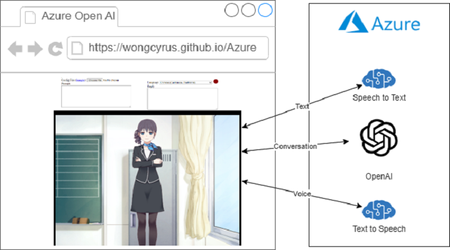
This post shows you how to create an extremely powerful virtual assistant with Azure OpenAI and Azure Speech Services for all languages. It is just a static web application without running any server and everything done with client side JavaScript. Azure OpenAI Service provides developers with API calls to make a virtual assistant that uses Azure AI and speech services. Students can use it to get course-related answers. You can try the Live2D Azure OpenAI chatbot by creating an Azure subscription and configuring it.22KViews1like5Comments