azure security center
6 Topics
Troubleshooting Microsoft Entra ID OATH Hardware Token Upload Errors
Deploying hardware OATH-TOTP tokens in Microsoft Entra ID can significantly boost your organisation's multi-factor authentication (MFA) security posture. However, administrators frequently encounter vague validation errors during the CSV file upload process. To ensure a smooth, error-free import, follow these top 3 definitive deployment tips gathered from real-world customer support scenarios. 1. Request the Correct Seed Format at the Point of Order Most administrators assume that any CSV file provided by a hardware vendor will automatically work with Microsoft Entra ID. This is a common misconception. Many vendors default to providing secret keys encoded in Hexadecimal, whereas Entra ID strictly mandates Base32 encoding for CSV uploads. • The Tip: When purchasing hardware tokens, explicitly request that the vendor send the seed data in "Entra ID MFA CSV" format. • Example: Trusted vendors like Deepnet Security offer dedicated formatting profiles at the point of ordering to ensure the secrets are delivered natively in the required Base32 string layout. 2. Use a Text Editor and Enforce Lowercase Headers Using spreadsheet software like Microsoft Excel to modify your user principal names (UPNs) is one of the fastest ways to corrupt your token seed files. • The Tip: Never open or edit your token CSV files in Excel. Excel automatically treats long token serial numbers as large integers. When saved, it converts them into destructive scientific notation (e.g., 1.23E+11) or strips essential leading zeros, breaking the alignment with the hardware device. • Execution: Use a dedicated text editor (such as Notepad++, VS Code, or TextEdit) to append user details. Additionally, ensure that the first line containing your headers uses strictly lowercase letters (upn, serialnumber, secretkey, timeinterval, manufacturer, model). Capitalised headers (like UPN or SerialNumber) will cause Entra ID syntax validation to fail. 3. Optimise for Scale: Bulk Uploads and Graph API Integration Managing bulk token rollouts manually through the Entra portal can quickly become inefficient or hit portal limitations when dealing with thousands of users. • The Tip for Large Deployments: If you are uploading a massive quantity of tokens, look into online enablement helper tools to map and chunk the data smoothly. Utilities like the Deepnet Security Token Enrollment Assistant or the SafeID Token Service make assigning UPNs and structuring large lists much easier before final tenant ingestion. • The Tip for Graph API & Advanced Encoding: If your deployment architecture requires user self-enrolment, or if your hardware vendor supplies raw Base256 encoded seeds, a standard CSV upload will not work. In these advanced scenarios, you must format the token details into a structured JSON payload and import them directly using the Microsoft Graph API. Unambiguous Base32 Reference CSV Layout When validating your file, ensure your secretkey string is entirely comprised of characters within the true Base32 alphabet (A–Z and digits 2–7). upn,serialnumber,secretkey,timeinterval,manufacturer,model email address removed for privacy reasons,1234567,ORSXG5BRGIZTINJWG44TSTST,30,VendorName,ModelA email address removed for privacy reasons,7654321,MZXW6YTBOJUW423VORSXG5BR,60,VendorName,ModelB296Views0likes1CommentShare Your Expertise: Help Shape Our Network Practitioner Community
Hello Azure network practitioners, We’re working on refining our understanding of network practitioner personas and building stronger community engagement strategies for networking practitioners. Your insights as an MVP are invaluable to this effort. Could you take a few minutes to complete this short survey? Your feedback will directly influence how we design future programs and resources for the community. 👉 https://forms.office.com/r/dfgXxNwQd9 Thank you for helping us make the Azure networking community even better! Best regards, Dan Product Marketing Manager, Identity & Network Access Growth154Views0likes0Comments
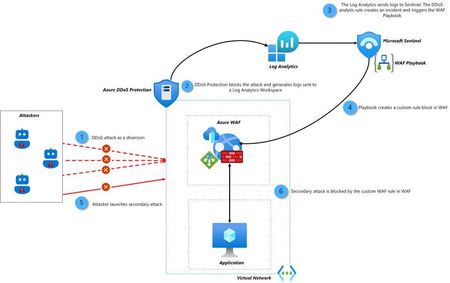
New Blog | Enhancing Your Azure Security: Azure DDoS Sentinel Solution and WAF Playbook Integration
In today's digital landscape, the rise of complex cyber threats poses a significant challenge for businesses relying on cloud-based services. Specifically, Distributed Denial of Service (DDoS) attacks are now often being used as a diversion in multi-layer attacks. To safeguard their applications and ensure uninterrupted service availability, organizations must deploy robust security solutions. Microsoft Azure offers powerful security solutions - Azure DDoS Protection, Azure Web Application Firewall (WAF) and Microsoft Sentinel - to help you proactively defend your assets against such attacks. In this blog, we will explore how to integrate the Azure DDoS Sentinel Solution with the Azure WAF Playbook to enable a powerful automated detection and response system. By combining these two solutions, you can ensure a secure and uninterrupted experience for users, protect your services, and minimize the risk of DDoS attacks. Read the full blog: Enhancing Your Azure Security: Azure DDoS Sentinel Solution and WAF Playbook Integration - Microsoft Community Hub1KViews0likes0CommentsNew Blog Post | Azure Firewall: New Monitoring and Logging Updates
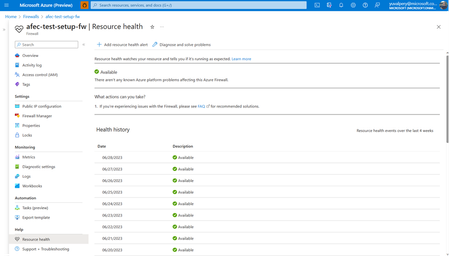
Contributors: Eliran Azulai and Yuval Pery Monitoring, management, and innovation are core pillars of Azure Firewall. With this in mind, we are delighted to share the following new capabilities: Resource Health is now in public preview Embedded Firewall Workbooks is now in public preview Latency Probe Metric is now in general availability When you monitor the firewall, it’s the end-to-end experience that we continuously strive to improve. Our aim is to empower you to make informed decisions quickly and maximize your organization's security demands. Understanding the importance of having visibility into your network, this release focuses on making it easier for you to monitor, manage, and troubleshoot your firewalls more efficiently. Read the full blog here: Azure Firewall: New Monitoring and Logging Updates - Microsoft Community Hub706Views0likes0CommentsNew Blog | Taking Azure Firewall IDPS on a Test Drive
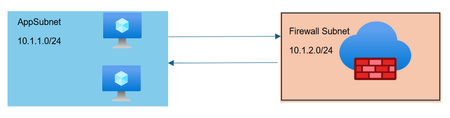
Written by Gopikrishna Kannan (Head of Products: Azure Firewall and Firewall Manager) Intrusion detection and prevention (IDPS) is an advanced threat prevention mechanism supported by the Azure Firewall Premium SKU. Unlike simple network filtering, IDPS matches traffic patterns to a set of known malicious signatures. Azure Firewall supports more than 60,000 malicious signatures which are updated in real time. These signatures apply when malicious patterns are detected under the right conditions. The conditions include traffic direction (inbound or outbound) and network scope (private network or public network). Below are examples to validate IDPS configuration in your environment. Read the full blog here: Taking Azure Firewall IDPS on a Test Drive - Microsoft Community Hub2.6KViews0likes0Comments