azure resource graph
14 Topics
I built an open-source tool for running ARG governance checks on a schedule and tracking findings
Most of the Azure governance work I have done over the last ten years ended the same way. Someone writes a sharp Resource Graph query, it finds something real, it gets pasted into a chat, and then it lives in that person's terminal history until they move on. The failure that costs more is quieter. A check that stops running does not turn red. It stays green, and the estate keeps drifting behind a number that nobody has any reason to distrust. Disclosure before I name anything: I built the tool below and I maintain it. RuleBeat runs the governance checks your team writes for Azure on a schedule, tracks every finding over time, and never holds write access. A check is a rule you author against Azure Resource Graph or Microsoft Graph, in a visual builder or as raw KQL. It ships 158 checks out of the box, 15 built-in rules plus the 143-rule APRL pack. Findings keep their lifecycle across scans, so they move through new, active and fixed and reopen on their own, and a suppression needs a reason and can carry an expiry date. The trade-offs, so nobody has to discover them after installing: - Read-only, permanently. It never holds write credentials and never creates its own service principal. You create the credential, so you can see in Azure RBAC exactly what it was granted. The cost is real: there is no one-click fix. Remediation stays your action under your own identity. - Self-hosted, one container, SQLite inside. Nothing about your tenant leaves your deployment and there is no telemetry. The cost is that you run it. Demo mode runs the real UI over a generated database with no Azure credential, if you would rather look before wiring anything up. - Honest numbers. A rule that has never run, or whose last run failed, is reported as unknown rather than passing. The posture number is uglier for it, and that is the point. On where this does and does not belong next to the native stack: Azure Policy is for enforcing a standard, and it does that better than anything I would write. Defender for Cloud covers its own scope well. If your assignments are enforcing, your Workbook answers the question you actually ask, and one person owns the whole loop, you do not need this. Where I kept running out of road was the organization-specific check that no built-in standard covers, and the question of who owns a flagged row once more than one person has to care about it. It is open source under Apache-2.0 and free, and it is v0.2, early on purpose. I build it with AI assistance from Claude, which the public commit history shows in the co-author trailers, and every change is human-reviewed and gated by the test suite in CI before it ships. Repo: https://github.com/rulebeat/rulebeat Docs: https://docs.rulebeat.com The question I would rather ask than answer: for those of you running recurring governance checks today, what do you do with a finding that is accepted on purpose? Every version of this I have seen was a tag, a wiki page, or a spreadsheet, and all three drift away from the query that produced them. I would like to know what has actually held up for you.152Views0likes0CommentsLessons Learned #546: Maintaining a Local Azure Resource Inventory
I worked on a service request that our customer has an application works repeatedly with the same Azure resources. I guess that it may be useful to maintain our own persistent inventory instead of retrieving and validating every resource individually during each execution. In this example, a PowerShell script maintains an inventory of Azure SQL logical servers in a local JSON file. The idea is: Load the local JSON inventory -> Query Azure Resource Graph -> Compare both inventories -> Validate only detected changes -> Update the JSON file. Azure Resource Graph provides the current list of Microsoft.Sql/servers resources. The result is compared with the inventory stored by the application. If a server exists in both inventories, it is marked as: Observed: No additional request is required. NewValidatedByPointGet:If a new server is detected, it is validated individually with Get-AzSqlServer before being added If a previously known server is missing from the current result, the script also validates it individually. The possible results are: RecoveredByPointGet: the server still exists and remains in the inventory. Deleted: the individual request returns ResourceNotFound, so the server is removed. UnknownRetainedFromCache: the validation is inconclusive, so the previous inventory entry is preserved. The JSON file therefore represents the application’s active resource inventory and remains available between executions. I think this approach reduces repeated API requests because individual validation is performed only when a resource is new, missing, or has changed. I would like to share the PowerShell Script. Set-StrictMode -Version Latest $ErrorActionPreference = "Stop" # ------------------------------------------------------------ # Configuration # ------------------------------------------------------------ $tenantId = "<tenant-id>" $subscriptionId = "<subscription-id>" $resourceGroup = "<resource-group>" $cacheFile = ".\sql-server-inventory.json" # Required modules: # Install-Module Az.ResourceGraph -Scope CurrentUser # Install-Module Az.Sql -Scope CurrentUser # Connect-AzAccount -Tenant $tenantId Set-AzContext ` -Tenant $tenantId ` -Subscription $subscriptionId ` -ErrorAction Stop | Out-Null # ------------------------------------------------------------ # Helper functions # ------------------------------------------------------------ function ConvertTo-NormalizedResourceId { param( [Parameter(Mandatory)] [string]$ResourceId ) return $ResourceId.Trim().TrimEnd("/").ToLowerInvariant() } function Test-IsResourceNotFound { param( [Parameter(Mandatory)] [System.Management.Automation.ErrorRecord]$ErrorRecord ) $errorText = @( $ErrorRecord.Exception.Message $ErrorRecord.ErrorDetails.Message $ErrorRecord.FullyQualifiedErrorId $ErrorRecord.ToString() ) -join " " return ( $errorText -match "(?i)(\b404\b|ResourceNotFound|ServerNotInSubscriptionResourceGroup)" ) } function New-InventoryItem { param( [Parameter(Mandatory)] [string]$ResourceId, [Parameter(Mandatory)] [string]$Name, [string]$Location, [Parameter(Mandatory)] [string]$ValidationStatus ) return [pscustomobject]@{ id = $ResourceId name = $Name location = $Location validationStatus = $ValidationStatus } } # ------------------------------------------------------------ # 1. Load the persistent inventory # ------------------------------------------------------------ if (Test-Path -LiteralPath $cacheFile) { $jsonContent = Get-Content ` -LiteralPath $cacheFile ` -Raw ` -ErrorAction Stop if ([string]::IsNullOrWhiteSpace($jsonContent)) { $cachedServers = @() } else { $cachedServers = @( $jsonContent | ConvertFrom-Json ` -ErrorAction Stop ) } } else { $cachedServers = @() } $cachedServersById = @{} foreach ($cachedServer in $cachedServers) { $resourceId = [string]$cachedServer.id if ([string]::IsNullOrWhiteSpace($resourceId)) { continue } $normalizedId = ConvertTo-NormalizedResourceId ` -ResourceId $resourceId $cachedServersById[$normalizedId] = $cachedServer } Write-Host "Stored inventory: $($cachedServersById.Count) server(s)" # ------------------------------------------------------------ # 2. Discover the current resources # ------------------------------------------------------------ $query = @" Resources | where subscriptionId =~ '$subscriptionId' | where resourceGroup =~ '$resourceGroup' | where type =~ 'microsoft.sql/servers' | project id = tostring(id), name = tostring(name), location = tostring(location) "@ try { $argResponse = Search-AzGraph ` -Query $query ` -Subscription $subscriptionId ` -First 1000 ` -ErrorAction Stop } catch { throw ( "Azure Resource Graph query failed. " + "The existing inventory has not been modified. " + "Error: $($_.Exception.Message)" ) } if ( $null -ne $argResponse -and $argResponse.PSObject.Properties.Name -contains "Data" ) { $currentServers = @($argResponse.Data) } else { $currentServers = @($argResponse) } $currentServersById = @{} foreach ($currentServer in $currentServers) { $resourceId = [string]$currentServer.id $serverName = [string]$currentServer.name if ( [string]::IsNullOrWhiteSpace($resourceId) -or [string]::IsNullOrWhiteSpace($serverName) ) { continue } $normalizedId = ConvertTo-NormalizedResourceId ` -ResourceId $resourceId $currentServersById[$normalizedId] = $currentServer } Write-Host "Current observation: $($currentServersById.Count) server(s)" # ------------------------------------------------------------ # 3. Build the synchronized active inventory # ------------------------------------------------------------ $activeInventoryById = @() $activeInventoryIndex = @{} $deletedServers = @() foreach ($normalizedId in $currentServersById.Keys) { $currentServer = $currentServersById[$normalizedId] $resourceId = [string]$currentServer.id $serverName = [string]$currentServer.name $location = [string]$currentServer.location if ($cachedServersById.ContainsKey($normalizedId)) { # The resource is present in both inventories. $item = New-InventoryItem ` -ResourceId $resourceId ` -Name $serverName ` -Location $location ` -ValidationStatus "Observed" $activeInventoryIndex[$normalizedId] = $item continue } # The resource is new. Validate it individually. Write-Host "Validating new server '$serverName'..." try { $validatedServer = Get-AzSqlServer ` -ResourceGroupName $resourceGroup ` -ServerName $serverName ` -ErrorAction Stop $item = New-InventoryItem ` -ResourceId $resourceId ` -Name ([string]$validatedServer.ServerName) ` -Location ([string]$validatedServer.Location) ` -ValidationStatus "NewValidatedByPointGet" $activeInventoryIndex[$normalizedId] = $item } catch { Write-Warning ( "New server '$serverName' could not be validated " + "and was not added to the inventory. " + "Error: $($_.Exception.Message)" ) } } # ------------------------------------------------------------ # 4. Validate previously known resources missing from discovery # ------------------------------------------------------------ foreach ($normalizedId in $cachedServersById.Keys) { if ($currentServersById.ContainsKey($normalizedId)) { continue } $cachedServer = $cachedServersById[$normalizedId] $resourceId = [string]$cachedServer.id $serverName = [string]$cachedServer.name $location = [string]$cachedServer.location Write-Host ( "Server '$serverName' is missing from the current " + "observation. Running individual validation..." ) try { $validatedServer = Get-AzSqlServer ` -ResourceGroupName $resourceGroup ` -ServerName $serverName ` -ErrorAction Stop $item = New-InventoryItem ` -ResourceId $resourceId ` -Name ([string]$validatedServer.ServerName) ` -Location ([string]$validatedServer.Location) ` -ValidationStatus "RecoveredByPointGet" $activeInventoryIndex[$normalizedId] = $item Write-Warning ( "Server '$serverName' was not returned by discovery, " + "but individual validation confirmed that it still exists." ) } catch { if (Test-IsResourceNotFound -ErrorRecord $_) { $deletedServers += [pscustomobject]@{ id = $resourceId name = $serverName location = $location validationStatus = "Deleted" } Write-Warning ( "Deleted server detected: '$serverName'. " + "It will be removed from the active inventory." ) } else { # The result is inconclusive. Preserve the previous entry. $item = New-InventoryItem ` -ResourceId $resourceId ` -Name $serverName ` -Location $location ` -ValidationStatus "UnknownRetainedFromCache" $activeInventoryIndex[$normalizedId] = $item Write-Warning ( "The status of server '$serverName' could not be " + "confirmed. The previous inventory entry was retained. " + "Error: $($_.Exception.Message)" ) } } } # ------------------------------------------------------------ # 5. Save the updated active inventory # ------------------------------------------------------------ $activeInventory = @( $activeInventoryIndex.Values | Sort-Object name ) $jsonOutput = ConvertTo-Json ` -InputObject $activeInventory ` -Depth 10 $temporaryFile = "$cacheFile.tmp" Set-Content ` -LiteralPath $temporaryFile ` -Value $jsonOutput ` -Encoding utf8 ` -Force Move-Item ` -LiteralPath $temporaryFile ` -Destination $cacheFile ` -Force # ------------------------------------------------------------ # 6. Report the synchronization result # ------------------------------------------------------------ Write-Host "" Write-Host "Active inventory: $($activeInventory.Count) server(s)" $activeInventory | Format-Table ` name, location, validationStatus ` -AutoSize if ($deletedServers.Count -gt 0) { Write-Host "" Write-Warning "Confirmed deleted servers:" $deletedServers | Format-Table ` name, location, validationStatus ` -AutoSize } Disclaimer This PowerShell script is provided as a simplified proof of concept to illustrate a persistent resource inventory pattern. It should be reviewed, tested, and adapted before being used in a production environment. Authentication, permissions, error handling, retry policies, concurrency, logging, inventory storage, and operational requirements may differ between environments. The local JSON file is suitable for demonstration purposes and small automation scenarios.261Views0likes0Comments
At-Scale Failure Reporting for Azure Update Manager
Introduction Azure Update Manager simplifies patching across Azure virtual machines and Azure Arc-enabled servers by providing a centralized platform for patch assessment and installation. However, as environments scale, a key challenge emerges—efficiently identifying and troubleshooting patch failures across large fleets of machines. While Azure Update Manager surfaces detailed error messages in the Azure portal, this information is typically available only at an individual machine level. In enterprise environments managing hundreds or thousands of systems, drilling into each VM to find error details quickly becomes impractical. In this article, we walk through a real-world use case and demonstrate how to leverage Azure Resource Graph (ARG) to extract failed machines along with their error details for a specific maintenance run—using a single query. The Challenge: Scaling Patch Failure Visibility In a large enterprise deployment, Azure Update Manager was configured to manage patching across: Windows and Linux virtual machines Azure cloud VMs and Arc-enabled on‑premises servers Multiple regions and subscriptions While patching operations were largely successful, a subset of machines experienced failures. The key challenges faced by the operations team were: Error messages were visible only by drilling into each failed VM in the portal No built‑in way to aggregate failures across all machines Lack of a simple mechanism to export: Failed VMs Error codes Error messages The team needed a scalable, query‑driven approach to analyze failures across an entire maintenance run. Key Insight: Where Azure Update Manager Stores Data Azure Update Manager does not rely on Log Analytics to store operational results. Instead: Patch assessment and installation results are stored in Azure Resource Graph Azure Resource Graph acts as a centralized, queryable store for update operations This design enables powerful querying without requiring additional ingestion, configuration, or cost overhead. Understanding Maintenance Runs and Correlation IDs Each Azure Update Manager maintenance run generates a unique identifier: properties.correlationId represents the maintenance (schedule) run ID All machines involved in the same patch cycle share this ID This allows all machines within a single patch execution to be correlated and queried collectively. The Solution: Query Failed VMs with Error Messages Azure Resource Graph allows querying failures at scale using the maintenanceresources dataset. Core Query (Kusto Query Language) 1 maintenanceresources 2 | where type =~ "microsoft.maintenance/applyupdates" 3 | where tostring(properties.correlationId) contains "<YourMaintenanceRunID>" 4 | where tostring(properties.status) =~ "Failed" 5 | project properties.resourceId, properties.errorCode, properties.errorMessage What This Query Delivers All machines that failed in a specific maintenance run Error codes for troubleshooting Full error messages that are otherwise visible only in the Azure portal Note: Property names for error information can vary by environment. Validate available fields using Azure Resource Graph Explorer and adjust the project clause if required. Sample Output (Conceptual) Resource ID Error Code Error Message vm-01 0x80244007 Windows Update API failed vm-02 0x80072f8f Connectivity issue vm-03 1C WSUS configuration issue Advanced Scenario: Automatically Detecting the Latest Failed Maintenance Run In real-world scenarios, you may not always know the maintenance run ID. The following query dynamically identifies the most recent maintenance run that had failures, and then retrieves all failed machines from that run. 1 // Step 1: Identify the latest maintenance run ID with failures 2 let lastFailedRun = toscalar( 3 maintenanceresources 4 | extend runId = extract(@"applyupdates/(\d+)$", 1, properties.correlationId) 5 | where type =~ "microsoft.maintenance/applyupdates" 6 | where tostring(properties.status) =~ "Failed" 7 | order by tostring(properties.startDateTime) desc 8 | take 1 9 | project runId 10 ); 11 // Step 2: Query all failed VMs from that run 12 maintenanceresources 13 | where type =~ "microsoft.maintenance/applyupdates" 14 | where tostring(properties.correlationId) contains lastFailedRun 15 | where tostring(properties.status) =~ "Failed" 16 | project properties.resourceId, properties.errorCode, properties.errorMessage This approach is ideal for automation, scheduled reporting, and dashboard scenarios. Why This Approach Matters Operational Efficiency Eliminates manual portal navigation Provides consolidated failure insights in seconds Scalability Works across large, distributed environments Supports both Azure and hybrid (Arc‑enabled) machines Automation Ready Can be integrated into scripts, dashboards, and reporting pipelines Enables proactive monitoring and alerting scenarios Best Practices for Enterprise Patch Reporting To maximize the value of this approach: Capture and track maintenance run IDs Use Azure Resource Graph as the primary reporting layer Build reusable queries for different patch scenarios Export reports for compliance and auditing Correlate failures with root‑cause trends over time Conclusion As organizations scale patching operations with Azure Update Manager, visibility, speed, and automation become essential. While the Azure portal is effective for per‑machine troubleshooting, it is not optimized for fleet‑level analysis. Azure Resource Graph fills this gap by enabling a shift from manual troubleshooting to automated, query‑driven failure analysis at scale. By adopting this approach, teams can significantly improve operational efficiency, reduce mean time to resolution, and build a more mature patch management strategy. Final takeaway: Don’t rely only on the portal Leverage Azure Resource Graph to operationalize patch insights at enterprise scale References Azure Update Manager – Query resources with Azure Resource Graph https://learn.microsoft.com/azure/update-manager/query-logs Azure Update Manager – Troubleshooting guide https://learn.microsoft.com/azure/update-manager/troubleshoot Sample Azure Resource Graph queries for Azure Update Manager https://github.com/MicrosoftDocs/azure-docs/blob/main/articles/update-manager/sample-query-logs.md
Deploying access packages as code
I know Microsoft graph can be used to automatically create access packages in Azure AD however it would be useful if a Terraform registry would eventually become available to deploy access packages using Terraform so you can manage your access packages in code. #AzureAD #IAC #accesspackages
Azure Resource Graph query to get subscription properties
I am very new to ARG queries. I am struggling to figure out how to get a list of our Azure Subscriptions using ARG, including some of the properties you see on the properties pane when using the azure portal. In particular, I want the property visually labelled "ACCOUNT ADMIN". Can anyone point me in the right direction? resourcecontainers | where type == 'microsoft.resources/subscriptions' | project subscriptionId, name, owner = ???
Microsoft's inconsistent implementation of tagging in Azure
We revamped our Azure resource tagging strategy several years ago and rely on them heavily for #Governance and #FinOps. We not only enforce #tags via #AzurePolicy, we also enforce tag values based on a set of permissible values for each tag. Even with that in place we experience some drift due to exclusions required in the policy definition or exemptions in the policy assignments. I won't get into why this flexibility is needed here, that's a whole separate discussion. Establishing a sound tag hygiene process becomes a vital component of your overall governance and FinOps strategies. One method we employ for tag hygiene is to surface the non-compliant resources in a #PowerBi report using an #AzureResourceGraph (ARG) query. Yes, you can do this in the Compliance section of Azure Policy as well however it lacks ease of use. For example, flipping back and forth between policies, filtering by subscriptions, surfacing other linked metadata is a cumbersome experience in the Azure Policy blade. Now onto my frustrations with how Microsoft has implemented tagging across Azure. 1. Inconsistent application of Tag case-sensitivity across tools - In Azure Policy and in the Azure portal, tag names are case-insensitive whereas tag values are case-sensitive. - In Azure Resource Graph Explorer, both tag names and tag values are case-sensitive. - Why is there inconsistency with case-sensitivity of tag names? 2. Inconsistent Tag validation across Resource Types - When deploying a Storage Account, Azure validates my tag policy before I am able to hit the create button (before it's submitted to ARM) whereas when deploying a resource like a Public IP Address, that validation only occurs after you hit the create button. This likely happens with other resource types as well. By the way, my tagging policy specifies "Indexed" for mode, so in effect it should apply to any and all resources that support tagging in Azure. - Why is does the evaluation of the tag policy differ based on the resource being deployed? 3. Inconsistent Tag UX across Resource Types - When deploying a Storage Account, the tags input is a drop-down list. However, when deploying an Azure Virtual Machine, the tags input is a textbox. Although the latter makes use of predictive text, it's still clearly a different experience. This inconsistency is found across multiple Azure resources. - Why is the tag UX different between resource types? I realize some of this is addressed or is less of a concern when using IaC but that may not be for everyone, or work in all scenarios. It would be great if Microsoft could standardize their implementation of tagging resources uniformly across the entire Azure estate. In my opinion I don't think that's a huge ask.2.3KViews4likes0CommentsConfused on the dispaly after "add lock" on storage
I am practising https://learn.microsoft.com/zh-cn/training/modules/describe-features-tools-azure-for-governance-compliance/5-exercise-configure-resource-lock. The display don't match the images. Steps: 1, create storage az900xliu under az900 resource group 2, Add lock lock1 on it 3, add container failed 4, navigate to az900:az900xliu:lock : NO LOCK here ( don't match the material) 5, navigate to az900:lock : lock1 is here 6, delete lock1 I repeated step 2-6 several times. And tried add lock2 under az900:az900xliu:lock, lock2 will disappear after navigate to other tab and back just like lock1. But, lock2 will NOT appear under az900:lock either. And, I tried add lock2 under az900:lock. It appears, but after navigate to other tab and back, it disappear. Really confused on these behavior. I tried create container after delete lock1(lock2 don't appear so I cannot delete). After click the link in error message, I navigate to az900:lock and two lock2 appear. One is under az900:lock, another is under az900:az900xliu:lock. After delete them, I successfully add container.Solved984Views0likes2Comments
Resource Graph RateLimiting
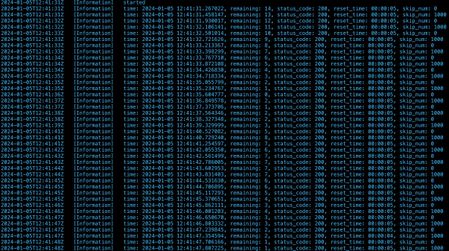
When running some resource graph queries inside a Function App I get RateLimiting error: error in resourceGraphFunction (RateLimiting) Please provide below info when asking for support: timestamp = 2024-01-02T16:10:29.7151093Z, correlationId = bf7ffdce-2c00-49f9-8171-0a682d3e6966. Code: RateLimiting Message: Please provide below info when asking for support: timestamp = 2024-01-02T16:10:29.7151093Z, correlationId = bf7ffdce-2c00-49f9-8171-0a682d3e6966. Exception Details: (RateLimiting) Client application has been throttled and should not attempt to repeat the request until an amount of time has elapsed. Please see Overview of Azure Resource Graph - Azure Resource Graph for help. Code: RateLimiting Message: Client application has been throttled and should not attempt to repeat the request until an amount of time has elapsed. Please see Overview of Azure Resource Graph - Azure Resource Graph for help. This error is not very frequent and not easily reproducible, I'm using the following python code to reproduce the issue. import azure.functions as func import azure.mgmt.resourcegraph as arg from azure.identity import DefaultAzureCredential import datetime def custom_res(pipeline_response, deserialized, *kwargs): resource = deserialized quota_remaining = None quota_resets_after = None try: headers = pipeline_response.http_response.internal_response.headers quota_remaining = headers._store['x-ms-user-quota-remaining'] quota_resets_after = headers._store['x-ms-user-quota-resets-after'] status_code = pipeline_response.http_response.status_code except AttributeError: pass setattr(resource, 'x-ms-user-quota-remaining', quota_remaining) setattr(resource, 'x-ms-user-quota-resets-after', quota_resets_after) setattr(resource, 'status_code', status_code) return resource def getPagedResources(sub_id, strQuery): subsList = [] if len(sub_id) > 0: subsList.append(sub_id) arg_result_arr = [] skip_num = 0 result_limit = 1000 while(True): argQueryOptions = arg.models.QueryRequestOptions(result_format="objectArray", top=result_limit, skip=skip_num) argQuery = arg.models.QueryRequest(subscriptions=subsList, query=strQuery, options=argQueryOptions) # Run query argResults = argClient.resources(argQuery, cls=custom_res) log.info(f"time: {datetime.datetime.now()}, remaining: {getattr(argResults, 'x-ms-user-quota-remaining', None)[1]}, status_code: {argResults.status_code}, reset_time: {getattr(argResults, 'x-ms-user-quota-resets-after', None)[1]}, skip_num: {skip_num}") if not argResults.data: break if not arg_result_arr: arg_result_arr = argResults.data else: arg_result_arr = arg_result_arr + argResults.data skip_num = skip_num + result_limit return arg_result_arr def main(req: func.HttpRequest) -> func.HttpResponse: qry = "resources" try: for i in range(20): res = getPagedResources('123-456-789-34343',qry) except Exception as err: log.error(f"error: {err}") Output: Even if the user-quota-remaining is 0, I don't get the RateLimit error that I sometimes get. Is there any way to reproduce the issue or any fix for it ?684Views0likes1CommentTeams Provisioning with Access Review
Hi Techies, I am exploring possibilities for app development as I have a case where users can provision specific Teams that require an Azure Access Review. I know automated Teams provisioning, but I haven't encountered the automated Access review creation as part of the Teams Provisioning. Anyone got tips or reference?Solved1.2KViews0likes2CommentsNeed help with a parsing query
I'm having a hard time querying out this bit of JSON (extracted from a larger JSON) into their own columns: [{"name":"Category","value":"Direct Agent"},{"name":"Computer","value":"servername.domeain.net"}] Essentially I want to have a column named agentCategory and a column named serverName with these values in them. Thanks in advance!Solved1.4KViews0likes2Comments