azure private link
30 Topics
Announcing Public Preview - Azure Private Link over IPv6
1. Overview Private Link over IPv6 (PL IPv6) enables customers to securely access Azure PaaS services over IPv6-based connectivity. This capability is critical for: IPv6 based PE connectivity to PaaS resources Enabling IPv6 in On-prem environments This document is intended to serve as guide to setup and test the On-prem connectivity from IPv6 customer address to Azure PaaS resources over Express Route via Private link. (IPv6 PE connectivity) Note: This feature is currently in public preview and is not recommended for production workloads. 2. Supported Scenarios Scenario A: Native Azure (Azure VM → PaaS via IPv6 Private Endpoint) IPv6 client VM in VNet → IPv6 Private Endpoint → Azure PaaS Scenario B: OnPrem Access via ExpressRoute On-prem IPv6 client → ExpressRoute → VNet Routing Appliance (VNRA) à IPv6 Private Endpoint → PaaS Supported via ER Circuits 3. Prerequisites 3.1 Supported Regions (Preview Scope) Limited preview regions West Central US East Asia UK South US Central North Europe 3.2 Supported Services (Preview) Azure Storage Azure SQL Azure Key Vault Azure Data Explorer 3.3. Subscription registration An Azure account with an active subscription. Create an account for free. Your subscription must be registered for the Private Link over IPv6 preview. Registration is mandatory before you configure any resources. You can self-register the subscription by running the following commands: az feature register --namespace Microsoft.Network --name SupportIPv6PrivateEndpoint --subscription <subscription-id> az provider register --namespace Microsoft.Network 4. Configurations 4.1 Azure VNET level configurations Please note that you will need to create: Dual-stack IPv6-enabled Vnet with a VM that is assigned both IPv4 and IPv6 address. For on-prem connectivity, this is the same Vnet where ER Gateway is created. Refer: Create an Azure virtual machine with a dual-stack network - Azure Virtual Network | Microsoft Learn PL scale enabled on VNET via configuration flags (refer config flags mentioned further in this section and bolded flags in the code snippet) Dual Stack (IPv4+ IPv6) Subnet Private Endpoints with IPv6 Refer these flags for enabling VNET with PL scale: Vnet level : "privateEndpointVNetPolicies": "Basic", Subnet level: “privateEndpointNetworkPolicies": "RouteTableEnabled" Refer Azure documentation for VNET creation: Quickstart: Create an Azure Virtual Network | Microsoft Learn 4.3 Private endpoint configuration: With the Private Link IPv6 support, we have introduced a new parameter in PE creation API/CLI, ‘ip VersionType’. Please ensure that this is set to ‘IPv6’ for enabling PL IPv6 traffic. Refer Azure documentation for PE creation: Quickstart: Create a private endpoint - Azure portal - Azure Private Link | Microsoft Learn Reference CLI: az network private-endpoint create \ --name <private-endpoint-name> \ --resource-group <resource-group-name> \ --vnet-name <vnet-name> \ --subnet <subnet-name> \ --private-connection-resource-id <resource-id-of-target-service> \ --group-id <group-id> \ --connection-name <connection-name> \ --location <region> \ --ip-version-type <Ipv4|Ipv6 > 4.4 DNS Configuration Ensure these points for DNS configurations: Create Private DNS Zone for each Service type Attach the respective DNS zone to the Private Endpoints. Ensure to check that after above steps completed PaaS FQDN resolves to PEIPv6 address. Refer Azure documentation for On-prem access via Private Link: Azure Private Endpoint DNS Integration Scenarios | Microsoft Learn Native Azure Connectivity (Azure VM → PaaS via IPv6) Validation: Ensure the Storage Account FQDN resolves to the IPv6 Private Endpoint address. Access the Storage Account using the standard service FQDN. From the dual-stack VM: nslookup <storageaccount>.blob.core.windows.net Expected Result: <storageaccount>.privatelink.blob.core.windows.net AAAA: <Private Endpoint IPv6 Address> Connectivity validation: curl https://<storageaccount>.blob.core.windows.net Test-NetConnection <storageaccount>.blob.core.windows.net -Port 443 Configurations specific to On-prem connectivity via ER circuit and Virtual Network Routing Appliance On-premises IPv6 clients access IPv6 private endpoints over ExpressRoute through a Virtual Network Routing Appliance (VNRA). ExpressRoute forwards traffic from on-premises IPv6 clients to the VNRA, which then routes the traffic to the target IPv6 private endpoint that's hosted by the Azure PaaS service. This connectivity requires the following components: An ExpressRoute circuit with the appropriate gateway SKU for your connectivity type (FastPath or standard). For more information, see Create and modify an ExpressRoute circuit. 4.5 Virtual Network Routing Appliance (VNRA) configurations To know more about VNRA, refer: Overview of Routing Appliances - Azure Virtual Network | Microsoft Learn We are leveraging VNRA to facilitate PL IPv6 ER traffic forwarding. User would be required to create a VNRA in the VNet. To facilitate the forwarding of PL IPv6 traffic via VNRA, a UDR would be required to be added in the gateway subnet with next hop as VNRA IPv6 address. Below are the guided steps to achieve all of this. Step 1: Create a VNRA in the VNet Create a VNRA in your resource group via Azure Preview portal. Search for Azure Virtual Network routing appliance on the Azure portal search Click on create: In the above creation page, choose your subscription and resource group, enter name, region, capacity (10-200 Gbps) & the VNet. Review and Create the VNRA. Step 2: Create User Defined Route (UDR) to VNRA The UDR will ensure ER PLIPv6 traffic is forwarded to VNRA which will further process & forward the traffic to the IPv6 Private Endpoint. 1.Create a new route table on Azure portal: 2. Choose the subscription, resource group and set ‘Gateway propagation’ as default (true) 3. Add a route in this route table to forward the on-prem PLIPv6 traffic to VNRA (for this please add route as shown in reference below) as per below details: Enter ‘Destination type’ as ‘IP Address’ Enter ‘Destination IP addresses/CIDR Ranges’ as Private Endpoint IPv6 subnet range - This is the subnet on which your Private Endpoint resides to which the traffic would be sent Enter ‘Next hop’ as “Virtual Appliance”, Give the ‘Next hop address’ as the IPv6 address of VNRA 4.Attach this route table to the Gateway subnet This completes the VNRA setup. 5. Validate Connectivity After establishing configuration and deploying your setup, you can run following validations: From OnPrem VM: Perform DNS lookup on PaaS FQDN → confirm IPv6 PE resolution Connect using PaaS FQDN Validation Checks VM → PE connectivity over IPv6 Data plane traffic successful 6. Preview Considerations Limited regional availability (Check preview regions above) Destination PaaS resource must be in the same region as the Private Endppint. Cross region connectivity is not supported in this release. Limited PaaS onboarding (Azure Storage, Azure SQL, Azure Key Vault, Azure Data Explorer) Current on-premises connectivity support is limited to ExpressRoute-based scenarios and does not currently include VPN, Virtual WAN (vWAN), or Network Virtual Appliances (NVAs). In Private Link IPv6 scenarios, the original client IPv6 address is not preserved in downstream service logs. Due to implicit NAT translation, logs will display the VNet-side translated source IP address instead. Link to Azure documentation: Configure Azure Private Link over IPv6 (Preview) - Azure Private Link | Microsoft Learn536Views0likes0CommentsAzure Virtual Network routing appliance is now generally available
Modern cloud networks are evolving faster than ever. Organizations are building larger AI platforms, connecting more services through private connectivity, adopting IPv6, and expanding applications across regions and business units. As these environments grow, the network becomes a critical foundation for delivering performance, resiliency, and operational simplicity. Today, we're excited to announce the general availability of Azure Virtual Network routing appliance, a managed, platform-native routing service designed to provide high-performance connectivity across Azure virtual networks at cloud scale. Virtual Network routing appliance brings together Azure-native operations, specialized networking infrastructure, built-in resiliency, and high-bandwidth forwarding to help organizations build the next generation of cloud network architectures. Built for the era of AI infrastructure AI is changing the scale at which networks operate. Training clusters, inference services, analytics platforms, data processing pipelines, and distributed application environments generate unprecedented volumes of east-west traffic. These workloads require high-performance connectivity between services, networks, and regions while maintaining operational simplicity. Virtual Network routing appliance provides a managed routing foundation for these environments, enabling organizations to scale network connectivity alongside their AI investments. Instead of building and operating custom routing infrastructure, teams can focus on accelerating innovation, deploying new services, and delivering business outcomes. Scale hub-and-spoke architectures Hub-and-spoke remains one of the most widely adopted network architectures in Azure because it provides centralized governance, simplified operations, and efficient connectivity. As organizations expand, however, these architectures often grow from a handful of virtual networks into hundreds or even thousands of connected environments. Virtual Network routing appliance enables customers to scale these architectures while maintaining a consistent operational model. By providing a dedicated routing layer within the hub, Virtual Network routing appliance simplifies connectivity between applications, shared services, and business units while supporting the scale required by modern enterprise environments. The result is a network architecture that remains manageable even as organizational growth accelerates. Unlock large-scale private connectivity Private connectivity has become the default connectivity model for modern cloud deployments. Applications, databases, platforms, shared services, and partner solutions increasingly depend on private communication patterns across Azure environments. Virtual Network routing appliance provides a centralized routing foundation that helps customers build and scale these architectures while maintaining a consistent private networking experience across their environments. Virtual Network routing appliance can also help scale Private Endpoint connectivity beyond the current 20,000-endpoint HSPE boundary. Looking ahead, it establishes a foundation for further accelerating private connectivity to on-premises environments, without introducing additional architectural specifics. As organizations continue consolidating services onto private connectivity models, Virtual Network routing appliance provides the performance and scale needed to support long-term growth. Accelerate your IPv6 journey IPv6 adoption continues to grow across enterprise, telecommunications, and cloud environments. Organizations increasingly need network architectures capable of supporting IPv4, IPv6, and dual-stack deployments while maintaining operational consistency. Virtual Network routing appliance supports IPv4, IPv6, and dual-stack virtual networks, enabling customers to modernize network architectures and expand address space without introducing new operational complexity. Whether organizations are beginning their IPv6 transition or building IPv6-first architectures, Virtual Network routing appliance provides a consistent routing foundation across both address families. Simplify multi-region architectures Modern applications rarely live within a single region. Organizations increasingly deploy workloads globally to improve performance, resiliency, business continuity, and regulatory compliance. These architectures require a networking foundation capable of supporting connectivity across regions while remaining simple to operate and govern. Virtual Network routing appliance helps customers build scalable multi-region network architectures by providing a centralized, high-performance routing layer that integrates naturally into Azure networking designs. This allows teams to focus on application architecture and customer experience rather than operational management of routing infrastructure. Built for enterprise scale As organizations continue to grow, networking teams face a common challenge: supporting increasing scale without increasing operational complexity. Virtual Network routing appliance was designed to meet this challenge by combining: High-performance routing using specialized Azure networking infrastructure Built-in resiliency and availability zone support Native Azure management and governance integration Support for IPv4, IPv6, and dual-stack deployments Integrated monitoring and observability through Azure Monitor metrics available Configurable bandwidth tiers for production workloads Future support for scaling Private Endpoints beyond 20,000 These capabilities allow customers to build large-scale networking architectures while maintaining a familiar Azure-native operational experience. Learn more Azure Virtual Network routing appliance is more than a new networking resource. It is a foundational building block for the next generation of Azure networking. Organizations are continuing to build larger AI platforms, expand private connectivity, increase multi-region deployments, and modernize network architectures. These transformations require a routing foundation that can scale alongside them. Virtual Network routing appliance provides that foundation, delivering the performance, scale, resiliency, and operational simplicity required for modern cloud networks. Whether you're building an AI platform, expanding a hub-and-spoke architecture, scaling private connectivity, enabling IPv6, or designing a global application footprint, Azure Virtual Network routing appliance helps simplify networking so you can focus on what matters most: delivering innovation faster. Overview of Routing Appliances - Azure Virtual Network | Microsoft Learn4.7KViews1like0Comments
Cross-Tenant Connectivity between Databricks and Storage account using Private Link
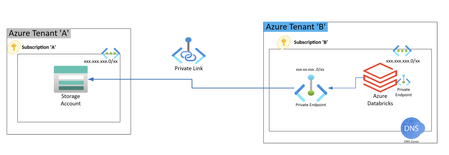
High Level Architecture Cross-Tenant Architecture Overview The setup involves two separate Azure tenants: Tenant A: Hosts the Storage Account. Tenant B: Hosts Azure Databricks. Databricks in Tenant B accesses the Hierarchical Namespace (HNS) enabled Storage Account in Tenant A using a Private Endpoint. The Storage Account in Tenant A is HNS enabled (i.e., suitable for Azure Data Lake Storage Gen2). A Private DNS Zone must be configured to resolve the NIC of the private endpoint created for the storage account. A multi-tenant Service Principal (SPN) is required to: Allow secure, managed access for Databricks in Tenant B to the storage account in Tenant A. Provide role-based access control (RBAC) access to the storage account. Steps to Configure Cross-Tenant Private Endpoint Create an HNS-enabled Storage Account in Tenant A. Capture the Resource ID and Subresource name (blob). In Tenant B, create a Private Endpoint: Use the Resource ID and Subresource name of the storage account from Tenant A. After creating the Private Endpoint: An approval request will be triggered in Tenant A. Approval is found under: Storage Account > Networking > Private endpoint connections In Tenant A, approve the private endpoint request: Minimum roles required: Private Link Service Owner OR Network Contributor Update the DNS configuration: Ensure the Private DNS Zone resolves the NIC of the private endpoint to allow successful name resolution for the storage account from Tenant B. Multi-Tenant SPN Configuration and Access In Tenant B, create a Multi-Tenant App Registration (SPN). In Tenant A, grant admin consent using the following URL: https://login.microsoftonline.com/{organization}/adminconsent?client_id={client-id} Replace: {organization} = Tenant A's Directory (Tenant) ID {client-id} = Application (Client) ID of the SPN Minimum Entra ID Role required to approve admin consent: Application Administrator After consent is granted, assign RBAC to the SPN in Tenant A: Role: Storage Blob Data Contributor Scope: On the target Storage Account Azure documentation references Multi-Tenant SPNs: https://learn.microsoft.com/en-us/entra/identity-platform/howto-convert-app-to-be-multi-tenant Tenant wide Admin Consent: Grant tenant-wide admin consent to an application - Microsoft Entra ID | Microsoft Learn3.4KViews1like1CommentNetwork security perimeter for Azure Service Bus & also now available in Azure Gov. Regions
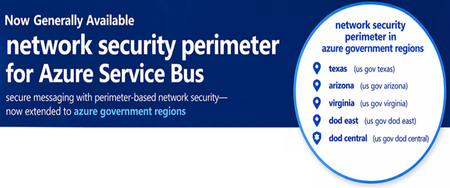
TL; DR Network security perimeter support for Azure Service Bus is now Generally Available. With this, you can now place your Service Bus namespace inside a central security boundary and apply perimeter-based governance for inbound/outbound network access—while keeping key PaaS-to-PaaS scenarios secure and auditable. Introduction We’re excited to announce that network security perimeter support for Azure Service Bus is now Generally Available (GA). This milestone brings one of Azure’s most widely used messaging services into the network security perimeter ecosystem, enabling customers to define a centralized security boundary across messaging and data services. Alongside this, we are also expanding network security perimeter’s reach — network security perimeter is now available in Azure Government regions, including: Texas Arizona Virginia DoD East DoD Central This ensures that customers operating in regulated, sovereign, and mission-critical environments can adopt network security perimeter while meeting their compliance and regional requirements. Why this matters? Modern applications rely heavily on messaging layers like Service Bus. These systems often connect microservices, data platforms, key management systems and external integrations. As architectures scale, managing network access individually becomes complex and error prone. Network security perimeter changes this by introducing a perimeter-based access model, where: Communication is restricted by default Access must be explicitly allowed Governance is applied consistently across services With Service Bus now onboarded and network security perimeter extending into Azure Gov regions, customers can apply this model across both commercial and sovereign environments. What you can do with Service Bus + network security perimeter Confine communication within a security boundary Service Bus namespaces communicate only with resources inside the perimeter by default—blocking unintended access. Secure PaaS-to-PaaS communication Enable secure interactions between Service Bus, Azure Key Vault (for CMK scenarios) and other network security perimeter-enabled services (What is a network security perimeter? - Azure Private Link | Microsoft Learn) Define explicit access controls Inbound rules → IP ranges and subscriptions Outbound rules → FQDN-based filtering Enable audit and compliance visibility Diagnostic logs capture all access attempts, supporting compliance and investigation workflows. Use Private Link seamlessly Private endpoint traffic continues to work without additional configuration inside the perimeter. Azure Government Availability With this update, network security perimeter is now available in key Azure Government regions (Texas Arizona Virginia DoD East DoD Central), enabling: Consistent security across clouds Apply the same network security perimeter model across public Azure regions and Azure Government environments. Support for regulated workloads Customers in federal, defence, and highly regulated industries can now: Enforce perimeter-based governance Reduce exposure risks Meet compliance requirements Enable secure cross-service patterns in Gov clouds Azure Government boundaries now support scenarios like: CMK with Key Vault Service-to-service messaging Controlled external access More details of onboarded PaaS services are detailed in What is a network security perimeter? - Azure Private Link | Microsoft Learn What’s next Service Bus GA further strengthens network security perimeter’s growing coverage across Azure PaaS services. We will continue to: Expand PaaS service onboarding Improve access rule capabilities (e.g. Service tag-based access, identity-based access)390Views0likes0Comments
Designing Outbound Connectivity for "Private Subnets" in Azure
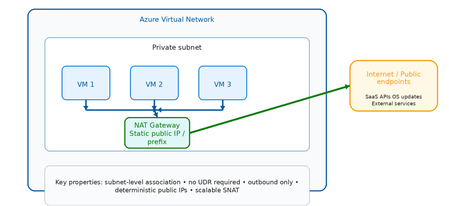
Why Private Subnets Change Everything Historically, Azure virtual machines relied on default outbound internet access, where the platform automatically assigned a dynamic SNAT IP from a shared pool. This was convenient but problematic: ❌ No deterministic outbound IP addresses ❌ No traffic inspection or filtering ❌ No FQDN or URL governance ❌ Difficult to audit for compliance ❌ Susceptible to noisy neighbor SNAT exhaustion With private subnets, outbound access is disabled by default. This shifts the responsibility to the architect — deliberately. The result is an environment where: ✅ Every outbound flow is intentional ✅ Every outbound IP is known and documented ✅ Every egress path can be governed and logged ✅ Compliance evidence is straightforward to produce The question is no longer "does my VM have internet access?" but rather "how exactly does my VM reach the internet, and is that path appropriate for this workload?" The Three Outbound Patterns at a Glance Option Primary Role Inspection Scale Cost Best For NAT Gateway Managed outbound SNAT ❌ None ⭐⭐⭐ High 💲 Low Simple, scalable egress Azure Firewall Secure governed egress ✅ Full L3–L7 ⭐⭐⭐ High 💲💲💲 Higher Security boundaries Load Balancer Legacy SNAT ❌ None ⭐⭐ Limited 💲 Low Legacy / transitional Scenario 1: NAT Gateway What is NAT Gateway? Azure NAT Gateway is a fully managed, zone‑resilient, outbound‑only SNAT service. It attaches at the subnet level and automatically handles all outbound flows from that subnet using one or more static public IP addresses or prefixes. It is purpose‑built for one thing: providing predictable, scalable outbound internet access — without routing complexity or inline devices. Key flow are depicted below: VM → NAT Gateway: Automatic SNAT (no UDR required) NAT Gateway → Internet: Static, deterministic public IP Inbound: NOT supported (outbound only) How it works (step by step) VM initiates an outbound connection (e.g., HTTPS to an API) NAT Gateway intercepts the flow at the subnet boundary Source IP is translated to the NAT Gateway's static public IP The packet is forwarded to the internet Return traffic is automatically tracked and delivered back to the VM No UDRs. No routing tables. No inline devices. It just works. Strengths Massive SNAT scale — no port exhaustion concerns at typical enterprise scale Deterministic outbound IPs — easy to allowlist with external services Zone resilient — survives availability zone failures Subnet scoped — applies to all VMs in the subnet automatically No routing configuration required Limitations ❌ No traffic inspection or filtering ❌ No FQDN or URL policy enforcement ❌ No threat intelligence integration ❌ Cannot restrict which internet destinations are allowed Best Fit Use Cases ✅ Application tiers calling external SaaS APIs ✅ VMs requiring OS updates and patch downloads ✅ CI/CD build agents and pipeline runners ✅ Spoke VNets in hub‑and‑spoke where east‑west goes through firewall, but simple internet egress is acceptable ✅ Dev/test environments Scenario 2: Azure Firewall What is Azure Firewall? Azure Firewall is a cloud‑native, stateful, L3–L7 network security service. When used for outbound egress, it transforms the egress path from a connectivity function into a security enforcement boundary. Unlike NAT Gateway, Azure Firewall inspects every packet, evaluates it against policy, and either allows or denies it based on network rules, application rules, and threat intelligence feeds. KEY Flow are depicted below: VM → UDR: Forces ALL outbound traffic to Firewall Firewall: Evaluates against policy before allowing Firewall → Internet: Only explicitly permitted flows pass All denied flows: Logged and alertable How it works (step by step) VM initiates an outbound connection UDR intercepts the flow and redirects to Azure Firewall's private IP Azure Firewall evaluates the traffic: Network rules (IP/port match) Application rules (FQDN/URL match) Threat intelligence (known malicious IPs/domains) If allowed: traffic is forwarded via Firewall's public IP If denied: traffic is dropped and logged All flows (allowed and denied) are logged to Log Analytics / Sentinel Strengths ✅ Full L3–L7 inspection ✅ FQDN and URL‑based filtering (application rules) ✅ Threat intelligence integration (Microsoft TI feed) ✅ TLS inspection (Premium SKU) ✅ Centralized governance across multiple VNets via Firewall Manager ✅ Rich logging — every allowed and denied flow is recorded ✅ IDPS (Intrusion Detection and Prevention) available in Premium Limitations ❌ Higher cost (hourly + data processing charges) ❌ Requires UDR configuration on each spoke subnet ❌ Adds latency (small but non‑zero) ❌ Requires careful SNAT configuration at scale Best Fit Use Cases ✅ Regulated industries (financial services, healthcare, government) ✅ Any workload where outbound internet is a security boundary ✅ Environments requiring egress allowlisting for compliance ✅ Hub‑and‑spoke architectures with centralized control plane ✅ SOC environments needing outbound flow telemetry Scenario 3: Load Balancer Outbound What is Load Balancer Outbound? Azure Load Balancer outbound rules were historically the primary mechanism for providing SNAT to VMs behind a Standard Load Balancer. While newer patterns (NAT Gateway, Azure Firewall) have largely replaced this approach for new designs, outbound rules remain valid in specific scenarios. Key flows are depicted below: VMs → Load Balancer: Backend pool members get SNAT LB Outbound Rules: Define port allocation per VM ⚠️ Port exhaustion risk at scale ⚠️ No inspection or policy enforcement How it works (step by step) VM in the backend pool initiates an outbound connection Load Balancer applies SNAT using the frontend public IP Ephemeral ports are allocated per VM from a fixed pool Return traffic is tracked and delivered back to the correct VM If port pool is exhausted: connections fail (SNAT exhaustion) Strengths Lower cost than NAT Gateway or Firewall Tightly integrated with existing load‑balanced workloads Familiar operational model for legacy teams Limitations ❌ SNAT port pool is fixed and must be manually managed ❌ Risk of SNAT exhaustion at scale ❌ No traffic inspection ❌ Less flexible than NAT Gateway ❌ Not recommended for new designs Best Fit Use Cases ✅ Existing architectures already built around Azure Load Balancer ✅ Low outbound connection volume workloads ✅ Transitional architectures during modernization to NAT Gateway Decision Framework: Choosing the Right Outbound Pattern Common Pitfalls to Avoid ⚠️ Pitfall 1: Forgetting SNAT scale limits Load Balancer outbound rules allocate a fixed number of ephemeral ports per VM. At scale this exhausts quickly. Use NAT Gateway instead. ⚠️ Pitfall 2: Over‑securing low‑risk workloads Not every workload needs Azure Firewall for outbound. Dev/test and patch traffic are better served by NAT Gateway — simpler, cheaper, faster. ⚠️ Pitfall 3: Mixing outbound models in the same subnet NAT Gateway and Load Balancer outbound rules cannot coexist on the same subnet. NAT Gateway always takes precedence. Plan your subnet boundaries carefully. ⚠️ Pitfall 4: Blocking Azure platform dependencies Many Azure services still use public endpoints (even when Private Link is available). Ensure your outbound policy allows required Azure service tags before enforcing egress controls. ⚠️ Pitfall 5: Relying on platform defaults Default outbound access is retired for new VNets. Do not assume VMs can reach the internet without explicit configuration. Summary and Key Takeaways Scenario Best Choice Why Simple internet egress at scale NAT Gateway Scalable, predictable, no complexity Security boundary for egress Azure Firewall Inspection, FQDN rules, threat intel Legacy load‑balanced workloads Load Balancer Outbound Transitional only Regulated / compliance environments Azure Firewall Audit logs, policy enforcement Dev / test / patch traffic NAT Gateway Low cost, low friction The core principle Private subnets make outbound access intentional. Choose the outbound pattern that matches the risk level of the workload — not the most complex option available. References https://learn.microsoft.com/azure/nat-gateway/nat-overview https://learn.microsoft.com/azure/firewall/overview https://learn.microsoft.com/azure/load-balancer/outbound-rules https://azure.microsoft.com/blog/default-outbound-access-for-vms-in-azure-will-be-retiredEnabling fallback to internet for Azure Private DNS Zones in hybrid architectures
Introduction Azure Private Endpoint enables secure connectivity to Azure PaaS services such as: Azure SQL Managed Instance Azure Container Registry Azure Key Vault Azure Storage Account through private IP addresses within a virtual network. When Private Endpoint is enabled for a service, Azure DNS automatically changes the name resolution path using CNAME Redirection Example: myserver.database.windows.net ↓ myserver.privatelink.database.windows.net ↓ Private IP Azure Private DNS Zones are then used to resolve this Private Endpoint FQDN within the VNet. However, this introduces a critical DNS limitation in: Hybrid cloud architectures (AWS → Azure SQL MI) Multiregion deployments (DR region access) Crosstenant / Crosssubscription access MultiVNet isolated networks If the Private DNS zone does not contain a corresponding record, Azure DNS returns: NXDOMAIN (NonExistent Domain) When a DNS resolver receives a negative response (NXDOMAIN), it sends no DNS response to the DNS client and the query fails. This results in: ❌ Application connectivity failure ❌ Database connection timeout ❌ AKS pod DNS resolution errors ❌ DR failover application outage Problem statement In traditional Private Endpoint DNS resolution: DNS query is sent from the application. Azure DNS checks linked Private DNS Zone. If no matching record exists: NXDOMAIN returned DNS queries for Azure Private Link and network isolation scenarios across different tenants and resource groups have unique name resolution paths which can affect the ability to reach Private Linkenabled resources outside a tenant's control. Azure does not retry resolution using public DNS by default. Therefore: Public Endpoint resolution never occurs DNS query fails permanently Application cannot connect Microsoft native solution Fallback to internet (NxDomainRedirect) Azure introduced a DNS resolution policy: resolutionPolicy = NxDomainRedirect This property enables public recursion via Azure’s recursive resolver fleet when an authoritative NXDOMAIN response is received for a Private Link zone. When enabled: ✅ Azure DNS retries the query ✅ Public endpoint resolution occurs ✅ Application connectivity continues ✅ No custom DNS forwarder required Fallback policy is configured at: Private DNS Zone → virtualnetwork link Resolution policy is enabled at the virtual network link level with the NxDomainRedirect setting. In the Azure portal this appears as: Enable fallback to internet How it works Without fallback: Application → Azure DNS → Private DNS Zone → Record missing → NXDOMAIN returned → Connection failure With fallback enabled: Application → Azure DNS → Private DNS Zone → Record missing → NXDOMAIN returned → Azure recursive resolver → Public DNS resolution → Public endpoint IP returned → Connection successful Azure recursive resolver retries the query using the public endpoint QNAME each time NXDOMAIN is received from the private zone scope Real world use case AWS Application Connecting to Azure SQL Managed Instance You are running: SQL MI in Azure Private Endpoint enabled Private DNS Zone: privatelink.database.windows.net AWS application tries to connect: my-mi.database.windows.net If DR region DNS record is not available: Without fallback: DNS query → NXDOMAIN → App failure With fallback enabled: DNS query → Retry public DNS → Connection success Step-by-step configuration Method 1 – Azure portal Go to: Private DNS Zones Select your Private Link DNS Zone: Example: privatelink.database.windows.net Select: Virtual network links Open your linked VNet Enable: ✅ Enable fallback to internet Click: Save Method 2 – Azure CLI You can configure fallback policy using: az network private-dns link vnet update \ --resource-group RG-Network \ --zone-name privatelink.database.windows.net \ --name VNET-Link \ --resolution-policy NxDomainRedirect Validation steps Run from Azure VM: nslookup my-mi.database.windows.net Expected: ✔ Private IP (if available) ✔ Public IP (if fallback triggered) Security considerations Fallback to internet: ✅ Does NOT expose data ✅ Only impacts DNS resolution ✅ Network traffic still governed by: NSG Azure Firewall UDR Service Endpoint Policies DNS resolution fallback only triggers on NXDOMAIN and does not change networklevel firewall controls. When should you enable this? Recommended in: Hybrid AWS → Azure connectivity Multiregion DR deployments AKS accessing Private Endpoint services CrossTenant connectivity Private Link + VPN / ExpressRoute scenarios Conclusion Fallback to Internet using NxDomainRedirect provides: Seamless hybrid connectivity Reduced DNS complexity No custom forwarders Improved application resilience and simplifies DNS resolution for modern Private Endpointenabled architectures.1.1KViews0likes0Comments
Azure PostgreSQL Lesson Learned#12: Private Endpoint Approval Fails for Cross Subscription
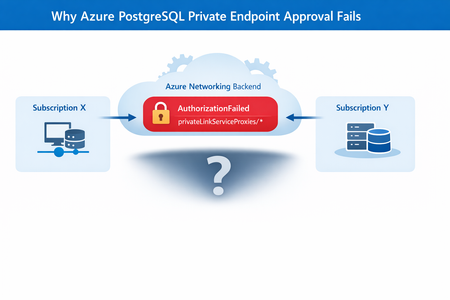
Co‑authored with HaiderZ-MSFT Symptoms Customers experience issues when attempting to approve a Private Endpoint for Azure PostgreSQL Flexible Server, particularly in cross‑subscription or cross‑tenant setups: Private Endpoint remains stuck in Pending state Portal approval action fails silently or reverts Selecting the Private Endpoint displays a “No Access” message Activity logs show repeated retries followed by failure Common Error Message AuthorizationFailed: The client '<object-id>' does not have authorization to perform action 'Microsoft.Network/privateEndpoints/privateLinkServiceProxies/write' over scope '<private-endpoint-resource-id>' or the scope is invalid. Root Cause Although the approval action is initiated from the PostgreSQL Flexible Server (service provider resource), Azure performs additional network‑level operations during approval. Specifically, Azure must update a Private Link Service Proxy on the Private Endpoint resource, which exists in the consumer subscription. When the Private Endpoint resides in a different subscription or tenant, the approval process fails if: Required Resource Providers are not registered, or The approving identity lacks network‑level permissions on the Private Endpoint scope In this case, the root cause was missing Resource Provider registration, resulting in an AuthorizationFailed error during proxy updates. Required Resource Providers Microsoft.Network Microsoft.DBforPostgreSQL If either provider is missing on either subscription, the approval process will fail regardless of RBAC configuration. Mitigation Steps Step 1: Register Resource Providers (Mandatory) Register the following providers on both subscriptions: Microsoft.Network Microsoft.DBforPostgreSQL This step alone resolves most cross‑subscription approval failures. Azure resource providers and types - Azure Resource Manager | Microsoft Learn Step 2: Validate Network Permissions Ensure the approving identity can perform: Microsoft.Network/privateEndpoints/privateLinkServiceProxies/write Grant Network Contributor if needed. Step 3: Refresh Credentials and Retry If changes were made recently: Sign out and sign in again Retry the Private Endpoint approval Post‑Resolution Outcome After correcting provider registration and permissions: Private Endpoint approval succeeds immediately Connection state transitions from Pending → Approved No further authorization or retry errors PostgreSQL connectivity works as expected Prevention & Best Practices Pre‑register required Resource Providers in landing zones Validate cross‑subscription readiness before creating Private Endpoints Document service‑specific approval requirements (PostgreSQL differs from Key Vault) Automate provider registration via policy or IaC where possible Include provider validation in enterprise onboarding checklists Why This Matters Missing provider registration can lead to: Failed Private Endpoint approvals Confusing authorization errors Extended troubleshooting cycles Production delays during go‑live A simple subscription readiness check prevents downstream networking failures that are difficult to diagnose from portal errors alone. Key Takeaways Issue: Azure PostgreSQL private endpoint approval fails across subscriptions Root Cause: Missing Resource Provider registration Fix: Register Microsoft.Network and Microsoft.DBforPostgreSQL on both subscriptions Result: Approval succeeds without backend authorization failures References Manage Azure Private Endpoints – Azure Private Link Approve Private Endpoint Connections – Azure Database for PostgreSQL Private Endpoint Overview – Azure Private Link307Views0likes0CommentsCan only remote into azure vm from DC
Hi all, I have set up a site to site connection from on prem to azure and I can remote in via the main dc on prem but not any other server or ping from any other server to the azure. Why can I only remote into the azure VM from the server that has Routing and remote access? Any ideas on how I can fix this?1.1KViews0likes2Comments
Azure traffic to storage account
Hello, I’ve set up a storage account in Tenant A, located in the AUEast region, with public access. I also created a VM in Tenant B, in the same region (AUEast). I’m able to use IP whitelisting on the storage account in Tenant A to allow traffic only from the VM in Tenant B. However, in the App Insights logs, the traffic appears as 10.X.X.X, likely because the VM is in the same region. I'm unsure why the public IP isn't reflected in the logs. Moreover, I am not sure about this part https://learn.microsoft.com/en-us/azure/storage/common/storage-network-security-limitations#:~:text=You%20can%27t%20use%20IP%20network%20rules%20to%20restrict%20access%20to%20clients%20in%20the%20same%20Azure%20region%20as%20the%20storage%20account.%20IP%20network%20rules%20have%20no%20effect%20on%20requests%20that%20originate%20from%20the%20same%20Azure%20region%20as%20the%20storage%20account.%20Use%20Virtual%20network%20rules%20to%20allow%20same%2Dregion%20requests. This seems contradictory, as IP whitelisting is working on the storage account. I assume the explanation above applies only when the client is hosted in the same tenant and region as the storage account, and not when the client is in a different tenant, even if it's in the same region. I’d appreciate it if someone could shed some light on this. Thanks, Mohsen354Views0likes3Comments
Not able to setup azure private endpoint url as webservice/backend for Azure API Management service
Hi all, I have integrated Private endpoint connected to private link service. Private link service is created by azure standard load balancer created by kubernetes load balancer service using below annotations . annotations: service.beta.kubernetes.io/azure-load-balancer-internal: "true" service.beta.kubernetes.io/azure-pls-create: "true" service.beta.kubernetes.io/azure-pls-name: myPLS service.beta.kubernetes.io/azure-pls-ip-configuration-subnet: YOUR SUBNET service.beta.kubernetes.io/azure-pls-ip-configuration-ip-address-count: "1" service.beta.kubernetes.io/azure-pls-ip-configuration-ip-address: SUBNET_IP service.beta.kubernetes.io/azure-pls-proxy-protocol: "false" service.beta.kubernetes.io/azure-pls-visibility: "*" # does not apply here because we will use Front Door later service.beta.kubernetes.io/azure-pls-auto-approval: "YOUR SUBSCRIPTION ID" i am getting expected response i.e response from kubernetes service from Private endpoint ip which confirms that private link and private endpoint integration is working fine. we now want to integrate above private endpoint service with azure api management service so we tried adding private endpoint url as web service url for api management service but api management service is returning 500 error { "statusCode": 500, "message": "Internal server error", "activityId": "76261291-7121-4814-b0e4-66b52284d76c" } I also tried api management service Troubleshoot & analysis page for exact error its showing below error: BackendConnectionFailure An attempt was made to access a socket in a way forbidden by its access permissions <private_endpoint_url>:80 Please help me what i am doing wrong in this implementation Our requirement is to have kubernetes private load balancer and integrate it with azure api management service. so user can access api only through api management service and only api management service should be able to access load balancer service. Thanks in advance910Views0likes1Comment