azure policy
58 Topics
I built an open-source tool for running ARG governance checks on a schedule and tracking findings
Most of the Azure governance work I have done over the last ten years ended the same way. Someone writes a sharp Resource Graph query, it finds something real, it gets pasted into a chat, and then it lives in that person's terminal history until they move on. The failure that costs more is quieter. A check that stops running does not turn red. It stays green, and the estate keeps drifting behind a number that nobody has any reason to distrust. Disclosure before I name anything: I built the tool below and I maintain it. RuleBeat runs the governance checks your team writes for Azure on a schedule, tracks every finding over time, and never holds write access. A check is a rule you author against Azure Resource Graph or Microsoft Graph, in a visual builder or as raw KQL. It ships 158 checks out of the box, 15 built-in rules plus the 143-rule APRL pack. Findings keep their lifecycle across scans, so they move through new, active and fixed and reopen on their own, and a suppression needs a reason and can carry an expiry date. The trade-offs, so nobody has to discover them after installing: - Read-only, permanently. It never holds write credentials and never creates its own service principal. You create the credential, so you can see in Azure RBAC exactly what it was granted. The cost is real: there is no one-click fix. Remediation stays your action under your own identity. - Self-hosted, one container, SQLite inside. Nothing about your tenant leaves your deployment and there is no telemetry. The cost is that you run it. Demo mode runs the real UI over a generated database with no Azure credential, if you would rather look before wiring anything up. - Honest numbers. A rule that has never run, or whose last run failed, is reported as unknown rather than passing. The posture number is uglier for it, and that is the point. On where this does and does not belong next to the native stack: Azure Policy is for enforcing a standard, and it does that better than anything I would write. Defender for Cloud covers its own scope well. If your assignments are enforcing, your Workbook answers the question you actually ask, and one person owns the whole loop, you do not need this. Where I kept running out of road was the organization-specific check that no built-in standard covers, and the question of who owns a flagged row once more than one person has to care about it. It is open source under Apache-2.0 and free, and it is v0.2, early on purpose. I build it with AI assistance from Claude, which the public commit history shows in the co-author trailers, and every change is human-reviewed and gated by the test suite in CI before it ships. Repo: https://github.com/rulebeat/rulebeat Docs: https://docs.rulebeat.com The question I would rather ask than answer: for those of you running recurring governance checks today, what do you do with a finding that is accepted on purpose? Every version of this I have seen was a tag, a wiki page, or a spreadsheet, and all three drift away from the query that produced them. I would like to know what has actually held up for you.
How to apply policy initiative Azure
Hello Mightly Wizards, trying to Assign an Azure Policy Initiative via power shell: step 1: New-AzPolicySetDefinition -Name 'DATABASE_OPEN_SOURCE_ID' -ManagementGroupName MGname -DisplayName 'DATABASES OPEN SOURCE' -PolicyDefinition "C:\path\initiatives\DATABASES_-_OPEN_SOURCE\policyset1.json" note policyset1.json comes from exporting to GitHub Initiative definition and assignment error ew-AzPolicySetDefinition : InvalidRequestContent : The request content was invalid and could not be deserialized: 'Could not find member 'properties' on object of type 'PolicyDefinitionReference'. Path 'properties.policyDefinitions[0].properties', line 7, position 21.'. CorrelationId: f01ee272-73c1-43b7-99fc-51a67650463a At line:1 char:1 + New-AzPolicySetDefinition -Name 'DATABASE_OPEN_SOURCE_ID' -Management ... + ~~~~~~~~~~~~~~~~~~~~~~~~~~~~~~~~~~~~~~~~~~~~~~~~~~~~~~~~~~~~~~~~~~~~~ + CategoryInfo : CloseError: (:) [New-AzPolicySetDefinition], ErrorResponseMessageException + FullyQualifiedErrorId : Microsoft.Azure.Commands.ResourceManager.Cmdlets.Implementation.NewAzurePolicySetDefinitionCmdlet First question. How does this file have to be formatted? can you give me an example? Second question how to assign this definition? With New-AzPolicyAssignment? Thank you in advance for yout reply. giuseppe
Fixing "Authentication to Linux machines should require SSH keys"
I have many Linux VMs running Centos 7.8 that are currently failing on this policy. Policy source is https://github.com/Azure/azure-policy/blob/58fcf068ecb5e96d23958d9799cf872e687a1a4a/built-in-policies/policyDefinitions/Guest%20Configuration/GuestConfiguration_LinuxNoPasswordForSSH_AINE.json and the "then" clause is: "then": { "effect": "[parameters('effect')]", "details": { "type": "Microsoft.GuestConfiguration/guestConfigurationAssignments", "name": "LinuxNoPasswordForSSH", "existenceCondition": { "field": "Microsoft.GuestConfiguration/guestConfigurationAssignments/complianceStatus", "equals": "Compliant" } } } My VMs are configured as follows without the "guestConfiguration" but with password login disabled. { "id": "/subscriptions/REDACTED/resourceGroups/REDACTED/providers/Microsoft.Compute/virtualMachines/REDACTED", "name": "REDACTED", "type": "Microsoft.Compute/virtualMachines", "location": "westeurope", "tags": { ... }, "properties": { "vmId": "REDACTED", "hardwareProfile": { "vmSize": "Standard_B1ms" }, "storageProfile": { "imageReference": { "publisher": "OpenLogic", "offer": "CentOS", "sku": "7_8", "version": "7.8.2021020400", "exactVersion": "7.8.2021020400" }, "osDisk": { "osType": "Linux", "name": "REDACTED", "createOption": "FromImage", "caching": "ReadOnly", "managedDisk": { "id": "/subscriptions/REDACTED/resourceGroups/REDACTED/providers/Microsoft.Compute/disks/REDACTED" }, "deleteOption": "Detach" }, "dataDisks": [ { "lun": 0, "name": "REDACTED", "createOption": "Empty", "caching": "ReadOnly", "managedDisk": { "id": "/subscriptions/REDACTED/resourceGroups/REDACTED/providers/Microsoft.Compute/disks/REDACTED" }, "deleteOption": "Detach", "toBeDetached": false } ] }, "osProfile": { "computerName": "REDACTED", "adminUsername": "REDACTED", "linuxConfiguration": { "disablePasswordAuthentication": true, "ssh": { "publicKeys": [ { "path": "REDACTED", "keyData": "REDACTED" } ] }, "provisionVMAgent": true, "patchSettings": { "patchMode": "ImageDefault", "assessmentMode": "ImageDefault" }, "enableVMAgentPlatformUpdates": false }, "secrets": [], "allowExtensionOperations": true }, "networkProfile": { "networkInterfaces": [ { "id": "/subscriptions/REDACTED/resourceGroups/REDACTED/providers/Microsoft.Network/networkInterfaces/REDACTED", "properties": { "primary": true } } ] }, "provisioningState": "Succeeded", "timeCreated": "2023-01-16T00:14:48.5932025+00:00" }, "resources": [ { "name": "LinuxAgent.AzureSecurityCenter", "id": "/subscriptions/REDACTED/resourceGroups/REDACTED/providers/Microsoft.Compute/virtualMachines/REDACTED/extensions/LinuxAgent.AzureSecurityCenter", "type": "Microsoft.Compute/virtualMachines/extensions", "location": "westeurope", "properties": { "autoUpgradeMinorVersion": false, "provisioningState": "Succeeded", "publisher": "Qualys", "type": "LinuxAgent.AzureSecurityCenter", "typeHandlerVersion": "1.0", "settings": { "LicenseCode": "REDACTED", "GrayLabel": { "CustomerID": "REDACTED", "ResourceID": "REDACTED" } } } }, { "name": "OmsAgentForLinux", "id": "/subscriptions/REDACTED/resourceGroups/REDACTED/providers/Microsoft.Compute/virtualMachines/REDACTED/extensions/OmsAgentForLinux", "type": "Microsoft.Compute/virtualMachines/extensions", "location": "westeurope", "properties": { "autoUpgradeMinorVersion": true, "provisioningState": "Succeeded", "enableAutomaticUpgrade": false, "publisher": "Microsoft.EnterpriseCloud.Monitoring", "type": "OmsAgentForLinux", "typeHandlerVersion": "1.0", "settings": { "workspaceId": "REDACTED" } } } ] } What is the added value of having guest configuration in this case and how to deploy the resources needed to comply with this policy? I deploy VMs using Ansible2.8KViews0likes1Comment
Azure Policy - Enable Hybrid Use Benefit
Hello there. I'm struggling with a custom policy. My requirements are the following: Enable Hybrid Use Benefit for Microsoft.Compute/virtualMachines (properties.licenseType=Windows_Server) Work for both Marketplace and not-Marketplace virtual machines (ASRed, etc) Fix deployments that are done without it enabled Allow remediation of existing resources Initially I found https://github.com/Azure/Community-Policy/blob/master/Policies/Compute/deploy-hybrid-benefit-windows/azurepolicy.json which works for Marketplace, but not for VMs without imagePublisher and imageOffer. I identified properties.storageProfile.osDisk.osType as another way to identify Windows machines. The full policy if below, but it only works for remediation, it does not work for new deployments. What am I doing wrong? I also found this issue, which suggests adding a licenseType to the If, but then the all resources are in compliance: https://github.com/Azure/azure-policy/issues/426 remediation does not work and new resources don't as well. Any help is very appreciated! { "displayName": "Deploy Azure Hybrid Benefit for Windows.", "mode": "Indexed", "description": "This policy ensures virtual machines are configured for Azure Hybrid Benefit for Windows Server - https://docs.microsoft.com/en-us/azure/virtual-machines/windows/hybrid-use-benefit-licensing#ways-to-use-azure-hybrid-benefit-for-windows-server.", "metadata": { "category": "Compute", "version": "1.0.1" }, "parameters": { "effect": { "type": "string", "metadata": { "displayName": "Effects", "description": "Enable or disable the execution of the Policy." }, "allowedValues": [ "DeployIfNotExists", "Disabled" ], "defaultValue": "DeployIfNotExists" } }, "policyRule": { "if": { "allOf": [{ "field": "type", "equals": "Microsoft.Compute/virtualMachines" }, { "field": "Microsoft.Compute/virtualMachines/storageProfile.osDisk.osType", "equals": "Windows" } ] }, "then": { "effect": "[parameters('effect')]", "details": { "type": "Microsoft.Compute/virtualMachines", "existenceCondition": { "allOf": [ { "field": "Microsoft.Compute/virtualMachines/licenseType", "equals": "Windows_Server" } ] }, "roleDefinitionIds": [ "/providers/Microsoft.Authorization/roleDefinitions/9980e02c-c2be-4d73-94e8-173b1dc7cf3c" ], "deployment": { "properties": { "mode": "incremental", "template": { "$schema": "http://schema.management.azure.com/schemas/2015-01-01/deploymentTemplate.json#", "contentVersion": "1.0.0.0", "parameters": { "vmName": { "type": "String" }, "licenseType": { "defaultValue": "None", "type": "String", "allowedValues" : [ "None", "Windows_Server" ] } }, "variables": {}, "resources": [ { "type": "Microsoft.Compute/virtualMachines", "apiVersion": "2021-03-01", "name": "[parameters('vmName')]", "location": "[resourceGroup().location]", "properties": { "licenseType": "[parameters('licenseType')]" } } ], "outputs": { "policy": { "type": "string", "value": "[concat('Changed LicenseType for Windows VM', ': ', parameters('vmName'), '- ', parameters('licenseType'))]" } } }, "parameters": { "vmName": { "value": "[field('name')]" }, "licenseType": { "value": "Windows_Server" } } } } } } } } Thanks, Joel.4.2KViews0likes1Comment
Misplacement of schema in AllowedHostPathVolumesInKubernetesClusterList Policy Parameter?
In the Microsoft Cloud Security Benchmark, the policy parameter `AllowedHostPathVolumesInKubernetesClusterList` defines a `schema` object nested under metadata. Is this placement intentional, or should the schema be defined at the top level of the parameter https://github.com/Azure/azure-policy/blob/303a0000a3b9d1aed7361c69edaafd4340d37df7/built-in-policies/policySetDefinitions/Azure%20Government/Security%20Center/AzureSecurityCenter.json#L4132259Views0likes2Comments
Query for NZ ISM versions
What are the different between NZ_ISM_Restricted_v3_5 and nz_ism.? azure-policy/built-in-policies/policySetDefinitions/Regulatory Compliance/NZ_ISM_Restricted_v3_5.json at master · Azure/azure-policy · GitHub azure-policy/built-in-policies/policySetDefinitions/Regulatory Compliance/nz_ism.json at master · Azure/azure-policy · GitHub Also, I see the latest version of NZ ISM is 3.6. Will we have the latest update for NZ ISM?623Views0likes1CommentAzure Policy - Configure backup on virtual machines with a given tag
I wonder if somebody could sanity check something for me with this please in case it's something I could be missing. We have this existing policy configured in a customers tenant (https://www.azadvertizer.net/azpolicyadvertizer/345fa903-145c-4fe1-8bcd-93ec2adccde8.html After creating a VM and allocating the correct tag etc. it didn't automatically have the backup policy assigned to it. With the policy assignment itself it didn't even appear as a non-compliant resource. I went through the checks to make sure it was the same region, correct tag, correct rsv and policy, which all appeared to look fine. When remediating it still wasn't pulling the resource through. When I went into the definition detail to see what could be amiss, I noticed the list of WindowServer image SKU's that were listed (image attached here https://i.stack.imgur.com/1YPpM.png. As I was sanity checking everything, I looked at the VM to see that the SKU wasn't actually in this list (2019-datacenter-smalldisk-g2). As every SKU is listed specifically it makes me think this image has just been missed off and needs adding? Rather than it getting captured by one of the SKU's listed. I can add the VM manually to the existing RSV for now but for future ref, is there a way I can raise this if my findings are indeed correct?Script or Query for Management Group Compliance Statistics
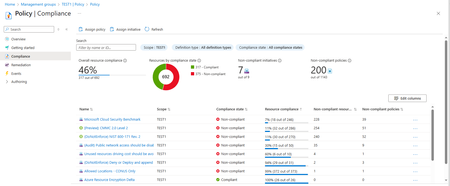
I've been trying to reproduce the Azure Portal Compliance statistics for a Management Group in a PowerShell script or Resource Graph query without much luck. What I'd like to do is reproduce the numbers like compliance percentage, number of compliant / non-compliant resources, in the portal display. And run a daily script or query to track the numbers over time. (Without doing screen shots every day.) Just to be clear, I've attached a screenshot of a compliance screen for management group TEST1. I want to automate calculation of the Overall Resource Compliance (46%, 317 out of 692), and the policies/initiatives compliance state and resource compliance percentages at the bottom of the screen. I'm only interested in the resource compliance percentages below a threshold like 90% in order to help guide our remediation efforts. I've found several scripts and resource graph queries online but none seem to address management group scope. And even the ones that produce numbers for subscription scope don't seem to match the portal numbers. Has anyone successfully reproduced the portal MG compliance numbers with a script or quiery? Or, is it possible to obtain the logic behind the portals' MG scope compliance code? Seems like we should be able to reproduce the numbers shown by the console. Thanks.
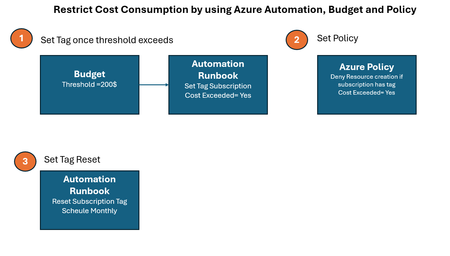
Restrict Cost Consumption by using Azure Automation, Budget and Policy
Video See the demo video by using below link Demonstration Video Automation Runbook Logic Logic which set tag value once threshold exceeds # Authenticate using Managed Identity (recommended for Automation Accounts) Connect-AzAccount -Identity # Define Subscription ID and Reset Tag $subscriptionId = (Get-AzContext).Subscription.Id $tags = @{ "cost exceeded" = "yes" } # Resetting the tag value # Update the tag Update-AzTag -ResourceId "/subscriptions/$subscriptionId" -Tag $tags -Operation Merge Write-Output "Tag 'cost exceeded' reset to 'yes' for subscription $subscriptionId" Logic which reset tag value every month # Authenticate using Managed Identity (recommended for Automation Accounts) Connect-AzAccount -Identity # Define Subscription ID and Reset Tag $subscriptionId = (Get-AzContext).Subscription.Id $tags = @{ "cost exceeded" = "no" } # Resetting the tag value # Update the tag Update-AzTag -ResourceId "/subscriptions/$subscriptionId" -Tag $tags -Operation Merge Write-Output "Tag 'cost exceeded' reset to 'no' for subscription $subscriptionId" Azure Policy Logic { "properties": { "displayName": "budget", "policyType": "Custom", "mode": "All", "metadata": { "version": "1.0.0", "createdBy": "f6bb4303-e52d-4cba-9790-01f0798164b7", "createdOn": "2025-03-13T05:08:05.8483517Z", "updatedBy": "f6bb4303-e52d-4cba-9790-01f0798164b7", "updatedOn": "2025-03-13T06:32:35.1740944Z" }, "version": "1.0.0", "parameters": {}, "policyRule": { "if": { "allOf": [ { "field": "type", "notEquals": "Microsoft.Resources/subscriptions" }, { "value": "[subscription().tags['cost exceeded']]", "equals": "yes" } ] }, "then": { "effect": "Deny" } }, "versions": [ "1.0.0" ] }, }Azure Policy require multiple tags with values
I have a policy that requires specific tag with specific values (json below), but I want to require more tags within the same policy also with specific value and not sure how to do it... Is there a way to add more tags with specific values to the same policy? For example, I want to require two tags: environment with prod/non-prod and department with Infra/Finance Is it possible? Thank you! { "properties": { "displayName": "Require tag environment and its values on resources ", "policyType": "Custom", "mode": "Indexed", "description": "Enforces a required tag environment and its value. Does not apply to resource groups.", "metadata": { "category": "Tags", "createdBy": "" "createdOn": "" "updatedBy": "" "updatedOn": "" }, "version": "1.0.0", "parameters": { "tagName": { "type": "String", "metadata": { "displayName": "Tag Name1", "description": "Name of the tag, such as 'environment'" }, "allowedValues": [ "environment" ] }, "tagValue": { "type": "Array", "metadata": { "displayName": "Tag Value1", "description": "Value of the tag, such as 'production'" }, "allowedValues": [ "prod", "non-prod" ] } }, "policyRule": { "if": { "not": { "field": "[concat('tags[', parameters('tagName'), ']')]", "in": "[parameters('tagValue')]" } }, "then": { "effect": "deny" } }, "versions": [ "1.0.0" ] }, } }621Views0likes1Comment