azure networking
2 TopicsLessons Learned #551: Azure SQL Connection Timeouts: Three Things to Check
An application starts reporting intermittent timeouts when connecting to Azure SQL Database. Some requests succeed, others fail, and a test from a developer’s laptop works perfectly. The database appears online, no recent deployment seems related, and the natural reaction is to ask: Is Azure SQL unavailable? Is the firewall blocking the connection? Should we increase the connection timeout? Should we change the driver or scale the database? Those are reasonable questions, but they may lead the investigation in the wrong direction. The most important lesson is simple: A timeout tells us how long the application waited. It does not tell us what the application was waiting for. Not every “SQL timeout” happens inside Azure SQL From the application’s point of view, opening a database connection may involve several operations: Resolving the server name. Reaching the SQL endpoint. Obtaining a Microsoft Entra access token. Waiting for an available pooled connection. Completing the SQL login. Executing the first command. When all these operations are reported through the same application method or log entry, it can look as though Azure SQL took thirty seconds to accept the connection. In reality, only part of that time may have been spent connecting to the database. In one anonymized support scenario, the application experienced problems mainly on its first connection. Network tests were successful and no corresponding SQL connection failure was identified. The investigation eventually showed that access-token acquisition was consuming a significant part of the available time. Increasing the SQL timeout or changing the firewall would not have addressed the real delay. Check 1: Capture the complete error and the exact time A screenshot containing only “Connection Timeout Expired” is rarely enough. Capture: The complete exception and inner exception. The operation being performed. The driver and version. The authentication method. The exact timestamp in UTC. Whether the issue affects every connection or only some of them. The wording around the timeout matters. For example, a timeout while obtaining a connection from the pool points toward the application’s pooling and concurrency behavior. A pre-login or TLS error belongs to a different investigation. A command timeout after the connection was established is usually a query-performance problem rather than a connection problem. Check 2: Measure the application timeline The application should record important operations separately. A simple timeline can completely change the investigation: 10:14:20.100 Token acquisition started 10:14:28.400 Token acquired 10:14:28.405 SQL connection started 10:14:29.050 SQL connection established The complete operation took almost nine seconds, but Azure SQL connection establishment took less than one second. Useful measurements include: Token-acquisition duration. Time waiting for a pooled connection. SQL connection-open duration. SQL command duration. Number of retry attempts. Applications using Microsoft Entra authentication must obtain an access token before authenticating to Azure SQL. Measuring that operation separately helps distinguish an identity delay from a database connectivity problem. This is particularly useful when the issue appears: On the first connection after startup. After a token expires. Only with Managed Identity or Workload Identity. Intermittently, while SQL authentication connections remain unaffected. Check 3: Test from the application environment A successful connection from a laptop does not validate the path used by an application running in: Azure App Service. Azure Functions. Azure Kubernetes Service. A virtual machine. An on-premises application server. A container or integration runtime. The laptop and the application may use different DNS servers, routes, firewalls, proxies and identities. Connectivity and DNS tests should therefore be performed from the environment that is actually failing. This becomes especially important when Private Endpoint is used. The application should continue connecting with: <server>.database.windows.net It should not use the Private Endpoint IP address or the privatelink.database.windows.net hostname directly. Direct login attempts using the private IP or the private-link FQDN fail; the normal logical-server FQDN must remain in the connection string. From the affected environment, confirm that: The expected DNS server answers the request. The server FQDN resolves to the expected private IP. The Private Endpoint connection is approved. The Private DNS zone is linked correctly. The resolved address is reachable through the intended route. A test from an unrelated machine is still useful for comparison, but it does not prove that the application path is healthy. Observed symptom Likely investigation area Timeout while obtaining a connection from the pool Application connection pooling Server name cannot be resolved DNS TCP connection to the endpoint cannot be established Network path, firewall or routing Error during the pre-login handshake TLS, driver, network interruption or pre-login processing Authentication or access-token error Microsoft Entra authentication, identity or token acquisition Timeout during the post-login phase Login completion, session initialization or server-side processing Execution or command timeout after connecting Query execution and database performance Avoid changing several things at once During a production incident, it is tempting to: Increase the timeout. Add firewall rules. Change the connection policy. Upgrade the driver. Restart the application. Clear connection pools. Applying several changes together makes it difficult to determine which one helped, and some may only hide the symptom. A better approach is to define one hypothesis: We believe DNS in the application environment is resolving the public endpoint instead of the Private Endpoint. Then define: The evidence supporting the hypothesis. One controlled change. The expected result. How the result will be measured. How the change will be reverted. Azure SQL supports Proxy and Redirect connection policies, which determine how traffic flows after reaching the Azure SQL gateway. The policy is configured for the logical server, so it should be verified before making firewall assumptions or changes. What should we collect before opening a support request? A small but precise evidence package can avoid several rounds of questions: Complete error and inner exception. Exact UTC timestamps. Application platform and location. Public or Private Endpoint. Server FQDN used by the application. Driver and version. Authentication method. Token, pool, connection and command durations. DNS result from the affected environment. Whether the issue is constant, intermittent or limited to the first connection. Recent application, network, identity or configuration changes.
Azure PostgreSQL Lesson Learned#12: Private Endpoint Approval Fails for Cross Subscription
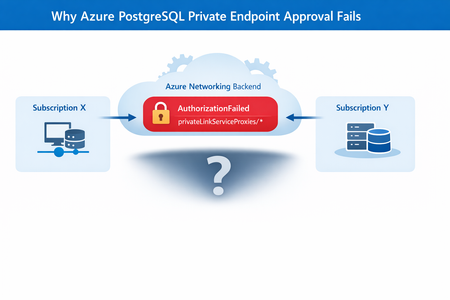
Co‑authored with HaiderZ-MSFT Symptoms Customers experience issues when attempting to approve a Private Endpoint for Azure PostgreSQL Flexible Server, particularly in cross‑subscription or cross‑tenant setups: Private Endpoint remains stuck in Pending state Portal approval action fails silently or reverts Selecting the Private Endpoint displays a “No Access” message Activity logs show repeated retries followed by failure Common Error Message AuthorizationFailed: The client '<object-id>' does not have authorization to perform action 'Microsoft.Network/privateEndpoints/privateLinkServiceProxies/write' over scope '<private-endpoint-resource-id>' or the scope is invalid. Root Cause Although the approval action is initiated from the PostgreSQL Flexible Server (service provider resource), Azure performs additional network‑level operations during approval. Specifically, Azure must update a Private Link Service Proxy on the Private Endpoint resource, which exists in the consumer subscription. When the Private Endpoint resides in a different subscription or tenant, the approval process fails if: Required Resource Providers are not registered, or The approving identity lacks network‑level permissions on the Private Endpoint scope In this case, the root cause was missing Resource Provider registration, resulting in an AuthorizationFailed error during proxy updates. Required Resource Providers Microsoft.Network Microsoft.DBforPostgreSQL If either provider is missing on either subscription, the approval process will fail regardless of RBAC configuration. Mitigation Steps Step 1: Register Resource Providers (Mandatory) Register the following providers on both subscriptions: Microsoft.Network Microsoft.DBforPostgreSQL This step alone resolves most cross‑subscription approval failures. Azure resource providers and types - Azure Resource Manager | Microsoft Learn Step 2: Validate Network Permissions Ensure the approving identity can perform: Microsoft.Network/privateEndpoints/privateLinkServiceProxies/write Grant Network Contributor if needed. Step 3: Refresh Credentials and Retry If changes were made recently: Sign out and sign in again Retry the Private Endpoint approval Post‑Resolution Outcome After correcting provider registration and permissions: Private Endpoint approval succeeds immediately Connection state transitions from Pending → Approved No further authorization or retry errors PostgreSQL connectivity works as expected Prevention & Best Practices Pre‑register required Resource Providers in landing zones Validate cross‑subscription readiness before creating Private Endpoints Document service‑specific approval requirements (PostgreSQL differs from Key Vault) Automate provider registration via policy or IaC where possible Include provider validation in enterprise onboarding checklists Why This Matters Missing provider registration can lead to: Failed Private Endpoint approvals Confusing authorization errors Extended troubleshooting cycles Production delays during go‑live A simple subscription readiness check prevents downstream networking failures that are difficult to diagnose from portal errors alone. Key Takeaways Issue: Azure PostgreSQL private endpoint approval fails across subscriptions Root Cause: Missing Resource Provider registration Fix: Register Microsoft.Network and Microsoft.DBforPostgreSQL on both subscriptions Result: Approval succeeds without backend authorization failures References Manage Azure Private Endpoints – Azure Private Link Approve Private Endpoint Connections – Azure Database for PostgreSQL Private Endpoint Overview – Azure Private Link242Views0likes0Comments