azure managed redis
17 Topics
Build 2026: New Azure Managed Redis Capabilities for AI-Ready Applications
As AI-driven applications continue to evolve, developers need a data platform that can keep up, delivering real time performance, intelligent context, and enterprise grade security at scale. At Microsoft Build 2026, we’re excited to share the latest capabilities in Azure Managed Redis, designed to help you build faster, smarter, and more secure applications, especially in the era of AI agents and intelligent services. These releases bring together a set of foundational improvements across security, performance, developer experience, and AI integration, reflecting our ongoing investment in making Azure Managed Redis one of the top data platforms for modern, real-time workloads. Powering the next generation of AI applications Azure Managed Redis is increasingly being used as the memory and context layer for AI powered applications, including copilots, chatbots, and autonomous agents. At Build 2026, we are highlighting enhanced capabilities to support these scenarios: Vector search and semantic caching to improve response relevance while reducing latency and cost Real-time memory and context management for agent workflows Support for retrieval augmented generation, also known as RAG, and event driven architectures These capabilities enable developers to build applications that retrieve the right information in milliseconds, delivering more responsive and context aware AI experiences. New enterprise grade data access with Entra ID based RBAC Security and governance are critical as Redis becomes a shared platform across teams and applications. At Build, we are introducing Entra ID based role-based access control for data access, now available in public preview. With this capability, you can: Enforce fine grained access control over Redis data with ACL Align permissions with your enterprise identity system Replace shared keys with identity-based access Improve auditability and compliance This feature is built on Redis access-control lists and enables secure, multi team collaboration without increasing operational complexity. Learn more. Flash-Optimized SKUs Now Generally Available (Up to 1.5 TB) We’re excited to announce the general availability of Flash-Optimized Azure Managed Redis (AMR) SKUs, now supporting capacities up to 1.5 TB. These new SKUs deliver a compelling balance of performance and cost-efficiency, enabling customers to run large-scale workloads with predictable latency and significantly lower memory costs. Learn more. Enterprise readiness In addition to new innovations, this release includes several important enhancements that improve enterprise readiness and feature completeness, based on customer feedback and real-world usage. Key updates include: Access control lists for controlling user permissions at a granular level Keyspace notifications (in preview) to enable event driven application patterns Larger SKUs, including 250 gigabyte and 350 gigabyte tiers, to support more demanding workloads Dashboards with Grafana in Azure Managed Redis bring Azure Monitor's built-in Grafana experience directly into the Azure portal. Expanded migration tooling for both Azure Cache for Redis and Redis Enterprise These updates address critical customer needs and remove barriers to adoption, especially for large scale and regulated environments. Simplified, AI-assisted migration With the retirement of Azure Cache for Redis underway, migration is a top priority for many customers. To support this transition, we are introducing: AI assisted migration planning to help assess and map existing environments A native migration workflow in the Azure portal for guided execution Tooling for both Azure Cache for Redis and Redis Enterprise migrations Together, these capabilities provide a more seamless and structured migration path, reducing risk while accelerating time to value. Built for performance, scale, and reliability Azure Managed Redis continues to deliver enterprise grade improvements, including: High throughput, low latency in memory processing Zone redundancy and geo replication for resilience Ongoing investments in developer experience and operational tooling These capabilities ensure you can scale confidently, whether you are supporting high traffic applications or real time AI systems. Developer takeaways At Build 2026, we are helping developers move from experimentation to production with technologies that are secure, scalable, and AI ready by design. These updates position Azure Managed Redis as a core building block for modern applications, including: AI agents and copilots Real-time personalization and recommendations Cloud native microservices High performance transactional systems Learn more at Build If you’re attending Build 2026 (in-person or online) you can find you Azure Managed Redis across sessions, demos, and the in-person expo experience. Lightning talk Stop by our lightning talk for fast, focused 15-minute sessions designed to give you an early look at what’s new. These in-person discussions spotlight emerging capabilities and real-world scenarios, offering a quick way to understand where the platform is evolving next. LTG41 | Faster and smarter agents with Redis and Foundry 📅 Wednesday, June 3 🕛 4:20 PM - 4:35 PM PDT On-demand session If you prefer to explore at your own pace, our on-demand sessions provide deeper walkthroughs of key updates and product capabilities. You’ll find detailed demos, scenario-based guidance, and technical insights that help you translate new features into real-world value. OD823 | Faster AI Responses with Semantic Caching in Azure Managed Redis Booth & expo presence Visit us at the Azure Data / NoSQL booth in the main expo hall to connect directly with product experts, see live demos, and explore real customer scenarios in action. Build’s interactive spaces are designed for hands-on engagement, giving you the opportunity to ask questions, test capabilities, and get guidance tailored to your environment. These experiences provide practical guidance, demos, and architectural patterns to help you apply these new Azure Managed Redis capabilities in your own applications. See you there!543Views0likes2CommentsKnow before you go: Azure Managed Redis at Microsoft Build 2026
Microsoft Build 2026 is almost here, and this year’s event boasts a new format, as well as a deeper technical focus across key themes such as AI agents, cloud-native applications, data platforms, developer tooling, and intelligent infrastructure. The updates showcased at Build signal where Microsoft is investing next—and how customers can start preparing now. Whether you’re joining in person or online, this is your opportunity to see how Azure is shaping the next generation of AI-powered applications—and where Azure Managed Redis fits into that future. In this post, we’ll cover everything you need to know to prepare, including what Build is (and how to participate), as well as where you can find Azure Managed Redis across sessions, demos, and the in-person expo experience. Where to find Azure Managed Redis at Build Azure Managed Redis’s presence at Build 2026 spans a mix of on-demand digital and in-person experiences, ranging from technical deep dives to open ended developer conversations. No matter your stage of development, Microsoft has you covered. Lightning talk Stop by our lightning talk for fast, focused 15-minute sessions designed to give you an early look at what’s new. These in-person discussions spotlight emerging capabilities and real-world scenarios, offering a quick way to understand where the platform is evolving next. LTG41 | Faster and smarter agents with Redis and Foundry 📅 Wednesday, June 3 🕛 4:20 PM – 4:35 PM PDT The Azure Managed Redis Lightning Talk will focus on: How Azure Managed Redis and Microsoft Foundry help developers build more effective AI agents High-performance in-memory data patterns for powering agent memory and context Vector search and semantic caching to reduce latency, lower cost, and return more relevant responses Practical approaches for RAG, persistent memory, and event-driven agent workflows This session is ideal for anyone looking to understand how Redis can serve as the data and memory layer for production-ready AI agents—helping deliver the right context in milliseconds and enabling richer, real-time reasoning. Expect to see a preview of upcoming investments across performance, developer experience, and AI-powered workflows. These sessions are ideal if you want a concise view of what’s changing and what it enables—before diving deeper into the full roadmap. ➡️ Tip: Lightning talks are in-person only and not available on demand—plan to attend live. On-demand session If you prefer to explore at your own pace, our on-demand sessions provide deeper walkthroughs of key updates and product capabilities. You’ll find detailed demos, scenario-based guidance, and technical insights that help you translate new features into real-world value. OD823 | Faster AI Responses with Semantic Caching in Azure Managed Redis on-demand session will cover: Building AI agents with Azure Managed Redis and Microsoft Foundry Real-time memory and context for agent workflows Vector search, semantic caching, and agent memory This session is ideal for: Developers building copilots or autonomous agents Architects designing large scale LLM chatbots Teams modernizing applications for AI ➡️ Tip: Sessions are designed to help you move from awareness to action, with a clearer understanding of how to apply what’s coming next. On-demand session will be available on Build Day 1, so keep an eye out for our Azure Managed Redis Build 2026 announcements blog for the on-demand session link and access details. Booth and expo presence Visit us on-site to connect directly with product experts, see live demos, and explore real customer scenarios in action. Build’s interactive spaces are designed for hands-on engagement, giving you the opportunity to ask questions, test capabilities, and get guidance tailored to your environment. Azure Managed Redis will be represented within a shared Azure Data / NoSQL booth experience, showcasing: Real-time AI application scenarios Vector search and semantic caching demos Integration with Azure AI Foundry and agent frameworks At the booth, you’ll get an early look at upcoming enhancements and how they fit into the broader Azure ecosystem. From performance improvements to new integrations and AI-driven experiences, you’ll leave with a clearer picture of how the product is evolving—and how to take advantage of it. ➡️ Tip: Expect a cross-product narrative aligned with Azure Data + AI platform positioning. What to expect at Build 2026 Microsoft Build 2026 is the company’s flagship developer conference, bringing together engineers, architects, and technical leaders for two days of hands-on sessions, product announcements, and deep technical engagement. This year’s event is focused on real code, real systems, and practical AI development, with a strong emphasis on how developers can build, deploy, and scale intelligent applications using Azure and the broader Microsoft platform. Across keynotes, breakout sessions, demos, and labs, attendees will get early access to the next wave of platform capabilities—from advancements in AI agents and model deployment to updates across cloud infrastructure and developer tooling. How to prepare Register for Microsoft Build 2026 Browse the Session Catalog and start building your agenda Bookmark the Azure Managed Redis Lightning Talk (LTG41) Attend the Microsoft Build opening keynote to hear from CEO Satya Nadella and Microsoft leaders on how Microsoft is creating new opportunities for developers across its platforms in the era of AI Stay tuned for the On-Demand Session Catalog going live on Build Day 1, where you can explore Azure Data & AI sessions focused on AI agents, data platforms, and intelligent applications Visit the Expert Meetup area to connect with Microsoft engineers and product teams Follow along with Azure Managed Redis on Microsoft Tech Community, as well as Microsoft social channels (LinkedIn, X) for additional key announcements and real-time updates We look forward to meeting you there!350Views0likes0CommentsAzure Cache for Redis to Azure Managed Redis: A Practical Guide with AI-Assisted Migration Planning
Author: Purna Mehta, Product Manager, Redis Inc and Shruti Pathak, Product Manager, Microsoft Today we’re introducing two capabilities for migrating from Azure Cache for Redis (ACR) to Azure Managed Redis (AMR): an AI-assisted planning skill and a native migration workflow in the Azure portal. Used together, these tools provide a structured path from initial assessment to a fully cleaned-up Azure Managed Redis deployment. This post walks through each phase of the migration, what to expect at each step, and how the agent and portal work together to reduce complexity and risk. Why Migrate to Azure Managed Redis? Azure Managed Redis is Microsoft’s next-generation managed Redis offering for enterprise workloads on Azure. It delivers higher throughput and lower latency than Azure Cache for Redis, along with flexible SKU tiers, enhanced clustering, active geo-replication, and advanced persistence options. Azure Managed Redis supports Redis-based AI workloads on Azure, including integrations for vector search and intelligent caching. If you’re building AI-powered applications on Azure, Azure Managed Redis is the recommended platform for Redis-based scenarios. We recognize that migrating a production cache requires care. That is why we built an end-to-end experience that begins with AI-assisted planning and ends with a guided portal migration. There is also a practical reason to start planning now: Azure Cache for Redis is being retired, and Azure Managed Redis is the path forward for Redis workloads on Azure. Migrating early gives you time to validate dependencies, update configurations, and make the transition on your own schedule instead of under deadline pressure. Just as importantly, the Azure Cache for Redis hostname will eventually expire, so cleaning up references to the old hostname is an important part of completing the migration cleanly. For details, see the retirement announcement and this blog post. The rest of this post outlines the planning and execution phases for migrating from Azure Cache for Redis to Azure Managed Redis with the Redis migration tooling. Phase 1: Migration Planning Before touching any infrastructure, you need a clear view of what you are migrating, what the target should look like, and which risks to address. The new Azure Cache for Redis migration agent skill helps with that. You can also refer to the migration documentation here. The migration agent skill can be added to any AI agent and invoked from AI-powered chat assistants such as GitHub Copilot and Claude. With read access to your Azure subscription, the skill can inspect your existing Azure Cache for Redis instances and help you: - Compare and contrast Azure Cache for Redis and Azure Managed Redis - Guide through selecting the appropriate Azure Managed Redis SKUs - Help convert IaC templates - Help with planning and execution of migration along with troubleshooting common issues You interact with it conversationally, asking questions and refining the plan iteratively until you are confident in the approach. In a typical planning session, the skill analyzes your source cache configuration in detail, including SKU and tier, memory size, eviction policy, persistence settings, clustering topology, TLS configuration, and any geo-replication setup. It then maps those properties to available Azure Managed Redis tiers and recommends the most appropriate target configuration for your workload. The skill can also fetch real-time cache usage metrics and recommend SKU optimizations. Beyond the SKU recommendation, the skill identifies potential compatibility issues and configuration gaps you need to address before migrating. This might include client library version requirements, changes to supported Redis commands, differences in eviction policy behavior between tiers, or networking considerations if your cache is deployed in a VNet. Surfacing these issues early, before you have provisioned anything, gives you time to address them without pressure. The skill can also help you choose a migration strategy. If downtime tolerance is low, it walks you through online migration options and what to expect during cutover. If your workload can tolerate a maintenance window, it can outline a simpler offline path. You can also ask follow-up questions about cost, rollback, or how to validate the new instance before switching traffic. At the end of the planning session, ask the agent for a structured migration checklist. It should summarize the recommended target configuration, pre-migration action items, and the step-by-step plan for Phases 2 and 3. This gives your team a shared reference for execution. Note: The AI-assisted migration planner is intended to support planning, not replace expert judgment. For highly critical workloads, we recommend working closely with a Solutions Architect or migration specialist to validate your plan before proceeding. Phase 2: Provision the Target Azure Managed Redis Cache With a clear migration plan from Phase 1, you are ready to create your Azure Managed Redis target instance. This step is straightforward, but one constraint matters: the target AMR cache must be in the same subscription and region as the source ACR cache. This is a requirement of the portal migration workflow in Phase 3, which links the two instances together to perform the migration. In the Azure portal, create a new Azure Managed Redis resource in the same subscription and region as your source cache. Apply the tier and SKU recommended in Phase 1, whether that is Balanced for general-purpose workloads, Memory Optimized for memory-intensive scenarios, or Compute Optimized for throughput-heavy applications. Configure the instance as outlined in your migration checklist, including Redis Users for Entra ID authentication, private endpoints, eviction policy, persistence, clustering, and TLS. The migration agent skill can also help update your IaC templates by converting them from Azure Cache for Redis to Azure Managed Redis. Once the instance is provisioned and running, note the resource name. You will select it by name when you start migration in Phase 3. At this point the AMR instance is empty, which lets you validate the configuration, test connectivity from your application environment, and confirm everything looks correct before migration. Note: Redis Migration tooling works by switching the DNS endpoint from your source Azure Cache for Redis instance to the target Azure Managed Redis instance. No data is transferred as part of this process. Phase 3: Initiate Migration from the Azure Portal Note: Before using the Redis migration tooling, please review the limitations of the tooling and other migration options. To use the Redis Migration tooling, navigate to your source Azure Cache for Redis instance in the Azure Portal and select Migrate in the command bar. Choose a target Azure Managed Redis instance from the dropdown, which lists only AMR instances in the same subscription and region as your source cache. Review the migration summary comparing source and target configurations. An automated compatibility check surfaces warnings or errors with guidance for resolving them. You can acknowledge warnings to proceed, but errors must be addressed first. We strongly recommend running the migration during a maintenance window or low-traffic period. Your resource state will update to “Migrating” while the migration is in process. After migration completes, the Azure Cache for Redis hostname redirects requests to the Azure Managed Redis instance, allowing applications to continue using the existing source connection string temporarily. Note: Keep your source ACR cache running and do not delete it. If you encounter problems after the migration, you can initiate a rollback to the original ACR cache and resume normal operation while you investigate. The source cache remains available and unchanged throughout the migration process. Once you are confident the new instance is stable and performing as expected, you can retry Phase 3 and then proceed to Phase 4 to clean up the source cache. Phase 4: Ensure success and delete old Azure Cache for Redis instance After migration, monitor application health to confirm everything is working as expected. If issues arise, you can roll back the migration. Once you have verified success, you can delete the source Azure Cache for Redis instance. The Azure Cache for Redis instance is now decoupled from its hostname and can be deleted safely. The hostname will continue to point to the new Azure Managed Redis instance. Phase 5: Update applications to use the Azure Managed Redis hostname After you confirm the migrated Azure Managed Redis instance is running as expected, update your applications to use the Azure Managed Redis connection string instead of the old Azure Cache for Redis connection string. This step is required because the old Azure Cache for Redis hostname will be purged automatically. Because traffic is already flowing to the migrated instance, this update should have minimal impact. It is easy to postpone this step, but doing it promptly keeps your subscription clean, avoids unnecessary cost, and removes ambiguity about which cache instance is active. The main cleanup task is purging the source Azure Cache for Redis hostname. Before you do, confirm that no applications or services still reference the old connection string, including Key Vault secrets, environment variables, monitoring dashboards, and background jobs. Take a few minutes to search broadly, since any missed reference will fail after the old hostname is purged. Once all references have been updated, use the ‘unlink’ API to purge the source Azure Cache for Redis hostname. If the Azure Cache for Redis instance has associated resources such as private endpoints, or diagnostic settings, review whether they should be removed or reconfigured for the new AMR instance. Finally, update any internal documentation, runbooks, and architecture diagrams that still reference the old cache. At that point, the migration is complete. Getting Started Both the migration planning agent skill and the portal migration workflow are available today. Here is how to get started: The migration agent skill is available here and includes setup instructions. To provision your Azure Managed Redis target, find instructions here. To start migration, go to your source Azure Cache for Redis cache in the Azure portal and select "Migrate to Azure Managed Redis" from the command bar. More details about the migration tooling are available here. We recommend starting every migration with a session with the planning agent, even when the migration seems straightforward. It consistently surfaces configuration details and compatibility issues that are easy to miss and can cause problems later. A few minutes of planning up front is well worth the time. Reach us at AzureManagedRedis@microsoft.com or through your account team with questions, suggestions, or stories from your migration journey.592Views2likes0CommentsUnlock real-time intelligence with Azure Managed Redis
Modern applications are no longer just transactional—they’re intelligent, conversational, and agent-driven. As organizations build copilots and autonomous agents, infrastructure requirements evolve. Applications must reason over context, retrieve knowledge instantly, and operate in real time. Azure Managed Redis is a fully-managed, enterprise-grade, in-memory data platform powered by Redis Enterprise and operated by Microsoft. It combines sub-millisecond performance, high availability, and advanced capabilities such as vector similarity search and multimodal data support. In this post, we’ll explore four key industry use cases for Azure Managed Redis—starting with building AI agents on modern agent frameworks. 1) Building AI agents on agent frameworks Agentic applications require fast memory, contextual retrieval, and low-latency orchestration. Azure Managed Redis provides the real-time data foundation for AI agents built on Microsoft Agent Framework, as well as LangChain and Azure AI services like Azure AI Foundry. Why Azure Managed Redis for AI agents? AI agents rely on: Vector similarity search for retrieval-augmented generation (RAG) Semantic caching to avoid repeated LLM calls Short-term memory for conversation state Long-term memory for preferences Real-time context updates from tools and APIs Azure Managed Redis enables all of these within a single in-memory data engine. Common Agent Scenarios Customer support agents retrieving knowledge base articles instantly Marketing copilots generating campaign insights using cached data Developer assistants accessing documentation with vector search Operational agents responding to real-time telemetry With vector indexing and JSON support, Redis can store embeddings alongside structured application data. Agents can retrieve relevant context in milliseconds, dramatically reducing latency and cost while improving response quality. For organizations adopting Microsoft’s AI ecosystem, Azure Managed Redis integrates seamlessly with Azure networking, identity, and compute services—making it a natural fit for production-grade agent architectures. 2) High-performance caching for modern applications Caching remains one of the most powerful patterns for improving performance and scalability. Applications backed by systems such as Azure SQL Database or Azure Database for PostgreSQL benefit from a high-speed caching layer to reduce repeated reads and minimize backend load. Azure Managed Redis enables: Microsecond data retrieval Reduced database pressure Improved application throughput Lower infrastructure costs Industry examples Retail & e-commerce: Cache product catalogs and pricing during peak events Financial services: Cache market data and pricing models Gaming: Store leaderboards and player states By inserting Redis between your application and your system of record, you gain immediate responsiveness without sacrificing durability. 3) Real-time analytics and streaming workloads For organizations that depend on real-time insight, in-memory processing is critical. Azure Managed Redis supports data structures such as Streams, Sorted Sets, JSON, and TimeSeries to enable near real-time analytics. Key Scenarios Fraud detection in financial services IoT telemetry ingestion and analysis Live dashboards for logistics and operations Dynamic pricing engines in retail Because processing happens in memory, latency remains predictable—even at scale. Streaming data can be ingested into Redis, enriched, scored, and surfaced to applications or dashboards immediately—without waiting for batch systems. 4) Session management at scale As applications scale horizontally, managing session state becomes increasingly complex. Azure Managed Redis provides a centralized, highly available session store that enables: Shared state across distributed app instances Automatic expiration with TTL Seamless failover and high availability Common Scenarios E-commerce platforms preserving shopping carts Media platforms tracking user preferences Enterprise SaaS applications managing authentication tokens By externalizing session state to Redis, applications become stateless and cloud-native—ready for autoscaling and global distribution. Enterprise-grade foundation for intelligent applications Azure Managed Redis delivers: 99.999% availability SLA Zone redundancy by default Automatic patching and updates Advanced security integration such as Entra ID authentication and private endpoints Native compatibility with modern Azure architectures Whether you're building AI agents, modernizing transactional applications, or enabling real-time analytics, Azure Managed Redis provides the in-memory data foundation required for intelligent, responsive systems. Getting started Ready to start building real-time and agent-driven applications with Azure Managed Redis? Explore the resources below to learn more, deploy your first instance, and experiment with AI-powered scenarios. Learn more: Azure Managed Redis Documentation Azure AI Foundry Overview Redis Enterprise Capabilities on Azure Try it yourself: Create an Azure Managed Redis instance Redis Quickstart (Azure) Build AI apps with Azure OpenAI + vector search Explore samples and architectures: Redis + LangChain RAG Sample Azure AI + Redis Vector Search Reference Architecture Redis Vector Similarity Search Examples Azure AI Foundry Samples Connect with the community: Azure Tech Community – Azure Databases Azure Managed Redis GitHub Discussions265Views0likes0CommentsAzure Managed Redis & Azure Cosmos DB with cache‑aside: a practical guide
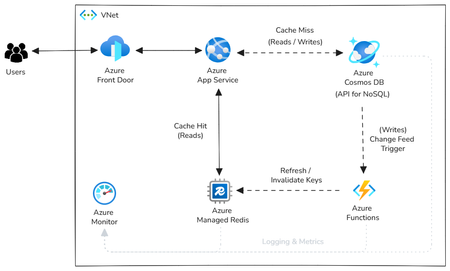
Co-authored by James Codella - Principal Product Manager, Azure Cosmos DB, Microsoft; Andrew Liu - Principal Group Product Manager, Azure Cosmos DB, Microsoft; Philip Laussermair – Azure Managed Redis Solution Architect, Redis Inc. Using Azure Managed Redis alongside Azure Cosmos DB is a powerful way to reduce operational costs in read-heavy applications. While Azure Cosmos DB delivers low-latency point reads, an SLA-backed 10ms at the 99th percentile of requests, each read consumes Request Units (RUs), which directly impact your billing. For workloads with frequent access to the same data, caching those reads in Azure Managed Redis can dramatically reduce RU consumption and smooth out cost spikes. This cache-aside pattern allows applications to serve hot data from memory while preserving Azure Cosmos DB as the system of record. By shifting repeated reads to Azure Managed Redis, developers can optimize for cost efficiency without sacrificing consistency, durability, or global availability. What each service does: Azure Managed Redis is Microsoft’s first‑party, fully managed service built on Redis Enterprise. Azure Cosmos DB offers higher durable multi-region writes, high availability SLAs, and in-region single-digit millisecond latency for point operations. Co-locating app compute, Azure Managed Redis, and Azure Cosmos DB in the same region minimizes round-trips; adding Azure Managed Redis on top of Azure Cosmos DB reduces RU consumption from repeat reads and smooths tail latency spikes during peak load. Both Azure Managed Redis and Azure Cosmos DB offer great support for queries (including vector search) over JSON data to work well together fast efficient AI apps. This pairing doesn’t require a rewrite. You can adopt a cache‑aside strategy in your data‑access layer: look in Redis first; on a miss, read from Azure Cosmos DB and populate Redis with a TTL; on writes, update Azure Cosmos DB and invalidate or refresh the corresponding cache key. Use Azure Cosmos DB ETags in cache keys to make invalidation deterministic, and use the Azure Cosmos DB Change Feed to trigger precise cache refreshes when data changes. The Cache‑Aside (Lazy Loading) Pattern Read path: GET key from Azure Managed Redis. If found, return. If not, issue a point read to Azure Cosmos DB, then SET/JSON.SET the value in Azure Managed Redis with a TTL and return the payload to the caller. Write path: Persist to Azure Cosmos DB as the source of truth. Invalidate or refresh the related Redis key (for example, delete product:{id}:v{etag} or write the new version). If you subscribe to the Change Feed, an Azure Function can perform this invalidation asynchronously to keep caches hot under write bursts. Code Example (.NET): using System; using System.Collections.Generic; using System.Threading.Tasks; using Microsoft.Azure.Documents; using Microsoft.Extensions.Logging; using StackExchange.Redis; using Microsoft.Azure.StackExchangeRedis; using Azure.Identity; public static class CosmosDbChangeFeedFunction { private static RedisConnection _redisConnection; static CosmosDbChangeFeedFunction() { // Initialize Redis connection using Entra ID (Azure AD) authentication var redisHostName = Environment.GetEnvironmentVariable("RedisHostName"); // e.g., mycache.redis.cache.windows.net var credential = new DefaultAzureCredential(); var configurationOptions = ConfigurationOptions.Parse($"{redisHostName}:10000"); _redisConnection = RedisConnection.ConnectAsync(configurationOptions.ConfigureForAzureWithTokenCredentialAsync(credential)).GetAwaiter().GetResult(); } [FunctionName("CosmosDbChangeFeedFunction")] public static async Task Run( [CosmosDBTrigger( databaseName: "my-database", containerName: "my-container", ConnectionStringSetting = "CosmosDBConnection", LeaseContainerName = "leases")] IReadOnlyList<Document> input, ILogger log) { var cache = _redisConnection.GetDatabase(); if (input != null && input.Count > 0) { foreach (var doc in input) { string id = doc.GetPropertyValue<string>("id"); string etag = doc.GetPropertyValue<string>("_etag"); string cacheKey = $"item:{id}:v{etag}"; string json = doc.ToString(); await cache.StringSetAsync(cacheKey, json, TimeSpan.FromMinutes(10)); log.LogInformation($"🔄 Refreshed cache for key: {cacheKey}"); } } } } Why it works: The database handles correctness and global replication; the cache handles locality and frequency. You reduce repeated reads (and RU costs) and lower p99 by serving hot keys from memory close to the compute. TTLs give you explicit control over staleness; negative caching and stale‑while‑revalidate are easy extensions when appropriate. Design Choices That Matter TTLs: Choose TTLs that reflect business tolerance for staleness. Use jitter (±N%) to avoid thundering herds when many keys expire simultaneously. Keying and versioning: Include an ETag or version in the key, e.g., product:{id}:v{etag}. When the record changes, the ETag changes, naturally busting the old key. Cache stampede control: For hot keys that miss, use a short single‑flight lock so that one request refreshes the value while others wait briefly or serve stale data. Serialization: For portability, utilize compact JSON (RedisJSON if you want field‑level reads/writes). Keep values small to preserve cache efficiency. Failure semantics: Treat Azure Managed Redis as an optimization. If the cache is unavailable, the app should continue by reading from Azure Cosmos DB. Favor idempotent writes and retry‑safe operations. Why Azure Managed Redis & Azure Cosmos DB Work Well in Practice Local speed, global reach: Azure Cosmos DB targets a single-digit millisecond p99 for in-region point operations. Placing Azure Managed Redis in the same region enables sub-millisecond memory reads for repeated access patterns, providing optimal performance for high-frequency data access. The result is a shorter, more predictable critical path. Active‑active at both layers: Azure Cosmos DB supports multi‑region writes, so each region can accept traffic locally. Azure Managed Redis supports active geo‑replication across up to five instances, using conflict-free replicated data types (CRDT) to converge cache state. That yields region‑local cache hits with eventual consistency at the cache tier and strong guarantees at the database tier. Reference Architecture Regional deployment Ingress: Clients reach the app via Azure Front Door (or similar) and land on Azure App Service in a VNet. Read path: The app queries Azure Managed Redis first. On a miss, it performs a point read/write against Azure Cosmos DB (API for NoSQL) and updates Redis with a TTL. Write path: Writes go to Azure Cosmos DB. The Change Feed triggers an Azure Function that invalidates or refreshes related Redis keys. Observability: Use Azure Monitor for logs and metrics. Monitor cache hit ratio, gets/sets, evictions, and geo‑replication health on the Azure Managed Redis side; RU/s, throttles, and p99 latency on the Azure Cosmos DB side. Operations and SRE Considerations Co‑location: Keep compute, Azure Managed Redis, and the Azure Cosmos DB write/read region together to avoid unnecessary RTTs. Capacity planning: Size Azure Managed Redis memory for working‑set coverage and headroom for failover. Validate eviction policies (volatile‑TTL vs all‑keys) against workload behavior. Back‑pressure: Watch RU throttling on Azure Cosmos DB and evictions on Azure Managed Redis. High evictions or a low hit ratio indicate a working-set mismatch or TTLs that are too short. Testing: Load‑test with realistic key distributions and measure p50/p95/p99 on both cache hits and misses. Chaos‑test cache outages to verify graceful degradation. Security: Use managed identities for data plane access where supported; apply App Service access restrictions and VNet integration as appropriate; audit with Azure Monitor logs. Putting It All Together Adopt cache‑aside in one region, measure hit ratio and RU savings, then add Change Feed–based invalidation to keep hot keys fresh under write load. When you need global scale, enable Azure Cosmos DB multi-region writes and Azure Managed Redis active geo-replication so that every region serves users locally. You end up with fast read paths, clear consistency boundaries, and a deployment model that scales without surprises. Next steps Review Azure Managed Redis documentation - https://learn.microsoft.com/azure/redis/ , Learn more about Cache Aside pattern in the Azure Architecture Center - https://learn.microsoft.com/azure/architecture/patterns/cache-aside Start with a sample app - https://github.com/AzureManagedRedis/1.6KViews0likes0CommentsIntroducing the PublicNetworkAccess property to Azure Managed Redis
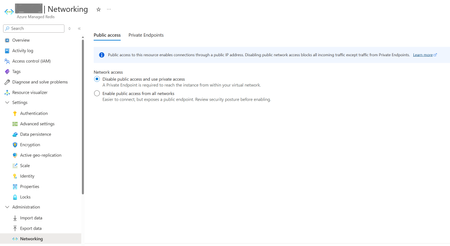
We want to enable users of Azure Managed Redis to disable public traffic without a private endpoint or allow both public and private access simultaneously. In certain enterprise environments, Redis and networking responsibilities are handled by distinct teams. The Data Operations team may securely provision Azure Managed Redis instances with PublicNetworkAccess set to Disabled, subsequently establishing connections to private links overseen by the Networking Operations team. By introducing a dedicated control for PublicNetworkAccess, it provides the flexibility of being no longer necessary to configure a Private Endpoint concurrently with Azure Managed Redis at the time of creation. With the new PublicNetworkAccess property, you can now restrict public IP traffic independently of Private Links to Virtual Networks. The following network configurations are now supported: • Public traffic without Private Links • Public traffic with Private Links • Private traffic without Private Links • Private traffic with Private Links API changes The PublicNetworkAccess property is introduced in Microsoft.Cache redisEnterprise 2025-07-01. This is a security-related breaking change. We will deprecate older API versions before 2025-07-01 in October 2026. After October 2026: • You can only set PublicNetworkAccess property using API versions 2025-07-01 or later • You can no longer send API calls with older versions prior to 2025-07-01 • Your older caches provisioned with the older versions of the APIs will continue to work, but additional operations on it will require calls to be made with API versions 2025-07-01 or later Changing an Existing Azure Managed Redis Cache to Use PublicNetworkAccess property Use the Azure portal to add PublicNetworkAccess config to your existing Azure Managed Redis cache. Steps to Change PublicNetworkAccess Property 1. Open your cache in the Azure Portal. 2. From the resource menu, select Networking. 3. In the portal, set the PublicNetworkAccess property here. Note: This is an irreversible operation—once set, you cannot revert to the unset state. 4. In the Public access pane, select Enable or Disable and save. 5. NOTE: your existing Private Endpoints will remain unaffected Figure 1: Set PublicNetworkAccess in existing Azure Managed Redis by selecting ‘Disable’ or ‘Enable’ public access Best practices Having PublicNetworkAccess controlled separately by a setting provides more flexibility for a team to reuse existing Private Endpoints to enhance the end-to-end management experience. To improve Azure Managed Redis security, disable PublicNetworkAccess and use a Virtual Network with Private Endpoint and Private Links. Virtual Networks provide network controls and extra protection, while Private Links enable one-way communication for greater isolation. This ensures other resources in the Virtual Network stay secure even if Redis is compromised.1.5KViews0likes2CommentsWhat’s new in Azure Managed Redis: Ignite 2025 feature announcements
Azure Managed Redis continues to power the world’s most demanding, low-latency workloads—from caching and session management to powering the next generation of AI agents. At Microsoft Ignite 2025, we’re excited to announce several new capabilities designed to make Azure Managed Redis even more scalable, manageable, and AI-ready. Bigger, faster, stronger: new enterprise-scale SKUs (generally available) We are expanding our capacity portfolio with the general availability of Memory Optimized 150 and 250, Balanced 150 and 250, Compute Optimized 150 and 250 SKUs/, bringing higher throughput, lower latency, and greater memory capacity for your most demanding workloads. Whether you’re running global gaming platforms, AI-powered personalization engines, or enterprise-scale caching tiers, these new SKUs offer the performance headroom to scale with confidence. Redis as a knowledge base for AI Agents Azure Managed Redis is now available as part of the Azure AI Foundry MCP tools catalog, allowing customers to use Redis as a knowledge store or memory store for AI agents. This integration makes it simple to connect Redis to Foundry-based agents, enabling semantic searching, long term and short term memory, and faster reasoning for multi-agent applications—all running on trusted Azure infrastructure. Scheduled Maintenance (public preview) You can now configure maintenance windows for their Azure Managed Redis instances, giving you greater control and predictability for planned service updates. This capability helps align maintenance with your own operational schedules—minimizing disruption and providing flexibility for mission-critical applications. Terraform Provider for Azure Managed Redis We’re making infrastructure automation even easier with a dedicated Terraform provider for Azure Managed Redis. This new provider enables you to declaratively create, manage, and configure AMR resources through code, improving consistency and streamlining CI/CD pipelines across environments. Reserved Instances: now in 30+ Regions Azure Managed Redis now supports Reserved Instances in over 30 regions, with more coming soon. Reserved pricing provides predictable costs and savings for long-term workloads.. Go to Azure Portal | Reservations | Add and search for ‘Azure Cache for Redis’. Azure Managed Redis SKUs like Balanced, Computer Optimized, Memory Optimized, and Flash Optimized, would show up as sub SKUs in the category. Reserved Instance is available for 35% discount with 1 year purchase and 55% discount with 3 year purchase. Learn More & Get Started Azure Managed Redis is redefining what’s possible for caching, data persistence, and agentic AI workloads. Explore the latest demos, architecture examples, and tutorials from Ignite: Learn more about Azure Managed Redis Try Azure Managed Redis samples on GitHub Watch the Azure Managed Redis session at Ignite on-demand (BRK129) Explore Redis as a memory store for Microsoft Agent Framework Introducing the PublicNetworkAccess property to Azure Managed Redis | Microsoft Community Hub Ready to build Internet-scale AI apps with Azure Managed Redis? Start today at aka.ms/hol-amr.808Views0likes0CommentsAzure Managed Redis at Ignite 2025: pre-day, session, and booth
Microsoft Ignite 2025 is almost here! Many practitioners are surprised by the powerful new capabilities in Azure Managed Redis—and now is your chance to see them in action. Whether you are modernizing applications, accelerating AI workloads, or building next-generation agent architectures, Azure Managed Redis is your key to speed and scale. Don’t miss the chance to connect with experts from Microsoft and Redis at our pre-day workshop and general session at Ignite and learn how to: Unlock high-performance caching for demanding workloads Build a powerful memory layer for agentic applications Leverage vector storage for Retrieval-Augmented Generation (RAG) Optimize LLM costs with semantic caching All in one fully-managed service—Azure Managed Redis. Connect with Azure Managed Redis team at Ignite 2025 1. Ignite pre-day workshop: Build Internet-Scale AI Apps with Azure Managed Redis — Caching to Agents (in-person only) When: Ignite pre-day on Monday, November 17, 2025, 1pm-5pm PT Where: Moscone Center, San Francisco Registration: Add this optional in-person workshop in the Ignite registration → Building AI applications and agents at internet scale requires more than speed — it demands unified memory, context, and scalability. You’ll see live demos and learn how to build and scale intelligent applications using Azure Managed Redis for caching and modern AI workloads, architect your applications for performance, reliability, and scale with geo-replication, and migrate to Azure Managed Redis. Seats are limited, please sign up today. 2. Breakout Session: Smarter AI Agents with Azure Managed Redis - BRK129 (in-person and online) View session details on the Ignite website and save to your event favorites Azure Managed Redis with Azure AI Foundry and Microsoft Agent Framework let developers build adaptive, context-aware AI systems. Redis handles real-time collaboration, persistent learning, and semantic routing, while the Agent Framework supports advanced reasoning and planning. Integrated short- and long-term memory lets agents access relevant data directly, simplifying development and operations. Azure Managed Redis supports MCP for control and data plane tasks, enabling easy management and scaling of workloads and knowledge stores. Join us to discover how to build scalable, multi-agent systems backed by the performance, reliability, and unified memory of Redis on Azure. 3. Visit the Azure Managed Redis booth in the Expo Hall Have questions? Looking to talk architecture, migration, and supercharging your AI apps? Visit us in the Expert Meetup Zone to connect with the Microsoft and Redis product teams, engineers, and architects behind Azure Managed Redis. Prepare for Ignite Learn more about Microsoft Ignite Explore the Azure Managed Redis documentation. Try the hands-on workshop for Azure Managed Redis.838Views0likes0CommentsRedis named Stack Overflow’s top data storage tool for AI Agents
Redis recognized by developers on Stack Overflow as the #1 data storage tool for AI agent workloads and #5 database in 2025. Microsoft is the only cloud provider to offer Redis Enterprise as a fully native, managed service with Azure Managed Redis.272Views0likes0CommentsSupercharging AI Agents with Memory on Azure Managed Redis
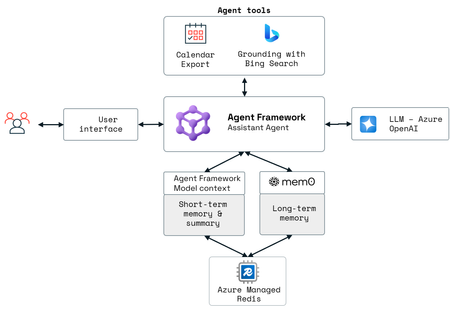
Co-authored by Purna Mehta, AMR Product Manager, Redis, Inc. and Han Xing Choong, Software Engineer, Redis, Inc. AI agents are quickly evolving from simple chatbots to sophisticated, context-aware systems that reason, orchestrate tools, and learn over time. Memory is at the heart of that transformation. Azure Managed Redis - Microsoft’s first-party service based on Redis Enterprise, can make agent memory management both seamless and production-ready in the Azure ecosystem. Memory capability enables AI agents to retain the context of interactions with users and systems. By continuously capturing preferences, operational patterns, and unique requirements, agents develop a comprehensive understanding over time. With the addition of vector store capabilities, Azure Managed Redis allows AI agents to efficiently store, index, and search high-dimensional data like embeddings, supporting advanced semantic search for more accurate, real-time responses. This is where Azure Managed Redis can help accelerate building agentic AI apps using Microsoft Agent Framework. What is Microsoft Agent Framework Microsoft Agent Framework is an open-source SDK and runtime designed to let developers build, deploy, and manage sophisticated multi-agent systems with ease. It unifies the enterprise-ready foundations of Semantic Kernel with the innovative orchestration of Autogen. Understanding agent memory architecture An agent’s usefulness depends on how and what it remembers. A typical agentic memory architecture contains two key components: Working short-term memory A play-by-play of the current interaction, so the agent can track ongoing conversation history and state without asking you to repeat yourself. Microsoft Agent Framework can help manage this short-term or working memory tied to a user’s session. In the Agent Framework SDK, it is implemented as Thread with an associated ChatMessageStore that can be offloaded to Redis. Durable long-term Memory Preferences, behavioral patterns, durable facts and interests pieced together from many interactions so the agent can learn and adapt over time. Long-term memory is typically shared across sessions. Within Microsoft Agent Framework SDK, long-term memory is provided through ContextProviders. Azure Managed Redis can be integrated directly as the context provider to maximize performance, control and advanced features. One of the popular context providers is powered by Mem0. Mem0 handles intelligent memory extraction, deduplication, and contextual grounding while recording these memories in Azure Managed Redis. Memory in action - travel agent example To show this in action, we have created a sample agent – an AI travel concierge – which provides time-aware information to generate trip itineraries personalized based on preferences. To achieve this goal, it relies on LLM, external tools, and manages user-specific context with a dual-memory layer. This layered memory design means a conversation isn’t a single exchange – it’s a long-running interaction. Agents can draw on past facts and preferences to shape current responses, creating continuity and building toward complex outcomes over time. Below is the agent architecture from the Travel Agent Sample application on GitHub built with Microsoft Agent Framework. How Azure Managed Redis fits this architecture When building an agent using Microsoft Agent Framework and Azure Managed Redis – these are some of the key attributes for production-grade internet scale applications on Azure: Latest innovation: Azure Managed Redis is a first-party service, building on Redis Enterprise capabilities. Azure Managed Redis brings multiple data types, fast vector similarity search and semantic caching (that helps you save tokens), full JSON support, high throughput, and low latency out of the box. Reliability and SLAs: Azure Managed Redis offers high availability up to 99.999%. Offers active-active geo-replication and persistent storage, so memory doesn’t disappear between sessions, and agents can scale globally. Enterprise ready: As a first-party product, Azure Managed Redis integrates with Azure Entra ID for authentication, Azure networking, and security – like Private Endpoints, TLS and encryption at rest - that are available and manageable through Azure Managed Redis in Azure portal. Azure Managed Redis brings the performance, simplicity, and scalability of Redis Enterprise directly into the Azure ecosystem, making it easier to build intelligent, stateful agents. With seamless integration into your Azure environment, you can rely on fully managed Redis to power agent memory, and context management. Azure Managed Redis also delivers sub-millisecond lookups that enable real-time agent interactions or intelligent systems that need near real-time responses like recommendation systems, text to speech or speech to speech agents. Next steps - Explore the Travel Agent Sample application on GitHub - Check the Azure Managed Redis Documentation - Deep dive into Microsoft Agent Framework1.9KViews0likes0Comments