azure managed hsm
9 TopicsThe CISO Cheat Sheet to Microsoft Digital Defense Report 2026
I know we’re all busy, so I’ve pulled the most important data from this year’s Microsoft Digital Defense Report into one short read. The full report is well worth exploring, but this article focuses on the numbers and trends most relevant to security leaders. This year’s edition shows that AI is lowering the time, expertise and cost required to discover and exploit weaknesses, enabling attackers to operate with greater speed, scale and autonomy. The report describes this as AI “changing the physics of cybersecurity”: attack timelines are compressing and agentic systems are beginning to automate more of the attack lifecycle. Trend 1: Time has collapsed The clearest finding is about speed. Vulnerability discovery is increasingly running ahead of remediation, while the time from discovery to weaponisation is shrinking. In the AI era, weaponisation can follow in hours. Vulnerability discovery and weaponisation now often needs only a well-written prompt. The median time from discovery in the wild to weaponisation is below 24 hours. Vulnerabilities were on track for a record estimated 72,000 CVEs in 2026. The report expects a multi-year period in which the number of known but unpatched vulnerabilities rises sharply before eventually declining. The median time from container start to first exploit attempt is 5.3 hours. The ransomware actor Storm-1175 moved from web-facing exploitation to deploying Medusa ransomware in as little as 24 hours. CISA added over 110 CVEs to its Known Exploited Vulnerabilities catalogue between November 2025 and May 2026, most within a week of disclosure. The mismatch with enterprise reality is the uncomfortable part. The report says the disclosure-to-exploitation window has shrunk to single-digit days. Between November 2025 and May 2026, CISA added more than 110 vulnerabilities to its Known Exploited Vulnerabilities catalogue, most within a week of disclosure. In one example, Storm-1175 moved from exploiting a web-facing vulnerability to deploying Medusa ransomware in as little as 24 hours. Microsoft’s Red Team makes an important point: a patch is also a disclosure. Every fix points attackers towards the flaw it closes. As AI-assisted analysis makes reversing patches faster and more reliable, the report argues that patch velocity, not simply patch availability, becomes the control that matters. Trend 2: Attack chains are gaining autonomy The report charts a clear progression: September–November 2025: AI assists in orchestrating a campaign, as in the Anthropic-reported espionage case. April–June 2026: Full-chain autonomy is demonstrated in labs. July 2026: Real-world autonomous attacks of increasing complexity appear. Two frontier models, Mythos and GPT-5.5, completed a 32-step attack chain against an emulated enterprise with no human help. The test environment had no defenders. The UK AI Security Institute reached a similar finding independently. GPT-5.5 was the second model to solve its end-to-end corporate network attack simulation, a task AISI estimates would take a human about 20 hours. Open-weight models lag closed models at orchestrating attacks by about seven months. In the wild, early July 2026 saw the first documented automated ransomware extortion attack, named JADEPUFFER by Sysdig. Microsoft has seen AI-orchestrated intrusions that share elements with it. Initial access consistently came from internet-exposed services running known-vulnerable software. The report is measured on this point. Volumes of AI-orchestrated activity remain low. In most observed real-world operations, complex end-to-end intrusions still retain meaningful human direction. The Red Team's framing is the most useful one: AI doesn't create a new class of attack, it collapses the effort needed to find and exploit existing attack paths. Trend 3: AI has become an attack surface The report's second takeaway is that attackers are already targeting AI itself. The adoption numbers explain why. 88% of enterprises are experimenting with agents, and 82% of leaders plan broader rollouts within 12–18 months. The report cites industry projections of roughly 1.3 billion agents in production by 2028. What attackers are doing to AI systems: Four techniques accounted for roughly 90% of observed attack activity in telemetry from Azure AI workloads: malicious link injection (52%), jailbreaks (16%), tool and agent abuse (12%), and identity and credential abuse (10%). Memory poisoning: An attacker who can place content anywhere an agent reads can often place it where the agent remembers. Email is the dominant pathway the Red Team has observed. Human-in-the-loop isn't a complete control: Red team testing saw approval prompts ignored, or bypassed by a policy stored in poisoned memory. Developer tools turned against their owners: The "s1ngularity" malware hijacked locally installed AI command-line tools to hunt for secrets. It leaked about 2,000 secrets and 20,000 files across 225 victims. AI browsers: In daily use at more than 40% of organisations in Microsoft's dataset, they were the initial infection vector in incidents involving 57 malware families in a May 2026 analysis. Chat histories as a target: Malicious AI-assistant extensions reached nearly 900,000 installs and more than 20,000 enterprise tenants, harvesting AI chat histories that often contain code, architecture and credentials. The identity implications are direct. Each agent needs its own identity, not one borrowed from an employee, and a named human sponsor. The report also treats revocation latency, the time to cut off a compromised agent, as a measured outcome. Trend 4: The front door is still identity AI changes the speed and personalisation of social engineering. It hasn't changed where attacks start. Initial access in Defender Experts data: User execution: 30% Valid accounts: 20% Malicious copy-and-paste: 13% Phishing: 11% Together, user execution and valid accounts account for over half of observed activity. In incident response engagements, phishing as an initial access vector jumped from 7% to 23% year on year. The standout numbers: ClickFix: Defender saw user-pasted malicious commands on more than 1.1 million unique devices between February and early May 2026, roughly an 8x increase. AiTM: URLs accounted for 45% of the identified phishing techniques in the report’s breakdown. Separately, the share of AiTM phishing and token-theft attacks more than doubled during the first six months of 2026, although the report notes that their overall share remained comparatively small. Teams vishing: Weekly confirmed malicious volume increased 502% year on year. Per attempt, 48% of vishing calls kept the victim engaged for more than 20 seconds, and 30% lasted more than one minute. When a call succeeds, attackers can persuade the victim to install a remote-management tool and complete reconnaissance in two minutes or less. Business contact impersonation (BCI): The report introduces this term for conversations that start with a trusted-looking contact. Microsoft detected more than 46 million attacks in 12 months, with a 121% spike in April 2026. The share of first-contact messages that explicitly asked for money or documents fell from 17% to 3%. The first message is deliberately bland, like "Are you at your desk?" Password attacks declined 26% year on year, which the report describes as strong evidence that MFA and passkeys are forcing attackers to pivot. That pivot includes techniques such as fatigue attacks, AiTM phishing and token theft designed to circumvent conventional MFA. Trend 5: Attackers are inheriting trust rather than breaking in The report's headline theme is that risk is increasingly interconnected. Threats travel through the trusted relationships between identities, software supply chains, partners and cloud platforms. The numbers: Supply chain: Major open-source ecosystems saw attacks roughly every ten days, accelerating through Q2 2026. Shai-Hulud 2.0 affected 25,000 repositories. Megalodon backdoored 5,561 GitHub repositories in under six hours. Trusted signing: In May 2026, Microsoft disrupted Fox Tempest, a "malware-signing-as-a-service" operation that obtained genuine certificates for ransomware loaders and infostealers. Microsoft revoked over a thousand fraudulent code-signing certificates. Legitimate access: An unsanctioned remote monitoring tool is now one of the most reliable mid-stage indicators of a human-operated intrusion. Cloud identity: Cloud identity abuse was the most observed technique against critical infrastructure, representing 78% of the technique mix in Microsoft’s data for March to June 2026. Hybrid intrusions: The Storm-2885 case showed an attacker using a privileged cloud identity to close and downgrade security alerts. The report says identity governance and alert-handling workflows deserve Tier 0 treatment. Dwell time: DART data shows a statistically significant increase in dwell time year on year, meaning organisations took longer to detect intrusions. Ransomware shows the same ecosystem pattern. Qilin led leak-site data with 16.4% of victims, up 386%. Defender detections tell a different story, with Akira at 22%. Trend 6: Defence works best when it's connected The report is not only a catalogue of threats. The strongest defensive evidence: Disruption works. Following the March 2026 disruption, Tycoon2FA activity had fallen 95% from its November 2025 peak by June. Its share of CAPTCHA-gated phishing declined from 76% in December 2025 to 12% in June 2026. Correlation is the highest-leverage variable. The report argues that how well defenders share and correlate signals across endpoint, identity, cloud, email and network is one of the highest-leverage strategic variables under their control. AI is also changing defensive operations. The report describes AI-assisted triage, incident summarisation, hunting-query generation and detection engineering as ways to accelerate investigations and allow analysts to concentrate on higher-value work. Automated disruption can compress response time. The report says that when a correlated incident reaches a defined confidence threshold, defensive systems can automatically isolate devices, disable compromised accounts, revoke sessions or quarantine affected cloud resources. It also stresses the importance of appropriate governance and human oversight for high-risk AI actions. The report also recommends changing what leaders measure. It suggests moving from patches deployed to exposure reduced, detection coverage increased and time-to-mitigate compressed. What the MDDR recommends: ten security priorities The report starts its recommendations with the foundations: Secure by Design, Secure by Default and Secure Operations, applied through identity-centric Zero Trust. Microsoft says these keep the priorities below durable as AI adds more identities, applications, agents and dependencies to govern. Govern cyber risk at leadership level. Report identity exposure, patch latency, agent permissions, critical dependencies, dwell time and recovery readiness to the board. Defend identity as the primary control plane. Deploy passkeys and phishing-resistant MFA, reduce privilege and govern human and non-human identities. Invalidate and rotate tokens and session credentials quickly. Establish governance, visibility and data controls for AI. Keep visibility of approved AI tools, services and agents, and monitor for unauthorised or unmanaged use. Apply sensitivity-aware access and data protection to the data those systems can reach. Reduce exposure and edge risk. Continuously discover internet-facing assets and patch edge devices quickly. Centralise high-fidelity logging, enforce strong authentication and combine network visibility with threat intelligence. Focus on cross-signal correlation. Correlate endpoint, identity, cloud, application, email and network signals to detect intrusions earlier. Correlation also helps defenders anticipate attack paths and likely targets. Enact a continuous threat and vulnerability management model. Combine asset visibility, vulnerability identification, threat detection and AI-accelerated insight into a single continuous programme. Validate exposure through proactive testing. Run assume-breach exercises on cloud services, SaaS platforms, APIs and workflow automation. Prioritise them by where your highest-value data is stored, accessed or aggregated. Secure software dependencies. Harden software installation, keep a software inventory and validate provenance. Monitor packages and prepare for rapid containment. Participate in collective defence. Share actionable threat indicators and victim-informed intelligence with trusted partners and law enforcement. This supports coordinated tracking, investigation and disruption. Prepare for long-horizon technology transitions. Build a cryptographic inventory and advance post-quantum planning alongside AI governance. Read together, the numbers tell one story: the attacker’s workflow is becoming faster and less expensive. AI can shorten vulnerability discovery, exploitation, secret discovery and lateral movement, while organisations still face the slower operational work of testing, coordinating and deploying safe changes across complex environments. At the same time, agent identities can proliferate faster than organisations can inventory, govern and revoke them The defining question for boards today is not whether disruption will occur, but whether the organization can continue operating, contain harm, recover quickly, and maintain trust when it does. Source: Microsoft Digital Defense Report 2026, Version 1.1. Reporting period: July 2025–June 2026.
General Availability: IP Network Firewalls for Azure Managed HSM
We are excited to announce the General Availability of IP Firewalls for Azure Key Vault Managed HSM in all public regions. The feature allows you to authorize a particular service to access your managed HSM through the Managed HSM Firewall by adding its IP address to the Key Vault Managed HSM firewall allowlist. This configuration is best for services that use static IP addresses or well-known ranges. There is a limit of 10 CIDR ranges for this case, and only IPv4 addresses are supported at this time. Note that firewall rules only apply to data plane operations. Control plane operations are not subject to the restrictions specified in firewall rules. Additionally, to access data by using tools such as the Azure portal, you must be on a machine within the trusted boundary that you establish when configuring network security rules. Here's how to configure Managed HSM firewalls by using the Azure portal: Browse to the Managed HSM you want to secure. Select Networking, then select the Public access tab. Under Public network access, select Manage. To add IP addresses to firewalls, next to Public network access, select Enable and next to Default action, select Enable from selected networks. Under IP Networks, add IPv4 address ranges by typing IPv4 address ranges in CIDR (Classless Inter-domain Routing) notation or individual IP addresses. If you want to allow Microsoft Trusted Services to bypass the Managed HSM Firewall, select Yes. For a full list of the current Managed HSM Trusted Services, see Azure Key Vault Trusted Services. Select Save. To learn more and try it out yourself, see the IP Firewall product documentation.Public Preview: IP Network Firewalls for Azure Managed HSM
We are excited to announce the Public Preview of IP Network Firewalls for Azure Key Vault Managed HSM in East US, West US, West US 2, West Central US, UK South, and West Europe. The feature allows you to authorize a particular service to access your managed HSM through the Managed HSM Firewall by adding its IP address to the Key Vault Managed HSM firewall allowlist. This configuration is best for services that use static IP addresses or well-known ranges. There is a limit of 10 CIDR ranges for this case, and only IPv4 addresses are supported at this time. Note that firewall rules only apply to data plane operations. Control plane operations are not subject to the restrictions specified in firewall rules. Additionally, to access data by using tools such as the Azure portal, you must be on a machine within the trusted boundary that you establish when configuring network security rules. To learn more and try it out yourself, see the IP Network Firewall product documentation.Azure Integrated HSM: New Chapter&Shift from Centralized Clusters to Embedded Silicon-to-Cloud Trust
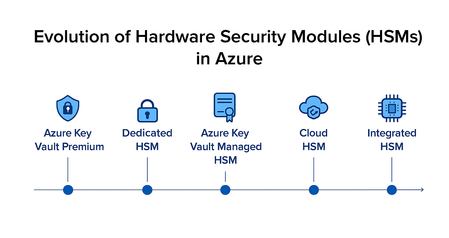
Azure Integrated HSM marks a major shift in how cryptographic keys are handled—moving from centralized clusters… to local, tamper‑resistant modules embedded directly in virtual machines. This new model brings cryptographic assurance closer to the workload, reducing latency, increasing throughput, and redefining what’s possible for secure applications in the cloud. Before diving into this innovation, let’s take a step back. Microsoft’s journey with HSMs in Azure spans nearly a decade, evolving through multiple architectures, vendors, and compliance models. From shared services to dedicated clusters, from appliance‑like deployments to embedded chips, each milestone reflects a distinct response to enterprise needs and regulatory expectations. Let’s walk through that progression — not as a single path, but as a layered portfolio that continues to expand. Azure Key Vault Premium, with nCipher nShield Around 2015, Microsoft made Azure Key Vault generally available, and soon after introduced the Premium tier, which integrated nCipher nShield HSMs (previously part of Thales, later acquired by Entrust). This was the first time customers could anchor their most sensitive cryptographic material in FIPS 140‑2 Level 2 validated hardware within Azure. Azure Key Vault Premium is delivered as a fully managed PaaS service, with HSMs deployed and operated by Microsoft in the backend. The service is redundant and highly available, with cryptographic operations exposed through Azure APIs while the underlying HSM infrastructure remains abstracted and secure. This enabled two principal cornerstone scenarios. Based on the Customer Encryption Key (CEK) model, customers could generate and manage encryption keys directly in Azure, always protected by HSMs in the backend. Going further with the Bring Your Own Key (BYOK) model, organizations could generate keys in their own on‑premises HSMs and then securely import and manage them into Azure Key Vault–backed HSMs. These capabilities were rapidly adopted across Microsoft’s second-party services. For example, they underpin the master key management for Azure RMS, later rebranded as Azure Information Protection, and now part of Microsoft Purview Information Protection. These HSM-backed keys can protect the most sensitive data if customers choose to implement the BYOK model through Sensitivity Labels, applying encryption and strict usage controls to protect highly confidential information. Other services like Service Encryption with Customer Key allow customers to encrypt all their data at rest in Microsoft 365 using their own keys, via Data Encryption Policies. This applies to data stored in Exchange, SharePoint, OneDrive, Teams, Copilot, and Purview. This approach also applies to Power Platform, where customer-managed keys can encrypt data stored in Microsoft Dataverse, which underpins services like Power Apps and Power Automate. Beyond productivity services, Key Vault Premium became a building block in hybrid customer architectures: protecting SQL Server Transparent Data Encryption (TDE) keys, storing keys for Azure Storage encryption or Azure Disk Encryption (SSE, ADE, DES), securing SAP workloads running on Azure, or managing TLS certificates for large‑scale web applications. It also supports custom application development and integrations, where cryptographic operations must be anchored in certified hardware — whether for signing, encryption, decryption, or secure key lifecycle management. Around 2020, Azure Key Vault Premium benefit from a shift away from the legacy nCipher‑specific BYOK process. Initially, BYOK in Azure was tightly coupled to nCipher tooling, which limited customers to a single vendor. As the HSM market evolved and customers demanded more flexibility, Microsoft introduced a multi‑vendor BYOK model. This allowed organizations to import keys from a broader set of providers, including Entrust, Thales, and Utimaco, while still ensuring that the keys never left the protection of FIPS‑validated HSMs. This change was significant: it gave customers freedom of choice, reduced dependency on a single vendor, and aligned Azure with the diverse HSM estates that enterprises already operated on‑premises. Azure Key Vault Premium remains a cornerstone of Azure’s data protection offerings. It’s widely used for managing keys, secrets (passwords, connection strings), and certificates. Around February 2024 then with a latest firmware update in April 2025, Microsoft and Marvel has announced the modernization of the Key Vault HSM backend to meet newer standards: Azure’s HSM pool has been updated with Marvell LiquidSecurity adapters that achieved FIPS 140-3 Level 3 certification. This means Key Vault’s underpinnings are being refreshed to the latest security level, though the service interface for customers remains the same. [A tip for Tech guys: you can check the HSM backend provider by looking at the FIPS level in the "hsmPlatform" key attribute]. Key Vault Premium continues to be the go-to solution for many scenarios where a fully managed, cloud-integrated key manager with a shared HSM protection is sufficient. Azure Dedicated HSM, with SafeNet Luna In 2018, Microsoft introduced Azure Dedicated HSM, built on SafeNet Luna hardware (originally Gemalto, later part of Thales). These devices were validated to FIPS 140‑2 Level 3, offering stronger tamper resistance and compliance guarantees. This service provided physically isolated HSM appliances, deployed as single-tenant instances within a customer’s virtual network. By default, these HSMs were non-redundant, unless customers explicitly provisioned multiple units across regions. Each HSM was connected to a private subnet, and the customer retained full administrative control over provisioning, partitioning, and policy enforcement. Unlike Key Vault, using a Dedicated HSM meant the customer had to manage a lot more: HSM user management, key backup (if needed), high availability setup, and any client access configuration. Dedicated HSM was particularly attractive to regulated industries such as finance, healthcare, and government, where compliance frameworks demanded not only FIPS‑validated hardware but also the ability to define their own cryptographic domains and audit processes. Over time, however, Microsoft evolved its HSM portfolio toward more cloud‑native and scalable services. Azure Dedicated HSM is now being retired: Microsoft announced that no new customer onboardings are accepted as of August 2025, and that full support for existing customers will continue until July 31, 2028. Customers are encouraged to plan their transition, as Azure Cloud HSM will succeed Dedicated HSM. Azure Key Vault Managed HSM, with Marvell LiquidSecurity By 2020, it was evident that Azure Key Vault (with shared HSMs) and Dedicated HSM (with single-tenant appliances) represented two ends of a spectrum, and customers wanted something in between: the isolation of a dedicated HSM and the ease-of-use of a managed cloud service. In 2021, Microsoft launched Azure Key Vault Managed HSM, a fully managed, highly available service built on Marvell LiquidSecurity adapters, validated to FIPS 140‑3 Level 3. The key difference with Azure Key Vault Premium lies in the architecture and assurance model. While AKV Premium uses a shared pool of HSMs per Azure geography, organized into region-specific cryptographic domains based on nShield technology — which enforces key isolation through its Security World architecture — Managed HSM provides dedicated HSM instances per customer, ensuring stronger isolation. Also delivered as a PaaS service, it is redundant by design, with built‑in clustering and high availability across availability zones; and fully managed in terms of provisioning, configuration, patching, and maintenance. Managed HSM consists of a cluster of multiple HSM partitions, each based on a separate customer-specific security domain that cryptographically isolates every tenant. Managed HSM supports the same use cases as AKV Premium — CEK, BYOK for Azure RMS or SEwCK, database encryption keys, or any custom integrations — but with higher assurance, stronger isolation, and FIPS 140‑3 Level 3 compliance. Azure Payment HSM, with Thales payShield 10K Introduced in 2022, Azure Payment HSM is a bare-metal, single-tenant service designed specifically for regulated payment workloads. Built on Thales payShield 10K hardware, it meets stringent compliance standards including FIPS 140-2 Level 3 and PCI HSM v3. Whereas Azure Dedicated HSM was built for general-purpose cryptographic workloads (PKI, TLS, custom apps), Payment HSM is purpose-built for financial institutions and payment processors, supporting specialized operations like PIN block encryption, EMV credentialing, and 3D Secure authentication. The service offers low-latency, high-throughput cryptographic operations in a PCI-compliant cloud environment. Customers retain full administrative control and can scale performance from 60 to 2500 CPS, deploying HSMs in high-availability pairs across supported Azure regions. Azure Cloud HSM, with Marvell LiquidSecurity In 2025, Microsoft introduced Azure Cloud HSM, also based on Marvell LiquidSecurity, as a single‑tenant, cloud‑based HSM cluster. These clusters offer a private connectivity and are validated to FIPS 140‑3 Level 3, ensuring the highest level of assurance for cloud‑based HSM services. Azure Cloud HSM is now the recommended successor to Azure Dedicated HSM and gives customers direct administrative authority over their HSMs, while Microsoft handles availability, patching, and maintenance. It is particularly relevant for certificate authorities, payment processors, and organizations that need to operate their own cryptographic infrastructure in the cloud but do not want the burden of managing physical hardware. It combines sovereignty and isolation with the elasticity of cloud operations, making it easier for customers to migrate sensitive workloads without sacrificing control. A single Marvell LiquidSecurity2 adapter can manage up to 100,000 key pairs and perform over one million cryptographic operations per second, making it ideal for high-throughput workloads such as document signing, TLS offloading, and PKI operations. In contrast to Azure Dedicated HSM, Azure Cloud HSM simplifies deployment and management by offering fast provisioning, built-in redundancy, and centralized operations handled by Microsoft. Customers retain full control over their keys while benefiting from secure connectivity via private links and automatic high availability across zones — without the need to manually configure clustering or failover. Azure Integrated HSM, with Microsoft Custom Chips In 2025, Microsoft finally unveiled Azure Integrated HSM, a new paradigm, shifting from a shared cryptographic infrastructure to dedicated, hardware-backed modules integrated at the VM level: custom Microsoft‑designed HSM chips are embedded directly into the host servers of AMD v7 virtual machines. These chips are validated to FIPS 140‑3 Level 3, ensuring that even this distributed model maintains the highest compliance standards. This innovation allows cryptographic operations to be performed locally, within the VM boundary. Keys are cached securely, hardware acceleration is provided for encryption, decryption, signing, and verification, and access is controlled through an oracle‑style model that ensures keys never leave the secure boundary. The result is a dramatic reduction in latency and a significant increase in throughput, while still maintaining compliance. This model is particularly well suited for TLS termination at scale, high‑frequency trading platforms, blockchain validation nodes, and large‑scale digital signing services, where both performance and assurance are critical. Entered public preview in September 2025, Trusted Launch must be enabled to use the feature, and Linux support is expected soon. Microsoft confirmed that Integrated HSM will be deployed across all new Azure servers, making it a foundational component of future infrastructure. Azure Integrated HSM also complements Azure Confidential Computing, allowing workloads to benefit from both in-use data protection through hardware-based enclaves and key protection via local HSM modules. This combination ensures that neither sensitive data nor cryptographic keys ever leave a secure hardware boundary — ideal for high-assurance applications. A Dynamic Vendor Landscape The vendor story behind these services is almost as interesting as the technology itself. Thales acquired nCipher in 2008, only to divest it in 2019 during its acquisition of Gemalto, under pressure from competition authorities. The buyer was Entrust, which suddenly found itself owning one of the most established HSM product lines. Meanwhile, Gemalto’s SafeNet Luna became part of Thales — which would also launch the Thales payShield 10K in 2019, leading PCI-certified payment HSM — and Marvell emerged as a new force with its LiquidSecurity line, optimized for cloud-scale deployments. Microsoft has navigated these shifts pragmatically, adapting its services and partnerships to ensure continuity for customers while embracing the best available hardware. Looking back, it is almost amusing to see how vendor mergers, acquisitions, and divestitures reshaped the HSM market, while Microsoft’s offerings evolved in lockstep to give customers a consistent path forward. Comparative Perspective Looking back at the evolution of Microsoft’s HSM integrations and services, a clear trajectory emerges: from the early days of Azure Key Vault Premium backed by certified HSMs (still active), completed by Azure Key Vault Managed HSM with higher compliance levels, through the Azure Dedicated HSM offering, replaced by the more cloud‑native Azure Cloud HSM, and finally to the innovative Azure Integrated HSM embedded directly in virtual machines. Each step reflects a balance between control, management, compliance, and performance, while also adapting to the vendor landscape and regulatory expectations. Service Hardware Introduced FIPS Level Model / Isolation Current Status / Notes Azure Key Vault Premium nCipher nShield (Thales → Entrust) Then Marvell LiquidSecurity 2015 FIPS 140‑2 Level 2 > Level 3 Shared per region, PaaS, HSM-backed Active; standard service; supports CEK and BYOK; multi-vendor BYOK since ~2020 Azure Dedicated HSM SafeNet Luna (Gemalto → Thales) 2018 FIPS 140‑2 Level 3 Dedicated appliance, single-tenant, VNet Retiring; no new onboardings; support until July 31, 2028; succeeded by Azure Cloud HSM Azure Key Vault Managed HSM Marvell LiquidSecurity 2021 FIPS 140‑3 Level 3 Dedicated cluster per customer, PaaS Active; redundant, isolated, fully managed; stronger compliance than Premium Azure Payment HSM Thales payShield 10K 2022 FIPS 140-2 Level 3 Bare-metal, single-tenant, full customer control, PCI-compliant Active. Purpose-built for payment workloads. Azure Cloud HSM Marvell LiquidSecurity 2025 FIPS 140‑3 Level 3 Single-tenant cluster, customer-administered Active; successor to Dedicated HSM; fast provisioning, built-in HA, private connectivity Azure Integrated HSM Microsoft custom chips 2025 FIPS 140‑3 Level 3 Embedded in VM host, local operations Active (preview/rollout); ultra-low latency, ideal for high-performance workloads Microsoft’s strategy shows an understanding that different customers have different requirements on the spectrum of control vs convenience. So Azure didn’t take a one-size-fits-all approach; it built a portfolio: - Use Azure Key Vault Premium if you want simplicity and can tolerate multi-tenancy. - Use Azure Key Vault Managed HSM if you need sole ownership of keys but want a turnkey service. - Use Azure Payment HSM if you operate regulated payment workloads and require PCI-certified hardware. - Use Azure Cloud HSM if you need sole ownership and direct access for legacy apps. - Use Azure Integrated HSM if you need ultra-low latency and per-VM key isolation, for the highest assurance in real-time. Beyond the HSM: A Silicon-to-Cloud Security Architecture by Design Microsoft’s HSM evolution is part of a broader strategy to embed security at every layer of the cloud infrastructure — from silicon to services. This vision, often referred to as “Silicon-to-Cloud”, includes innovations like Azure Boost, Caliptra, Confidential Computing, and now Azure Integrated HSM. Azure Confidential Computing plays a critical role in this architecture. As mentioned, by combining Trusted Execution Environments (TEEs) with Integrated HSM, Azure enables workloads to be protected at every stage — at rest, in transit, and in use — with cryptographic keys and sensitive data confined to verified hardware enclaves. This layered approach reinforces zero-trust principles and supports compliance in regulated industries. With Azure Integrated HSM installed directly on every new server, Microsoft is redefining how cryptographic assurance is delivered — not as a remote service, but as a native hardware capability embedded in the compute fabric itself. This marks a shift from centralized HSM clusters to distributed, silicon-level security, enabling ultra-low latency, high throughput, and strong isolation for modern cloud workloads. Resources To go a bit further, I invite you to check out the following articles and take a look at the related documentation. Protecting Azure Infrastructure from silicon to systems | Microsoft Azure Blog by Mark Russinovich, Chief Technology Officer, Deputy Chief Information Security Officer, and Technical Fellow, Microsoft Azure, Omar Khan, Vice President, Azure Infrastructure Marketing, and Bryan Kelly, Hardware Security Architect, Microsoft Azure Microsoft Azure Introduces Azure Integrated HSM: A Key Cache for Virtual Machines | Microsoft Community Hub by Simran Parkhe Securing Azure infrastructure with silicon innovation | Microsoft Community Hub by Mark Russinovich, Chief Technology Officer, Deputy Chief Information Security Officer, and Technical Fellow, Microsoft Azure About the Author I'm Samuel Gaston-Raoul, Partner Solution Architect at Microsoft, working across the EMEA region with the diverse ecosystem of Microsoft partners—including System Integrators (SIs) and strategic advisory firms, Independent Software Vendors (ISVs) / Software Development Companies (SDCs), and Startups. I engage with our partners to build, scale, and innovate securely on Microsoft Cloud and Microsoft Security platforms. With a strong focus on cloud and cybersecurity, I help shape strategic offerings and guide the development of security practices—ensuring alignment with market needs, emerging challenges, and Microsoft’s product roadmap. I also engage closely with our product and engineering teams to foster early technical dialogue and drive innovation through collaborative design. Whether through architecture workshops, technical enablement, or public speaking engagements, I aim to evangelize Microsoft’s security vision while co-creating solutions that meet the evolving demands of the AI and cybersecurity era.Azure Managed HSM and Azure Key Vault Premium HSM Devices Certified for eIDAS Compliance
Azure Managed HSM and Azure Key Vault Premium are now eIDAS compliant under A-SIT. We have been working with our vendor Marvell to validate the Marvell LiquidSecurity HSM adapters utilized in our services to meet the European Union’s electronic identification, authentication, and trust services (eIDAS) regulations. The HSM for both Azure Managed HSM and Azure Key Vault Premium has received eIDAS (Austrian Scheme) certification as a Qualified Signature Creation Device (QSCD). Why are these certifications important for Azure Managed HSM and Azure Key Vault Premium customers? These new certifications to Azure Managed HSM and Azure Key Vault Premium provide Trust Service Providers and others that provide time stamping, website authentication, certificate issuance, electronic registered delivery, electronic seal, and electronic signature services the ability to utilize Azure Managed HSM and Azure Key Vault Premium as part of their eIDAS-compliant solution. What is eIDAS? The regulation of electronic IDentification, Authentication, and trust Services for Electronic Transactions (eIDAS) is a European regulation aimed at creating a framework for cross-border electronic identification and transactions across EU member countries. What is a Qualified Signature Creation Device (QSCD)? A Qualified Signature Creation Device (QSCD) is a secure and special hardware such as an HSM designed to generate and protect digital signatures in compliance with eIDAS regulation (EU Regulation No. 910/2014). A QSCD is critical for generating qualified electronic signatures that have the same legal holding as handwritten signatures under EU law. Azure Managed HSM and Azure Key Vault Premium provide the highest levels of assurance and compliance, now meeting FIPS 140-3 Level 3, PCI DSS, PCI 3DS, and eIDAS compliance.General Availability: Key Attestation for Azure Managed HSM
We are excited to announce the General Availability of Key attestation for Azure Key Vault Managed HSM. Key attestation for Azure Managed HSM enables a way to validate the origin and integrity of cryptographic keys generated and stored within a trusted, FIPS 140-3 Level 3 certified HSM. This thereby enhances trust in key management processes by offering transparency and further enables compliance with strict security standards. This feature is especially valuable in scenarios where customers need assurance that their keys are protected from unauthorized access, even from cloud providers. The key attestation process has four steps: Downloading or cloning the open source Python scripts and requirements from our Github repository Setting up a virtual environment and installing the required Python packages Retrieving key attestation data from the HSM via CLI Verifying the key’s authenticity and the attestation data file, and viewing parsed attributes of the attestation binary via the open source Python script. When running the script in verbose mode, you can see how we establish a certificate chain validation and which certificates are used to verify the integrity of the attestation blob. You can validate the certificates we use in /src/vendor/marvell/marvell_validate_key_attestation.py. To learn more and try it out yourself, see the Key attestation product documentation.Azure Managed HSM and Azure Key Vault Premium are now FIPS 140-3 Level 3
We are excited to announce that the HSM firmware for both Azure Managed HSM and Azure Key Vault Premium are officially upgraded to a modern version validated to FIPS 140-3 Level 3 standard in all Azure public cloud regions. This upgrade represents a significant step forward in our commitment to providing best-in-class security to safeguard your valuable data. Key Improvements With the upgraded firmware, Azure Managed HSM and Azure Key Vault Premium users can benefit from: FIPS 140-3 Level 3 Validation: The Azure Key Vault Managed HSM and Azure Key Vault Premium firmware update ensure compliance with the rigorous standards set forth by FIPS 140-3 Level 3. This transition from FIPS 140-2 to FIPS 140-3 demonstrates our dedication to adhering to the highest security standards and industry best practices, giving you peace of mind knowing that your data is handled with the utmost care and security. Improved Compliance: In addition to bolstering security, the updated firmware also enhances compliance capabilities. Whether you're subject to industry regulations or internal compliance policies, this firmware ensures that your HSMs meet or exceed the required standards, helping you maintain regulatory compliance effortlessly. As we continue to innovate and enhance our services, our commitment to delivering the highest standards of security remains unwavering. We are confident this upgrade to FIPS 140-3 Level 3 improves the security and compliance posture of your infrastructure, allowing you to focus on your core business activities with confidence. For more information on FIPS 140-3, see Security Requirements for Cryptographic Modules, and Cryptographic Module Validation Program | CSRC3.6KViews0likes0CommentsPublic Preview: Key Attestation for Azure Managed HSM
We are excited to announce the Public Preview of Key attestation for Azure Key Vault Managed HSM. This feature allows you to validate the authenticity of cryptographic keys stored within the hardware security module (HSM) thereby enhancing trust in key management processes and further enabling compliance with stringent security standards. This feature is especially valuable in scenarios where customers need assurance that their keys are protected from unauthorized access, even from cloud providers. The key attestation process has four steps: Downloading or cloning the Python scripts and requirements from our Github repository Setting up a virtual environment and installing the required Python packages Retrieving key attestation data from the HSM Verifying the key’s authenticity and the attestation data file, and viewing parsed attributes of the attestation binary To learn more and try it out yourself, see the Key attestation product documentation.1.4KViews0likes2CommentsGeneral Availability: Monitoring and Logging for Azure Managed HSM in Azure Portal
Monitoring in Azure portal For each managed HSM you can navigate to the Metrics tab in the left-hand sidebar, under Monitoring, in the Azure portal to view the following metrics: Overall service API latency Overall service availability Total service API hits Customers can also analyze monitoring data in the Azure Monitor Logs / Log Analytics store using the Kusto query language (KQL). By writing custom queries, customers can get details on their logs about operations and errors important for auditing as well as troubleshooting purposes. Some example queries are: Are there any slow requests? Are there any failures? How active has this Managed HSM been? Who is calling this Managed HSM? Azure Monitor also provides Alerts for proactively fixing any issues before there is an impact. With Alert rules, customers can get notified whenever a metric crosses a threshold. Azure Advisor alerts allow customers to create alerts for specific recommendations such as creating a backup of an HSM within a given amount of time. To learn more about this feature, refer to: Monitor Azure Managed HSM Configure Managed HSM alerts Setting up Microsoft Sentinel for Azure Managed HSM