azure managed grafana
31 TopicsEnabling Full-stack Observability with Azure Monitor and Grafana
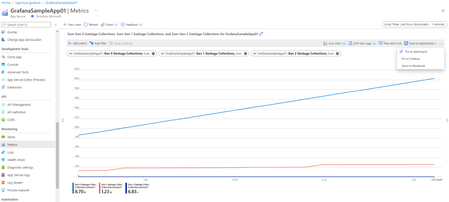
Along with the announcement of Azure Managed Grafana, we are excited to introduce new Grafana integrations with Azure Monitor including the ability to pin Azure Monitor visualizations from Azure Portal to Grafana dashboards and new out-of-the-box Azure Monitor dashboards.22KViews8likes11CommentsTroubleshoot with OpenTelemetry in Azure Monitor - Public Preview
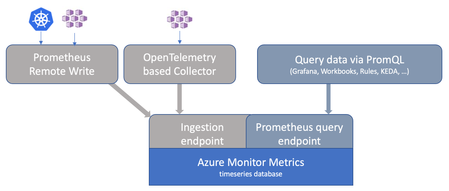
OpenTelemetry is fast becoming the industry standard for modern telemetry collection and ingestion pipelines. With Azure Monitor’s new OpenTelemetry Protocol (OTLP) support, you can ship logs, metrics, and traces from wherever you run workloads to analyze and act on your observability data in one place. What’s in the preview Direct OTLP ingestion into Azure Monitor for logs, metrics, and traces. Automated onboarding for AKS workloads. Application Insights on OTLP for distributed tracing, performance and troubleshooting experiences. Pre-built Grafana dashboards to visualize signals quickly. Prometheus for metric storage and query. OpenTelemetry semantic conventions for logs and traces, so your data lands in a familiar standard-based schema. How to send OTLP to Azure Monitor: pick your path AKS: Auto-instrument Java and Node.js workloads using the Azure Monitor OpenTelemetry distro, or auto-configure any OpenTelemetry SDK-instrumented workload to export OTLP to Azure Monitor. Get started Limited preview: Auto-instrumentation for .NET and Python is also available. Get started VMs/VM Scale Sets (and Azure Arc-enabled compute): Use the Azure Monitor Agent (AMA) to receive OTLP from your apps and export it to Azure Monitor. Get started Any environment: Use the OpenTelemetry Collector to receive OTLP signals and export directly to Azure Monitor cloud ingestion endpoints. Get started Under the hood: where your telemetry lands Metrics: Stored in an Azure Monitor Workspace, a Prometheus metrics store. Logs + traces: Stored in a Log Analytics workspace using an OpenTelemetry semantic conventions–based schema. Troubleshooting: Application Insights lights up distributed tracing and end-to-end performance investigations, backed by Azure Monitor. Why it matters Standardize once: Instrument with OpenTelemetry and keep your telemetry portable. Reduce overhead: Fewer bespoke exporters and pipelines to maintain. Debug faster: Correlate metrics, logs, and traces to get from alert to root cause with less guesswork. Observe with confidence: Use dashboards and tracing views that are ready on day one. Next step: Try the OTLP preview in your environment, then validate end-to-end signal flow with Application Insights and Grafana dashboards. Learn More607Views3likes0Comments
Advancing Full-Stack Observability with Azure Monitor at Ignite 2025
New AI-powered innovations in the observability space First, we’re excited to usher in the era of agentic cloud operations with Azure Copilot agents. At Ignite 2025, we are announcing the preview of the Azure Copilot observability agent to help you enhance full-stack troubleshooting. Formerly “Azure Monitor investigate”, the observability agent streamlines troubleshooting across application services and resources such as AKS and VMs with advanced root cause analysis in alerts, the portal, and Azure Copilot (gated preview). By automatically correlating telemetry across resources and surfacing actionable findings, it empowers teams to resolve issues faster, gain deeper visibility, and collaborate effectively. Learn more here about the observability agent and learn about additional agents in Azure Copilot here. Additionally, with the new Azure Copilot, we are streamlining agentic experiences across Azure. From operations center in the Azure portal, you can get a single view to navigate, operate and optimize your environments and invoke agents in your workflows. You also get suggested top actions within the observability blade of operations center to prioritize, diagnose and resolve issues with support from the observability agent. Learn more here. In the era of AI, more and more apps are now AI apps. That’s why we’re enhancing our observability capabilities for GenAI and agents: Azure Monitor brings agent-level visibility and control into a single experience in partnership with Observability in Foundry Control Plane through a new agent details view (public preview) showcasing success metrics, quality indicators, safety checks, and cost insights in one place. Simplified tracing also transforms every agent run into a reasonable, plan-and-act narrative for faster understanding. On top of these features, the new smart trace search enables faster detection of anomalies—such as policy violations, unexpected cost spikes, or model regressions—so teams can troubleshoot and optimize with confidence. These new agentic experiences build upon a solid observability foundation provided by Azure Monitor. Learn more here. We’re making several additional improvements in Azure Monitor: Simplified Onboarding & More Centralized Visibility Streamlined onboarding: Azure Monitor now offers streamlined onboarding for VMs, containers, and applications with sensible defaults and abstraction layers. This means ITOps teams can enable monitoring across environments in minutes, not hours. Previously, configuring DCRs and linking Log Analytics workspaces was a multi-step process; now, you can apply predefined templates and scale monitoring across hundreds of VMs faster than before. Centralized dashboards: A new monitor overview page in operations center consolidates top suggested actions and Azure Copilot-driven workflows for rapid investigation. Paired with the new monitoring coverage page (public preview) in Azure Monitor, ITOps can quickly identify gaps based on Azure Advisor recommendations, enable VM Insights and Container Insights at scale, and act on monitoring recommendations—all from a single pane of glass. Learn more here. Richer visualizations: Azure Monitor dashboards with Grafana are now in GA, delivering rich visualizations and data transformation capabilities on Prometheus metrics, Azure resource metrics, and more. Learn more here. Cloud to edge visibility: With expanded support for Arc-enabled Kubernetes with OpenShift and Azure Red Hat OpenShift in Container Insights and Managed Prometheus, Azure Monitor offers an even more complete set of services for monitoring the health and performance of different layers of Kubernetes infrastructure and the applications that depend on it. Learn more here. Advanced Logs, Metrics, and Alert Management Logs & metrics innovations: Azure Monitor now supports the log filtering and transformation (GA), as well as the emission of logs to additional destinations (public preview) such as Azure Data Explorer and Fabric—unlocking real-time analytics and more seamless data control. Learn more here. More granular access for managing logs: Granular RBAC for Log Analytics workspaces ensures compliance and least privilege principles across teams, now in general availability. Learn more here. Dynamic thresholds for log search alerts (public preview): Now you can apply the advanced machine learning methods of dynamic threshold calculations to enhance monitoring with log search alerts. Learn more here. Query-based metric alerts (public preview): Get rich and flexible query-based alerting on Prometheus, VM Guest OS, and custom OTel metrics to reduce complexity and unblock advanced alerting scenarios. Learn more here. OpenTelemetry Ecosystem Expansion Azure Monitor doubles down on our commitment to OpenTelemetry with expanded support for monitoring applications deployed to Azure Kubernetes Service (AKS) by using OTLP for instrumentation and data collection. New capabilities include: Auto-instrumentation with the Azure Monitor OpenTelemetry distro for Java and NodeJS apps on AKS (public preview): this reduces friction for teams adopting OTel standards and ensures consistent telemetry across diverse compute environments. Auto-configuration for apps on AKS in any language already instrumented with the open-source OpenTelemetry SDK to emit telemetry to Azure Monitor. Learn more here. Additionally, we are making it easier to gain richer and more consistent visibility across Azure VMs and Arc Servers with OpenTelemetry visualizations, offering standardized system metrics, per-process insights, and extensibility to popular workloads on a more cost-efficient and performant solution. Learn more here. Next Steps These innovations redefine observability from cloud to edge—simplifying onboarding, accelerating troubleshooting, and embracing open standards. For ITOps and DevOps teams, this means fewer blind spots, faster MTTR, and improved operational resilience. Whether you’re joining us at Microsoft Ignite 2025 in-person or online, there are plenty of ways to connect with the Azure Monitor team and learn more: Attend breakout session BRK149 for a deep dive into Azure Monitor’s observability capabilities and best practices for optimizing cloud resources. Attend breakout session BRK145 to learn more about how agentic AI can help you streamline cloud operations and management. Attend breakout session BRK190 to learn about how Azure Monitor and Microsoft Foundry deliver an end-to-end observability experience for your AI apps and agents. Join theater demo THR735 to see a live demo on monitoring AI agents in production. Connect with Microsoft experts at the Azure Copilot, Operations, and Management expert meet-up booth to get your questions answered.2.2KViews3likes0Comments