azure kubernetes service
212 TopicsRethinking Ingress on Azure: Application Gateway for Containers Explained
Introduction Azure Application Gateway for Containers is a managed Azure service designed to handle incoming traffic for container-based applications. It brings Layer-7 load balancing, routing, TLS termination, and web application protection outside of the Kubernetes cluster and into an Azure-managed data plane. By separating traffic management from the cluster itself, the service reduces operational complexity while providing a more consistent, secure, and scalable way to expose container workloads on Azure. Service Overview What Application Gateway for Containers does Azure Application Gateway for Containers is a managed Layer-7 load balancing and ingress service built specifically for containerized workloads. Its main job is to receive incoming application traffic (HTTP/HTTPS), apply routing and security rules, and forward that traffic to the right backend containers running in your Kubernetes cluster. Instead of deploying and operating an ingress controller inside the cluster, Application Gateway for Containers runs outside the cluster, as an Azure-managed data plane. It integrates natively with Kubernetes through the Gateway API (and Ingress API), translating Kubernetes configuration into fully managed Azure networking behavior. In practical terms, it handles: HTTP/HTTPS routing based on hostnames, paths, headers, and methods TLS termination and certificate management Web Application Firewall (WAF) protection Scaling and high availability of the ingress layer All of this is provided as a managed Azure service, without running ingress pods in your cluster. What problems it solves Application Gateway for Containers addresses several common challenges teams face with traditional Kubernetes ingress setups: Operational overhead Running ingress controllers inside the cluster means managing upgrades, scaling, certificates, and availability yourself. Moving ingress to a managed Azure service significantly reduces this burden. Security boundaries By keeping traffic management and WAF outside the cluster, you reduce the attack surface of the Kubernetes environment and keep security controls aligned with Azure-native services. Consistency across environments Platform teams can offer a standard, Azure-managed ingress layer that behaves the same way across clusters and environments, instead of relying on different in-cluster ingress configurations. Separation of responsibilities Infrastructure teams manage the gateway and security policies, while application teams focus on Kubernetes resources like routes and services. How it differs from classic Application Gateway While both services share the “Application Gateway” name, they target different use cases and operating models. In the traditional model of using Azure Application Gateway is a general-purpose Layer-7 load balancer primarily designed for VM-based or service-based backends. It relies on centralized configuration through Azure resources and is not Kubernetes-native by design. Application Gateway for Containers, on the other hand: Is designed specifically for container platforms Uses Kubernetes APIs (Gateway API / Ingress) instead of manual listener and rule configuration Separates control plane and data plane more cleanly Enables faster, near real-time updates driven by Kubernetes changes Avoids running ingress components inside the cluster In short, classic Application Gateway is infrastructure-first, while Application Gateway for Containers is platform- and Kubernetes-first. Architecture at a Glance At a high level, Azure Application Gateway for Containers is built around a clear separation between control plane and data plane. This separation is one of the key architectural ideas behind the service and explains many of its benefits. Control plane and data plane The control plane is responsible for configuration and orchestration. It listens to Kubernetes resources—such as Gateway API or Ingress objects—and translates them into a running gateway configuration. When you create or update routing rules, TLS settings, or security policies in Kubernetes, the control plane picks up those changes and applies them automatically. The data plane is where traffic actually flows. It handles incoming HTTP and HTTPS requests, applies routing rules, performs TLS termination, and forwards traffic to the correct backend services inside your cluster. This data plane is fully managed by Azure and runs outside of the Kubernetes cluster, providing isolation and high availability by design. Because the data plane is not deployed as pods inside the cluster, it does not consume cluster resources and does not need to be scaled or upgraded by the customer. Managed components vs customer responsibilities One of the goals of Application Gateway for Containers is to reduce what customers need to operate, while still giving them control where it matters. Managed by Azure Application Gateway for Containers data plane Scaling, availability, and patching of the gateway Integration with Azure networking Web Application Firewall engine and updates Translation of Kubernetes configuration into gateway rules Customer-managed Kubernetes resources (Gateway API or Ingress) Backend services and workloads TLS certificates and references Routing and security intent (hosts, paths, policies) Network design and connectivity to the cluster This split allows platform teams to keep ownership of the underlying Azure infrastructure, while application teams interact with the gateway using familiar Kubernetes APIs. The result is a cleaner operating model with fewer moving parts inside the cluster. In short, Application Gateway for Containers acts as an Azure-managed ingress layer, driven by Kubernetes configuration but operated outside the cluster. This architecture keeps traffic management simple, scalable, and aligned with Azure-native networking and security services. Traffic Handling and Routing This section explains what happens to a request from the moment it reaches Azure until it is forwarded to a container running in your cluster. Traffic Flow: From Internet to Pod Azure Application Gateway for Containers (AGC) acts as the specialized "front door" for your Kubernetes workloads. By sitting outside the cluster, it manages high-volume traffic ingestion so your environment remains focused on application logic rather than networking overhead. The Request Journey Once a request is initiated by a client—such as a browser or an API—it follows a streamlined path to your container: 1. Entry via Public Frontend: The request reaches AGC’s public frontend endpoint. Note: While private frontends are currently the most requested feature and are under high-priority development, the service currently supports public-facing endpoints. 2. Rule Evaluation: AGC evaluates the incoming request against the routing rules you’ve defined using standard Kubernetes resources (Gateway API or Ingress). 3. Direct Pod Proxying: Once a rule is matched, AGC forwards the traffic directly to the backend pods within your cluster. 4. Azure Native Delivery: Because AGC operates as a managed data plane outside the cluster, traffic reaches your workloads via Azure networking. This removes the need for managing scaling or resource contention for in-cluster ingress pods. Flexibility in Security and Routing The architecture is designed to be as "hands-off" or as "hands-on" as your security policy requires: Optional TLS Offloading: You have full control over the encryption lifecycle. Depending on your specific use case, you can choose to perform TLS termination at the gateway to offload the compute-intensive decryption, or maintain encryption all the way to the container for end-to-end security. Simplified Infrastructure: By using AGC, you eliminate the "hop" typically required by in-cluster controllers, allowing the gateway to communicate with pods with minimal latency and high predictability. Kubernetes Integration Application Gateway for Containers is designed to integrate natively with Kubernetes, allowing teams to manage ingress behavior using familiar Kubernetes resources instead of Azure-specific configuration. This makes the service feel like a natural extension of the Kubernetes platform rather than an external load balancer. Gateway API as the primary integration model The Gateway API is the preferred and recommended way to integrate Application Gateway for Containers with Kubernetes. With the Gateway API: Platform teams define the Gateway and control how traffic enters the cluster. Application teams define routes (such as HTTPRoute) to expose their services. Responsibilities are clearly separated, supporting multi-team and multi-namespace environments. Application Gateway for Containers supports core Gateway API resources such as: GatewayClass Gateway HTTPRoute When these resources are created or updated, Application Gateway for Containers automatically translates them into gateway configuration and applies the changes in near real time. Ingress API support For teams that already use the traditional Kubernetes Ingress API, Application Gateway for Containers also provides Ingress support. This allows: Reuse of existing Ingress manifests A smoother migration path from older ingress controllers Gradual adoption of Gateway API over time Ingress resources are associated with Application Gateway for Containers using a specific ingress class. While fully functional, the Ingress API offers fewer capabilities and less flexibility compared to the Gateway API. How teams interact with the service A key benefit of this integration model is the clean separation of responsibilities: Platform teams Provision and manage Application Gateway for Containers Define gateways, listeners, and security boundaries Own network and security policies Application teams Define routes using Kubernetes APIs Control how their applications are exposed Do not need direct access to Azure networking resources This approach enables self-service for application teams while keeping governance and security centralized. Why this matters By integrating deeply with Kubernetes APIs, Application Gateway for Containers avoids custom controllers, sidecars, or ingress pods inside the cluster. Configuration stays declarative, changes are automated, and the operational model stays consistent with Kubernetes best practices. Security Capabilities Security is a core part of Azure Application Gateway for Containers and one of the main reasons teams choose it over in-cluster ingress controllers. The service brings Azure-native security controls directly in front of your container workloads, without adding complexity inside the cluster. Web Application Firewall (WAF) Application Gateway for Containers integrates with Azure Web Application Firewall (WAF) to protect applications against common web attacks such as SQL injection, cross-site scripting, and other OWASP Top 10 threats. A key differentiator of this service is that it leverages Microsoft's global threat intelligence. This provides an enterprise-grade layer of security that constantly evolves to block emerging threats, a significant advantage over many open-source or standard competitor WAF solutions. Because the WAF operates within the managed data plane, it offers several operational benefits: Zero Cluster Footprint: No WAF-specific pods or components are required to run inside your Kubernetes cluster, saving resources for your actual applications. Edge Protection: Security rules and policies are applied at the Azure network edge, ensuring malicious traffic is blocked before it ever reaches your workloads. Automated Maintenance: All rule updates, patching, and engine maintenance are handled entirely by Azure. Centralized Governance: WAF policies can be managed centrally, ensuring consistent security enforcement across multiple teams and namespaces—a critical requirement for regulated environments. TLS and certificate handling TLS termination happens directly at the gateway. HTTPS traffic is decrypted at the edge, inspected, and then forwarded to backend services. Key points: Certificates are referenced from Kubernetes configuration TLS policies are enforced by the Azure-managed gateway Applications receive plain HTTP traffic, keeping workloads simpler This approach allows teams to standardize TLS behavior across clusters and environments, while avoiding certificate logic inside application pods. Network isolation and exposure control Because Application Gateway for Containers runs outside the cluster, it provides a clear security boundary between external traffic and Kubernetes workloads. Common patterns include: Internet-facing gateways with WAF protection Private gateways for internal or zero-trust access Controlled exposure of only selected services By keeping traffic management and security at the gateway layer, clusters remain more isolated and easier to protect. Security by design Overall, the security model follows a simple principle: inspect, protect, and control traffic before it enters the cluster. This reduces the attack surface of Kubernetes, centralizes security controls, and aligns container ingress with Azure’s broader security ecosystem. Scale, Performance, and Limits Azure Application Gateway for Containers is built to handle production-scale traffic without requiring customers to manage capacity, scaling rules, or availability of the ingress layer. Scalability and performance are handled as part of the managed service. Interoperability: The Best of Both Worlds A common hesitation when adopting cloud-native networking is the fear of vendor lock-in. Many organizations worry that using a provider-specific ingress service will tie their application logic too closely to a single cloud’s proprietary configuration. Azure Application Gateway for Containers (AGC) addresses this directly by utilizing the Kubernetes Gateway API as its primary integration model. This creates a powerful decoupling between how you define your traffic and how that traffic is actually delivered. Standardized API, Managed Execution By adopting this model, you gain two critical advantages simultaneously: Zero Vendor Lock-In (Standardized API): Your routing logic is defined using the open-source Kubernetes Gateway API standard. Because HTTPRoute and Gateway resources are community-driven standards, your configuration remains portable and familiar to any Kubernetes professional, regardless of the underlying infrastructure. Zero Operational Overhead (Managed Implementation): While the interface is a standard Kubernetes API, the implementation is a high-performance Azure-managed service. You gain the benefits of an enterprise-grade load balancer—automatic scaling, high availability, and integrated security—without the burden of managing, patching, or troubleshooting proxy pods inside your cluster. The "Pragmatic" Advantage As highlighted in recent architectural discussions, moving from traditional Ingress to the Gateway API is about more than just new features; it’s about interoperability. It allows platform teams to offer a consistent, self-service experience to developers while retaining the ability to leverage the best-in-class performance and security that only a native cloud provider can offer. The result is a future-proof architecture: your teams use the industry-standard language of Kubernetes to describe what they need, and Azure provides the managed muscle to make it happen. Scaling model Application Gateway for Containers uses an automatic scaling model. The gateway data plane scales up or down based on incoming traffic patterns, without manual intervention. From an operator’s perspective: There are no ingress pods to scale No node capacity planning for ingress No separate autoscaler to configure Scaling is handled entirely by Azure, allowing teams to focus on application behavior rather than ingress infrastructure. Performance characteristics Because the data plane runs outside the Kubernetes cluster, ingress traffic does not compete with application workloads for CPU or memory. This often results in: More predictable latency Better isolation between traffic management and application execution Consistent performance under load The service supports common production requirements such as: High concurrent connections Low-latency HTTP and HTTPS traffic Near real-time configuration updates driven by Kubernetes changes Service limits and considerations Like any managed service, Application Gateway for Containers has defined limits that architects should be aware of when designing solutions. These include limits around: Number of listeners and routes Backend service associations Certificates and TLS configurations Throughput and connection scaling thresholds These limits are documented and enforced by the platform to ensure stability and predictable behavior. For most application platforms, these limits are well above typical usage. However, they should be reviewed early when designing large multi-tenant or high-traffic environments. Designing with scale in mind The key takeaway is that Application Gateway for Containers removes ingress scaling from the cluster and turns it into an Azure-managed concern. This simplifies operations and provides a stable, high-performance entry point for container workloads. When to Use (and When Not to Use) Scenario Use it? Why Kubernetes workloads on Azure ✅ Yes The service is designed specifically for container platforms and integrates natively with Kubernetes APIs. Need for managed Layer-7 ingress ✅ Yes Routing, TLS, and scaling are handled by Azure without in-cluster components. Enterprise security requirements (WAF, TLS policies) ✅ Yes Built-in Azure WAF and centralized TLS enforcement simplify security. Platform team managing ingress for multiple apps ✅ Yes Clear separation between platform and application responsibilities. Multi-tenant Kubernetes clusters ✅ Yes Gateway API model supports clean ownership boundaries and isolation. Desire to avoid running ingress controllers in the cluster ✅ Yes No ingress pods, no cluster resource consumption. VM-based or non-container backends ❌ No Classic Application Gateway is a better fit for non-container workloads. Simple, low-traffic test or dev environments ❌ Maybe not A lightweight in-cluster ingress may be simpler and more cost-effective. Need for custom or unsupported L7 features ❌ Maybe not Some advanced or niche ingress features may not yet be available. Non-Kubernetes platforms ❌ No The service is tightly integrated with Kubernetes APIs. When to Choose a Different Path: Azure Container Apps While Application Gateway for Containers provides the ultimate control for Kubernetes environments, not every project requires that level of infrastructure management. For teams that don't need the full flexibility of Kubernetes and are looking for the fastest path to running containers on Azure without managing clusters or ingress infrastructure at all, Azure Container Apps offers a specialized alternative. It provides a fully managed, serverless container platform that handles scaling, ingress, and networking automatically "out of the box". Key Differences at a Glance Feature AGC + Kubernetes Azure Container Apps Control Granular control over cluster and ingress. Fully managed, serverless experience. Management You manage the cluster; Azure manages the gateway. Azure manages both the platform and ingress. Best For Complex, multi-team, or highly regulated environments. Rapid development and simplified operations. Appendix - Routing configuration examples The following examples show how Application Gateway for Containers can be configured using both Gateway API and Ingress API for common routing and TLS scenarios. More examples can be found here, in the detailed documentation. HTTP listener apiVersion: gateway.networking.k8s.io/v1 kind: HTTPRoute metadata: name: app-route spec: parentRefs: - name: agc-gateway rules: - backendRefs: - name: app-service port: 80 Path routing logic apiVersion: gateway.networking.k8s.io/v1 kind: HTTPRoute metadata: name: path-routing spec: parentRefs: - name: agc-gateway rules: - matches: - path: type: PathPrefix value: /api backendRefs: - name: api-service port: 80 - backendRefs: - name: web-service port: 80 Weighted canary / rollout apiVersion: gateway.networking.k8s.io/v1 kind: HTTPRoute metadata: name: canary-route spec: parentRefs: - name: agc-gateway rules: - backendRefs: - name: app-v1 port: 80 weight: 80 - name: app-v2 port: 80 weight: 20 TLS Termination apiVersion: networking.k8s.io/v1 kind: Ingress metadata: name: app-ingress spec: ingressClassName: azure-alb-external tls: - hosts: - app.contoso.com secretName: tls-cert rules: - host: app.contoso.com http: paths: - path: / pathType: Prefix backend: service: name: app-service port: number: 80277Views0likes0CommentsSeamless Migrations From Self Hosted Nginx Ingress To The AKS App Routing Add-On
The Kubernetes Steering Committee has announced that the Nginx Ingress controller will be retired in March 2026. That' not far away, and once this happens Nginx Ingress will not receive any further updates, including security patches. Continuing to run the standalone Nginx Ingress controller past the end of March could open you up to security risks. Azure Kubernetes Service (AKS) offers a managed routing add-on which also implements Nginx as the Ingress Controller. Microsoft has recently committed to supporting this version of Nginx Ingress until November 2026. There is also an updated version of the App Routing add-on in the works, that will be based on Istio to allow for transition off Nginx Ingress. This new App Routing add-on will support Gateway API based ingress only, so there will be some migration required if you are using the Ingress API. There is tooling availible to support migration from Ingress to Gateway API, such as the Ingress2Gateway tool. If you are already using the App Routing add-on then you are supported until November and have extra time to either move to the new Istio based solution when it is released or migrate to another solution such as App Gateway for Containers. However, if you are running the standalone version of Nginx Ingress, you may want to consider migrating to the App Routing add-on to give you some extra time. To be very clear, migrating to the App Routing add-on does not solve the problem; it buys you some more time until November and sets you up for a transition to the future Istio based App Routing add-on. Once you complete this migration you will need to plan to either move to the new version based on Istio, or migrate to another Ingress solution, before November. This rest of this article walks through migrating from BYO Nginx to the App Routing add-on without disrupting your existing traffic. How Parallel Running Works The key to a zero-downtime migration is that both controllers can run simultaneously. Each controller uses a different IngressClass, so Kubernetes routes traffic based on which class your Ingress resources reference. Your BYO Nginx uses the nginx IngressClass and runs in the ingress-nginx namespace. The App Routing add-on uses the webapprouting.kubernetes.azure.com IngressClass and runs in the app-routing-system namespace. They operate completely independently, each with its own load balancer IP. This means you can: Enable the add-on alongside your existing controller Create new Ingress resources targeting the add-on (or duplicate existing ones) Validate everything works via the add-on's IP Cut over DNS or backend pool configuration Remove the old Ingress resources once you're satisfied At no point does your production traffic go offline. Enabling the App Routing add-on Start by enabling the add-on on your existing cluster. This doesn't touch your BYO Nginx installation. bash az aks approuting enable \ --resource-group <resource-group> \ --name <cluster-name> </cluster-name></resource-group> Wait for the add-on to deploy. You can verify it's running by checking the app-routing-system namespace: kubectl get pods -n app-routing-system kubectl get svc -n app-routing-system You should see the Nginx controller pod running and a service called nginx with a load balancer IP. This IP is separate from your BYO controller's IP. bash # Get both IPs for comparison BYO_IP=$(kubectl get svc ingress-nginx-controller -n ingress-nginx \ -o jsonpath='{.status.loadBalancer.ingress[0].ip}') add-on_IP=$(kubectl get svc nginx -n app-routing-system \ -o jsonpath='{.status.loadBalancer.ingress[0].ip}') echo "BYO Nginx IP: $BYO_IP" echo "add-on IP: $add-on_IP" Both controllers are now running. Your existing applications continue to use the BYO controller because their Ingress resources still reference ingressClassName: nginx. Migrating Applications: The Parallel Ingress Approach For production workloads, create a second Ingress resource that targets the add-on. This lets you validate everything before cutting over traffic. Here's an example. Your existing Ingress might look like this: apiVersion: networking.k8s.io/v1 kind: Ingress metadata: name: myapp-ingress-byo namespace: myapp annotations: nginx.ingress.kubernetes.io/rewrite-target: / spec: ingressClassName: nginx # BYO controller rules: - host: myapp.example.com http: paths: - path: / pathType: Prefix backend: service: name: myapp port: number: 80 Create a new Ingress for the add-on: apiVersion: networking.k8s.io/v1 kind: Ingress metadata: name: myapp-ingress-add-on namespace: myapp annotations: nginx.ingress.kubernetes.io/rewrite-target: / spec: ingressClassName: webapprouting.kubernetes.azure.com # add-on controller rules: - host: myapp.example.com http: paths: - path: / pathType: Prefix backend: service: name: myapp port: number: 80 Apply this new Ingress resource. The add-on controller picks it up and configures routing, but your production traffic still flows through the BYO controller because DNS (or your backend pool) still points to the old IP. Validating Before Cutover Test the new route via the add-on IP before touching anything else: # For public ingress with DNS curl -H "Host: myapp.example.com" http://$add-on_IP # For private ingress, test from a VM in the VNet curl -H "Host: myapp.example.com" http://$add-on_IP Run your full validation suite against this IP. Check TLS certificates, path routing, authentication, rate limiting, custom headers, and anything else your application depends on. If you have monitoring or synthetic tests, point them at the add-on IP temporarily to gather confidence. If something doesn't work, you can troubleshoot without affecting production. The BYO controller is still handling all real traffic. Cutover To Routing Add-on If your ingress has a public IP and you're using DNS to route traffic, the cutover is straightforward. Lower your DNS TTL well in advance. Set it to 60 seconds at least an hour before you plan to cut over. This ensures changes propagate quickly and you can roll back fast if needed. When you're ready, update your DNS A record to point to the add-on IP If your ingress has a private IP and sits behind App Gateway, API Management, or Front Door, the cutover involves updating the backend pool instead of DNS. In-Place Patching: The Faster But Riskier Option If you're migrating a non-critical application or an internal service where some downtime is acceptable, you can patch the ingressClassName in place: kubectl patch ingress myapp-ingress-byo -n myapp \ --type='json' \ -p='[{"op":"replace","path":"/spec/ingressClassName","value":"webapprouting.kubernetes.azure.com"}]' This is atomic from Kubernetes' perspective. The BYO controller immediately drops the route, and the add-on controller immediately picks it up. In practice, there's usually a few seconds gap while the add-on configures Nginx and reloads. Once this change is made, the Ingress will not work until you update your DNS or backend pool details to point to the new IP. Decommissioning the BYO Nginx Controller Once all your applications are migrated and you're confident everything works, you can remove the BYO controller. First, verify nothing is still using it: kubectl get ingress --all-namespaces \ -o custom-columns='NAMESPACE:.metadata.namespace,NAME:.metadata.name,CLASS:.spec.ingressClassName' \ | grep -v "webapprouting" If that returns only the header row (or is empty), you're clear to proceed. If it shows any Ingress resources, you've still got work to do. Remove the BYO Nginx Helm release: helm uninstall ingress-nginx -n ingress-nginx kubectl delete namespace ingress-nginx The Azure Load Balancer provisioned for the BYO controller will be deprovisioned automatically. Verify only the add-on IngressClass remains: kubectl get ingressclass You should see only webapprouting.kubernetes.azure.com. Key Differences Between BYO Nginx and the App Routing add-on The add-on runs the same Nginx binary, so most of your configuration carries over. However, there are a few differences worth noting. TLS Certificates: The BYO setup typically uses cert-manager or manual Secrets for certificates. The add-on supports this, but it also integrates natively with Azure Key Vault. If you want to use Key Vault, you need to configure the add-on with the appropriate annotations. Otherwise, your existing cert-manager setup continues to work. DNS Management: If you're using external-dns with your BYO controller, it works with the add-on too. The add-on also has native integration with Azure DNS zones if you want to simplify your setup. This is optional. Custom Nginx Configuration: With BYO Nginx, you have full access to the ConfigMap and can customise the global Nginx configuration extensively. The add-on restricts this because it's managed by Azure. If you've done significant customisation (Lua scripts, custom modules, etc.), audit carefully to ensure the add-on supports what you need. Most standard configurations work fine. Annotations: The nginx.ingress.kubernetes.io/* annotations work the same way. The add-on adds some Azure-specific annotations for WAF integration and other features, but your existing annotations should carry over without changes. What Comes Next This migration gets you onto a supported platform, but it's temporary. November 2026 is not far away, and you'll need to plan your next move. Microsoft is building a new App Routing add-on based on Istio. This is expected later in 2026 and will likely become the long-term supported option. Keep an eye on Azure updates for announcements about preview availability and migration paths. If you need something production-ready sooner, App Gateway for Containers is worth evaluating. It's built on Envoy and supports the Kubernetes Gateway API, which is the future direction for ingress in Kubernetes. The Gateway API is more expressive than the Ingress API and is designed to be vendor-neutral. For now, getting off the unsupported BYO Nginx controller is the priority. The App Routing add-on gives you the breathing room to make an informed decision about your long-term strategy rather than rushing into something because you're running out of time.215Views0likes0Comments
Beyond iptables: Scaling AKS Networking with nftables and Project Calico
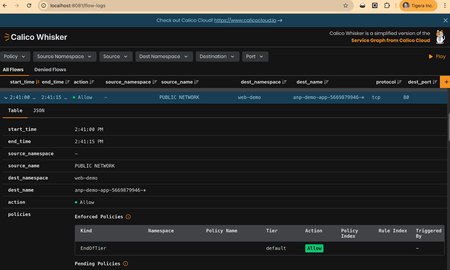
Author : Reza Ramezanpour Senior Developer Advocate @ Tigera For most of Kubernetes’ life, service networking has relied on iptables. It was practical, widely available on all Linux distributions, and good enough for clusters with modest scale with predictable workloads. However, as cloud providers are increasing the pod limits for clusters and deployments are taking advantage of their multi-regional, highly available infrastructure the need for running more workloads shines a light on an old design problem. Today’s production clusters by taking advantage of cloud provider infrastructure run thousands of services that may experience constant endpoint churn, and must satisfy strict requirements around performance, security, and compliance. In this case the old iptables model which we will discuss here is inefficient and it was never designed with these environments in mind. This is why the Kubernetes community started to move away from iptables toward nftables, and the upstream Kubernetes graduated the kube-proxy support for nftables mode to stable in the v1.33 release which was followed by Tigera’s free and open source Project Calico v3.29. Last year, Microsoft’s decision to support kube-proxy in nftables mode reflects a broader reality, the traditional iptables model is becoming a structural bottleneck for modern Kubernetes platforms, including managed environments such as AKS. In this blog we are going to use Microsoft’s latest kube-proxy preview features to create a Bring Your Own CNI cluster configured for nftables, and use Project Calico to establish networking and security on it. We will also look at why a shift from iptabels to nftables is recommended and should happen sooner than later. The Hidden Tax of iptables You might be using iptables in a large cluster today and thinking, everything works, why change it? But that’s how the problem usually starts. The iptables limitations don’t show up as a failure. They show up gradually: higher CPU usage, slower updates, harder debugging. Then one day, they’re unavoidable. Think of it like this, You have two security guards checking people entering a stadium. Both have the same guest list. The first guard (iptables) holds the list on paper. For every person, he starts at the top of the list, scans name by name, finds a match, then goes back to the top for the next person. Each time a new person joins the line, he needs to re-write the whole/or part of the list again and start from scratch. The second guard (nftables) has the list in a searchable database. He types the name, gets an instant answer, and moves on. Both let the right people in. However, one of these security guards slows down as the crowd grows, and at some point it will just give up scanning for new people. That’s the hidden cost of sticking to iptables, lookup time grows with the number of services that you have in your cluster, and updates get more expensive as the system scales. Creating Your First AKS Managed Nftables Ready Cluster Microsoft Azure Kubernetes Service (AKS) now includes preview support for running kube-proxy in nftables mode. This preview is opt-in and not enabled by default, because it’s still under development. To use it in AKS you must explicitly opt into the preview : az extension add --name aks-preview az extension update --name aks-preview Next, you have to register the kubeproxy custom configuration preview feature. az feature register --namespace "Microsoft.ContainerService" --name "KubeProxyConfigurationPreview" Once the feature is registered (this may take a few minutes to complete), you can customize the kube-proxy deployment. To enable nftables mode, define a minimal kube-proxy configuration like the following and save it as kube-proxy.json, which will be referenced when creating the AKS cluster in the next step: { "enabled": true, "mode": "NFTABLES" } With that config saved in a file (e.g., kube-proxy.json), issue the following command and create your cluster: az group create --name nftables-demo --location canadacentral az aks create \ --resource-group nftables-demo \ --name calico-nftables \ --kube-proxy-config kube-proxy.json \ --network-plugin none \ --pod-cidr "10.10.0.0/16" \ --generate-ssh-keys \ --location canadacentral \ --node-count 2 \ --vm-size Standard_A8m_v2 After the cluster is created, verify that kube-proxy is running in nftables mode by issuing the following command: kubectl logs -n kube-system ds/kube-proxy | egrep "Proxier" Output: I0129 21:09:06.613047 1 server_linux.go:259] "Using nftables Proxier" After you’ve confirmed nftables is active, install Calico. kubectl create -f https://docs.tigera.io/calico/latest/manifests/tigera-operator.yaml Next, install the cluster installation resource which instructs Tigera operator about the Calico features that should be enabled in your environment. kubectl create -f https://gist.githubusercontent.com/frozenprocess/6932bae9e33468b53696f1a901f2aa76/raw/d74ba8ef30a5657e7474a1fe22a650f87c08ecaf/installation.yaml If you already installed Calico and are using any of its dataplanes such as iptables, IPVS or Calico eBPF mode simply use the following command to only change the dataplane to nftables. kubectl patch installation default --type=merge -p='{"spec":{"calicoNetwork":{"linuxDataplane":"Nftables"}}}' A Tale of Two Backends - How Services Works In Nftables Now that we have the analogy and an environment, let's look at the actual differences between these two backends. For that, first deploy an application on your cluster. This demo app creates a deployment with 1 replica and a service with the type of LoadBalancer. NAME READY STATUS RESTARTS AGE pod/anp-demo-app-5669879946-rb28v 1/1 Running 0 91s NAME TYPE CLUSTER-IP EXTERNAL-IP PORT(S) AGE service/container-service LoadBalancer 10.0.92.204 40.82.188.95 80:31907/TCP 90s NAME READY UP-TO-DATE AVAILABLE AGE deployment.apps/anp-demo-app 1/1 1 1 91s NAME DESIRED CURRENT READY AGE replicaset.apps/anp-demo-app-5669879946 1 1 1 92s 1. Service Maps (The list in our analogy) In nftables mode, kube-proxy doesn't just create a long list of linear rules. Instead, it leverages maps. Think of a map as a high-speed lookup table. Our first step is to see how Kubernetes stores the mapping between a Service's Public/Cluster IP and its internal handling logic. kubectl exec -itn calico-system ds/calico-node -c calico-node -- nft list map ip kube-proxy service-ips Output: type ipv4_addr . inet_proto . inet_service : verdict elements = { 40.82.188.95 . tcp . 80 : goto external-SG2JDYAZ-web-demo/container-service/tcp/ } What’s happening here? The output shows that any traffic hitting the External IP 40.82.188.95 on port 80 is immediately told to goto a specific chain. Unlike iptables, which has to evaluate rules one by one, nftables jumps straight to the relevant logic. 2. The Dispatcher Chain Once a packet matches a service in the map, it is handed off to a specific chain. This chain acts as a dispatcher, preparing the packet for the "External" world. A map is a simple way to figure out what to do if a flow is matched, here the idea is if source IP, protocol, and destination port matches with a flow the verdict should arrive by using the external-SG2JDYAZ-web-demo/container-service/tcp/ chain entry. Note that an external facing service doesn’t have access to the internal pods, so now nftables need to NAT the communication and send it to the pod. kubectl exec -itn calico-system ds/calico-node -c calico-node -- nft list chain ip kube-proxy "external-SG2JDYAZ-web-demo/container-service/tcp/" Note: Here, nftables marks the packet for Masquerade (SNAT) to ensure the return traffic flows back through the gateway, and then forwards it to the primary service chain. Output: table ip kube-proxy { chain external-SG2JDYAZ-web-demo/container-service/tcp/ { jump mark-for-masquerade goto service-SG2JDYAZ-web-demo/container-service/tcp/ } } 3. Load Balancing via Verdict Maps This is where the magic happens. Kubernetes needs to decide which Pod should receive the traffic. In nftables, this is handled using a vmap (verdict map) combined with a random number generator. kubectl exec -itn calico-system ds/calico-node -c calico-node -- nft list chain ip kube-proxy "service-SG2JDYAZ-web-demo/container-service/tcp/" Notice the numgen random mod 1. Since we currently have only one replica, the logic is simple: 100% of traffic goes to the single available endpoint. table ip kube-proxy { chain service-SG2JDYAZ-web-demo/container-service/tcp/ { ip daddr 10.0.92.204 tcp dport 80 ip saddr != 10.10.0.0/16 jump mark-for-masquerade numgen random mod 1 vmap { 0 : goto endpoint-KEOBOJ73-web-demo/container-service/tcp/__10.10.219.68/80 } } } 4. The Final Destination: DNAT to Pod IP The last stop in the nftables journey is the endpoint chain. This is where the packet’s destination address is actually changed from the Service IP to the Pod’s internal IP. kubectl exec -itn calico-system ds/calico-node -c calico-node -- nft list chain ip kube-proxy "endpoint-KEOBOJ73-web-demo/container-service/tcp/__10.10.219.68/80" The rule dnat to 10.10.219.68:80 rewritten the packet header. The packet is now ready to be routed directly to the container. Output: table ip kube-proxy { chain endpoint-KEOBOJ73-web-demo/container-service/tcp/__10.10.219.68/80 { ip saddr 10.10.219.68 jump mark-for-masquerade meta l4proto tcp dnat to 10.10.219.68:80 } } Scaling Deployments What happens when we scale? Let’s increase our replicas to 10 to see how nftables updates its load-balancing table dynamically. kubectl patch deployment -n web-demo --type=merge anp-demo-app -p='{"spec":{"replicas":10}}' What changed? The numgen (number generator) will now be mod 10, and the vmap will contain 10 different target chains (one for each Pod). This is significantly more efficient than the "probability" flags used in legacy iptables. You can verify this by re-issuing the command from step 3. Note: The actual journey doesn’t start at the map; it begins at the nat-prerouting chain, moves to the services chain, and is finally evaluated against the service-ips map. If you like to learn how iptables services works take a look at this free course. It’s end of an era As more and more Linux distributions, companies, and projects try to shift from iptables to nftables the cost of maintaining an iptables environment will increase for its users. The shift from iptables to nftables isn't just a minor version bump; it is a fundamental architectural upgrade for the modern cloud-native solution. As we examined, the "hidden tax" of linear rule evaluation in iptables becomes a bottleneck while your Kubernetes clusters scale into thousands of services and endpoints. This is why the industry is looking for solutions that are more tuned for the cloud native environment. By leveraging the new nftables mode in kube-proxy, that is now in a preview mode in Microsoft AKS and added to Kubernetes from v1.33 and Project Calico v3.29+, platform engineers can finally move away from iptables. Footnote - Observability and troubleshooting In this blog, we explored the inner workings of nftables using the command line, a powerful way to understand the underlying mechanics of packet filtering. However, manual terminal work isn't the only way to troubleshoot networking in Kubernetes. In a production environment, you often need a higher-level view to observe traffic flows and policy impacts across hundreds of pods. Several open-source projects provide "browser-based" observability, allowing you to debug network flows visually rather than parsing text logs. Network Observability Tools Calico Whisker: A dedicated observability tool for Calico (v3.30+) that visualizes real-time network flows. It is particularly useful for debugging Staged Network Policies, as it shows you exactly which flows would be denied before you actually enforce the rules. Learn more about Calico Whisker here. kubectl port-forward -n calico-system svc/whisker 8081:8081 Microsoft Retina: A CNI-agnostic, eBPF-based platform that provides deep insights into packet drops, DNS health, and TCP metrics. It works across different cloud providers and operating systems (including Windows). Learn more about Microsoft Retina here.302Views0likes0CommentsExploring Traffic Manager Integration for External DNS
When you deploy externally accessible applications into Kubernetes, there is usually a requirement for creating some DNS records pointing to these applications, to allow your users to resolve them. Rather than manually creating these DNS records, there are tools that will do this work for you, one of which is External DNS. External DNS can watch your Kubernetes resource configuration for specific annotations and then use these to create DNS records in your DNS zone. It has integrations with many DNS providers, including Azure DNS. This solution works well and is in use by many customers using AKS and Azure DNS. Where we hit a limitation with External DNS in Azure is in scenarios where we are need to distribute traffic across multiple clusters for load balancing and global distribution. There are a few ways to achieve this global distribution in Azure, one way is to use Azure Traffic Manger. Unlike something like Azure Front Door, Azure Traffic Manager is a DNS based global load balancer. Traffic is directed to your different AKS clusters based on DNS resolution using Traffic Manager. When a user queries your Traffic Manager CNAME, they hit the Traffic Manager DNS servers, which then return a DNS record for a specific cluster based on your load balancing configuration. Traffic Manager can then introduce advanced load balancing scenarios such as: Geographic routing - direct users to the nearest endpoint based on their location Weighted distribution - split traffic percentages (e.g., 80% to one region, 20% to another) Priority-based failover - automatic disaster recovery with primary/backup regions Performance-based routing - direct users to the endpoint with lowest latency So, given Azure Traffic Manager is a essentially a DNS service, it would be good if we could manage it using External DNS. We already use External DNS to create DNS records for each of our individual clusters, so why not use it to also create the Traffic Manager DNS configuration to load balance across them. This would also provides the added benefit of allowing us to change our load balancing strategy or configuration by making changes to our External DNS annotations. Unfortunately, an External DNS integration for Traffic Manager doesn't currently exist. In this post, I'll walk through a proof-of-concept for a provider I built to explore whether this integration is viable, and share what I learned along the way. External DNS Webhook Provider External DNS has two types of integrations. The first, and most common for "official" providers are "In-tree" providers, which are the integrations that have been created by External DNS contributors and sit within the central External DNS repository. This includes the Azure DNS provider. The second type of provider is the WebHook provider, which allows for external contributors to easily create their own providers without the need to submit them to the core External DNS repo and go through that release process. We are going to use the WebHook provider External DNS has begun the process of phasing out "In-tree" providers and replacing with WebHook ones. No new "In-tree" providers will be accepted. By using the WebHook provider mechanism, I was able to create a proof of concept Azure Traffic Manager provider that does the following: Watches Kubernetes Services for Traffic Manager annotations Automatically creates and manages Traffic Manager profiles and endpoints Syncs state between your Kubernetes clusters and Azure Enables annotation-driven configuration - no manual Traffic Manager management needed Handles duplication so that when your second cluster attempts to create a Traffic Manager record it adds an endpoint to the existing instance Works alongside the standard External DNS Azure provider for complete DNS automation Here's what the architecture looks like: Example Configuration: Multi-Region Deployment Let me walk you through a practical example using this provider to see how it works. We will deploy an application across two Azure regions with weighted traffic distribution and automatic failover. This example assumes you have built and deployed the PoC provider as discussed below. Step 1: Deploy Your Application You deploy your application to both East US and West US AKS clusters. Each deployment is a standard Kubernetes Service with LoadBalancer type. We then apply annotations that tell our External DNS provider how to create and configure the Traffic Manger resource. These annotations are defined as part of our plugin. apiVersion: v1 kind: Service metadata: name: my-app-east namespace: production annotations: # Standard External DNS annotation external-dns.alpha.kubernetes.io/hostname: my-app-east.example.com # Enable Traffic Manager integration external-dns.alpha.kubernetes.io/webhook-traffic-manager-enabled: "true" external-dns.alpha.kubernetes.io/webhook-traffic-manager-resource-group: "my-tm-rg" external-dns.alpha.kubernetes.io/webhook-traffic-manager-profile-name: "my-app-global" # Weighted routing configuration external-dns.alpha.kubernetes.io/webhook-traffic-manager-weight: "70" external-dns.alpha.kubernetes.io/webhook-traffic-manager-endpoint-name: "east-us" external-dns.alpha.kubernetes.io/webhook-traffic-manager-endpoint-location: "eastus" # Health check configuration external-dns.alpha.kubernetes.io/webhook-traffic-manager-monitor-path: "/health" external-dns.alpha.kubernetes.io/webhook-traffic-manager-monitor-protocol: "HTTPS" spec: type: LoadBalancer ports: - port: 443 targetPort: 8080 selector: app: my-app The West US deployment has identical annotations, except: Weight: "30" (sending 30% of traffic here initially) Endpoint name: "west-us" Location: "westus" Step 2: Automatic Resource Creation When you deploy these Services, here's what happens automatically: Azure Load Balancer provisions and assigns public IPs to each Service External DNS (Azure provider) creates A records: my-app-east.example.com → East US LB IP my-app-west.example.com → West US LB IP External DNS (Webhook provider) creates a Traffic Manager profile named my-app-global Webhook adds endpoints to the profile: East endpoint (weight: 70, target: my-app-east.example.com) West endpoint (weight: 30, target: my-app-west.example.com) External DNS (Azure provider) creates a CNAME: my-app.example.com → Traffic Manager FQDN Now when users access my-app.example.com, Traffic Manager routes 70% of traffic to East US and 30% to West US, with automatic health checking on both endpoints. Step 3: Gradual Traffic Migration Want to shift more traffic to West US? Just update the annotations: kubectl annotate service my-app-east \ external-dns.alpha.kubernetes.io/webhook-traffic-manager-weight="50" \ --overwrite kubectl annotate service my-app-west \ external-dns.alpha.kubernetes.io/webhook-traffic-manager-weight="50" \ --overwrite Within minutes, traffic distribution automatically adjusts to 50/50. This enables: Blue-green deployments - test new versions with small traffic percentages Canary releases - gradually increase traffic to new deployments Geographic optimisation - adjust weights based on user distribution Step 4: Automatic Failover If the East US cluster becomes unhealthy, Traffic Manager's health checks detect this and automatically fail over 100% of traffic to West US, no manual intervention required. How It Works The webhook implements External DNS's webhook provider protocol: 1. Negotiate Capabilities External DNS queries the webhook to determine supported features and versions. 2. Adjust Endpoints External DNS sends all discovered endpoints to the webhook. The webhook: Filters for Services with Traffic Manager annotations Validates configuration Enriches endpoints with metadata Returns only Traffic Manager-enabled endpoints 3. Record State External DNS queries the webhook for current Traffic Manager state. The webhook: Syncs profiles from Azure Converts to External DNS endpoint format Returns CNAME records pointing to Traffic Manager FQDNs 4. Apply Changes External DNS sends CREATE/UPDATE/DELETE operations. The webhook: Creates Traffic Manager profiles as needed Adds/updates/removes endpoints Configures health monitoring Updates in-memory state cache The webhook uses Azure SDK for Go to interact with the Traffic Manager API and maintains an in-memory cache of profile state to optimise performance and reduce API calls. Proof of Concept 🛑 Important: This is a Proof of Concept This project is provided as example code to demonstrate the integration pattern between External DNS and Traffic Manager. It is not a supported product and comes with no SLAs, warranties, or commitments. The code is published to help you understand how to build this type of integration. If you decide to implement something similar for your production environment, you should treat this as inspiration and build your own solution that you can properly test, secure, and maintain. Think of this as a blueprint, not a finished product. With that caveat out of the way, if you want to experiment with this approach, the PoC is available on GitHub: github.com/sam-cogan/external-dns-traffic-manager. The readme file containers detailed instructions on how to deploy the PoC into a single and multi-cluster environment, along with demo applications to try it out. Use Cases This integration unlocks several powerful scenarios: Multi-Region High Availability - Deploy your application across multiple Azure regions with automatic DNS-based load balancing and health-based failover. No additional load balancers or gateways required. Blue-Green Deployments - Deploy a new version alongside your current version, send 5% of traffic to test, gradually increase, and roll back instantly if issues arise by changing annotations. Geographic Distribution - Route European users to your Europe region and US users to your US region automatically using Traffic Manager's geographic routing with the same annotation-based approach. Disaster Recovery - Configure priority-based routing with your primary region at priority 1 and DR region at priority 2. Traffic automatically fails over when health checks fail. Cost Optimisation - Use weighted routing to balance traffic across regions based on capacity and costs. Send more traffic to regions where you have reserved capacity or lower egress costs. Considerations and Future Work This is a proof of concept and should be thoroughly tested before production use. Some areas for improvement: Current Limitations In-memory state only - no persistent storage (restarts require resync) Basic error handling - needs more robust retry logic Limited observability - could use more metrics and events Manual CRD cleanup - DNSEndpoint CRDs need manual cleanup when switching providers Potential Enhancements Support for more endpoint types - currently focuses on ExternalEndpoints Advanced health check configuration - custom intervals, timeouts, and thresholds Metric-based routing decisions - integrate with Azure Monitor for intelligent routing GitOps integration - Flux/ArgoCD examples and best practices Helm chart - simplified deployment If you try this out or have ideas for improvements, please open an issue or PR on GitHub. Wrapping Up This proof of concept shows that External DNS and Traffic Manager can work together nicely. Since Traffic Manager is really just an advanced DNS service, bringing it into External DNS's annotation-driven workflow makes a lot of sense. You get the same declarative approach for both basic DNS records and sophisticated traffic routing. While this isn't production-ready code (and you shouldn't use it as-is), it demonstrates a viable pattern. If you're dealing with multi-region Kubernetes deployments and need intelligent DNS-based routing, this might give you some ideas for building your own solution. The code is out there for you to learn from, break, and hopefully improve upon. If you build something based on this or have feedback on the approach, I'd be interested to hear about it. Resources GitHub Repository: github.com/sam-cogan/external-dns-traffic-manager External DNS Documentation: kubernetes-sigs.github.io/external-dns Azure Traffic Manager: learn.microsoft.com/azure/traffic-manager Webhook Provider Guide: External DNS Webhook Tutorial384Views0likes0Comments
Announcing Conversational Diagnostics (Preview) on Azure Kubernetes Service
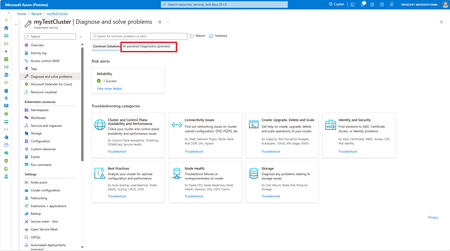
We are pleased to announce Conversational Diagnostics (Preview), a new feature in Azure Kubernetes Service (AKS) that leverages the powerful capabilities of OpenAI to take your problem-solving to the next level. With this feature, you can engage in a conversational dialogue to accurately identify the issue with your AKS clusters, and receive a clear set of solutions, documentation, and diagnostics to help resolve the issue. How to access Conversational Diagnostics (Preview) Navigate to your AKS cluster on the Azure Portal. Select Diagnose and Solve Problems. Select AI Powered Diagnostics (preview) to open chat What is the tool capable of? Type a question or select any of the sample questions in the options. Types of questions you can ask include but not limited to: Questions regarding a specific issue that your cluster is experiencing Questions about how-to instructions Questions about best practices The AI-powered Diagnostics runs relevant diagnostic checks and provides a diagnosis of the issue and a recommended solution. Additionally, it can provide documentation addressing your questions. Once you are done with troubleshooting, you can create a summary of your troubleshooting session by responding to the chat with the message that the issue has been resolved. If you want to start a new investigation, select New Chat. How to sign up for access To get started, sign up for early access to the Conversational Diagnostics (Preview) feature in the Diagnose and Solve Problems experience. Your access request may take up to 4 weeks to complete. Once access is granted, Conversational Diagnostics (Preview) will be available for all the Azure Kubernetes Service resources on your subscription. Navigate to your AKS cluster on the Azure Portal. Select Diagnose and Solve Problems. Select Request Access in the announcement banner. (Note: Announcement banner will be available starting on Mar 18th, 2024 PST) Whether you're a seasoned developer or a newcomer to Azure Kubernetes Service, Conversational Diagnostics (Preview) provides an intuitive and efficient way to understand and tackle any issue you may encounter. You can easily access this feature whenever you need it without any extra configuration. Say goodbye to frustrating troubleshooting and hello to a smarter, more efficient way of resolving issues with AKS clusters. Preview Terms Of Use | Microsoft Azure Microsoft Privacy Statement – Microsoft privacy4.2KViews4likes2CommentsExciting Updates Coming to Conversational Diagnostics (Public Preview)
Last year, at Ignite 2023, we unveiled Conversational Diagnostics (Preview), a revolutionary tool integrated with AI-powered capabilities to enhance problem-solving for Windows Web Apps. This year, we're thrilled to share what’s new and forthcoming for Conversational Diagnostics (Preview). Get ready to experience a broader range of functionalities and expanded support across various Azure Products, making your troubleshooting journey even more seamless and intuitive.387Views0likes0CommentsSimplifying Image Signing with Notary Project and Artifact Signing (GA)
Securing container images is a foundational part of protecting modern cloud‑native applications. Teams need a reliable way to ensure that the images moving through their pipelines are authentic, untampered, and produced by trusted publishers. We’re excited to share an updated approach that combines the Notary Project, the CNCF standard for signing and verifying OCI artifacts, with Artifact Signing—formerly Trusted Signing—which is now generally available as a managed signing service. The Notary Project provides an open, interoperable framework for signing and verification across container images and other OCI artifacts, while Notary Project tools like Notation and Ratify enable enforcement in CI/CD pipelines and Kubernetes environments. Artifact Signing complements this by removing the operational complexity of certificate management through short‑lived certificates, verified Azure identities, and role‑based access control, without changing the underlying standards. If you previously explored container image signing using Trusted Signing, the core workflows remain unchanged. As Artifact Signing reaches GA, customers will see updated terminology across documentation and tooling, while existing Notary Project–based integrations continue to work without disruption. Together, Notary Project and Artifact Signing make it easier for teams to adopt image signing as a scalable platform capability—helping ensure that only trusted artifacts move from build to deployment with confidence. Get started Sign container images using Notation CLI Sign container images in CI/CD pipelines Verify container images in CI/CD pipelines Verify container images in AKS Extend signing and verification to all OCI artifacts in registries Related content Simplifying Code Signing for Windows Apps: Artifact Signing (GA) Simplify Image Signing and Verification with Notary Project (preview article)402Views3likes0CommentsIdentity Bindings: A Cleaner Model for Multi‑Cluster Identity in AKS
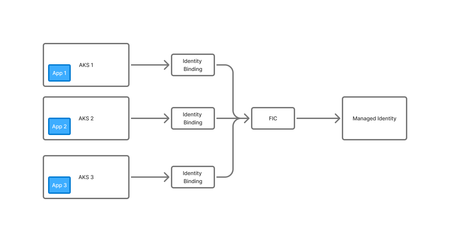
AKS has supported assigning Azure Managed Identities to pods for some time, first through Pod Identity and then later through Workload Identity. Using these tools it is possible to give a pod an Azure Identity that it can use to interact with other Azure services - pull secrets from Key Vault, read a file from Blob Storage or write to a database. Workload Identity is the latest incarnation of this feature and significantly simplified this feature, removing the need to run additional management pods in the cluster and to have the identity injected in every node however it does have some issues of it's own. These issues are particularly evident when operating at scale and wanting to share the same Managed Identity across multiple workloads in the same cluster, or across multiple clusters. Workload Identity relies on creating a Federated Identity Credential (FIC) in Azure that defines the trust relationship between the AKS OIDC issuer and Entra ID. Each combination of Service Account and Namespace that uses the same Managed Identity requires a separate FIC, as do services running in different clusters. As your scale grows, this can start to become a problem. Each managed identity can only support up to 20 FICs. Once you hit that limit, your only option is to create another Managed Identity. This leads to the proliferation of Managed Identities that have the same permissions and do the same job, but only exist to work around this problem. In addition to the 20 FIC limit, there are some other issues with Workload Identity: Creation of the FIC is an Azure Resource creation that often needs to occur alongside Kubernetes resource creation and makes automation of app deployment harder There can be a cyclic dependency issue where the service account in Kubernetes needs to know the Identity details before the pod is created, but the FIC needs the service account and namespace details to create the OIDC binding Additional outbound rules are required to allow the AKS cluster to access the Entra ID (login.microsoftonline.com) endpoints Introducing Identity Bindings Identity Bindings are currently in preview. Previews are provided "as is" and "as available," and they're excluded from the service-level agreements and limited warranty. AKS previews are partially covered by customer support on a best-effort basis. As such, these features aren't meant for production use. Identity Bindings introduce a cleaner, RBAC-driven approach to identity management in AKS. Instead of juggling multiple federated credentials and namespace scoping, you define bindings that link Kubernetes RBAC roles to Azure identities. Pods then request tokens via an AKS-hosted proxy, no external egress required. Key benefits: Centralised Access Control: Authorisation flows through Kubernetes RBAC. Cross-Cluster Identity Reuse: Federated credentials can be shared across namespaces and clusters. Reduced Networking Requirements: No outbound calls for token acquisition; everything stays within the cluster. Simplified IaC: Eliminates the “chicken-and-egg” problem when deploying identities alongside workloads. Identity Bindings act as the link between applications running in AKS and the Azure managed identities they need to use. Instead of every cluster or namespace requiring its own federated identity configuration, each application is authorised through an Identity Binding defined inside the cluster. The binding expresses which workloads (via service accounts and RBAC) are allowed to request tokens for a given identity. When a pod needs a token, AKS validates the request against the binding, and if it matches, the request is routed through the cluster’s identity proxy to the single Federated Identity Credential (FIC) associated with the managed identity. The FIC then exchanges the pod’s OIDC token for an Azure access token. This pattern allows multiple clusters or namespaces to share one managed identity cleanly, while keeping all workload‑level authorisation decisions inside Kubernetes. With Workload Identity, every workload using a managed identity required its own Federated Identity Credential (FIC) tied to a specific namespace and service account, and you had to repeat that for every cluster. Hitting the 20‑FIC limit often forced teams to create duplicate managed identities, and deployments had to be carefully ordered to avoid cyclic dependencies. You also needed outbound access to Entra ID for token requests. Identity Bindings significantly simplifies this. You create a single binding per cluster–identity pair, authorise workloads through RBAC, and let AKS handle token exchange internally with no external egress. There is no FIC sprawl, no need for identity duplication and less complexity in your automation. Using Identity Bindings To get started with using Identity Bindings, you need an AKS cluster and a Managed Identity created. Your Managed Identity should be granted permissions to access the Azure resources you require. The first thing you need to do is ensure the feature is registered. az feature register --namespace Microsoft.ContainerService --name IdentityBindingPreview Next, we need to do is create the identity binding. This is a one-to-one mapping between AKS cluster and Managed Identity, so only needs to be created once for each clusters/identity mapping. You provide the name of the cluster you want the binding mapped to, the full resource ID of the Managed Identity resources, and the name you want to give this binding, and this maps the two resources together. This only needs to be created once per cluster and all further administration is done via Kubernetes. az aks identity-binding create -g "<resource group name>" --cluster-name "<cluster name>" -n "<binding name>" --managed-identity-resource-id "<managed identity Azure Resource ID>" Once this has been created, we need to configure access to it inside Kubernetes. To do this we create a ClusterRole which references the Managed Identity ID. Note that this must be a ClusterRole, it cannot just be a Role. apiVersion: rbac.authorization.k8s.io/v1 kind: ClusterRole metadata: name: identity-binding-user rules: - verbs: ["use-managed-identity"] apiGroups: ["cid.wi.aks.azure.com"] resources: ["<MI_CLIENT_ID>"] Once this ClusterRole is created, we can assign it to any Namespace and Service Account combination we require, using a ClusterRoleBinding. Indentity Bindings are accessible to all Pods that use that Service Account, in that Namespace. apiVersion: rbac.authorization.k8s.io/v1 kind: ClusterRoleBinding metadata: name: <clusterrole name> roleRef: apiGroup: rbac.authorization.k8s.io kind: ClusterRole name: identity-binding-user subjects: - kind: ServiceAccount name: <service account name> namespace: <namespace of service account> Now all that is left to do is configure the Pod to use the Identity Binding, there are a two steps to this. First we need to apply the required labels and annotations to the pod to enable Identity Binding support: metadata: labels: azure.workload.identity/use: "true" annotations: azure.workload.identity/use-identity-binding: "true" Then, we need to ensure that the Pod is running using the Service Account we granted permission to use the Identity Binding. spec: serviceAccountName: <service account name> Below is an example deployment that uses Identity Bindings. apiVersion: apps/v1 kind: Deployment metadata: name: keyvault-demo namespace: identity-binding-demo spec: replicas: 1 selector: matchLabels: app: keyvault-demo template: metadata: labels: app: keyvault-demo azure.workload.identity/use: "true" annotations: azure.workload.identity/use-identity-binding: "true" spec: serviceAccountName: keyvault-demo-sa containers: - name: keyvault-demo ... Once this Pod has been created, the Identity Binding should be attached and you should then be able to use it within your application using your SDK and language of choice. You can see an example of consuming an Identity Binding in GO here . Demo App If you want to deploy a demo workload to test out your bindings, you can use the Pod definition below. This requires you to deploy a Key Vault, and grant your managed identity the "Key Vault Secret User" role on that Key Vault. You will also need to update the service principle and namespace to match your environment. apiVersion: v1 kind: Pod metadata: name: demo namespace: demo labels: azure.workload.identity/use: "true" annotations: azure.workload.identity/use-identity-binding: "true" spec: serviceAccount: demo containers: - name: azure-sdk # source code: https://github.com/Azure/azure-workload-identity/blob/feature/custom-token-endpoint/examples/identitybinding-msal-go/main.go image: ghcr.io/bahe-msft/azure-workload-identity/identitybinding-msal-go:latest-linux-amd64 env: - name: KEYVAULT_URL value: ${KEYVAULT_URL} - name: SECRET_NAME value: ${KEYVAULT_SECRET_NAME} restartPolicy: Never Once deployed, if you look at the logs, you should see that it is able to read the secret from Key Vault. kubectl logs demo -n demo I1107 20:03:42.865180 1 main.go:77] "successfully got secret" secret="Hello!" Conclusion Identity Bindings offer a much cleaner model for managing workload identities in AKS, especially once you start operating at scale. By moving authorisation decisions into Kubernetes and relying on a single Federated Identity Credential per managed identity, they avoid the FIC sprawl, cyclic dependencies, and networking requirements that made Workload Identity harder to operate in larger environments. The end result is a simpler, more predictable way to let pods acquire Azure tokens. If you’re already using Workload Identity today, Identity Bindings are a natural evolution that reduces operational friction while keeping the security properties you expect. Further Reading Identity Bindings Overview Setup Identity Bindings534Views0likes0Comments
Find the Alerts You Didn't Know You Were Missing with Azure SRE Agent
I had 6 alert rules. CPU. Memory. Pod restarts. Container errors. OOMKilled. Job failures. I thought I was covered. Then my app went down. I kept refreshing the Azure portal, waiting for an alert. Nothing. That's when it hit me: my alerts were working perfectly. They just weren't designed for this failure mode. Sound familiar? The Problem Every Developer Knows If you're a developer or DevOps engineer, you've been here: a customer reports an issue, you scramble to check your monitoring, and then you realize you don't have the right alerts set up. By the time you find out, it's already too late. You set up what seems like reasonable alerting and assume you're covered. But real-world failures are sneaky. They slip through the cracks of your carefully planned thresholds. My Setup: AKS with Redis I love to vibe code apps using GitHub Copilot Agent mode with Claude Opus 4.5. It's fast, it understands context, and it lets me focus on building rather than boilerplate. For this project, I built a simple journal entry app: AKS cluster hosting the web API Azure Cache for Redis storing journal data Azure Monitor alerts for CPU, memory, pod restarts, container errors, OOMKilled, and job failures Seemed solid. What could go wrong? The Scenario: Redis Password Rotation Here's something that happens constantly in enterprise environments: the security team rotates passwords. It's best practice. It's in the compliance checklist. And it breaks things when apps don't pick up the new credentials. I simulated exactly this. The pods came back up. But they couldn't connect to Redis (as expected). The readiness probes started failing. The LoadBalancer had no healthy backends. The endpoint timed out. And not a single alert fired. Using SRE Agent to Find the Alert Gaps Instead of manually auditing every alert rule and trying to figure out what I missed, I turned to Azure SRE Agent. I asked it a simple question: "My endpoint is timing out. What alerts do I have, and why didn't any of them fire?" Within minutes, it had diagnosed the problem. Here's what it found: My Existing Alerts Why They Didn't Fire High CPU/Memory No resource pressure,just auth failures Pod Restarts Pods weren't restarting, just unhealthy Container Errors App logs weren't being written OOMKilled No memory issues Job Failures No K8s jobs involved The gaps SRE Agent identified: ❌ No synthetic URL availability test ❌ No readiness/liveness probe failure alerts ❌ No "pods not ready" alerts scoped to my namespace ❌ No Redis connection error detection ❌ No ingress 5xx/timeout spike alerts ❌ No per-pod resource alerts (only node-level) SRE Agent didn't just tell me what was wrong, it created a GitHub issue with : KQL queries to detect each failure type Bicep code snippets for new alert rules Remediation suggestions for the app code Exact file paths in my repo to update Check it out: GitHub Issue How I Built It: Step by Step Let me walk you through exactly how I set this up inside SRE Agent. Step 1: Create an SRE Agent I created a new SRE Agent in the Azure portal. Since this workflow analyzes alerts across my subscription (not just one resource group), I didn't configure any specific resource groups. Instead, I gave the agent's managed identity Reader permissions on my entire subscription. This lets it discover resources, list alert rules, and query Log Analytics across all my resource groups. Step 2: Connect GitHub to SRE Agent via MCP I added a GitHub MCP server to give the agent access to my source code repository.MCP (Model Context Protocol) lets you bring any API into the agent. If your tool has an API, you can connect it. I use GitHub for both source code and tracking dev tickets, but you can connect to wherever your code lives (GitLab, Azure DevOps) or your ticketing system (Jira, ServiceNow, PagerDuty). Step 3: Create a Subagent inside SRE Agent for managing Azure Monitor Alerts I created a focused subagent with a specific job and only the tools it needs: Azure Monitor Alerts Expert Prompt: " You are expert in managing operations related to azure monitor alerts on azure resources including discovering alert rules configured on azure resources, creating new alert rules (with user approval and authorization only), processing the alerts fired on azure resources and identifying gaps in the alert rules. You can get the resource details from azure monitor alert if triggered via alert. If not, you need to ask user for the specific resource to perform analysis on. You can use az cli tool to diagnose logs, check the app health metrics. You must use the app code and infra code (bicep files) files you have access to in the github repo <insert your repo> to further understand the possible diagnoses and suggest remediations. Once analysis is done, you must create a github issue with details of analysis and suggested remediation to the source code files in the same repo." Tools enabled: az cli – List resources, alert rules, action groups Log Analytics workspace querying – Run KQL queries for diagnostics GitHub MCP – Search repositories, read file contents, create issues Step 4: Ask the Subagent About Alert Gaps I gave the agent context and asked a simple question: "@AzureAlertExpert: My API endpoint http://132.196.167.102/api/journals/john is timing out. What alerts do I have configured in rg-aks-journal, and why didn't any of them fire? The agent did the analysis autonomously and summarized findings with suggestions to add new alert rules in a GitHub issue. Here's the agentic workflow to perform azure monitor alert operations Why This Matters Faster response times. Issues get diagnosed in minutes, not hours of manual investigation. Consistent analysis. No more "I thought we had an alert for that" moments. The agent systematically checks what's covered and what's not. Proactive coverage. You don't have to wait for an incident to find gaps. Ask the agent to review your alerts before something breaks. The Bottom Line Your alerts have gaps. You just don't know it until something slips through. I had 6 alert rules and still missed a basic failure. My pods weren't restarting, they were just unhealthy. My CPU wasn't spiking, the app was just returning errors. None of my alerts were designed for this. You don't need to audit every alert rule manually. Give SRE Agent your environment, describe the failure, and let it tell you what's missing. Stop discovering alert gaps from customer complaints. Start finding them before they matter. A Few Tips Give the agent Reader access at subscription level so it can discover all resources Use a focused subagent prompt, don't try to do everything in one agent Test your MCP connections before running workflows What Alert Gaps Have Burned You? What's the alert you wish you had set up before an incident? Credential rotation? Certificate expiry? DNS failures? Let us know in the comments.464Views1like0Comments