azure front door
45 Topics
Addressing Java4Shell CVE-2026-114938: upgrade guidance and Azure WAF mitigations
Introduction On November 17, 2026, CVE-2026-114938, also known as Java4Shell, a critical remote code execution (RCE) vulnerability affecting OpenJDK, was publicly disclosed. Under specific conditions, specially crafted Base64 input can trigger memory corruption in affected Java runtimes, potentially allowing unauthenticated attackers to execute arbitrary code. We strongly recommend that customers update the Java runtime used by their own applications to a patched version or update third-party Java-based applications to a version that includes the security fix, as applicable. Updating the affected Java runtime is the primary way to fully remediate this vulnerability. For further details, refer to Oracle's official security advisory. Azure Web Application Firewall (WAF) has developed mitigations designed to detect and block known HTTP-based exploitation patterns associated with this vulnerability, providing an additional layer of protection while customers apply the necessary security updates. These mitigations are intended to complement patching, not replace it. About CVE-2026-114938 CVE-2026-114938 is a memory-corruption vulnerability in OpenJDK's hardware-accelerated Base64 decoder. When an affected Java application processes specially crafted Base64 input, the vulnerability can cause heap memory corruption, potentially leading to application crashes, sensitive information disclosure, or remote code execution. The vulnerability primarily affects unpatched OpenJDK-based Java runtimes version 17.0.6 and later, including Java 21, 25, and 27, running on x86-64 processors supporting the AVX-512 VBMI instruction set. Exploitation requires attacker-controlled input to reach the vulnerable Base64 decoding functionality. ARM64 systems and x86-64 processors without AVX-512 VBMI support are not known to be affected. Recommended action: Update affected Java runtimes and third-party Java-based applications to versions containing the security fix as soon as possible. Treat Azure WAF mitigations as supplementary protection, not as a substitute for patching. Azure WAF protection If you are unable to upgrade your Java application to a patched version immediately, apply the following mitigations in the interim. Azure Front Door Since the vulnerability is exploited through malformed Base64 input, apply the following WAF custom rules based on where your application accepts Base64-encoded values in incoming HTTP requests: Request headers: Apply the request headers rule and specify the relevant header names (e.g., Cookie). Request body: Apply the request body rule and specify the relevant HTTP POST argument name. Query string: Apply the query string rule. Authorization header: Apply the authorization header rule. If your application accepts Base64-encoded input in multiple parts of an HTTP request, apply all applicable rules to ensure comprehensive coverage. { "customRules": { "rules": [ { "name": "Java4ShellB64Header", "priority": 10, "ruleType": "MatchRule", "action": "Block", "enabledState": "Enabled", "matchConditions": [ { "matchVariable": "RequestHeader", "selector": "REPLACE_WITH_HEADER_NAME", "operator": "RegEx", "negateCondition": false, "matchValue": [ "(?:\\A|[^A-Za-z0-9+/])(?:[A-Za-z0-9+/]{64})+(?:[A-Za-z0-9+/]{0,2}=|[A-Za-z0-9+/]?==)(?:\\z|[^A-Za-z0-9+/=])" ], "transforms": [ "Trim" ] } ] }, { "name": "Java4ShellB64BodyField", "priority": 11, "ruleType": "MatchRule", "action": "Block", "enabledState": "Enabled", "matchConditions": [ { "matchVariable": "PostArgs", "selector": "REPLACE_WITH_BODY_FIELD_NAME", "operator": "RegEx", "negateCondition": false, "matchValue": [ "\\A(?:[A-Za-z0-9+/]{64})+(?:[A-Za-z0-9+/]{0,2}=|[A-Za-z0-9+/]?==)\\z" ], "transforms": [ "Trim" ] } ] }, { "name": "Java4ShellB64Query", "priority": 12, "ruleType": "MatchRule", "action": "Block", "enabledState": "Enabled", "matchConditions": [ { "matchVariable": "QueryString", "operator": "RegEx", "negateCondition": false, "matchValue": [ "(?:\\A|&)[^&=]*=(?:[A-Za-z0-9+/]{64})+(?:[A-Za-z0-9+/]{0,2}=|[A-Za-z0-9+/]?==)(?:&|\\z)" ], "transforms": [ "Trim" ] } ] }, { "name": "Java4ShellB64Authorization", "priority": 13, "ruleType": "MatchRule", "action": "Block", "enabledState": "Enabled", "matchConditions": [ { "matchVariable": "RequestHeader", "selector": "Authorization", "operator": "RegEx", "negateCondition": false, "matchValue": [ "\\A(?:(?i:Bearer|Basic)\\s+)?(?:(?:[A-Za-z0-9+\\/]{64})+(?:[A-Za-z0-9+\\/]{0,2}=|[A-Za-z0-9+\\/]?==)|(?:[A-Za-z0-9_-]+=*\\.)?(?:[A-Za-z0-9_-]+=*\\.)?(?:[A-Za-z0-9_-]{64})+(?:[A-Za-z0-9_-]{0,2}=|[A-Za-z0-9_-]?==)(?:\\.[A-Za-z0-9_-]+=*){0,2})\\z" ], "transforms": [ "Trim" ] } ] } ] } } Azure Application Gateway and Application Gateway for Containers Since the vulnerability is exploited through malformed Base64 input, you should apply the following WAF custom rules based on where your application accepts Base64-encoded values within incoming HTTP requests: Request headers: Apply the request headers rule. This rule applies to all request headers. Request body: Apply the request body rule. Query string: Apply the query string rule. If your application accepts Base64-encoded input in multiple parts of an HTTP request, apply all applicable rules to ensure comprehensive coverage of the relevant attack vectors. "customRules": [ { "name": "Java4ShellB64BodyField", "priority": 10, "ruleType": "MatchRule", "action": "Block", "matchConditions": [ { "matchVariables": [ { "variableName": "PostArgs" } ], "operator": "Regex", "negationConditon": false, "matchValues": [ "\\A(?:[A-Za-z0-9+/]{64})+(?:[A-Za-z0-9+/]{0,2}=|[A-Za-z0-9+/]?==)\\z" ], "transforms": [ "Trim" ] } ], "skippedManagedRuleSets": [], "state": "Enabled" }, { "name": "Java4ShellB64Query", "priority": 11, "ruleType": "MatchRule", "action": "Block", "matchConditions": [ { "matchVariables": [ { "variableName": "QueryString" } ], "operator": "Regex", "negationConditon": false, "matchValues": [ "(?:\\A|&)[^&=]*=(?:[A-Za-z0-9+/]{64})+(?:[A-Za-z0-9+/]{0,2}=|[A-Za-z0-9+/]?==)(?:&|\\z)" ], "transforms": [ "UrlDecode", "Trim" ] } ], "skippedManagedRuleSets": [], "state": "Enabled" }, { "name": "Java4ShellB64Header", "priority": 12, "ruleType": "MatchRule", "action": "Block", "matchConditions": [ { "matchVariables": [ { "variableName": "RequestHeaders" } ], "operator": "Regex", "negationConditon": false, "matchValues": [ "\\A(?:(?i:Bearer|Basic)\\s+)?(?:(?:[A-Za-z0-9+\\/]{64})+(?:[A-Za-z0-9+\\/]{0,2}=|[A-Za-z0-9+\\/]?==)|(?:[A-Za-z0-9_-]+=*\\.)?(?:[A-Za-z0-9_-]+=*\\.)?(?:[A-Za-z0-9_-]{64})+(?:[A-Za-z0-9_-]{0,2}=|[A-Za-z0-9_-]?==)(?:\\.[A-Za-z0-9_-]+=*){0,2})\\z", "(?:\\A|[^A-Za-z0-9+/])(?:[A-Za-z0-9+/]{64})+(?:[A-Za-z0-9+/]{0,2}=|[A-Za-z0-9+/]?==)(?:\\z|[^A-Za-z0-9+/=])" ], "transforms": [] } ], "skippedManagedRuleSets": [], "state": "Enabled" } ]25KViews0likes2Comments
Addressing PHP2Shell CVE-2026-109618 and CVE-2026-109619: upgrade guidance and Azure WAF mitigations
Written in collaboration with yuvalpery and Gunjan Jain Introduction Today, two critical remote code execution (RCE) vulnerabilities were disclosed in PHP. We strongly recommend that customers upgrade to a patched version of PHP as soon as possible. Upgrading is the only way to fully remediate these vulnerabilities. Read more on the PHP official website. Microsoft has been part of the coordinated industry response to these vulnerabilities, working alongside the PHP Foundation, Wiz, security researchers, and other industry partners to help protect customers. Azure Web Application Firewall (WAF) has developed mitigations against known exploitation patterns to provide an additional layer of protection while customers apply the PHP security updates. These protections are intended to complement patching and are not a replacement for it. About the vulnerabilities: CVE-2026-109618 - RCE via OOM corruption CVE-2026-109619- RCE via stale global state Both vulnerabilities can be exploited over the network without privileges or user interaction, with a high potential impact on confidentiality, integrity, and availability. The vulnerabilities relate to PHP handling of memory when a request terminates abnormally, for example due to memory exhaustion or a fatal error. Under certain conditions, improper memory handling could allow an attacker to achieve remote code execution. Fixed versions: 8.5.12, 8.4.27, 8.3.36, 8.2.35. Refer to vendor guidancefor patching of different versions of PHP. Recommended action: upgrade PHP We recommend that customers: Upgrade all PHP deployments to a patched version, including virtual machines, containers, base images, and platform runtimes. We suggest prioritizing internet-facing workloads. Rebuild and redeploy container images that include their own PHP runtime, since updating the host does not update PHP inside an image. Migrate to a supported PHP branch if the branch currently in use no longer receives security fixes. Treat the Azure WAF mitigations below as a temporary, supplementary measure. They address a specific technique and do not remediate the underlying vulnerabilities. Azure WAF protection If you are unable to upgrade PHP to a patched version immediately, apply the following mitigations in the interim - Azure Front Door WAF: Apply the mitigation using custom rules for request-side mitigation and enable the managed rule for response-side mitigation. Application Gateway WAF: Apply the mitigation using custom rules for request-side mitigation and enable the rewrite rule for response-side mitigation. Application Gateway for Container WAF: Apply the mitigation using custom rules for request-side mitigation. See below sections for details. Mitigation using custom rules These custom rules can help reduce exposure to selected request patterns associated with exploitation techniques for these vulnerabilities. Depending on application traffic, the rules may result in false positives and affect legitimate requests. They are intended as temporary mitigations and do not replace the need to upgrade PHP. Learn more: Azure WAF custom rules for PHP2Shell mitigation. Request-side signals alone may not be sufficient to reliably identify certain exploitation attempts. Signals in the server response can provide additional evidence that malicious activity has occurred, enabling more targeted mitigation with higher confidence and lower false positives. For this vulnerability, Azure WAF identifies known malicious patterns in the session and removes the potentially malicious elements from the response before it reaches the client. This provides an additional layer of protection for supported exploitation scenarios, while patching PHP remains necessary to fully address the underlying vulnerability. Azure Front Door WAF: managed rule A managed rule to handle potential attack vector in response is available for Azure Front Door WAF, its details are as follows: Rule group: MS-ThreatIntel-Response-CVEs Rule ID: 99006001 Default state: disabled. Customers need to enable the rule. Supported rulesets: DRS 2.0, 2.1 and 2.2. Unlike other WAF rules, this rule does not block or challenge any traffic. When the rule identifies malicious signals in the session that provides strong evidence of exploitation, it removes the potentially malicious elements from the response while leaving the remainder of the response unchanged. Mitigation for this rule takes effect only when the rule action is set to Block on anamoly. Please note that the response side mitigation does not generate WAF log entries or hit counts. Application Gateway WAF: rewrite rule Customers can apply an interim mitigation now using the HTTP header rewrite capability of Application Gateway, which is available on v2 SKUs. A WAF managed rule for Application Gateway is expected to roll out at a later date. Until then, we recommend the following rewrite rule: 1. Create a rewrite rule in a rewrite set associated with your routing rule(s). 2. Add a condition that evaluates the Set-Cookie response header against the following regular expression: ^PHPSESSID=(?:[a-zA-Z0-9\-]|%2[Cc])*(?:[^a-zA-Z0-9\-;%]|%(?!2[Cc]))+[a-zA-Z0-9\-]*[^;]+; 3. Set the action to delete the matching Set-Cookie response header. Alternatively, the header can be set to a replacement value of your choice. Please note that setting a value overwrites the entire header, including attributes such as Path=/;. Additional considerations: The rule applies only to a Set-Cookie header that matches the pattern. Other Set-Cookie headers in the same response are not affected. We recommend validating the rule on a non-production gateway before broader deployment. For further information, see Rewrite HTTP headers and URL with Azure Application Gateway. Application Gateway for Containers (AGC): A WAF managed rule for Application Gateway for Containers is expected to roll out at a later date. In the interim, customers can apply the custom rules. Application Gateway for Containers does not support regex-based rewrite rules on HTTP response. Restrict request size The proof-of-concept payloads analyzed so far are about 60 MB each. Attackers may be able to craft smaller payloads, so treat size limits as an extra layer of protection, not a mitigation on their own. Whatever rule set version you use, we recommend the following: Azure WAF on Application Gateway and Application Gateway for Containers The proof-of-concept payloads are well above the default maximum request body size of 128 KB on Application Gateway and Application Gateway for Containers. We recommend setting the maximum request body size in your WAF policy to the smallest value your application needs. Learn more. Azure WAF on Azure Front Door To limit request body size, create a custom rule with a size constraint. For request body checks, the size is measured on the decoded body. Set the limit to the smallest value your application needs and make sure request body inspection is enabled in your WAF policy settings. The following example blocks request bodies larger than 40 KB. This rule supports limits of up to 128 KB. { "name": "BlockLargeRequestBody", "priority": 130, "enabledState": "Enabled", "ruleType": "MatchRule", "action": "Block", "matchConditions": [ { "matchVariable": "RequestBody", "operator": "GreaterThan", "negateCondition": false, "matchValue": [ "40960" ] } ] } Conclusion Following PHP security guidance and upgrading to a patched version is the recommended and complete remediation. Azure WAF mitigations can help reduce exposure during the upgrade period, and we encourage customers to upgrades at the earliest opportunity. Changelog 10/26/2026 9:00 AM PST - Updated with additional guidance around request size restrictions 10/21/2026 7:00 PM PST – Updated with additional guidance around custom rules42KViews1like4CommentsProtect against Brotli CVE-2026-111497 with Azure Web Application Firewall (WAF)
Google Brotli versions 1.0.3 through 1.2.0 contain a buffer overflow vulnerability in the Brotli decoder, according to the recently published CVE-2026-111497. A remote, unauthenticated attacker can send a crafted Brotli-compressed stream to corrupt decoder memory, expose sensitive memory contents, cause a denial of service, or potentially run arbitrary code. Any application that decompresses untrusted Brotli data may be affected. This includes Node.js and Python applications that bundle the vulnerable decoder, and services that accept request bodies with the Content-Encoding: br header. We strongly recommend upgrading Brotli to a patched version: 1.0.10, 1.1.1 or 1.2.1 (Brotli releases). If you use Node.js, upgrade to 22.23.4, 24.22.1 or 26.12.1 (Node.js security release). If you can't patch your applications right away, Azure WAF on Application Gateway, Application Gateway for Containers and Azure Front Door can help mitigate the inbound attack vector, which is Brotli-compressed request bodies sent to your application. Note: Azure WAF inspects only inbound requests to your application. It can't protect applications that fetch and decompress Brotli-encoded responses from external servers. Those applications must be patched. Built-in protection enabled by default If you use Azure WAF with DRS 2.2 on Application Gateway or Azure Front Door Premium, you're protected by default against crafted Brotli-compressed request bodies. Rule 920450 (Paranoia Level 1, enabled by default) checks requests against a list of restricted headers, and DRS 2.2 adds Content-Encoding to that list. The rule has a critical anomaly score, so a single match blocks the request when the WAF policy is in Prevention mode. Earlier rule set versions don't restrict the Content-Encoding header. If you're still on DRS 2.1, CRS 3.2 or earlier, we recommend upgrading to DRS 2.2 to get the latest protection. To learn how, see Upgrade CRS or DRS ruleset version. If your application uses Next.js image optimization, apply the BlockNextImageCVE2026111497 custom rule below, even if you're on DRS 2.2. Custom rules to mitigate CVE-2026-111497 The custom rules block two attack vectors: 1. CVE2026111497 blocks any request whose Content-Encoding header includes the br (Brotli) coding, which this attack uses. DRS 2.2 already covers this vector through rule 920450. We recommend this rule for: WAF policies still on DRS 2.1 or earlier, while you plan the upgrade. WAF policies where rule 920450 is disabled or overridden. Azure Front Door Standard, which supports custom rules only. Managed rule sets require Azure Front Door Premium. WAF policies attached to Azure Application Gateway for Containers. 2. BlockNextImageCVE2026111497 blocks any request to the Next.js image optimization endpoint, including under a base path. It URL-decodes and lowercases the request URI first, so encoded or mixed-case variants are also blocked. No managed rule set covers this vector. We recommend this rule for all WAF policies that protect Next.js applications, whatever rule set version they use. These rules may also block legitimate traffic. The first may block clients sending Brotli-compressed request bodies. The second blocks every image served through Next.js image optimization (for example, by the image component), so those images won't load. If you aren't sure whether your application relies on either, set the action to 'Log traffic only' first, and review your WAF logs before switching to 'Deny traffic'. You can remove the Content-Encoding rule once your applications are patched or your policy uses DRS 2.2. Keep the Next.js image optimization rule until your applications are patched. Azure WAF on Application Gateway and Application Gateway for Containers If you are using CRS 3.0 or CRS 3.1, upgrade your ruleset version to a later version first, then apply the custom rule. { "name": "CVE2026111497", "priority": 100, "ruleType": "MatchRule", "action": "Block", "matchConditions": [ { "matchVariables": [ { "variableName": "RequestHeaders", "selector": "Content-Encoding" } ], "operator": "Regex", "matchValues": [ "(?:^|,)[ \\t]*br[ \\t]*(?:,|$)" ], "transforms": [ "Lowercase" ] } ] } { "name": "BlockNextImageCVE2026111497", "priority": 90, "ruleType": "MatchRule", "action": "Block", "state": "Enabled", "matchConditions": [ { "matchVariables": [{"variableName": "RequestUri"}], "operator": "Regex", "negationConditon": false, "matchValues": ["^(?:https?://[^/?#]+)?/(?:[^?#]*/)?_next/image/?(?:\\?|$)"], "transforms": ["UrlDecode", "Lowercase"] } ] } Azure WAF on Azure Front Door { "name": "CVE2026111497", "priority": 120, "enabledState": "Enabled", "ruleType": "MatchRule", "action": "Block", "matchConditions": [ { "matchVariable": "RequestHeader", "selector": "Content-Encoding", "operator": "RegEx", "negateCondition": false, "transforms": [ "Lowercase" ], "matchValue": [ "(?:^|,)[ \\t]*br[ \\t]*(?:,|$)" ] } ] } { "name": "BlockNextImageCVE2026111497", "priority": 90, "ruleType": "MatchRule", "action": "Block", "enabledState": "Enabled", "matchConditions": [ { "matchVariable": "RequestUri", "operator": "RegEx", "negateCondition": false, "matchValue": ["^(?:https?://[^/?#]+)?/(?:[^?#]*/)?_next/image/?(?:\\?|$)"], "transforms": ["UrlDecode", "Lowercase"] } ] } Restrict request size The proof-of-concept payloads analyzed so far are about 23 MB each. Attackers may be able to craft smaller payloads, so treat size limits as an extra layer of protection, not a mitigation on their own. Whatever rule set version you use, we recommend the following: Azure WAF on Application Gateway and Application Gateway for Containers The proof-of-concept payloads are well above the default maximum request body size of 128 KB on Application Gateway and Application Gateway for Containers. We recommend setting the maximum request body size in your WAF policy to the smallest value your application needs. Learn more. Azure WAF on Azure Front Door To limit request body size, create a custom rule with a size constraint. For request body checks, the size is measured on the decoded body. Set the limit to the smallest value your application needs and make sure request body inspection is enabled in your WAF policy settings. The following example blocks request bodies larger than 40 KB. This rule supports limits of up to 128 KB. { "name": "BlockLargeRequestBody", "priority": 130, "enabledState": "Enabled", "ruleType": "MatchRule", "action": "Block", "matchConditions": [ { "matchVariable": "RequestBody", "operator": "GreaterThan", "negateCondition": false, "matchValue": [ "40960" ] } ] } You can find more information about custom rules on Azure WAF for Application Gateway or for Azure Front Door. Changelog 11/2 9:00 AM PST - Updated with additional custom rules18KViews3likes0CommentsAzure WAF custom rules for PHP2Shell mitigation
Written in collaboration with Gunjan Jain and yuvalpery As described in our earlier blog, Addressing PHP2Shell CVE-2026-109618 and CVE-2026-109619: upgrade guidance and Azure WAF mitigations, we strongly recommend upgrading to a patched version of PHP as soon as possible. Upgrading PHP remains the recommended and complete remediation for these vulnerabilities. For customers who are unable to upgrade immediately, this guidance provides WAF custom rules that can help reduce exposure to selected request patterns associated with exploitation techniques for these vulnerabilities. WAF custom rules The following three custom rules can be considered based on your application configuration and traffic patterns. Because custom rules can affect legitimate application traffic, review the potential application impact and validate the rules before enabling enforcement. Restrict PHP session upload progress PHP supports session upload progress for tracking file uploads. For applications that do not depend on this functionality, customers can use a custom rule to restrict multipart form requests containing PHP_SESSION_UPLOAD_PROGRESS. The rule checks for multipart/form-data requests whose inspected request body contains the PHP session upload progress token. Custom rule definitions: Azure Front Door WAF { "name": "BlockPhpSessionUploadProgress", "priority": 100, "enabledState": "Enabled", "ruleType": "MatchRule", "action": "Block", "matchConditions": [ { "matchVariable": "RequestHeader", "selector": "Content-Type", "operator": "Contains", "negateCondition": false, "transforms": ["Lowercase"], "matchValue": ["multipart/form-data"] }, { "matchVariable": "RequestBody", "operator": "Contains", "negateCondition": false, "matchValue": ["php_session_upload_progress"], "transforms": ["Lowercase"] } ] } Application Gateway and Application Gateway for Container (AGC) WAF { "name": "BlockPhpSessionUploadProgress", "priority": 90, "ruleType": "MatchRule", "action": "Block", "state": "Enabled", "matchConditions": [ { "matchVariables": [ { "variableName": "RequestHeaders", "selector": "Content-Type" } ], "operator": "Contains", "negationConditon": false, "matchValues": [ "multipart/form-data" ], "transforms": [ "Lowercase" ] }, { "matchVariables": [ { "variableName": "PostArgs" } ], "operator": "Contains", "negationConditon": false, "matchValues": [ "php_session_upload_progress" ], "transforms": [ "Lowercase" ] } ] } This rule reduces exposure through the PHP session-upload-progress path but does not address all exploitation paths associated with the vulnerabilities. Potential application impact: Applications that legitimately use PHP session upload progress will also match this rule. A substring match may also detect the token when it appears as harmless text or in uploaded content exposed to inspection. Limit deeply nested form parameters Customers can use a custom rule to identify unusually deep parameter nesting in application/x-www-form-urlencoded requests. The proposed rule detects request field names containing 20 or more levels of bracket nesting after URL decoding. Because the 20-level threshold is an application policy choice rather than a vulnerability-defined boundary, legitimate applications using deeply nested parameters may also match this rule. Custom rule definitions: Azure Front Door WAF: { "name": "PhpFormNesting20", "priority": 110, "enabledState": "Enabled", "ruleType": "MatchRule", "action": "Log", "matchConditions": [ { "matchVariable": "RequestHeader", "selector": "Content-Type", "operator": "BeginsWith", "negateCondition": false, "transforms": [ "Trim", "Lowercase" ], "matchValue": [ "application/x-www-form-urlencoded" ] }, { "matchVariable": "RequestBody", "operator": "RegEx", "negateCondition": false, "transforms": [ "UrlDecode" ], "matchValue": [ "(?:^|&)[^&=\\[]+(?:\\[[^&=\\]]*\\]){20}" ] } ] } Application Gateway and Application Gateway for Container (AGC) WAF { "name": "PhpFormNesting20", "priority": 91, "ruleType": "MatchRule", "action": "Log", "state": "Enabled", "matchConditions": [ { "matchVariables": [ { "variableName": "RequestHeaders", "selector": "Content-Type" } ], "operator": "BeginsWith", "negationConditon": false, "matchValues": [ "application/x-www-form-urlencoded" ], "transforms": [ "Trim", "Lowercase" ] }, { "matchVariables": [ { "variableName": "RequestBody" } ], "operator": "Regex", "negationConditon": false, "matchValues": [ "(?:^|&)[^&=\\[]+(?:\\[[^&=\\]]*\\]){20}" ], "transforms": [ "UrlDecode" ] } ] } Recommended deployment: Start with the rule in Log mode and review matches against legitimate application traffic. Consider moving the rule to Block only after validating application compatibility. Limit deeply nested multipart parameters Customers can apply a similar control to multipart/form-data requests by detecting deeply nested field names. The proposed rule detects multipart field names containing 20 or more levels of nesting where the relevant request content is available to WAF inspection. As with deeply nested URL-encoded parameters, legitimate applications may use complex multipart field structures. Custom rule definitions: Azure Front Door WAF { "name": "PhpMultipartNesting20", "priority": 111, "enabledState": "Enabled", "ruleType": "MatchRule", "action": "Log", "matchConditions": [ { "matchVariable": "RequestHeader", "selector": "Content-Type", "operator": "BeginsWith", "negateCondition": false, "transforms": [ "Trim", "Lowercase" ], "matchValue": [ "multipart/form-data" ] }, { "matchVariable": "RequestBody", "operator": "RegEx", "negateCondition": false, "matchValue": [ "(?i)(?:^|\\r?\\n)content-disposition:[ \\t]*form-data[^\\r\\n]*;[ \\t]*name[ \\t]*=[ \\t]*(?:\"(?:\\\\[\"\\\\]|[^\"\\r\\n\\[])+(?:\\[(?:\\\\[\"\\\\]|[^\"\\r\\n\\]])*\\]){20}|[^ \\t\\r\\n;\"\\[]+(?:\\[[^ \\t\\r\\n;\"\\]]*\\]){20})" ] } ] } Application Gateway and Application Gateway for Container (AGC) WAF { "name": "PhpMultipartNesting20", "priority": 92, "ruleType": "MatchRule", "action": "Log", "state": "Enabled", "matchConditions": [ { "matchVariables": [ { "variableName": "RequestHeaders", "selector": "Content-Type" } ], "operator": "BeginsWith", "negationConditon": false, "matchValues": [ "multipart/form-data" ], "transforms": [ "Trim", "Lowercase" ] }, { "matchVariables": [ { "variableName": "PostArgs" } ], "operator": "Regex", "negationConditon": false, "matchValues": [ "^[^\\[\\]]+(?:\\[[^\\]]*\\]){20}" ], "transforms": [] } ] } This rule targets deeply nested multipart field names. It does not restrict every multipart upload or provide complete mitigation for the underlying vulnerabilities. Recommended deployment: Start in Log mode, review matching traffic, and consider moving to Block only after validating the impact on your application. Deployment and validation considerations We recommend applying these custom rules only to affected PHP application domains and routes, including extensionless routes handled by PHP, rather than broadly applying them to unrelated applications. Before enabling enforcement: Review the potential impact on legitimate application traffic. Test each custom rule independently before deploying the rules together. Start applicable rules in Log mode and review legitimate matches. Verify the WAF policy scope and custom-rule precedence. After changing a rule to Block, validate both application behavior and the corresponding WAF events. Continue to prioritize upgrading PHP even when these controls are deployed. Custom rules may produce false positives, and WAF request-body inspection boundaries can affect coverage. An earlier terminal Allow rule in the WAF policy can also bypass subsequent custom-rule checks. The custom rules described above target selected request patterns associated with exploitation techniques for CVE-2026-109618 and CVE-2026-109619. They reduce selected attack surfaces but do not provide complete protection against either vulnerability. You can find more information about Custom Rules on Azure WAF for Application Gateway here or for Azure Front Door here. Upgrading to a patched version of PHP remains the recommended and complete remediation.8.7KViews1like2CommentsHow Azure network security can help you meet NIS2 compliance
With the adoption of the NIS2 Directive EU 2022 2555, cybersecurity obligations for both public and private sector organizations have become more strict and far reaching. NIS2 aims to establish a higher common level of cybersecurity across the European Union by enforcing stronger requirements on risk management, incident reporting, supply chain protection, and governance. If your organization runs on Microsoft Azure, you already have powerful services to support your NIS2 journey. In particular Azure network security products such as Azure Firewall, Azure Web Application Firewall WAF, and Azure DDoS Protection provide foundational controls. The key is to configure and operate them in a way that aligns with the directive’s expectations. Important note This article is a technical guide based on the NIS2 Directive EU 2022 2555 and Microsoft product documentation. It is not legal advice. For formal interpretations, consult your legal or regulatory experts. What is NIS2? NIS2 replaces the original NIS Directive 2016 and entered into force on 16 January 2023. Member states must transpose it into national law by 17 October 2024. Its goals are to: Expand the scope of covered entities essential and important entities Harmonize cybersecurity standards across member states Introduce stricter supervisory and enforcement measures Strengthen supply chain security and reporting obligations Key provisions include: Article 20 management responsibility and governance Article 21 cybersecurity risk management measures Article 23 incident notification obligations These articles require organizations to implement technical, operational, and organizational measures to manage risks, respond to incidents, and ensure leadership accountability. Where Azure network security fits The table below maps common NIS2 focus areas to Azure network security capabilities and how they support compliance outcomes. NIS2 focus area Azure services and capabilities How this supports compliance Incident handling and detection Azure Firewall Premium IDPS and TLS inspection, Threat Intelligence mode, Azure WAF managed rule sets and custom rules, Azure DDoS Protection, Azure Bastion diagnostic logs Detect, block, and log threats across layers three to seven. Provide telemetry for triage and enable response workflows that are auditable. Business continuity and resilience Azure Firewall availability zones and autoscale, Azure Front Door or Application Gateway WAF with zone redundant deployments, Azure Monitor with Log Analytics, Traffic Manager or Front Door for failover Improve service availability and provide data for resilience reviews and disaster recovery scenarios. Access control and segmentation Azure Firewall policy with DNAT, network, and application rules, NSGs and ASGs, Azure Bastion for browser based RDP SSH without public IPs, Private Link Enforce segmentation and isolation of critical assets. Support Zero Trust and least privilege for inbound and egress. Vulnerability and misconfiguration defense Azure WAF Microsoft managed rule set based on OWASP CRS. Azure Firewall Premium IDPS signatures Reduce exposure to common web exploits and misconfigurations for public facing apps and APIs. Encryption and secure communications TLS policy: Application Gateway SSL policy; Front Door TLS policy; App Service/PaaS minimum TLS. Inspection: Azure Firewall Premium TLS inspection Inspect and enforce encrypted communication policies and block traffic that violates TLS requirements. Inspect decrypted traffic for threats. Incident reporting and evidence Azure Network Security diagnostics, Log Analytics, Microsoft Sentinel incidents, workbooks, and playbooks Capture and retain telemetry. Correlate events, create incident timelines, and export reports to meet regulator timelines. NIS2 articles in practice Article 21 cybersecurity risk management measures Azure network controls contribute to several required measures: Prevention and detection. Azure Firewall blocks unauthorized access and inspects traffic with IDPS. Azure DDoS Protection mitigates volumetric and protocol attacks. Azure WAF prevents common web exploits based on OWASP guidance. Logging and monitoring. Azure Firewall, WAF, DDoS, and Bastion resources produce detailed resource logs and metrics in Azure Monitor. Ingest these into Microsoft Sentinel for correlation, analytics rules, and automation. Control of encrypted communications. Azure Firewall Premium provides TLS inspection to reveal malicious payloads inside encrypted sessions. Supply chain and service provider management. Use Azure Policy and Defender for Cloud to continuously assess configuration and require approved network security baselines across subscriptions and landing zones. Article 23 incident notification Build an evidence friendly workflow with Sentinel: Early warning within twenty four hours. Use Sentinel analytics rules on Firewall, WAF, DDoS, and Bastion logs to generate incidents and trigger playbooks that assemble an initial advisory. Incident notification within seventy two hours. Enrich the incident with additional context such as mitigation actions from DDoS, Firewall and WAF. Final report within one month. Produce a summary that includes root cause, impact, and corrective actions. Use Workbooks to export charts and tables that back up your narrative. Article 20 governance and accountability Management accountability. Track policy compliance with Azure Policy initiatives for Firewall, DDoS and WAF. Use exemptions rarely and record justification. Centralized visibility. Defender for Cloud’s network security posture views and recommendations give executives and owners a quick view of exposure and misconfigurations. Change control and drift prevention. Manage Firewall, WAF, and DDoS through Network Security Hub and Infrastructure as Code with Bicep or Terraform. Require pull requests and approvals to enforce four eyes on changes. Network security baseline Use this blueprint as a starting point. Adapt to your landing zone architecture and regulator guidance. Topology and control plane Hub and spoke architecture with a centralized Azure Firewall Premium in the hub. Enable availability zones. Deploy Azure Bastion Premium in the hub or a dedicated management VNet; peer to spokes. Remove public IPs from management NICs and disable public RDP SSH on VMs. Use Network Security Hub for at-scale management. Require Infrastructure as Code for all network security resources. Web application protection Protect public apps with Azure Front Door Premium WAF where edge inspection is required. Use Application Gateway WAF v2 for regional scenarios. Enable the Microsoft managed rule set and the latest version. Add custom rules for geo based allow or deny and bot management. enable rate limiting when appropriate. DDoS strategy Enable DDoS Network Protection on virtual networks that contain internet facing resources. Use IP Protection for single public IP scenarios. Configure DDoS diagnostics and alerts. Stream to Sentinel. Define runbooks for escalation and service team engagement. Firewall policy Enable IDPS in alert and then in alert and deny for high confidence signatures. Enable TLS inspection for outbound and inbound where supported. Enforce FQDN and URL filtering for egress. Require explicit allow lists for critical segments. Deny inbound RDP SSH from the internet. Allow management traffic only from Bastion subnets or approved management jump segments. Logging, retention, and access Turn on diagnostic settings for Firewall, WAF, DDoS, and Application Gateway or Front Door. Send to Log Analytics and an archive storage account for long term retention. Set retention per national law and internal policy. Azure Monitor Log Analytics supports table-level retention and archive for up to 12 years, many teams keep a shorter interactive window and multi-year archive for audits. Restrict access with Azure RBAC and Customer Managed Keys where applicable. Automation and playbooks Build Sentinel playbooks for regulator notifications, ticket creation, and evidence collection. Maintain dry run versions for exercises. Add analytics for Bastion session starts to sensitive VMs, excessive failed connection attempts, and out of hours access. Conclusion Azure network security services provide the technical controls most organizations need in order to align with NIS2. When combined with policy enforcement, centralized logging, and automated detection and response, they create a defensible and auditable posture. Focus on layered protection, secure connectivity, and real time response so that you can reduce exposure to evolving threats, accelerate incident response, and meet NIS2 obligations with confidence. References NIS2 primary source Directive (EU) 2022/2555 (NIS2). https://eur-lex.europa.eu/eli/dir/2022/2555/oj/eng Azure Firewall Premium features (TLS inspection, IDPS, URL filtering). https://learn.microsoft.com/en-us/azure/firewall/premium-features Deploy & configure Azure Firewall Premium. https://learn.microsoft.com/en-us/azure/firewall/premium-deploy IDPS signature categories reference. https://learn.microsoft.com/en-us/azure/firewall/idps-signature-categories Monitoring & diagnostic logs reference. https://learn.microsoft.com/en-us/azure/firewall/monitor-firewall-reference Web Application Firewall WAF on Azure Front Door overview & features. https://learn.microsoft.com/en-us/azure/frontdoor/web-application-firewall WAF on Application Gateway overview. https://learn.microsoft.com/en-us/azure/web-application-firewall/overview Examine WAF logs with Log Analytics. https://learn.microsoft.com/en-us/azure/application-gateway/log-analytics Rate limiting with Front Door WAF. https://learn.microsoft.com/en-us/azure/web-application-firewall/afds/waf-front-door-rate-limit Azure DDoS Protection Service overview & SKUs (Network Protection, IP Protection). https://learn.microsoft.com/en-us/azure/ddos-protection/ddos-protection-overview Quickstart: Enable DDoS IP Protection. https://learn.microsoft.com/en-us/azure/ddos-protection/manage-ddos-ip-protection-portal View DDoS diagnostic logs (Notifications, Mitigation Reports/Flows). https://learn.microsoft.com/en-us/azure/ddos-protection/ddos-view-diagnostic-logs Azure Bastion Azure Bastion overview and SKUs. https://learn.microsoft.com/en-us/azure/bastion/bastion-overview Deploy and configure Azure Bastion. https://learn.microsoft.com/en-us/azure/bastion/tutorial-create-host-portal Disable public RDP and SSH on Azure VMs. https://learn.microsoft.com/en-us/azure/virtual-machines/security-baseline Azure Bastion diagnostic logs and metrics. https://learn.microsoft.com/en-us/azure/bastion/bastion-diagnostic-logs Microsoft Sentinel Sentinel documentation (onboard, analytics, automation). https://learn.microsoft.com/en-us/azure/sentinel/ Azure Firewall solution for Microsoft Sentinel. https://learn.microsoft.com/en-us/azure/firewall/firewall-sentinel-overview Use Microsoft Sentinel with Azure WAF. https://learn.microsoft.com/en-us/azure/web-application-firewall/waf-sentinel Architecture & routing Hub‑spoke network topology (reference). https://learn.microsoft.com/en-us/azure/architecture/networking/architecture/hub-spoke Azure Firewall Manager & secured virtual hub. https://learn.microsoft.com/en-us/azure/firewall-manager/secured-virtual-hub2KViews0likes4CommentsAzure WAF Tuning for Web Applications
False positives occur when a Web Application Firewall (WAF) erroneously detects legitimate web traffic as malicious and subsequently denies access. For instance, an HTTP request that poses no threat may trigger WAF to classify it as an SQL injection attack due to how characters are passed through the request body, thereby causing the request to be rejected and denying access to the user. Find out in this post some examples to help reduce false positives in your Azure WAF environment.24KViews3likes5CommentsGeneral availability of Default Ruleset (DRS) 2.2 for Web Application Firewall
Introduction As attackers continue to evolve their techniques, organizations require web application security that keeps pace with emerging threats without disrupting legitimate traffic. Azure Web Application Firewall (WAF) continues to evolve to meet these demands and now supports Default Rule Set (DRS) 2.2 across both Azure Front Door and Azure Application Gateway. The latest recommended Azure WAF ruleset, based on OWASP Core Rule Set (CRS) 3.3.4., DRS 2.2 combines OWASP CRS protections with Microsoft-authored rules developed with the Microsoft Threat Intelligence team, delivering broader coverage, updated signatures, reduced false positives, and a more modern security baseline for your internet-facing applications. What is new in DRS 2.2? DRS 2.2 builds on earlier rule sets with improvements focused on three areas: breadth of coverage, quality of detections, and false positive reductions. Broader security coverage DRS 2.2 is based on the OWASP Core Rule Set 3.3.4, delivering improvements in rule accuracy and new protections for common web vulnerabilities. DRS 2.2 contains 18 rule groups, organizing protections across SQL injections, XSS, protocol violations, remote code execution, and more, making it easier to understand and manage the scope of coverage. Notable improvements include: Detection of mismatched content types, where the declared content-type header does not match the actual payload format. This is a common tactic in evasion and obfuscation attacks. Improved Remote Code Execution (RCE) detections to catch increasingly sophisticated payloads used by threat actors. Microsoft Threat Intelligence rules In addition to the OWASP improvements, DRS 2.2 introduces new Microsoft Threat Intelligence rules. These rules expand coverage for: SQL Injection. Cross-Site Scripting (XSS). Advanced application security attack patterns. Improved false positive reduction with paranoia levels One of the standout features of DRS 2.2 is its paranoia level (PL) configuration, which allows you to balance security and usability. Paranoia levels (PL) determine how aggressively rules in the OWASP Core Rule Set (CRS) detect and block potential threats in a Web Application Firewall (WAF). OWASP CRS defines four paranoia levels (PL1–PL4), each offering progressively stricter security controls: PL1 (Default): Offers baseline protection against common web attacks, minimizes false positives, and is appropriate for most applications. PL2: Adds additional rules targeting more sophisticated threats, which may result in more false positives. PL3: Strict detection rules aimed at high-security environments. PL4: Implements the most aggressive security rules, suitable for highly secure environments, requiring extensive management and tuning efforts. Azure WAF currently does not support rules from paranoia levels 3 and 4. For more information on Azure WAF paranoia levels refer to Paranoia Levels. DRS 2.2 ships with paranoia level 1 (PL1) enabled by default. This gives customers the strongest baseline protection with minimal tuning overhead. DRS 2.2 rules configured in paranoia level 2 are disabled by default. Customers can leave PL2 disabled or selectively enable individual PL2 rules based on their threat model and application behavior. Enabling and upgrading to DRS 2.2 Upgrading to DRS 2.2 is straightforward, but there is an important planning consideration: when you assign a new managed ruleset version through the Azure portal, previous managed-ruleset customizations such as rule state overrides, rule action overrides, and rule-level exclusions are reset to the new defaults. Due to this, it is recommended to use PowerShell, CLI, REST API, or templates when you want to preserve overrides and exclusions, and validating changes in a test environment before production rollout. Please refer to Upgrade CRS or DRS Ruleset Version - Azure Web Application Firewall. To use DRS 2.2: Open your WAF policy (associated with your Azure Front Door or Application Gateway). Navigate to Managed Rules. Select “Assign”. Choose DRS 2.2 from the ruleset dropdown. Review enabled rule groups and optionally configure the rule actions. After upgrading, monitor your logs and metrics to understand traffic behavior and fine-tune as required. Figure 1: Enabling DRS 2.2 in Azure Front Door WAF Figure 2: Enabling DRS 2.2 in Azure Front Door WAF Conclusion Default Rule Set 2.2 marks a significant advancement for Azure Web Application Firewall, providing stronger security coverage, improved detection accuracy, and better control over false positives. By bringing the same modern ruleset experience to both Azure Front Door WAF and Application Gateway WAF, customers can apply a consistent web security baseline across global, regional, and internal application architectures. For customers already using Azure WAF, upgrading to DRS 2.2 is the simplest way to benefit from the latest protections while maintaining operational flexibility. References Web Application Firewall (WAF) on Azure Front Door | Microsoft Learn Web Application Firewall on Azure Application Gateway | Microsoft Learn Azure Front Door WAF - DRS and CRS rule groups and rules | Microsoft Learn Azure Application Gateway WAF - DRS and CRS rule groups and rules Azure Front Door WAF - Default Ruleset 2.2 | Microsoft Learn Application Gateway WAF – Default Ruleset 2.2 | Microsoft Learn Upgrade CRS or DRS Ruleset Version - Azure Web Application Firewall | Microsoft Learn2.1KViews0likes0CommentsProtect against React RSC CVE-2025-55182 with Azure Web Application Firewall (WAF)
Please subscribe to this blog as we will be updating the suggested rules as new attack permutations are found. On December 3, 2025, the React team disclosed a critical remote code execution (RCE) vulnerability in React Server Components (RSC), tracked as CVE-2025-55182. The vulnerability allows an unauthenticated attacker to send a specially crafted request to an RSC “Server Function” endpoint and potentially execute arbitrary code on the server. This vulnerability affects applications using React RSC in the following versions: 19.0.0 19.1.0 19.1.1 19.2.0 Patched versions are available, and all customers are strongly encouraged to update immediately. About CVE-2025-55182 According to the React security advisory, the issue stems from unsafe deserialization within React Server Components, where server function payloads were not adequately validated. When exploited, an attacker can execute arbitrary code on the server without authentication. The NVD entry classifies this vulnerability as Critical, with a CVSS score of 10.0, due to its ease of exploitation and the potential impact on server-side execution. All organizations using React Server Components — or frameworks that embed RSC capabilities such as Next.js, React Router (RSC mode), Waku, @parcel/rsc, @vitejs/plugin-rsc, or rwsdk — should consider themselves potentially exposed until the relevant patches are applied. Azure WAF Mitigation to CVE-2025-55182 The primary and most effective mitigation for this vulnerability is to upgrade any unpatched React versions to the latest security-patched releases. Mitigation on WAF on Application Gateway or Application Gateway for Containers If you are using the latest and recommended Default Rule Set (DRS) 2.1, or the previous Core Rule Set (CRS) 3.2, a new CVE-specific managed rule is available in Azure Web Application Firewall (WAF) for Application Gateway and Application Gateway for Containers. Please ensure this rule is enabled and retains its default Anomaly Score–based action: Rule ID: 99001018 (DRS 2.1) or 800115 (CRS 3.2) Rule description: Attempted React2Shell remote code execution exploitation (CVE-2025-55182) This CVE-specific rule has also been added to CRS 3.1. However, for enhanced and more comprehensive protection specifically against CVE-2025-55182, we strongly recommend upgrading to DRS 2.1, which includes additional detection coverage and tuning for this vulnerability. If you are using CRS 3.0, there is no built-in CVE-specific protection for CVE-2025-55182, and upgrading to DRS 2.1 is strongly advised. If upgrading is not currently possible, you may implement custom WAF rules to detect this exploit pattern using a Block action. Any custom rules should be validated in a test or staging environment before being enforced in production. Custom rules definition for WAF on Application Gateway and Application Gateway for Containers: "customRules": [ { "name": "cve202555182", "priority": 1, "ruleType": "MatchRule", "action": "Block", "matchConditions": [ { "matchVariables": [ { "variableName": "PostArgs" } ], "operator": "Contains", "negationConditon": false, "matchValues": [ "constructor", "__proto__", "prototype", "_response" ], "transforms": [ "Lowercase", "UrlDecode", "RemoveNulls" ] }, { "matchVariables": [ { "variableName": "RequestHeaders", "selector": "next-action" } ], "operator": "Any", "negationConditon": false, "matchValues": [], "transforms": [] } ], "skippedManagedRuleSets": [], "state": "Enabled" }, { "name": "cve202555182ver2", "priority": 100, "ruleType": "MatchRule", "action": "Block", "matchConditions": [ { "matchVariables": [ { "variableName": "PostArgs" } ], "operator": "Contains", "negationConditon": false, "matchValues": [ "constructor", "__proto__", "prototype", "_response" ], "transforms": [ "Lowercase", "UrlDecode", "RemoveNulls" ] }, { "matchVariables": [ { "variableName": "RequestHeaders", "selector": "rsc-action-id" } ], "operator": "Any", "negationConditon": false, "matchValues": [], "transforms": [] } ], "skippedManagedRuleSets": [], "state": "Enabled" } ], Adding these custom rules may fail if your WAF runs on the old WAF engine. In this case, we strongly recommend upgrading your WAF policy to the next-generation WAF engine by moving to a newer ruleset: either to the latest DRS 2.1 which includes the built-in managed rule (preferred) or to the previous CRS 3.2, then apply the custom rules described above. If upgrading your ruleset version is not an option, and your WAF remains on the old WAF engine, you can instead use the following alternative rules: "CustomRules": [ { "Name": "cve202555182", "Priority": 1, "RuleType": "MatchRule", "MatchConditions": [ { "MatchVariables": [ { "VariableName": "PostArgs" } ], "Operator": "Contains", "MatchValues": [ "constructor", "__proto__", "prototype", "_response" ], "Transforms": [ "Lowercase", "UrlDecode", "RemoveNulls" ] }, { "MatchVariables": [ { "VariableName": "RequestHeaders", "Selector": "next-action" } ], "Operator": "Regex", "MatchValues": [ "." ], "Transforms": [] } ], "Action": "Block" }, { "Name": "cve202555182ver2", "Priority": 2, "RuleType": "MatchRule", "MatchConditions": [ { "MatchVariables": [ { "VariableName": "PostArgs" } ], "Operator": "Contains", "MatchValues": [ "constructor", "__proto__", "prototype", "_response" ], "ATransforms": [ "Lowercase", "UrlDecode", "RemoveNulls" ] }, { "MatchVariables": [ { "VariableName": "RequestHeaders", "Selector": "rsc-action-id" } ], "Operator": "Regex", "MatchValues": [ "." ], "Transforms": [] } ], "Action": "Block" } ] Mitigation for WAF on Azure Front Door: If you are using WAF on Azure Front Door, you can create custom WAF rules to detect this exploit pattern. These custom rules are configured with a Block action. We recommend validating them in a test or staging environment before enforcing them in production. "customRules": [ { "name": "cve202555182", "enabledState": "Enabled", "priority": 1, "ruleType": "MatchRule", "rateLimitDurationInMinutes": 1, "rateLimitThreshold": 100, "matchConditions": [ { "matchVariable": "RequestHeader", "selector": "next-action", "operator": "Any", "negateCondition": false, "matchValue": [], "transforms": [] }, { "matchVariable": "RequestHeader", "selector": "content-type", "operator": "Contains", "negateCondition": false, "matchValue": [ "multipart/form-data", "application/x-www-form-urlencoded" ], "transforms": [ "Lowercase" ] }, { "matchVariable": "RequestBody", "operator": "Contains", "negateCondition": false, "matchValue": [ "constructor", "__proto__", "prototype", "_response" ], "transforms": [ "Lowercase", "UrlDecode", "RemoveNulls" ] } ], "action": "Block", "groupBy": [] }, { "name": "cve202555182ver2", "enabledState": "Enabled", "priority": 2, "ruleType": "MatchRule", "rateLimitDurationInMinutes": 1, "rateLimitThreshold": 100, "matchConditions": [ { "matchVariable": "RequestHeader", "selector": "rsc-action-id", "operator": "Any", "negateCondition": false, "matchValue": [], "transforms": [] }, { "matchVariable": "RequestHeader", "selector": "content-type", "operator": "Contains", "negateCondition": false, "matchValue": [ "multipart/form-data", "application/x-www-form-urlencoded" ], "transforms": [ "Lowercase" ] }, { "matchVariable": "RequestBody", "operator": "Contains", "negateCondition": false, "matchValue": [ "constructor", "__proto__", "prototype", "_response" ], "transforms": [ "Lowercase", "UrlDecode", "RemoveNulls" ] } ], "action": "Block", "groupBy": [] } ] You can find more information about Custom Rules on Azure WAF for Application Gateway here or for Azure Front Door here. Changelog 1/19/2026 5:00 PST - Updated built-in managed rule for CRS 3.2 and CRS 3.1 on WAF for Application Gateway 12/20/2025 11:00 PST - Updated built-in managed rule on WAF for Application Gateway and Application Gateway for Containers 12/7/2025 23:30 PST - Updated custom rules to detect additional attack permutation 12/5/2025 17:45 PST - Updated custom rules to include additional transform "RemoveNulls".16KViews7likes1CommentGeneral Availability of JavaScript Challenge in Azure Front Door WAF
We are pleased to announce the General Availability (GA) of the JavaScript Challenge feature for Azure Web Application Firewall (WAF) on Azure Front Door. This capability equips organizations with a seamless, invisible anti-bot verification layer that distinguishes legitimate users from malicious scripts helping protect web applications from automated threats while preserving a smooth user experience. Azure WAF JavaScript Challenge Modern bot attacks are increasingly evasive, often bypassing traditional defenses like IP based blocking or simple rate limits. The JavaScript Challenge introduces a lightweight, browser-based verification step that helps distinguish legitimate users from automated scripts without requiring user interaction. Benefits of the JavaScript Challenge include: Low friction for legitimate users: Genuine users experience minimal latency or interruption since no manual interaction is required. Stronger bot protection: Automated tools and scripts fail to pass the computational challenge, enabling more effective blocking of bad bots. Flexible enforcement: You can target specific endpoints (e.g., login, registration, checkout flows), apply to bot manager or custom rules, and adjust cookie lifetimes to align with your user experience goals. How JavaScript Challenge Works The JavaScript Challenge is configured as an action in either custom rules or in the Bot Manager ruleset. When a client’s HTTP/S request matches a rule with this action, Azure WAF directs the browser to a lightweight challenge page. The page runs a short computational task automatically usually invisible to the user. If the browser successfully completes the computation, the request is validated and allowed to proceed, confirming that it originated from a legitimate user. If the challenge fails, the request will be blocked, preventing automated bots from accessing the application. Getting Started If you have been using JavaScript Challenge during the public preview, your existing configurations will continue to work. For new users, simply enable the JavaScript Challenge action in your WAF policy and define the triggering conditions. For more details on configuration and best practices, check out our earlier blogs: Azure WAF Public Preview: JavaScript Challenge | Microsoft Community Hub Azure WAF’s Bot Manager 1.1 and JavaScript Challenge: Navigating the Bot Threat Terrain | Microsoft Community Hub Documentation Web Application Firewall JavaScript Challenge | Microsoft Learn948Views0likes0CommentsGeneral Availability of CAPTCHA in Azure Front Door WAF
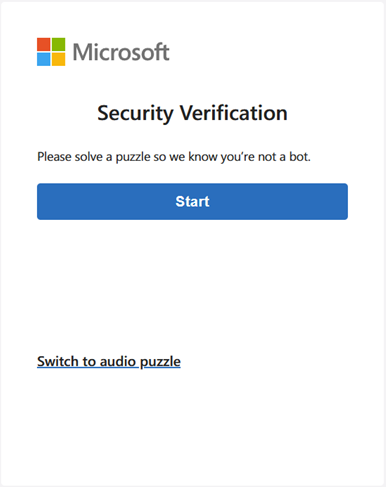
We are excited to announce the General Availability (GA) of the Azure Web Application Firewall (WAF) CAPTCHA challenge for Azure Front Door, empowering customers to better defend their web applications against automated bot attacks while ensuring legitimate users can still access their apps seamlessly. This milestone marks the culmination of a successful public preview that saw hundreds of customers defend against more than 700 million bot requests, reinforcing the value of interactive security mechanisms in modern web application protection. Why CAPTCHA Matters Web applications today face an ever-growing array of automated threats - bots, scrapers, credential stuffing, and brute-force attacks - that often bypass traditional defenses like IP blocking and rate limiting. CAPTCHA introduces a human verification layer that helps distinguish legitimate users from malicious automation. With this GA release, Azure Front Door WAF now offers a fully supported CAPTCHA action that can be configured in custom rules or Bot Manager rules. When suspicious traffic matches a CAPTCHA-enabled rule, users are prompted with a visual or audio challenge to verify their identity before proceeding. How CAPTCHA Works When a client request matches a WAF rule that has the CAPTCHA action enabled, Azure WAF displays an interactive CAPTCHA challenge in the browser to verify that the requester is human. If the user successfully solves the CAPTCHA, Azure WAF marks the request as validated and allows it to proceed through the rest of the rule evaluation. Requests that don’t complete the challenge (or fail it) are blocked, stopping automated bots from advancing. What’s New in GA With the GA release, customers can expect: Updated Interstitial Page: The CAPTCHA page now includes refreshed Microsoft branding, delivering a more consistent and trusted experience for users. Enhanced Stability and Performance: Improvements based on feedback from preview deployments to ensure faster response times and smoother user verification experiences. Full Production Support: The feature is now backed by Microsoft’s service-level agreement (SLA) and is recommended for all production workloads. How to Get Started If you have already been using CAPTCHA during the public preview, no action is needed, your configurations will continue to work as expected. For new users, simply enable the CAPTCHA action within your custom rules or managed rule sets and define the triggering conditions. For a deeper dive into how CAPTCHA works and how to configure it, check out our earlier blogs: Securing web applications with Azure Front Door WAF CAPTCHA | Microsoft Community Hub Public Preview of Azure WAF CAPTCHA Challenge for Azure Front Door | Microsoft Community Hub Documentation Azure Front Door Web Application Firewall CAPTCHA | Microsoft Learn1.6KViews0likes0Comments