azure friday
399 TopicsApplying DevOps Principles on Lean Infrastructure. Lessons From Scaling to 102K Users.
Hi Azure Community, I'm a Microsoft Certified DevOps Engineer, and I want to share an unusual journey. I have been applying DevOps principles on traditional VPS infrastructure to scale to 102,000 users with 99.2% uptime. Why am I posting this in an Azure community? Because I'm planning migration to Azure in 2026, and I want to understand: What mistakes am I already making that will bite me during migration? THE CURRENT SETUP Platform: Social commerce (West Africa) Users: 102,000 active Monthly events: 2 million Uptime: 99.2% Infrastructure: Single VPS Stack: PHP/Laravel, MySQL, Redis Yes - one VPS. No cloud. No Kubernetes. No microservices. WHY I HAVEN'T USED AZURE YET Honest answer: Budget constraints in emerging market startup ecosystem. At our current scale, fully managed Azure services would significantly increase monthly burn before product-market expansion. The funding we raised needs to last through growth milestones. The trade: I manually optimize what Azure would auto-scale. I debug what Application Insights would catch. I do by hand what Azure Functions would automate. DEVOPS PRACTICES THAT KEPT US RUNNING Even on single-server infrastructure, core DevOps principles still apply: CI/CD Pipeline (GitHub Actions) • 3-5 deployments weekly • Zero-downtime deploys • Automated rollback on health check failures • Feature flags for gradual rollouts Monitoring & Observability • Custom monitoring (would love Application Insights) • Real-time alerting • Performance tracking and slow query detection • Resource usage monitoring Automation • Automated backups • Automated database optimization • Automated image compression • Automated security updates Infrastructure as Code • Configs in Git • Deployment scripts • Environment variables • Documented procedures Testing & Quality • Automated test suite • Pre-deployment health checks • Staging environment • Post-deployment verification KEY OPTIMIZATIONS Async Job Processing • Upload endpoint: 8 seconds → 340ms • 4x capacity increase Database Optimization • Feed loading: 6.4 seconds → 280ms • Strategic caching • Batch processing Image Compression • 3-8MB → 180KB (94% reduction) • Critical for mobile users Caching Strategy • Redis for hot data • Query result caching • Smart invalidation Progressive Enhancement • Server-rendered pages • 2-3 second loads on 4G WHAT I'M WORRIED ABOUT FOR AZURE MIGRATION This is where I need your help: Architecture Decisions • App Service vs Functions + managed services? • MySQL vs Azure SQL? • When does cost/benefit flip for managed services? Cost Management • How do startups manage Azure costs during growth? • Reserved instances vs pay-as-you-go? • Which Azure services are worth the premium? Migration Strategy • Lift-and-shift first, or re-architect immediately? • Zero-downtime migration with 102K active users? • Validation approach before full cutover? Monitoring & DevOps • Application Insights - worth it from day one? • Azure DevOps vs GitHub Actions for Azure deployments? • Operational burden reduction with managed services? Development Workflow • Local development against Azure services? • Cost-effective staging environments? • Testing Azure features without constant bills? MY PLANNED MIGRATION PATH Phase 1: Hybrid (Q1 2026) • Azure CDN for static assets • Azure Blob Storage for images • Application Insights trial • Keep compute on VPS Phase 2: Compute Migration (Q2 2026) • App Service for API • Azure Database for MySQL • Azure Cache for Redis • VPS for background jobs Phase 3: Full Azure (Q3 2026) • Azure Functions for processing • Full managed services • Retire VPS QUESTIONS FOR THIS COMMUNITY Question 1: Am I making migration harder by waiting? Should I have started with Azure at higher cost to avoid technical debt? Question 2: What will break when I migrate? What works on VPS but fails in cloud? What assumptions won't hold? Question 3: How do I validate before cutting over? Parallel infrastructure? Gradual traffic shift? Safe patterns? Question 4: Cost optimization from day one? What to optimize immediately vs later? Common cost mistakes? Question 5: DevOps practices that transfer? What stays the same? What needs rethinking for cloud-native? THE BIGGER QUESTION Have you migrated from self-hosted to Azure? What surprised you? I know my setup isn't best practice by Azure standards. But it's working, and I've learned optimization, monitoring, and DevOps fundamentals in practice. Will those lessons transfer? Or am I building habits that cloud will expose as problematic? Looking forward to insights from folks who've made similar migrations. --- About the Author: Microsoft Certified DevOps Engineer and Azure Developer. CTO at social commerce platform scaling in West Africa. Preparing for phased Azure migration in 2026. P.S. I got the Azure certifications to prepare for this migration. Now I need real-world wisdom from people who've actually done it!368Views0likes1Comment
Pipeline Intelligence is live and open-source real-time Azure DevOps monitoring powered by AI .
Every DevOps team I've worked with had the same problem: Slow pipelines. Zero visibility. No idea where to start. So I stopped complaining and built the solution. So I built something about it. ⚡ Pipeline Intelligence is a full-stack Azure DevOps monitoring dashboard that: ✅ Connects to your real Azure DevOps organization via REST API ✅ Detects bottlenecks across all your pipelines automatically ✅ Calculates exactly how much time your team is wasting per month ✅ Uses Gemini AI to generate prioritized fixes with ready-to-paste YAML solutions ✅ JWT-secured, Docker-ready, and fully open-source Tech Stack: → React 18 + Vite + Tailwind CSS → Node.js + Express + Azure DevOps API v7 → Google Gemini 1.5 Flash → JWT Authentication + Docker 𝗪𝗵𝗮𝘁 𝗺𝗮𝗸𝗲𝘀 𝗶𝘁 𝗱𝗶𝗳𝗳𝗲𝗿𝗲𝗻𝘁? Most tools show you generic estimates. Pipeline Intelligence reads your actual cluster config, node count, and pipeline structure and gives you recommendations specific to your infrastructure. 🎯 This year, I set myself a personal challenge: Build and open-source a series of production-grade tools exclusively focused on Azure services tools that solve real problems for real DevOps teams. This project represents weeks of research, architecture decisions, and late-night debugging sessions. I'm sharing it with the community because I believe great tooling should be accessible to everyone not locked behind enterprise paywalls. If this resonates with you, I have one simple ask: 👉 A like, a comment, or a share takes 3 seconds but it helps this reach the DevOps engineers who need it most. Your support is what keeps me building. ❤️ GitHub: https://github.com/HlaliMedAmine/pipeline-intelligence324Views0likes1CommentExcited to share my latest open-source project: KubeCost Guardian
After seeing how many DevOps teams struggle with Kubernetes cost visibility on Azure, I built a full-stack cost optimization platform from scratch. 𝗪𝗵𝗮𝘁 𝗶𝘁 𝗱𝗼𝗲𝘀: ✅ Real-time AKS cluster monitoring via Azure SDK ✅ Cost breakdown per namespace, node, and pod ✅ AI-powered recommendations generated from actual cluster state ✅ One-click optimization actions ✅ JWT-secured dashboard with full REST API 𝗧𝗲𝗰𝗵 𝗦𝘁𝗮𝗰𝗸: - React 18 + TypeScript + Vite - Tailwind CSS + shadcn/ui + Recharts - Node.js + Express + TypeScript - Azure SDK (@azure/arm-containerservice) - JWT Authentication + Azure Service Principal 𝗪𝗵𝗮𝘁 𝗺𝗮𝗸𝗲𝘀 𝗶𝘁 𝗱𝗶𝗳𝗳𝗲𝗿𝗲𝗻𝘁: Most cost tools show you generic estimates. KubeCost Guardian reads your actual VM size, node count, and cluster configuration to generate recommendations that are specific to your infrastructure not averages. For example, if your cluster has only 2 nodes with no autoscaler enabled, it immediately flags the HA risk and calculates exactly how much you'd save by switching to Spot instances based on your actual VM size. This project is fully open-source and built for the DevOps community. ⭐ GitHub: https://github.com/HlaliMedAmine/kubecost-guardian This project represents hours of hard work, and passion. I decided to make it open-source so everyone can benefit from it 🤝 ,If you find it useful, I’d really appreciate your support . Your support motivates me to keep building and sharing more powerful projects 👌. More exciting ideas are coming soon… stay tuned! 🔥.292Views0likes1CommentAzure Quantum orchestrated by enterprise apps via jBPM
Hi Community! Sharing this quantum enterprise computing example: https://medium.com/@sergey.lukyanchikov/jbpm-as-quantum-orchestration-platform-26f55897232e plus its GitHub repo: https://github.com/C-NLTX/Open-Source - enjoy!Solved293Views0likes1Comment
Building a Production-Ready Azure Lighthouse Deployment Pipeline with EPAC
Recently I worked on an interesting project for an end-to-end Azure Lighthouse implementation. What really stood out to me was the combination of Azure Lighthouse, EPAC, DevOps, and workload identity federation. The deployment model was so compelling that I decided to build and validate the full solution hands-on in my own personal Azure tenants. The result is a detailed article that documents the entire journey, including pipeline design, implementation steps, and the scripts I prepared along the way. You can read the full article here290Views0likes1Comment
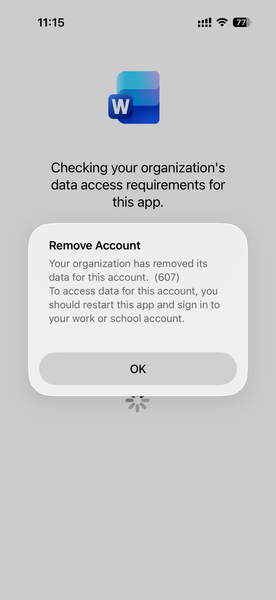
Intune MAM BYOD: Remove Account message for iOS devices
Hello, I am seeing an issue for Intune MAM BYOD(iOS) users. After a user account password reset, it causes Intune to remove the account configured from mobile applications like MS Outlook, Work, OneDrive, etc. Current Intune Configuration: Done - App Protection Policy Done - Conditional access policy --> Grant --> Requires app protection policy (checked) Users had to re-enrol to access his/her data. Here is the screenshot, Thank you,602Views0likes1Comment
Azure passowrd protection
We have a hybrid Azure infrastructure with an AD Connector installed on-prem and configured for PTA. We installed the password protection server and registered it with the Azure tenant, then deployed the DC agent on all domain controllers. Both the proxy and agents are operational. We published a few banned words to block in case anyone uses them. For testing, I changed my password to include one of the banned words. To my surprise, I was able to change the password. I checked the corresponding logon server, and the DC event viewer showed that the password was validated, but the banned word was in the password list that Azure set to enforce. Why is it not blocking the change?Solved243Views0likes1CommentBlocking users using edge add-ons store
Hi all, I am really struggling to find a way to stop users getting to this location: https://microsoftedge.microsoft.com/addons/microsoft-edge-extensions-home and adding addons. I have tried multiple intune policies like blocking the side bar: Any ideas?3.6KViews1like3Comments
Having trouble with MDM
I am trying to set up a surface pro with a business account. However I got a error saying looks like we can't connect to the URL for your organization's MDM terms of us. Error: invalid_client Error subcode: Description: failed%20to%20authenticate%20user Does anyone know a quick fix to this problem. Thanks,324Views0likes1Comment