azure foundry
2 TopicsStaying in the flow: SleekFlow and Azure turn customer conversations into conversions
A customer adds three items to their cart but never checks out. Another asks about shipping, gets stuck waiting eight minutes, only to drop the call. A lead responds to an offer but is never followed up with in time. Each of these moments represents lost revenue, and they happen to businesses every day. SleekFlow was founded in 2019 to help companies turn those almost-lost-customer moments into connection, retention, and growth. Today we serve more than 2,000 mid-market and enterprise organizations across industries including retail and e-commerce, financial services, healthcare, travel and hospitality, telecommunications, real estate, and professional services. In total, those customers rely on SleekFlow to orchestrate more than 600,000 daily customer interactions across WhatsApp, Instagram, web chat, email, and more. Our name reflects what makes us different. Sleek is about unified, polished experiences—consolidating conversations into one intelligent, enterprise-ready platform. Flow is about orchestration—AI and human agents working together to move each conversation forward, from first inquiry to purchase to renewal. The drive for enterprise-ready agentic AI Enterprises today expect always-on, intelligent conversations—but delivering that at scale proved daunting. When we set out to build AgentFlow, our agentic AI platform, we quickly ran into familiar roadblocks: downtime that disrupted peak-hour interactions, vector search delays that hurt accuracy, and costs that ballooned under multi-tenant workloads. Development slowed from limited compatibility with other technologies, while customer onboarding stalled without clear compliance assurances. To move past these barriers, we needed a foundation that could deliver the performance, trust, and global scale enterprises demand. The platform behind the flow: How Azure powers AgentFlow We chose Azure because building AgentFlow required more than raw compute power. Chatbots built on a single-agent model often stall out. They struggle to retrieve the right context, they miss critical handoffs, and they return answers too slowly to keep a customer engaged. To fix that, we needed an ecosystem capable of supporting a team of specialized AI agents working together at enterprise scale. Azure Cosmos DB provides the backbone for memory and context, managing short-term interactions, long-term histories, and vector embeddings in containers that respond in 15–20 milliseconds. Powered by Azure AI Foundry, our agents use Azure OpenAI models within Azure AI Foundry to understand and generate responses natively in multiple languages. Whether in English, Chinese, or Portuguese, the responses feel natural and aligned with the brand. Semantic Kernel acts as the conductor, orchestrating multiple agents, each of which retrieves the necessary knowledge and context, including chat histories, transactional data, and vector embeddings, directly from Azure Cosmos DB. For example, one agent could be retrieving pricing data, another summarizing it, and a third preparing it for a human handoff. The result is not just responsiveness but accuracy. A telecom provider can resolve a billing question while surfacing an upsell opportunity in the same dialogue. A financial advisor can walk into a call with a complete dossier prepared in seconds rather than hours. A retailer can save a purchase by offering an in-stock substitute before the shopper abandons the cart. Each of these conversations is different, yet the foundation is consistent on AgentFlow. Fast, fluent, and focused: Azure keeps conversations moving Speed is the heartbeat of a good conversation. A delayed answer feels like a dropped call, and an irrelevant one breaks trust. For AgentFlow to keep customers engaged, every operation behind the scenes has to happen in milliseconds. A single interaction can involve dozens of steps. One agent pulls product information from embeddings, another checks it against structured policy data, and a third generates a concise, brand-aligned response. If any of these steps lag, the dialogue falters. On Azure, they don’t. Azure Cosmos DB manages conversational memory and agent state across dedicated containers for short-term exchanges, long-term history, and vector search. Sharded DiskANN indexing powers semantic lookups that resolve in the 15–20 millisecond range—fast enough that the customer never feels a pause. Microsoft Phi’s model Phi-4 as well as Azure OpenAI in Foundry Models like o3-mini and o4-mini, provide the reasoning, and Azure Container Apps scale elastically, so performance holds steady during event-driven bursts, such as campaign broadcasts that can push the platform from a few to thousands of conversations per minute, and during daily peak-hour surges. To support that level of responsiveness, we run Azure Container Apps on the Pay-As-You-Go consumption plan, using KEDA-based autoscaling to expand from five idle containers to more than 160 within seconds. Meanwhile, Microsoft Orleans coordinates lightweight in-memory clustering to keep conversations sleek and flowing. The results are tangible. Retrieval-augmented generation recall improved from 50 to 70 percent. Execution speed is about 50 percent faster. For SleekFlow’s customers, that means carts are recovered before they’re abandoned, leads are qualified in real time, and support inquiries move forward instead of stalling out. With Azure handling the complexity under the hood, conversations flow naturally on the surface—and that’s what keeps customers engaged. Secure enough for enterprises, human enough for customers AgentFlow was built with security-by-design as a first principle, giving businesses confidence that every interaction is private, compliant, and reliable. On Azure, every AI agent operates inside guardrails enterprises can depend on. Azure Cosmos DB enforces strict per-tenant isolation through logical partitioning, encryption, and role-based access control, ensuring chat histories, knowledge bases, and embeddings remain auditable and contained. Models deployed through Azure AI Foundry, including Azure OpenAI and Microsoft Phi, process data entirely within SleekFlow’s Azure environment and guarantees it is never used to train public models, with activity logged for transparency. And Azure’s certifications—including ISO 27001, SOC 2, and GDPR—are backed by continuous monitoring and regional data residency options, proving compliance at a global scale. But trust is more than a checklist of certifications. AgentFlow brings human-like fluency and empathy to every interaction, powered by Azure OpenAI running with high token-per-second throughput so responses feel natural in real time. Quality control isn’t left to chance. Human override workflows are orchestrated through Azure Container Apps and Azure App Service, ensuring AI agents can carry conversations confidently until they’re ready for human agents. Enterprises gain the confidence to let AI handle revenue-critical moments, knowing Azure provides the foundation and SleekFlow provides the human-centered design. Shaping the next era of conversational AI on Azure The benefits of Azure show up not only in customer conversations but also in the way our own teams work. Faster processing speeds and high token-per-second throughput reduce latency, so we spend less time debugging and more time building. Stable infrastructure minimizes downtime and troubleshooting, lowering operational costs. That same reliability and scalability have transformed the way we engineer AgentFlow. AgentFlow started as part of our monolithic system. Shipping new features used to take about a month of development and another week of heavy testing to make sure everything held together. After moving AgentFlow to a microservices architecture on Azure Container Apps, we can now deploy updates almost daily with no down time or customer impact. And this is all thanks to native support for rolling updates and blue-green deployments. This agility is what excites us most about what's ahead. With Azure as our foundation, SleekFlow is not simply keeping pace with the evolution of conversational AI—we are shaping what comes next. Every interaction we refine, every second we save, and every workflow we streamline brings us closer to our mission: keeping conversations sleek, flowing, and valuable for enterprises everywhere.892Views3likes0CommentsThe brand new Azure AI Agent Service at your fingertips
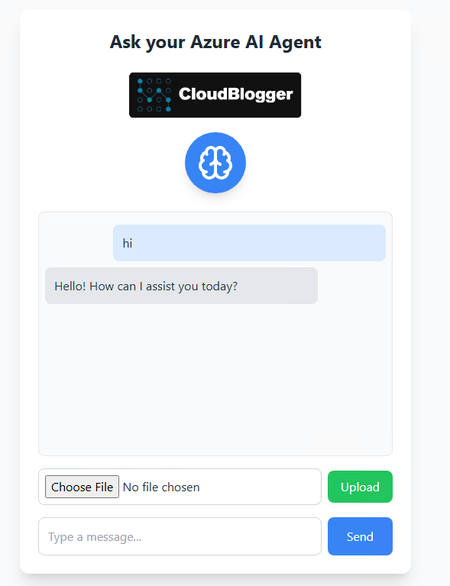
Intro Azure AI Agent Service is a game-changer for developers. This fully managed service empowers you to build, deploy, and scale high-quality, extensible AI agents securely, without the hassle of managing underlying infrastructure. What used to take hundreds of lines of code can now be achieved in just a few lines! So here it is, a web application that streamlines document uploads, summarizes content using AI, and provides seamless access to stored summaries. This article delves into the architecture and implementation of this solution, drawing inspiration from our previous explorations with Azure AI Foundry and secure AI integrations. Architecture Overview Our Azure AI Agent Service WebApp integrates several Azure services to create a cohesive and scalable system: Azure AI Projects & Azure AI Agent Service: Powers the AI-driven summarization and title generation of uploaded documents. Azure Blob Storage: Stores the original and processed documents securely. Azure Cosmos DB: Maintains metadata and summaries for quick retrieval and display. Azure API Management (APIM): Manages and secures API endpoints, ensuring controlled access to backend services. This architecture ensures a seamless flow from document upload to AI processing and storage, providing users with immediate access to summarized content. Azure AI Agent Service – Frontend Implementation The frontend of the Azure AI Agent Service WebApp is built using Vite and React, offering a responsive and user-friendly interface. Key features include: Real-time AI Chat Interface: Users can interact with an AI agent for various queries. Document Upload Functionality: Supports uploading documents in various formats, which are then processed by the backend AI services. Document Repository: Displays a list of uploaded documents with their summaries and download links. This is the main UI , ChatApp.jsx. We can interact with Chat Agent for regular chat, while the keyword “upload:” activates the hidden upload menu. Azure AI Agent Service – Backend Services The backend is developed using Express.js, orchestrating various services to handle: File Uploads: Accepts documents from the frontend and stores them in Azure Blob Storage. AI Processing: Utilizes Azure AI Projects to extract text, generate summaries, and create concise titles. Metadata Storage: Saves document metadata and summaries in Azure Cosmos DB for efficient retrieval. One of the Challenges was to not recreate the Agents each time our backend reloads. So a careful plan is configured, with several files – modules for the Azure AI Agent Service interaction and Agents creation. The initialization for example is taken care by a single file-module: const { DefaultAzureCredential } = require('@azure/identity'); const { SecretClient } = require('@azure/keyvault-secrets'); const { AIProjectsClient, ToolUtility } = require('@azure/ai-projects'); require('dotenv').config(); // Keep track of global instances let aiProjectsClient = null; let agents = { chatAgent: null, extractAgent: null, summarizeAgent: null, titleAgent: null }; async function initializeAI(app) { try { // Setup Azure Key Vault const keyVaultName = process.env.KEYVAULT_NAME; const keyVaultUrl = `https://${keyVaultName}.vault.azure.net`; const credential = new DefaultAzureCredential(); const secretClient = new SecretClient(keyVaultUrl, credential); // Get AI connection string const secret = await secretClient.getSecret('AIConnectionString'); const AI_CONNECTION_STRING = secret.value; // Initialize AI Projects Client aiProjectsClient = AIProjectsClient.fromConnectionString( AI_CONNECTION_STRING, credential ); // Create code interpreter tool (shared among agents) const codeInterpreterTool = ToolUtility.createCodeInterpreterTool(); const tools = [codeInterpreterTool.definition]; const toolResources = codeInterpreterTool.resources; console.log('🚀 Creating AI Agents...'); // Create chat agent agents.chatAgent = await aiProjectsClient.agents.createAgent("gpt-4o-mini", { name: "chat-agent", instructions: "You are a helpful AI assistant that provides clear and concise responses.", tools, toolResources }); console.log('✅ Chat Agent created'); // Create extraction agent agents.extractAgent = await aiProjectsClient.agents.createAgent("gpt-4o-mini", { name: "extract-agent", instructions: "Process and clean text content while maintaining structure and important information.", tools, toolResources }); console.log('✅ Extract Agent created'); // Create summarization agent agents.summarizeAgent = await aiProjectsClient.agents.createAgent("gpt-4o-mini", { name: "summarize-agent", instructions: "Create concise summaries that capture main points and key details.", tools, toolResources }); console.log('✅ Summarize Agent created'); // Create title agent agents.titleAgent = await aiProjectsClient.agents.createAgent("gpt-4o-mini", { name: "title-agent", instructions: `You are a specialized title generation assistant. Your task is to create titles for documents following these rules: 1. Generate ONLY the title text, no additional explanations 2. Maximum length of 50 characters 3. Focus on the main topic or theme 4. Use proper capitalization (Title Case) 5. Avoid special characters and quotes 6. Make titles clear and descriptive 7. Respond with nothing but the title itself Example good responses: Digital Transformation Strategy 2025 Market Analysis: Premium Chai Tea Cloud Computing Implementation Guide Example bad responses: "Here's a title for your document: Digital Strategy" (no explanations needed) This document appears to be about digital transformation (just the title needed) The title is: Market Analysis (no extra text)`, tools, toolResources }); console.log('✅ Title Agent created'); // Store in app.locals app.locals.aiProjectsClient = aiProjectsClient; app.locals.agents = agents; console.log('✅ All AI Agents initialized successfully'); return { aiProjectsClient, agents }; } catch (error) { console.error('❌ Error initializing AI:', error); throw error; } } // Export both the initialization function and the shared instances module.exports = { initializeAI, getClient: () => aiProjectsClient, getAgents: () => agents }; Our backend utilizes 4 agents, creating the Azure AI Agent Service Agents and we will find them in the portal, when the Backend deploys At the same time, each interaction is stored and managed as thread and that’s how we are interacting with the Azure AI Agent Service. Deployment and Security of Azure AI Agent Service WebApp Ensuring secure and efficient deployment is crucial. We’ve employed: Azure API Management (APIM): Secures API endpoints, providing controlled access and monitoring capabilities. Azure Key Vault: Manages sensitive information such as API keys and connection strings, ensuring data protection. Every call to the backend service is protected with Azure API Management Basic Tier. We have only the required endpoints pointing to the matching Endpoints of our Azure AI Agent Service WebApp backend. Also we are storing the AIConnectionString variable in Key Vault and we can move all Variables in Key Vault as well, which i recommend ! Get started with Azure AI Agent Service To get started with Azure AI Agent Service, you need to create an Azure AI Foundry hub and an Agent project in your Azure subscription. Start with the quickstart guide if it’s your first time using the service. You can create a AI hub and project with the required resources. After you create a project, you can deploy a compatible model such as GPT-4o. When you have a deployed model, you can also start making API calls to the service using the SDKs. There are already 2 Quick-starts available to get your Azure AI Agent Service up and running, the Basic and the Standard. I have chosen the second one the Standard plan, since we have a WebApp, and the whole Architecture comes very handy ! We just added the CosmosDB interaction and the API Management to extend to an enterprise setup ! Our own Azure AI Agent Service deployment, allows us to interact with the Agents, and utilize tools and functions very easy. Conclusion By harnessing the power of Azure’s cloud services, we’ve developed a scalable and efficient web application that simplifies document management through AI-driven processing. This solution not only enhances productivity but also ensures secure and organized access to essential information. References Azure AI Agent Service Documentation What is Azure AI Agent Service Azure AI Agent Service Quick starts Azure API Management Azure AI Foundry Azure AI Foundry Inference Demo1.1KViews1like2Comments