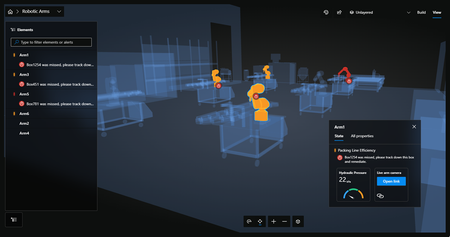
azure digital twins
39 TopicsAzure IoT Hub + Azure Device Registry (Preview Refresh): Device Trust and Management at Fleet Scale
What’s New in this Preview In November 2025, we announced the preview integration of Azure IoT Hub with Azure Device Registry, marking a huge step towards integrating IoT devices into the broader Azure ecosystem. We’re grateful to the customers and partners who participated in the preview and shared valuable feedback along the way. Today, we’re expanding the preview with new capabilities to strengthen security, improve fleet management, and simplify development for connected devices. With this refresh, preview customers can: Automate device certificate renewals with zero-touch, at-runtime operations to minimize downtime and maintain a strong security posture. Integrate existing security infrastructure like private certificate authorities with your Azure Device Registry namespace. Leverage certificate revocation controls to isolate device or fleet-level risks and maintain operational continuity Utilize an improved Azure Portal experience for streamlined configuration and lifecycle management of your devices. Accelerate solution development with expanded IoT Hub and DPS Device SDK compatibility for smoother integration and faster time to value. Together, these enhancements help organizations to secure, govern, and manage their IoT deployments using familiar Azure-native tools and workflows. Why this matters: From Connected Devices to Connected Operations Operational excellence begins by bridging the gap between physical assets and digital intelligence. Consider a global logistics fleet where every vehicle is more than just a machine; it is a trusted, connected, and manageable digital entity in the cloud. As these assets move, they emit a continuous stream of telemetry - from engine vibrations to fuel consumption – directly to a unified data ecosystem, where AI agents can reason over it with greater context. Instead of waiting for a breakdown, these agents detect wear patterns, cross-reference with digital twins, and provide recommendations to reroute a vehicle for service before a failure occurs. This completes a shift from reactive troubleshooting to proactive physical operations. Yet, for many organizations, this transformation is often stalled by fragmented systems where security policies, device registries, and data streams exist in silos. Overcoming this requires a sophisticated stack designed to establish trust, manage device lifecycles, and orchestrate data flows at a global scale: The Digital Operations stack for cloud-connected devices This journey starts with having a secure foundation for fleet management. In an era where perimeter security is no longer enough, organizations need an identity foundation that is both hardware-rooted and deeply integrated with device provisioning. Utilizing robust X.509 certificate management, where keys and credentials are anchored in tamper-resistant hardware, provides high-assurance system integrity across millions of endpoints. Once trust is established, Azure Device Registry creates a unified management plane, where devices are represented as first-class Azure resources, enabling ARM-based fleet management, role-based access control for lifecycle operations, and Azure Policy for enforcement. Simultaneously, IoT Hub provides secure, bidirectional messaging for at-scale fleets. This high-fidelity data provides the essential fuel for Physical AI. By streaming trusted telemetry into Microsoft Fabric, organizations can break down data silos and allow AI agents to reason over real-world events in a centralized analytics environment. The Azure IoT stack provides the essential bridge for cloud-connected devices, enabling customers to transform their industrial environments into highly secure and intelligent ecosystems. For more information on Azure's approach to industrial AI, check out: Making Physical AI Practical for Real-World Industrial Operations. Azure IoT Hub + ADR (Preview): Expanding Fleet and Certificate Lifecycle Management The April 2026 Preview for Azure IoT Hub and Azure Device Registry (ADR) deliver key features to further standardize device identity and enable policy‑driven management for certificates at scale. You can think of device identity in Azure Device Registry like the birth record of a person. When someone is born, certain information becomes permanently associated with them - such as their date and place of birth. In the same way, a device’s identity represents its immutable existence within your solution - things like its serial number, model, or ownership context. However, as that person moves through life, they obtain different credentials that allow them to prove who they are in different situations - such as a driver’s license or passport. These credentials may expire, be renewed, or even replaced entirely over time without changing the person’s underlying identity. In IoT, devices use X.509 certificates as their credential to prove identity to services like IoT Hub. In your Azure Device Registry namespace, you can define the public key infrastructure (PKI) that manage your X.509 certificates and certificate authorities (CAs). In this preview, we are making it easier to integrate with existing security infrastructure and manage certificates at fleet scale. Certificate Management for Cloud-connected Devices in Azure Bring Your Own Certificate Authority (BYO CA) in Azure Device Registry Organizations that already operate sophisticated certificate authorities, with well‑established compliance controls, audit processes, and key custody requirements, want to integrate their trusted CA with the Azure Device Registry operating model. With BYO CA, customers can use their own private certificate authority while still benefiting from Azure’s fully managed device provisioning, and lifecycle management. Azure handles the heavy lifting of issuing, rotating, and revoking issuing certificate authorities (ICAs) and device certificates - while you stay in control of the top-most CA. Full Ownership of Trust and Keys: By bringing their own CA, organizations maintain absolute control over their private keys and security boundaries. Azure never takes custody of the external CA, ensuring existing governance, auditability, and compliance controls remain fully intact. Automated Lifecycle Management: While the CA remains customer-owned, Azure Device Registry automates the issuance, rotation, and revocation of device certificates. This eliminates the need for custom tooling or manual, per-device workflows that typically slow down deployments. Bring your own Certificate Authority in Azure Device Registry Fleet‑Wide Protection with Certificate Revocations Revocation is a mechanism for selective isolation, used to contain a single or group of devices by decommissioning a single device's certificates or the entire anchor of trust. When a single device is compromised, lost, or retired, device certificate revocation enables a precise, targeted response. This allows organizations to isolate individual devices instantly, reduce blast radius, and maintain uninterrupted operations for healthy devices - without rebuilding device identities. ADR propagates the revocation state to IoT Hub, blocking revoked devices until they’re re-provisioned. When a subset of devices requires isolation, policy revocation allows operators to decommission an entire trust anchor rather than managing individual devices. By mapping a specific Issuing CA to a single ADR policy, organizations gain a high-precision containment mechanism. In a single action, an operator can invalidate a compromised CA and then plan for a staged credential rollover across the entire segment. ADR automatically enforces this updated trust chain within IoT Hub, ensuring that only devices with newly issued certificates can connect. This makes large‑scale certificate rotation predictable, controlled, and operationally simple. Revoking the certificate for a single ADR Device on Azure Portal Flexible Options to renew Device Certificates Managing X.509 certificates at scale doesn’t stop once a device is onboarded. Operational certificates are short-lived by design, ensuring devices do not rely on long-lived credentials for authentication. In real-world IoT fleets, devices are often intermittently connected, deployed in hard-to-reach locations, and expected to run continuously - making certificate renewal one of the most operationally challenging parts of device security. Azure IoT Hub now enables device certificate renewal directly through IoT Hub, complementing the role of Device Provisioning Service (DPS). While DPS remains the solution for first-time device onboarding and certificate issuance, IoT Hub renewal is designed for the steady state - keeping already-connected devices securely authenticated over time without introducing downtime. IoT Hub certificate renewal follows similar patterns as other device-initiated operations such as twin updates and direct methods. With this capability, devices can request a new certificate as part of normal operation, using the same secure MQTT connection they already rely on. Support for IoT Hub and Device Provisioning Service (DPS) Device SDKs Managing credential issuance and renewals at scale is only possible if devices can handle their own credential lifecycles. We’ve added Certificate Signing Request (CSR) support to our C, C# (.NET), Java, Python, and Embedded device SDKs for IoT Hub and Device Provisioning Service (DPS). Beyond developer convenience, this provides multiple device-initiated paths for certificate renewal and trust-chain agility. Devices can generate CSRs and request newly signed X.509 certificates through IoT Hub or DPS as part of normal operation. This allows security teams to rotate and update certificates in the field without touching the hardware, keeping fleets secure as certificate authorities and policies evolve over time. Customer Feedback from Preview We’re grateful to the customers and partners who participated in the preview and shared valuable feedback along the way. Hear some of what our customers had to say: "The availability of a built-in certificate manager is a great upgrade in keeping the IoT space more secure."— Martijn Handels, CTO, Helin Data “Secure data is the starting line for industrial AI. With Azure certificate management, at CogitX we can ingest manufacturing signals safely and confidently - then use domain‑aware models to deliver real‑time insights and agentic workflows that improve throughput, quality, and responsiveness.” – Pradeep Parappil, CEO, CogitX Get Started Explore the new capabilities in preview today and start building the next generation of connected operations with Azure IoT Hub and Azure Device Registry: Get Started with Certificate Management in Preview.838Views2likes0Comments
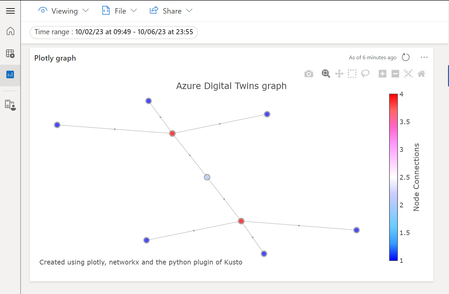
[New blog post] Plotting the Azure Digital Twins graph in Azure Data Explorer
See how your Azure Digital Twins graph evolves over time. Add extra information to your relationship popups. Learn how to use @@plotly graph visualizations in Azure Data Explorer in addition to Azure Digital Twins data history Read the full story at https://sandervandevelde.wordpress.com/2023/10/08/plotting-the-azure-digital-twins-graph-in-azure-data-explorer/462Views0likes0Comments
Issue receiving simulated telemetry data in azure digital twins
Hey there, I am still pretty new to digital twins/IoT and am currently working on a digital twin solution using simulated data from the IoT Hub VS Code extension. I can successfully send the simulated telemetry data to my IoT Hub however when I try to forward it onto my ADT instance using a Function file it is not being received. From my thoughts there are 3 possible causes that might stop it from receiving the telemetry data. The Azure Function code - I have checked this over a couple times and have even checked with chat gpt to ensure this is correct. The DTDL model in ADT - I based this off of the working version of a twin I made before using a virtual raspberry pi and just added the simulated data sources which I was including. The Event Grid - Not 100% sure about this being the cause as from what I know of the process however I did the exact same set up as I did with my previous working project. Any help will be greatly appreciated as I have hit a bit of a wall with it today!1.1KViews0likes1Comment[New blog post] Using Azure Logic apps as business rules for Azure Digital Twins
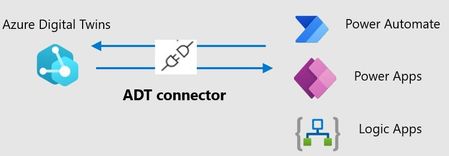
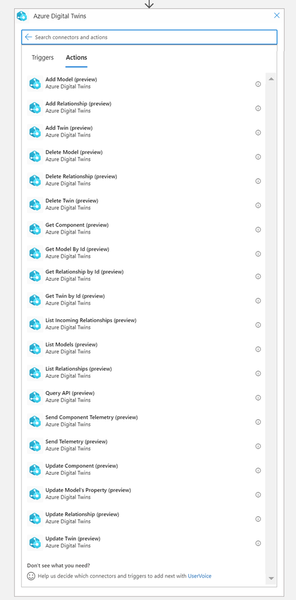
A new ADT connector for the Microsoft Power platform is available in preview. You can now offer rule-based decision-making using Azure Digital Twins together with Logic apps using the that ADT connector. This means you can organize your business rules as flow diagrams in a visual editor. Check out how it adds value to your solutions for current twin changes. Combine it with the connector for Azure Data Explorer to make historical Twin data part of your rules. Read the full story here.1.1KViews0likes0Comments