azure database for postgresql - flexible server
10 TopicsUltimate Guide to POSETTE: An Event for Postgres, 2026 edition
POSETTE: An Event for Postgres 2026 is back for its 5th year: free, virtual, and unapologetically all about Postgres. No travel budget required and no jet lag involved. Just your laptop, a decent internet connection, and curiosity. This year the POSETTE 2026 schedule has 4 livestreams (16-18 June) with 44 talks at ~25 minutes each—covering everything from query performance and partitioning to Postgres 19 features, extensions, and use cases. Which is awesome but also a bit of work to figure out which talks are for you. Hence this ultimate guide post. Every talk will land on YouTube afterward (un-gated, of course) so if you miss anything you care about, you can watch it later. But if you can catch a livestream in June, do it. That’s when the “virtual hallway track” happens on Discord—where you can ask the POSETTE speakers questions and compare notes with other attendees. Meeting other attendees who have the same weird Postgres problems you do can be reassuring somehow. And yes, there will be swag. This guide is your cheat sheet: I’ve categorized and tagged all 44 talks so you don’t have to read 44 abstracts back-to-back. In this post you'll get: “By the numbers” summary Map of the 44 talks 2 Keynote sessions 23 Postgres core talks 11 Postgres ecosystem talks 8 Azure Database talks Why participate on the virtual hallway track on Discord A big thank you to our amazing speakers Join us for POSETTE 2026 & mark your calendars Official POSETTE 2026 Trailer “By the numbers” summary for POSETTE 2026 Here’s a quick snapshot of what you need to know about POSETTE this year: 3 days 16-18 June 2026 4 livestreams In Americas & EMEA time zones but of course you can watch from anywhere 44 talks All free, all virtual 2 invited keynotes Driving Postgres forward at Microsoft (Livestream 1), and Postgres 19 Hackers Panel: What’s In, What’s Out, & What’s Next (Livestream 2) 25 minutes Average length per talk ~1100 minutes Total minutes in POSETTE 2026 talks 50 speakers POSETTE 2026 speakers include PostgreSQL hackers and contributors, users, application developers, PG community members, Azure engineers, & Azure customers 6 keynote speakers Affan Dar & Charles Feddersen (Livestream 1); and Álvaro Herrera, Heikki Linnakangas, Melanie Plageman, & Thomas Munro (Livestream 2) 19 countries Speakers reside in 19 different countries 23 companies Speakers hail from 23 different companies 17.6% CFP acceptance rate 42 talks selected from 238 submisssions 75% general Postgres talks 33 talks are not cloud-specific at all, they’re about the Postgres technology & ecosystem 25% Azure-related talks 11 of 44 talks feature Azure Database for PostgreSQL or Azure HorizonDB 1 organizing company Organized by the Postgres team at Microsoft, in partnership with AMD 17 languages Published talk videos will have captions available in 17 languages, including English, Czech, Dutch, French, German, Hindi, Italian, Japanese, Korean, Polish, Portuguese, Russian, Spanish, Turkish, Ukrainian, and Chinese Simplified & Chinese Traditional Map of the 44 talks To help you quickly navigate all 44 talks, here’s a map of the high-level categories and detailed topics. : A map of the POSETTE 2026 talks—high-level categories and detailed tags to help you find what you care about 2 Keynote sessions Affan Dar and Charles Feddersen lead the PostgreSQL engineering and product teams at Microsoft, In this keynote, they’ll walk through how Microsoft is contributing to Postgres, both upstream in the open source project and in the cloud database service they build on top of it. Driving Postgres forward at Microsoft, by Affan Dar & Charles Feddersen (Azure Database for PostgreSQL, Azure HorizonDB, VS Code, Dev tools, community, Postgres hacking, open source, PosetteConf, livestream-1) Want to understand how Postgres features get decided? This keynote panel with 4 PostgreSQL committers & hackers will peel back the curtain. You’ll hear what made it into Postgres 19, what didn’t (and why), and get a sneak peek into a few of the things in the oven for Postgres 20. Postgres 19 Hackers Panel: What’s In, What’s Out, & What’s Next, by Álvaro Herrera, Heikki Linnakangas, Melanie Plageman, & Thomas Munro (Postgres 19, Postgres hacking, panel, open source, collaboration, multithreading, livestream-2) 23 Postgres core talks Data Modeling JSON in PostgreSQL - evil data type or just needs to be tamed?, by Boriss Mejias (JSON, performance, data modeling, livestream-1) PostgreSQL Design Patterns, by Chris Ellis (data modeling, SQL, PG use cases, livestream-1) Graph Data Exploring property graphs with SQL/PGQ in PostgreSQL, by Ashutosh Bapat (SQL/PGQ, graph data, data modeling, Postgres 19, livestream-4) LISTEN/NOTIFY LISTEN Carefully: How NOTIFY Can Trip Up Your Database, by Jimmy Angelakos (LISTEN/NOTIFY, PG use cases, triggers, livestream-4) Performance Maintaining Large Tables in PostgreSQL, by Sarat Balijepalli (WAL, performance, scaling Postgres, vacuum, autovacuum, statistics, partitioning, monitoring, livestream-3) My Postgres partitioning cookbook, by Derk van Veen (partitioning, PG use cases, data modeling, performance, livestream-4) PostgreSQL 17 vs 18: Side‑by‑Side Performance Wins in Real‑World Queries, by Divya Bhargov (performance, PG use cases, livestream-3) Vacuuming Enhancements in PostgreSQL 18: Faster, Smarter, More Predictable, by Shashikant Shakya (vacuum, async IO, monitoring, performance, livestream-4) PG Internals Linux and PostgreSQL in the Multiverse of Connections, by Josef Machytka (Linux, PG internals, connection pooling, livestream-2) pg_stats: How Postgres Internal Stats Work, by Richard Yen (statistics, pg_stats, PG internals, query planner, livestream-2) Postgres isn’t slow, your storage is, by Sai Srirampur (storage, IO, performance, livestream-3) PostgreSQL queues done right with PgQ, by Alexander Kukushkin (queues, PG internals, extensions, livestream-2) random_page_cost in Postgres - why the default is 4.0 and should you lower it?, by Tomas Vondra (PG internals, IO, performance, livestream-1) The Wonderful World of WAL, by Bruce Momjian (WAL, PG internals, replication, livestream-3) What's new with constraints in Postgres 18, by Gülçin Yıldırım Jelínek (constraints, data modeling, livestream-2) Postgres Hacking Fuzzing PostgreSQL, by Adam Wolk (PG internals, testing, Dev tools, libpq, security, livestream-1) Journey of developing a performance optimization feature in PostgreSQL, by Rahila Syed (Postgres hacking, PG internals, performance, WAL, replication, livestream-4) The Hitchhiker’s Guide to PostgreSQL Hacking: Don’t Panic, Just Start Small, by Xuneng Zhou (Postgres hacking, PG internals, community, livestream-2) Replication Past, Present, and Future: Logical Decoding and Replication in PostgreSQL, by Hari Kiran (replication, logical decoding, PG internals, livestream-4) Where Does My INSERT Go? A Logical Replication Story, by Hamid Akhtar (replication, PG internals, WAL, livestream-4) Security From Dev to Prod: Securing Postgres the Right Way, by Sakshi Nasha (security, roles, PG use cases, extensions, monitoring, livestream-4) From trust to Tokens: A Short History of PostgreSQL Authentication, by Murat Tuncer (authentication, security, livestream-2) PostgreSQL vs. SQL Server: Security Model Differences, by Taiob Ali (security, authentication, SQL Server, roles, livestream-1) 11 Postgres ecosystem talks Analytics pg_lake: Postgres as a lakehouse, by Marco Slot (pg_lake, extensions, OLAP, data warehouse, Iceberg, DuckDB, analytics, livestream-2) Apache AGE Querying & Visualizing Graphs in Postgres with Apache AGE, by Christian Miles (Apache AGE, graph data, data visualization, SQL/PGQ, Azure HorizonDB, livestream-1) Autotuning Building safety tooling for risk-free AI tuning of Postgres: Fast cars need fast brakes, by Mohsin Ejaz (autotuning, AI, performance, monitoring, livestream-2) Change Data Capture Building Event-Driven Systems with PostgreSQL Logical Replication and Drasi, by Diaa Radwan (Drasi, replication, WAL, CDC, livestream-3) Citus Move Less, Move Faster: Speeding Up Citus Cluster Scaling, by Muhammad Usama (Citus, extensions, performance, scaling Postgres, livestream-4) Dev Tools An MCP for your Postgres DB, by Pamela Fox (MCP, AI, Python, Dev tools, livestream-1) pgcov: Bringing Real Test Coverage to PostgreSQL Code, by Pavlo Golub (testing, Postgres hacking, Dev tools, extensions, CI/CD, livestream-3) PostgreSQL Tooling Across AI Editors and Agents, by Matt McFarland (Dev tools, VS Code, Cursor, AI, data visualization, Apache AGE, graph data, Azure, MCP, Copilot, livestream-1) Django PostgreSQL Generated Columns by Example, by Paolo Melchiorre (app dev, Django, generated columns, livestream-2) Kubernetes Quorum-Based Consistency for Cluster Changes with CloudNativePG Operator, by Jeremy Schneider & Leonardo Cecchi (CloudNativePG, Kubernetes, PG use cases, livestream-3) Performance Modelling Postgres Performance Degradation on Burstable Cloud Instances, by Chun Lin Goh (performance, burstable, compute, QA, livestream-4) 8 Azure Database for PostgreSQL & Azure HorizonDB talks AI-related talks From Queries to Agents: The Next Era of Data Retrieval on PostgreSQL, by Abe Omorogbe (AI, MCP, Azure Database for PostgreSQL, graph data, Apache AGE, Azure HorizonDB, livestream-3) Production RAG at Scale with Azure Database for PostgreSQL, by Julia Schröder Langhaeuser & Paula Santamaría (Azure Database for PostgreSQL, AI, RAG, PG use cases, livestream-3) AMD Choose the Right Azure Infrastructure to Improve Postgres Performance by Over 60%, by Andrew Ruffin (AMD, performance, Azure, compute, Azure Database for PostgreSQL, livestream-1) Azure HorizonDB Why we built Azure HorizonDB for PostgreSQL, by Dingding Lu (Azure HorizonDB, scaling Postgres, livestream-3) Flexible Server pg_duckdb in Action: Accelerating Analytics on Azure Database for PostgreSQL, by Nitin Jadhav (DuckDB, Azure Database for PostgreSQL, extensions, OLAP, analytics, performance, livestream-4) The Rise of PostgreSQL as the Everything Database, by Varun Dhawan (Postgres history, extensions, graph data, Apache AGE, Azure Database for PostgreSQL, DuckDB, Citus, livestream-3) What I’ve Learned Teaching Postgres to 200+ field engineers at Microsoft, by Paula Berenguel (training, Azure, Postgres skilling, livestream-1) Oracle to Postgres Migrating VLDBs from Oracle to Azure Database for PostgreSQL, by Adithya Kumaranchath (migration, Azure Database for PostgreSQL, Oracle to Postgres, livestream-2) Why participate in the virtual hallway track on Discord If you’ve checked out the schedule and plan to watch some of the talks, you might still be wondering: why join live—and why bother with the virtual hallway track on Discord? Here’s how a few of last year’s attendees described the experience: “Very impressed by all the speakers and content I am absolutely shattered as there was so much great content in all the talks over the past 3 days but I have probably learnt more in these sessions than I could have in months of reading up.” “Want to let y’all know how much I got from this onine conference, the speakers were excellent, well-prepared and well-presented. The hosts were informative, engaging, & amusing. The discord hallway channel made me feel connected. I learned a lot and found some new inspiration. I’ll be back next year!” “I have no idea how I’m going to summarise all the interesting stuff for coworkers.” The common thread: the live, shared experience—being able to ask questions, compare notes, and learn alongside other people in real time. How to join the virtual hallway track Head to the #posetteconf channel on Discord (on the Microsoft Open Source Discord) That’s where speakers and attendees hang out during the livestreams—it’s where you can ask questions, share reactions, and just say hi Big thank you to our amazing speakers Every great event starts with great talks—and great talks start with great speakers. Want to learn more about the people behind these talks? Visit the POSETTE 2026 Speaker page Click a speaker’s bio to see their written interview (if available) If a speaker has been a guest on the Talking Postgres podcast in the past, then you’ll find a link to their episode there, too Join us for POSETTE 2026! Mark your calendars I hope you join us for POSETTE 2026. Consider yourself officially invited. As part of the talk selection team, I’m definitely biased—but I truly believe these speakers and talks are worth your time. I’ll be hosting Livestream 1 and you’ll find me in the #posetteconf Discord chat. I hope to see you there. And please: tell your Postgres friends, so they don’t miss out! 🗓️ Add the livestreams to your calendar Livestream 1: Tue 16 June, 8am–2pm PDT (UTC-7) [ register for updates ] and/or [ add to calendar ] Livestream 2: Wed 17 June, 8am–2pm CEST (UTC+2) [ register for updates ] and/or [ add to calendar ] Livestream 3: Wed 17 June, 8am–2pm PDT (UTC-7) [ register for updates ] and/or [ add to calendar ] Livestream 4: Thu 18 June, 8am–2pm CEST (UTC+2) [ register for updates ] and/or [ add to calendar ] Watch last year’s POSETTE 2025 talks in advance: And if you want to get ready, you can watch talks from the POSETTE 2025 playlist on YouTube anytime, anywhere. Lots of solid, useful, and evergreen Postgres talks in there. “Official Trailer” for POSETTE 2026 is on YouTube To help more developers, community members, and Postgres users discover POSETTE 2026, our team created this short video trailer. Take a peek and share it with friends as an invitation of sorts. We’re trying to make sure that people don’t miss their opportunity to be part of the livestreams and ask questions on the discord during the conference (as well as watch the talks on YouTube after the event is over.) Watch and share the trailer: Official Trailer for POSETTE: An Event for Postgres 2026 Acknowledgements & Gratitude I’ve already thanked the 50 amazing speakers above. In addition, thanks go to Silvano Coriani, Cornelia Biacsics, Aaron Wislang, and My Nguyen for reviewing parts of this post before publication. I also want to thank the team at AMD for their partnership and support of POSETTE this year! And of course, big thank you to the POSETTE 2026 organizing team and POSETTE talk selection team—without you, there would be no POSETTE! Figure 3: Visual invitation to join the virtual hallway track for POSETTE 2026 on the Microsoft Open Source Discord, so you can chat with the speakers & others in the Postgres community1.3KViews3likes0CommentsGeneral Availability of Online Migration to Azure Database for PostgreSQL Flexible server
Online migration minimizes downtime by keeping your source database operational during the migration process, with continuous data synchronization until cut over. How can I use Online migration? The Online migration is available in the Azure portal on the Migration setup screen, in the “Migration mode” drop down selection box, once you initiate a migration from the Flexible server page. Figure 1: Screenshot from the Azure Portal from the Migration setup page. Here you can select the “Online” migration mode to migrate from any of the listed PostgreSQL sources to Azure Database for PostgreSQL- Flexible server It can also be used from the Azure CLI by specifying the 'migration-mode' parameter as 'Online'. How does Online migration work? In an online database migration to Azure Database for PostgreSQL – Flexible Server, your application that is connecting to your Postgres source is not stopped while your database(s) are copied to Flexible Server target. Instead, the initial copy of the database(s) is followed by replication to keep the Postgres Flexible Server in sync with the Postgres source. A cutover is performed when the Azure Database for PostgreSQL - Flexible Server is in complete sync with the Postgres source, resulting in minimal downtime. Figure 2: Cutover in Online migration: Screenshot from the Migration status screen, where you can execute the cutover and complete the migration. The latency here is zero indicating that target Postgres Flex server is in sync with the source Postgres instance. In the ‘OnlineMigrationDemo’ above, the Latency is 0 which indicates that the Azure Database for PostgreSQL - Flexible Server is in sync with the source Postgres instance. Similarly, Online migration can be executed using the Command Line Interface (CLI) as well. Figure 3: Online migration through CLI: Screenshot when you execute ‘show’ to get the Migration status displays latency for the individual Databases In the ‘OnlineMigrationDemo’ above, the Latency is 0 for the ‘customer-info’ Database being migrated which indicates that the target is in sync with the source. Whether you execute the migration from the Portal or the CLI, once the latency parameter decreases to 0 or close to 0, you can go ahead and execute the cutover to complete the migration. Before you execute the cutover, it is essential that you: Stop all writes at the source Postgres instance Validate the data that has been migrated to the target Flexible server Copy any custom server parameters and connection security details from the source to the target server Once you execute the cutover, the migration shows successful completion. At the point, ensure that you make changes to your application to point all connection strings to the Flexible server. What are the differences between Offline and Online migration? The following table gives an overview of Offline and Online modes of migration. Comparison of Migration modes Online Offline Ideal for small Databases ✓ Simple to execute, with no manual intervention for cutover ✓ Migrate without logical replication restrictions ✓ Ideal for Production databases ✓ Minimal downtime to Application & better user experience ✓ Depending on the nature of your workload, you can choose either Offline or Online migration. Get started with Online migration If you’re looking to migrate to Flexible Server from any of the listed PostgreSQL sources, you’ll find the Migration service overview quite useful. If you only have a small downtime window in particular and you want to minimize the downtime of moving your production workloads from any compatible PostgreSQL source to Flexible Server, then Online migration could be a good fit for your situation. Where to find more info about Online migration for Azure Database for PostgreSQL – Flexible Server? Overview: How to migrate from your PostgreSQL source to Flexible server Tutorials: How to migrate Online from your Azure VM/On-premise instance to Flexible server How to migrate Online from your Amazon RDS instance to Flexible server How to migrate Online from your Amazon Aurora instance to Flexible server How to migrate Online from your Google Cloud SQL for PostgreSQL instance to Flexible server We’re always eager to hear from you, so please reach out to us at migrationpm@service.microsoft.com.477Views3likes0CommentsManaging bloat in PostgreSQL using pgstattuple on Azure Database for PostgreSQL flexible server
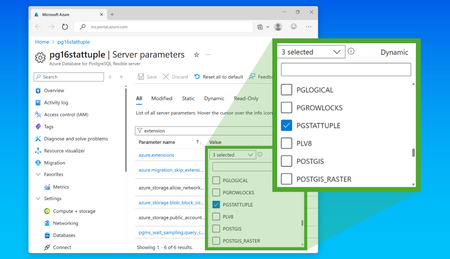
Bloat refers to the unused space within database objects like tables and indexes, caused by accumulated dead tuples that have not been reclaimed by the storage engine. This often results from frequent updates, deletions, or insertions, leading to inefficient storage and performance issues. Addressing bloat is crucial for maintaining optimal database performance, as it can significantly impact storage efficiency, increase I/O operations, reduce cache efficiency, prolong vacuum times, and slow down index scans. In this blog post, I will walk you through how to use the pgstattuple extension in PostgreSQL to analyze and understand the physical storage of your database objects. By leveraging pgstattuple, you can identify and quantify the unused space within your tables and indexes. We will guide you through analyzing bloat, interpreting the results, and addressing the bloat to optimize your database and improve its performance. I will be using the pg_repack extension as an alternative to VACUUM FULL and REINDEX. pg_repack is a PostgreSQL extension that removes bloat from tables and indexes and reorganizes them more efficiently. pg_repack works by creating a new copy of the target table or index, applying any changes that occurred during the process, and then swapping the old and new versions atomically. pg_repack doesn't require any downtime or exclusive access locks on the processed table or index, except for a brief period at the beginning and at the end of the operation. Performing a full table repack requires free disk space about twice as large as the target table(s) and its indexes. For example, if the total size of the tables and indexes to be reorganized is 1GB, an additional 2GB of disk space is required. For pg_repack to run successfully on a table you must have either a PRIMARY KEY or a UNIQUE index on a NOT NULL column. Let us dive in and see how you can make the most of this powerful tool. To get more details on the bloat on an Azure Database for PostgreSQL flexible server, you can follow these steps: 1. Installing pgstattuple Add pgstattuple to the azure.extensions server parameter. You must install the extension on the database in which you want to analyze the bloat. To do so, connect to the database of interest and run the following command: CREATE EXTENSION pgstattuple; 2. Analyze the table/index Once the extension is installed, you can use the pgstattuple function to gather the detailed statistics to analyze the bloat on test table. The function provides information such as the number of live tuples, dead tuples, and the percentage of bloat, free space within the pages. To showcase the pgstattuple extension features, I have used a 4 Vcore SKU with PG version 16, created a test table with an index, loaded it with 24 Gb data and kept on generating bloat by performing some update/delete commands on the table leading to bloat. Creating a test table using the below script. CREATE TABLE test_table ( id bigserial PRIMARY KEY, column1 text, column2 text, column3 text, column4 text, column5 text, column6 text, column7 text, column8 text, column9 text, column10 text); Loading the table with 24 GB data using the below script. INSERT INTO test_table (column1, column2, column3, column4, column5, column6, column7, column8, column9, column10) SELECT md5(random()::text), md5(random()::text), md5(random()::text), md5(random()::text), md5(random()::text), md5(random()::text), md5(random()::text), md5(random()::text), md5(random()::text), md5(random()::text) FROM generate_series(1, 22000000); Create an index on this table to depict the usage of pgstatindex function to analyze bloat on an index. CREATE INDEX idx_column1 ON test_table (column1); Run functions pgstattuple on the above table and pgstatindex on the above index without bloat. pgstattuple on unbloated table You can observe the dead_tuple_percent is 0 and free_percent is 4.3 referring to the healthy state of a table. pgstatindex on unbloated index You can observe the avg_leaf_density is 89.07% and leaf_fragementation is 8.1 referring to healthy state of the index. Using the command below, I am generating bloat on the table. UPDATE test_table SET column1 = md5(random()::text), column2 = md5(random()::text), column3 = md5(random()::text), column4 = md5(random()::text), column5 = md5(random()::text), column6 = md5(random()::text) WHERE id % 5 = 0; You can analyze a table using the below query: SELECT * FROM pgstattuple('your_table_name'); What it does: It performs a full scan to gather detailed statistics Performance: On large tables the performance is slower and might take some seconds to minutes depending on the table size due to the full table scans Use case: To diagnose bloat or planning vacuuming strategies like (performing VACUUM/VACUUM FULL) To achieve faster estimates you can use, SELECT * FROM pgstattuple_approx(‘your_table_name’); What it does: Uses sampling to estimate statistics about the table. Accuracy: Results are close but not exact Performance: On large tables the performance is faster as it only considers a sample (subset of pages). Use case: quick insights The function provides the following information about the table. Column Description table_len Table length in bytes (tuple_len+dead_tuple_len+frees_space) and the overhead accounts for the padding (for tuple alignment) and page header (for per page table pointers) tuple_count Number of live tuples tuple_len Length of live tuples in bytes tuple_percent Percentage of live tuples dead_tuple_count Number of dead tuples dead_tuple_len Length of dead tuples in bytes dead_tuple_percent Percentage of dead tuples free_space Total free space in bytes within the pages free_percent Percentage of free space within the pages You should mainly concentrate on the below 3 columns to understand the table bloat and the unused space. dead_tuple_percent column tells us the percentage of dead tuples in the table. It is calculated as below. dead_tuple_percent = dead_tuple_len / table_len * 100 This can be reduced by running VACUUM on the table. However, VACUUM does not reclaim the space. Hence, free_space and free_percent would increase after the VACUUM. free_space and free_percent depict the unused/wasted space within the pages. The space can be reclaimed only by performing a VACUUM FULL on the table. If you see high free_percent it depicts the table needs VACUUM FULL (here instead you could use pg_repack) to reclaim the space. If you observe a dead_tuple_percent anything > 20% you would need to run VACUUM on the table. However, if you observe a free_percent > 50% you would need to run VACUUM FULL on the table. The below 3 snips depict the pgstattuple function run on a bloated table, vacuumed table and the output after pg_repack run on the table. Pgstattuple function run on the bloated table. pgstattuple function run on the table after vacuuming the table. Note: Here you also see a difference in tuple_count as I have performed some delete statements which are not captured in the document. Hence you see a tuple count difference. pgstattuple function on after running pg_repack on the table. Summary of Changes with vacuum and pg_repack run on a bloated table: dead_tuple_count: Reduced to 0 after VACUUM dead_tuple_len: Reduced to 0 after VACUUM dead_tuple_percent: Reduced after VACUUM from 21% to 0 free_space: Increased after VACUUM but significantly reduced after pg_repack free_percent: Increased after VACUUM but drastically reduced after pg_repack Similarly, to analyze an index, you can run: SELECT * FROM pgstatindex('your_index_name'); The function provides the following information about the index. Column Description version B-tree version number tree_level Tree level of the root page index_size Total number of pages in index root_block_no Location of root block internal_pages Number of "internal" (upper-level) pages leaf_pages Number of leaf pages empty_pages Number of empty pages deleted_pages Number of deleted pages avg_leaf_density Average density of leaf pages leaf_fragmentation Leaf page fragmentation Low avg_leaf_density implies underutilized pages. It denotes the percentage of good data in index pages. After VACUUM this column value would further go down as cleaning the dead tuples in the indexes reduces the leaf density further pointing us to increase in unused/wasted space. To reclaim the unused/wasted space REINDEX needs to be performed for the index to be performant. High leaf_fragmentation implies Poor data locality within the pages again a REINDEX would help. If you see avg_leaf_density anything < 20% you would need perform REINDEX. The below 3 snips depict the pgstatindex function run on a bloated table index, vacuumed table index and the output after pg_repack run on the table index. pgstatindex ran on bloated table pgstatindex run on index after Vacuuming the table pgstatindex run on index after pg_repack run Summary of Changes with vacuum and pg_repack run on a bloated index: index_size: Remained high after VACUUM but significantly reduced after pg_repack as the unused/wasted space is reclaimed avg_leaf_density: Reduced significantly after VACUUM from 80%-14% depicting a smaller number of good data on the leaf page and increased to 89% after pg_repack leaf_fragmentation: Remained the same after VACUUM and reduced to 0 after pg_repack depicting no page fragmentation happening Note: The index size is a sum of leaf_pages, empty_pages, deleted_pages and internal_pages. pgstattuple acquires a read lock on the object (table/index). So the results do not reflect an instantaneous snapshot; concurrent updates will affect them. For more information on pgstatginindex and pgstathasindex functions refer to PostgreSQL documentation here. For more insights on pgstattuple with respect to TOAST tables, please refer to the relevant documentation here. 3. Analyze bloat on partition tables The pgstattuple extension in PostgreSQL is a powerful tool for analyzing table and index bloat by providing detailed statistics such as dead tuple percentage and free space. However, it’s important to note that this function cannot be executed directly on a partitioned table. Instead, it must be run individually on each partition to gather meaningful insights. To streamline this process, especially when dealing with a large number of partitions, you can use a PL/pgSQL script that iterates through all partitions of a parent table. This script executes pgstattuple on each partition and stores the resulting statistics—such as dead tuple percentage and free space—in a summary table for easy review and analysis. This approach not only simplifies the task of identifying bloat across partitions but also enables proactive monitoring and optimization of storage efficiency in partitioned PostgreSQL environments. -- Create a temporary table to store bloat statistics DROP TABLE IF EXISTS bloat_summary; CREATE TEMP TABLE bloat_summary ( partition_name TEXT, table_len BIGINT, tuple_count BIGINT, tuple_len BIGINT, tuple_percent NUMERIC, dead_tuple_count BIGINT, dead_tuple_len BIGINT, dead_tuple_percent NUMERIC, free_space BIGINT, free_percent NUMERIC ); -- DO block to iterate over all partitions and collect statistics DO $$ DECLARE part RECORD; stats RECORD; BEGIN FOR part IN SELECT inhrelid::regclass AS partition_name FROM pg_inherits WHERE inhparent = 'your_parent_table'::regclass LOOP EXECUTE format('SELECT * FROM pgstattuple(%L)', part.partition_name) INTO stats; INSERT INTO bloat_summary VALUES ( part.partition_name, stats.table_len, stats.tuple_count, stats.tuple_len, stats.tuple_percent, stats.dead_tuple_count, stats.dead_tuple_len, stats.dead_tuple_percent, stats.free_space, stats.free_percent ); END LOOP; END $$; -- Output the summary SELECT * FROM bloat_summary ORDER BY dead_tuple_percent DESC; 4. Addressing the bloat Once you have identified a bloat, you can address it by taking the following steps. Below are common approaches. VACUUM: Clears dead tuples without reclaiming the space. Pg_repack: Performs VACUUM FULL and REINDEX online and efficiently reorganizes the data. Note: Other unused space, like the one left in heap or index pages due to a configured fill factor lower than 100 or because the remaining available space on a page cannot accommodate a row, given its minimum size, is not considered bloat, while it's also unused space. pgstattuple will help you address bloat! This blog post guided you through understanding and managing bloat in PostgreSQL using the pgstattuple extension. By leveraging this tool, you were able to gain detailed insights into the extent of bloat within their tables and indexes. These insights prove valuable in maintaining efficient storage and ensuring optimal server performance.1.8KViews2likes0CommentsScaling PostgreSQL at OpenAI: Lessons in Reliability, Efficiency, and Innovation
At POSETTE: An Event for Postgres 2025, Bohan Zhang of OpenAI delivered a compelling talk on how OpenAI has scaled Azure Database for PostgreSQL- Flexible Server to meet the demands of one of the world’s most advanced AI platforms running at planetary scale. The Postgres team at Microsoft has partnered deeply with OpenAI for years to enhance the service to meet their performance, scale, and availability requirements, and it is great to see how OpenAI is now deploying and depending on Flexible Server as a core component of ChatGPT. Hearing firsthand about their challenges and breakthroughs is a reminder of what’s possible when innovation meets real-world needs. This blog post captures the key insights from Bohan’s POSETTE talk, paired with how Azure’s cloud platform supports innovation at scale. PostgreSQL at the Heart of OpenAI As Bohan shared during his talk, PostgreSQL is the backbone of OpenAI’s most critical systems. Because PostgreSQL plays a critical role in powering services like ChatGPT, Open AI has prioritized making it more resilient and scalable to avoid any disruptions. That’s why OpenAI has invested deeply in optimizing PostgreSQL for reliability and scale. Why Azure Database for PostgreSQL? OpenAI has long operated PostgreSQL on Azure, initially using a single primary instance without sharding. This architecture worked well—until write scalability limits emerged. Azure’s managed PostgreSQL service provides the flexibility to scale read replicas, optimize performance, and maintain high availability to provide global low latency reads without the burden of managing infrastructure. This is why we designed Azure Database for PostgreSQL to support precisely these kinds of high-scale, mission-critical workloads, and OpenAI’s use case is a powerful validation of that vision. Tackling Write Bottlenecks PostgreSQL’s MVCC (Multi-Version Concurrency Control) design presents challenges for write-heavy workloads—such as index bloat, autovacuum tuning complexity, and version churn. OpenAI addressed this by: Reducing unnecessary writes at the application level Using lazy writes and controlled backfills to smooth spikes Migrating extreme write-heavy workloads with natural sharding keys to other systems. These strategies allowed OpenAI to preserve PostgreSQL’s strengths while mitigating its limitations. Optimizing Read-Heavy Workloads With writes offloaded, OpenAI focused on scaling read-heavy workloads. Key optimizations included: Offloading read queries to replicas Avoiding long-running queries and expensive multi-way join queries Using PgBouncer for connection pooling, reducing latency from 50ms to under 5ms Categorizing requests by priority and assigning dedicated read replicas to high-priority traffic As Bohan noted, “After all the optimization we did, we are super happy with Postgres right now for our read-heavy workloads.” Schema Governance and Resilience OpenAI also implemented strict schema governance to avoid full table rewrites and production disruptions. Only lightweight schema changes are allowed, and long-running queries are monitored to prevent them from blocking migrations. To ensure resilience, we categorized requests by priority and implemented multi-level rate limiting—at the application, connection, and query digest levels. This helped prevent resource exhaustion and service degradation. Takeaway OpenAI’s journey is a masterclass in how to operate PostgreSQL at hyper-scale. By offloading writes, scaling read replicas, and enforcing strict schema governance, OpenAI demonstrated PostgreSQL on Azure meets the demands of cutting-edge AI systems. It also reinforces the value of Azure’s managed database services in enabling teams to focus on innovation rather than infrastructure. We’re proud of the work we’ve done to co-innovate with OpenAI and excited to see how other organizations can apply these lessons to their own PostgreSQL deployments. Check out the on-demand talk “Scaling Postgres to the next level at OpenAI” and many more PostgreSQL community sessions from POSETTE.2.1KViews5likes0CommentsPostgreSQL 17 In-Place Upgrade – Now in Public Preview
PostgreSQL 17 in-place upgrade is now available in Public Preview on Azure Database for PostgreSQL flexible server! You can now upgrade from PostgreSQL 14, 15, or 16 to PG17 with no data migration and no changes to connection strings—just a few clicks or a CLI command. Learn what’s new and how to get started: https://aka.ms/pg17-mvu We’d love to hear your thoughts—feel free to share feedback or questions in the comments! #Microsoft #Azure #PostgreSQL #PG17 #Upgrade #OpenSourceInnovating with PostgreSQL @Build
At this year's Microsoft Build, we're excited to share the latest updates and innovations in Microsoft Azure Database for PostgreSQL. Whether you're building AI powered apps and agents or just looking to uplevel your PostgreSQL experience, we've got sessions packed with insights and tools tailored for developers and technical leaders. As a fully managed, AI-ready open source relational database that offers 58% cost savings over an on-premises PostgreSQL database – Azure Database for PostgreSQL enhances your security, scalability, and management of enterprise workloads. Check out what’s happening with Postgres at Build — in Seattle and online: 🔍 Breakout Sessions BRK211: Building Advanced Agentic Apps with PostgreSQL on Azure What benefits do agentic architectures bring compared to traditional RAG patterns? Find out how we answer this question by exploring advanced agentic capabilities offered by popular GenAI frameworks (LangChain, LlamaIndex, Semantic Kernel) and how they transform RAG applications built on Azure Database for PostgreSQL. Learn how to further improve agentic apps by integrating advanced RAG techniques, making vector search faster with the DiskANN vector search algorithm, and more accurate with Semantic Ranking and GraphRAG. BRK204: What’s New in Microsoft Databases: Empowering AI-Driven App Dev Explore advanced applications powered by Microsoft databases on-premises, on Azure and in Microsoft Fabric. Uncover innovative approaches to scalability and learn about intelligent data processing with AI-driven insights and agentic integrations. See new features with engaging demos across all databases including Azure Database for PostgreSQL. 💻 Demo Session DEM564: Boost Your Development Workflows with PostgreSQL Discover how to transform your development workflow on PostgreSQL. Whether you're building AI-powered apps, managing complex datasets, or just looking to streamline your PostgreSQL experience, this demo will show you how to level up your productivity with PostgreSQL on Azure. 🧪 Hands-On Labs LAB360: Build an Agentic App with PostgreSQL, GraphRAG, and Semantic Kernel Sign up to get hands-on experience building an agent-driven, RAG-based application with Azure Database for PostgreSQL and VS Code. Explore coding and architectural concepts while using DiskANN Index for Vector Search, and integrating Apache AGE for PostgreSQL to extend into a GraphRAG pattern leveraging the Semantic Kernel Agent Framework. 💬 Meet the Experts Have questions? Looking to talk open source, AI agentic apps, or migration? Visit us in the Expert Meetup Zone to connect with the Postgres product teams, engineers, and architects. 🔎 How to find it: Log into the Microsoft Build 2025 website or use the official event mobile app to view the venue map and session schedule. 📍 To find the Expert Meetup zone, check out the official MS Build Event Guide for a venue maps and other logistical information. 🐘Get Started with Azure Database for PostgreSQL Want to try it out firsthand? 🚀 Start building 📘 Explore the documentation Let's connect, code, and grow together at Build 2025!500Views3likes0CommentsMicrosoft PostgreSQL OSS engine team: reflecting on 2024
In "Microsoft PostgreSQL OSS engine team: reflecting on 2024", the first part of a two part blog post, you will learn about who the Microsoft PostgreSQL OSS Engine team is, their code contributions to the upstream PostgreSQL & journey during 2024. In the second part, you will get a sneak preview of upcoming work in 2025 (and PG18 cycle) and more.2.1KViews3likes1Comment