azure copilot
5 TopicsAnnouncing the resiliency agent in Azure Copilot, now in public preview
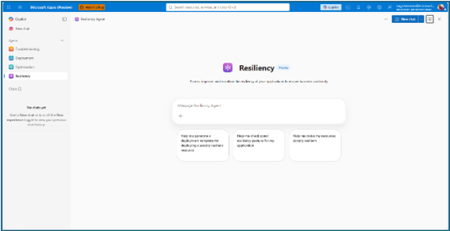
The distance between knowing and doing Most teams already know that zonal resiliency matters. What slows them down is everything in between: assessing posture across subscriptions and regions, deciding which gaps should be prioritized, writing the templates, and confirming the change actually rolled out. That is four separate workstreams, in four separate places, usually picked up long after the application is shipped. The resiliency agent closes that distance. We’re excited to announce that it is now available in public preview as part of the agents in Azure Copilot. The agent brings resiliency assessment, prioritized recommendations, and deployment-ready code into a single conversation, so resiliency becomes something your team does continuously rather than something you audit once a year. Learn more about Azure Copilot agents here. What the resiliency agent does The Resiliency agent is the conversational, action-oriented layer of Azure Infrastructure Resiliency Manager. The platform gives you a goal-driven view of your resiliency posture, and the agent lets you act on that posture in plain language. It brings together the signals you would otherwise chase manually across availability zones, Azure Backup, Azure Site Recovery, service level indicators, and Azure health models, then turns them into workload-aware guidance you can execute. Starting with zonal resiliency, it is designed to complement the resiliency capabilities you already rely on rather than replace them. The agent is built on the same foundational belief as Azure Infrastructure Resiliency Manager: application resiliency is a continuous journey, not a one-time task. That journey runs in three phases: Start Resilient Get Resilient Stay Resilient. This public preview addresses the activities associated with first two phases, frontloading the capabilities customers asked for most: direct remediation, Infrastructure as Code integration, and cost visibility. Stay Resilient comes next. What you can do in public preview Generate deployment-ready Bicep and Terraform with zone-redundant settings already enabled, before your first deployment Find the service groups and resources that are not zone resilient across your subscriptions and regions Prioritize remediation with cost-aware indicators that flag whether a fix needs extra spend, downtime, or redeployment Generate ready-to-deploy scripts to configure zone resiliency for supported resource types Create and update service groups so your applications are modeled correctly from the start Start resilient: build it in from the first line of code The most durable resiliency is the kind you never have to retrofit. Starting resilient means treating zone resiliency as an architectural requirement on day one, and the Resiliency Agent makes that the path of least resistance. Describe the application you are building, and the agent helps you generate deployment-ready Infrastructure as Code with the recommended resiliency configurations already enabled at creation time. Ask for a Bicep or Terraform template for a new workload and the agent returns one with zone-redundant settings pre-built for your databases, VMs, and load balancers, aligned to the goals you set. For example, try prompts like: “Generate a Bicep template for a zonally resilient VM setup.” “Create Terraform templates for a resilient architecture with VMs, AKS, and Storage.” The payoff: new services reach production already meeting your high availability standards, and the expensive redesign never has to happen. Get resilient: close the gaps in what you already run Applications change. The configuration that was right at first deployment is often not the one a business-critical workload needs two years later. This is where the resiliency agent turns posture insight into prioritized, executable action. Ask the agent to assess your environment, and it surfaces the resources and service groups that are not zone resilient, that are exposed to a datacenter outage, or that have key alerts waiting on attention. Every recommendation carries cost-aware decision support, qualitative indicators that flag whether a fix requires additional spend, downtime, or redeployment, so your team can sequence remediation against business value instead of guesswork. When you are ready to act, the agent generates ready-to-deploy scripts to configure zone resiliency for supported resource types, or targeted IaC snippets to close one specific gap. Try prompts like: “Assign resiliency goals for my application.” “Give me the posture of my service group: Contoso Payments.” “Enable zonal resiliency for my PostgreSQL server.” “Generate scripts to create a zonally resilient storage account.” This is a human-in-the-loop model by design. The agent brings the analysis, the recommendations, and the code. You keep full control over execution. Remediation gets faster without giving up governance. Stay resilient: what comes next Resiliency is not only about withstanding a zone outage. It is about protecting your data and knowing you can recover when something does go wrong. Recovery orchestration plans and zone drills are available today in Azure Infrastructure Resiliency Manager, and we are bringing both into the agent experience next. That closes the loop: assess, remediate, and validate recovery readiness in the same conversation. Get started with the public preview Open Azure Copilot and select the Resiliency Agent from the dropdown or the side panel. Three actions will get you value in the first session. Model your application. The agent works from your application, not a flat list of resources, so make sure it is represented as a service group that reflects your latest resource discovery. You can create service groups natively through the agent. Try: “Create a service group for my application.” Find your gaps. Ask which of your service groups and resources are not zone resilient. Most teams uncover exposure that was previously invisible. See Set resiliency goals and track compliance. Design it in. Ask for a Bicep template with zone-redundant defaults for a workload you plan to deploy and see how much retrofit effort disappears. See Generate resilient Bicep templates. What to expect in the preview Ready-to-deploy zone resiliency scripts are supported for Azure services that have zonal resiliency support in Infrastructure Resiliency Manager. See the support matrix for current coverage. Some advanced configurations, including multi-user authorization and Azure Site Recovery, may require manual steps, and the agent provides guidance to help you complete them. Where we are going This public preview is a starting line, not a finish. We are building toward end-to-end, agent-led journeys across Start, Get, and Stay Resilient, with cross-agent orchestration that reaches into migration, deployment, and observability, and multi-surface delivery so resiliency validation shows up in your IDEs, APIs, and CI/CD pipelines, not only in Azure Copilot. Service coverage will keep expanding, and the guidance will keep getting richer. The goal is simple and ambitious: make resilient-by-design the path of least resistance for every application on Azure. Preview is where that gets shaped, so tell us what is working and what you need next at azureresiliency@microsoft.com. Start here: open Azure Copilot, select the resiliency agent, and ask which of your applications are not zone resilient yet. Resources Announcing Azure Infrastructure Resiliency Manager public preview Agents in Azure Copilot public preview Resiliency capabilities in Agents (preview) in Azure Copilot, Azure Infrastructure Resiliency Manager overview Get started with service groups Microsoft Learn Questions or feedback: azureresiliency@microsoft.comFind and fix app issues - Azure Copilot Observability Agent
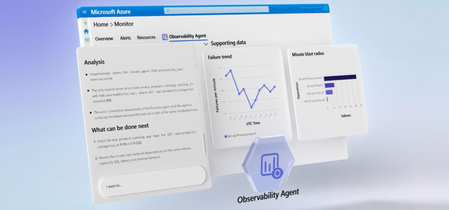
The Azure Copilot Observability Agent autonomously investigates incidents, correlates signals across logs, metrics, alerts, application health, and ML anomalies, then surfaces root cause with charts and recommended next steps. Extend coverage to your AI agents in Microsoft Foundry, track Gen AI errors and token consumption with trace-level detail, and write plain-language instructions to tune autonomous behavior to match your team’s workflow. Matt McSpirit, Microsoft Azure expert, shares how to take full control of incident response at scale. Any alert, full stack. The Azure Copilot Observability Agent correlates OpenTelemetry & native Azure signals end-to-end. Trace any issue to deep failure analysis across every tier. Check it out. Logs. Metrics. Alerts. ML anomalies. The Azure Copilot Observability Agent correlates them all, surfaces root cause, and recommends mitigation steps automatically. See it here. Tune the Azure Copilot Observability Agent to match your team’s workflow. Write natural-language instructions to set alert groupings, escalation rules, and issue priorities. See how. QUICK LINKS: 00:00 — Azure Copilot Observability Agent 00:43 — How to use it as you work 01:33 — Unified Full-Stack Telemetry 02:39 — Root Cause Investigation 04:12 — Investigate further 04:55 — Re-run the investigation 05:36 — Autonomous Alert Correlation & Triage 07:13 — Natural Language Agent Customization 07:34 — Wrap up Link References Get started at https://aka.ms/ObservabilityAgent Unfamiliar with Microsoft Mechanics? As Microsoft’s official video series for IT, you can watch and share valuable content and demos of current and upcoming tech from the people who build it at Microsoft. Subscribe to our YouTube: https://www.youtube.com/c/MicrosoftMechanicsSeries Talk with other IT Pros, join us on the Microsoft Tech Community: https://techcommunity.microsoft.com/t5/microsoft-mechanics-blog/bg-p/MicrosoftMechanicsBlog Watch or listen from anywhere, subscribe to our podcast: https://microsoftmechanics.libsyn.com/podcast Keep getting this insider knowledge, join us on social: Follow us on Twitter: https://twitter.com/MSFTMechanics Share knowledge on LinkedIn: https://www.linkedin.com/company/microsoft-mechanics/ Enjoy us on Instagram: https://www.instagram.com/msftmechanics/ Loosen up with us on TikTok: https://www.tiktok.com/@msftmechanics Video Transcript: -When you run compute services at scale, issues are bound to happen. The real question is how quickly you can understand and fix them. This is where AI can cut through the noise, bringing you the right signals so that you can start your day with critical issues already investigated. Azure Copilot Observability Agent, powered by Azure Monitor, can run autonomously with knowledge of your environment, application topology, its dependencies and typical patterns. It monitors alerts streaming into Azure Monitor, triaging and correlating related alerts into issues requiring your attention so that you experience less alert fatigue and noise. The agent investigates critical issues to determine the root cause, and then recommends mitigation steps. Let me walk you through how you can use the Observability Agent to your advantage as you work. -Using Azure Monitor, I can observe my app, across tiers. The App map shows me the topological view of my app. It’s a multi-tier app with a modern micro-service backend, hosted on Kubernetes, with a SQL database, Redis cache and more. The app also has an agent built in Microsoft Foundry, and with the new Foundry capabilities, I can also observe how it is performing from operational metrics, including Agent Runs, Gen AI Errors, Tool Calls, underlying Models, and Token Consumption. And scrolling up, we can even view traces with Gen AI errors and can see a list of traces. I’ll look at this one with 93 items. And if I click in, I can see a trace view of all the agent’s activities with direct integration into our existing backend APIs through an MCP server. This is where Azure Monitor and unified logging is foundational to connecting the dots for a more complete view of the health of your service. It unifies telemetry in real time across the stack using OpenTelemetry as well as native integrations with Azure Services and normalizes those signals into a consistent schema. -And because everything shares the same data foundation, it’s easy for either you or the Observability Agent to move instantly from insights, such as failed requests to more details across different failure categories, which can be drilled into and queried further without having to stitch anything together. So, this way even though there are several teams involved across app and infrastructure managing my app, everyone shares a common operational view to keep it operating smoothly. -In fact, let’s go back into Azure Monitor to see how my app is doing, specifically my agent. This time I’ll start in our agent alerts view. It looks like my agent is experiencing some errors I’ll choose this alert, to view additional details and this is where you can invoke the Observability Agent using the investigate button. Importantly, once you have Azure Monitor running in your environment, there is no setup needed. -So, now I have the agent open. Let’s start the investigation. Now, when invoked for the first time, the Observability Agent will learn about your app, its topology, patterns, baselines, and more. In this case, the agent already has deep knowledge of my app so it launches directly into an investigation. It’s able to correlate and reason across signals spanning the full application stack, logs, metrics, alerts, application health, and ML-detected anomalies, to pinpoint the root cause of the incident. It plans, executes, backtracks, runs multiple queries and validates or disproves hypotheses, just like a human expert would. After completing the investigation, Observability Agent produces a detailed report with its findings. Now in this case, it’s discovered failures when the agent hit the MCP product catalog where the backend telemetry shows the underlying failure was a SQL execution time out. We can see a consistent time out pattern with 117 failed SQL dependency calls. It’s ruled out any issues with the Redis cache. And has determined that there was NO SQL outage. -Instead, SQL metrics show a small saturation window at the incident start which dropped after the initial spike which would have led to connection failure. And it also charts its findings visually with search failures, latency spikes, failures by dependency and CPU and DTU spikes. And back on the left we see it’s recommending what can be done next, including how to improve querying and code, as well as monitoring. -Now at this point, you can either start a new investigation or build off the Observability Agent’s findings. I want to investigate further. There are a few things that cause spikes like this so I’m going to clarify if our SQL server saw a spike in traffic leading to timeouts. The Observability Agent responds quickly and notes stable to moderate SQL volume with many of the details we saw earlier. This time though, it’s found the root cause. It appears that an expensive query consumed significant SQL CPU resources. I am also concerned about token usage during the incident so I’ll ask the Observability Agent to check for anomalies. And after it’s done its analysis, the agent rules out my hypothesis there too. -So, it’s easy to collaborate with the Observability Agent, in the context of the incident. You can even ask the agent to re-run the entire investigation with additional instructions if you need to. Next, I want to create an issue that captures the progress of the investigation I’ll keep all the details and agree to share the agent chat around this issue so that it can be viewed by others on my team, which lets you hand off the issue to a colleague without losing context. The issue will retain the history of the incident, so no one has to start from scratch. In fact, this becomes a shared case file for the investigation. -So, I just walked you through a manual flow for how you can use the new Observability Agent as you work. Next, let me show you how you can get the Observability Agent to work alongside you autonomously on your behalf with a new capability in public preview. Either from the marketplace or Azure Monitor, you can create a new Observability Agent resource. -First, you start by giving it name, selecting the region, and your Azure Monitor workspace. Next, you’ll point it at your Application Insights resource. We’ll use our “ct-agent” from before. And then you can configure whether you want the agent instance to run autonomously on auto-created issues to provide root cause analysis and next steps. From there, I just review and confirm. The Observability Agent will then learn about your application to establish deep expertise and knowledge of your environment and preserve it in the agent instance. And if an alert arrives, the agent creates an issue automatically and correlates any additional related alerts into that same issue, before launching an investigation. -Now once an investigation is underway, the Observability Agent notifies you, for example, via email, with background on the detected issue. And from there, you can review the overview and look at the associated alerts. As you can see, in our case, the Observability Agent was able to use deep, agentic reasoning to correlate separate alerts both for the agent in this application and for the backend APIs invoked independently and then bring them together into a single, unified view. This significantly reduces alert noise. -Now this correlation is also important for issue triage. Because individually, these alerts might have lower severity, but when correlated, they increase the overall severity of the issue. And clicking into the Observability Agent tab we can see that the investigation is complete. This is a comprehensive report like we saw earlier with its analysis, corresponding chart visualizations, and recommendations on what to do next. Now as you set up agents, you can also customize them with your own instructions to prioritize what’s important. So, if we go back to where you create a new agent instance, here’s where you would add specific instructions, written in natural language. For example, you can tell an agent to group certain alerts, and prioritize the ones that should always trigger an issue so that its autonomous behavior matches how your team operates. -So that’s the power of Azure Monitor with the Azure Copilot Observability Agent which together turn alerts into fully investigated issues with clear, actionable insights. By correlating signals across your entire stack, it helps you move from detection, to root cause, to action-faster, and without losing context. The result: less time triaging, faster resolution, and more resilient systems at scale. To learn more, visit aka.ms/ObservabilityAgent. Keep watching Microsoft Mechanics for the latest tech updates and thanks for watching.283Views0likes0CommentsLangChain.js + Azure: A Generative AI App Journey
In an era where the landscape of Generative Artificial Intelligence (GenAI) is rapidly evolving, developers find themselves at the crossroads of innovation and practical implementation. The Azure Developers JavaScript Day 2024 provided an illuminating session, presented by Yohan, a Senior Cloud Developer Advocate at Microsoft, focusing on the development of GenAI applications using LangChain.js and Azure. This article delves into the highlights of this session, offering insights into the processes, tools, and methodologies that pave the way for developers to harness the power of GenAI.3KViews0likes0Comments
Microsoft copilot for Azure is not providing appropriate answer.
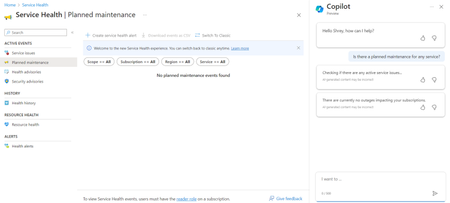
I have been testing Azure copilot and i saw some wrong answers and it is not integrated with Service Health appropriately. When i asked if there was any Planned maintenance for any of the service, it checked if all the service are working fine or not. When i asked if there was any Security advisory for any of the service, it checked if all the service are working fine or not. Does anyone else facing the same issue or is the prompt wrong?708Views1like1Comment