azure container registry
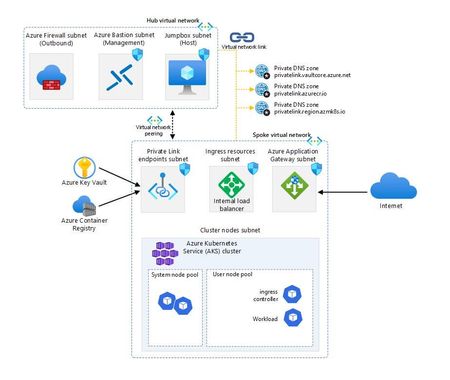
49 TopicsAzure Kubernetes Service Baseline - The Hard Way
Are you ready to tackle Kubernetes on Azure like a pro? Embark on the “AKS Baseline - The Hard Way” and prepare for a journey that’s likely to be a mix of command line, detective work and revelations. This is a serious endeavour that will equip you with deep insights and substantial knowledge. As you navigate through the intricacies of Azure, you’ll not only face challenges but also accumulate a wealth of learning that will sharpen your skills and broaden your understanding of cloud infrastructure. Get set for an enriching experience that’s all about mastering the ins and outs of Azure Kubernetes Service!44KViews8likes6Comments
How to remove secrets from Container Apps linked to ACR
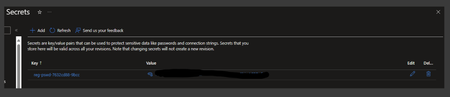
Azure Container Apps allows your application to securely store sensitive configuration values. Once secrets are defined at the application level, secured values are available to revisions in your container apps. Additionally, you can reference secured values inside scale rules. This blog provides a detailed, step-by-step procedure for removing secrets associated with an Azure Container Registry (ACR). In this example, we will walk through the process of creating a Container App with an image reference from the ACR, which automatically generates a secret. We will then attempt to remove this secret and observe its behaviour throughout the process. Secrets are scoped to an application, outside of any specific revision of an application. Adding, removing, or changing secrets doesn't generate new revisions. Each application revision can reference one or more secrets. Multiple revisions can reference the same secret(s). An updated or deleted secret doesn't automatically affect existing revisions in your app. When a secret is updated or deleted, you can respond to changes in one of two ways: Deploy a new revision. Restart an existing revision. Before you delete a secret, deploy a new revision that no longer references the old secret. Then deactivate all revisions that reference the secret. Create an Azure Container Registry: az acr create \ --name "$CONTAINER_REGISTRY_NAME"\ --resource-group "$RESOURCE_GROUP"\ --location "$LOCATION"\ --sku Basic \ --admin-enabled true Explanation: This command creates an Azure Container Registry (ACR) with the specified name, resource group and location. The --sku Basic specifies the pricing tier for the registry, and --admin-enabled true enables admin access to the registry. Build and push image from a Dockerfile. Now use Azure Container Registry to build and push an image. First, create a local working directory and then create a Dockerfile named Dockerfile with the single line: FROM mcr.microsoft.com/hello-world. This is a simple example to build a Linux container image from the hello-world image hosted at Microsoft Container Registry. You can create your own standard Dockerfile and build images for other platforms. If you are working at a bash shell, create the Dockerfile with the following command: echo "FROM mcr.microsoft.com/hello-world" > Dockerfile Run the az acr build command, which builds the image and, after the image is successfully built, pushes it to your registry. The following example builds and pushes the sample/hello-world:v1 image. The . at the end of the command sets the location of the Dockerfile, in this case the current directory. az acr build --image sample/hello-world:v1 \ --registry myContainerRegistry008 \ --file Dockerfile . Create and Deploy the Container App from ACR Create and deploy your container app with the containerapp up command. This command will: Create the resource group Create the Container Apps environment Create the Log Analytics workspace Create and deploy the container app using a public container image Note that if any of these resources already exist, the command will use them instead of creating new ones. az containerapp up \ --name my-container-app \ --resource-group my-container-apps \ --location centralus \ --environment 'my-container-apps' \ --image azuredockerregistry.azurecr.io/image:latest \ --target-port 80 \ --ingress external \ --query properties.configuration.ingress.fqdn 1. Once the Container App gets created , check if there are any secrets added to your container app. 2. If you attempt to delete an existing secret and encounter an error, it's because there is a running revision that still references the secret. 3. In this case, ensure you deactivate all existing revisions that reference the secret and create a new revision that references an image from a public repository (e.g., docker.io). 4. After verifying that there are no references to secrets in existing revisions, you can use the `az containerapp registry remove` command to remove a registry associated with your container app. az containerapp registry remove -n MyContainerapp -g MyResourceGroup --server MyContainerappRegistry.azurecr.io If successful, the command will return "Registry Successfully Removed." 5. Upon checking the "Secrets" section in the portal you should see the secret removed. 6. If you continue to see secrets in the portal UI even after following the above steps, now try deleting the secrets directly using the delete option in the portal. It's crucial to manage secrets carefully to maintain the security and integrity of your Azure Container Apps and associated resources. !!HAPPY LEARNING !!3.6KViews7likes1Comment
Leveraging Azure Container Apps Labels for Environment-based Routing and Feature Testing
Azure Container Apps offers a powerful feature through labels and traffic splitting that can help developers easily manage multiple versions of an app, route traffic based on different environments, and enable controlled feature testing without disrupting live users. In this blog, we'll walk through a practical scenario where we deploy an experimental feature in a staging revision, test it with internal developers, and then switch the feature to production once it’s validated. We'll use Azure Container Apps labels and traffic splitting to achieve this seamless deployment process.2.2KViews5likes1CommentAzure Container Apps Jobs in a secure Landing Zone
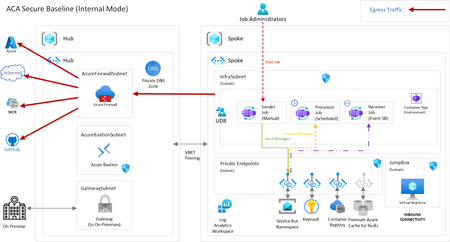
Are you looking for deploying your microservices containerized workloads with short run tasks triggered by events or based on a schedule or by other service with a production grade infrastructure? Then, look no further and dive deep into this article about Azure Container Apps Landing Zone Accelerator that helps to build and deploy containerized workloads faster to production. The new scenario covers about the ACA Jobs feature with a sample application demonstrating all the three different trigger types.7.3KViews5likes0CommentsAnnouncing support of OCI v1.1 specification in Azure Container Registry
Azure Container Registry announces support for the latest stable release v1.1.0, which provides a production-ready support for OCI artifacts in addition to container images. By supporting the new version of OCI, ACR can store, distribute, and discover non-container content as OCI artifacts in addition to container images, which expands the possibilities of what can be stored in a container registry.5.6KViews4likes0CommentsAnnouncing Notation Azure Key Vault plugin v1.0 for signing container images
As container adoption continues to grow, there is more scrutiny than ever on container supply chains. A container image from an unknown source could include vulnerabilities and malicious code injected by bad actors. To mitigate container supply chain threats, enterprises and open-source communities are exploring safeguards. Signing container images enables software consumers to detect tampering and ensure the authenticity of the containerized workloads. 4KViews4likes0Comments
Building a SaaS Application on Azure AKS with Github Actions
AKS is key to building multi-tenant SaaS solutions on Azure. On this blog we will explain SaaS infrastructure requirements and see how AKS can help address these requirements. Finally we will demonstrate how a SaaS tenant onboarding can be automated with configuration with GitHub actions.5.2KViews4likes0CommentsInside ACR Artifact Cache: Pull-Through Caching at Scale
By: Akash Singhal, Luis Dieguez, Kiran Challa, Nathan Anderson, Tony Vargas, Caroline Barker, Ren Shao, Mabel Egba, Toddy Mladenov, Johnson Shi Introduction For many customers, Azure Container Registry (ACR) is the only registry their workloads can trust, even when images and artifacts originate from a different registry such as Docker Hub, Microsoft Artifact Registry, GitHub Container Registry, Quay, another ACR, or a private registry. ACR Artifact Cache makes this many-to-one model practical by letting a platform team map a downstream ACR repository path to an upstream source repository. Here, upstream means the source registry and repository ACR contacts on behalf of the customer, and downstream means the ACR-facing path customers pull from. From the outside, the experience looks like a normal pull from ACR. Inside the service, that pull moves through the same multi-tenant registry platform that serves ACR traffic across regions, clouds, and data plane stamps. This series is about the gap between that simple external experience and the internal system. The goal is to show what happens inside ACR, why the system is designed this way, and how those design choices shape the behavior customers ultimately observe. Some implementation details are simplified, and the system continues to evolve. The request paths and design constraints are representative, but this article intentionally avoids service-by-service internals that are not necessary to understand the feature. For this overview, the useful mental model is: serve now, hydrate for later. Later sections will show where that model helps, and where it creates engineering pressure. Why serve upstream content from ACR? Pulling directly from an upstream is often sufficient for development, but production systems need stronger guarantees from the pull path. The failure modes are familiar to anyone who has operated containerized workloads at scale: an upstream registry is slow or temporarily unavailable an upstream applies rate limits or burst protection credentials for various upstream sources need to be handled safely ACR-to-ACR scenarios should avoid customer-managed credentials entirely by using managed identity network policy expects pulls to stay inside an approved network boundary a platform team wants one shared, sanitized catalog of public content for first-party consumption while individual teams pull only what they need Let’s take Docker Hub as a concrete example. Docker Hub pull rate limits mean that unauthenticated users and Docker Personal users can exhaust their allowed pulls in a time window, causing shared build agents or Kubernetes nodes to receive rate-limit errors instead of images. That is a useful example because it makes the upstream dependency visible, but it is not the whole story. The broader engineering problem is that upstream-sourced artifacts should behave like local registry dependencies once a customer chooses to route them through ACR. Artifact Cache addresses that problem by letting customers map a downstream ACR namespace to an upstream namespace, pull through ACR, and allow ACR to materialize content locally as it is requested. A pull-through cache inside ACR Azure Container Registry operates across 60+ Azure regions and 6 public and sovereign clouds, serves hundreds of thousands of registries, and handles billions of requests per day. Artifact Cache is only one part of that larger service, but it is large enough to be a distributed systems problem in its own right: more than 100 million image pulls per day, petabyte-scale egress, upstreams with different behavior, and customers who expect registry pulls to remain predictable. This scale matters because Artifact Cache is not deployed beside ACR as a separate service. It is part of the same registry system that serves normal pushes, pulls, tag listing, catalog operations, authentication flows, private networking scenarios, and other registry API traffic. That means Artifact Cache has to fit into ACR's existing resource model and request-serving model. Customers configure cache rules and authentication boundaries through the control plane, then their pulls are served through the data plane. The next sections follow those two parts in order: first the resources customers create, then the runtime path those resources affect. The customer workflow The setup begins in the control plane, where customers define the relationship between an ACR namespace and an upstream source. A customer starts with an ACR and chooses an upstream repository. In the examples below, myregistry.azurecr.io is the customer's ACR login server. The dockerhub/library/node path is the downstream ACR namespace the customer wants to use for cached content. The authentication model depends on the upstream: For a public upstream, the cache rule may not need credentials. For a private upstream, the customer stores upstream credential material in their Azure Key Vault, creates a credential set that references those secrets, and then associates that credential set with a cache rule. At access time, ACR uses the system-assigned managed identity associated with the cache rule to read the referenced Key Vault secrets, so the customer controls access by granting that identity the required secret permissions. ACR materializes those credentials only when it needs to contact the upstream, so the customer-owned Key Vault remains the secret store. For an ACR-to-ACR upstream, the customer can use a user-assigned managed identity. In that scenario, credential sets are not part of the flow; managed identity replaces the credential-set and Key Vault path. At a high level, the customer defines a namespace mapping: docker pull myregistry.azurecr.io/dockerhub/library/node:latest maps to: docker pull docker.io/library/node:latest In ACR, that mapping is stored as a cache rule: a control-plane resource that maps a downstream ACR path to an upstream source path. If the upstream requires authentication, the cache rule links to the appropriate credential boundary: a credential set backed by customer-owned Key Vault secrets, or a user-assigned managed identity for ACR-to-ACR. This is where the control-plane/data-plane split shows up. The control plane manages registry configuration through surfaces such as CLI, portal, Bicep, ARM templates, and other Azure Resource Manager clients. ARM sends those resource operations to the ACR control plane, which creates or updates the cache rule and, when needed, the credential set as child resources under the registry. Those resources do not own customer secrets or identities directly; they link to existing Azure resources such as the customer's Key Vault or an optional user-assigned managed identity. Later, the data plane uses that persisted configuration to decide whether a runtime registry request, such as a pull or tag listing, should be handled by Artifact Cache. After setup, the runtime path begins with the simplest possible pull: docker pull myregistry.azurecr.io/dockerhub/library/node:latest To understand what happens after that command, we need a map of the ACR components that participate in the request path. The ACR components involved The architecture needed for this overview is much smaller than ACR's full internal service graph. ACR is a regionalized service. The control plane operates at the regional level, while data plane stamps serve hot-path registry traffic for the registries assigned to them. A registry is pinned to a stamp, and high-traffic regions may have more than one stamp. Stamp architecture is an ACR concept covered in more detail in the stamp rebalancing post; this article only needs the simplified model below. For this article, ACR has three important boundaries: The regional control plane manages registry resources and provisioning operations. The data plane stamp serves hot-path registry traffic for registries pinned to that stamp. The storage layer holds downstream registry metadata, blobs, and storage-backed event queues. At this level of detail, a data plane stamp is composed of a few major runtime substrates. The registry data plane virtual machine scale set (VMSS) is the core ACR data plane. It runs containerized services including the frontend, the registry API entry point that receives and routes OCI and ACR-specific requests. The data proxy VMSS also runs containerized services and serves selected blob-content paths. It serves eligible blob-content traffic behind ACR's dedicated data endpoint; see the ACR data endpoint documentation. The stamp also includes a runtime cluster for additional data plane services, including services that are not on the hot path. This article will not explain why ACR uses both VMSS-based services and a runtime cluster inside the data plane stamp. That tradeoff is useful context, but it belongs in a separate deep dive. For Artifact Cache, the important point is narrower: the stamp contains the runtime substrates that participate in data plane serving, including runtime-cluster services that process async import and hydration work. The component list is: Component Role Region control plane Manages registry resources and provisioning operations Data plane stamp Serves pinned registries in a region Registry data plane VMSS Core ACR data plane for OCI and ACR-specific APIs Frontend Handles OCI registry API traffic inside the registry data plane Data proxy VMSS Serves selected blob-content paths, including Artifact Cache Runtime Kubernetes Cluster Hosts additional data plane services, including async import and hydration workers Cache rule Maps downstream ACR path to upstream path Credential set or managed identity Provides the upstream authentication boundary when needed Cache Backend service Handles cache-rule-backed pulls Storage queue Regional storage resource used for hydration events Metadata/blob storage Stores downstream manifests, tags, digests, and layer blobs Import workers Run in the data plane runtime cluster and hydrate downstream content asynchronously Upstream registry Public, private, or another ACR registry used as the source The diagram below is a component map rather than a step-by-step pull trace. It shows one visible data plane stamp in West US for myregistry.azurecr.io, with a muted marker to indicate that larger regions can contain multiple stamps. The stamp contains a registry data plane VMSS, a data proxy VMSS, and a runtime Kubernetes cluster. Regional metadata/blob storage and the storage queue sit outside the stamp boundary. The storage queue is also outside the regional control plane cluster; it is a storage resource consumed by data plane runtime-cluster workers. First artifact pull Now return to the pull request: docker pull myregistry.azurecr.io/dockerhub/library/node:latest The request reaches the data plane stamp where myregistry is pinned. The frontend in the registry data plane VMSS handles the registry API request and forwards it to the Cache Backend Service, which checks whether the requested repository path matches a cache rule. If there is no matching cache rule, the request follows the normal ACR path. If a cache rule matches, Artifact Cache logic applies. The next check is local state. ACR looks at downstream metadata and blob storage to determine whether the requested manifest and blobs are already available locally. If the content is present, ACR can serve it from the downstream registry path. If the content is not available locally, ACR resolves the upstream repository path from the cache rule. If the upstream requires authentication, ACR uses the configured auth boundary for that upstream: a credential set for private upstreams, or a user-assigned managed identity for ACR-to-ACR upstreams. The request can then be served through the upstream-backed data path, with the data proxy handling the blob content path. The first pull does not need to wait for durable hydration to complete before the client receives content. Serving the pull and hydrating the downstream registry are related operations, but they are deliberately separated. The trace above follows the same node:latest image used in the setup example. On a cache miss, the data plane queues an async import event for the requested image while still serving the client request. Manifest content returns through the frontend path. For layer blobs, the frontend returns a redirect to the data proxy, and the client follows that redirect while the data proxy streams blob content from the upstream CDN. The data plane serves the customer request, but it also detects that durable downstream state needs to be populated. That durable work is where hydration comes in. Hydration Hydration is the process that materializes upstream content into the downstream ACR registry. ACR performs hydration asynchronously because the data plane workload can be bursty and variable. A deployment or scale-out event can cause many clients to request the same not-yet-hydrated image at nearly the same time. Image size, layer count, multi-platform manifest trees, upstream behavior, queue depth, and retry behavior all matter in a multi-tenant service. The north star is to coordinate those requests: collapse duplicate work, hydrate the content from upstream, and serve all waiting clients without turning one customer action into unnecessary upstream load. That coordination problem is challenging at ACR scale, and we are continuing to improve it. The existing async import path gives Artifact Cache a durable and scalable foundation while that serving path continues to evolve. At a high level, the data plane queues an import event. A notification service consumes the event and dispatches work to import workers in the data plane runtime cluster. Those workers fetch the required content from the upstream registry and write manifests, tags, digests, and layer blobs into ACR metadata and blob storage. When import workers complete, they notify the notification service, which can publish completion signals through ACR eventing surfaces such as Event Grid and webhooks. This allows customers to use webhooks to detect when cached content is fully available locally. You can read more about how it works here. The mental model is that the first pull can serve immediately, while hydration makes future local serving durable. A follow-up post will go deeper on the work ACR does to reduce upstream load during this hydration window. Later pulls After hydration completes, later pulls for the same content can be served from ACR. For digest references, the model is relatively direct because a digest is content-addressed. If ACR has the requested digest and its blobs downstream, the data plane can serve that content locally. Tags are more subtle because tags can change. A tag such as latest is a name that can point to different content over time. Artifact Cache therefore must care about freshness semantics for tag-based pulls. This is one of the reasons a pull-through cache becomes more complex than "fetch once and forget." The benefit is not only lower latency. ACR also reduces repeated dependency on the upstream for content that has already been materialized downstream. Guarding the pull path Once content is hydrated, ACR must serve that content from the customer's registry boundary even when the upstream is slow, unavailable, or returning errors. That distinction matters for tag-based pulls: ACR may need upstream checks to reason about freshness, but an upstream failure should not automatically prevent ACR from serving content that is already available downstream. Artifact Cache also must be careful about how it behaves when upstreams are unhealthy. If an upstream starts returning 5xx errors or throttling requests, ACR should avoid amplifying the problem by repeatedly sending customer-triggered requests upstream. Circuit breaking and upstream work minimization are part of being a good steward of both customer traffic and upstream registry limits. More details to follow in subsequent posts. There is a separate availability question inside ACR: what happens if Artifact Cache-specific components, such as the cache backend path, are operationally unavailable? ACR handles that case gracefully by falling back to normal registry pull behavior: it checks the customer's registry state and serves the image if the requested content already exists in ACR. In other words, cache-backend unavailability should not block pulls for content that is already present in the registry. What we will explore next This overview is the map for the rest of the series. The following posts will go deeper into the parts of the system where the design pressure is highest. Minimizing upstream work We will start with how Artifact Cache avoids making more upstream requests than necessary. This becomes difficult when many clients request the same not-yet-hydrated image at the same time. A Kubernetes scale-out event is the classic example: many nodes may ask for the same image concurrently, and the system must avoid turning one customer's action into unnecessary duplicate upstream work. Making Artifact Cache observable to customers We will also look at how customers understand whether their cache rule is healthy, whether credentials are usable, and why a pull failed. This is hard because a failed pull can involve customer configuration, Key Vault access, managed identity configuration, upstream credentials, upstream availability, data plane request handling, or asynchronous hydration. The engineering challenge is to expose the right customer-facing health and debug signals without turning internal topology into the user interface. Repository semantics in Artifact Cache Finally, we will look at repository semantics. Once upstream content becomes local, the repository is no longer just a mirror. Tags can move upstream, digest references are content-addressed, and customers may push their own content into downstream repositories. The visible repository state can involve both upstream-derived content and customer-owned downstream writes. Closing Artifact Cache is designed to make upstream-sourced artifacts behave like ACR-served content once customers choose to route those artifacts through their registry. The design goal is that customers can pull from ACR and reason about the result using ACR boundaries: registry configuration, local serving, customer-visible health, and predictable repository semantics.692Views3likes0Comments