azure cli
22 Topics
Proposal: Azure Portable Edge Nodes for Programmable Tool Security
Dear Microsoft Team, I propose an advanced architecture: Portable Edge Micro-Gateways for Third-Party Programmable Tools, extending Zero Trust security to hardware. Key Features: Portable Edge Nodes: Local micro-gateways delivering zero-latency execution and full offline (air-gapped) resilience for lab tools. IP-Safe Encryption: Granular hash-based tracking protecting manufacturers' code privacy. Instant Cloud Recovery: Automated tamper detection and pristine-state rollback synchronized with Azure. This creates a resilient, high-security ecosystem bridging local control with cloud intelligence. Contact: email address removed for privacy reasons Best regards42Views0likes0CommentsSigning in to Microsoft Foundry from OpenClaw using Azure AD: a smoother way to bring your models in
This post is a quick update to walk through the new flow. If you read the previous one, think of this as the easier path I wish I had the first time round. If you have not seen the original, you can find it here: Integrating Microsoft Foundry with OpenClaw: Step by Step Model Configuration | Microsoft Community Hub Pre-requisite: You will need the Azure CLI (azure-cli) installed on your machine. The official install guide for Linux is here: https://learn.microsoft.com/en-us/cli/azure/install-azure-cli-linux?view=azure-cli-latest I am on Linux so I went the Homebrew route, which keeps things simple. The formula is here: https://formulae.brew.sh/formula/azure-cli Microsoft also has official docs covering the Homebrew/Linuxbrew install: https://learn.microsoft.com/en-us/cli/azure/install-azure-cli-macos?view=azure-cli-latest#install-with-homebrew Once Homebrew is ready, run this in your terminal: brew install azure-cli Why this matters: Before this update, every Foundry model you wanted to use in OpenClaw needed its own API key and endpoint pasted into the config. It worked, but it was tedious, and keys are easy to leak if you are copying them around. The Azure AD path solves both problems. You authenticate as yourself (or a service principal), OpenClaw asks Azure for the list of Foundry resources you have access to, and it brings the models in automatically. Signing in to Microsoft Foundry from OpenClaw via Azure AD A device-code OAuth handshake replaces the old static-API-key flow. OpenClaw delegates auth to the local Azure CLI; the CLI handles the browser-side sign-in, holds the resulting tokens, and refreshes them silently. OpenClaw then walks the Azure resource graph, subscriptions → Foundry resources → model deployments and registers each model into its own config. No API keys move through OpenClaw at any point. Sequence diagram of the OAuth 2.0 device-authorization flow as orchestrated by OpenClaw. Phases 1–3 establish identity (the developer authenticates once, in a real browser, against Azure AD). Phases 4–5 perform service discovery (OpenClaw walks the ARM resource hierarchy, subscriptions → Foundry accounts → model deployments and persists the result to a local provider config). After registration, every model call OpenClaw makes against Foundry reuses the same Azure-CLI-managed token cache: tokens refresh transparently, and access is gated by the Foundry resource's RBAC assignments rather than a static API key. Dashed lines denote return values; the teal line in step 7 marks the single token-issuance event the rest of the system pivots on. Walking through the new flow: Start with the command to onboard openclaw as if you were setting up OpenClaw for the first time: openclaw onboard Kick things off with the OpenClaw onboard command, the same one you would use when setting up OpenClaw for the first time. When it prompts you, choose update values. Next, you will be asked to configure your models. Scroll down a little and you will see Microsoft Foundry listed as a supported provider. Pick it. From here, you have two options. You can sign in with an API key, which is what I covered in the previous blog post, or you can sign in through Azure AD. The Azure AD path is easier and more secure, so that is the one we will use. OpenClaw will give you a URL and a device code. Copy the URL into your browser and use the code to complete the sign in. (This is where the az CLI from the pre-requisite section earns its keep.) If everything worked, you should see a success prompt similar to this: Once you are signed in, OpenClaw will ask you to pick the Azure subscription that your Microsoft Foundry resource lives in. Pick the subscription, then pick the Foundry resource where your models are deployed. And that is pretty much it. All the models you have deployed to that Foundry resource get pulled into OpenClaw automatically. Compared to the old way of pasting API keys and endpoints one by one, this is a huge time saver, and you do not have to babysit any keys. From here you can start using your Foundry-deployed models inside OpenClaw straight away: Wrapping up The Azure AD sign-in option in OpenClaw is one of those small updates that quietly removes a real pain point. If you have ever juggled multiple Foundry endpoints and rotated keys across them, you already know why. With this flow, you sign in once, your models show up, and you can get back to actually building. If you have not tried OpenClaw with Microsoft Foundry yet, this is a good time to give it a go. And if you were holding off because of the key management overhead, that excuse is gone now. References Previous post on integrating Microsoft Foundry with OpenClaw using API keys: Integrating Microsoft Foundry with OpenClaw: Step by Step Model Configuration | Microsoft Community Hub Install the Azure CLI on Linux: https://learn.microsoft.com/en-us/cli/azure/install-azure-cli-linux?view=azure-cli-latest Install the Azure CLI on macOS: https://learn.microsoft.com/en-us/cli/azure/install-azure-cli-macos?view=azure-cli-latest#install-with-homebrew Homebrew formula for azure-cli: https://formulae.brew.sh/formula/azure-cli468Views0likes0CommentsHow do I use Azure Data Studio with schemas?
I had thought that a database schema was the name of the structure on which tables are interconnected by primary keys and foreign keys. But in the tool, Azure Data Studio, the user is asked to select from a pre-defined set of schemas when creating a table. What is more is that when setting up or createing a database through Azure, we are given the opportuniityh to use a sample database and this is where "SalesLT" comes from and so there must be some place where we can define a schema with Azure Data Studio. Where would that be? It was generated when deciding to use a demo sample database. So there must be some way, using SQL code or otherwise, to generate a schema.865Views0likes1CommentPrevent Accidental Deletion of an Instance in Azure Postgres
Did you know that accidental deletion of database servers is a leading source of support tickets? Read this blog post to learn how you can safeguard your Azure Database for PostgreSQL Flexible Server instances using ARM’s CanNotDelete lock — an easy best-practice that helps prevent accidental deletions while keeping regular operations seamless. 🌐 Prevent Accidental Deletion of an Instance in Azure PostgresPostgreSQL 17 In-Place Upgrade – Now in Public Preview
PostgreSQL 17 in-place upgrade is now available in Public Preview on Azure Database for PostgreSQL flexible server! You can now upgrade from PostgreSQL 14, 15, or 16 to PG17 with no data migration and no changes to connection strings—just a few clicks or a CLI command. Learn what’s new and how to get started: https://aka.ms/pg17-mvu We’d love to hear your thoughts—feel free to share feedback or questions in the comments! #Microsoft #Azure #PostgreSQL #PG17 #Upgrade #OpenSource
Azure Event Grid Domain Creation: Overcoming AZ CLI's TLS Parameter Limitations with Workaround
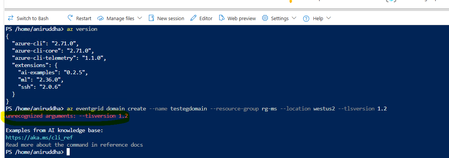
Introduction: The Intersection of Security Policies and DevOps Automation In the modern cloud landscape, organizations increasingly enforce strict security requirements through platform policies. One common requirement is mandating latest TLS versions for example TLS 1.2 across all deployed resources to protect data in transit. While this is an excellent security practice, it can sometimes conflict with the available configuration options in deployment tools, particularly in the Azure CLI. This blog explores a specific scenario that many Azure DevOps teams encounter: how to deploy an Azure Event Grid domain when your organization has a custom policy requiring latest version considering TLS 1.2, but the Azure CLI command doesn't provide a parameter to configure this setting. The Problem: Understanding the Gap Between Policy and Tooling What Is Azure Event Grid? Azure Event Grid is a serverless event routing service that enables event-driven architectures. It manages the routing of events from various sources (like Azure services, custom applications, or SaaS products) to different handlers such as Azure Functions, Logic Apps, or custom webhooks. An Event Grid domain provides a custom topic endpoint that can receive events from multiple sources, offering a way to organize and manage events at scale. The Policy Requirement: Many organizations implement Azure Policy to enforce security standards across their cloud infrastructure. A common policy might look like this: { "policyRule": { "if": { "allOf": [ { "field": "type", "equals": "Microsoft.EventGrid/domains" }, { "anyOf": [ { "field": "Microsoft.EventGrid/domains/minimumTlsVersion", "exists": false }, { "field": "Microsoft.EventGrid/domains/minimumTlsVersion", "notEquals": "1.2" } ] } ] }, "then": { "effect": "deny" } } } This policy blocks the creation of any Event Grid domain that doesn't explicitly set TLS 1.2 as the minimum TLS version. The CLI Limitation: Now, let's examine the Azure CLI command to create an Event Grid domain: az eventgrid domain | Microsoft Learn TLS property is unrecognized with the latest version of AZ CLI version. Current Status of This Limitation: It's worth noting that this limitation has been recognized by the Azure team. There is an official GitHub feature request tracking this issue, which you can find at => Please add TLS support while creation of Azure Event Grid domain through CLI · Issue #31278 · Azure/azure-cli Before implementing this workaround described in this article, I recommend checking the current status of this feature request. The Azure CLI is continuously evolving, and by the time you're reading this, the limitation might have been addressed. However, as of April 2025, this remains a known limitation in the Azure CLI, necessitating the alternative approach outlined below. Why This Matters: This limitation becomes particularly problematic in CI/CD pipelines or Infrastructure as Code (IaC) scenarios where you want to automate the deployment of Event Grid domain resources. Workaround: You can utilize below ARM template and deploy it through AZ CLI in your deployment pipeline as below: Working ARM template: { "$schema": "https://schema.management.azure.com/schemas/2019-04-01/deploymentTemplate.json#", "contentVersion": "1.0.0.0", "parameters": { "domainName": { "type": "string", "metadata": { "description": "Name of the Event Grid Domain" } }, "location": { "type": "string", "defaultValue": "[resourceGroup().location]", "metadata": { "description": "Azure region for the domain" } } }, "resources": [ { "type": "Microsoft.EventGrid/domains", "apiVersion": "2025-02-15", "name": "[parameters('domainName')]", "location": "[parameters('location')]", "properties": { "minimumTlsVersionAllowed": "1.2" } } ] } Please note I've used latest API version from below official Microsoft documentation : Microsoft.EventGrid/domains - Bicep, ARM template & Terraform AzAPI reference | Microsoft Learn Working AZ CLI command: az deployment group create --resource-group <rg> --template-file <armtemplate.json> --parameters domainName=<event grid domain name> You can store this ARM template in your configuration directory with replacement for Azure CLI command. It explicitly sets TLS 1.2 for Event Grid domains, ensuring security compliance where the CLI lacks this parameter. For example: az deployment group create --resource-group <rg> --template-file ./config/<armtemplate.json> --parameters domainName=<event grid domain name> Disclaimer: The sample scripts provided in this article are provided AS IS without warranty of any kind. The author is not responsible for any issues, damages, or problems that may arise from using these scripts. Users should thoroughly test any implementation in their environment before deploying to production. Azure services and APIs may change over time, which could affect the functionality of the provided scripts. Always refer to the latest Azure documentation for the most up-to-date information. Thanks for reading this blog! I hope you've found this workaround valuable for addressing the Event Grid domain TLS parameter limitation in Azure CLI. 😊313Views4likes0Comments