azure bastion
15 Topics
Secure Native Access to Azure Kubernetes Service (AKS) Private Clusters with Azure Bastion
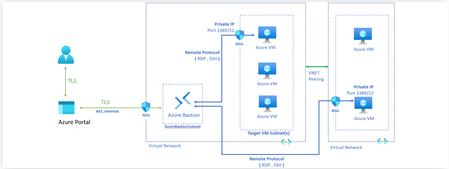
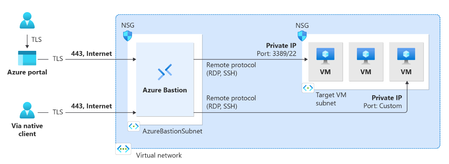
Written in Collaboration with AvirupChat ShabazShaik Mohit_Kumar YuriDiogenes Introduction: As organizations move toward containerized workloads such as Azure Kubernetes Service (AKS), secure access to cluster resources becomes critical. Making the Kubernetes API server private, therefore, significantly reduces the attack surface. However, it also changes how engineers perform routine management tasks. Operations as simple as running kubectl logs, describing resources, or troubleshooting workloads require connectivity to the virtual network hosting the cluster. This challenge becomes even more apparent during day-to-day operations. An engineer may have the necessary Kubernetes credentials and Azure RBAC permissions yet still be unable to access the cluster because the API server is reachable only from within the private network. Establishing VPN connectivity, using jump hosts, or deploying dedicated management workstations often becomes part of the operational workflow, adding complexity to what should be straightforward administrative tasks. This balance between maintaining strong network isolation and enabling efficient cluster management is exactly what Azure Bastion's native client tunneling support for private AKS clusters is designed to address. Many Azure customers already use Azure Bastion to securely access virtual machines without exposing them to the public internet. Native client tunneling now brings that same secure access model to AKS private clusters. This capability is in public preview currently. Before discussing how it works, it is worth understanding the operational challenges it is designed to solve and how it's done. Bastion for Azure Kubernetes Service (AKS) private clusters: At its core, Azure Bastion is designed to simplify secure access to private Azure resources. Since its launch, it has provided browser-based and native client RDP and SSH connectivity to Azure VMs without exposing management ports to the internet. No public IPs on your VMs. No inbound NSG rules for port 22 or 3389. Just TLS over port 443, routed through a fully managed service that Microsoft patches, scales, and secures on your behalf. When you establish a Bastion tunnel to your private AKS cluster, you are not signing in to an intermediary machine and running kubectl from there. You are opening an encrypted tunnel from your local machine, through Bastion, directly to the private API server endpoint. Your kubeconfig points to localhost on a dynamically assigned port, so local kubectl, helm, and scripts continue to work as they would against a public cluster. You get the developer experience of a public cluster with the security posture of a private one as shown in Figure 1. The high-level flow has three parts: The engineer authenticates to Azure, retrieves cluster credentials, and uses Azure Bastion to establish a managed tunnel into the private network. Local Kubernetes tools then use that tunnel to reach the private API server. This keeps the workflow familiar while removing the need for jump hosts or VPN-based access paths. However, this raises an important question - Does making access easier also make it easier for an attacker to connect? The short answer is no. In fact, Bastion tunneling strengthens the security posture in ways that are worth unpacking. First, the API server itself remains private. There is no public endpoint. There is no public IP address discoverable by scanners. The only network path to the API server runs through Azure's managed infrastructure. Authentication and authorization then depend on the AKS cluster configuration. Second, Bastion eliminates an entire class of infrastructure that itself becomes a security target. Jump box VMs, when not meticulously maintained, accumulate credentials, kubeconfig files, and browser sessions. They are machines that admins log into, which means they are machines that can be compromised. Bastion is not a machine you log into. It is an agentless, managed tunnel you pass through. And for public clusters, there is a related but distinct benefit. Many teams use API server authorized IP ranges to restrict which source IPs can reach their public API endpoint. This is a good practice, but it breaks down quickly when your team works remotely, uses dynamic IPs, or includes contractors. Adding Bastion's stable public IP to the authorized range gives you a consistent, managed access path without the operational toil of constantly updating IP allow lists. With the network path established through Bastion, the next question is how users are authenticated and authorized once they reach the AKS API server. That distinction matters: Bastion provides secure connectivity, while AKS access is governed by the authentication and authorization model configured on the cluster. Authentication and authorization options: When creating an AKS cluster, you can choose from three authentication and authorization modes, as shown in Figure below. That choice shapes everything about how access is granted, audited, and governed over the lifetime of the cluster. ⚠️Local accounts with Kubernetes RBAC is the default if you change nothing. It uses a static certificate that never expires, is shared across all administrators, and has no connection to your corporate identity provider. There is no MFA. No Conditional Access. Note: For most production environments, Microsoft recommends using Microsoft Entra ID integrated authentication rather than local accounts to enable centralized identity, MFA, and auditing. ☑️ Microsoft Entra ID with Kubernetes RBAC moves authentication to Entra ID, which means users sign in with their corporate identity, MFA is enforced, and Conditional Access policies apply. Authorization is handled through native Kubernetes Role and ClusterRole bindings, which reference Entra ID users and groups as subjects. This works well for teams that manage cluster configuration through GitOps, because RBAC manifests live alongside other cluster YAML. The limitation is that these permissions are invisible in Azure IAM — they live only inside the cluster. ✅ Microsoft Entra ID with Azure RBAC is the model we recommend for most production environments. Authentication still flows through Entra ID with full MFA and Conditional Access support. But authorization is handled by Azure RBAC role assignments on the AKS resource itself. Permissions are visible in Azure IAM, participate in access reviews, and integrate with Privileged Identity Management for just-in-time elevation. You can assign the built-in Azure Kubernetes Service RBAC Cluster Admin, Admin, Writer, or Reader roles at either cluster scope or namespace scope. A single subscription-level role assignment can grant access to every cluster in the subscription. The real value is the combination. Bastion provides the encrypted network tunnel. Entra ID provides the identity, MFA, and Conditional Access. Azure RBAC provides centralized, auditable authorization that your security team can review alongside every other Azure resource. For the exact steps to configure Entra ID authentication and Azure RBAC on your AKS cluster, see the AKS identity documentation. End-to-end flow for connectivity to AKS via Bastion: az account set --subscription <subscription ID> Retrieve credentials to your AKS private cluster using the commands below: az aks get-credentials --name <AKSClusterName> --resource-group <ResourceGroupName> Open the tunnel to your target AKS Cluster with the following command: az aks bastion --name <aksClusterName> --resource-group <aksClusterResourceGroup> --bastion <bastionResourceId> Now the default authentication method is Device code authentication i.e., this authentication method prompts the device code for the user to sign in from a browser session. If you want CLI only authentication, you can run the following command next. kubelogin convert-kubeconfig -l azurecli Then go on with your AKS connectivity: kubectl get nodes How to Try It: If you are already running private AKS clusters, getting started is straightforward. You need a Standard or Premium Azure Bastion host deployed in the same VNet as your cluster (or in a peered VNet), with native client support enabled. The aks-preview and bastion CLI extensions handle the rest. The detailed connection steps are documented on Microsoft Learn. We Want Your Feedback Write a comment in this blog or open an issue on the AKS GitHub repository or leave feedback directly on the Microsoft Learn documentation page. We read everything, and it genuinely influences what we prioritize.754Views2likes2Comments
A deep dive into Azure Bastion session recording
If you’ve worked with Azure Bastion’s Premium SKU, you’ve likely encountered one of its most powerful security features: graphical session recording. Capturing RDP and SSH sessions end to end strengthens compliance, supports forensic investigations, and improves operational accountability. How you configure session recording can make a significant difference. It determines whether you must manage manual tokens and expiry settings or benefit from a low-maintenance experience. With the recently announced Public Preview: Managed Identity support for graphical session recording, managing Bastion authentication credentials to store session recordings to a designated storage account is simpler and reduces manual work. In this blog, we’ll explain the Azure Bastion session recording feature, show how to set it up, compare SAS URL and Managed Identity options for storage authentication, and outline why Managed Identity is a great choice for production and enterprise environments. What Is Azure Bastion session recording? Azure Bastion is Microsoft’s fully managed, browser-based RDP/SSH gateway that removes the need for a public IP on your VMs. With the Premium SKU, you get access to session recording, which records graphical activity for every RDP and SSH session and uploads it as a browser playable video within the Bastion resource → Session recordings blade. This gives security teams: An audit trail of admin and user interactions Forensic evidence for incident response Visibility into privileged access across your environment Prerequisites Before you can enable session recording, you need: Requirement Detail Azure Bastion SKU Premium (Developer, Basic, and Standard do not support this feature) Storage Account General Purpose v2, same Azure region as Bastion Permissions Owner or Contributor on the Bastion resource and Blob Data Reader permission on the storage account for users to access the recordings The two configuration options When you enable session recording, Azure Bastion needs a way to authenticate to your Storage Account to upload the recorded sessions. There are two options: SAS URL Managed Identity Let’s look at how to set up each authentication option. Option 1: SAS URL How it works A Shared Access Signature (SAS) is a URI that grants restricted, time-limited access to Azure Storage resources. When using this option for session recording: You navigate to your Storage Account and generate a SAS URL token scoped to your container with at minimum Read, Create, Write, and List permissions. You paste the resulting SAS URL into the Bastion session recording blade. Bastion uses that URL to authenticate and write recordings to a storage container for every session. Prerequisites If you have not configured a storage account container for session recordings, visit Configure storage account container. Ensure you have Session recording and SAS URL selected in Azure Bastion configuration settings. Setup steps Go to your Storage Account. In the left pane, expand Settings, then select Resource sharing (CORS). Create a new policy under Blob service with the following values and save your changes at the top of the page. Next go to your Storage Account → Data Storage → Containers → Choose your container → Select Shared access tokens under Settings Under permissions drop down, select Read, Create, Write, and List. This is the minimum set of privileges required for session recording. Define a start and expiry date and select generate the SAS token and URL. Copy the Blob service SAS URL provided. In your Bastion resource → Session recording → paste the SAS URL and select Upload. New Azure Bastion sessions will now be recorded and available with the option for immediate playback. The challenges of using SAS URLs at scale 🔴 Token expiry overhead: SAS tokens expire after a set period. Once a token expires, Bastion can no longer write recordings, which can silently interrupt your audit trail until someone detects the issue and generates a new token. 🔴 Token access risk: If a SAS URL is accidentally logged or shared, it grants write access to your storage account for anyone who has access to it. 🔴 No Entra ID identity: Because SAS tokens provide preauthorized access for a limited time, they bypass Entra RBAC capabilities entirely. This means they don’t benefit from Conditional Access policies restriction capabilities. 🔴 Manual rotation: Unlike secrets stored in Key Vault with automated rotation, SAS tokens require a human or a custom automation pipeline to regenerate and update the Bastion configuration on a regular cadence. Option 2: Managed Identity How it works Azure Managed Identity is a feature of Microsoft Entra ID that provides Azure services with an automatically managed identity—no passwords, secrets, or tokens required. When Bastion is configured with a Managed Identity for session recording: Bastion’s system-assigned (or user-assigned) managed identity authenticates to the Storage Account via Microsoft Entra ID tokens issued by the Entra ID platform. RBAC controls what that identity can do. Specifically, it requires the Storage Blob Data Contributor role on the storage account. Token issuance, refresh, and lifecycle are all handled automatically by Azure. Setup Steps Go to your Storage Account. In the left pane, expand Settings, then select Resource sharing (CORS). Create a new policy under Blob service with the following values and save your changes at the top of the page. Next navigate to Identity (Preview). In our example, we are using a System Assigned Managed Identity, so we toggle Status to On to enable the Managed Identity to be used by Bastion for session recordings. An object (principal) ID will be generated, which is the unique identifier of the managed identity resources that is registered with Microsoft Entra ID for authentication purposes. Ensure you have Session recording and either System Assigned or User Assigned Managed Identity is selected in Azure Bastion configuration settings. Select the container you would like to store session recordings to and validate Blob Container URI is correctly noted in the configuration and click Apply to perform the configuration changes on the Bastion host. Now we need to allow RBAC permissions for the Managed Identity to store session recordings in our configured Storage Account and Container. Under Permissions select Azure role assignments. Select Add role assignment (Preview) and a new blade will appear. Here, will choose our scope which is Storage, we select our subscription, and target our Storage Account under Resource category, and for Role we will need to choose Storage Blob Data Contributor for the role assignment. Proceed to click Save to see our new role assignment listed. The setup and configuration is complete and Azure Bastion will now use the configured system-assigned managed identity to store session recordings on our Storage Container. Recordings can be found after a session in the Session recordings option under Settings. Benefits of a Managed Identity 🔴 No credentials to manage: No need to worry about credentials leaking or needing rotation. 🔴 No risks of silent failures: SAS tokens can expire and stop recordings without warning. Managed Identity handles tokens automatically, so recording continues without issues. 🔴 Better security visibility: It’s part of Entra ID, so you can see it in access reviews and control it with proper permissions. 🔴 Compliance improvements: It uses a real identity that can be tracked and audited, which aligns better with security and compliance requirements. Conclusion Azure Bastion session recording is essential for organizations that need to monitor privileged access. Using Managed Identity for authentication helps protect against credential leaks and requires no ongoing maintenance after setup, compared to the SAS URL configuration option. References Public Preview: Managed Identity support for graphical session recording | Microsoft Community Hub Azure Bastion: Enterprise-grade secure access made simple | Microsoft Community Hub Managed Identity Support for Azure Bastion - Azure Network Security in the Field #1 Record Bastion sessions - Azure Bastion | Microsoft Learn531Views1like0CommentsHow Azure network security can help you meet NIS2 compliance
With the adoption of the NIS2 Directive EU 2022 2555, cybersecurity obligations for both public and private sector organizations have become more strict and far reaching. NIS2 aims to establish a higher common level of cybersecurity across the European Union by enforcing stronger requirements on risk management, incident reporting, supply chain protection, and governance. If your organization runs on Microsoft Azure, you already have powerful services to support your NIS2 journey. In particular Azure network security products such as Azure Firewall, Azure Web Application Firewall WAF, and Azure DDoS Protection provide foundational controls. The key is to configure and operate them in a way that aligns with the directive’s expectations. Important note This article is a technical guide based on the NIS2 Directive EU 2022 2555 and Microsoft product documentation. It is not legal advice. For formal interpretations, consult your legal or regulatory experts. What is NIS2? NIS2 replaces the original NIS Directive 2016 and entered into force on 16 January 2023. Member states must transpose it into national law by 17 October 2024. Its goals are to: Expand the scope of covered entities essential and important entities Harmonize cybersecurity standards across member states Introduce stricter supervisory and enforcement measures Strengthen supply chain security and reporting obligations Key provisions include: Article 20 management responsibility and governance Article 21 cybersecurity risk management measures Article 23 incident notification obligations These articles require organizations to implement technical, operational, and organizational measures to manage risks, respond to incidents, and ensure leadership accountability. Where Azure network security fits The table below maps common NIS2 focus areas to Azure network security capabilities and how they support compliance outcomes. NIS2 focus area Azure services and capabilities How this supports compliance Incident handling and detection Azure Firewall Premium IDPS and TLS inspection, Threat Intelligence mode, Azure WAF managed rule sets and custom rules, Azure DDoS Protection, Azure Bastion diagnostic logs Detect, block, and log threats across layers three to seven. Provide telemetry for triage and enable response workflows that are auditable. Business continuity and resilience Azure Firewall availability zones and autoscale, Azure Front Door or Application Gateway WAF with zone redundant deployments, Azure Monitor with Log Analytics, Traffic Manager or Front Door for failover Improve service availability and provide data for resilience reviews and disaster recovery scenarios. Access control and segmentation Azure Firewall policy with DNAT, network, and application rules, NSGs and ASGs, Azure Bastion for browser based RDP SSH without public IPs, Private Link Enforce segmentation and isolation of critical assets. Support Zero Trust and least privilege for inbound and egress. Vulnerability and misconfiguration defense Azure WAF Microsoft managed rule set based on OWASP CRS. Azure Firewall Premium IDPS signatures Reduce exposure to common web exploits and misconfigurations for public facing apps and APIs. Encryption and secure communications TLS policy: Application Gateway SSL policy; Front Door TLS policy; App Service/PaaS minimum TLS. Inspection: Azure Firewall Premium TLS inspection Inspect and enforce encrypted communication policies and block traffic that violates TLS requirements. Inspect decrypted traffic for threats. Incident reporting and evidence Azure Network Security diagnostics, Log Analytics, Microsoft Sentinel incidents, workbooks, and playbooks Capture and retain telemetry. Correlate events, create incident timelines, and export reports to meet regulator timelines. NIS2 articles in practice Article 21 cybersecurity risk management measures Azure network controls contribute to several required measures: Prevention and detection. Azure Firewall blocks unauthorized access and inspects traffic with IDPS. Azure DDoS Protection mitigates volumetric and protocol attacks. Azure WAF prevents common web exploits based on OWASP guidance. Logging and monitoring. Azure Firewall, WAF, DDoS, and Bastion resources produce detailed resource logs and metrics in Azure Monitor. Ingest these into Microsoft Sentinel for correlation, analytics rules, and automation. Control of encrypted communications. Azure Firewall Premium provides TLS inspection to reveal malicious payloads inside encrypted sessions. Supply chain and service provider management. Use Azure Policy and Defender for Cloud to continuously assess configuration and require approved network security baselines across subscriptions and landing zones. Article 23 incident notification Build an evidence friendly workflow with Sentinel: Early warning within twenty four hours. Use Sentinel analytics rules on Firewall, WAF, DDoS, and Bastion logs to generate incidents and trigger playbooks that assemble an initial advisory. Incident notification within seventy two hours. Enrich the incident with additional context such as mitigation actions from DDoS, Firewall and WAF. Final report within one month. Produce a summary that includes root cause, impact, and corrective actions. Use Workbooks to export charts and tables that back up your narrative. Article 20 governance and accountability Management accountability. Track policy compliance with Azure Policy initiatives for Firewall, DDoS and WAF. Use exemptions rarely and record justification. Centralized visibility. Defender for Cloud’s network security posture views and recommendations give executives and owners a quick view of exposure and misconfigurations. Change control and drift prevention. Manage Firewall, WAF, and DDoS through Network Security Hub and Infrastructure as Code with Bicep or Terraform. Require pull requests and approvals to enforce four eyes on changes. Network security baseline Use this blueprint as a starting point. Adapt to your landing zone architecture and regulator guidance. Topology and control plane Hub and spoke architecture with a centralized Azure Firewall Premium in the hub. Enable availability zones. Deploy Azure Bastion Premium in the hub or a dedicated management VNet; peer to spokes. Remove public IPs from management NICs and disable public RDP SSH on VMs. Use Network Security Hub for at-scale management. Require Infrastructure as Code for all network security resources. Web application protection Protect public apps with Azure Front Door Premium WAF where edge inspection is required. Use Application Gateway WAF v2 for regional scenarios. Enable the Microsoft managed rule set and the latest version. Add custom rules for geo based allow or deny and bot management. enable rate limiting when appropriate. DDoS strategy Enable DDoS Network Protection on virtual networks that contain internet facing resources. Use IP Protection for single public IP scenarios. Configure DDoS diagnostics and alerts. Stream to Sentinel. Define runbooks for escalation and service team engagement. Firewall policy Enable IDPS in alert and then in alert and deny for high confidence signatures. Enable TLS inspection for outbound and inbound where supported. Enforce FQDN and URL filtering for egress. Require explicit allow lists for critical segments. Deny inbound RDP SSH from the internet. Allow management traffic only from Bastion subnets or approved management jump segments. Logging, retention, and access Turn on diagnostic settings for Firewall, WAF, DDoS, and Application Gateway or Front Door. Send to Log Analytics and an archive storage account for long term retention. Set retention per national law and internal policy. Azure Monitor Log Analytics supports table-level retention and archive for up to 12 years, many teams keep a shorter interactive window and multi-year archive for audits. Restrict access with Azure RBAC and Customer Managed Keys where applicable. Automation and playbooks Build Sentinel playbooks for regulator notifications, ticket creation, and evidence collection. Maintain dry run versions for exercises. Add analytics for Bastion session starts to sensitive VMs, excessive failed connection attempts, and out of hours access. Conclusion Azure network security services provide the technical controls most organizations need in order to align with NIS2. When combined with policy enforcement, centralized logging, and automated detection and response, they create a defensible and auditable posture. Focus on layered protection, secure connectivity, and real time response so that you can reduce exposure to evolving threats, accelerate incident response, and meet NIS2 obligations with confidence. References NIS2 primary source Directive (EU) 2022/2555 (NIS2). https://eur-lex.europa.eu/eli/dir/2022/2555/oj/eng Azure Firewall Premium features (TLS inspection, IDPS, URL filtering). https://learn.microsoft.com/en-us/azure/firewall/premium-features Deploy & configure Azure Firewall Premium. https://learn.microsoft.com/en-us/azure/firewall/premium-deploy IDPS signature categories reference. https://learn.microsoft.com/en-us/azure/firewall/idps-signature-categories Monitoring & diagnostic logs reference. https://learn.microsoft.com/en-us/azure/firewall/monitor-firewall-reference Web Application Firewall WAF on Azure Front Door overview & features. https://learn.microsoft.com/en-us/azure/frontdoor/web-application-firewall WAF on Application Gateway overview. https://learn.microsoft.com/en-us/azure/web-application-firewall/overview Examine WAF logs with Log Analytics. https://learn.microsoft.com/en-us/azure/application-gateway/log-analytics Rate limiting with Front Door WAF. https://learn.microsoft.com/en-us/azure/web-application-firewall/afds/waf-front-door-rate-limit Azure DDoS Protection Service overview & SKUs (Network Protection, IP Protection). https://learn.microsoft.com/en-us/azure/ddos-protection/ddos-protection-overview Quickstart: Enable DDoS IP Protection. https://learn.microsoft.com/en-us/azure/ddos-protection/manage-ddos-ip-protection-portal View DDoS diagnostic logs (Notifications, Mitigation Reports/Flows). https://learn.microsoft.com/en-us/azure/ddos-protection/ddos-view-diagnostic-logs Azure Bastion Azure Bastion overview and SKUs. https://learn.microsoft.com/en-us/azure/bastion/bastion-overview Deploy and configure Azure Bastion. https://learn.microsoft.com/en-us/azure/bastion/tutorial-create-host-portal Disable public RDP and SSH on Azure VMs. https://learn.microsoft.com/en-us/azure/virtual-machines/security-baseline Azure Bastion diagnostic logs and metrics. https://learn.microsoft.com/en-us/azure/bastion/bastion-diagnostic-logs Microsoft Sentinel Sentinel documentation (onboard, analytics, automation). https://learn.microsoft.com/en-us/azure/sentinel/ Azure Firewall solution for Microsoft Sentinel. https://learn.microsoft.com/en-us/azure/firewall/firewall-sentinel-overview Use Microsoft Sentinel with Azure WAF. https://learn.microsoft.com/en-us/azure/web-application-firewall/waf-sentinel Architecture & routing Hub‑spoke network topology (reference). https://learn.microsoft.com/en-us/azure/architecture/networking/architecture/hub-spoke Azure Firewall Manager & secured virtual hub. https://learn.microsoft.com/en-us/azure/firewall-manager/secured-virtual-hub1.5KViews0likes4CommentsPublic Preview: Managed Identity support for graphical session recording
Overview Azure Bastion provides secure RDP and SSH access to Azure virtual machines directly via the Azure portal or via the native SSH/RDP client already installed on your local computer. Today, we are introducing public preview for managed identity support for session recording, giving administrators a seamless, identity-based way to authenticate Bastion when writing recordings to a designated storage account. Why Managed Identities? With managed identity support, Bastion authenticates directly to your storage account using an Azure identity, no additional credentials to configure or manage. You can use either a system-assigned or user-assigned managed identity depending on your needs. Authentication is handled automatically through Microsoft Entra ID, which means setup is straightforward: enable the identity, assign a role, and point Bastion at your storage container. For organizations operating at scale across many Bastion deployments and regions, this identity-based approach removes the need to manage credentials, aligns with Zero Trust principles, and lets you control access centrally through Azure RBAC. Getting Started in Azure Portal Prerequisites Ensure that Azure Bastion is deployed with the Premium SKU Ensure that a storage account with a dedicated container for session recordings is created Ensure that the storage account has the required CORS policy configured. Click here to set up the storage account for session recordings Ensure that users who need to view recordings have the Storage Blob Data Reader role on the storage account Steps Navigate to your Bastion resource in the Azure portal. Select Identity (Preview) in the left pane and turn the Status to On to enable a system-assigned managed identity. Wait for the configuration to complete. Select Azure role assignments, then select Add role assignment (Preview). Assign the Storage Blob Data Contributor role scoped to your storage account. Select Save, then navigate to the Configuration blade. Under Session Recording Configuration, select System Assigned Managed Identity and enter the Blob Container URI for your storage container. Navigate to the Session recordings blade to view and play back recorded sessions. Next Steps Learn more about configuring session recording with managed identities here and keep up to date with all things Azure Bastion in our What's New page.902Views0likes0CommentsAzure Bastion: Enterprise-grade secure access made simple
Managing secure remote access to virtual machines traditionally means juggling public IP addresses, configuring jump boxes, deploying VPN infrastructure, and managing complex firewall rules. Each layer adds cost, complexity, and potential security vulnerabilities. Azure Bastion changes everything. It's a fully managed PaaS service that provides secure RDP/SSH connectivity to Azure VMs directly through the Azure portal, without exposing VMs to the public internet. No public IPs, no jump boxes, no VPN clients. Azure Bastion isn't one-size-fits-all. Whether you're running a development sandbox, managing production workloads at scale, or operating in regulated industries with strict compliance requirements, there's a Bastion SKU designed for your specific needs. Basic SKU for small production workloads with browser-based access. Ideal for small businesses, startups, or single-application environments with limited concurrent users (up to 2 instances). Standard SKU for scalable production environments requiring VNet peering, native client and shareable links for non-portal access. Supports up to 50 scale units, perfect for growing organizations and multi-VNET architectures. Premium SKU for regulated industries requiring session recording for compliance (HIPAA, SOX, PCI-DSS, FDA), private-only deployment for zero internet exposure. Essential for healthcare, finance, pharmaceuticals, government, and air-gapped environments. Let's dive into real-world scenarios that showcase how Azure Bastion simplifies enterprise-grade secure access. Real-World Scenarios: Azure Bastion features are best understood through real-world application. In the scenarios below, we'll tackle three common enterprise challenges with remote secure access. Let's see Azure Bastion in action. Scenario 1: Instant Vendor Access Without the Hassle The Challenge: It's 3 PM on Friday when your production database experiences critical performance issues. An external DBA consultant needs immediate access to investigate, but your organization faces a familiar dilemma. The traditional provisioning process requires creating a temporary Azure AD account, configuring VPN access and credentials, coordinating with the security team for approvals, and ensuring timely revocation after the engagement concludes. Even with expedited processes, this takes 2-3 hours—and there's always the risk of lingering permissions if revocation is overlooked. By the time access is provisioned, it's often too late to resolve the issue before the weekend, leaving your production environment vulnerable and your team working overtime. The Solution: Shareable Links: Generate a secure URL for instant VM access: no Azure credentials, no VPN, no account creation is required. Implementation: Step 1: Enable Shareable Links Navigate to Bastion → Configuration → Toggle Shareable Link to Enabled → Click Apply Step 2: Generate Link Go to Bastion → Select Shareable Links → Add → Choose VM→ Apply →Copy generated URL Step 3: Share & Monitor Share URL securely with vendor → Vendor connects via browser using VM credentials Monitor active sessions in Bastion → Shareable Links Real World Impact: A global financial services firm now grants emergency vendor access in under 5 minutes instead of 2-3 hours, with zero IT overhead for account provisioning or VPN setup. Links can be revoked after the set duration, eliminating lingering access risks. Every vendor session is logged, providing complete audit trails that satisfy SOX and PCI-DSS compliance requirements without additional administrative effort. Scenario 2: Comprehensive Compliance with Session Recording The Challenge: Your healthcare organization operates under HIPAA regulations, which mandate comprehensive audit trails of all administrative access to systems containing Protected Health Information (PHI). Traditional text logs capture what was accessed, but not what actions were performed—and they're difficult to analyze during audits. You need indisputable video evidence of administrative activities with secure 7-year retention. The Solution: Graphical Session Recording: Azure Bastion Premium's Session Recording feature automatically captures every RDP and SSH session as a video recording, stored securely in Azure Storage with immutable retention policies. Implementation: Step 1: Prepare Storage Account Create a dedicated storage account with blob versioning, lifecycle management (7 years for HIPAA), soft delete (90 days), and RBAC restricted to security/compliance team. Also make sure there is a dedicated container created for Bastion Sessions and CORS policy configured on the storage account to allow your bastion. Step 2: Enable Session Recording Navigate to Bastion → Configuration → Toggle Session Recording to Enabled → Apply Add/Update the SAS URL of the storage account in the Session Recordings blade of Bastion for the recordings to be stored in the specified storage account. Step 3: Connect as Usual Administrators connect through Azure portal normally: VM → Connect → Bastion → Enter credentials → Connect Every session is automatically recorded—no extra steps for users. Step 4: Review Recordings Security teams access recordings from the Session Recordings blade on Azure Bastion which will retrieve data from the configured Storage Account. Real World Impact: A healthcare provider with 50+ hospitals now maintains 100% HIPAA-compliant audit trails of all administrative access to PHI systems through automated video recordings. The organization reduced audit preparation time by 75%, as compliance teams can quickly review specific sessions instead of analyzing thousands of text log entries. Session recordings have enabled post-incident investigations to identify unauthorized configuration changes and provide indisputable video evidence for security reviews and regulatory audits. Scenario 3: Zero Internet Exposure with Private-Only Deployment The Challenge: A global pharmaceutical company developing cancer treatments operates under FDA regulations requiring zero internet exposure for drug development systems. Their security mandate: no public IP addresses on production infrastructure, complete air-gapped connectivity to protect intellectual property, and administrative access from corporate network only. Traditional Azure Bastion requires a public IP address—violating their zero-trust security policy. The Solution: Private-Only Bastion: Azure Bastion Premium's private-only deployment eliminates the public IP address entirely. All connectivity flows through your org’s configured Express Route, S2S or P2S connectivity for complete air-gapped operations. Implementation: Select Azure Bastion Premium SKU and Deploy Private-Only Bastion Configure Private Connectivity from On Prem using your orgs preferred way of connectivity Connect from Corporate Network using Private IP address of the Bastion Deployment Real-World Impact A pharmaceutical company with 20+ research facilities deploys private-only Bastion for FDA-regulated drug development systems. The company now achieves complete air-gapped operations with zero internet endpoints while maintaining centralized access management for 200+ researchers across global facilities. Research teams connect securely via ExpressRoute with all administrative sessions network-isolated, FDA compliance audits confirm 100% of connections originate from corporate private networks, and the organization eliminated $2M in annual costs by decommissioning internet-isolated jump boxes. Conclusion: Azure Bastion transforms the traditional trade-off between security and operational efficiency into a unified solution. Whether you're granting emergency access or preparing for your next HIPAA audit, Azure Bastion delivers what enterprises need: secure temporary access as and when needed, complete audit trails with zero administrator overhead, and comprehensive compliance without compromising productivity, bringing a fundamental shift in how organizations approach secure remote access in the cloud. Resources: https://learn.microsoft.com/azure/bastion/ https://learn.microsoft.com/azure/bastion/shareable-link https://learn.microsoft.com/azure/bastion/session-recording https://azure.microsoft.com/pricing/details/azure-bastion/1.3KViews0likes0CommentsBest Practices for Securing Access to VMs
Azure Bastion and Microsoft Entra PIM work together to secure VM access by eliminating the need for public IPs, enabling identity-based authentication, and enforcing Just-In-Time (JIT) access. Bastion provides secure RDP/SSH connections through Entra ID without local credentials, while Entra PIM ensures that users only receive time-limited, approved access. This combination supports a Zero Trust model by minimizing persistent privileges and reducing the overall attack surface.3.7KViews0likes0Comments