azure bastion
15 TopicsAzure Network Security Demo Lab Environment with new updates. v2.1
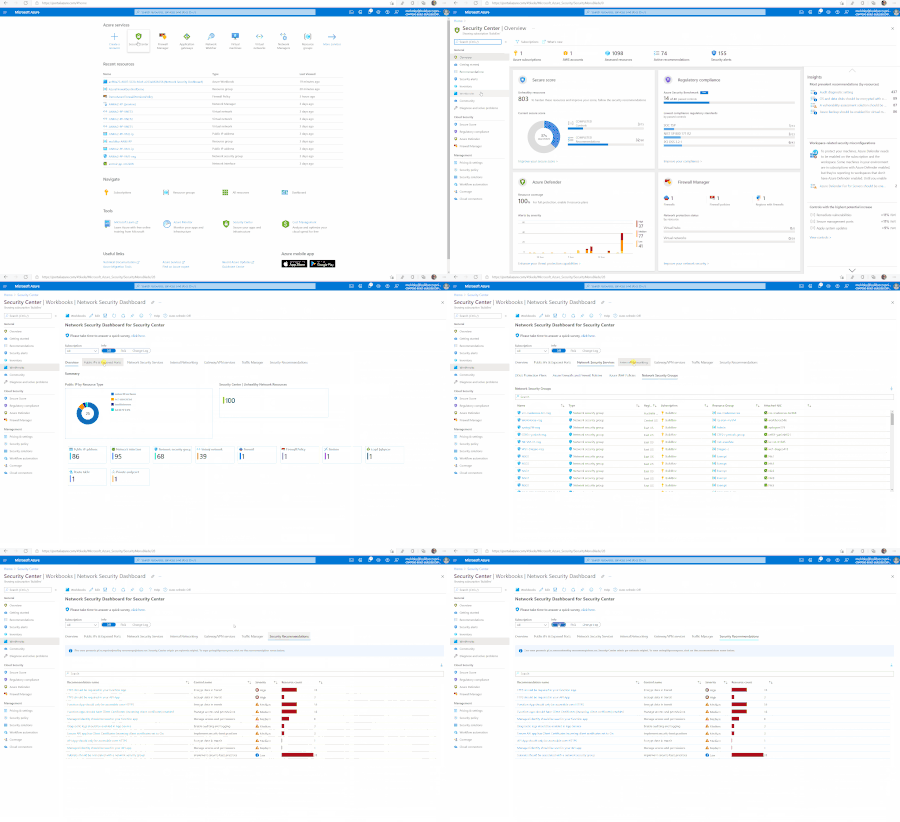
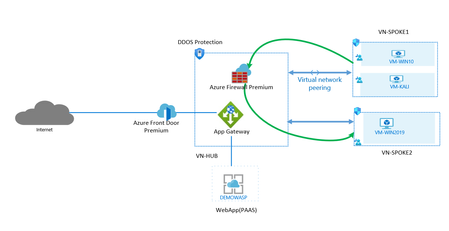
Announcing our new Network Security Demo lab environment. This blog post provides information about the updated demo lab environment version 2.1 in our Github Repository. You can learn the new features and POC scenarios you can now set out to validate. This lab environment contains the recently GA Azure Firewall premium with Firewall Manager and Azure Frontdoor Premium.8.1KViews5likes4CommentsImprove your Azure Network Infrastructure Security with Complementary Services
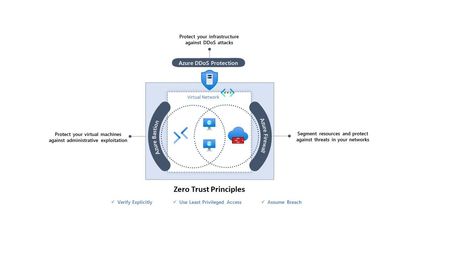
For a while now, it’s been clear that securing only your network’s perimeter is simply not enough. The idea that we can inherently trust systems or users in “internal networks” is a recipe for disaster. Not to mention, it’s likely that many of your systems and users are not even in an internal network anymore.9KViews5likes0CommentsSecure Access to Your Azure Virtual Machines for Free with Bastion Developer
Now generally available in 6 public regions, Azure Bastion Developer will revolutionize connectivity for developers by delivering secure and seamless access to Azure Virtual Machines—at no extra cost.18KViews3likes0Comments
Secure Native Access to Azure Kubernetes Service (AKS) Private Clusters with Azure Bastion
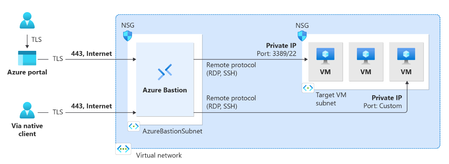
Written in Collaboration with AvirupChat ShabazShaik Mohit_Kumar YuriDiogenes Introduction: As organizations move toward containerized workloads such as Azure Kubernetes Service (AKS), secure access to cluster resources becomes critical. Making the Kubernetes API server private, therefore, significantly reduces the attack surface. However, it also changes how engineers perform routine management tasks. Operations as simple as running kubectl logs, describing resources, or troubleshooting workloads require connectivity to the virtual network hosting the cluster. This challenge becomes even more apparent during day-to-day operations. An engineer may have the necessary Kubernetes credentials and Azure RBAC permissions yet still be unable to access the cluster because the API server is reachable only from within the private network. Establishing VPN connectivity, using jump hosts, or deploying dedicated management workstations often becomes part of the operational workflow, adding complexity to what should be straightforward administrative tasks. This balance between maintaining strong network isolation and enabling efficient cluster management is exactly what Azure Bastion's native client tunneling support for private AKS clusters is designed to address. Many Azure customers already use Azure Bastion to securely access virtual machines without exposing them to the public internet. Native client tunneling now brings that same secure access model to AKS private clusters. This capability is in public preview currently. Before discussing how it works, it is worth understanding the operational challenges it is designed to solve and how it's done. Bastion for Azure Kubernetes Service (AKS) private clusters: At its core, Azure Bastion is designed to simplify secure access to private Azure resources. Since its launch, it has provided browser-based and native client RDP and SSH connectivity to Azure VMs without exposing management ports to the internet. No public IPs on your VMs. No inbound NSG rules for port 22 or 3389. Just TLS over port 443, routed through a fully managed service that Microsoft patches, scales, and secures on your behalf. When you establish a Bastion tunnel to your private AKS cluster, you are not signing in to an intermediary machine and running kubectl from there. You are opening an encrypted tunnel from your local machine, through Bastion, directly to the private API server endpoint. Your kubeconfig points to localhost on a dynamically assigned port, so local kubectl, helm, and scripts continue to work as they would against a public cluster. You get the developer experience of a public cluster with the security posture of a private one as shown in Figure 1. The high-level flow has three parts: The engineer authenticates to Azure, retrieves cluster credentials, and uses Azure Bastion to establish a managed tunnel into the private network. Local Kubernetes tools then use that tunnel to reach the private API server. This keeps the workflow familiar while removing the need for jump hosts or VPN-based access paths. However, this raises an important question - Does making access easier also make it easier for an attacker to connect? The short answer is no. In fact, Bastion tunneling strengthens the security posture in ways that are worth unpacking. First, the API server itself remains private. There is no public endpoint. There is no public IP address discoverable by scanners. The only network path to the API server runs through Azure's managed infrastructure. Authentication and authorization then depend on the AKS cluster configuration. Second, Bastion eliminates an entire class of infrastructure that itself becomes a security target. Jump box VMs, when not meticulously maintained, accumulate credentials, kubeconfig files, and browser sessions. They are machines that admins log into, which means they are machines that can be compromised. Bastion is not a machine you log into. It is an agentless, managed tunnel you pass through. And for public clusters, there is a related but distinct benefit. Many teams use API server authorized IP ranges to restrict which source IPs can reach their public API endpoint. This is a good practice, but it breaks down quickly when your team works remotely, uses dynamic IPs, or includes contractors. Adding Bastion's stable public IP to the authorized range gives you a consistent, managed access path without the operational toil of constantly updating IP allow lists. With the network path established through Bastion, the next question is how users are authenticated and authorized once they reach the AKS API server. That distinction matters: Bastion provides secure connectivity, while AKS access is governed by the authentication and authorization model configured on the cluster. Authentication and authorization options: When creating an AKS cluster, you can choose from three authentication and authorization modes, as shown in Figure below. That choice shapes everything about how access is granted, audited, and governed over the lifetime of the cluster. ⚠️Local accounts with Kubernetes RBAC is the default if you change nothing. It uses a static certificate that never expires, is shared across all administrators, and has no connection to your corporate identity provider. There is no MFA. No Conditional Access. Note: For most production environments, Microsoft recommends using Microsoft Entra ID integrated authentication rather than local accounts to enable centralized identity, MFA, and auditing. ☑️ Microsoft Entra ID with Kubernetes RBAC moves authentication to Entra ID, which means users sign in with their corporate identity, MFA is enforced, and Conditional Access policies apply. Authorization is handled through native Kubernetes Role and ClusterRole bindings, which reference Entra ID users and groups as subjects. This works well for teams that manage cluster configuration through GitOps, because RBAC manifests live alongside other cluster YAML. The limitation is that these permissions are invisible in Azure IAM — they live only inside the cluster. ✅ Microsoft Entra ID with Azure RBAC is the model we recommend for most production environments. Authentication still flows through Entra ID with full MFA and Conditional Access support. But authorization is handled by Azure RBAC role assignments on the AKS resource itself. Permissions are visible in Azure IAM, participate in access reviews, and integrate with Privileged Identity Management for just-in-time elevation. You can assign the built-in Azure Kubernetes Service RBAC Cluster Admin, Admin, Writer, or Reader roles at either cluster scope or namespace scope. A single subscription-level role assignment can grant access to every cluster in the subscription. The real value is the combination. Bastion provides the encrypted network tunnel. Entra ID provides the identity, MFA, and Conditional Access. Azure RBAC provides centralized, auditable authorization that your security team can review alongside every other Azure resource. For the exact steps to configure Entra ID authentication and Azure RBAC on your AKS cluster, see the AKS identity documentation. End-to-end flow for connectivity to AKS via Bastion: az account set --subscription <subscription ID> Retrieve credentials to your AKS private cluster using the commands below: az aks get-credentials --name <AKSClusterName> --resource-group <ResourceGroupName> Open the tunnel to your target AKS Cluster with the following command: az aks bastion --name <aksClusterName> --resource-group <aksClusterResourceGroup> --bastion <bastionResourceId> Now the default authentication method is Device code authentication i.e., this authentication method prompts the device code for the user to sign in from a browser session. If you want CLI only authentication, you can run the following command next. kubelogin convert-kubeconfig -l azurecli Then go on with your AKS connectivity: kubectl get nodes How to Try It: If you are already running private AKS clusters, getting started is straightforward. You need a Standard or Premium Azure Bastion host deployed in the same VNet as your cluster (or in a peered VNet), with native client support enabled. The aks-preview and bastion CLI extensions handle the rest. The detailed connection steps are documented on Microsoft Learn. We Want Your Feedback Write a comment in this blog or open an issue on the AKS GitHub repository or leave feedback directly on the Microsoft Learn documentation page. We read everything, and it genuinely influences what we prioritize.1KViews2likes2Comments
A deep dive into Azure Bastion session recording
If you’ve worked with Azure Bastion’s Premium SKU, you’ve likely encountered one of its most powerful security features: graphical session recording. Capturing RDP and SSH sessions end to end strengthens compliance, supports forensic investigations, and improves operational accountability. How you configure session recording can make a significant difference. It determines whether you must manage manual tokens and expiry settings or benefit from a low-maintenance experience. With the recently announced Public Preview: Managed Identity support for graphical session recording, managing Bastion authentication credentials to store session recordings to a designated storage account is simpler and reduces manual work. In this blog, we’ll explain the Azure Bastion session recording feature, show how to set it up, compare SAS URL and Managed Identity options for storage authentication, and outline why Managed Identity is a great choice for production and enterprise environments. What Is Azure Bastion session recording? Azure Bastion is Microsoft’s fully managed, browser-based RDP/SSH gateway that removes the need for a public IP on your VMs. With the Premium SKU, you get access to session recording, which records graphical activity for every RDP and SSH session and uploads it as a browser playable video within the Bastion resource → Session recordings blade. This gives security teams: An audit trail of admin and user interactions Forensic evidence for incident response Visibility into privileged access across your environment Prerequisites Before you can enable session recording, you need: Requirement Detail Azure Bastion SKU Premium (Developer, Basic, and Standard do not support this feature) Storage Account General Purpose v2, same Azure region as Bastion Permissions Owner or Contributor on the Bastion resource and Blob Data Reader permission on the storage account for users to access the recordings The two configuration options When you enable session recording, Azure Bastion needs a way to authenticate to your Storage Account to upload the recorded sessions. There are two options: SAS URL Managed Identity Let’s look at how to set up each authentication option. Option 1: SAS URL How it works A Shared Access Signature (SAS) is a URI that grants restricted, time-limited access to Azure Storage resources. When using this option for session recording: You navigate to your Storage Account and generate a SAS URL token scoped to your container with at minimum Read, Create, Write, and List permissions. You paste the resulting SAS URL into the Bastion session recording blade. Bastion uses that URL to authenticate and write recordings to a storage container for every session. Prerequisites If you have not configured a storage account container for session recordings, visit Configure storage account container. Ensure you have Session recording and SAS URL selected in Azure Bastion configuration settings. Setup steps Go to your Storage Account. In the left pane, expand Settings, then select Resource sharing (CORS). Create a new policy under Blob service with the following values and save your changes at the top of the page. Next go to your Storage Account → Data Storage → Containers → Choose your container → Select Shared access tokens under Settings Under permissions drop down, select Read, Create, Write, and List. This is the minimum set of privileges required for session recording. Define a start and expiry date and select generate the SAS token and URL. Copy the Blob service SAS URL provided. In your Bastion resource → Session recording → paste the SAS URL and select Upload. New Azure Bastion sessions will now be recorded and available with the option for immediate playback. The challenges of using SAS URLs at scale 🔴 Token expiry overhead: SAS tokens expire after a set period. Once a token expires, Bastion can no longer write recordings, which can silently interrupt your audit trail until someone detects the issue and generates a new token. 🔴 Token access risk: If a SAS URL is accidentally logged or shared, it grants write access to your storage account for anyone who has access to it. 🔴 No Entra ID identity: Because SAS tokens provide preauthorized access for a limited time, they bypass Entra RBAC capabilities entirely. This means they don’t benefit from Conditional Access policies restriction capabilities. 🔴 Manual rotation: Unlike secrets stored in Key Vault with automated rotation, SAS tokens require a human or a custom automation pipeline to regenerate and update the Bastion configuration on a regular cadence. Option 2: Managed Identity How it works Azure Managed Identity is a feature of Microsoft Entra ID that provides Azure services with an automatically managed identity—no passwords, secrets, or tokens required. When Bastion is configured with a Managed Identity for session recording: Bastion’s system-assigned (or user-assigned) managed identity authenticates to the Storage Account via Microsoft Entra ID tokens issued by the Entra ID platform. RBAC controls what that identity can do. Specifically, it requires the Storage Blob Data Contributor role on the storage account. Token issuance, refresh, and lifecycle are all handled automatically by Azure. Setup Steps Go to your Storage Account. In the left pane, expand Settings, then select Resource sharing (CORS). Create a new policy under Blob service with the following values and save your changes at the top of the page. Next navigate to Identity (Preview). In our example, we are using a System Assigned Managed Identity, so we toggle Status to On to enable the Managed Identity to be used by Bastion for session recordings. An object (principal) ID will be generated, which is the unique identifier of the managed identity resources that is registered with Microsoft Entra ID for authentication purposes. Ensure you have Session recording and either System Assigned or User Assigned Managed Identity is selected in Azure Bastion configuration settings. Select the container you would like to store session recordings to and validate Blob Container URI is correctly noted in the configuration and click Apply to perform the configuration changes on the Bastion host. Now we need to allow RBAC permissions for the Managed Identity to store session recordings in our configured Storage Account and Container. Under Permissions select Azure role assignments. Select Add role assignment (Preview) and a new blade will appear. Here, will choose our scope which is Storage, we select our subscription, and target our Storage Account under Resource category, and for Role we will need to choose Storage Blob Data Contributor for the role assignment. Proceed to click Save to see our new role assignment listed. The setup and configuration is complete and Azure Bastion will now use the configured system-assigned managed identity to store session recordings on our Storage Container. Recordings can be found after a session in the Session recordings option under Settings. Benefits of a Managed Identity 🔴 No credentials to manage: No need to worry about credentials leaking or needing rotation. 🔴 No risks of silent failures: SAS tokens can expire and stop recordings without warning. Managed Identity handles tokens automatically, so recording continues without issues. 🔴 Better security visibility: It’s part of Entra ID, so you can see it in access reviews and control it with proper permissions. 🔴 Compliance improvements: It uses a real identity that can be tracked and audited, which aligns better with security and compliance requirements. Conclusion Azure Bastion session recording is essential for organizations that need to monitor privileged access. Using Managed Identity for authentication helps protect against credential leaks and requires no ongoing maintenance after setup, compared to the SAS URL configuration option. References Public Preview: Managed Identity support for graphical session recording | Microsoft Community Hub Azure Bastion: Enterprise-grade secure access made simple | Microsoft Community Hub Managed Identity Support for Azure Bastion - Azure Network Security in the Field #1 Record Bastion sessions - Azure Bastion | Microsoft Learn685Views1like0CommentsAzure Network Security Proof of Concept Part 2: Deploying the environment
The core products comprising the Azure Network Security stack include Azure Firewall, Azure WAF, and Azure DDoS Protection Standard. A combination of these tools can provide the essential elements for securing Azure networks. This guide will walk step by step through the process of provisioning and testing some sample POC scenarios.9.8KViews1like4Comments