azure backup
177 Topics
Azure Backup for PostgreSQL flexible server and elastic cluster (v2) is now in public preview
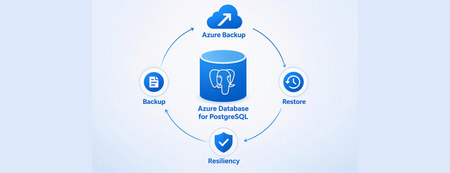
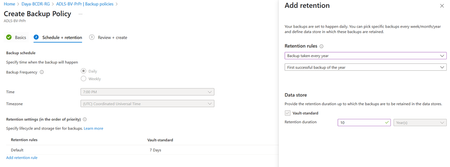
Azure Backup for PostgreSQL flexible servers and elastic clusters (v2) is now in public preview. Built on physical, snapshot-based backups, v2 brings scalable protection, flexible retention and streamlined recovery to PostgreSQL estates of all sizes. It helps customers improve data resiliency through vaulted backups and support compliance requirements with long-term retention of backups. Organizations can protect larger databases, back them up more frequently and restore them directly to a server when recovery is needed. What v2 can do V2 protects both Azure Database for PostgreSQL flexible servers and elastic clusters. It supports databases of up to 32 TB on Premium SSD v1 and up to 64 TB on Premium SSD v2, including production configurations with high availability, virtual network or private endpoint connectivity through Trusted Access, and Customer Managed Key encryption. You can schedule backups daily or weekly, with a recovery point objective goal of one day, and create on-demand backups whenever an additional recovery point is required. The first backup is full and subsequent backups are incremental, enabling a practical daily protection cadence even for multi-terabyte databases. Retention can range from 7 days to 10 years. Separate daily, weekly, monthly and yearly retention rules make it possible to align one policy with both operational recovery and long-term compliance requirements. Recovery points are stored in an Azure Backup vault and can use the platform protections organizations already rely on: Soft delete and WORM immutability to protect backups from premature deletion or alteration. Multi-user authorisation and MFA for sensitive operations. Customer Managed Key encryption and cross-subscription vaulting within the same tenant. Central monitoring and management through Backup center. Restore as Server Restore as Server turns a recovery point into a ready-to-use PostgreSQL environment by restoring it directly to a pre-created flexible server or elastic cluster. Unlike Restore as Files, which writes the backup to a storage container and requires a separate manual import into PostgreSQL, Restore as Server removes that intermediate phase. This reduces operational effort, shortens the path to application recovery and provides a more consistent restore experience at scale. How v2 improves on v1 V2 moves from logical exports to physical backups created from managed disk snapshots. This architectural change expands the service from the 1 TB limit in v1 to as much as 64 TB on supported storage, while incremental backups make daily schedules possible instead of limiting vaulted backups to a weekly full copy. The new solution also extends protection to elastic clusters and introduces direct restoration to a server. Together, these improvements provide broader workload coverage, more frequent recovery points and a simpler path from backup to a usable PostgreSQL environment. How to get started with v2 You can configure v2 in the Azure portal from a Backup vault, the Resiliency experience, or the LTR (Vaulted Backups) pane of the flexible server. Each entry point leads to the same policy and protection workflow. Before enabling protection, confirm that the server meets the preview requirements and check details on supported scenarios and limitations. Once eligibility is confirmed, create or select a Backup vault, define the schedule and retention rules that fit your recovery objectives, and enable protection for the server or elastic cluster. For PostgreSQL flexible server and elastic cluster vaulted backup v2 (preview), you incur charges from 15 October 2026. Refer to Azure Backup pricing page and pricing calculator for more details. How to migrate from v1 to v2 Existing protected items can be moved to v2 while retaining the same policy and Backup vault. The protected item and its existing recovery points are preserved, allowing organisations to adopt the new capabilities without losing backups already retained for operational or compliance needs. The migration is one way, so review readiness before starting. Servers running PostgreSQL 14 or earlier must first be upgraded to PostgreSQL 15 or later, and servers on the Burstable tier must be scaled to General Purpose or Memory Optimized. With those prerequisites complete, the move to v2 opens the way to larger-scale protection, daily incremental backups, elastic cluster coverage and direct server recovery—all while preserving the continuity of your existing backup estate.Operating Azure Backup at Scale: Day-2 Excellence for IaaS, PaaS, and Storage Workloads
Hello Folks! If you have ever inherited a sprawling Azure environment and quietly wondered whether every VM, database, AKS cluster, and storage account in it is actually being backed up the way the business thinks it is, you are in good company. In session this session of the Microsoft Azure Infra Summit 2026, Bhavya Tadikonda and Shobhit Garg from the Azure Resiliency product team walked us through how Azure Backup is evolving into a unified, application-centric service that protects IaaS, PaaS, AKS, PostgreSQL, and unstructured storage from a single pane of glass. Why IT Pros Should Care Backup is one of those topics nobody talks about until the day it really matters. Then it is the only topic. The session framed Azure Resiliency around three pillars (infrastructure resiliency, data resiliency, and cyber recovery), and Azure Backup sits squarely in the middle of the last two. The reason this session lands hard for ops teams is that the surface area we are expected to protect keeps growing: VMs, SQL on Azure VMs, SAP HANA, Sybase, AKS, PostgreSQL flexible servers, Azure Files, blobs, ADLS, and on it goes. Here is why this should matter to you: One vault model now protects IaaS, PaaS, AKS, PostgreSQL flexible server, and storage workloads, with consistent policies and reporting. Cyber resiliency is built into the vault layer with immutability, soft delete, and multi-user authorization, so backups themselves can survive a ransomware event. A new threat detection preview (powered by Microsoft Defender for Cloud) scans restore points and tags them healthy or suspicious before you recover. Azure Backup for AKS protects cluster resources and persistent volumes with granular restores and immutable recovery points. You can configure backups from VS Code through the Azure MCP server using natural language prompts, which is genuinely useful when you are protecting dozens of resources. In short, fewer point tools, fewer scripts, and a much better chance of actually meeting your RPO and RTO targets when the day comes. What Operating Azure Backup at Scale Means, a Technical Overview The session opened with a quick reminder that resiliency in Azure stands on three pillars working together. Infrastructure resiliency keeps the underlying VMs, zones, and networks alive. Data resiliency keeps your data intact, available, and recoverable. Cyber recovery assumes the worst (a ransomware attack or insider event) and gives you air-gapped, immutable backups plus isolated recovery to restore safely. Azure Backup is the connective tissue across data resiliency and cyber recovery. At the data layer, it offers snapshot tier backups for instant operational recovery (with up to a four-hour RPO), vault tier backups for long-term retention, and an archive tier for cold compliance storage. For databases, you get database-aware protection for SQL Server in Azure VMs, SAP HANA, and SAP ASE (Sybase), with point-in-time restore and log backups as frequent as every 15 minutes. That gets you to an RPO as low as 15 minutes for SQL, which is a number most IT pros will recognise as good enough for the vast majority of business apps. At the vault layer, three security primitives stack together: soft delete (deleted backups are kept for an additional retention window), immutability (no operation can shorten retention or destroy recovery points before expiry), and multi-user authorization (critical operations need approval from a second admin via a Resource Guard). These are not bolt-ons. They are baked into Recovery Services vaults and Backup vaults. How It Works, Under the Hood The session followed a Contoso scenario where John, a cloud architect, configures backup for an application VM and a database VM. He picks a Recovery Services vault, creates a backup policy, and defines frequency and retention based on his RTO and RPO requirements. For the Linux application tier, John enables the new agentless, crash-consistent backup, which is non-invasive and protects performance-sensitive workloads without an in-guest agent. For the database tier, John enables Azure Backup for SQL in Azure VMs. The service auto-discovers all databases inside the VM, removes the manual config dance, and lets him layer log backups, differential backups, and archival retention. For SQL Always On, HANA HSR, and Sybase HA clusters, snapshot-based acceleration gives him faster backups and instant restores. Then John turns to cyber resiliency. From vault properties he reviews soft delete, immutability, and multi-user authorization, then enables the new threat detection preview. This integration with Microsoft Defender for Cloud scans restore points for malware so you can confirm a recovery point is clean before you roll back. Inside the protected items view, each restore point is marked healthy or suspicious, which is exactly the signal you want during an incident response. For PaaS and cloud-native, Shobhit took over and walked through Azure Backup for AKS and Azure Backup for PostgreSQL flexible server. AKS protection covers the cluster resources, the persistent volumes, and the namespaces, with automated scheduled backups, granular restores, immutable recovery points, and flexible retention. PostgreSQL flexible server gets vaulted backups with long-term retention plus a unified view for monitoring and alerts. The piece that made the room sit up was the demo of configuring backup from VS Code using the Azure MCP server. John installs the Azure MCP extension, validates mcp.json, opens the chat window, and starts the MCP server. He prompts it to list unprotected AKS clusters in his subscription, then asks it to configure backup for a specific cluster. The MCP server reuses an existing vault and policy, creates the protected item, and applies the enterprise security defaults. That is the kind of conversational ops experience that scales nicely when you have hundreds of resources. For unstructured data, Azure Backup brings file shares, ADLS data, application artifacts, and large object stores into the same vault-based model, with off-site protection, long-term retention, immutability, soft delete, and MUA applied consistently. Real-World Value So where does the ROI show up? A few honest scenarios: Ransomware attack on production VMs. With immutability and MUA, even a compromised admin account cannot destroy your recovery points. With threat detection, you avoid restoring an infected snapshot. Accidental deletion of an AKS namespace. Granular AKS backup gets you a controlled, application-aware restore without redeploying the whole cluster. Compliance audit on a regulated workload. Vault tier plus archive tier gives you the retention you need without inflating hot storage costs. A cloud architect onboarding 30 new VMs and 10 PostgreSQL servers. Using Azure MCP from VS Code, they can configure backup conversationally instead of click-clicking through portal blades. A BCDR drill. The resiliency agent (powered by Azure Copilot) can recommend enabling Azure Site Recovery on top of Azure Backup for stricter RTO and RPO, then guide you through enabling it. Honest tradeoff: threat detection is in preview, agentless crash-consistent backup is newer than the in-guest variant, and multi-user authorization requires a Resource Guard that lives in a separate subscription (ideally a separate tenant). That is extra setup work, but it is the right design for separation of duties. Getting Started Concrete first steps you can take this week: Open Backup Center (or the new Resiliency in Azure experience) and inventory what is already protected versus exposed. Pick one Recovery Services vault and turn on enhanced soft delete with a meaningful retention period, then make it AlwaysOn for production. Stand up a Resource Guard in a separate subscription or tenant and wire up MUA on your most critical vault. For a non-production AKS cluster, install the Backup extension and protect a namespace end to end, including a test restore. Try the Azure MCP server from VS Code to list unprotected resources and configure backup with a prompt. If you run SQL on Azure VMs, enable log backups every 15 minutes on one database and validate a point-in-time restore. Resources Azure Backup documentation (official docs for vaults, policies, and workload protection) Configure Multi-user authorization using Resource Guard (separation of duties for critical backup operations) Threat detection in Azure Backup with Microsoft Defender for Cloud (preview) (healthy or suspicious tagging for VM restore points) Back up Azure Kubernetes Service by using Azure Backup (cluster resources, namespaces, and persistent volumes) Azure Backup for PostgreSQL flexible server (vaulted backups with long-term retention) Azure Site Recovery documentation (DR replication on top of Azure Backup) Keep Learning... Catch the full Microsoft Azure Infra Summit 2026 session playlist here Cheers! Pierre507Views1like0CommentsApplying DevOps Principles on Lean Infrastructure. Lessons From Scaling to 102K Users.
Hi Azure Community, I'm a Microsoft Certified DevOps Engineer, and I want to share an unusual journey. I have been applying DevOps principles on traditional VPS infrastructure to scale to 102,000 users with 99.2% uptime. Why am I posting this in an Azure community? Because I'm planning migration to Azure in 2026, and I want to understand: What mistakes am I already making that will bite me during migration? THE CURRENT SETUP Platform: Social commerce (West Africa) Users: 102,000 active Monthly events: 2 million Uptime: 99.2% Infrastructure: Single VPS Stack: PHP/Laravel, MySQL, Redis Yes - one VPS. No cloud. No Kubernetes. No microservices. WHY I HAVEN'T USED AZURE YET Honest answer: Budget constraints in emerging market startup ecosystem. At our current scale, fully managed Azure services would significantly increase monthly burn before product-market expansion. The funding we raised needs to last through growth milestones. The trade: I manually optimize what Azure would auto-scale. I debug what Application Insights would catch. I do by hand what Azure Functions would automate. DEVOPS PRACTICES THAT KEPT US RUNNING Even on single-server infrastructure, core DevOps principles still apply: CI/CD Pipeline (GitHub Actions) • 3-5 deployments weekly • Zero-downtime deploys • Automated rollback on health check failures • Feature flags for gradual rollouts Monitoring & Observability • Custom monitoring (would love Application Insights) • Real-time alerting • Performance tracking and slow query detection • Resource usage monitoring Automation • Automated backups • Automated database optimization • Automated image compression • Automated security updates Infrastructure as Code • Configs in Git • Deployment scripts • Environment variables • Documented procedures Testing & Quality • Automated test suite • Pre-deployment health checks • Staging environment • Post-deployment verification KEY OPTIMIZATIONS Async Job Processing • Upload endpoint: 8 seconds → 340ms • 4x capacity increase Database Optimization • Feed loading: 6.4 seconds → 280ms • Strategic caching • Batch processing Image Compression • 3-8MB → 180KB (94% reduction) • Critical for mobile users Caching Strategy • Redis for hot data • Query result caching • Smart invalidation Progressive Enhancement • Server-rendered pages • 2-3 second loads on 4G WHAT I'M WORRIED ABOUT FOR AZURE MIGRATION This is where I need your help: Architecture Decisions • App Service vs Functions + managed services? • MySQL vs Azure SQL? • When does cost/benefit flip for managed services? Cost Management • How do startups manage Azure costs during growth? • Reserved instances vs pay-as-you-go? • Which Azure services are worth the premium? Migration Strategy • Lift-and-shift first, or re-architect immediately? • Zero-downtime migration with 102K active users? • Validation approach before full cutover? Monitoring & DevOps • Application Insights - worth it from day one? • Azure DevOps vs GitHub Actions for Azure deployments? • Operational burden reduction with managed services? Development Workflow • Local development against Azure services? • Cost-effective staging environments? • Testing Azure features without constant bills? MY PLANNED MIGRATION PATH Phase 1: Hybrid (Q1 2026) • Azure CDN for static assets • Azure Blob Storage for images • Application Insights trial • Keep compute on VPS Phase 2: Compute Migration (Q2 2026) • App Service for API • Azure Database for MySQL • Azure Cache for Redis • VPS for background jobs Phase 3: Full Azure (Q3 2026) • Azure Functions for processing • Full managed services • Retire VPS QUESTIONS FOR THIS COMMUNITY Question 1: Am I making migration harder by waiting? Should I have started with Azure at higher cost to avoid technical debt? Question 2: What will break when I migrate? What works on VPS but fails in cloud? What assumptions won't hold? Question 3: How do I validate before cutting over? Parallel infrastructure? Gradual traffic shift? Safe patterns? Question 4: Cost optimization from day one? What to optimize immediately vs later? Common cost mistakes? Question 5: DevOps practices that transfer? What stays the same? What needs rethinking for cloud-native? THE BIGGER QUESTION Have you migrated from self-hosted to Azure? What surprised you? I know my setup isn't best practice by Azure standards. But it's working, and I've learned optimization, monitoring, and DevOps fundamentals in practice. Will those lessons transfer? Or am I building habits that cloud will expose as problematic? Looking forward to insights from folks who've made similar migrations. --- About the Author: Microsoft Certified DevOps Engineer and Azure Developer. CTO at social commerce platform scaling in West Africa. Preparing for phased Azure migration in 2026. P.S. I got the Azure certifications to prepare for this migration. Now I need real-world wisdom from people who've actually done it!408Views0likes1Comment
Pipeline Intelligence is live and open-source real-time Azure DevOps monitoring powered by AI .
Every DevOps team I've worked with had the same problem: Slow pipelines. Zero visibility. No idea where to start. So I stopped complaining and built the solution. So I built something about it. ⚡ Pipeline Intelligence is a full-stack Azure DevOps monitoring dashboard that: ✅ Connects to your real Azure DevOps organization via REST API ✅ Detects bottlenecks across all your pipelines automatically ✅ Calculates exactly how much time your team is wasting per month ✅ Uses Gemini AI to generate prioritized fixes with ready-to-paste YAML solutions ✅ JWT-secured, Docker-ready, and fully open-source Tech Stack: → React 18 + Vite + Tailwind CSS → Node.js + Express + Azure DevOps API v7 → Google Gemini 1.5 Flash → JWT Authentication + Docker 𝗪𝗵𝗮𝘁 𝗺𝗮𝗸𝗲𝘀 𝗶𝘁 𝗱𝗶𝗳𝗳𝗲𝗿𝗲𝗻𝘁? Most tools show you generic estimates. Pipeline Intelligence reads your actual cluster config, node count, and pipeline structure and gives you recommendations specific to your infrastructure. 🎯 This year, I set myself a personal challenge: Build and open-source a series of production-grade tools exclusively focused on Azure services tools that solve real problems for real DevOps teams. This project represents weeks of research, architecture decisions, and late-night debugging sessions. I'm sharing it with the community because I believe great tooling should be accessible to everyone not locked behind enterprise paywalls. If this resonates with you, I have one simple ask: 👉 A like, a comment, or a share takes 3 seconds but it helps this reach the DevOps engineers who need it most. Your support is what keeps me building. ❤️ GitHub: https://github.com/HlaliMedAmine/pipeline-intelligence365Views0likes1CommentExcited to share my latest open-source project: KubeCost Guardian
After seeing how many DevOps teams struggle with Kubernetes cost visibility on Azure, I built a full-stack cost optimization platform from scratch. 𝗪𝗵𝗮𝘁 𝗶𝘁 𝗱𝗼𝗲𝘀: ✅ Real-time AKS cluster monitoring via Azure SDK ✅ Cost breakdown per namespace, node, and pod ✅ AI-powered recommendations generated from actual cluster state ✅ One-click optimization actions ✅ JWT-secured dashboard with full REST API 𝗧𝗲𝗰𝗵 𝗦𝘁𝗮𝗰𝗸: - React 18 + TypeScript + Vite - Tailwind CSS + shadcn/ui + Recharts - Node.js + Express + TypeScript - Azure SDK (@azure/arm-containerservice) - JWT Authentication + Azure Service Principal 𝗪𝗵𝗮𝘁 𝗺𝗮𝗸𝗲𝘀 𝗶𝘁 𝗱𝗶𝗳𝗳𝗲𝗿𝗲𝗻𝘁: Most cost tools show you generic estimates. KubeCost Guardian reads your actual VM size, node count, and cluster configuration to generate recommendations that are specific to your infrastructure not averages. For example, if your cluster has only 2 nodes with no autoscaler enabled, it immediately flags the HA risk and calculates exactly how much you'd save by switching to Spot instances based on your actual VM size. This project is fully open-source and built for the DevOps community. ⭐ GitHub: https://github.com/HlaliMedAmine/kubecost-guardian This project represents hours of hard work, and passion. I decided to make it open-source so everyone can benefit from it 🤝 ,If you find it useful, I’d really appreciate your support . Your support motivates me to keep building and sharing more powerful projects 👌. More exciting ideas are coming soon… stay tuned! 🔥.346Views0likes1Comment
Replicate workload from VMWare to Azure using Azure Site Recovery(ASR)
Hello, I am working on a project to replicate worklooad hosted on a VMWare to Azure Site Recovery for disaster recovery purpose. Current Environment: More than 80 VMs hosted on VMWare managed by VMWare Sphere running both Linux and Windows OS.. Databases: Oracle DB, Microsoft SQL and MySQL Requirements: seamless failover and disaster recovery requirements. scalable setup No down-time integrate identity and access mgt. integration with Microsoft Entra ID. RTO < 2 hrs and RPO > 15 minutes Backup: critical database backup every 3 hours App servers: Daily*incremental) and weekly (full) Transaction Logs: every 10 mins backup config. should be Daily Questions I have confirmed ASR supports fail back from Azure- on premise(VMWare specifically). Hence ASR(Azure site recovery) will be used for the project. However, what is the seamless method to replicate the databases(Oracle, Microsoft SQL and MySQL). https://learn.microsoft.com/en-us/azure/site-recovery/vmware-azure-failback What is the best approach to replicate the Application Servers? integrating existing on-premise 3rd party network security tool for firewall etc instead of the azure cloud native security tool. recommendation?? cost optimization techniques/recommendations Best practices for conducting non-destructive DR drills.486Views0likes2Comments
Backing up Azure Files - High cost Read operations
I have found that Azure Files is unusable for large deployments due to the high cost of backups, especially for deployments with lots of small files. Most backup solutions have a changed block tracking mechanism and filter driver that can quickly determine what has changed between the prior backup. If nothing has changed since the last backup, the job quickly makes this determination and the backup job can take seconds to complete. But with Azure Backup backing up Azure Files, it appears to me that each backup has to enumerate every file and blob before making this determination. I first noticed this when I created a 1TB file share and nothing changed with the files from the prior backup and the job took 12 hours to complete. I then looked at my bill and it was $12 in read operations just for that backup where no files have changed. Azure Files is an awesome product, but securing your backups in a vault using Azure Backup just isn't doable from a price perspective. Does anyone know if there are changes on the horizon to Azure Backup in terms of a more robust change block tracking system?300Views0likes1Comment
MS SQL backup immutability
Hello. What is you experience on enabling immutability for MS SQL backups while running Always on AGs on VM? Backups must locked and not be modifiable after written. I have looked at ~7 different solutions but non of them seems to be ideal. Thanks for you time!316Views0likes3CommentsProtect Azure Data Lake Storage with Vaulted Backups
Update 11/21/2025: Vaulted Backup for Azure Data Lake Storage is now generally available! For more information refer to Generally Available: Vaulted Backup for Azure Data Lake Storage (ADLS) --- Original Blog --- We are thrilled to announce a limited public preview of vaulted backups for Azure Data Lake Storage. This is available now for test workloads and we’d like to get your feedback. Vaults are secure, encrypted copies of your data, enabling restoration to an alternate location in cases of accidental or malicious deletion. Vaulted backups are fully isolated from the source data, ensuring continuity for your business operations even in scenarios where the source data is compromised. This fully managed solution leverages the Azure Backup service to manage backups with automated retention and scheduling. By creating a backup policy, you can define a backup schedule and retention period. Based on this policy, Azure Backup service generates recovery points and manages the lifecycle of backups seamlessly. Ways vaulted backups protect your data: Isolation from Production Data – Vaulted backups are stored in a separate, Microsoft-managed tenant, preventing attackers from accessing both primary and backup data. Strict Access Controls – Backup management requires distinct permissions, ensuring segregation of duties and reducing insider threats. Advanced Security Features – With features like soft delete, immutability, and encryption, vaulted backups safeguard data against unauthorized modifications and premature deletions. Even if attackers compromise the primary storage account, backups remain secure within the vault, preserving data integrity and ensuring compliance. Alternate location recovery - Vaulted backups provide a reliable recovery solution by enabling restoration to an alternate storage account, ensuring business continuity even when the original account is inaccessible. Additionally, this capability allows organizations to create separate data copies for purposes such as testing, development, or analytics, without disrupting production environments. Granular recovery - With vaulted backups, you can restore the entire storage account or specific containers based on your needs. You can also use prefix matching to recover select blobs. With the growing frequency and sophistication of cyberattacks, protecting your data against loss or corruption is more critical than ever. Consider the following example use case where having vaulted backups can save the day. Enhanced Protection Against Ransomware Attacks Ransomware attacks can encrypt critical data, complicating recovery unless a ransom is paid. Vaulted backups offer an independent and secure recovery solution, allowing you to restore data without succumbing to attackers' demands. Accidental or Malicious Storage Account Deletion Human errors, insider threats, or compromised credentials can result in the deletion of entire storage accounts. Vaulted backups provide a crucial layer of protection by storing backups in Microsoft-managed storage, independent of your primary storage account. This ensures that an additional copy of your data remains intact, even if the original storage account is accidentally or maliciously deleted. Compliance Regulations Certain industries mandate offsite backups and long-term data retention to meet regulatory standards. Vaulted backups enable organizations to comply by offering offsite backup storage within the same Azure region as the primary storage account. With vaulted backups, data can be retained for up to 10 years. Getting started Vaulted backups can be configured for block blobs within HNS-enabled, standard general-purpose v2 ADLS storage accounts in specified regions here. Support for additional regions will be added incrementally. Currently, this preview is recommended exclusively for testing purposes. The Azure Backup protected instance fee and the vault backup storage fees are not currently charged. Now is a great time to give vaulted backups a try! Contact us If you have questions or feedback, please reach out to us at AskAzureBackupTeam@microsoft.com.1.3KViews0likes0Comments