azure archive
6 Topics
Discover and assess on-premises Network Attached Storage (NAS) shares using Azure Migrate
Network-attached storage (NAS) holds much of an enterprise’s data; home directories, project shares, media libraries, application data, and analytics datasets, often spanning tens or hundreds of terabytes across protocols and administrative boundaries. Moving this estate to Azure starts not with copying data, but with understanding what you have, where each share should go, and what it will cost. Building on the file share assessment capability we announced in May, today we’re announcing the public preview of NAS share discovery and assessment in Azure Migrate. It connects directly to Dell PowerScale/Isilon and NetApp ONTAP clusters, inventories every SMB, NFS, and S3 share, and assesses each against Azure Files, Azure Blob Storage, and Azure NetApp Files—providing readiness, right-sized configurations, cost estimates, and migration tooling guidance. Your NAS assets now join servers, applications, and databases in the same Azure Migrate project, inventory, and business case. Why does this matter NAS planning has historically been done with spreadsheets, vendor-specific tools, and a lot of manual reconciliation. Storage ends up being assessed separately from the servers and applications that depend on it, which makes it hard to sequence a migration or defend a budget. This capability is designed to help you: Replace manual inventory with automated discoveries across Dell and NetApp platforms, so you can go from "we think we have a few thousand shares" to a verified, per-share inventory. Effectively plan your NAS shares alongside everything else. NAS clusters and their shares appear in the same Azure Migrate inventory as your VMware, Hyper-V, and physical servers, databases, and web apps. Make your informed decision before you migrate. Each share gets a readiness verdict, a recommended Azure service and SKU, and a monthly cost estimate. What's available in public preview Add Dell or NetApp NAS clusters: Discover Dell PowerScale / Isilon (OneFS) and NetApp ONTAP AFF / FAS clusters, and inventory every SMB, NFS, and S3 shares they host — including shares exposed through more than one protocol. Explore and review on-prem shares and workloads: Review cluster and share details in the portal: model, nodes, total and used capacity, protocol versions, volume, and estimated size. Group and filter shares by tag — by business unit, cost center, or application — so related workloads can be planned together. Suitable Azure storage targets: Assess each share against Azure Files, Azure Blob Storage, and Azure NetApp Files, with control over target region, sizing criteria, comfort factor, redundancy, media type, access frequency, and workload type. Alternative migration paths: Compare various migration paths side by side — a recommended mixed path that sends each share to its best-fit service, alongside single-service alternatives — with readiness, monthly cost, and estimated emissions for each. Business case: Build a business case for a NAS-only estate or for a mixed estate of VMs and NAS, comparing a modernization approach against lift-and-shift. End-to-end experience The experience follows the same guided workflow you already know from Azure Migrate. 1. Enable the feature Install the latest Azure Migrate appliance or turn on auto-update, so your existing appliance picks up the new capability. Unlike file shares hosted on Windows and Linux servers, NAS clusters need to be added explicitly: in the appliance configuration manager, add a credential of source type NAS Server, then add a discovery source of type NAS Server with your cluster's FQDN and port. The account needs read-only permission at cluster level — Azure Migrate only reads metadata and never writes to your storage. 2. Discover your NAS estate Create an Azure Migrate project, deploy the appliance on VMware, Hyper-V, or a physical server, and point it at your clusters. The appliance connects to each cluster's management endpoint and collects system and share metadata, vendor, product and model, operating system version, cluster nodes, total and used capacity, share and bucket paths, protocols and protocol versions; followed by performance signals such as IOPS and throughput. Discovered clusters and their shares appear as first-class inventory objects, listed alongside the Windows and Linux file servers the appliance already finds. Filter by type, search, tag, and export the inventory at whatever scale your estate demands. Discovery runs a daily cycle and updates existing items as new metadata arrives, so the picture improves over time rather than being a one-shot snapshot. 3. Create an assessment Select the shares you care about — individually, by tag, or a whole cluster at a time — and create an assessment. The share is the unit of assessment, so every SMB, NFS, or S3 share receives its own verdict rather than inheriting one from its host. Assessment settings let you shape the recommendation to your environment: choose the target Azure region, pick as-is or performance-based sizing, set a comfort factor for headroom, and configure redundancy, Azure Files media preferences, and Azure Blob access frequency. A workload type setting from general purpose file shares through to AI/ML and mission-critical, helps Azure Migrate recommend an appropriate performance level. Azure NetApp Files is added to the evaluation automatically when the source share is detected on NetApp NAS. Settings can be changed, and the assessment recalculated at any time. 4. Review results and build the business case Results are organized as migration paths. The recommended path routes each share to its best-fit Azure service and is shown next to single-service alternatives, so you can compare readiness and cost on the same basis. Key insights include: Readiness for every share — Ready, Ready with conditions, or Not ready — with the warnings that need attention before you move. A recommended Azure configuration per share. For example, a multi-protocol NetApp volume is recommended for Azure NetApp Files, while a general-purpose SMB share is recommended for Azure Files with a specific media type and redundancy. Provisioned size, IOPS, and throughput behind the recommendation, plus the reasoning Azure Migrate used to select the SKU and access tier. Monthly cost estimates per share and per path, an on-premises versus Azure TCO comparison, and estimated carbon savings. Next, you can generate a wave plan to sequence the migration or build a business case that helps you with cost modernizing Azure storage services. Assessment results showing the recommended path, source-to-target mappings, estimated Azure TCO, and carbon savings. Note: All screenshots in this post are from a sample environment. Cluster and share names, capacity values, readiness distributions, cost and TCO estimates, and emissions figures are illustrative and shown for reference and indicative purposes only. They are not a price quote. Your own results depend on your discovered environment, the assessment settings you choose, your target Azure region, and the pricing and offers that apply to your subscription. Prepare for migration with the right tool Assessment tells you where each share should go; Azure Migrate then points you at the tool to get it there. Azure Storage Mover is the recommended path for moving shares to Azure Files and Azure Blob Storage. For ONTAP volumes heading to Azure NetApp Files, the Azure NetApp Files migration assistant is recommended, and Azure File Sync remains the option for active sync and hybrid scenarios with Windows file servers. To learn more about our recommendations for unstructured data migration, visit https://aka.ms/migratemydata. Get started Update your Azure Migrate appliance, add your first NAS cluster, and let a discovery cycle run. Within a few hours you'll start to see a per-share picture of your NAS estate; you can then create an assessment to view the right target service to migrate to Azure. Learn more in our documentation. Connect and discover your NAS appliance Review discovered NAS resources Create a fileshare assessment of NAS shares Review NAS File share assessment recommendations Write to us at azurestoragemigrations@microsoft.com with questions or feedback, or to suggest additional NAS systems you’d like this capability to support. We look forward to hearing from you!93Views0likes1Comment
How Microsoft Azure and Qumulo Deliver a Truly Cloud-Native File System for the Enterprise
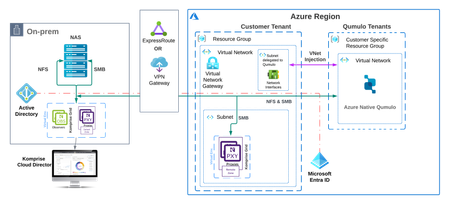
Disclaimer: The following is a post authored by our partner Qumulo. Qumulo has been a valued partner in the Azure Storage ecosystem for many years and we are happy to share details on their unique approach to solving challenges of scalable filesystems! Whether you’re training massive AI models, running HPC simulations in life sciences, or managing unstructured media archives at scale, performance is everything. Qumulo and Microsoft Azure deliver the cloud-native file system built to handle the most data-intensive workloads, with the speed, scalability, and simplicity today's innovators demand. But supporting modern workloads at scale is only part of the equation. Qumulo and Microsoft have resolved one of the most entrenched and difficult challenges in modernizing the enterprise data estate: empowering file data with high performance across a global workforce without impacting the economics of unstructured data storage. According to Gartner, global end-user spending on public cloud services is set to surpass $1 trillion by 2027. That staggering figure reflects more than just a shift in IT budgets—it signals a high-stakes race for relevance. CIOs, CTOs, and other tech-savvy execs are under relentless pressure to deliver the capabilities that keep businesses profitable and competitive. Whether they’re ready or not, the mandate is clear: modernize fast enough to keep up with disruptors, many of whom are using AI and lean teams to move at lightning speed. To put it simply, grow margins without getting outpaced by a two-person startup using AI in a garage. That’s the challenge leaders face every day. Established enterprises must contend with the duality of maintaining successful existing operations and the potential disruption to those operations by a more agile business model that offers insight into the next wave of customer desires and needs. Nevertheless, established enterprises have a winning move - unleash the latent productivity increases and decision-making power hidden within years, if not decades, worth of data. Thoughtful CIOs, CTOs, and CXOs have elected to move slowly in these areas due to the tyranny of quarterly results and the risk of short-term costs reflecting poorly on the present at the expense of the future. In this sense, adopting innovative technologies forced organizations to choose between self-disruption with long-term benefits or non-disruptive technologies with long-term disruption risk. When it comes to network-attached storage, CXOs were forced to accept non-disruptive technologies because the risk was too high. This trade-off is no longer required. Microsoft and Qumulo have addressed this challenge in the realm of unstructured file data technologies by delivering a cloud-native architecture that combines proven Azure primitives with Qumulo’s suite of file storage solutions. Now, those patient CXOs, waiting to adopt hardened technologies, can shift their file data paradigm into Azure while improving business value, data portability, and reducing the financial burden on their business units. Today, organizations that range from 50,000+ employees with global offices, to organizations with a few dozen employees with unstructured data-centric operations have discovered the incredible performance increases, data availability, accessibility, and economic savings realized when file data moves into Azure using one of two Qumulo solutions: Option 1 — Azure Native Qumulo (ANQ) is a fully managed file service that delivers truly elastic capacity, throughput, and IOPS, along with all the enterprise features of your on-premises NAS and a TCO to match. Option 2 — Cloud Native Qumulo (CNQ) on Microsoft Azure is a self-hosted file data service that offers the performance and scale your most demanding workloads require, at a comparable total cost of ownership to on-premises storage. Both CNQ on Microsoft Azure and ANQ offer the flexibility and capacity of object storage while remaining fully compatible with file-based workflows. As data platforms purpose-built for the cloud, CNQ and ANQ provide three key characteristics: Elasticity — Performance and capacity can scale independently, both up and down, dynamically. Boundless Scale — Virtually no limitations on file system size or file count, with full multi-protocol support. Utility-Based Pricing — Like Microsoft Azure, Qumulo operates on a pay-as-you-go model, charging only for resources used without requiring pre-provisioned capacity or performance. The collaboration between Qumulo’s cloud-native file solutions and the Microsoft Azure ecosystem enables seamless migration of a wide range of workflows, from large-scale archives to high-performance computing (HPC) applications, from on-premises environments to the cloud. For example, a healthcare organization running a fully cloud-hosted Picture Archiving and Communication System (PACS) alongside a Vendor Neutral Archive (VNA) can leverage Cloud Native Qumulo (CNQ) to manage medical imaging data in Azure. CNQ offers a HIPAA-compliant, highly durable, and cost-efficient platform for storing both active and infrequently accessed diagnostic images, enabling secure access while optimizing storage costs. With Azure’s robust cloud infrastructure, organizations can design a cloud file solution that scales to meet virtually any size or performance requirement, while unlocking new possibilities in cloud-based AI and HPC workloads. Further, using the Qumulo Cloud Data Fabric, the enterprise is able to connect geographically separated data sources within one unified, strictly consistent (POSIX-compliant), secure, and high-performance file system. As organizational needs evolve — whether new workloads are added or existing workloads expand — Cloud Native Qumulo or Azure Native Qumulo can easily scale to meet performance demands while maintaining the predictable economics that meet existing or shrinking budgets. About Azure Native Qumulo and Cloud Native Qumulo on Azure Azure Native Qumulo (ANQ) and Cloud Native Qumulo (CNQ) enable organizations to leverage a fully customizable, multi-protocol solution that dynamically scales to meet workload performance requirements. Engineered specifically for the cloud, ANQ is designed for simplicity of operation and automatic scalability as a fully managed service. CNQ offers the same great technology, directly leveraging cloud-native resources like Azure Virtual Machines (VMs), Azure Networking, and Azure Blob Storage to provide a scalable platform that adapts to the evolving needs of today’s workloads – but deploys entirely in the enterprise tenant, allows for direct control over the underlying infrastructure, and requires a little bit higher level of internal expertise to operate. Azure Native Qumulo and Cloud Native Qumulo on Azure also deliver a fully dynamic file storage platform that is natively integrated with the Microsoft Azure backend. Here’s what sets ANQ and CNQ apart: Elastic Scalability — Each ANQ and CNQ instance on Azure Blob Storage can automatically scale to exabyte-level storage within a single namespace by simply adding data. On Microsoft Azure, performance adjustments are straightforward: just add or remove compute instances to instantly boost throughput or IOPS, all without disruption and within minutes. Plus, you pay only for the capacity and compute resources you use. Deployed in Minutes — ANQ deploys from the Azure Portal, CLI, or PowerShell, just like a native service. CNQ runs in your own Azure virtual network and can be deployed via Terraform. You can select the compute type that best matches your workload’s performance requirements and build a complete file data platform on Azure in under six minutes for a three-node cluster. Automatic TCO Management — can be facilitated through services like Komprise Intelligent Tiering for Azure and Azure Blob Storage access tiers. It optimizes storage costs and manages data lifecycle. By analyzing data access patterns, these systems move files or objects to appropriate tiers, reducing costs for infrequently accessed data. Additionally, all data written to CNQ is compressed to ensure maximum cost efficiency. ANQ automatically adapts to your workload requirements, and CNQ’s fully customizable architecture can be configured to meet the specific throughput and IOPS requirements of virtually any file or object-based workload. You can purchase either ANQ or CNQ through a pay-as-you-go model, eliminating the need to pre-provision cloud file services. Simply pay for what you use. ANQ and CNQ deliver comparable performance and services to on-premises file storage at a similar TCO. Qumulo’s cloud-native architecture redefines cloud storage by decoupling capacity from performance, allowing both to be adjusted independently and on demand. This provides the flexibility to modify components such as compute instance type, compute instance count, and cache disk capacity — enabling rapid, non-disruptive performance adjustments. This architecture, which includes the innovative Predictive Cache, delivers exceptional elasticity and virtually unlimited capacity. It ensures that businesses can efficiently manage and scale their data storage as their needs evolve, without compromising performance or reliability. ANQ and CNQ retain all the core Qumulo functionalities — including real-time analytics, robust data protection, security, and global collaboration. Example architecture In the example architecture, we see a solution that uses Komprise to migrate file data from third-party NAS systems to ANQ. Komprise provides platform-agnostic file migration services at massive scale in heterogeneous NAS environments. This solution facilitates the seamless migration of file data between mixed storage platforms, providing high-performance data movement, ensuring data integrity, and empowering you to successfully complete data migration projects from your legacy NAS to an ANQ instance. Figure: Azure Native Qumulo’s exabyte-scale file data platform and Komprise Beyond inherent scalability and dynamic elasticity, ANQ and CNQ support enterprise-class data management features such as snapshots, replication, and quotas. ANQ and CNQ also offer multi-protocol support — NFS, SMB, FTP, and FTP-S — for file sharing and storage access. Additionally, Azure supports a wide range of protocols for various services. For authentication and authorization, it commonly uses OAuth 2.0, OpenID Connect, and SAML. For IoT, MQTT, AMQP, and HTTPS are supported for device communication. By enabling shared access to the same data via all protocols, ANQ and CNQ support collaborative and mixed-use workloads, eliminating the need to import file data into object storage. Qumulo consistently delivers low time-to-first-byte latencies of 1–2ms, offering a combined file and object platform for even the most performance-intensive AI and HPC workloads. ANQ and CNQ can run in all Azure regions (although ANQ operates best in regions with three availability zones), allowing your on-premises data centers to take advantage of Azure’s scalability, reliability, and durability. ANQ and CNQ can also be dynamically reconfigured without taking services offline, so you can adjust performance — temporarily or permanently — as workloads change. An ANQ or CNQ instance deployed initially as a disaster recovery or archive target can be converted into a high-performance data platform in seconds, without redeploying the service or migrating hosted data. If you already use Qumulo storage on-premises or in other cloud platforms, Qumulo’s Cloud Data Fabric enables seamless data movement between on-premises, edge, and Azure-based deployments. Connect portals between locations to build a Global Namespace and instantly extend your on-premises data to Azure’s portfolio of cloud-native applications, such as Microsoft Copilot, AI Studio, Microsoft Fabric, and high-performance compute and GPU services for burst rendering or various HPC engines. Cloud Data Fabric moves files through a large-scale data pipeline instantly and seamlessly. Use Qumulo’s continuous replication engine to enable disaster recovery scenarios, or combine replication with Qumulo’s cryptographically locked snapshot feature to protect older versions of critical data from loss or ransomware. ANQ and CNQ leverage Azure Blob’s 11-nines durability to achieve a highly available file system and utilizes multiple availability zones for even greater availability — without the added costs typically associated with replication in other file systems. Conclusion The future of enterprise storage isn’t just in the cloud — it’s in smart, cloud-native infrastructure that scales with your business, not against it. Azure Native Qumulo (ANQ) and Cloud Native Qumulo (CNQ) on Microsoft Azure aren’t just upgrades to legacy storage — they’re a reimagining of what file systems can do in a cloud-first world. Whether you're running AI workloads, scaling HPC environments, or simply looking to escape the limitations of aging on-prem NAS, ANQ and CNQ give you the power to do it without compromise. With elastic performance, utility-based pricing, and native integration with Azure services, Qumulo doesn’t just support modernization — it accelerates it. To help you unlock these benefits, the Qumulo team is offering a free architectural assessment tailored to your environment and workloads. If you’re ready to lead, not lag, and want to explore how ANQ and CNQ can transform your enterprise storage, reach out today by emailing Azure@qumulo.com. Let’s build the future of your data infrastructure together.989Views1like0CommentsHow to Save 70% on File Data Costs
In the final entry in our series on lowering file storage costs, DarrenKomprise shares how Komprise can help lower on-premises and Azure-based file storage costs. Komprise and Azure offer you a means to optimize unstructured data costs now and in the future!15KViews1like1CommentManaging long term log retention (or any business data)
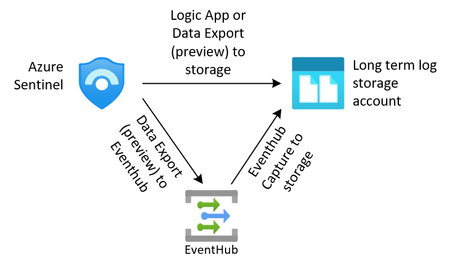
The shared responsibility model of the public cloud helps us all pass of some of the burden that needed to be solved completely in-house. Leveraging Azures capability for information management, this article will provide some insight on how to enable immutable long term log storage, manage the storage tiers and remove the information once it is no longer needed.9.7KViews0likes1Comment