azure arc
265 TopicsAnnouncing the General Availability of the Azure Arc Gateway for Arc-enabled Servers!
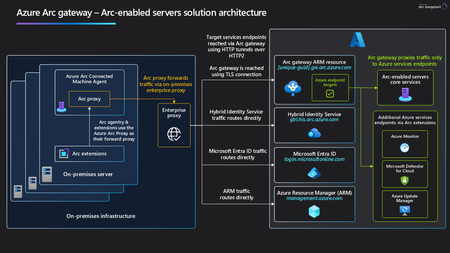
We’re excited to announce the General Availability of Arc gateway for Arc‑enabled servers. Arc gateway dramatically simplifies the network configuration required to use Azure Arc by consolidating outbound connectivity through a small, predictable set of endpoints. For customers operating behind enterprise proxies or firewalls, this means faster onboarding, fewer change requests, and a smoother path to value with Azure Arc. What’s new: To Arc‑enable a server, customers previously had to allow 19 distinct endpoints. With Arc gateway GA, you can do the same with just 7, a ~63% reduction that removes friction for security and networking teams. Why This Matters Organizations with strict outbound controls often spend days, or weeks, coordinating approvals for multiple URLs before they can onboard resources to Azure Arc. By consolidating traffic to a smaller set of destinations, Arc gateway: Accelerates onboarding for Arc‑enabled servers by cutting down the proxy/firewall approvals needed to get started. Simplifies operations with a consistent, repeatable pattern for routing Arc agent and extension traffic to Azure. How Arc gateway works Arc gateway introduces two components that work together to streamline connectivity: Arc gateway (Azure resource): A single, unique endpoint in your Azure tenant that receives incoming traffic from on‑premises Arc workloads and forwards it to the right Azure services. You configure your enterprise environment to allow this endpoint. Azure Arc Proxy (on every Arc‑enabled server): A component of the connected machine agent that routes agent and extension traffic to Azure via the Arc gateway endpoint. It’s part of the core Arc agent; no separate install is required. At a high level, traffic flows: Arc agent → Arc Proxy → Enterprise Proxy → Arc gateway → Target Azure service. Scenario Coverage As part of this GA release, common Arc‑enabled Server scenarios are supported through the gateway, including: Windows Admin Center SSH Extended Security Updates (ESU) Azure Extension for SQL Server For other scenarios, some customer‑specific data plane destinations (e.g., your Log Analytics workspace or Key Vault URLs) may still need to be allow‑listed per your environment. Please consult the Arc gateway documentation for the current scenario‑by‑scenario coverage and any remaining per‑service URLs. Over time, the number of scenarios filly covered by Arc gateway will continue to grow. Get started Create an Arc gateway resource using the Azure portal, Azure CLI, or PowerShell. Allow the Arc gateway endpoint (and the small set of core endpoints) in your enterprise proxy/firewall. Onboard or update servers to use your Arc gateway resource and start managing them with Azure Arc. For step‑by‑step guidance, see the Arc gateway documentation on Microsoft Learn. You can also watch a quick Arc gateway Jumpstart demo to see the experience end‑to‑end. FAQs Does Arc gateway require new software on my servers? No additional installation - Arc Proxy is part of the standard connected machine agent for Arc‑enabled servers. Will every Arc scenario route through the gateway today? Many high‑value server scenarios are covered at GA; some customer‑specific data plane endpoints (for example, Log Analytics workspace FQDNs) may still need to be allowed. Check the docs for the latest coverage details. When will Arc gateway for Azure Local be GA? Today! Please refer to the Arc gateway GA on Azure Local Announcement to learn more. When will Arc gateway for Arc-enabled Kubernetes be GA? We don't have an exact ETA to share quite yet for Arc gateway GA for Arc-enabled Kubernetes. The feature is currently still in Public Preview. Please refer to the Public Preview documentation for more information. Tell us what you think We’d love your feedback on Arc gateway GA for servers—what worked well, what could be improved, and which scenarios you want next. Use the Arc gateway feedback form to share your input with the product team.1.8KViews5likes3CommentsAnnouncing the preview of Azure Local rack aware cluster
We are excited to announce the public preview of Azure Local rack aware cluster! We previously published a blog post with a sneak peek of Azure Local rack aware cluster and now, we're excited to share more details about its architecture, features, and benefits. Overview of Azure Local rack aware cluster Azure Local rack aware cluster is an advanced architecture designed to enhance fault tolerance and data distribution within an Azure Local instance. This solution enables you to cluster machines that are strategically placed across two physical racks in different rooms or buildings, connected by high bandwidth and low latency within the same location. Each rack functions as a local availability zone, spanning layers from the operating system to Azure Local management, including Azure Local VMs. The architecture leverages top-of-rack (ToR) switches to connect machines between rooms. This direct connection supports a single storage pool, with rack aware clusters distributing data copies evenly between the two racks. Even if an entire rack encounters an issue, the other rack maintains the integrity and accessibility of the data. This design is valuable for environments needing high availability, particularly where it is essential to avoid rack-level data loss or downtime from failures like fires or power outages. Key features Starting in Azure Local version 2510, this release includes the following key features for rack aware clusters: Rack-Level Fault Tolerance & High Availability Clusters span two physical racks in separate rooms, connected by high bandwidth and low latency. Each rack acts as a local availability zone. If one rack fails, the other maintains data integrity and accessibility. Support for Multiple Configurations Architecture supports 2 machines up to 8 machines, enabling scalable deployments for a wide range of workloads. Scale-Out by Adding Machines Easily expand cluster capacity by adding machines, supporting growth and dynamic workload requirements without redeployment. Unified Storage Pool with Even Data Distribution Rack aware clusters offer a unified storage pool with Storage Spaces Direct (S2D) volume replication, automatically distributing data copies evenly across both racks. This ensures smooth failover and reduces the risk of data loss. Azure Arc Integration and Management Experience Enjoy native integration with Azure Arc, enabling consistent management and monitoring across hybrid environments—including Azure Local VMs and AKS—while maintaining the familiar Azure deployment and operational experience. Deployment Options Deploy via Azure portal or ARM templates, with new inputs and properties in the Azure portal for rack aware clusters. Provision VMs in Local Availability Zones via the Azure Portal Provision Azure Local virtual machines directly into specific local availability zones using the Azure portal, allowing for granular workload placement and enhanced resilience. Upgrade Path from Preview to GA Deploy rack aware clusters with the 2510 public preview build and update to General Availability (GA) without redeployment—protecting your investment and ensuring operational continuity. Get started The preview of rack aware cluster is now available to all interested customers. We encourage you to try it out and share your valuable feedback. To get started, visit our documentation: Overview of Azure Local rack aware clustering (Preview) - Azure Local | Microsoft Learn Stay tuned for more updates as we work towards general availability in 2026. We look forward to seeing how you leverage Azure Local rack aware cluster to power your edge workloads!919Views4likes4CommentsAzure Arc Server Forum: 2026 Updates
We are excited to announce the fourth calendar year of the Azure Arc Server Forum. We are incredibly thankful to all the customers and community members, who have joined our forum and newsletter from our start back in the Fall of 2023. From January 2026, the monthly Azure Arc Server Forum will be hosted on the third Thursday of each month from 9:30 – 10:15 AM PST. Each Arc Server Forum includes live demos of new capabilities, question and answer sessions with the product group, and feedback opportunities covering Windows, Linux, and SQL Server management, licensing, and connectivity across hybrid, multicloud, and edge environments. Sessions are skipped in July and December for summer and winter holidays respectively. Forum participants also receive a monthly newsletter summarizing updates including: Announcements of General Availability, Public Preview, and Private Previews capabilities including key details and documentation Updates on agent improvements and updates on experience changes Opportunities to provide feedback to and influence the product group’s roadmap or engage in ongoing customer research studies Updates on the invitation and timing of the Arc Server Forum Recordings from the Arc Server Forum are periodically uploaded to the Azure Arc Server Forum YouTube channel: Azure Arc Server Forum - YouTube typically within 2-3 weeks of the Forum. To sign up for the Azure Arc Server Forum and newsletter, please register with contact details at https://aka.ms/arcserverforumsignup/. Thank you!806Views3likes2CommentsAutomating Windows Server Licensing Benefits with Azure Arc Policy
Introduction: Managing Windows Server benefits licensing across hybrid environments can be challenging. Azure Arc combined with Azure Policy simplifies this by automatically enforcing licensing compliance. This blog explains how the provided policy works and how to deploy it. Why implement this policy? Automating Windows Server Licensing Benefits with Azure Arc Policy ensures that all eligible machines are seamlessly enabled for essential management services, including Azure Update Manager, Best Practice Assessment, Change Tracking, Inventory, and Windows Admin Center integration. For organizations managing hundreds or thousands of servers, manual enablement can be time-consuming and error prone. This policy continuously monitors your environment, automatically identifying newly added machines and highlighting those missing the required benefits, so you can maintain compliance and streamline operations at scale This learn document detail the benefits available when Windows Server is connected via Azure Arc, especially for machines with Software Assurance or subscription licenses: https://learn.microsoft.com/en-us/azure/azure-arc/servers/windows-server-management-overview?tabs=portal Note – Ensure that your organization has the proper Software Assurance Benefits to cover the machines that are being assigned. Please reference this link for billing information Windows Server Management enabled by Azure Arc - Azure Arc | Microsoft Learn "Customers need to explicitly attest for their Azure Arc-enabled servers or enroll in Windows Server pay-as-you-go to be exempt from billing for these services. Eligibility isn't inferred directly from the enablement to Azure Arc. Eligibility is not inferred from licensing status for the Azure Arc-enabled SQL Server instances that may be connected to an Azure Arc-enabled." Policy Purpose and Logic The policy ensures Arc-enabled Windows Servers are licensed correctly. It evaluates machines based on OS type, license status, and conditions for Software Assurance or Pay-As-You-Go. If compliance is missing, a remediation policy deploys the appropriate license profile. Key Conditions Applies to resources of type Microsoft.HybridCompute/machines with osType = windows. Checks if licenseProfile.licenseStatus equals Licensed. Uses existenceCondition to determine if the machine should have SA or PAYG licensing based on osSku and licenseChannel. Deployment Details The policy uses DeployIfNotExists effect. It deploys licenseProfiles under the Arc machine resource. Two scenarios are handled: Pay-As-You-Go: If licenseChannel contains 'PGS', productProfile.subscriptionStatus is set to Enabled. Software Assurance: If licenseChannel does not contain 'PGS', softwareAssuranceCustomer is set to true. The Policy The policy is located in GitHub (Link) and AzPolicyAdvertiser (Link). Download the policy files to be used in the following steps. Policy Description For 2025 server, if license type is Pay-as-you-go, then this will check the Pay-as-you-go box in license menu. If 2025 and not Pay-as-you-go license or not 2025 server then check Software Assurance box. This policy only checks Windows Server resources and will NOT check unlicensed servers How to Deploy the Policy After downloading the policy file, use Az PowerShell to create and assign the policy: #Create policy definition New-AzPolicyDefinition ` -Name "activate-azure-benefits-for-windows-arc-machines" ` -DisplayName "Activate Azure Benefits for Windows Arc Machines" ` -Policy 'azurepolicy.json' ` -ManagementGroupName "<MyManagementGroup>" ` -Mode Indexed #Assign policy definition $Policy = Get-AzPolicyDefinition -Name 'activate-azure-benefits-for-windows-arc-machines' -ManagementGroupName "<ScopeOfDefinitionCreation>" New-AzPolicyAssignment ` -Name "activate-arc-benefits" ` -DisplayName "Activate Azure Benefits for Windows Arc Machines" ` -PolicyDefinition $Policy ` -Scope "/providers/Microsoft.Management/managementGroups/<MyManagementGroup>" ` -Location 'eastus' ` -IdentityType 'SystemAssigned' # Optional use subscriptions instead of management groups. # or "/subscriptions/<SubscriptionId>" You can also copy and paste the contents of the policy into the portal or use a policy-as-code solution of your choice. Compliance The compliance blade of the Azure Policy will show the machines that do not abide by the policy definition. In this example many of the machines are not enabled for the Windows Server Benefits. The next step will be to use remediation tasks to enable these machines. On the Policy Remediation blade, you can initiate a remediation task to add the machines to enable the Azure Arc Benefits. Choose between the two radio button options for remediating all the selected locations, a single location, or select specific resources to remediate. When the Remediate button is pressed, a task is summitted and a notification will be displaced when the task is completed. The process may take some time and a status of In Progress will be displayed until the status changes to Complete. After this is completed go back and look at the Azure Arc Benefits – Windows Server Blade and you will see the machines activated. Note on Pay-as-you-go enablement When a Windows machine is deployed using Pay-as-you-go, as an example a new Windows Server 2025 machine, the status of the license after creation will be “Unlicensed” as shown below. The policy is not evaluating Unlicensed machines. The machine will need to have the Pay-as-you-go with Azure check box checked at least one time to “License” the machine. After the machine is Licensed the License details will show: Now if the machine would have the benefits removed in the future by unchecking the box, the machine will be audited with the policy. As an example, the Arc machine would show that the License type is Pay-as-you-go, Licensed, Disabled (for the Azure Benefits). Summary This policy automates Windows Server licensing for Arc-enabled machines. It ensures compliance by deploying license profiles for Software Assurance or Pay-As-You-Go scenarios. Deploying this policy reduces manual effort and enforces consistent licensing across your hybrid environment.Introducing Azure Local: cloud infrastructure for distributed locations enabled by Azure Arc
Today at Microsoft Ignite 2024 we're introducing Azure Local, cloud-connected infrastructure that can be deployed at your physical locations and under your operational control. With Azure Local, you can run the foundational Azure compute, networking, storage, and application services locally on hardware from your preferred vendor, providing flexibility to meet your requirements and budget.89KViews24likes27Comments
Azure Arc Monthly Forum Recap – November 2025
Key Highlights Auto Agent Upgrade Status: Public Preview Capability: Automatically updates AZCM Agent Support: Email arcautoupgradefeedback@microsoft.com for feedback or issues. Essential Machine Management (EMM) Status: Private Preview Capability: Enables simple and unified machine management experience. Link: https://aka.ms/operationsCenterLab Support: Email machineEnrollmentSupport@microsoft.com for feedback and issues. Machine Configuration – CIS Baseline Compliance Status: Public Preview Capability: Filter, search, exclude and modify baseline settings in Azure Policy. Link: aka.ms/machine-config-insiders Support: Email machineconfig@microsoft.com for feedback and issues. November 2025 FAQs Essential Machine Management (EMM) Does EMM cover Azure Local? Yes, Azure Local is supported. Optimizations vs. Recommendations? Recommendations come from Azure Advisor (security, observability, configs). Optimizations focus on cost and emissions for now. Is Arc being rebranded as Operations Center? No. Operations Center is a new unified management experience. Training material for Operations Center? We have published official documentation (link) which provides an overview of Operations Center. Setup costs for Log Analytics & Monitor? The Azure Monitor Workspace is free with the metrics that are configured through EMM. The Log Analytics Workspace logs are still charged separately and the only service that is configured to send logs is Change Tracking and Inventory Machine Configuration – CIS Baseline Compliance Will other baselines be added? Yes. DeployIfNotExists Policy for Security Baseline? Audit policies available; remediation is on the roadmap. What about Windows Security Baseline? Planned for WS2025. Override local GPO policies? Audit-only for now; no overrides yet. Machine Configuration – OS Settings Inventory Platform Are there any plans to give us custom classes we can build and ingest the data we want? Not at the moment. Is it just Windows, or do you have Linux support in Guest Configuration resources? Linux support will be available soon.422Views1like0CommentsMicrosoft 365 Local is Generally Available
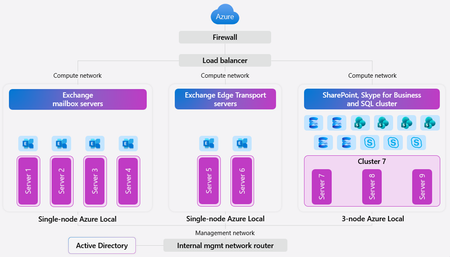
In today’s digital landscape, organizations and governments are prioritizing data sovereignty to comply with local regulations, protect sensitive information, and safeguard national security. This growing demand for robust jurisdictional controls makes the Microsoft Sovereign Cloud offering especially compelling, providing flexibility and assurance for complex requirements. For those with the most stringent needs, Azure Local enables data and workloads to remain within jurisdictional borders, supporting mission-critical workloads and now expanding to include Microsoft’s productivity solutions—so customers can securely collaborate and communicate within a sovereign private cloud environment. Today, we’re excited to announce the general availability of Microsoft 365 Local. Microsoft 365 Local is a deployment framework for enabling core collaboration and communication tools—including Exchange Server, SharePoint Server, and Skype for Business Server—on Azure Local. Built on a validated reference architecture using Azure Local Premier Solutions , it provides compatibility and support for sovereign deployments. Partner-led services provide guidance on sizing and configuration, ensuring a full-stack deployment including best practices for networking and security. Managing infrastructure across a wide range of workloads is simplified with Azure as your control plane, offering cloud-consistent, at-scale management capabilities. In the Azure portal, you get full visibility into your Microsoft 365 Local deployment across the servers and clusters. All hosts and virtual machines (VMs) are Arc-enabled out of the box, providing built-in visibility into connectivity, health, updates, and security alerts and recommendations. Microsoft 365 Local leverages Azure Local’s best-in-class sovereign and security controls, including Network Security Groups managed with Software Defined Networking enabled by Azure Arc, to isolate networks and secure access to infrastructure and workloads. Azure Local also uses a secure by default strategy by applying a security baseline of over 300 settings on both the host infrastructure and the VMs running the productivity workloads. These security baselines incorporate best practices for network security, identity management, privileged access, data protection, and more—helping organizations maintain compliance and reduce risk. Customers who want to take advantage of Azure as the control plane for Microsoft 365 Local can now benefit from a seamless cloud-based infrastructure management experience, including Azure services like Azure Monitor and Microsoft Defender for Cloud—available today with Microsoft 365 Local connected to Azure. For organizations with the most stringent jurisdictional requirements that need to operate Microsoft 365 Local in a fully disconnected environment, support for Azure Local disconnected operations will be available in early 2026. To learn more about Microsoft 365 Local, visit https://aka.ms/M365LocalDocs. If you’d like to connect with an authorized partner for consultation and deployment support, reach out to your Microsoft account team or visit https://aka.ms/M365LocalSignup.17KViews7likes6CommentsAKS enabled by Azure Arc: Powering AI Applications from Cloud to Edge [Ignite 2025]
A New Era for Hybrid Kubernetes and AI Microsoft Ignite 2025 continues to accelerate Azure’s hybrid vision, extending cloud-native innovation into datacenters, factories, retail sites, and remote, fully disconnected environments. This year’s announcements expand the capabilities of AKS enabled by Azure Arc, making it the most versatile and secure platform for deploying modern applications and AI workloads across any environment. AKS Arc now underpins Azure’s hybrid and edge strategy — and increasingly its hybrid AI strategy by delivering consistent operations, strong security, and flexible deployment models for distributed applications. TL;DR: New AKS Arc offering and features in 2025 Azure Kubernetes Fleet Manager for Arc-enabled clusters Public Preview AKS on Azure Local Disconnected Operations Public Preview Improvements to AKS on Azure Local, including lifecycle, portability, additional GPU support and hardware support expansion. Improvements to AKS on Windows Server, improved platform reliability, security, and consistency through fixes to image packaging, dependency handling, node/agent synchronization, certificate and key management, error detection, telemetry and cleanup of stale resources 2-Node High Availability for AKS Arc at the edge Private Preview AI Foundry Local integration for offline/hybrid AI development KAITO on AKS Arc Public Preview for hybrid/edge model deployment Edge RAG on Azure Local Arc Gateway for AKS Arc Public Preview KMS v2 for secrets encryption on AKS on Azure Local Expanded GPU support for AKS Arc on Azure Local (RTX 6000 Ada GA, NVIDIA L-series Preview) AKS Container Apps on Azure Local Public Preview AKS Edge Essentials release for improved stability and offline operations Arc-enabled Azure Monitor Pipeline, Workload Identity Federation, and Azure Container Storage enhancements Azure Linux 3.0 support, Key Vault Secret Store extension Azure Kubernetes Fleet Manager for Arc-enabled clusters As customers scale Kubernetes across datacenters, edge sites, and multiple clouds, fleet operations become increasingly complex. To address this, Azure Kubernetes Fleet Manager now supports Azure Arc-enabled clusters in Public Preview, extending centralized fleet management to any CNCF-compliant Kubernetes distribution, regardless of where it runs. With Arc-enabled clusters onboarded as Fleet Manager members, teams gain a single place to monitor fleet health, enforce governance, and deploy apps and configurations consistently across environments. Intelligent workload placement further simplifies running the right workloads in the right places, helping customers reduce operational overhead while improving agility and reliability for distributed Kubernetes at scale. Fleet Manager now supports Arc-enabled Kubernetes clusters for unified multi-cluster management. Enables centralized health visibility, consistent configuration rollout, and smarter workload placement across hybrid and multi-cloud fleets. Learn more. AKS on Azure Local: Evolving the Hybrid Managed Kubernetes Platform This year, AKS on Azure Local introduces several major enhancements that broaden where and how customers can deploy AKS as their managed Kubernetes platform at the edge. Disconnected Operations Public Preview AKS on Azure Local can now operate entirely offline, supporting customers in sovereign, regulated, or isolated environments. Clusters can be deployed, managed, and updated without continuous Azure connectivity, syncing only when connectivity is temporarily restored. Small Form Factor Bare-Metal Preview The new SFF edition brings AKS to compact industrial PCs and constrained retail or factory environments. It delivers bare-metal performance in a much smaller footprint, including optional GPU support for edge inferencing. Improvements to Azure Local Azure Local continues to mature with expanded hardware compatibility, improved lifecycle reliability, and better workload portability across cloud and local deployments — enabling enterprises to standardize on AKS across all tiers of infrastructure. 2-Node High Availability for the Edge For space- and cost-constrained environments, AKS Arc can support HA clusters with only two nodes, enabling robust production workloads in places where traditional 3-node clusters are not feasible. Operational Excellence with AKS Arc Enterprises operating distributed Kubernetes fleets will benefit from new governance and connectivity capabilities. AKS Arc Gateway Public Preview Arc Gateway simplifies hybrid connectivity by streamlining cluster onboarding and reducing required firewall rules. This creates a more secure and operationally efficient pattern for managing large fleets of Arc-enabled clusters. KMS v2 for Kubernetes secrets encryption at rest in etcd KMS v2 enhances Kubernetes secret encryption for hybrid and on-prem clusters, delivering improved reliability, stronger security boundaries, and consistency with Azure’s cloud-native cryptography approach. AKS as the Hybrid AI Application Platform AI is the defining theme of Ignite 2025 and AKS enabled by Azure Arc is now the foundation for deploying AI where the data resides. Organizations increasingly need to run AI models in datacenters, factories, field environments, and sovereign locations, and this year’s updates establish AKS Arc as Azure’s platform for distributed and offline AI workloads. AI Foundry Local: Build and Fine-Tune AI Models Anywhere AI Foundry Local brings Azure AI Foundry’s core capabilities: the curated model catalog, development tools, templates, and fine-tuning support into customer environments. It allows developers to run foundation models locally using optimized execution paths for GPUs, NPUs, and CPUs; fine-tune models with LoRA/QLoRA in regulated or offline scenarios; and package model artifacts for deployment on AKS clusters. This enables a complete hybrid AI development loop that works both online and fully disconnected. KAITO Public Preview on AKS Arc KAITO automates model serving across cloud, datacenter, and edge. Now available on AKS Arc, it provides one-click packaging, optimization, and deployment of models built in AI Foundry Local. Customers can run ONNX, Hugging Face, or custom models with edge-aware performance optimization across diverse hardware, including CPU-only and GPU-accelerated nodes. Expanded GPU Capabilities Hybrid AI workloads benefit from expanded GPU options, including general availability of the NVIDIA RTX 6000 Ada, preview support for NVIDIA L-series GPUs, and new GPU Partitioning (GPU-PV) support for efficient resource utilization. These capabilities make it possible to run high-performance inferencing and training workloads across a wide range of hybrid deployment scenarios. RAG on Azure Local: Bring Generative AI to On-Premises Data RAG (Retrieval-Augmented Generation) on Azure Local enables organizations to ground AI in their own on-premises data without moving information to the cloud. Delivered as a first-party Azure Arc extension, it provides an integrated retrieval pipeline for ingesting, indexing, and querying enterprise content stored in datacenters or edge locations. With support for hybrid search, multi-modal data, evaluation tooling, and responsible AI controls, organizations can build RAG applications that remain fully compliant with data sovereignty requirements while reducing latency and improving accuracy. By running the full RAG workflow locally — from retrieval to generation — customers can create intelligent applications that leverage proprietary documents, images, and other unstructured data directly within their secure environments. Expanding Application Capabilities at the Edge AKS Container Apps on the Edge A major milestone this year is the public preview of ACA on the edge, enabling teams to bring the simplicity of Azure Container Apps to Azure Local. Developers can deploy AI-powered microservices, inference endpoints, and event-driven applications at the edge using the same ACA programming model used in Azure. AKS Edge Essentials The latest release improves cluster stability, enhances offline lifecycle operations, and strengthens both Linux and Windows support, making it easier to operate AKS at scale in constrained or intermittently connected environments. Enhanced Storage, Telemetry, and Security for Hybrid AI Distributed AI workloads require robust identity, storage, and observability patterns, and Ignite brings major updates in all three areas. The Arc-enabled Azure Monitor Pipeline improves telemetry ingestion across disconnected or segmented networks, caching data locally and syncing to Azure when connectivity is available. Workload Identity Federation for Arc enables secure, secret-less identity for workloads running at the edge. And Azure Container Storage enabled by Arc, now expanded for AKS Arc clusters, provides a high-performance persistent storage layer suited for vector stores, embedding caches, cloud ingest and mirror. Conclusion Ignite 2025 represents a major step forward for AKS enabled by Azure Arc as both a hybrid Kubernetes platform and a hybrid AI application platform. With disconnected operations, edge-native Container Apps, improved GPU acceleration, KAITO for unified model serving, AI Foundry Local for offline model development, and a fully consistent operational model across cloud, datacenter, and edge, AKS Arc now enables organizations to run their most critical cloud-native and AI workloads anywhere they operate. We look forward to continuing to support customers as they build the next generation of hybrid and edge AI applications.948Views1like0CommentsPublic Preview Refresh Announcement - Site Manager
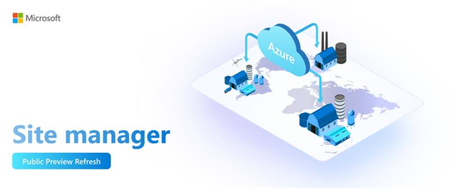
Public Preview Refresh Announcement - Site Manager Introduction: Modern industrial environments—such as factories, manufacturing plants, and distributed infrastructure sites— and retail environments are increasingly hybrid and edge-driven. These sites often run Azure Arc-enabled resources (servers, VMs, Kubernetes clusters, IoT assets) alongside on-prem systems. Managing them at scale introduces unique challenges: Complexity of Distributed Environments, Operational Risk and Downtime, Governance at Scale and Unified Observability. We’re excited to announce the Public Preview Refresh of Azure ARC Site Manager, a powerful solution designed to streamline site configuration and lifecycle observability and management for modern edge and cloud environments. After months of feedback during preview, Site Manager is now ready for production use, delivering enterprise-grade reliability and enhanced capabilities. Site Manager addresses the challenges in managing Azure Edge resources by providing a single pane of glass that aggregates security, alerts, updates and connectivity status across all sites; enabling policy-driven compliance and consistent monitoring; and ensuring streamlined operations, improved reliability, and simplified management at scale. Key features of Site Manager 1. Flexibility of Site Scope with Service Groups Site Manager enables customers to create sites using flexible scopes— Resource Groups, Subscriptions, and Service Groups. The Service Group scope allows organizations to logically group resources across multiple resource groups and subscriptions, such that they reflect real-world operations, making it easier to manage distributed environments, apply consistent policies, and streamline workflows across hybrid and edge deployments. The result is improved scalability, governance, and operational efficiency. 2. Hierarchical Site Organization - a representation of Business Organization Site Manager supports multi-level site hierarchy, including parent sites and subsites, for better representation of physical or logical locations. This hierarchy improves navigation and enables views for distributed infrastructure. Site Manager supports creating sites that mirror an organization’s hierarchical structure, such as Regions, Business Units, Factories, Stores etc. This alignment makes it easier for customers to manage resources in a way that reflects their operational reality, enabling clear visibility and streamlined views across distributed teams and locations. 3. Aggregated Monitoring and Insights Site Manager offers a single pane of glass for monitoring distributed environments. It aggregates Connectivity status, Updates, Alerts and Security status for all resources within a site, enabling quick identification of issues across the hierarchy, efficient prioritization and reduced operational complexity. 4. Site Configurations Site Manager helps define configurations—such as network settings and secrets management—at the site level and reuse them across deployments. This ensures consistency and reduces operational overhead for large-scale environments. The configurations can also be reused across partner solutions like workload orchestration and Zero-Touch Provisioning (ZTP). This approach ensures consistency, accelerates deployments, and reduces manual effort, delivering a more integrated and efficient operational experience across hybrid and edge environments. Architecture & Workflow: Azure Arc Site Manager is a cloud-native service within the Azure Arc suite that empowers customers to manage and monitor their on-premises infrastructure at scale. Its architecture streamlines status aggregation by unifying connectivity, security baseline, alerts, and update data from diverse resource types into a single schema. This aggregated data is surfaced through an extension resource, enabling the Azure portal and other clients to retrieve summary views from a centralized location. Built on Azure Resource Manager, Site Manager benefits from fine-grained Role-Based Access Control (RBAC), ensuring secure and scoped operations across sites. Management actions—such as creating, updating, or querying Arc sites—can be performed through familiar client tools including SDKs, CLI, PowerShell, Terraform, or directly via the Azure portal, offering flexibility and consistency across environments. Important Details & Limitations: Azure Resource Supported: Currently, site manager supports the following Azure resources with the following capabilities: Site manager only provides status aggregation for the supported resource types. Site manager doesn't manage resources of other types that exist in the resource group or subscription, but those resources continue to function normally otherwise. Regions and Availability: Site manager supports resources that exist in supported regions, with a few exceptions. For the following regions, connectivity and update status aren't supported for Arc-enabled machines or Arc-enabled Kubernetes clusters: Brazil South, UAE North, South Africa North Feedback and Engagement We’d love to hear your feedback! As you try out Site Manager, please share your experiences, questions, and suggestions. You can leave a comment below this blog post – our team will be actively monitoring and responding to comments throughout the preview. Let us know what worked well, what could be improved, and any features you’d love to see in the future. Your insights are incredibly valuable to us and will help shape the product as we progress toward General Availability. If you encounter any issues or have urgent feedback, you can also engage with us through the following channels: Please fill up the form at SMfeedback for feedback Contact your Microsoft account representative or support channel and mention “Site Manager Public Preview Refresh” – they can route your feedback to us as well. Occasionally, we may reach out to select customers for deeper feedback sessions or to participate in user research. If you’re interested in that, please mention it in your comment or forum post. We truly consider our users as co-creators of the product. Learn More To help you get started and dive deeper into workload orchestration, we’ve prepared a set of resources: Site Manager Documentation – What is Azure Arc site manager (preview) - Azure Arc | Microsoft Learn CLI Reference – Command reference: Detailed documentation of all site manager CLI commands with examples. Az.Site Module | Microsoft Learn Conclusion: We’re thrilled for you to explore Site Manager and see how it can transform your unified observability strategy at scale. This Public Preview Refresh is a major step towards aggregated status monitoring and site management at edge.578Views1like3Comments
Azure Local 22H2 Clusters: End of Service and Feature Degradation
Azure Local (formerly Azure Stack HCI) version 22H2 reached End of Service (EOS) on May 31, 2025. As communicated earlier, this means: No further security updates or bug fixes will be provided. CSS support is limited to upgrade assistance of the existing environment only. What’s Changing? Around February 23, 2026, Microsoft will begin degrading features on 22H2 clusters. These changes align with Microsoft’s Modern Lifecycle Policy, which requires customers to stay current with servicing and system requirements to maintain support. Under this policy, failure to upgrade can lead to significant degradation of product functionality, starting with: Disabling ESU: Extended Security Updates will no longer be available. Disabling WSS: Windows Server Subscription benefits will be removed. Once these changes take effect: Customers will not be able to purchase or renew ESU or WSS for 22H2 clusters, meaning: ESU updates will no longer be offered, leaving guest operating systems exposed to security vulnerabilities. Guest operating systems will no longer be licensed, which can lead to compliance violations and potential service disruptions. Any degraded feature will not be restored under best-effort support. Customer Responsibility If the customer chooses to remain on 22H2: They assume full responsibility for any security vulnerabilities, compliance issues, or government regulatory requirements associated with running an unsupported version. Microsoft does not provide guarantees or remediation for risks arising from continued use of 22H2. Next Steps To maintain a secure and supported environment: Upgrade to 24H2 as soon as possible. Learn how to upgrade → We strongly recommend planning your upgrade now to avoid service disruptions and compliance risks.461Views0likes0Comments