azure application gateway
46 TopicsIntroducing the Application Gateway WAF Triage Workbook
The new "Application Gateway WAF Triage" workbook is free of charge and it provides a convenient way to triage WAF events and identify false positives. It gives you the insights you need to better fine-tune your WAF policy. 30KViews6likes35Comments
Azure WAF Tuning for Web Applications
False positives occur when a Web Application Firewall (WAF) erroneously detects legitimate web traffic as malicious and subsequently denies access. For instance, an HTTP request that poses no threat may trigger WAF to classify it as an SQL injection attack due to how characters are passed through the request body, thereby causing the request to be rejected and denying access to the user. Find out in this post some examples to help reduce false positives in your Azure WAF environment.24KViews3likes5Comments
Addressing PHP2Shell CVE-2026-109618 and CVE-2026-109619: upgrade guidance and Azure WAF mitigations
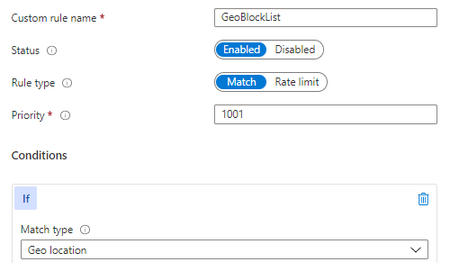
Written in collaboration with yuvalpery and Gunjan Jain Introduction Today, two critical remote code execution (RCE) vulnerabilities were disclosed in PHP. We strongly recommend that customers upgrade to a patched version of PHP as soon as possible. Upgrading is the only way to fully remediate these vulnerabilities. Read more on the PHP official website. Microsoft has been part of the coordinated industry response to these vulnerabilities, working alongside the PHP Foundation, Wiz, security researchers, and other industry partners to help protect customers. Azure Web Application Firewall (WAF) has developed mitigations against known exploitation patterns to provide an additional layer of protection while customers apply the PHP security updates. These protections are intended to complement patching and are not a replacement for it. About the vulnerabilities: CVE-2026-109618 - RCE via OOM corruption CVE-2026-109619- RCE via stale global state Both vulnerabilities can be exploited over the network without privileges or user interaction, with a high potential impact on confidentiality, integrity, and availability. The vulnerabilities relate to PHP handling of memory when a request terminates abnormally, for example due to memory exhaustion or a fatal error. Under certain conditions, improper memory handling could allow an attacker to achieve remote code execution. Fixed versions: 8.5.12, 8.4.27, 8.3.36, 8.2.35. Refer to vendor guidancefor patching of different versions of PHP. Recommended action: upgrade PHP We recommend that customers: Upgrade all PHP deployments to a patched version, including virtual machines, containers, base images, and platform runtimes. We suggest prioritizing internet-facing workloads. Rebuild and redeploy container images that include their own PHP runtime, since updating the host does not update PHP inside an image. Migrate to a supported PHP branch if the branch currently in use no longer receives security fixes. Treat the Azure WAF mitigations below as a temporary, supplementary measure. They address a specific technique and do not remediate the underlying vulnerabilities. Azure WAF protection If you are unable to upgrade PHP to a patched version immediately, apply the following mitigations in the interim - Azure Front Door WAF: Apply the mitigation using custom rules for request-side mitigation and enable the managed rule for response-side mitigation. Application Gateway WAF: Apply the mitigation using custom rules for request-side mitigation and enable the rewrite rule for response-side mitigation. Application Gateway for Container WAF: Apply the mitigation using custom rules for request-side mitigation. See below sections for details. Mitigation using custom rules These custom rules can help reduce exposure to selected request patterns associated with exploitation techniques for these vulnerabilities. Depending on application traffic, the rules may result in false positives and affect legitimate requests. They are intended as temporary mitigations and do not replace the need to upgrade PHP. Learn more: Azure WAF custom rules for PHP2Shell mitigation. Request-side signals alone may not be sufficient to reliably identify certain exploitation attempts. Signals in the server response can provide additional evidence that malicious activity has occurred, enabling more targeted mitigation with higher confidence and lower false positives. For this vulnerability, Azure WAF identifies known malicious patterns in the session and removes the potentially malicious elements from the response before it reaches the client. This provides an additional layer of protection for supported exploitation scenarios, while patching PHP remains necessary to fully address the underlying vulnerability. Azure Front Door WAF: managed rule A managed rule to handle potential attack vector in response is currently rolling out for Azure Front Door WAF, expected to complete October 28. Once the rule is available, its details are as follows: Rule group: MS-ThreatIntel-Response-CVEs Rule ID: 99006001 Default state: disabled. Customers need to enable the rule. Supported rulesets: DRS 2.0, 2.1 and 2.2. Unlike other WAF rules, this rule does not block or challenge any traffic. When the rule identifies malicious signals in the session that provides strong evidence of exploitation, it removes the potentially malicious elements from the response while leaving the remainder of the response unchanged. Mitigation for this rule takes effect only when the rule action is set to Block on anamoly. Please note that the response side mitigation does not generate WAF log entries or hit counts. Application Gateway WAF: rewrite rule Customers can apply an interim mitigation now using the HTTP header rewrite capability of Application Gateway, which is available on v2 SKUs. A WAF managed rule for Application Gateway is expected to roll out at a later date. Until then, we recommend the following rewrite rule: 1. Create a rewrite rule in a rewrite set associated with your routing rule(s). 2. Add a condition that evaluates the Set-Cookie response header against the following regular expression: ^PHPSESSID=(?:[a-zA-Z0-9-]|%2[Cc])*(?:[^a-zA-Z0-9;%-]|%(?!2[Cc]))+[a-zA-Z0-9-]*[^;]+; 3. Set the action to delete the matching Set-Cookie response header. Alternatively, the header can be set to a replacement value of your choice. Please note that setting a value overwrites the entire header, including attributes such as Path=/;. Additional considerations: The rule applies only to a Set-Cookie header that matches the pattern. Other Set-Cookie headers in the same response are not affected. We recommend validating the rule on a non-production gateway before broader deployment. For further information, see Rewrite HTTP headers and URL with Azure Application Gateway. Application Gateway for Containers (AGC): A WAF managed rule for Application Gateway for Containers is expected to roll out at a later date. In the interim, customers can apply the custom rules. Application Gateway for Containers does not support regex-based rewrite rules on HTTP response. Summary Service Available protection Recommended action Azure Front Door WAF Custom rules, managed rule 99006001 rolling out, expected to complete by 28 October 2026; mitigation using high confidence signals without blocking traffic. Upgrade PHP to a patched version. If you are unable to patch, apply custom rules in the interim. Application Gateway WAF Custom rules, header rewrite mitigation available now; managed rule expected to roll out later. Upgrade PHP to a patched version. If you are unable to patch, apply custom and rewrite rule in the interim. Application Gateway for Containers Custom rules, managed rule expected to roll out later. Upgrade PHP to a patched version. If you are unable to patch, apply custom rules. Conclusion Following PHP security guidance and upgrading to a patched version is the recommended and complete remediation. Azure WAF mitigations can help reduce exposure during the upgrade period, and we encourage customers to upgrades at the earliest opportunity. Changelog 10/21/2026 9:00 PM PST – Updated with additional guidance around custom rules 10/22/2026 9:00 AM PST – Updated rule rewrite regular expression22KViews1like3CommentsAzure Web Application Firewall: WAF config versus WAF policy
In this blog, we will explore the feature variations when deploying Azure Web Application Firewall (WAF) on Azure Application Gateway using WAF config or WAF policy. We will also show how WAF policies differ between Azure WAF for Azure Front Door and Azure Application Gateway deployments.21KViews8likes3CommentsNavigating Azure WAF Exclusions
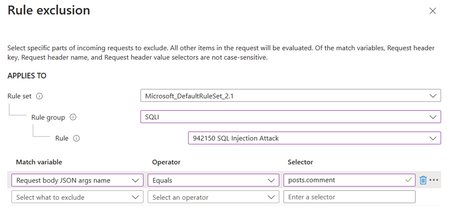
Exclusions in Azure WAF (Web Application Firewall) are a critical feature that allows administrators to fine-tune security rules by specifying elements that should not be evaluated by WAF rules. This capability is essential for reducing false positives and ensuring that legitimate traffic flows unimpeded. Exclusions are designed to fine-tune the WAF’s sensitivity, allowing legitimate traffic to pass through while maintaining robust security measures. They are particularly useful in scenarios where certain request attributes, such as specific cookie values or query strings, are known to be safe but might trigger WAF rules due to their content or structure.19KViews2likes0Comments