azure api management
60 Topics
Developer Tier APIM + Self-hosted Gateway
Developer tier APIM enjoys many "premium" features such as vnet injection. Feature Consumption Developer Basic Basic v2 Standard Standard v2 Premium Premium v2 (preview) Microsoft Entra integration 1 No Yes No Yes Yes Yes Yes Yes Virtual network injection support No Yes No No No No Yes Yes Private endpoint support for inbound connections No Yes Yes No Yes Yes Yes No Outbound virtual network integration support No No No No No Yes No Yes Multi-region deployment No No No No No No Yes No Availability zones No No No No No No Yes No Multiple custom domain names for gateway No Yes No No No No Yes No Developer portal 2 No Yes Yes Yes Yes Yes Yes Yes Built-in cache No Yes Yes Yes Yes Yes Yes Yes External cache Yes Yes Yes Yes Yes Yes Yes Yes Autoscaling No No Yes No Yes No Yes No API analytics No Yes Yes Yes Yes Yes Yes Yes Self-hosted gateway 3 No Yes No No No No Yes No Workspaces No No No No No No Yes Yes TLS settings Yes Yes Yes Yes Yes Yes Yes Yes Client certificate authentication Yes Yes Yes Yes Yes Yes Yes Yes Policies 4 Yes Yes Yes Yes Yes Yes Yes Yes Credential manager Yes Yes Yes Yes Yes Yes Yes Yes Backup and restore No Yes Yes No Yes No Yes No Management over Git No Yes Yes No Yes No Yes No Azure Monitor metrics Yes Yes Yes Yes Yes Yes Yes Yes Azure Monitor and Log Analytics request logs No Yes Yes Yes Yes Yes Yes Yes Application Insights request logs Yes Yes Yes Yes Yes Yes Yes Yes Static IP No Yes Yes No Yes No Yes No Export API to Power Platform Yes Yes Yes Yes Yes Yes Yes Yes Export API to Postman Yes Yes Yes Yes Yes Yes Yes Yes Export API to MCP server (preview) No No Yes Yes Yes Yes Yes Yes Expose existing MCP server (preview) No No Yes Yes Yes Yes Yes Yes Feature-based comparison of Azure API Management tiers | Microsoft Learn It however comes with weaknesses like no SLA guaranteed since it's designed for non-production use cases and evaluations in the first place. For projects that benefit from the ROI of developer tier APIM and would like to have more control over APIM service availability, developer tier + self-hosted gateway might be an option. One example use case here is to provision an Azure VM and then setup self-hosted gateway on the VM. This way users are able to manage and maintain the underlying VM and avoid events like VM Guest OS upgrade during business hours that would have caused service disruptions on developer tier APIM. Just a quick thought...437Views0likes0Comments
Custom Tracing in API Management
When issues such as run time errors, or unexpected behavior occur, request tracing can help isolate the problem by showing policy code or any other component is responsible. The trace policy in APIM can add a custom trace into the request tracing output1.3KViews1like0CommentsAI Resilience: Strategies to Keep Your Intelligent App Running at Peak Performance
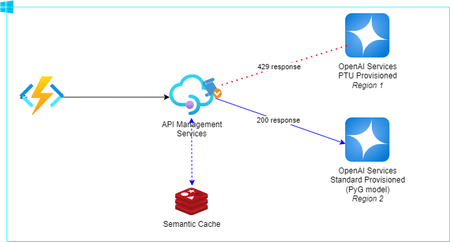
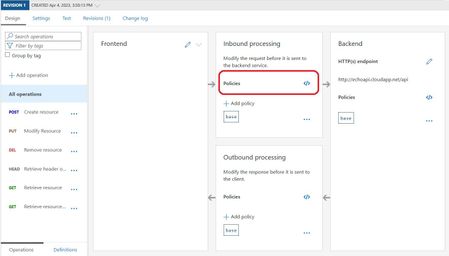
Stay Online Reliability. It's one of the 5 pillars of Azure Well-Architect Framework. When starting to implement and go-to-market any new product witch has any integration with Open AI Service you can face spikes of usage in your workload and, even having everything scaling correctly in your side, if you have an Azure Open AI Services deployed using PTU you can reach the PTU threshold and them start to experience some 429 response code. You also will receive some important information about the when you can retry the request in the header of the response and with this information you can implement in your business logic a solution. Here in this article I will show how to use the API Management Service policy to handle this and also explore the native cache to save some tokens! Architecture Reference The Azure Function in the left of the diagram just represent and App request and can be any kind of resource (even in an On-Premisse environment). Our goal in this article is to show one in n possibilities to handle the 429 responses. We are going to use API Management Policy to automatically redirect the backend to another Open AI Services instance in other region in the Standard mode, witch means that the charge is going to be only what you use. First we need to create an API in our API Management to forward the requests to your main Open AI Services (region 1 in the diagram). Now we are going to create this policy in the API call request: <policies> <inbound> <base /> <set-backend-service base-url="<your_open_ai_region1_endpoint>" /> </inbound> <backend> <base /> </backend> <outbound> <base /> </outbound> <on-error> <retry condition="@(context.Response.StatusCode == 429)" count="1" interval="5" /> <set-backend-service base-url="<your_open_ai_region2_endpoint>" /> </on-error> </policies> The first part of our job is done! Now we have an automatically redirect to our OpenAI Services deployed at region 2 when our PTU threshold is reached. Cost consideration So now you can ask me: and about my cost increment for using API Management? Even if you don't want to use any other feature on API Management you can leverage of the API Management native cache and, once again using policy and AI, put some questions/answers in the built-in Redis* cache using semantic cache for Open AI services. Let's change our policy to consider this: <policies> <inbound> <base /> <azure-openai-semantic-cache-lookup score-threshold="0.05" embeddings-backend-id ="azure-openai-backend" embeddings-backend-auth ="system-assigned" > <vary-by>@(context.Subscription.Id)</vary-by> </azure-openai-semantic-cache-lookup> <set-backend-service base-url="<your_open_ai_region1_endpoint>" /> </inbound> <backend> <base /> </backend> <outbound> <base /> <azure-openai-semantic-cache-store duration="60" /> </outbound> <on-error> <retry condition="@(context.Response.StatusCode == 429)" count="1" interval="5" /> <set-backend-service base-url="<your_open_ai_region2_endpoint>" /> </on-error> </policies> Now, API Management will handle the tokens inputted and use semantic equivalence and decide if its fit with cached information or redirect the request to your OpenAI endpoint. And, sometime, this can help you to avoid reach the PTU threshold as well! * Check the tier / cache capabilities to validate your business solution needs with the API Management cache feature: Compare API Management features across tiers and cache size across tiers. Conclusion API Management offers key capabilities for AI that we are exploring in this article and also others that you can leverage for your intelligent applications. Check it out on this awesome AI Gateway HUB repository At least but not less important, dive in API Management features with experts in the field inside the API Management HUB. Thanks for reading and Happy Coding!1KViews4likes1CommentUsing Azure API Management for legacy apps: XML to Json
Legacy systems often communicate using XML, while modern APIs tend to rely on JSON due to its simplicity and widespread support. In scenarios where your API needs to interact with both formats, a transformation mechanism becomes crucial.6.2KViews1like0CommentsAnalyze HAR trace when importing an Azure Appservice/Webapp on API Management from Azure Portal.
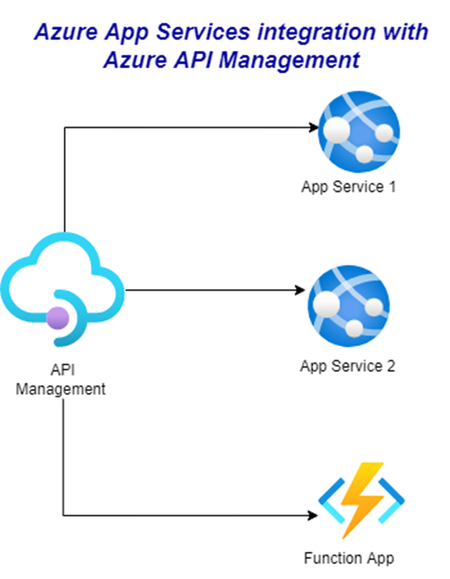
Introduction: The Azure PaaS product API management allows to expose APIs hosted on Azure App Services, also known as webapps. The process of importing and publishing the App service is described in document: Import Azure Web App to Azure API Management ; however, on this article we will analyze what actions Azure Portal performs behind the scenes to complete the import and figure out the cause of common scenarios. Steps to collect a Browser Trace: HAR Troubleshooting: Background steps to import a WebApp to API Management: Once you clicked on the Azure Portal > APIM > APIs > App Service and Browse, there's a rest API call made to Azure Resource Manager by the Azure Portal to list the "Microsoft.Web" resources (this includes the App Service resources) present on your subscriptions. Once you choose the App service to import and click on select. There are a couple of rest calls made: An Azure Resource Manager GET call to the web site selected in order to list the app service configuration. Note that there's a specific field on the response called apiDefinition with the complete URL of the API specification returned by app services (example: https://webapp-azuredevreadyapimwebapp.azurewebsites.net/swagger/v1/swagger.json ). A POST call to apiDefinition URL specified on below step to collect the OpenAPI specification. It's very important to mention that call is made from APIM cors proxy API Management "apimanagement-cors-proxy-prd.azure-api.net ". An Azure Resource Manager HEAD call to resource provider "Microsoft.ApiManagement" is made to determine whether the API name already exist or not, API name should be a unique identifier name. In this case result is 404 because API with name: "todowebapimarcoproject11" does not exist yet and name can be used. An Azure Resource Manager PUT call to resource provider "Microsoft.ApiManagement" to create the simple API with the above name. An Azure Resource Manager PUT call to resource provider "Microsoft.ApiManagement" to import the openAPI specification validated on step # 2.b to the API previously created. Important: This is an asynchronous call, so you might see other GET calls validating the status of the import operation. An Azure Resource Manager GET call to resource provider "Microsoft.ApiManagement" to list the new API details, and get prepared to create a new API Management backend object. The next request you will see is the PUT call to resource provider "Microsoft.ApiManagement" to create the backend for this specific resource, in this case named: "WebApp_webapp-azuredevreadyapimwebapp". An Azure Resource Manager PUT call to resource provider "Microsoft.ApiManagement" to create a policy referencing that backend previously created <set-backend-service id="apim-generated-policy" backend-id="WebApp_webapp-azuredevreadyapimwebapp" />. Finally, after successful creation you will get a new API imported to APIM from an Azure App Service resource. Please note that App service can be imported independently the Web App is on Virtual Network or attached to a Private Endpoint because behind the scenes the requests are Control Plane Data to Azure Resource Manager ARM. However, there are common scenarios where you can find that App Service is not Imported as expected. Scenario#1: App services not on list to be added to API Management. Symptom: When going to Azure Portal > APIM > APIs > create new API from App Service and Browse, It is not listing all the webapps you are expecting to. Cause: As mentioned on step#1- "Once you clicked on the Azure Portal > APIM > APIs > App Service and Browse, there's a rest API call made to Azure Resource Manager by the Azure Portal to list the "Microsoft.Web" resources (this includes the App Service resources) present on your subscriptions." Resolution: Make sure that the user you signed into the Azure Portal has sufficient RBAC role permissions over the WebApps along the subscriptions those App Services belong to. Scenario#2: API imported from Azure App service to APIM missing OpenAPI specification. Symptom: After importing the API to APIM from a WebApp you noticed that it did not import the Open API specification, and instead created a wildcard for each HTTP verb operation, example: GET, DELETE, PATCH, POST, PUT. Cause: As mentioned on step # 2, there's a Get call to the web site selected in order to list the app service configuration. Note that there's a specific field on the response called apiDefinition with the complete URL of the API specification returned by app services (example: https://webapp-azuredevreadyapimwebapp.azurewebsites.net/swagger/v1/swagger.json ). You can specify the above apiDefinition by going to the Azure Portal > App Service> API definition. As portal states "API definition lets you configure the location of the Swagger 2.0 metadata describing your API. This makes it easy for others to discover and consume your API. Note: the URL can be a relative or absolute path, but must be publicly accessible." Resolution: Make sure you add OpenAPI URL on the API definition of the App service, as it stated this URL should be publicly accessible. There's a common scenario where the URL is inside the same app service being imported for example: https://webapp-azuredevreadyapimwebapp.azurewebsites.net/swagger/v1/swagger.json , and web app is only accessible throughout a private endpoint, in this scenario there still would be a workaround, as you could also see on step # 2 point B "POST call to apiDefinition specified on below step to collect the OpenAPI specification. It's very important to mention that call is made from APIM cors proxy API Management "apimanagement-cors-proxy-prd.azure-api.net ". You can edit the access restrictions on the Web App side by going to the Azure Portal > App Service> Networking > Access Restriction and accept traffic from tag Azure Cloud.3.9KViews1like0Comments
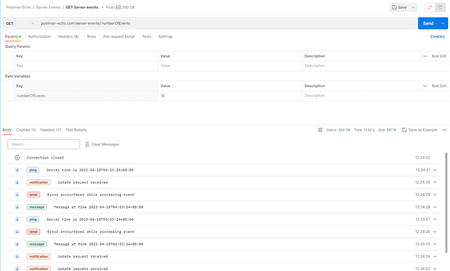
Set up an API within Azure API Management to facilitate the implementation of server-sent events.
Supercharge your APIs with Server-Sent Events (SSE) in Azure API Management. Discover best practices to optimize SSE APIs, including disabling unnecessary logging, maintaining persistent connections, and eliminating response buffering, enabling real-time data updates for your applications.7.4KViews1like1Comment
Analyze HAR trace when importing Function App into API Management
Background introduction API Management allow us to import a function app as an API, the UI offers a straightforward process to import the function app as described on this Microsoft public document. However, in this article we want to go beyond and explore what actions are performed in the background, it will allow us to understand the import process better and will help us dealing with issues while importing the function app. Steps Please review all the steps carefully, they are executed in the following order. Note: The easiest way to see these steps is collecting a HAR trace. 1- It first sends a HEAD request to Microsoft.ApiManagement provider to confirm if the API exists in APIM, (of course it returns a 404 Not Found error which is expected because the API does not exist yet), we are just about to create it. 2- Then it sends a PUT request to Microsoft.ApiManagement and starts creating an empty (without operations) API in APIM. 3- Then it sends a GET request to Microsoft.Web provider trying to list all the HTTP triggers that we have in the function app. 4- Then it sends a POST request to Microsoft.Web provider to list the function app keys. 5- Then it sends a PUT request to Microsoft.Web provider to create a new Host key in the Function app, with the name apim-{your Azure API Management service instance name}. The value is an autogenerated random string. (If we are importing the same function app a second time from same APIM service, this step is not performed since the host key is already created). 6- Then it sends a PUT request to Microsoft.ApiManagement provider to create a named-value pair with the name {your Azure Function App instance name}-key. The value is a copy of the host key created in the previous step. (If we are importing the same function app into APIM a second time to create another API with different name, the same name value is used, no need to create a new named value). 7- Then it sends a POST/batch request to Microsoft.ApiManagement provider to create a backend object in APIM with the same name of the API being created. This backend is set with the following properties: For credentials it uses a header named x-functions-key (this header name MUST NOT BE CHANGED) and the value of this header is {{functionAppName-key}} which is a reference of the he named value created before, which contains the host key. The process also set up a Runtime URL for this backend object; the URL looks like https://<functionname>.azurewebsites.net/api which is the default domain of the function app being imported in APIM. (If we are importing the same function app to APIM a second time to create another API with different name, the same backend object is used, no need to create a new one). 8- Then it sends a POST/batch request to Microsoft.ApiManagement provider to create the API operations based on the HTTP triggers it got from the function app in step #3. Note: it creates 2 operations for each function, a POST and a GET operation. 9- Then it sends a POST/batch request to Microsoft.ApiManagement provider to create a policy for those API operations created in previous step, the policy looks like this: <set-backend-service id=”apim-generated-policy” backend-id=”functionAppName” /> this policy references the backend object created in step #7, to make use of the backend URL and host key when sending a request to the backend function app. This policy is set at the individual operation scope for each operation created. Finally, the API is created successfully with all its setting mentioned above. As noted above, the first of the import process is to create an empty API, so if any of the subsequent steps fail, the import process will send a DELETE request to Microsoft.ApiManagement provider to undo the API created in APIM, as it was unsuccessfully configured. There are many reasons that may cause the import process to fail, let’s review the most common ones from the below Troubleshooting scenarios: Note: The function app can be imported in APIM no matter if the function app is integrated with virtual network or private endpoint. Symptom Cause Resolution Unable to list function app keys. Sometimes customers deploy their Function app from Terraform, DevOps, atc. And they do not generate app keys, so it fails to import function app in APIM if not keys are there. It aslo may be an issue trying to retrieve keys from function app storage. Function runtime unreachable. Commonly you will see a 400 Bad request. Ask customers to redeploy function apps but generating function keys. Or check if customer can list those keys from Azure portal or REST API to confirm keys are populated. Unable to create a new host key in the function app. A Ready-only lock in the function app avoids adding host keys. Commonly you will see a 409 Conflict error even when trying to list keys. Ask customer to remove lock and try the deployment again. Consideration Please be aware that the 9 steps described above are just the main actions of our interest and note that I am importing the API without specifying Tags, Products nor Versioning, so if you import the function app and select those additional options of course you will notice more requests and actions in the trace.4.1KViews0likes0CommentsCommunication between APIM and function App as backend
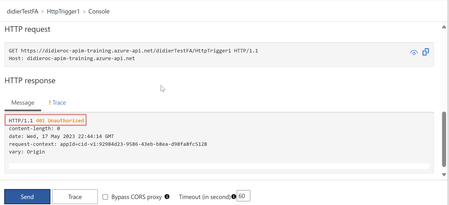
Background introduction When a Function App is added as an API in APIM, there are some authorization details we need to consider while communicating from APIM to the backend function app. It does not matter what Authorization level (function or anonymous) the function app has configured, APIM will always attach a function host key to the request. The host key is attached to the request as a header. However, we may experiment unauthorized errors even though the function host key is present in the request header. So, this article is focused on analyzing one of those scenarios when communication between APIM and backend function app is truncated due to unauthorized errors. Scenario Request is going through APIM to backend function app, and we are getting a 401 Unauthorized error. Note: APIM Subscription required is disabled and function auth level is set to function. Sending the requests from APIM test console. Same error if we send request from Postman. We proceed to collect an APIM inspector trace to confirm if the host key is attached to the request. Checking the trace, we can confirm the host key is attached to the request as a header. However, is fails with a 401 error. If we check the function host keys, we note that the host key attached to the request matches with the apim-didieroc-apim-training host key value. So, why the request is failing even though the host key is the correct one? Please go to your APIM backends and select the backend object created for function app imported. Then, inside the backend object, select Authorization credentials then select Headers. Note that the header that references the host function key stored in a Named value, has the name x-functions-keys. The import function app in APIM process creates that header automatically, but with the header name as x-functions-key. So, if we change that header name that will cause that when the request is sent to the backend function app even though with the correct host key, the function app will not recognize any header name different than x-functions-key. Resolution: Update the header name, setting it as x-functions-key then save changes. Testing after changes Sending the request again, this time it should succeed. You can double check if correct header name is present in the APIM inspector trace too.8.1KViews1like0CommentsStreamlining API Management with Workspaces: A Comprehensive Guide
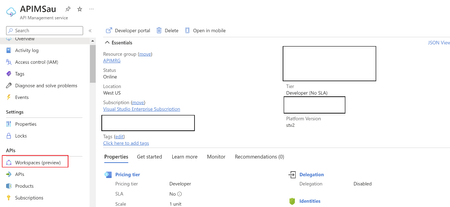
In this blog post, I will explain the API Management Workspace, how to create a workspace and the key features and benefits that you will get while using the APIM Workspace in your API Management. We will also cover how APIM Workspace will help organizations streamline API governance, collaboration, and deployment.5.4KViews7likes1Comment