azure api management
46 Topics
Enhanced API Developer Experience with the Microsoft-Postman partnership
Application Programming Interfaces (APIs) have emerged as the foundational technology powering application modernization. As developers move to modern applications and embrace an API-first world, an easy-to-use API management platform is the need of the hour. At Microsoft, we are on a mission to build a comprehensive and reliable API management platform that’s enabling developers to streamline and secure APIs at scale. Today, at Microsoft Ignite, the Azure API Management team is excited to announce our partnership with Postman, a leading API testing and development platform used by 20M+ developers worldwide. This partnership is aimed at both simplifying API testing and monitoring using the Postman platform for Azure API developers and making the Azure platform readily available to deploy APIs for Postman developers. “This announcement is great news for organizations that recognize APIs as fundamental business assets critical to digital transformation,” said Abhijit Kane, Postman co-founder. “By uniting the world’s top API platform and a leading cloud provider, our two companies have taken a significant step in giving customers the comprehensive set of tools they need for accelerating the API lifecycle.” Boost developer productivity and achieve faster time to market with the Azure API Management and Postman Integrated platform These integrations provide developers all the support they need to test their APIs on Postman and deploying them back on Azure. It takes away unnecessary friction and enables developers to spend more time on writing and shipping software. Let’s take a closer look at how Azure API Management platform and Postman platform integrate to offer developers a fast path to build, test, deploy and iterate on APIs. Test Azure APIs faster with an integrated Postman platform Azure API developers have instant access to the Postman API testing, monitoring, and development platform for rapid iteration on API changes. The integration support includes: Postman-initiated import from Azure API Management with the ability to import OpenAPI definitions from Azure API Management Azure API Management-initiated export of APIs into Postman using “Run in Postman” Accelerate the path to deployment for Postman tested APIs on Azure Once the APIs are designed, tested and ready to go, the integration makes it easy to deploy them on Azure. The integration support includes: Export of OpenAPI definitions from Postman to Azure API Management With over a million APIs published on Azure API Management platform today - it is a battle-hardened, production ready, and highly scaled platform that stretches from on-premises to multi-cloud. Over the past few years, Azure API Management platform has expanded to support every stage of the API lifecycle - enhancing the overall experience for API developers, consumers, operators, and policymakers. Postman partnership is making this even more frictionless, as Smit Patel, head of partnerships at Postman, said, “We’re very proud because this is Postman’s first bidirectional product alliance with a major cloud provider. Aligning with a cloud leader like Microsoft is terrific for our mutual customers and also boosts Postman’s status as the enterprise grade solution for the API-first world.” The Azure API Management team welcomes Postman to the Microsoft partner ecosystem, and together we look forward to enabling our developers embrace an API-first culture to deliver innovations faster, create new revenue streams, and generate value for their end users. Check out Azure integration docs and Postman integration docs for more details. To learn more about this news, read Postman’s press release and Postman’s blog.35KViews9likes0CommentsBuild next-gen apps with OpenAI and Microsoft Power Platform
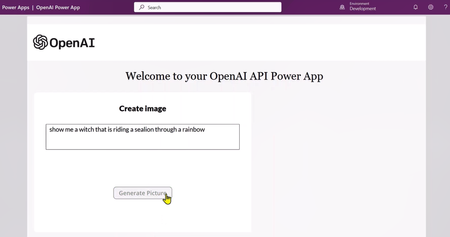
Let's discuss how developers can leverage OpenAI's APIs to build next-gen application using Microsoft Power Apps. We will use DALL·E 2 (a new AI system model) to create realistic images and art from a description in natural language.32KViews8likes5CommentsCalculating Chargebacks for Business Units/Projects Utilizing a Shared Azure OpenAI Instance
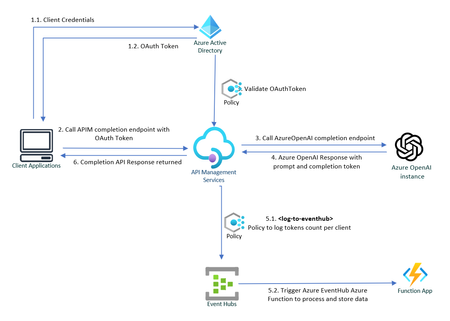
Azure OpenAI Service is at the forefront of technological innovation, offering REST API access to OpenAI's suite of revolutionary language models, including GPT-4, GPT-35-Turbo, and the Embeddings model series. Enhancing Throughput for Scale As enterprises seek to deploy OpenAI's powerful language models across various business units, they often require granular control over configuration and performance metrics. To address this need, Azure OpenAI Service is introducing dedicated throughput, a feature that provides a dedicated connection to OpenAI models with guaranteed performance levels. Throughput is quantified in terms of tokens per second (tokens/sec), allowing organizations to precisely measure and optimize the performance for both prompts and completions. The model of provisioned throughput provides enhanced management and adaptability for varying workloads, guaranteeing system readiness for spikes in demand. This capability also ensures a uniform user experience and steady performance for applications that require real-time responses. Resource Sharing and Chargeback Mechanisms Large organizations frequently provision a singular instance of Azure OpenAI Service that is shared across multiple internal departments. This shared use necessitates an efficient mechanism for allocating costs to each business unit or consumer, based on the number of tokens consumed. This article delves into how chargeback is calculated for each business unit based on their token usage. Leveraging Azure API Management Policies for Token Tracking Azure API Management Policies offer a powerful solution for monitoring and logging the token consumption for each internal application. The process can be summarized in the following steps: ** Sample Code: Refer to this GitHub repository to get a step-by-step instruction on how to build the solution outlined below : private-openai-with-apim-for-chargeback 1. Client Applications Authorizes to API Management To make sure only legitimate clients can call the Azure OpenAI APIs, each client must first authenticate against Azure Active Directory and call APIM endpoint. In this scenario, the API Management service acts on behalf of the backend API, and the calling application requests access to the API Management instance. The scope of the access token is between the calling application and the API Management gateway. In API Management, configure a policy (validate-jwt or validate-azure-ad-token) to validate the token before the gateway passes the request to the backend. 2. APIM redirects the request to OpenAI service via private endpoint. Upon successful verification of the token, Azure API Management (APIM) routes the request to Azure OpenAI service to fetch response for completions endpoint, which also includes prompt and completion token counts. 3. Capture and log API response to Event Hub Leveraging the log-to-eventhub policy to capture outgoing responses for logging or analytics purposes. To use this policy, a logger needs to be configured in the API Management: # API Management service-specific details $apimServiceName = "apim-hello-world" $resourceGroupName = "myResourceGroup" # Create logger $context = New-AzApiManagementContext -ResourceGroupName $resourceGroupName -ServiceName $apimServiceName New-AzApiManagementLogger -Context $context -LoggerId "OpenAiChargeBackLogger" -Name "ApimEventHub" -ConnectionString "Endpoint=sb://<EventHubsNamespace>.servicebus.windows.net/;SharedAccessKeyName=<KeyName>;SharedAccessKey=<key>" -Description "Event hub logger with connection string" Within outbound policies section, pull specific data from the body of the response and send this information to the previously configured EventHub instance. This is not just a simple logging exercise; it is an entry point into a whole ecosystem of real-time analytics and monitoring capabilities: <outbound> <choose> <when condition="@(context.Response.StatusCode == 200)"> <log-to-eventhub logger-id="TokenUsageLogger">@{ var responseBody = context.Response.Body?.As<JObject>(true); return new JObject( new JProperty("Timestamp", DateTime.UtcNow.ToString()), new JProperty("ApiOperation", responseBody["object"].ToString()), new JProperty("AppKey", context.Request.Headers.GetValueOrDefault("Ocp-Apim-Subscription-Key",string.Empty)), new JProperty("PromptTokens", responseBody["usage"]["prompt_tokens"].ToString()), new JProperty("CompletionTokens", responseBody["usage"]["completion_tokens"].ToString()), new JProperty("TotalTokens", responseBody["usage"]["total_tokens"].ToString()) ).ToString(); }</log-to-eventhub> </when> </choose> <base /> </outbound> EventHub serves as a powerful fulcrum, offering seamless integration with a wide array of Azure and Microsoft services. For example, the logged data can be directly streamed to Azure Stream Analytics for real-time analytics or to Power BI for real-time dashboards With Azure Event Grid, the same data can also be used to trigger workflows or automate tasks based on specific conditions met in the incoming responses. Moreover, the architecture is extensible to non-Microsoft services as well. Event Hubs can interact smoothly with external platforms like Apache Spark, allowing you to perform data transformations or feed machine learning models. 4: Data Processing with Azure Functions An Azure Function is invoked when data is sent to the EventHub instance, allowing for bespoke data processing in line with your organization’s unique requirements. For instance, this could range from dispatching the data to Azure Monitor, streaming it to Power BI dashboards, or even sending detailed consumption reports via Azure Communication Service. [Function("TokenUsageFunction")] public async Task Run([EventHubTrigger("%EventHubName%", Connection = "EventHubConnection")] string[] openAiTokenResponse) { //Eventhub Messages arrive as an array foreach (var tokenData in openAiTokenResponse) { try { _logger.LogInformation($"Azure OpenAI Tokens Data Received: {tokenData}"); var OpenAiToken = JsonSerializer.Deserialize<OpenAiToken>(tokenData); if (OpenAiToken == null) { _logger.LogError($"Invalid OpenAi Api Token Response Received. Skipping."); continue; } _telemetryClient.TrackEvent("Azure OpenAI Tokens", OpenAiToken.ToDictionary()); } catch (Exception e) { _logger.LogError($"Error occured when processing TokenData: {tokenData}", e.Message); } } } In the example above, Azure function processes the tokens response data in Event Hub and sends them to Application Insights telemetry, and a basic Dashboard is configured in Azure, displaying the token consumption for each client application. This information can conveniently be used to compute chargeback costs. A sample query used in dashboard above that fetches tokens consumed by a specific client: customEvents | where name contains "Azure OpenAI Tokens" | extend tokenData = parse_json(customDimensions) | where tokenData.AppKey contains "your-client-key" | project Timestamp = tokenData.Timestamp, Stream = tokenData.Stream, ApiOperation = tokenData.ApiOperation, PromptTokens = tokenData.PromptTokens, CompletionTokens = tokenData.CompletionTokens, TotalTokens = tokenData.TotalTokens Azure OpenAI Landing Zone reference architecture A crucial detail to ensure the effectiveness of this approach is to secure the Azure OpenAI service by implementing Private Endpoints and using Managed Identities for App Service to authorize access to Azure AI services. This will limit access so that only the App Service can communicate with the Azure OpenAI service. Failing to do this would render the solution ineffective, as individuals could bypass the APIM/App Service and directly access the OpenAI Service if they get hold of the access key for OpenAI. Refer to Azure OpenAI Landing Zone reference architecture to build a secure and scalable AI environment. Additional Considerations If the client application is external, consider using an Application Gateway in front of the Azure APIM If "streaming" is set to true, tokens count is not returned in response. In that that case libraries like tiktoken (Python), orgpt-3-encoder(javascript) for most GPT-3 models can be used to programmatically calculate tokens count for the user prompt and completion response. A useful guideline to remember is that in typical English text, one token is approximately equal to around 4 characters. This equates to about three-quarters of a word, meaning that 100 tokens are roughly equivalent to 75 words. (P.S. Microsoft does not endorse or guarantee any third-party libraries.) A subscription key or a custom header like app-key can also be used to uniquely identify the client as appId in OAuth token is not very intuitive. Rate-limiting can be implemented for incoming requests using OAuth tokens or Subscription Keys, adding another layer of security and resource management. The solution can also be extended to redirect different clients to different Azure OpenAI instances. For example., some clients utilize an Azure OpenAI instance with default quotas, whereas premium clients get to consume Azure Open AI instance with dedicated throughput. Conclusion Azure OpenAI Service stands as an indispensable tool for organizations seeking to harness the immense power of language models. With the feature of provisioned throughput, clients can define their usage limits in throughput units and freely allocate these to the OpenAI model of their choice. However, the financial commitment can be significant and is dependent on factors like the chosen model's type, size, and utilization. An effective chargeback system offers several advantages, such as heightened accountability, transparent costing, and judicious use of resources within the organization.23KViews10likes10CommentsIntegrating network isolated backends with Azure Static Web Apps
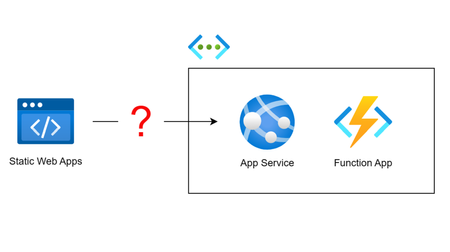
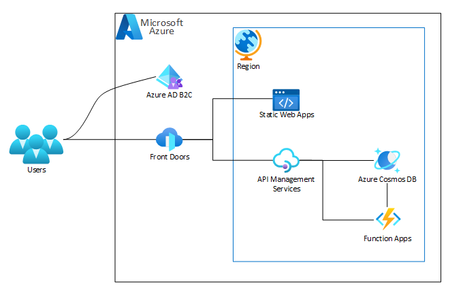
Azure Static Web Apps' built-in support for APIs requires your API to be accessible by Static Web Apps' distributed runtime. But what if you have an existing backend API deployed in a virtual network? In this article, we consider different approaches to integrating a Static Web Apps instance with a network isolated backend and weigh the pros and cons of each.18KViews3likes8CommentsSecure APIM and Azure OpenAI with managed identity
Ok, so you might have read somewhere that API keys is not secure, and you might even have heard about this managed identity thing. But what is it, and why is it better than API keys? Let's try to answer that question and show a practical example of how to use managed identities in Azure.12KViews1like1CommentUnlock New AI and Cloud Potential with .NET 9 & Azure: Faster, Smarter, and Built for the Future
.NET 9, now available to developers, marks a significant milestone in the evolution of the .NET platform, pushing the boundaries of performance, cloud-native development, and AI integration. This release, shaped by contributions from over 9,000 community members worldwide, introduces thousands of improvements that set the stage for the future of application development. With seamless integration with Azure and a focus on cloud-native development and AI capabilities, .NET 9 empowers developers to build scalable, intelligent applications with unprecedented ease. Expanding Azure PaaS Support for .NET 9 With the release of .NET 9, a comprehensive range of Azure Platform as a Service (PaaS) offerings now fully support the platform’s new capabilities, including the latest .NET SDK for any Azure developer. This extensive support allows developers to build, deploy, and scale .NET 9 applications with optimal performance and adaptability on Azure. Additionally, developers can access a wealth of architecture references and sample solutions to guide them in creating high-performance .NET 9 applications on Azure’s powerful cloud services: Azure App Service: Run, manage, and scale .NET 9 web applications efficiently. Check out this blog to learn more about what's new in Azure App Service. Azure Functions: Leverage serverless computing to build event-driven .NET 9 applications with improved runtime capabilities. Azure Container Apps: Deploy microservices and containerized .NET 9 workloads with integrated observability. Azure Kubernetes Service (AKS): Run .NET 9 applications in a managed Kubernetes environment with expanded ARM64 support. Azure AI Services and Azure OpenAI Services: Integrate advanced AI and OpenAI capabilities directly into your .NET 9 applications. Azure API Management, Azure Logic Apps, Azure Cognitive Services, and Azure SignalR Service: Ensure seamless integration and scaling for .NET 9 solutions. These services provide developers with a robust platform to build high-performance, scalable, and cloud-native applications while leveraging Azure’s optimized environment for .NET. Streamlined Cloud-Native Development with .NET Aspire .NET Aspire is a game-changer for cloud-native applications, enabling developers to build distributed, production-ready solutions efficiently. Available in preview with .NET 9, Aspire streamlines app development, with cloud efficiency and observability at its core. The latest updates in Aspire include secure defaults, Azure Functions support, and enhanced container management. Key capabilities include: Optimized Azure Integrations: Aspire works seamlessly with Azure, enabling fast deployments, automated scaling, and consistent management of cloud-native applications. Easier Deployments to Azure Container Apps: Designed for containerized environments, .NET Aspire integrates with Azure Container Apps (ACA) to simplify the deployment process. Using the Azure Developer CLI (azd), developers can quickly provision and deploy .NET Aspire projects to ACA, with built-in support for Redis caching, application logging, and scalability. Built-In Observability: A real-time dashboard provides insights into logs, distributed traces, and metrics, enabling local and production monitoring with Azure Monitor. With these capabilities, .NET Aspire allows developers to deploy microservices and containerized applications effortlessly on ACA, streamlining the path from development to production in a fully managed, serverless environment. Integrating AI into .NET: A Seamless Experience In our ongoing effort to empower developers, we’ve made integrating AI into .NET applications simpler than ever. Our strategic partnerships, including collaborations with OpenAI, LlamaIndex, and Qdrant, have enriched the AI ecosystem and strengthened .NET’s capabilities. This year alone, usage of Azure OpenAI services has surged to nearly a billion API calls per month, illustrating the growing impact of AI-powered .NET applications. Real-World AI Solutions with .NET: .NET has been pivotal in driving AI innovations. From internal teams like Microsoft Copilot creating AI experiences with .NET Aspire to tools like GitHub Copilot, developed with .NET to enhance productivity in Visual Studio and VS Code, the platform showcases AI at its best. KPMG Clara is a prime example, developed to enhance audit quality and efficiency for 95,000 auditors worldwide. By leveraging .NET and scaling securely on Azure, KPMG implemented robust AI features aligned with strict industry standards, underscoring .NET and Azure as the backbone for high-performing, scalable AI solutions. Performance Enhancements in .NET 9: Raising the Bar for Azure Workloads .NET 9 introduces substantial performance upgrades with over 7,500 merged pull requests focused on speed and efficiency, ensuring .NET 9 applications run optimally on Azure. These improvements contribute to reduced cloud costs and provide a high-performance experience across Windows, Linux, and macOS. To see how significant these performance gains can be for cloud services, take a look at what past .NET upgrades achieved for Microsoft’s high-scale internal services: Bing achieved a major reduction in startup times, enhanced efficiency, and decreased latency across its high-performance search workflows. Microsoft Teams improved efficiency by 50%, reduced latency by 30–45%, and achieved up to 100% gains in CPU utilization for key services, resulting in faster user interactions. Microsoft Copilot and other AI-powered applications benefited from optimized runtime performance, enabling scalable, high-quality experiences for users. Upgrading to the latest .NET version offers similar benefits for cloud apps, optimizing both performance and cost-efficiency. For more information on updating your applications, check out the .NET Upgrade Assistant. For additional details on ASP.NET Core, .NET MAUI, NuGet, and more enhancements across the .NET platform, check out the full Announcing .NET 9 blog post. Conclusion: Your Path to the Future with .NET 9 and Azure .NET 9 isn’t just an upgrade—it’s a leap forward, combining cutting-edge AI integration, cloud-native development, and unparalleled performance. Paired with Azure’s scalability, these advancements provide a trusted, high-performance foundation for modern applications. Get started by downloading .NET 9 and exploring its features. Leverage .NET Aspire for streamlined cloud-native development, deploy scalable apps with Azure, and embrace new productivity enhancements to build for the future. For additional insights on ASP.NET, .NET MAUI, NuGet, and more, check out the full Announcing .NET 9 blog post. Explore the future of cloud-native and AI development with .NET 9 and Azure—your toolkit for creating the next generation of intelligent applications.10KViews2likes1Comment