artificial intelligence in development
4 TopicsPostgreSQL Meets AI at POSETTE: An Event for Postgres 2026 (T-3 weeks)
POSETTE: An Event for Postgres 2026 is where that evolution comes into focus, please visit conference’s site to register and add the event to your calendar! Artificial intelligence is changing how we build applications, but not in the way many people expected. The hardest problems aren’t about writing the perfect prompt or choosing the “best” model. Once teams move past demos and start putting systems in front of real users, the pain shows up somewhere else: in the data layer. The recurring failure modes of production AI are remarkably consistent. Systems return answers that sound plausible but aren’t grounded. They pull the wrong records, miss key context, or stitch together fragments from unrelated sources. Sometimes they are correct, but wildly expensive. And when you let an AI system generate queries dynamically, the operational questions get sharper very quickly: what stops it from issuing a destructive statement, scanning a massive table, or repeatedly hammering a hot index until your p95 latency falls off a cliff? In other words, the hard part is not generation. The hard part is retrieval, how data is accessed, shaped, governed, and observed. That’s exactly why the AI track at POSETTE: An Event for Postgres 2026 is so compelling this year: it treats PostgreSQL not as a passive database at the end of a request, but as an active foundation for the next wave of AI, native applications. What’s emerging across the agenda is a new mental model. PostgreSQL, long trusted as a durable, transactional system, has become the place where “truth” lives for many applications. And as AI agents become the interface to those applications, Postgres increasingly becomes the retrieval backbone that keeps those agents honest. From queries to agents: when the database becomes a tool In traditional application design, we assume a deterministic relationship between intent and query. The application decides what it needs, SQL expresses it precisely, and the database returns a predictable result set. We tune the query, we add an index, we cache the hot path, and we move on. Agentic systems break that contract. An agent doesn’t just execute a query. It interprets intent, decides what tools to use, and often iterates, sometimes several times, based on intermediate results. That “tool use” framing is central to Pamela Fox’s session An MCP for your Postgres DB, which explores how MCP (Model Context Protocol) turns a database into an explicit, discoverable interface, one where design choices directly influence whether an LLM behaves safely and predictably when it interacts with Postgres. In parallel, Abe Omorogbe’s From Queries to Agents: The Next Era of Data Retrieval on PostgreSQL frames the evolution in a way that resonates with anyone building production systems: as agents move from demos to reality, the challenge isn’t the model, it’s “reliable, safe, and context, aware data retrieval.” In practice, that means dealing with failures that don’t show up in toy examples: agents producing SQL that’s syntactically valid but semantically wrong; pulling the right table but the wrong slice; or forming queries that quietly explode costs because there’s no natural “stop” condition. Once you accept that agents are going to query your system in ways you didn’t anticipate, PostgreSQL becomes part of your application’s safety boundary. It must handle unpredictable access patterns without falling over. It must protect you from unsafe operations, whether accidental or adversarial. And increasingly, it must support multi, modal retrieval, because the context an agent needs rarely lives in a single shape of data. That’s the pivot POSETTE: An Event For Postgres 2026 is capturing: the database is no longer just queried, it is increasingly negotiated with by AI systems. RAG in practice: why PostgreSQL keeps showing up Retrieval, Augmented Generation (RAG) has become the default architecture for serious AI applications. It’s a pragmatic response to a simple reality: models are good at language, but they aren’t systems of record. If you care about accuracy, freshness, or traceability, you retrieve relevant information first, then generate a response grounded in that retrieved context. The interesting question isn’t “does RAG work?”, it does. The interesting question is where teams choose to implement it. A growing number of teams are using PostgreSQL as the core retrieval substrate for RAG pipelines because it lets them keep the system cohesive. You can store structured records, join across metadata, filter and rank, and now, thanks to the ecosystem, incorporate vector similarity search without standing up a separate database whose contents need to be continuously synchronized. That’s the practical framing behind Julia Schröder Langhaeuser and Paula Santamaría’s session Production RAG at Scale with Azure Database for PostgreSQL. Their talk centers on what it takes to go from prototype to production, including architecture choices, performance tuning, and the operational discipline required when you’re serving RAG workloads at meaningful scale. The message is less “Postgres can do vectors” and more “RAG becomes real when you can observe it, tune it, and trust it.” This distinction matters, because the failure modes of RAG systems are rarely about embeddings. They are about context assembly. The best answer in the world is useless if the system retrieved the wrong snippets, missed an important constraint, or pulled stale policy text from last quarter. PostgreSQL’s value here is subtle but powerful: it gives you a place to combine retrieval signals, structured filters, semantic similarity, graph, like relationships, business rules, inside a system whose behavior you can reason about. The real problem is retrieval, not generation If you spend time around production AI teams, you start to hear the same phrase: retrieval is the hard part. Models can generate fluent text easily. But without high, quality input, and without guardrails around what the system is allowed to do, they generate confident nonsense, partial answers, and occasionally harmful advice. In the worst cases, they can become operational liabilities: issuing expensive queries repeatedly, pulling sensitive data into prompts, or creating “self, inflicted incidents” that look like outages but are really uncontrolled tool usage. That’s why POSETTE’s AI programming doesn’t just celebrate capability. It spends real time on safety and operational control. Building safety tooling for risk, free AI tuning of Postgres: Fast cars need fast brakes by Mohsin Ejaz captures this mindset perfectly. The title says what many teams learn too late: if you’re going to let an automated system tune or optimize database behavior, the safety net matters more than the accelerator. Guardrails, validation, monitoring, and rollback discipline aren’t “nice to have”, they’re the difference between a neat demo and a system you can run while you sleep. When you connect that back to the agent conversation, you get a coherent picture. Whether the system is generating queries, selecting tools, or attempting optimizations, the foundation of reliability is the same: controlled access, predictable performance, and strong observability. PostgreSQL contributes here not because it’s magical, but because it’s mature. It has deep access control primitives, transactional guarantees, and an ecosystem that has spent decades building operational muscle. The AI shift doesn’t eliminate those fundamentals, it makes them more important. The emerging retrieval stack: what sits between agents and data One of the most useful ways to interpret this year’s sessions is as the early shape of a new architectural layer: a retrieval stack that lives between AI agents and your data systems. This stack is not a single product. It’s a set of practices and components that make agent, to, data interactions safe and effective. It includes abstraction layers (like MCP, style tool interfaces), orchestration logic that can combine relational queries with vector similarity (and, increasingly, graph, aware traversal), context shaping that ranks and filters results into something a model can actually use, and governance controls that define what data may be accessed in which situations. What’s exciting about POSETTE: An Event For Postgres 2026 is that the agenda treats this as a real engineering problem, not a buzzword. Pamela Fox’s work on MCP surfaces the interface, design angle: when you expose Postgres as tools, the shape of those tools determines whether the agent behaves well. Abe Omorogbe’s framing pushes toward retrieval architectures that are robust by design rather than bespoke glue code. Julia Schröder Langhaeuser and Paula Santamaría bring the production perspective: what breaks at scale, and what you need to monitor. And Mohsin Ejaz anchors the safety story: the more automation you introduce, the more you need reliable brakes. That same story now extends all the way to the developer experience. In Matt McFarland’s session PostgreSQL Tooling Across AI Editors and Agents, the focus shifts from retrieval architecture inside applications to the environments where developers and AI assistants actually work. By showing how PostgreSQL capabilities such as connection management, query execution, schema analysis, plan inspection, and performance insights can be surfaced consistently across VS Code, Cursor, and the GitHub Copilot CLI through an MCP server, the session adds an important dimension to the overall AI track: if agents are going to become part of everyday software development, PostgreSQL tooling also needs to become agent-aware, portable, and usable wherever those workflows happen. It’s a practical reminder that the AI future of Postgres is not only about what runs in production, but also about how humans and AI systems collaborate around the database during development itself. Together, these sessions sketch a coherent future: PostgreSQL isn’t just where data sits. It’s becoming one of the engines that powers retrieval, first application design. Why this matters if you build real systems If you’re building applications today, this shift is not theoretical. It changes how you think about database design, performance tuning, security, and cost. You can’t assume query predictability anymore, because agents don’t behave like carefully written application code. You can’t treat access control as a static checklist, because prompts are leaky abstractions and tool use creates new attack surfaces. And you can’t ignore cost modeling, because AI, generated queries can be expensive in ways that traditional workloads rarely are, especially when they iterate. POSETTE: An Event For Postgres 2026 tackles these realities head, on. Not with hype, but with practical patterns, real failure modes, and the kind of engineering trade, offs you only learn when systems meet production constraints. What you’ll take away from the AI track at POSETTE: An Event for Postgres this year If there’s a single theme to keep in mind, it’s this: AI isn’t replacing databases. It’s forcing us to use them differently. The AI sessions at POSETTE: An Event For Postgres 2026 will help you build a clearer mental model of how agents interact with PostgreSQL, how RAG systems become production, ready, and what it means to design retrieval layers with safety and observability from day one. And, importantly, you’ll leave with a vocabulary for discussing these systems without hand, waving: where the risk is, where the cost is, and where the true engineering work lives. PostgreSQL’s flexibility and extensibility make it a natural foundation for this transition, but the real advantage will go to teams that treat retrieval as an engineering discipline, not an afterthought. At POSETTE, that transformation is on full display. A quick call to action POSETTE: An Event for Postgres 2026 is a can’t, miss event for the PostgreSQL community. Register to get updates and save the livestream sessions you want to attend on your calendar.297Views1like0CommentsDeploy Open Web UI on Azure VM via Docker: A Step-by-Step Guide with Custom Domain Setup.
Introductions Open Web UI (often referred to as "Ollama Web UI" in the context of LLM frameworks like Ollama) is an open-source, self-hostable interface designed to simplify interactions with large language models (LLMs) such as GPT-4, Llama 3, Mistral, and others. It provides a user-friendly, browser-based environment for deploying, managing, and experimenting with AI models, making advanced language model capabilities accessible to developers, researchers, and enthusiasts without requiring deep technical expertise. This article will delve into the step-by-step configurations on hosting OpenWeb UI on Azure. Requirements: Azure Portal Account - For students you can claim $USD100 Azure Cloud credits from this URL. Azure Virtual Machine - with a Linux of any distributions installed. Domain Name and Domain Host Caddy Open WebUI Image Step One: Deploy a Linux – Ubuntu VM from Azure Portal Search and Click on “Virtual Machine” on the Azure portal search bar and create a new VM by clicking on the “+ Create” button > “Azure Virtual Machine”. Fill out the form and select any Linux Distribution image – In this demo, we will deploy Open WebUI on Ubuntu Pro 24.04. Click “Review + Create” > “Create” to create the Virtual Machine. Tips: If you plan to locally download and host open source AI models via Open on your VM, you could save time by increasing the size of the OS disk / attach a large disk to the VM. You may also need a higher performance VM specification since large resources are needed to run the Large Language Model (LLM) locally. Once the VM has been successfully created, click on the “Go to resource” button. You will be redirected to the VM’s overview page. Jot down the public IP Address and access the VM using the ssh credentials you have setup just now. Step Two: Deploy the Open WebUI on the VM via Docker Once you are logged into the VM via SSH, run the Docker Command below: docker run -d --name open-webui --network=host --add-host=host.docker.internal:host-gateway -e PORT=8080 -v open-webui:/app/backend/data --restart always ghcr.io/open-webui/open-webui:dev This Docker command will download the Open WebUI Image into the VM and will listen for Open Web UI traffic on port 8080. Wait for a few minutes and the Web UI should be up and running. If you had setup an inbound Network Security Group on Azure to allow port 8080 on your VM from the public Internet, you can access them by typing into the browser: [PUBLIC_IP_ADDRESS]:8080 Step Three: Setup custom domain using Caddy Now, we can setup a reverse proxy to map a custom domain to [PUBLIC_IP_ADDRESS]:8080 using Caddy. The reason why Caddy is useful here is because they provide automated HTTPS solutions – you don’t have to worry about expiring SSL certificate anymore, and it’s free! You must download all Caddy’s dependencies and set up the requirements to install it using this command: sudo apt install -y debian-keyring debian-archive-keyring apt-transport-https curl -1sLf 'https://dl.cloudsmith.io/public/caddy/stable/gpg.key' | sudo gpg --dearmor -o /usr/share/keyrings/caddy-stable-archive-keyring.gpg curl -1sLf 'https://dl.cloudsmith.io/public/caddy/stable/debian.deb.txt' | sudo tee /etc/apt/sources.list.d/caddy-stable.list sudo apt update && sudo apt install caddy Once Caddy is installed, edit Caddy’s configuration file at: /etc/caddy/Caddyfile , delete everything else in the file and add the following lines: yourdomainname.com { reverse_proxy localhost:8080 } Restart Caddy using this command: sudo systemctl restart caddy Next, create an A record on your DNS Host and point them to the public IP of the server. Step Four: Update the Network Security Group (NSG) To allow public access into the VM via HTTPS, you need to ensure the NSG/Firewall of the VM allow for port 80 and 443. Let’s add these rules into Azure by heading to the VM resources page you created for Open WebUI. Under the “Networking” Section > “Network Settings” > “+ Create port rule” > “Inbound port rule” On the “Destination port ranges” field, type in 443 and Click “Add”. Repeat these steps with port 80. Additionally, to enhance security, you should avoid external users from directly interacting with Open Web UI’s port - port 8080. You should add an inbound deny rule to that port. With that, you should be able to access the Open Web UI from the domain name you setup earlier. Conclusion And just like that, you’ve turned a blank Azure VM into a sleek, secure home for your Open Web UI, no magic required! By combining Docker’s simplicity with Caddy’s “set it and forget it” HTTPS magic, you’ve not only made your app accessible via a custom domain but also locked down security by closing off risky ports and keeping traffic encrypted. Azure’s cloud muscle handles the heavy lifting, while you get to enjoy the perks of a pro setup without the headache. If you are interested in using AI models deployed on Azure AI Foundry on OpenWeb UI via API, kindly read my other article: Step-by-step: Integrate Ollama Web UI to use Azure Open AI API with LiteLLM Proxy5.2KViews2likes1CommentCrafting Spells with GitHub Copilot
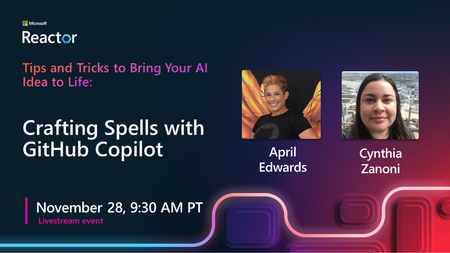
Unleash the magic of coding with our latest episode, "Crafting Spells with GitHub Copilot"! Join us on an enchanting journey where we explore the wonders of GitHub Copilot, your AI programming assistant. Learn the art of mastering Copilot, from its intuitive interface to turning your intentions into functional code. Delve into the magic of artificial intelligence as it becomes your coding ally, making each line more efficient and powerful. Discover the latest features, tips, and tricks that Copilot offers, and gain practical experience through examples and demonstrations. If you're ready to transform your coding experience and uncover the secrets of GitHub Copilot, don't miss this enchanting lecture. Join us for an informative session that will redefine your approach to software development!2.8KViews0likes0Comments