application insights
53 TopicsReliability Starter Kit: SLIs, Health models, and SRE Agent
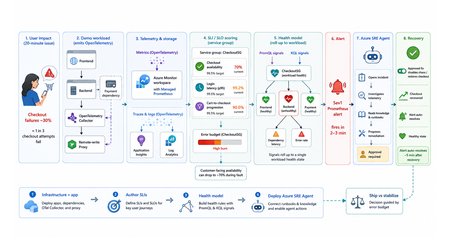
TL;DR This walkthrough uses a small e-commerce demo app to show how Azure Monitor can measure a user journey with service level indicators (SLIs) and service level objectives (SLOs), roll those results into a health model, and have the Azure SRE Agent investigate the alert. When the demo intentionally breaks, about one in three checkout attempts, a Sev1 Prometheus alert fires in about 2 to 3 minutes, and the agent opens an incident from that alert within a minute or two. Clone the kit, run four steps in order, and watch the failure go from alert to proposed fix on your own subscription. Who this is for Site reliability engineers who own on-call and want alerts that mean something. Platform engineers wiring observability for other teams. Application developers who need to prove a service is healthy before they ship. Engineering leaders deciding when to ship and when to stabilize. What the user felt, and what the system reported In the demo app, a fault makes about one in three checkout attempts fail for twenty minutes. The table below shows how that same incident can look to customers and to the platform. What the customer experienced What the system reported Payment failed, retried twice, gave up CPU 40%, memory normal, every instance up Cart abandoned, no order placed No alert fired on slidemo-be-<suffix> Called support: "it works fine for us" Average latency 180 ms, inside target Every statement in the right column is accurate. None of them explains the left column. The platform was answering a resource question: are the apps running? Users had a different question: can I complete checkout? A service level indicator (SLI) closes that gap. It is one number: successful checkouts divided by attempted checkouts, as a percentage. It changes when checkout succeeds or fails, not when CPU or memory changes. Set a target for that number, say 99.5%, and the target is your service level objective (SLO). With both in place, the questions that matter answer themselves: The question What the SLI tells you Is this real? Checkout availability is 70%, against a 99.5% target How bad is it? Most of a week's error budget is gone in ten minutes What broke? The checkout journey is failing, so responders start in the right place Azure Monitor computes that SLI for you. Azure Monitor health models roll it up into one workload state. The Azure SRE Agent turns the right alert into an investigation and a proposed fix. The hard part is the wiring between them: which metric feeds the indicator, which indicator feeds the health signal, and which alert source actually reaches the agent. This kit ships that wiring, as scripts you can run, against a workload you can break on purpose. What the kit ships The kit is a self-contained reference implementation. It deploys its own demo workload, instruments it, and connects five stages end to end: telemetry is emitted, stored in Azure Monitor, scored into SLIs and rolled up by a health model, turned into an alert the Azure SRE Agent acts on, and finally weighed against the error budget. It is opinionated on purpose: one workload, one service group, three SLIs, one health model, one agent, one proven trigger. The four services it wires together Service What it does Layer Azure Monitor SLIs and SLOs on a Service Group You name the metric that counts as good and the one that counts as total. It computes the ratio on a schedule, compares it to your target, and tracks the error budget. The score belongs to a service group, which is how Azure Monitor names your application as a whole, so the number describes the app rather than any one resource. This post calls that scoring component the SLI engine. Measurement Azure Monitor health models A dependency graph where every node carries its own health state. Each node is an entity, either an Azure resource or an application component discovered from Application Insights. You attach signals to an entity (a PromQL query, a KQL query, or a platform metric) with degraded and unhealthy thresholds, and the worst child state rolls up into one state for the workload. Aggregation Azure SRE Agent Takes Azure Monitor alerts as incidents and runs the first-pass investigation: queries the relevant metrics, logs, and recent deployments, forms a root-cause hypothesis, and proposes a remediation. It never applies a change without human approval. The kit deploys it read-only, so it investigates freely and has to ask before it changes anything. Action The telemetry plane OpenTelemetry (OTel) in the apps, a collector, an Azure Monitor workspace running managed Prometheus for metrics, and Application Insights backed by a Log Analytics workspace for traces and logs. One workspace holds both the raw metrics and the SLI results, so everything reads a single consistent set of numbers. Foundation What ships in the box Four steps you run in order: infrastructure and the app, SLIs on a service group, the health model, and the Azure SRE Agent. Runnable PowerShell scripts for every step, all idempotent, all with teardown. A demo workload with a chaos endpoint, so you can break checkout on demand. Validated console transcripts in the lab guides, so you know what "working" looks like before you run it. Everything is in this repo. The diagram shows how the pieces hand off to each other: Walking the flow: Emit. The apps emit OpenTelemetry counters and histograms. The Collector splits the stream two ways: metrics go to a remote-write proxy that attaches a Microsoft Entra ID token, and traces and logs go to Application Insights, backed by a Log Analytics workspace. Store. The Azure Monitor workspace ingests the metric series. Prometheus recording rules pre-aggregate them into the exact label shape the SLI engine can filter on. Score and roll up. Three SLIs on the CheckoutSG-<suffix> service group compute good over total, compare against a 99.5% baseline, and write their evaluated results back into the same workspace. The health model reads those stored results as PromQL signals and the failure data as a KQL signal, then rolls the worst child state up to the workload root. Alert and act. A Prometheus alert rule on the workspace fires Sev1 into the action group and into the Azure SRE Agent's incident source. The agent reads its uploaded knowledge base, correlates against the traces and logs, and proposes a runbook. After you approve it, the remediation runs and the agent verifies recovery. The health model's own health-state alerts reach the action group for human triage only: they fire in rg-healthmodel-demo, which is not the agent's incident-ingestion scope, so they never become incidents. Decide. The error budget gates the release call: ship when healthy, stabilize when burning. The demo workload The workload is a small e-commerce store, deliberately boring so the reliability mechanics are the interesting part. Component What it is What it does Frontend Node.js on App Service Linux Customer site, proxies /api/* to the backend Backend Node.js on App Service Linux Serves /login and /checkout, calls the payment dependency, emits the SLI source metrics Payment dependency Simulated, inside the backend Exercised through checkout, never called directly OpenTelemetry Collector Container web app Receives OpenTelemetry Protocol (OTLP) traffic, fans traces to Application Insights and metrics toward Prometheus remote write Remote-write proxy Node.js on App Service Linux Attaches a managed identity token so remote write works on App Service, which has no Instance Metadata Service (IMDS) endpoint Azure Monitor workspace Managed Prometheus Both the SLI source and the SLI destination Application Insights + Log Analytics workspace Traces and logs The investigation surface the agent correlates against The three source metrics are the raw material for every SLI in the kit: Metric Type Labels Feeds http_server_requests_total counter service, route, status_class Checkout availability (good is status_class="2xx") http_server_request_duration_seconds histogram service, route Login latency (good is under 300 ms) dependency_calls_total counter dependency, status Payment dependency availability The chaos endpoint Use the backend admin endpoint to inject failures or latency: POST {backend}/admin/chaos Set service to "login" or "checkout", then use errorRate and extraLatencyMs to shape the fault. Do not pass "payment": the payment dependency is exercised through checkout, so "payment" returns HTTP 400. Before you start: prerequisites Start by cloning the kit: git clone https://github.com/jvargh/azure-reliability-starter-kit.git cd azure-reliability-starter-kit Every command in this post runs from that repository root. No step asks you to change directory. Open two terminals there: the traffic generator described later in "Start traffic and leave it running" blocks its shell for the full run. Two things the table cannot tell you. Every step creates role assignments, so you need a subscription where you can grant roles, not just create resources. And the App Service plan defaults to P1v3, which is what you want if you also care about Azure Resource Health signals in the health model; pass -PlanSku B1 for a cheaper run, and use the Clean up section when you are finished. Requirement Value used in this kit Subscription role Owner, or Contributor plus User Access Administrator Shell PowerShell 7+ (pwsh), two terminals CLI Azure CLI, signed in (az login) Tooling (Step 4) git, jq, Python 3 with PyYAML on PATH (Phase 2 can install the last three) Resource providers Microsoft.Monitor, Microsoft.Web, Microsoft.CloudHealth, Microsoft.App Network Outbound to *.azuresre.ai Workload region eastus2 (any region works) Health model region centralus (region limited, so the kit pins it) Azure SRE Agent region eastus2 (check the current region list before changing it) Prefer to paste the whole sequence and read afterwards? The full command sequence is consolidated later in "Try it now." Step 1: stand up the infrastructure and the app Folder: 01-sli-demo/infra Prerequisites: everything in the table above. infra-deploy.ps1 registers the required resource providers itself, so you do not need to pre-register them. What infra-deploy.ps1 does infra-deploy.ps1 is one script that takes you from an empty subscription to a running, instrumented workload: Creates the resource group (rg-sli-demo) in your chosen location, or leaves it alone if it already exists. Registers the required resource providers. Deploys the Bicep in main.bicep, which composes four modules: monitoring (Azure Monitor workspace, Log Analytics workspace, Application Insights), identity (the user-assigned managed identity plus its Monitoring roles), the App Service plan and four web apps, and the ingestion wiring for the workspace. Zip-deploys the three Node.js applications (backend, frontend, remote-write proxy) with Oryx building each one on the platform. Prints every value the later steps need: the frontend URL, the Azure Monitor workspace name, the managed identity client id, and the suggested service group name. az login az account set --subscription "<SUBSCRIPTION_ID>" ./01-sli-demo/infra/infra-deploy.ps1 -ResourceGroup rg-sli-demo -Location eastus2 A clean run, trimmed: PS ...\azure-reliability-starter-kit> ./01-sli-demo/infra/infra-deploy.ps1 -ResourceGroup rg-sli-demo -Location eastus2 ==> Ensuring resource group rg-sli-demo (eastus2) ==> Registering required resource providers ==> Deploying infrastructure (Bicep) ==> Deploying app code (backend, frontend, proxy) ==> Deploying code to slidemo-be-<suffix> Status: Build successful. Time: 52(s) Status: Site started successfully. Time: 87(s) ... ==> Done. Resources deployed and code pushed. Frontend: https://slidemo-fe-<suffix>.azurewebsites.net Backend: https://slidemo-be-<suffix>.azurewebsites.net Azure Monitor WS: slidemo-amw-<suffix> Service Group name: CheckoutSG-<suffix> (add rg-sli-demo as a member) Keep <suffix> handy. Every later script auto-discovers it from the deployment outputs, but you will see it in resource names throughout. Smoke-test it with infra-validate-lab.ps1 infra-validate-lab.ps1 reads the deployment outputs and asserts the deployment succeeded, all four App Services are running, and every health and functional endpoint responds (including the frontend-to-backend proxy path). It prints [PASS], [FAIL], or [SKIP] per check and exits non-zero on any failure, so you can gate a demo or a pipeline on it. Run it with no optional switches at this point. The metric and SLI checks depend on traffic and on Step 2, neither of which has happened yet. ./01-sli-demo/infra/infra-validate-lab.ps1 -ResourceGroup rg-sli-demo Validating SLI/SLO demo infrastructure in 'rg-sli-demo'... == Prerequisites == [PASS] Azure CLI signed in [PASS] Resource group 'rg-sli-demo' exists == Deployment == [PASS] Deployment 'main' found [PASS] Deployment provisioningState (Succeeded) ... == Health endpoints == [PASS] backend /healthz (GET -> 200) [PASS] frontend /healthz (GET -> 200) [PASS] proxy /healthz (GET -> 200) ... == Functional endpoints == [PASS] frontend /api/checkout (GET -> 200) ... The two optional switches, -IncludeMetrics and -IncludeSlo, are staged deliberately. Switch -IncludeMetrics needs live traffic, and -IncludeSlo looks for the recording-rule group that Step 2 creates, so both belong at the end of Step 2 (see Re-validate, now with the metric and SLI checks). A [FAIL] means a resource is missing; a [SKIP] means it exists but has no data yet. Start traffic and leave it running Run this in a second terminal at the repository root. It blocks the shell for the full duration, and every remaining step needs it flowing. pwsh -File ./01-sli-demo/load/generate-traffic-all.ps1 -ResourceGroup rg-sli-demo -Rps 30 -DurationSeconds 3600 generate-traffic-all.ps1 auto-discovers the frontend URL from the main deployment output (falling back to the App Service whose name contains -fe-), then drives a mixed load defaulting to 30 requests per second with a 70% checkout weight. It requires PowerShell 7 or later. PS ...\azure-reliability-starter-kit> pwsh -File ./01-sli-demo/load/generate-traffic-all.ps1 -ResourceGroup rg-sli-demo -Rps 30 -DurationSeconds 3600 Resolved target from 'rg-sli-demo': https://slidemo-fe-<suffix>.azurewebsites.net Driving ~30 rps against https://slidemo-fe-<suffix>.azurewebsites.net checkout 70% (also drives payment dependency) | login 30% duration: 3600 s [1188s] checkout: sent=11032 ok=10977 fail=23 | login: sent=4777 ok=4772 fail=1 | payment via checkout Keep traffic running before you author SLIs. The SLI query validator needs the Azure Monitor workspace to index metric dimensions first, and that only happens after metrics flow. Histogram-derived dimensions index later than plain counters, so starting traffic early avoids false validation errors such as status_class not being available yet. Step 2: author the SLIs Folder: 01-sli-demo Prerequisites: Step 1 deployed and green in infra-validate-lab.ps1, and generate-traffic-all.ps1 still running in its own terminal, for the indexing reason in the callout above. What deploy-sli.ps1 does deploy-sli.ps1 automates the SLI authoring flow: Stage What the script does Why it matters Read context Reads the Azure Monitor workspace, managed identity, and suggested service group name from the main deployment outputs. Keeps later commands tied to the deployed workload. Prepare metrics Deploys six Prometheus recording rules. Four feed the SLIs; two (sli:http_request_latency_p95:5m, sli:http_request_latency_avg:5m) support dashboards and the health model. The SLI engine can filter dimensions on recording-rule output, not raw remote-written series. Create scope Creates CheckoutSG-<suffix>, adds rg-sli-demo as a member, and sets the default managed identity and Azure Monitor workspace. Puts the frontend and backend in SLI scope. Wait for data Waits up to -MetricWaitMinutes for sli:http_requests:rate5m and sli:http_request_latency_total:rate5m, then retries SLI creation for up to -SliIndexingRetryMinutes while dimensions index. Avoids false validation failures while metric metadata catches up. Author SLIs Creates the three SLIs and polls until each reports Succeeded. Produces the customer-facing reliability measurements. Wire alerts Creates ag-sli-demo and the linked baseline, fast-burn, and slow-burn alerts for each SLI. Makes the SLIs visible with their alert configuration. The three SLIs it creates. All three sit at a 99.5% baseline over a 7 rolling-day window: SLI Type Good over total CheckoutAvailabilitySLI Availability 2xx checkout requests over all checkout requests LoginLatencySLI Latency Login requests under 300 ms over all login requests PaymentDependencySLI Dependency availability Successful payment calls over all payment calls Run this script from the repository root after traffic has started. It creates the recording rules, service group, SLIs, and linked alert configuration in one pass. ./01-sli-demo/infra/sli/deploy-sli.ps1 -ResourceGroup rg-sli-demo A successful run should show these checkpoints: PS ...\azure-reliability-starter-kit> ./01-sli-demo/infra/sli/deploy-sli.ps1 -ResourceGroup rg-sli-demo ==> Reading deployment context AMW : .../Microsoft.Monitor/accounts/slidemo-amw-<suffix> Identity : .../userAssignedIdentities/slidemo-id-<suffix> ServiceGroup : CheckoutSG-<suffix> ==> Deploying Prometheus recording rules Succeeded ==> Creating Service Group Service Group: Succeeded ==> Adding resource group as a Service Group member Member relationship submitted. ==> Enabling monitoring on the Service Group Default workspace and identity set. ==> Waiting up to 10 min for recording-rule metrics Counter metric present: True Latency total metric present: True ==> Creating SLIs CheckoutAvailabilitySLI created LoginLatencySLI created PaymentDependencySLI created ==> Verifying SLI provisioning CheckoutAvailabilitySLI Succeeded LoginLatencySLI Succeeded PaymentDependencySLI Succeeded The result is a service group view with three SLIs: checkout availability, login latency, and payment dependency availability. Each one uses the same 99.5% baseline over a 7 rolling-day window, and the list shows both the current SLI value and the remaining error budget. The guided design method: sli-run-lab.ps1 Automation gets you three SLIs. It does not teach you how to choose them for your own application. That is what sli-run-lab.ps1 is for: an eight-phase interactive method that walks from telemetry to a design checklist, prompting for the judgement calls and computing everything else. Phase Name What you get 1 Environment setup and access checks Resolved workspace, identity, service group, Prometheus endpoint 2 Enumerate ALL user journeys journey-inventory.csv built from live telemetry 3 Extract the CRITICAL journeys Criticality scores and a shortlist 4 Data collection (per critical journey) Dimensions confirmed, performance measured, continuity checked 5 Consolidate into the design checklist design-checklist.csv, one row per SLI 6 Author the SLIs in the portal The wizard, or deploy-sli.ps1 7 Validate end-to-end Published :value series cross-checked against your own math 8 Lab completion checklist What "done" looks like Phase 4 is where the evidence gets collected, per journey: ---- checkout ---- ==> 4.1 - Confirm the source metric and required dimensions exist checkout / 2xx checkout / 5xx ==> 4.2 - Measure CURRENT performance (evidence for the target) Measuring over the last 7d... Measured (7d): 99.796% ==> 4.3 - Confirm the signal is continuous (no silent gaps) Checking the last 6h in 5m buckets... Continuous: yes (no empty 5m buckets). ==> 4.4 - Write the good / valid definition (the contract) ==> 4.5 - Data-collection worksheet (fill one per critical journey) At target 99.5% the error budget is 0.5% (currently ~0.41x used). Recorded worksheet for CheckoutAvailabilitySLI. Phase 7 proves the engine is not just configured but actually publishing, and cross-checks its arithmetic against yours: ==> 7.2 - Confirm the engine publishes results Authored SLIs: CheckoutAvailabilitySLI, LoginLatencySLI, PaymentDependencySLI ---- CheckoutAvailabilitySLI ---- engine value = 99.6914 ==> 7.3 - Cross-check the engine against your own math 100*good/total = 99.6914 (internal consistency) ... ---- LoginLatencySLI ---- engine value = 100.0000 Right after you restart traffic, Phase 7 will report "No published :value series yet." That is the engine waiting on evaluation cycles, not a failure. The portal's SLI status and error budget columns lag a further 30 to 60 minutes. You can validate the same thing yourself with one PromQL (the Prometheus query language) query against the workspace: 100 * sum(sli:http_requests:rate5m{service="checkout",status_class="2xx"}) / sum(sli:http_requests:rate5m{service="checkout"}) Re-validate, now with the metric and SLI checks With traffic flowing and the recording rules deployed, the two switches you skipped in Step 1 now have something to assert against. This is the full 22-check run: ./01-sli-demo/infra/infra-validate-lab.ps1 -ResourceGroup rg-sli-demo -IncludeMetrics -IncludeSlo == Metric pipeline == [PASS] Prometheus query token acquired [PASS] Source metrics present (http_server_requests_total series=3) [PASS] Recording-rule group deployed (slidemo-sli-recording-rules) [PASS] Recording-rule metrics present (sli:http_requests:rate5m) Summary: 22 passed, 0 failed, 0 skipped Before you move to Step 3, give the SLI engine 30 to 60 minutes to publish evaluated values into the workspace. The health model reads those stored results rather than recomputing them, so starting Step 3 too early gives you a graph of Unknown states and nothing to debug. Step 3: roll it up with an Azure Monitor health model Folder: 02-healthmodel-demo Prerequisites: the three SLIs authored and publishing values, and generate-traffic-all.ps1 still running. What healthmodel-run-lab.ps1 does healthmodel-run-lab.ps1 is a six-phase runner that calls two write scripts: src/healthmodel-deploy.ps1 creates the model, and src/configure-signals-alerts.ps1 attaches signals and alerts. Phase Name 1 Environment setup and access checks 2 Create the health model 3 Discover the app as entities 4 Map the SLIs to entities (from the sli label) 5 Configure signals and alerts 6 Validate end-to-end ./02-healthmodel-demo/healthmodel-run-lab.ps1 Phase 2 creates the health model (hm-checkout-demo) with a system-assigned identity under the Microsoft.CloudHealth provider at API version 2026-05-01-preview, grants that identity Monitoring Reader on the workload resource group, binds an authentication setting, and creates the discovery rules. Why there are two discovery nodes The kit creates two discovery rules, not one, because they answer different questions: Azure Resource Graph discovery imports the workload's Azure resources (the four App Services and the plan) as entities. This is the infrastructure view: concrete resource ids the Azure SRE Agent can act on. Application Insights topology discovery imports the application's own component map (sli-demo-frontend, sli-demo-backend) and their observed dependencies. This is the application view, which survives resource renames and shows call relationships that Resource Graph cannot see. The model uses a "worst of" rollup: if any child entity is Unhealthy, the parent moves to Unhealthy too. Discovery is not instant; it runs every five minutes, so wait 5 to 10 minutes after Phase 2 before checking for entities in Phase 3. The critical detail: tap the stored SLI results The health model does not recompute your SLIs from raw metrics. It reads the stored SLI result series that the SLI engine writes back into the Azure Monitor workspace. That is what keeps the model's numbers identical to the SLI blade's numbers. Those series are named ns::<servicegroup-lowercase>/m::<sli-lowercase>:value (with :good and :total alongside). The :: and / characters make that invalid as a bare metric token, so the selector has to be pinned with __name__ equality: last_over_time({__name__="ns::checkoutsg-<suffix>/m::checkoutavailabilitysli:value"}[1h]) Thresholds and the one-hour lookback. The one-hour last_over_time lookback is what keeps a brief gap in traffic from reading as an error: the signal returns the most recently published value instead of an empty result, and only goes Unknown when the SLI has published nothing for a full hour. Thresholds on that signal are degraded below 99 and unhealthy below 95, which means a 99.9% reading correctly stays Healthy instead of tripping on a "below 100" rule. ==> 5.1 - Invoking src/configure-signals-alerts.ps1 ==> Ensuring AMW query roles (Monitoring Data Reader + Monitoring Reader) for the health model identity Monitoring Data Reader assigned Monitoring Reader assigned ==> Discovering published SLI result series in the AMW CheckoutAvailabilitySLI: found LoginLatencySLI: found PaymentDependencySLI: found ==> Checkout (backend): slidemo-be-<suffix>: Checkout availability SLI (AMW), Payment dependency SLI (AMW) ==> Login (frontend): slidemo-fe-<suffix>: Login latency SLI (AMW) ==> App Service plan tier: PremiumV3 (Resource Health supported: True) ==> Uptime signal (Resource Health) on 'slidemo-promproxy-<suffix>' ==> Linking the model root to each discovery node so health rolls up root -> appinsights-topology updated root -> resource-graph updated Phase 6 reads the resulting states and confirms the numbers match: ==> 6.1 - Entity health states and attached SLI signals Entity Health SliSignals ------ ------ ---------- slidemo-be-<suffix> Healthy Checkout availability SLI (AMW), Payment dependency SLI (AMW) slidemo-fe-<suffix> Healthy Login latency SLI (AMW) Checkout/Login workload Healthy hm-checkout-demo Healthy ... -- 6.2 stored :value series -- checkoutavailabilitysli = 99.82 loginlatencysli = 100 paymentdependencysli = 99.82 Tier awareness matters. Azure Resource Health is unsupported on Free and Shared App Service plans, so configure-signals-alerts.ps1 reads the plan SKU and adapts: Basic and above use the built-in Resource Health signal, while Free and Shared fall back to the Http2xx platform metric on the sites and CpuPercentage on the plan. Without that fallback, every supporting entity reads Unknown on a cheap plan and the model looks broken when it is not. Step 4: deploy the Azure SRE Agent Folder: 03-sre-agent Prerequisites: Microsoft.App registered on the subscription, Owner or User Access Administrator so the deployment can create role assignments on both managed resource groups, outbound access to *.azuresre.ai for the agent data plane, and git, jq, and Python 3 with PyYAML available on PATH. Phase 2 can install the last three for you through the templates' Install-Prerequisites.ps1, so a clean machine only needs git in advance. What sre-run-lab.ps1 does sre-run-lab.ps1 runs six phases: Phase Name 1 Environment and access checks 2 Acquire the Azure SRE Agent IaC templates 3 Generate the agent config from the recipe 4 Deploy the agent 5 Validate the agent is up 6 Wire inputs from the health model and SLI 6.1 Alerts on the target resource groups 6.2 Action group (human notification path) 6.3 Confirm the agent target scope covers both resource groups 6.4 Apply response plans (incident filters) so alerts are auto-handled 6.5 Final data-plane verification 6.6 Upload knowledge (app topology and remediation runbooks) Phase 2 pulls the official Infrastructure as Code templates from github.com/microsoft/sre-agent. Phase 3 generates config from the azmon-lawappinsights recipe, which wires Azure Monitor alert response together with Log Analytics and Application Insights connectors, safety defaults, and a daily health check. Phase 4 deploys Microsoft.App/agents (API version 2025-05-01-preview) plus a user-assigned managed identity, a Log Analytics workspace, Application Insights, and role assignments on both managed resource groups. The Azure Resource Manager (ARM) deployment itself takes roughly 2 to 3 minutes. One naming trap to get ahead of: sre-run-lab.ps1 defaults -ResourceGroup to rg-sre-agent, while sli-alert-scenario.ps1 defaults -AgentResourceGroup to rg-sre-checkout. Pass the name explicitly so both scripts point at the same agent. -SkipRepos strips the optional placeholder GitHub connection, so the deploy never pauses for a browser sign-in. ./03-sre-agent/sre-run-lab.ps1 -SkipRepos -ResourceGroup rg-sre-checkout The deploy header confirms the safety posture before anything is created: ==> 4.1 - Deploy-Agent.ps1 ──────────────── SRE Agent deployment ──────────────── Region: eastus2 Agent name: sre-checkout Agent RG: rg-sre-checkout (will be created) Target RGs: rg-sli-demo, rg-healthmodel-demo Access level: Low Action mode: Review ───────────────────────────────────────────────────── ─────────────── Deployment Succeeded ─────────────── Agent (portal): https://sre.azure.com/#/agent/<SUBSCRIPTION_ID>/rg-sre-checkout/sre-checkout Phase 6.5 is the authoritative check. It re-reads the data plane and compares actual against expected: ARM PATCH -> incidentManagementConfiguration.type=AzMonitor ok ==> 6.4 - Apply response plans (incident filters) so alerts are auto-handled Response plan applied: azmon-sev01 (priorities Sev0/Sev1 -> alert-investigator) ==> 6.5 - Final data-plane verification (all config applied) Check Actual Expected Result ───────────────────────── ────────── ────────── ────── Incident platform AzMonitor AzMonitor PASS Connectors (total) 0 0 PASS Response Plans 1 1 PASS Filter names azmon-sev01 azmon-sev01 PASS ... Results: 22 passed, 0 failed All 22 checks pass on a clean run. One earlier line reads like a failure and is not. Phase 6.1 reports that rg-healthmodel-demo has no metric alert rules. That is correct, because health-model alerts live inside the health model resource and never appear in az monitor metrics alert list. The key settings are incidentManagementConfiguration.type = AzMonitor and response plan azmon-sev01. Together they turn Sev0 and Sev1 Azure Monitor alerts into agent investigations; the agent still runs in review mode, so it proposes mitigation and waits for approval. Finish the two portal steps that cannot be scripted The runner provisions everything it can, but two interactive OAuth steps have no scriptable equivalent. Do both before you run The end-to-end run, or no incident will appear and the agent will look inert. Open the agent in sre.azure.com using the portal link the deployment prints. Complete the GitHub sign-in prompt if you want the agent to correlate deploys. Skip it if you passed -SkipRepos. Open the agent's incident source settings and confirm the Azure Monitor Alerts incident source. Until you confirm it, fired alerts are not converted into incidents. The knowledge upload (phase 6.6) Phase 6.6 uploads a knowledge base to the agent's Knowledge settings, indexed for semantic search. This is the difference between an agent that spends its first incident rediscovering your architecture and one that starts from a map. Two kinds of document go up. The first is checkout-app-topology-and-runbook.md: the services, the telemetry pipeline (crucially, that request metrics live in the Azure Monitor workspace and not in Application Insights), the recording rules, the alerts, and the common failure scenarios. Without it, the agent burns cycles querying Application Insights for request data that is not there. The second is every remediation runbook, each wrapped into an indexed markdown document, because a .ps1 file is not an indexable knowledge type on its own. Runbook When to use it What it does disable-chaos.ps1 Injected or demo failure, chaos knobs non-zero Resets errorRate and extraLatencyMs to 0 per service restart-backend.ps1 Transient backend state Runs az webapp restart on the backend scale-plan.ps1 Latency under load Scales the App Service plan out or up rollback-deploy.ps1 Regression correlates with a deploy Lists recent deployments and prints the rollback command ==> 6.6 - Upload knowledge (app topology + all remediation runbooks) =================== Upload knowledge to SRE Agent =================== Agent : sre-checkout (rg-sre-checkout) Files : 1 knowledge + 4 runbook doc(s) ==> Uploading checkout-app-topology-and-runbook.md ok (indexed for semantic search) ==> Uploading runbook-disable-chaos.md ok (indexed for semantic search) ... 5/5 document(s) uploaded to sre-checkout Knowledge settings. The end-to-end run Prerequisites: the agent deployed and its knowledge uploaded (Step 4 complete, Phase 6.6 green), and traffic running against the workload. The scenario script starts its own traffic job, but the SLI needs recent data before the fault lands. sli-alert-scenario.ps1 drives the whole scenario, and it stops once the alert fires. Nothing in the script contacts the agent: the agent's Azure Monitor incident source ingests the fired alert on its own and opens the incident. What the scenario script does ./03-sre-agent/sli-alert-scenario.ps1 sli-alert-scenario.ps1 does five things: Stage What happens Reset Clears old chaos settings, traffic jobs, and prior trigger rules. Create trigger Creates a unique Sev1 Prometheus rule group on the Azure Monitor workspace in rg-sli-demo. Start traffic Starts load and warms up for 90 seconds so the SLI has recent data. Inject fault Sets checkout errorRate to 0.30, so about 30% of checkout requests fail. Watch alert Polls Azure Monitor until the new alert fires, reports it, and exits. Representative output, reconstructed from the script's messages. Timestamps and the per-run suffix will differ. =================== SLI alert -> SRE Agent scenario =================== Subscription : <SUBSCRIPTION_ID> AMW : .../Microsoft.Monitor/accounts/slidemo-amw-<suffix> (eastus2) Action group : .../actionGroups/ag-sli-demo Backend : https://slidemo-be-<suffix>.azurewebsites.net Agent : sre-checkout (rg-sre-checkout) Alert : sli-fast-alerts-<run> / checkoutAvailabilityFastBreach (Sev1, checkout availability < 95%; unique per run) ====================================================================== ==> 0 - Reset leftover state from any previous run Prior chaos cleared, stale traffic stopped, and old trigger alerts removed. ==> 1 - Create the fast SRE-Agent trigger alert (unique name per run) Alert 'sli-fast-alerts-<timestamp>/checkoutAvailabilityFastBreach' created (Sev1; unique name = new SRE-A incident). Auto-resolves ~5m after recovery. ==> 2 - Start traffic against the workload [<time>] Traffic job 'sli-scenario-traffic' started (~30 rps). Warming up 90s so the SLI value has fresh data... ==> 3 - Inject the fault (chaos) on 'checkout' [<time>] Chaos injected (errorRate 0.3). Watching for the SLI alert to fire... ==> 4 - Watch for the alert (it should fire in ~2-3 min) ... Alert FIRED (within the expected 2 to 3 minute band): checkoutAvailabilityFastBreach severity : Sev1 monitorService : Prometheus targetRG : rg-sli-demo (in the agent's managed scope) ==> 5 - The SRE Agent engages The timeline The default path, with the agent deployed as the kit ships it: T+ Event 0:00 30% error rate injected on checkout about 2 to 3 minutes Sev1 Prometheus alert fires on the Azure Monitor workspace, scoped to rg-sli-demo within a minute or two The Azure SRE Agent ingests the alert as an incident and investigates on its own next It reads the uploaded topology doc, identifies the chaos knob as the cause, and proposes the disable-chaos runbook on your approval The chaos knob is reset and checkout availability climbs back above 95% about 5 minutes after recovery The alert auto-resolves, because the rule carries timeToResolve: PT5M Watch it happen in sre.azure.com under Incidents. The Azure SRE Agent Lab covers the rest: widening the agent identity beyond the default Reader and Log Analytics Reader, the alerts that look like triggers but never fire, and a troubleshooting table for every failure mode above. Clean up Prerequisites: the same shell, at the repository root, with az login still valid. Work in reverse order. Steps 1 and 2 tear down together, and the scenario state is reset first. # Reset first: removes the per-run Prometheus rule group, clears the injected chaos, stops traffic ./03-sre-agent/sli-alert-scenario.ps1 -TeardownAlert # Step 4: delete the Azure SRE Agent (and optionally its resource group) ./03-sre-agent/teardown.ps1 -ResourceGroup rg-sre-checkout -AgentName sre-checkout -DeleteResourceGroup -Yes # Step 3: delete the health model and its Monitoring Reader role assignment ./02-healthmodel-demo/teardown.ps1 -ResourceGroup rg-healthmodel-demo -HealthModelName hm-checkout-demo -DeleteResourceGroup # Steps 1 and 2: remove the service group and SLIs first, then delete the workload resource group ./01-sli-demo/infra/infra-teardown.ps1 Two things the comments do not say. -ResourceGroup rg-sre-checkout is required on the agent teardown because the script defaults to rg-sre-agent, and -Yes skips its confirmation prompt. And infra-teardown.ps1 asks you to type yes before it deletes anything (skip with -Force). The order matters for one reason. The service group and its SLIs are tenant scoped, so they live outside rg-sli-demo and a plain resource group delete would orphan them. infra-teardown.ps1 removes them first, then deletes the resource group. To drop only the service group and leave the workload standing, run teardown-slo.ps1 instead. Conclusion and next steps You now have the full path: a metric a customer would recognize, an SLI that scores it, a health model that rolls it up, an alert that means something, and an agent that acts on it. The wiring is the product. Try it now Terminal 1 (leave running). Clone, deploy, then start traffic and leave it flowing for the rest of the walkthrough. The traffic generator blocks this shell for the full hour. git clone https://github.com/jvargh/azure-reliability-starter-kit.git cd azure-reliability-starter-kit az login az account set --subscription "<SUBSCRIPTION_ID>" # Step 1: infrastructure + apps, then traffic ./01-sli-demo/infra/infra-deploy.ps1 -ResourceGroup rg-sli-demo -Location eastus2 ./01-sli-demo/infra/infra-validate-lab.ps1 -ResourceGroup rg-sli-demo pwsh -File ./01-sli-demo/load/generate-traffic-all.ps1 -ResourceGroup rg-sli-demo -Rps 30 -DurationSeconds 3600 Terminal 2. Open a second shell at the same repository root and run the remaining steps while traffic flows. # Step 2: SLIs on the service group ./01-sli-demo/infra/sli/deploy-sli.ps1 -ResourceGroup rg-sli-demo # Step 3: health model (allow 30 to 60 min after Step 2 for SLI values to publish) ./02-healthmodel-demo/healthmodel-run-lab.ps1 # Step 4: Azure SRE Agent, then break checkout and watch it heal ./03-sre-agent/sre-run-lab.ps1 -SkipRepos -ResourceGroup rg-sre-checkout ./03-sre-agent/sli-alert-scenario.ps1 Learn more Repository lab guides. Each one carries the full captured console transcript of a validated run, so you can compare your output line by line: SLI/SLO Design Lab and the SLI/SLO Design Guide Health Model Lab and the Health Model Design Guide Azure SRE Agent Lab Video walkthroughs: # Walkthrough Video 01 Infrastructure and SLI demo Watch 02 Health modeling Watch 03 Azure SRE Agent Watch 04 End-to-end test Watch Microsoft Learn documentation: Create service level indicators Azure Monitor health models overview Azure SRE Agent overview Connect and contribute Run the steps, break them, and tell the repository what broke. Open an issue or a pull request at the solution repo.1.1KViews5likes0Comments
Azure Monitor Observability Agent goes autonomous (preview)
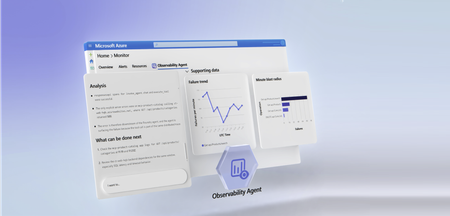
Autonomous operations for the Azure Copilot Observability Agent are now in public preview, alongside the agent's general availability. With autonomous operations enabled, the Observability Agent listens to your alerts as they fire, triages them in the background, and runs deep investigations on the issues it creates. Along the way, it correlates related alerts into a single issue - so your team starts from a small set of explained, investigated issues instead of a stream of raw alerts. Until now, teams invoked the agent when they needed it - an interactive assistant, ready to investigate when you pointed it at a problem. Now it also prepares triage context continuously, on its own, while people stay responsible for decisions and any change to the environment. See autonomous operations in action. The Observability Agent triages incoming alerts, correlates related ones into a single Azure Monitor issue, and runs a deep investigation automatically, with no human trigger. From alerts to answers Azure Monitor already gives you strong signals when something is wrong - across both metric and log alerts. Dynamic thresholds learn normal behavior and flag anomalies automatically, and that same anomaly detection now extends to log search alerts and, in preview, to Prometheus and OpenTelemetry metrics. Smart detection in Application Insights surfaces failures and performance anomalies without manual rules. The hard part is what happens next: connecting dozens of alerts, working out what they share, and figuring out what's actually going on - before anyone can act. That's the work that still lands on a person, often in the middle of the night. It's exactly where the Observability Agent comes in. What's in the public preview In public preview, you can enable the Observability Agent to: Promote individual prominent alerts into issues when you configure that with custom instructions. Run a deep investigation automatically on every issue it creates. Correlate related alerts into a single Azure Monitor issue, with a natural-language explanation of why they belong together. You provision the agent once as a resource in your Azure environment - a dedicated identity to scope, govern, and assign autonomous tasks to - then turn on autonomous operations and it gets to work. What it changes for your team The outcome is fewer things to look at and faster triage: Your team works from a short queue of meaningful issues, not a constant stream of alerts. Each issue arrives with context, reasoning, and an investigation already attached. Low-priority issues can be reviewed and dismissed in seconds. The assembly work that used to come first now happens before anyone is paged. People still make every decision and every change. The agent just makes sure they start with full context. How it works Your own instructions. Topology shows how services connect, but your team knows which boundaries matter: ownership, escalation paths, and the alerts that should always become issues. Custom instructions let you capture that in plain language and apply it going forward. For example: "The billing service is owned by a different team with a separate on-call rotation. Even when billing alerts fire alongside clinical service alerts, treat them as separate issues." Instructions shape how the agent correlates and creates issues. They don't grant permissions, bypass Azure RBAC, or change resources. Automatic topology discovery. Point the agent at your Application Insights resource and it maps services, dependencies, and how they relate. That map becomes persisted knowledge the agent builds and reuses - the same context that grounds both its correlation decisions and its deep investigations, so reasoning reflects your real architecture instead of starting from scratch each time. Deeper investigations. When the agent investigates a correlated issue, it starts from the whole picture: every related alert, every impacted resource, and the reasoning correlation already produced. The result is sharper root-cause hypotheses and recommendations that account for the full scope of impact. In practice A database latency spike triggers alerts across checkout, billing, and recommendation services. Without autonomous operations, each alert is triaged on its own. With autonomous operations enabled, the Observability Agent groups the related alerts into one issue, explains the shared timeline, and starts investigating automatically. Because your custom instructions define billing as a separate ownership boundary, its alerts become a distinct issue routed to that team's rotation. Responders start from two clear, ownership-aligned issues - each already investigated - instead of dozens of isolated alerts. What's next Autonomous operations mark the next step for the Observability Agent: from user-invoked analysis to continuous preparation. The agent assembles the context, explains the issue, and runs the investigation; your team reviews the evidence and decides what to do. And once issues are created, you can act on them. Azure Monitor issues connect to Action Groups, so approved actions can flow into your existing workflows - more on that in a future post. Next steps Learn how to get started with the Azure Copilot Observability Agent. Review the preview details in Autonomous operations in the Observability Agent. Explore how investigations work in Deep investigations in the Observability Agent. Learn how teams preserve context with Azure Monitor issues. Stay connected Follow this blog for ongoing deep dives, updates on current capabilities, and a preview of what's coming next. Live webinar A walkthrough of real Observability Agent scenarios, best practices, and what's available today, along with a look at what's coming next and live Q&A with the product team. Register for the Observability Agent webinar We'd love your feedback The Observability Agent continues to evolve based on real-world usage and operator feedback. Share your thoughts directly through the Give Feedback option in the experience or reach us at azureobsagent@microsoft.com. 495Views1like0Comments
Find anomalies in Prometheus and OpenTelemetry metrics with Dynamic Thresholds (Preview)
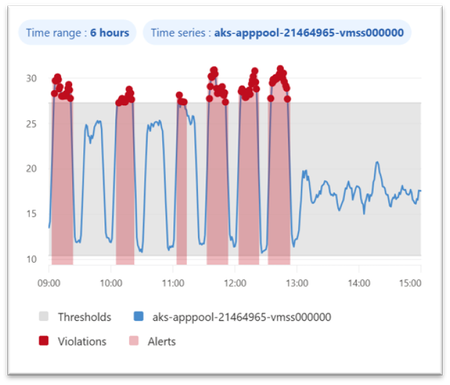
Dynamic thresholds are extended to query-based metric alerts in Azure Monitor, allowing to detect and alert on anomalies in Azure Monitor managed Prometheus metrics and OpenTelemetry metrics stored in an Azure Monitor Workspace. This follows the introduction of Dynamic Thresholds for Log search alerts — Azure Monitor now offers consistent Dynamic Thresholds support across logs and metrics — platform metrics, log search queries, and now query-based metric alerts. A consistent anomaly-detection approach, wherever your signals live. Dynamic thresholds are not a single static formula. They apply a range of machine-learning models and algorithms to historical query results, learn each series’ normal rhythm — including hourly, daily, and weekly seasonality — and automatically fit the most appropriate baseline separately to every time series. This way, a single alert rule can monitor many resources or dimensions while each one gets its own independent, self-refining baseline. Why Dynamic Thresholds Matter Simpler configuration: Reduce the need to define, maintain, and continuously tune static thresholds inside PromQL alert logic. Adaptive monitoring: Let alert thresholds adjust to changing workload behavior, recurring traffic peaks, and seasonal usage patterns. At-scale intelligence: Monitor multiple time series with a single alert rule, while Azure Monitor learns an independent baseline for each resource or dimension combination. Example 1 — Spot CPU anomalies in AKS workloads Scenario: Monitor container CPU utilization across pods or deployments in AKS with a query-based metric alert built on Prometheus metrics. Example query: sum by (microsoft_resource_id, namespace, deployment, container) (rate(container_cpu_usage_seconds_total[5m])) / sum by (microsoft_resource_id, namespace, deployment, container) (container_spec_cpu_quota / container_spec_cpu_period) Why dynamic thresholds help: CPU usage of a Kubernetes workload changes with workload mix, deployment timing, scaling activity, and traffic patterns. Static thresholds can be difficult to tune across namespaces, deployments, and containers. Dynamic thresholds learn a separate baseline for each monitored time series — in this example, for every pod, deployment, and container combination — so genuine CPU spikes stand out while expected variation from autoscaling and traffic mix stays quiet. Example 2 — Catch application latency regressions sooner Scenario: Detect abnormal latency patterns in an application by alerting on custom OpenTelemetry metrics stored in an Azure Monitor Workspace. Example query: histogram_quantile(0.95, sum by (le, service_name, http_route, http_method) (rate(http_server_duration_seconds_bucket[5m]))) Why dynamic thresholds help: Application latency naturally changes with traffic, user behavior, and release cadence. Fixed thresholds can be noisy during peak periods and too loose during quiet ones. Dynamic thresholds learn a separate baseline for each time series — here, for every service, route, and method — so real p95 latency regressions surface even as traffic and release cadence shift throughout the day. Best practices for better results To get the best results from dynamic thresholds for PromQL-based alerts, design your query so Azure Monitor can learn a clear, stable signal over time: Keep the expression numeric. Dynamic thresholds work best when the query returns a continuous numeric signal rather than a Boolean true/false result. For example, use an expression that calculates CPU usage, not a Boolean comparison like CPU > 0.8. Use meaningful dimensions. Split by dimensions such as namespace, deployment, service, or route when you want separate baselines for different workloads or endpoints. Prefer stable entities. Use longer-lived dimensions or aggregate across short-lived entities so the model has enough consistent history to learn from. In Kubernetes, for example, deployment is usually a better baseline dimension than individual pod ID. Choose the right threshold behavior. Decide whether the alert should trigger on values above the learned upper bound, below the lower bound, or both. Start with medium sensitivity. Use Medium as a balanced default, then tune up or down based on noise and missed anomalies. Allow enough historical data. Dynamic thresholds improve as more history is collected. Initial seasonal patterns use recent history, and weekly seasonality becomes more effective after several weeks of data. Get started Ready to try it? Create a query-based metric alert with dynamic thresholds on your metrics in Azure Monitor Workspace. You can create such rules in the Azure portal, where the built-in preview chart shows when your dynamic threshold alert would have fired based on historical baseline analysis. Use the preview chart to tune both the PromQL query and the dynamic threshold sensitivity before enabling the rule. You can also create query-based metric alert rules using programmatic interfaces or resource templates. Figure 1. Dynamic thresholds preview chart showing the learned baseline and the points where an alert would have fired. Dynamic thresholds cut alert noise where it starts — at detection. The alerts that do fire connect into Azure Monitor’s broader AIOps experience, where the Azure Copilot Observability Agent can help correlate signals into investigated issues with explainable reasoning — with humans in control. Next steps Related blog: Anomaly detection made easy with Dynamic thresholds for Log search alerts Dynamic thresholds in Azure Monitor Query-based metric alerts overview Create query-based metric alerts Prometheus metrics in Azure Monitor OpenTelemetry on Azure Monitor Stay connected Follow the Azure Observability Blog for more updates on Azure Monitor, Prometheus-based monitoring, alerting, and troubleshooting experiences. We’ll continue sharing product updates, practical guidance, and examples to help you improve observability across your Azure environments. Feedback We’d love to hear how dynamic thresholds for query-based metric alerts work for your scenarios. Share your feedback through your Microsoft account team, Azure support channels, or the feedback options in the Azure portal so we can continue improving the experience.212Views0likes0CommentsAzure Copilot Observability Agent is generally available, with autonomous operations in preview
Complex cloud environments have outpaced manual operations. Agentic cloud operations connect people, tools, and data to streamline investigation workflows and move teams from scattered signals to evidence-backed next steps. With unified observability, teams can investigate Azure-monitored applications, Azure Kubernetes Service (AKS) environments, VMs, Foundry telemetry, infrastructure, and platform signals with greater context and control. Powered by Azure Monitor, the Azure Copilot Observability Agent is now generally available. It helps engineering, SRE, DevOps, and operations teams move from telemetry and alert noise to investigated issues, explainable reasoning, and recommended next steps that can reduce Time-To-Mitigate (TTM). Autonomous operations are also available in public preview. They help prepare context and reduce triage work while people remain responsible for mitigation decisions and any changes to the environment. From alert noise to investigated issues The Observability Agent helps teams reduce the effort required to understand operational problems. Instead of starting every investigation from a dashboard, query editor, or alert payload, teams can work with an AI companion that reasons across telemetry, Azure resource context, discovered topology, and custom instructions to identify what changed, what is correlated, and what evidence supports the conclusion. Teams can start with natural-language exploration and continue into deeper investigations when an issue requires more evidence. That light-to-deep workflow helps responders move from broad questions to a structured investigation without losing the reasoning trail. Here's what this looks like in practice: after a deployment, several alerts might fire across an app, database dependency, and compute resource. The Observability Agent can group those signals around the affected service, identify when the regression started, compare related dependencies and infrastructure metrics, and capture the findings in an Azure Monitor issue. The responder can then validate the evidence, add team context, route work to the right owner, and decide whether a rollback, configuration change, or code fix is appropriate. Explainable investigations across Azure-monitored signals Operations teams need more than a chatbot that answers questions. The Observability Agent follows an investigation workflow: it frames hypotheses, gathers evidence, compares signals by time, scope, and type, rules out weak explanations, and shows the reasoning path behind its findings. The Observability Agent can help teams: Investigate incidents and alerts across Azure-monitored applications, Azure Kubernetes Service (AKS) environments, VMs, Foundry telemetry, infrastructure, and platform signals Correlate related signals to reduce noise and surface higher-signal issues with context Explore telemetry using natural language while preserving transparency into the supporting data Compare signals by time, scope, and type to separate likely causes from coincidental changes Provide a reasoning trail that shows what the agent found, what it ruled out, and why Recommend next steps that engineers can review before deciding how to act This same investigation model applies to specialized skills and issue types, including customer's application, Azure Kubernetes Service (AKS), Foundry, VMs, and GenAI issues. When the relevant telemetry is available, the Observability Agent can correlate logs, metrics, traces, alerts, dependencies, resource graph, resource health, activity logs, Foundry telemetry, and changes. This helps teams investigate customer-visible issues with evidence, including latency, token spikes, tool-call failures, agent errors, hallucinations, deployments, API failures, performance regressions, infrastructure dependencies, and platform incidents. This explainability is central to the product. In production operations, trust is earned through evidence. The Observability agent is built to support human judgment, not bypass it. . Azure expertise, with context from your environment Context matters in every investigation. The same symptom can mean different things depending on application architecture, recent deployments, dependencies, historical incidents, and team practices. The Observability Agent brings Microsoft and Azure operational knowledge into the investigation experience. It can use discovered topology, Azure resource context, logs, metrics, traces, and custom instructions to ground investigations in signals that are more relevant to your environment. Native to Azure Monitor, with humans in control Because the Observability Agent is built into Azure Monitor, teams can use it close to the telemetry, alerts, and workflows they already rely on. Investigations can also be captured as Azure Monitor issues, creating a shared case file for humans and agents to collaborate on evidence, reasoning, and next steps. The Observability Agent is designed for governed AI operations inside Azure Monitor. Interactive chat and investigations use the signed-in user's identity and Azure role-based access control (RBAC). Prompts and responses are not used to train foundation models, and the agent doesn't restart resources, change configuration, or resolve issues on its own. Autonomous operations in public preview Alongside general availability, autonomous operations for the Observability Agent are available in public preview. When enabled, the agent can analyze alerts in the background, correlate related alerts when they likely represent the same incident, create Azure Monitor issues automatically, and run deep investigations on agent-created issues. This automatic triage helps reduce alert noise by turning streams of individual alerts into higher-signal issues with context, findings, and recommended next steps. Teams can review the issue, continue the investigation, and decide what action to take. Autonomous operations are designed to prepare context and reduce triage work, not to remove human control. Engineers remain responsible for decisions, approvals, and any changes to the environment. Next steps Check out our latest announcements and related blogs: Azure Blog and OMB Blog. Learn how to use the Observability Agent in Azure Copilot Observability Agent. Explore how investigations work in Deep investigations in the Azure Copilot Observability Agent. Learn more on how to Chat with your observability data Learn how teams preserve context in Azure Monitor issues. Review preview details in Autonomous operations in the Azure Copilot Observability Agent. Stay connected Follow this blog for ongoing deep dives, updates on current capabilities, and a preview of what's coming next. Live webinar - a walkthrough of real Observability Agent scenarios, best practices, and what's available today - along with a look at what's coming next, and live Q&A with the product team. Register for the Observability Agent webinar. We'd love your feedback The Observability agent continues to evolve based on real-world usage and operator feedback. Share your thoughts directly through the Give Feedback option in the experience, or reach us at enauerman@microsoft.com.10KViews6likes0CommentsAccelerating AKS troubleshooting with the Azure Copilot Observability Agent
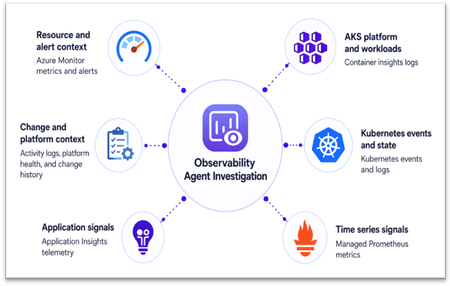
AKS incidents rarely stay within one Kubernetes object, signal, or tool. A latency spike might first appear in application telemetry, but the root cause may sit elsewhere: pod restarts, node pressure, scheduling failures, or a recent configuration change. The Azure Copilot Observability Agent in Azure Monitor helps connect these signals into an explainable investigation, so teams can move from symptoms to evidence-backed next steps. Why AKS troubleshooting is complex Troubleshooting Azure Kubernetes Service (AKS) is complex because failures can originate in workloads, platform components, infrastructure, or the application code running on the cluster. For example, pods stuck in Pending may indicate capacity or scheduling issues, while application latency may be caused by throttling, failed probes, pod restarts, or node pressure below the app. During an incident, simply having more telemetry is not enough. Teams need a way to test likely causes, rule out unrelated signals, and keep the investigation tied to the affected workload and time window. From signal to root cause: the investigation flow The Observability Agent follows a consistent investigation pipeline: Scope the problem by identifying the most likely infrastructure resources involved, plus connected dependencies. Collect data across metrics, logs, traces, change history, and related signals. Detect anomalies using learned baselines (for metrics) and log analysis. Correlate across resources spanning infrastructure and application layers. Run deep diagnostics by invoking resource-specific tools when needed to pinpoint root cause. Summarize findings in a structured format: what happened, why it happened, and what to do next. AKS investigation data sources The agent works with telemetry already available in your Azure Monitor environment. Investigation depth improves as more relevant signals are enabled, including Container insights logs, Kubernetes events and state, Azure managed service for Prometheus, container and pod logs, Application Insights telemetry for AKS-hosted workloads, Azure Activity Log changes, control plane logs routed through diagnostic settings, and resource metadata for the cluster, node pools, workloads, and related Azure resources. Figure 1. AKS investigation data sources You don’t need to enable every telemetry source to get started. The Observability Agent uses the data already available in Azure Monitor, and its findings become more complete as more AKS and application signals are collected. Example 1: AKS infrastructure — explaining why new pods never start Consider a workload rollout on AKS where replacement pods remain stuck in Pending state. What looks like a failed release may stem from the workload definition, cluster state, or underlying infrastructure. Investigation walkthrough Symptom: rollout is blocked Replacement pods remain in Pending during rollout, and Kubernetes events show repeated scheduling failures. This indicates that the rollout is blocked before new pods can start. Workload evidence: scheduling, not startup Pod state identifies the affected workload, while Kubernetes events show repeated placement failures. The issue is therefore tied to scheduling rather than application startup or container crash behavior. Cluster evidence: capacity pressure When enabled, Prometheus node metrics show CPU and memory utilization near capacity. Cluster-level trends show resource pressure increasing at the same time as pending pods and scheduling failures. Likely cause: insufficient schedulable capacity The scheduler cannot place new pods because the relevant node pool does not have enough available capacity. The failed rollout is best explained by capacity pressure in the target node pool rather than an application crash or image startup failure. Recommended action Scale out the affected node pool or adjust workload resource requests, then retry the rollout once schedulable capacity is restored. Figure 2. AKS investigation flow The Observability Agent connects pod state, scheduling events, and node pressure to explain why the rollout is blocked and which capacity action to consider next. Example 2: Joint app-AKS investigation — tracing application latency to pod restarts Now consider a customer-facing application where users see increased latency and intermittent HTTP 5xx errors after deployment. The first symptom appears in application telemetry, but the unhealthy requests are served by pods that are repeatedly restarting in AKS. Investigation walkthrough Symptom: customer-facing service degradation After deployment, application telemetry shows increased latency and HTTP 5xx errors. The first visible impact appears at the application layer. AKS evidence: unstable pods Affected pods enter CrashLoopBackOff, restart counts increase, and Kubernetes events show back-off restarts, probe failures, or image or command errors. Container logs point to startup exceptions, missing configuration, or crash details. Resource evidence: workload-specific pressure Container memory usage approaches configured limits before restarts, while node metrics show no broad node pressure. This suggests the issue is workload-specific rather than cluster-wide capacity related. Change evidence: deployment correlation Deployment history shows a new image or configuration change shortly before restarts began, with no matching platform health event. The timing points to the latest deployment or configuration change. Recommended action Review the latest image or configuration change, inspect container logs, adjust memory limits, or roll back if needed. Focus remediation on the workload change rather than node pool scaling. This pattern shows how an application symptom can map back to AKS workload behavior. Application telemetry establishes the user impact, while Kubernetes events, container logs, and resource metrics help explain why the affected pods keep failing. Operational impact For site reliability engineers, platform teams, and IT professionals, the Observability Agent reduces the time spent moving between application and AKS telemetry. It brings relevant signals into one investigation, surfaces supporting evidence, and applies Azure Monitor and AKS context so your team can review the findings, validate the recommended path, and decide which production changes to make. Figure 3. AKS investigation results Using the Observability Agent You can start using the Observability Agent from the Azure portal in two common AKS troubleshooting flows: Investigation mode: Start an investigation from an Azure Monitor alert on an AKS resource or from an Application Insights alert for an AKS-hosted workload. The agent uses the alert context to scope the incident, correlate application and cluster telemetry, and summarize the likely cause with recommended next steps. Chat-based exploration: Open the Monitor experience in AKS and select the Observability Agent button to chat with your telemetry. Use natural language to ask follow-up questions, explore logs and metrics, detect and inspect anomalies, and narrow down likely causes. Figure 4. Starting Observability Agent from AKS Monitor experience Next steps Azure Copilot Observability Agent overview Monitor Azure Kubernetes Service with Azure Monitor Stay connected Follow this blog for ongoing deep dives, updates on current capabilities, and a preview of what's coming next. Live webinar — A walkthrough of real Observability Agent scenarios, best practices, and what's available today, along with a look at what's coming next and live Q&A with the product team. Register for the Observability Agent webinar. We'd love your feedback The Observability Agent continues to evolve based on real-world usage and operator feedback. Share your thoughts directly through the Give Feedback option in the experience, or reach us at: azureobsagent@microsoft.com345Views0likes0CommentsInside the Observability Agent: How Deep Investigations and Reasoning Work
Deep investigation in the Azure Copilot Observability Agent turns observability data into a verified, data-backed explanation of what happened during an incident, correlating application, infrastructure, and platform signals across time, scope, and type to produce a structured root cause analysis.616Views1like0CommentsPUBLIC PREVIEW - Azure Monitor - Collect Azure Resource Platform Logs at Scale with DCRs
PUBLIC PREVIEW - Azure Monitor - Collect Azure Resource Platform Logs at Scale with DCRs. How DCR-based platform logs simplify the telemetry collection for organizations managing 1,000+ resources.1.1KViews2likes1CommentAzure Monitor Copilot Observability Agent: What’s new at Build
The Observability agent in Azure Copilot is an AI-powered assistant built into Azure Monitor that helps engineers investigate issues and explore their systems using natural language. By grounding its analysis in telemetry data such as metrics, logs, and traces, it supports both open-ended exploration and guided troubleshooting. For more details, see the documentation. Since our initial public preview, the Observability agent in Azure Copilot has continued to evolve with new capabilities and expanded coverage (You can read more about the initial release in our previous blog) At Build 2026, we’re introducing updates that expand the Observability agent’s capabilities and the range of scenarios it can support. These updates provide deeper analysis and more detailed responses for both exploration and investigation. Expanded Investigation Scenarios The Observability agent now supports a broader set of scenarios across applications and infrastructure. These can be accessed directly from relevant product experiences, without requiring a prior alert, allowing teams to explore data conversationally and initiate deeper investigations as signals emerge. Integration with Microsoft Foundry AI Agent The Observability agent integrates with Microsoft Foundry AI Agents, enabling correlation of signals across key generative AI and agent observability scenarios such as latency spikes, error patterns, and tool invocation failures. Teams can interact with the Observability agent either from alerts - including alerts based on Foundry telemetry - or directly within Application Insights, where the Agents details experience serves as the primary entry point. From there, users can use the Observability agent to diagnose errors, analyze trends, and explore their data across one or multiple agents. Application Insights integration The Observability agent enables investigation of failure scenarios directly from Application Insights Failures blade, allowing teams to analyze application-level issues and move from symptom to root cause. Azure Kubernetes Service (AKS) integration The Observability agent enables deep investigation of issues in Azure Kubernetes Service (AKS) clusters. AKS investigations correlate signals from Azure Monitor with Kubernetes logs and events, and (coming soon) Prometheus metrics stored in an Azure Monitor Workspace. Together, these signals enable full‑stack analysis of applications running on AKS. The Observability agent helps teams determine whether an issue originates from the application or from the underlying Kubernetes platform, reducing time to diagnosis and resolution. Activity Logs integration Investigations can be initiated based on Azure Resource Health events surfaced in Activity Logs, enabling analysis of service-impacting signals related to the Azure platform. Deeper Insights across systems Multiple Application Insights - Coming soon! The Observability agent supports investigations that can span multiple Application Insights resources, enabling scenarios that involve multiple services within distributed applications. The agent can guide users to expand the investigation scope when cross-service issues are detected. Integration with Azure Service Health The Observability agent correlates investigation context with Azure Service Health events, helping teams understand potential platform impact as part of their investigation. This helps distinguish application-level issues from broader Azure platform conditions and prioritize active impacts. Issue management Enhancements Viewing issues Issues can now be viewed in multiple places, depending on the required scope: Azure Monitor: showing issues across all Azure Monitor Workspaces (AMWs) under the selected subscriptions Azure Monitor Workspace: showing issues stored within a specific AMW Issue actions & notifications Issue actions trigger notifications when issues are created or updated, enabling integration with workflows such as email, webhooks, and automation. Sharing and follow-up You can now download investigation results as a PDF, including supported data, enabling teams to capture and share investigation context for incident reviews and reporting. Coming Soon Billing for the Observability agent starts on July 1, 2026. The agent uses a consumption-based pricing model, so customers pay only for the AI work the agent performs. Agent consumption is measured in Azure Agent Credit (AAC) units, which reflect how many LLM tokens the agent used. For more details, see the documentation. Stay connected Follow this blog for ongoing updates and deeper dives into new capabilities Join our upcoming webinar for real-world scenarios, best practices, and a look at what’s coming next 👉 Register here We’d love your feedback The Observability Agent continues to evolve based on real-world usage and customer feedback. Share feedback through the Give Feedback option in the product or contact us at: azureobsagent@microsoft.com Want to learn more? Read our previous blog posts - Public Preview Update: Azure Copilot Observability Agent | Microsoft Community Hub The Azure Copilot Observability Agent Chat - Stop Writing Queries, Start Asking Questions. | Microsoft Community Hub Explore our documentation - Azure Copilot observability agent (preview) - Azure Monitor | Microsoft Learn888Views0likes1Comment
Connect Metrics to Traces with Exemplars in Azure Monitor
Following Microsoft’s recent GA announcement for OpenTelemetry (OTel) support, we are excited to announce support for Exemplars for customers instrumenting metrics with Prometheus or OpenTelemetry and traces using OpenTelemetry, enhancing Azure Monitor’s integrated observability experience for cloud-native applications. Modern cloud-native applications generate enormous volumes of telemetry. Metrics help teams detect that something is wrong, but traces explain why. Exemplars bridge these two worlds by attaching trace references directly to metric data points, making it dramatically easier to pivot from a spike in latency or errors to the exact distributed trace responsible for the issue. With Azure Monitor, customers can now ingest metrics with exemplars and visualize them in Azure Managed Grafana. This enables seamless correlation between metrics and traces, helping engineering teams troubleshoot issues faster and reduce mean time to resolution (MTTR). Why Exemplars Matter Traditional monitoring workflows often require users to manually correlate data across multiple systems. Exemplars simplify this workflow by embedding trace context directly into metric samples. For example, if a latency metric spikes at a specific timestamp, the exemplar associated with that data point can link directly to the distributed trace responsible for the outlier. This provides several benefits: Faster root cause analysis Quicker transition from aggregate metrics to request-level details Simplified debugging workflows for SRE and platform teams Better observability experiences for microservices and distributed applications Unified Observability with Azure Monitor With Azure Monitor and Azure Managed Grafana, you can now: Ingest OTLP or Prometheus metrics with exemplars into Azure Monitor Workspace Store and analyze traces in Azure Monitor Application Insights Visualize exemplar markers directly in Grafana charts Navigate from a metric spike to the exact distributed trace associated with that data point By combining these signals in a single observability platform, organizations can correlate infrastructure health, application behavior, and request traces without context switching between tooling. How It Works Once metrics, exemplars, and traces are ingested into Azure Monitor, Azure Managed Grafana can consume exemplar information from the configured Prometheus data source. When exemplars are enabled in Grafana dashboards, users will see markers associated with individual metric data points. Selecting an exemplar opens the associated trace in Azure Monitor, providing end-to-end diagnostic context. Getting Started Setup data ingestion: Instrument your application to emit OpenTelemetry traces, OpenTelemetry or Prometheus metrics with exemplars, and enable ingestion of the same to Azure Monitor using OpenTelemetry Collector. Follow the instructions in Ingest OTLP Data into Azure Monitor with OTel Collector - Azure Monitor | Microsoft Learn. After this step, you will have the Log Analytics Workspace, Azure Monitor Workspace and Application Insights resources all set up to store the telemetry data. Create an Azure Managed Grafana instance and connect it with the Azure Monitor Workspace by navigating to your Azure Monitor Workspace in the Azure portal and then clicking on “Linked Grafana workspaces”. To learn more, see Manage an Azure Monitor workspace - Azure Monitor | Microsoft Learn Optionally, enable Azure Managed Prometheus on your AKS cluster or use remote-write and configure it to use the same Azure Monitor Workspace to centralize infrastructure and application metrics. Enable Exemplars in Azure Managed Grafana: After setting up the data ingestion, ensure that logs and traces are flowing into Log Analytics Workspace, and metrics are flowing into Azure Monitor Workspace. Step 1: Enable Exemplars on Prometheus Data Source in Azure Managed Grafana Navigate to Connections -> Data Sources in Azure Managed Grafana. Since you have connected Azure Managed Grafana to Azure Monitor Workspace, you will see the data source (Managed_Prometheus_<AMW-Name>) already configured. If the data source is not configured, follow the steps here to add your Azure Monitor Workspace as a data source. Open the data source configuration. Click Add Exemplars to enable exemplar support. Step 2: Configure Trace Linking with Azure Monitor In the exemplar configuration section, toggle Internal Link to On. Select Azure Monitor as the data source. In the Label Name, enter the name of the field in the labels object that should be used to get the trace id, eg. trace_id. Click Save & Test. This configuration enables direct navigation from exemplar markers in Grafana charts to the associated traces stored in Azure Monitor. Azure Managed Grafana also supports trace correlation from other solutions like Jaeger etc. To use your trace solution, use the appropriate links. Step 3: Enable Exemplars in Dashboards Navigate to a Grafana dashboard that uses your configured Prometheus data source. Open the panel options for a metrics chart. Toggle Exemplars to On. Once enabled, exemplar markers will appear on supported metric visualizations. Clicking on it will show exemplar details along with an option to open the corresponding distributed trace in Azure Monitor. To learn more, visit https://aka.ms/azmon-exemplars329Views1like0CommentsNew Capabilities to Observe Agents in Azure Monitor
Over the last six months, we have been listening to you and building new capabilities to help you observe your agents. You’ve been sharing with us that quality issues are tricky and evaluation is critical, that agent reasoning needs to be understood, that humans must be in the loop to review select agent interactions, and that security and privacy are essential. To address these concerns, we’re announcing several new capabilities that make agents a first-class artifact in Azure Monitor, so you can debug them in the context of your broader distributed application alongside non-agentic components. Microsoft Foundry remains the surface for building and evaluating agents within the context of your project, while Azure Monitor provides the full-stack observability platform and underlying data foundation that powers those experiences. Today, we’re announcing new capabilities in Azure Monitor across ingestion, performance, evaluation workflows, agent debugging, and instrumentation updates to help teams get telemetry faster, inspect agent behavior more deeply, and standardize observability across hosting environments and frameworks. What’s new Reducing pipeline latency from more than 60 seconds to 7.5 seconds at P90. This makes telemetry available faster for teams troubleshooting agents at scale. Emitting events up to 1MB and up to 256kB per attribute. Prompts and responses can get large, and this helps avoid data truncation. Introducing a new view that shows a list of all agents being monitored. Whether you use Microsoft Agent Framework, LangChain, Microsoft Copilot Studio, Foundry Hosting, AKS Hosting, or something else, they all show up here. Improving drill-in from Evaluations to underlying prompts/responses. Evaluations in Azure Monitor are powered by Foundry, and we continue to improve visuals. Showing conversation context in end-to-end transaction view. In chat agents, conversations have become critical glue that connects traces and eases debugging. Searching by text and showing prompt previews in end-to-end transaction view. Prompts and responses are essential to understanding agent logic, and now you can search based on keyword text in Search and End-to-end transaction details views. Show evaluation scores in end-to-end transaction details and sort by evaluation score in Search. Evaluation is emerging as a “4 th pillar” of telemetry, and you’ll see it surface more prominently across Azure Monitor Application Insights. Access the entire JSON blob of prompt/response text. This makes it easier to get to your underlying data and copy out of Azure Monitor for custom analysis/evaluation. Adding a “trace tree” to enhance traversing the agent’s reasoning logic. This new addition to end-to-end transaction view makes traversing long-traces much easier. Enabling builders to annotate (i.e., manual evaluations) from transaction details. Get rid of spreadsheets on the side and annotate from within Azure Monitor. Enabling capture of end-user feedback (i.e., thumbs up/down). Brings end-user feedback alongside other telemetry for more powerful troubleshooting. Extending AI-powered troubleshooting to agents. Observability agent offers full-stack, AI-powered troubleshooting and surfaces up findings in an issue. Learn More. Observability of Coding Agents. Get end-to-end visibility into agent and model usage, performance, and cost with Azure Monitor Application Insights, and built-in Grafana dashboards. Learn More. A unified “Microsoft OpenTelemetry Distro” to observe agents hosted anywhere. A unified Microsoft OpenTelemetry Distro for observing agents hosted anywhere gives teams a single starting point across Foundry, Azure Monitor, and A365, reducing fragmentation and simplifying onboarding (GH Repos: Python, .NET, JavaScript). Skills-based enablement. Getting started is easier. Just point your agent to a skill for AI-assisted instrumentation. We also plan to upgrade tools for instrumentation in Azure MCP. What’s next We’re continuing to invest in this area, with upcoming work focused on stronger security controls for prompts and responses, better cost transparency for agents, and clearer ways to measure ROI across your agent fleet. These updates make it possible to observe agents without adopting a separate toolchain. Explore the new capabilities, and if you see gaps, let us know so we can continue shaping the roadmap based on your feedback. Learn More.885Views1like0Comments