application gateway
22 Topics
Azure Application Gateway: 502 error due to backend certificate not whitelisted in the AppGW
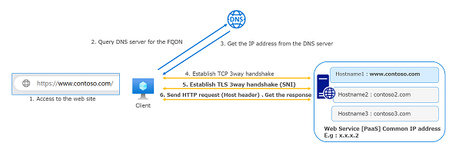
If you are using Azure Application Gateway as Layer 7 WAF for End to End SSL connectivity , you might have come across Certificate related issues most of the times. In this article I am going to talk about one most common issue "backend certificate not whitelisted" If you check the backend health of the application gateway you will see the error like this "The root certificate of the server certificate used by the backend does not match the trusted root certificate added to the application gateway. Ensure that you add the correct root certificate to whitelist the backend" The error says that Root cert is not whitelisted on the AppGW , but you might have a valid Third party certificate on the backend , and more over if you try to access the backend directly bypassing the Application Gateway you will not see any issues related to certificate in the browser. If your certificate is working on browser directly hitting the app and not with AppGW then what is the exact problem? To Answer we need to understand what happens in any SSL/TLS negotiation. During SSL negotiation , Client sends "Client Hello" and Server Responds with "Server Hello" with its Certificate to the Client. Now Clients will check the Server certificate and confirm if the certificate is issued by Trusted root or not. For the server certificate to be trusted we need the Root certificate in Trusted Root Cert Store , usually if you are having certs issued by Godaddy,Digicert,Vergion like Third party Vendors you don’t have to do anything because they are automatically trusted by your client/browser. If your cert is issued by Internal Root CA , you would have export the root cert and import it the Trust Root Store in the Client. This is the exact thing what we do when import .CER file in the HTTP Settings of the Application Gateway. In Azure docs, it is clearly documented that you don’t have to import Auth certificate in HTTP settings of the backend if your backend application has Global trusted certificate. You should do this only if the backend has cert which is issued by internal CA I hope we are clear till now on why we import Authenticate cert in the HTTP settings of the AppGW and when we use the option "Use Well Known CA" But the actual problem arises if you are using a Third party Cert or Internal CA Cert which has Intermediate CA and then Leaf certificate Most of the orgs for security reasons use Root Cert----> Intermediate Cert ------> Leaf Cert , even Microsoft follows the same for bing , check the screenshot below Now lets discuss what exactly is the confusion here if we have multiple Chain Cert When you have single chain certificate , then there will be no confusion with appgw , if your root CA is Global trusted just select "Use Trusted Root CA" option in HTTPsettings If you root CA is Internal CA , then import that Top root cert in .cer format and upload it in the HTTP settings Below is what happens during SSL negotiation when you have single chain cert and root in the AppGW. Server will send its Certificate and because AppGW will already have its Root Cert, it verifies the backend server certificate and finds that it was issued by the Root cert which it is Trusting and they it starts connecting on HTTPs further for probing. But when we have multiple chain certificate and if your backend application/server sends only the leaf the certificate , AppGW will not be able to trust the cert up to the top level domain root. when the backend server cert hits AppGW after Server Hello , AppGW tries to check who issued the certificate and it finds that it was issued by Intermediate certificate but then it does not have information about Intermediate cert, like who issued the cert and what is the root certificate of that intermediate certificate. This causes SSL/TLS negoatiation failure and AppGW marks the backend as unhealthy because it is not able to initiate the probe. Now you may ask why it works when you browse the backend directly through browser. Most of the browsers are thick clients , so it may work in the new browsers but reverse proxies like Application Gateway wont behave like our browsers they only trust the certificates if the backend sends the complete chain. here is what happens in in Multiple chain certificate. AppGW is a PaaS instance , by default you wont get access to the Applicaiton Gateway. Now how do we find if my application/backendserver is sending the complete chain to AppGW? You can find this by running openssl from either windows client or Linux client which is present in the same network/subnet of the backend application. We should get one Linux machine which is in the same subnet/VNET of the backend application and run the following commands. what we are doing is actually trying to simulate the Linux box as AppGW as if that machine is trying probe to the backend server as AppGW. here is the sample command you need to run, from the machine that can connect to the backend server/application. OpenSSL s_client -connect 10.0.0.4:443 -servername www.example.com -showcerts If the output doesn't show the complete chain of the certificate being returned, export the certificate again with the complete chain, including the root certificate. Configure that certificate on your backend server. For details on this Openssl command you can refer to Troubleshoot backend health issues in Azure Application Gateway | Microsoft Docs , Look for the sub topic "Trusted root certificate mismatch"20KViews6likes0CommentsAzure Front Door: Resiliency Series – Part 2: Faster recovery (RTO)
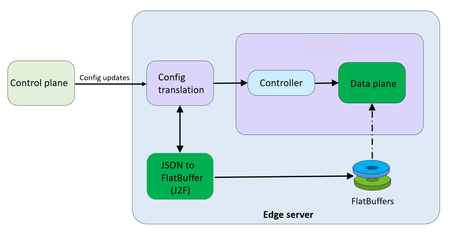
Abhishek Tiwari, Vice President of Engineering, Azure Networking Amit Srivastava, Partner Director of PM, Azure Networking Varun Chawla, Partner Director of Engineering, Azure Networking Karthik Uthaman, Principal Engineer, Azure Networking In Part 1 of this blog series, we outlined our four‑pillar strategy for resiliency in Azure Front Door: configuration resiliency, data plane resiliency, tenant isolation, and accelerated Recovery Time Objective (RTO). Together, these pillars help Azure Front Door remain continuously available and resilient at global scale. Part 1 focused on the first two pillars: configuration and data plane resiliency. Our goal is to make configuration propagation safer, so incompatible changes never escape pre‑production environments. We discussed how incompatible configurations are blocked early, and how data plane resiliency ensures the system continues serving traffic from a last‑known‑good (LKG) configuration even if a bad change manages to propagate. We also introduced ‘Food Taster’, a dedicated sacrificial process running in each edge server’s data plane, that pretests every configuration change in isolation, before it ever reaches the live data plane. In this post, we turn to the recovery pillar. We describe how we have made key enhancements to the Azure Front Door recovery path so the system can return to full operation in a predictable and bounded timeframe. For a global service like Azure Front Door, serving hundreds of thousands of tenants across 210+ edge sites worldwide, we set an explicit target: to be able to recover any edge site – or all edge sites – within approximately 10 minutes, even in worst‑case scenarios. In typical data plane crash scenarios, we expect recovery in under a second. Repair status The first blog post in this series mentioned the two Azure Front Door incidents from October 2025 – learn more by watching our Azure Incident Retrospective session recordings for the October 9 th incident and/or the October 29 th incident. Before diving into our platform investments for improving our Recovery Time Objectives (RTO), we wanted to provide a quick update on the overall repair items from these incidents. We are pleased to report that the work on configuration propagation and data plane resiliency is now complete and fully deployed across the platform (in the table below, “Completed” means broadly deployed in production). With this, we have reduced configuration propagation latency from ~45 minutes to ~20 minutes. We anticipate reducing this even further – to ~15 minutes by the end of April 2026, while ensuring that platform stability remains our top priority. Learning category Goal Repairs Status Safe customer configuration deployment Incompatible configuration never propagates beyond ‘EUAP or canary regions’ Control plane and data plane defect fixes Forced synchronous configuration processing Additional stages with extended bake time Early detection of crash state Completed Data plane resiliency Configuration processing cannot impact data plane availability Manage data-plane lifecycle to prevent outages caused by configuration-processing defects. Completed Isolated work-process in every data plane server to process and load the configuration. Completed 100% Azure Front Door resiliency posture for Microsoft internal services Microsoft operates an isolated, independent Active/Active fleet with automatic failover for critical Azure services Phase 1: Onboarded critical services batch impacted on Oct 29 th outage running on a day old configuration Completed Phase 2: Automation & hardening of operations, auto-failover and self-management of Azure Front Door onboarding for additional services March 2026 Recovery improvements Data plane crash recovery in under 10 minutes Data plane boot-up time optimized via local cache (~1 hour) Completed Accelerate recovery time < 10 minutes April 2026 Tenant isolation No configuration or traffic regression can impact other tenants Micro cellular Azure Front Door with ingress layered shards June 2026 Why recovery at edge scale is deceptively hard To understand why recovery took as long as it did, it helps to first understand how the Azure Front Door data plane processes configuration. Azure Front Door operates in 210+ edge sites with multiple servers per site. The data plane of each edge server hosts multiple processes. A master process orchestrates the lifecycle of multiple worker processes, that serve customer traffic. A separate configuration translator process runs alongside the data plane processes, and is responsible for converting customer configuration bundles from the control plane into optimized binary FlatBuffer files. This translation step, covering hundreds of thousands of tenants, represents hours of cumulative computation. A per edge server cache is kept locally at each server level – to enable a fast recovery of the data plane, if needed. Once the configuration translator process produces these FlatBuffer files, each worker processes them independently and memory-maps them for zero-copy access. Configuration updates flow through a two-phase commit: new FlatBuffers are first loaded into a staging area and validated, then atomically swapped into production maps. In-flight requests continue using the old configuration, until the last request referencing them completes. The data process recovery is designed to be resilient to different failure modes. A failure or crash at the worker process level has a typical recovery time of less than one second. Since each server has multiple such worker processes which serve customer traffic, this type of crash has no impact on the data plane. In the case of a master process crash, the system automatically tries to recover using the local cache. When the local cache is reused, the system is able to recover quickly – in approximately 60 minutes – since most of the configurations in the cache were already loaded into the data plane before the crash. However, in certain cases if the cache becomes unavailable or must be invalidated because of corruption, the recovery time increases significantly. During the October 29 th incident, a data plane crash triggered a complete recovery sequence that took approximately 4.5 hours. This was not because restarting a process is slow, it is because a defect in the recovery process invalidated the local cache, which meant that “restart” meant rebuilding everything from scratch. The configuration translator process then had to re-fetch and re-translate every one of the hundreds of thousands of customer configurations, before workers could memory-map them and begin serving traffic. This experience has crystallized three fundamental learnings related to our recovery path: Expensive rework: A subset of crashes discarded all previously translated FlatBuffer artifacts, forcing the configuration translator process to repeat hours of conversion work that had already been validated and stored. High restart costs: Every worker on every node had to wait for the configuration translator process to complete the full translation, before it could memory-map any configuration and begin serving requests. Unbounded recovery time: Recovery time grew linearly with total tenant footprint rather than with active traffic, creating a ‘scale penalty’ as more tenants onboarded to the system. Separately and together, the insight was clear: recovery must stop being proportional to the total configuration size. Persisting ‘validated configurations’ across restarts One of the key recovery improvements was strengthening how validated customer configurations are cached and reused across failures, rather than rebuilding configuration states from scratch during recovery. Azure Front Door already cached customer configurations on host‑mounted storage prior to the October incident. The platform enhancements post outage focused on making the local configuration cache resilient to crashes, partial failures, and bad tenant inputs. Our goal was to ensure that recovery behavior is dominated by serving traffic safely, not by reconstructing configuration state. This led us to two explicit design goals… Design goals No category of crash should invalidate the configuration cache: Configuration cache invalidation must never be the default response to failures. Whether the failure is a worker crash, master crash, data plane restart, or coordinated recovery action, previously validated customer configurations should remain usable—unless there is a proven reason to discard it. Bad tenant configuration must not poison the entire cache: A single faulty or incompatible tenant configuration should result in targeted eviction of that tenant’s configuration only—not wholesale cache invalidation across all tenants. Platform enhancements Previously, customer configurations persisted to host‑mounted storage, but certain failure paths treated the cache as unsafe and invalidated it entirely. In those cases, recovery implicitly meant reloading and reprocessing configuration for hundreds of thousands of tenants before traffic could resume, even though the vast majority of cached data was still valid. We changed the recovery model to avoid invalidating customer configurations, with strict scoping around when and how cached entries are discarded: Cached configurations are no longer invalidated based on crash type. Failures are assumed to be orthogonal to configuration correctness unless explicitly proven otherwise. Cache eviction is granular and tenant‑scoped. If a cached configuration fails validation or load checks, only that tenant’s configuration is discarded and reloaded. All other tenant configurations remain available. This ensures that recovery does not regress into a fleet‑wide rebuild due to localized or unrelated faults. Safety and correctness Durability is paired with strong correctness controls, to prevent unsafe configurations from being served: Per‑tenant validation on load: Each cached tenant configuration is validated during the ‘load and verification’ phase, before being promoted for traffic serving. Therefore, failures are contained to that tenant. Targeted re‑translation: When validation fails, only the affected tenant’s configuration is reloaded or reprocessed. Therefore, the cache for other tenants is left untouched. Operational escape hatch: Operators retain the ability to explicitly instruct a clean rebuild of the configuration cache (with proper authorization), preserving control without compromising the default fast‑recovery path. Resulting behavior With these changes, recovery behavior now aligns with real‑world traffic patterns - configuration defects impact tenants locally and predictably, rather than globally. The system now prefers isolated tenant impact, and continued service using last-known-good over aggressive invalidation, both of which are critical for predictable recovery at the scale of Azure Front Door. Making recovery scale with active traffic, not total tenants Reusing configuration cache solves the problem of rebuilding configuration in its entirety, but even with a warm cache, the original startup path had a second bottleneck: eagerly loading a large volume of tenant configurations into memory before serving any traffic. At our scale, memory-mapping, parsing hundreds of thousands of FlatBuffers, constructing internal lookup maps, adding Transport Layer Security (TLS) certificates and configuration blocks for each tenant, collectively added almost an hour to startup time. This was the case even when a majority of those tenants had no active traffic at that moment. We addressed this by fundamentally changing when configuration is loaded into workers. Rather than eagerly loading most of the tenants at startup across all edge locations, Azure Front Door now uses an Machine Learning (ML)-optimized lazy loading model. In the new architecture, instead of loading a large number of tenant configurations, we only load a small subset of tenants that are known to be historically active in a given site, we call this the “warm tenants” list. The warm tenants list per edge site is created through a sophisticated traffic analysis pipeline that leverages ML. However, loading the warm tenants is not good enough, because when a request arrives and we don’t have the configuration in memory, we need to know two things. Firstly, is this a request from a real Azure Front Door tenant – and, if it is, where can I find the configuration? To answer these questions, each worker maintains a hostmap that tracks the state of each tenant’s configuration. This hostmap is constructed during startup, as we process each tenant configuration – if the tenant is in the warm list, we will process and load their configuration fully; if not, then we will just add an entry into the hostmap where all their domain names are mapped to the configuration path location. When a request arrives for one of these tenants, the worker loads and validates that tenant’s configuration on demand, and immediately begins serving traffic. This allows a node to start serving its busiest tenants within a few minutes of startup, while additional tenants are loaded incrementally only when traffic actually arrives—allowing the system to progressively absorb cold tenants as demand increases. The effect on recovery is transformative. Instead of recovery time scaling with the total number of tenants configured on a server, it scales with the number of tenants actively receiving traffic. In practice, even at our busiest edge sites, the active tenant set is a small fraction of the total. Just as importantly, this modified form of lazy loading provides a natural failure isolation boundary. Most Edge sites won’t ever load a faulty configuration of an inactive tenant. When a request for an inactive tenant with an incompatible configuration arrives, impact is contained to a single worker. The configuration load architecture now prefers serving as many customers as quickly as possible, rather than waiting until everything is ready before serving anyone. The above changes are slated to complete in April 2026 and will bring our RTO from the current ~1 hour to under 10 minutes – for complete recovery from a worst case scenario. Continuous validation through Game Days A critical element of our recovery confidence comes from GameDay fault-injection testing. We don’t simply design recovery mechanisms and assume they work—we break the system deliberately and observe how it responds. Since late 2025, we have conducted recurring GameDay drills that simulate the exact failure scenarios we are defending against: Food Taster crash scenarios: Injecting deliberately faulty tenant configurations, to verify that they are caught and isolated with zero impact on live traffic. In our January 2026 GameDay, the Food Taster process crashed as expected, the system halted the update within approximately 5 seconds, and no customer traffic was affected. Master process crash scenarios: Triggering master process crashes across test environments to verify that workers continue serving traffic, that the Local Config Shield engages within 10 seconds, and that the coordinated recovery tool restores full operation within the expected timeframe. Multi-region failure drills: Simulating simultaneous failures across multiple regions to validate that global Config Shield mechanisms engage correctly, and that recovery procedures scale without requiring manual per-region intervention. Fallback test drills for critical Azure services running behind Azure Front Door: In our February 2026 GameDay, we simulated the complete unavailability of Azure Front Door, and successfully validated failover for critical Azure services with no impact to traffic. These drills have both surfaced corner cases and built operational confidence. They have transformed recovery from a theoretical plan into tested, repeatable muscle memory. As we noted in an internal communication to our team: “Game day testing is a deliberate shift from assuming resilience to actively proving it—turning reliability into an observed and repeatable outcome.” Closing Part 1 of this series emphasized preventing unsafe configurations from reaching the data plane, and data plane resiliency in case an incompatible configuration reaches production. This post has shown that prevention alone is not enough—when failures do occur, recovery must be fast, predictable, and bounded. By ensuring that the FlatBuffer cache is never invalidated, by loading only active tenants, and by building safe coordinated recovery tooling, we have transformed failure handling from a fleet-wide crisis into a controlled operation. These recovery investments work in concert with the prevention mechanisms described in Part 1. Together, they ensure that the path from incident detection to full service restoration is measured in minutes, with customer traffic protected at every step. In the next post of this series, we will cover the third pillar of our resiliency strategy: tenant isolation—how micro-cellular architecture and ingress-layered sharding can reduce the blast radius of any failure to a small subset, ensuring that one customer’s configuration or traffic anomaly never becomes everyone’s problem. We deeply value our customers’ trust in Azure Front Door. We are committed to transparently sharing our progress on these resiliency investments, and to exceed expectations for safety, reliability, and operational readiness.3KViews5likes0CommentsAzure Networking Portfolio Consolidation
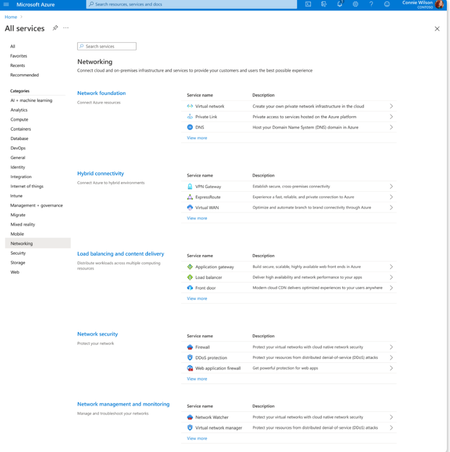
Overview Over the past decade, Azure Networking has expanded rapidly, bringing incredible tools and capabilities to help customers build, connect, and secure their cloud infrastructure. But we've also heard strong feedback: with over 40 different products, it hasn't always been easy to navigate and find the right solution. The complexity often led to confusion, slower onboarding, and missed capabilities. That's why we're excited to introduce a more focused, streamlined, and intuitive experience across Azure.com, the Azure portal, and our documentation pivoting around four core networking scenarios: Network foundations: Network foundations provide the core connectivity for your resources, using Virtual Network, Private Link, and DNS to build the foundation for your Azure network. Try it with this link: Network foundations Hybrid connectivity: Hybrid connectivity securely connects on-premises, private, and public cloud environments, enabling seamless integration, global availability, and end-to-end visibility, presenting major opportunities as organizations advance their cloud transformation. Try it with this link: Hybrid connectivity Load balancing and content delivery: Load balancing and content delivery helps you choose the right option to ensure your applications are fast, reliable, and tailored to your business needs. Try it with this link: Load balancing and content delivery Network security: Securing your environment is just as essential as building and connecting it. The Network Security hub brings together Azure Firewall, DDoS Protection, and Web Application Firewall (WAF) to provide a centralized, unified approach to cloud protection. With unified controls, it helps you manage security more efficiently and strengthen your security posture. Try it with this link: Network security This new structure makes it easier to discover the right networking services and get started with just a few clicks so you can focus more on building, and less on searching. What you’ll notice: Clearer starting points: Azure Networking is now organized around four core scenarios and twelve essential services, reflecting the most common customer needs. Additional services are presented within the context of these scenarios, helping you stay focused and find the right solution without feeling overwhelmed. Simplified choices: We’ve merged overlapping or closely related services to reduce redundancy. That means fewer, more meaningful options that are easier to evaluate and act on. Sunsetting outdated services: To reduce clutter and improve clarity, we’re sunsetting underused offerings such as white-label CDN services and China CDN. These capabilities have been rolled into newer, more robust services, so you can focus on what’s current and supported. What this means for you Faster decision-making: With clearer guidance and fewer overlapping products, it's easier to discover what you need and move forward confidently. More productive sales conversations: With this simplified approach, you’ll get more focused recommendations and less confusion among sellers. Better product experience: This update makes the Azure Networking portfolio more cohesive and consistent, helping you get started quickly, stay aligned with best practices, and unlock more value from day one. The portfolio consolidation initiative is a strategic effort to simplify and enhance the Azure Networking portfolio, ensuring better alignment with customer needs and industry best practices. By focusing on top-line services, combining related products, and retiring outdated offerings, Azure Networking aims to provide a more cohesive and efficient product experience. Azure.com Before: Our original Solution page on Azure.com was disorganized and static, displaying a small portion of services in no discernable order. After: The revised solution page is now dynamic, allowing customers to click deeper into each networking and network security category, displaying the top line services, simplifying the customer experience. Azure Portal Before: With over 40 networking services available, we know it can feel overwhelming to figure out what’s right for you and where to get started. After: To make it easier, we've introduced four streamlined networking hubs each built around a specific scenario to help you quickly identify the services that match your needs. Each offers an overview to set the stage, key services to help you get started, guidance to support decision-making, and a streamlined left-hand navigation for easy access to all services and features. Documentation For documentation, we looked at our current assets as well as created new assets that aligned with the changes in the portal experience. Like Azure.com, we found the old experiences were disorganized and not well aligned. We updated our assets to focus on our top-line networking services, and to call out the pillars. Our belief is these changes will allow our customers to more easily find the relevant and important information they need for their Azure infrastructure. Azure Network Hub Before the updates, we had a hub page organized around different categories and not well laid out. In the updated hub page, we provided relevant links for top-line services within all of the Azure networking scenarios, as well as a section linking to each scenario's hub page. Scenario Hub pages We added scenario hub pages for each of the scenarios. This provides our customers with a central hub for information about the top-line services for each scenario and how to get started. Also, we included common scenarios and use cases for each scenario, along with references for deeper learning across the Azure Architecture Center, Well Architected Framework, and Cloud Adoption Framework libraries. Scenario Overview articles We created new overview articles for each scenario. These articles were designed to provide customers with an introduction to the services included in each scenario, guidance on choosing the right solutions, and an introduction to the new portal experience. Here's the Load balancing and content delivery overview: Documentation links Azure Networking hub page: Azure networking documentation | Microsoft Learn Scenario Hub pages: Azure load balancing and content delivery | Microsoft Learn Azure network foundation documentation | Microsoft Learn Azure hybrid connectivity documentation | Microsoft Learn Azure network security documentation | Microsoft Learn Scenario Overview pages What is load balancing and content delivery? | Microsoft Learn Azure Network Foundation Services Overview | Microsoft Learn What is hybrid connectivity? | Microsoft Learn What is Azure network security? | Microsoft Lea Improving user experience is a journey and in coming months we plan to do more on this. Watch out for more blogs over the next few months for further improvements.3.3KViews4likes0Comments
Unlock enterprise AI/ML with confidence: Azure Application Gateway as your scalable AI access layer
As enterprises accelerate their adoption of generative AI and machine learning to transform operations, enhance productivity, and deliver smarter customer experiences, Microsoft Azure has emerged as a leading platform for hosting and scaling intelligent applications. With offerings like Azure OpenAI, Azure Machine Learning, and Cognitive Services, organizations are building copilots, virtual agents, recommendation engines, and advanced analytics platforms that push the boundaries of what is possible. However, scaling these applications to serve global users introduces new complexities: latency, traffic bursts, backend rate limits, quota distribution, and regional failovers must all be managed effectively to ensure seamless user experiences and resilient architectures. Azure Application Gateway: The AI access layer Azure Application Gateway plays a foundational role in enabling AI/ML at scale by acting as a high-performance Layer 7 reverse proxy—built to intelligently route, protect, and optimize traffic between clients and AI services. Hundreds of enterprise customers are already using Azure Application Gateway to efficiently manage traffic across diverse Azure-hosted AI/ML models—ensuring uptime, performance, and security at global scale. The AI delivery challenge Inferencing against AI/ML backends is more than connecting to a service. It is about doing so: Reliably: across regions, regardless of load conditions Securely: protecting access from bad actors and abusive patterns Efficiently: minimizing latency and request cost Scalable: handling bursts and high concurrency without errors Observably: with real-time insights, diagnostics, and feedback loops for proactive tuning Key features of Azure Application Gateway for AI traffic Smart request distribution: Path-based and round-robin routing across OpenAI and ML endpoints. Built-in health probes: Automatically bypass unhealthy endpoints Security enforcement: With WAF, TLS offload, and mTLS to protect sensitive AI/ML workloads Unified endpoint: Expose a single endpoint for clients; manage complexity internally. Observability: Full diagnostics, logs, and metrics for traffic and routing visibility. Smart rewrite rules: Append path, or rewrite headers per policy. Horizontal scalability: Easily scale to handle surges in demand by distributing load across multiple regions, instances, or models. SSE and real-time streaming: Optimize connection handling and buffering to enable seamless AI response streaming. Azure Web Application Firewall (WAF) Protections for AI/ML Workloads When deploying AI/ML workloads, especially those exposed via APIs, model endpoints, or interactive web apps, security is as critical as performance. A modern WAF helps protect not just the application, but also the sensitive models, training data, and inference pipelines behind it. Core Protections: SQL injection – Prevents malicious database queries targeting training datasets, metadata stores, or experiment tracking systems. Cross-site scripting (XSS) – Blocks injected scripts that could compromise AI dashboards, model monitoring tools, or annotation platforms. Malformed payloads – Stops corrupted or adversarial crafted inputs designed to break parsing logic or exploit model pre/post-processing pipelines. Bot protections – Bot Protection Rule Set detects & blocks known malicious bot patterns (credential stuffing, password spraying). Block traffic based on request body size, HTTP headers, IP addresses, or geolocation to prevent oversized payloads or region-specific attacks on model APIs. Enforce header requirements to ensure only authorized clients can access model inference or fine-tuning endpoints. Rate limiting based on IP, headers, or user agent to prevent inference overloads, cost spikes, or denial of service against AI models. By integrating these WAF protections, AI/ML workloads can be shielded from both conventional web threats and emerging AI-specific attack vectors, ensuring models remain accurate, reliable, and secure. Architecture Real-world architectures with Azure Application Gateway Industries across sectors rely on Azure Application Gateway to securely expose AI and ML workloads: Healthcare → Protecting patient-facing copilots and clinical decision support tools with HIPAA-compliant routing, private inference endpoints, and strict access control. Finance → Safeguarding trading assistants, fraud-detection APIs, and customer chatbots with enterprise WAF rules, rate limiting, and region-specific compliance. Retail & eCommerce → Defending product recommendation engines, conversational shopping copilots, and personalization APIs from scraping and automated abuse. Manufacturing & industrial IoT → Securing AI-driven quality control, predictive maintenance APIs, and digital twin interfaces with private routing and bot protection. Education → Hosting learning copilots and tutoring assistants safely behind WAF, preventing misuse while scaling access for students and researchers. Public sector & government → Enforcing FIPS-compliant TLS, private routing, and zero-trust controls for citizen services and AI-powered case management. Telecommunications & media → Protecting inference endpoints powering real-time translation, content moderation, and media recommendations at scale. Energy & utilities → Safeguarding smart grid analytics, sustainability dashboards, and AI-powered forecasting models through secure gateway routing. Advanced integrations Position Azure Application Gateway as the secure, scalable network entry point to your AI infrastructure Private-only Azure Application Gateway: Host AI endpoints entirely within virtual networks for secure internal access SSE support: Configure HTTP settings for streaming completions via Server-Sent Events Azure Application Gateway+ Azure Functions: Build adaptive policies that reroute traffic based on usage, cost, or time of day Azure Application Gateway + API management to protect OpenAI workloads What’s next: Adaptive AI gateways Microsoft is evolving Azure Application Gateway into a more intelligent, AI aware platform with capabilities such as: Auto rerouting to healthy endpoints or more cost-efficient models. Dynamic token management directly within Azure Application Gateway to optimize AI inference usage. Integrated feedback loops with Azure Monitor and Log Analytics for real-time performance tuning. The goal is to transform Azure Application Gateway from a traditional traffic manager into an adaptive inference orchestrator one that predicts failures, optimizes operational costs, and safeguards AI workloads from misuse. Conclusion Azure Application Gateway is not just a load balancer—it’s becoming a critical enabler for enterprise-grade AI delivery. Today, it delivers smart routing, security enforcement, adaptive observability, and a compliance-ready architecture, enabling organizations to scale AI confidently while safeguarding performance and cost. Looking ahead, Microsoft’s vision includes future capabilities such as quota resiliency to intelligently manage and balance AI usage limits, auto-rerouting to healthy endpoints or more cost-efficient models, dynamic token management within Azure Application Gateway to optimize inference usage, and integrated feedback loops with Azure Monitor and Log Analytics for real-time performance tuning. Together, these advancements will transform Azure Application Gateway from a traditional traffic manager into an adaptive inference orchestrator capable of anticipating failures, optimizing costs, and protecting AI workloads from misuse. If you’re building with Azure OpenAI, Machine Learning, or Cognitive Services, let Azure Application Gateway be your intelligent command center—anticipating needs, adapting in real time, and orchestrating every interaction so your AI can deliver with precision, security, and limitless scale. For more information, please visit: What is Azure Application Gateway v2? | Microsoft Learn What Is Azure Web Application Firewall on Azure Application Gateway? | Microsoft Learn Azure Application Gateway URL-based content routing overview | Microsoft Learn Using Server-sent events with Application Gateway (Preview) | Microsoft Learn AI Architecture Design - Azure Architecture Center | Microsoft Learn988Views4likes0CommentsQUIC based HTTP/3 with Application Gateway: Feature information Private Preview
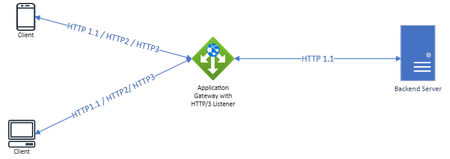
Azure Application Gateway now supports HTTP/3 QUIC. As part of private preview, Application Gateway users can create HTTP/3 enabled Listeners which can support either of HTTP/1.1 or HTTP/2 along with HTTP/3. Note: HTTP/3, if enabled on one listener, will be available on that listener only. If some of your clients do not support HTTP/3, there’s no panic. They will still be able to communicate with HTTP/3 enabled listeners using previous HTTP versions. Why should HTTP/3 with Application Gateway be used? HTTP/3 is the latest version of the Hypertext Transfer Protocol built on the top of QUIC which operates over UDP. It represents a significant leap forward in terms of user experience, efficiency, and security. Here are some compelling reasons why migrating to HTTP/3 could greatly benefit your organization: Faster Web Page Loading (~200ms advantage): If you run a website or web application, implementing HTTP/3 can lead to faster page load times and improved user experiences. HTTP/3's reduced connection establishment latency and multiplexing capabilities help deliver resources more efficiently. Table below shows latency numbers of different HTTP versions. HTTPS (TCP+TLS) QUIC 1-RTT QUIC 0-RTT* First time connection 300ms 100ms 100ms Repeat Connection 200ms 50ms 0ms *0-RTT comes with its share of security risks and is not part of the private preview Enhanced Web Application Performance: Applications that make use of multiple resources, like images, scripts, and stylesheets, can benefit from HTTP/3's multiplexing and concurrent stream support. Mobile Applications: If you develop mobile apps, integrating HTTP/3 can enhance data transfer speed and responsiveness, which is especially important on mobile networks where latency can be higher. Reducing HOL Blocking: HTTP/3's use of QUIC helps mitigate head-of-line blocking, where the delay of one resource can block the delivery of others. This is especially advantageous for applications that require efficient resource loading. Security: HTTP/3's integration with QUIC provides improved security features by design, reducing the risk of certain types of attacks compared to previous versions of HTTP. Presently, 26.5% of the internet traffic is on HTTP/3 and there has been a steady increase in the adoption compared to HTTP/2 which has seen a decreasing trend (by ~10% in the last 12 months) owing to some of its demerits (explained in the sections later). How should HTTP/3 with Application Gateway be enabled? Prerequisite: You have an existing Application Gateway resource on standard_v2 SKU only. Please reach out to us @ quicforappgw@microsoft.com with the Resource URI on which you want the HTTP/3 feature enabled and we'll take you along with the next steps. What all HTTP/3 features are supported in private preview? HTTP/3 will be supported only in the front leg of the connection and backends will continue to be HTTP1.1. Application Gateway will support client-initiated connection migration (explained below) Application Gateway will support PMTU discovery. Application Gateway can advertise support for HTTP/3 via alt-svc header as part of HTTP1/2 response. (Image below explains the flow) What is HTTP/3 & QUIC? TCP (Transmission Control Protocol) (RFC793) has been the most widely used transport layer protocol since its inception. But, with the advent of more real time applications, the evolution of the edge, and an ever increasing need to reduce latency and congestion, using TCP is becoming untenable. UDP (User Datagram Protocol) (RFC768) was always seen as an alternative to TCP especially in instances where connectionless-less-reliable transmission was okey-dokey! But UDP suffered with the implementation of congestion control. TLS (Transport Layer Security) (RFC8446) adds another layer over TCP after the 3-way handshake for TLS negotiation to establish session key and session data encryption. Though the combination provides reliability and security, increased connection establishment has made application developers smirk than smile. QUIC (Quick UDP Internet Connections) (RFC9000) attempts to bridge these UDP gaps by inducing the TCP niceties and attempts to reduce the TCP ossification in the network. Put in brief, TCP encapsulated and encrypted in a UDP payload is QUIC. It appears like a bidirectional concealed UDP packet sequence to the external network. To the endpoints, it provides an advantage over TCP by deliberately concealing the transport parameters from the network and by shifting the responsibility of the flow control and the encryption service to the application layer from the transport layer. Pre-HTTP/3 protocols: HTTP/1.1 and HTTP/2 are done over TCP. HTTP/1.x versions have slow response times and never satisfy faster-load-times hungry webpages. HTTP/1.1, being a textual protocol, does a below average job in resource prioritization by transmitting the request and response headers as plain text. Without multiplexing capabilities, network requests are served in an ordered and blocking manner. With this approach, HTTP/1.1 suffers from HTTP Head of Line (HOL) blocking where the client waits for the previous requests to be serviced before sending another resulting in the subsequent blocked requests on a single TCP connection. Imagine a webpage needing multiple resources to load (Images, CSS, HTML files, Js files etc) the complete page! To overcome all these HTTP/1.1 limitations, HTTP/2 was brought in. It introduced header field compression by binary framing layer and creating a stream for communication reducing the amount of data in the header. Concurrent exchanges on the same connection by interleaving request and response messages and efficient coding of HTTP header fields. Prioritization of requests allowed more important requests complete quicker thus improving performance. HTTP/2 protocol communication involved binary encoded frames that carried data mapped to messages (request/response) in a stream which contained identifiers and priority information multiplexed in a single TCP connection. Figure-1 shows the flow of protocol communication in HTTP/2. All these enhancements mean lesser no. of TCP connections, longer-lived connections, less competition with other flows leading to better network utilization. By allowing multiple HTTP requests over a single TCP connection, HTTP/2 resolved HTTP HOL blocking issue but created the TCP HOL blocking issue. In the event of a network blip like network congestion, unavailability of network or change of a cell in a mobile network which might lead to loss of a packet throwing a TCP connection into a tizzy as it ensures that the order of packets transmitted and received are same. A loss of one packet will mean everything stops until the lost packet is retransmitted. In the case of multiple requests multiplexed onto a single TCP connection, all the requests are blocked although the “lost packet” in real impacts only one request. With increasing no. of mobile friendly apps, increase in the usage of cellular networks, and, in countries with not so good networks and high chances of network blips, such an issue can cause interruption to services. Enter QUIC based HTTP/3: HTTP/3 is based on QUIC. It is designed to be faster than TCP with lower latency, lesser overhead during connection establishment and quicker data transfer over the established connection. QUIC is based on UDP and offers 0-RTT and 1-RTT handshakes compared to 3-way handshakes of TCP. This is possible as it supports additional streams. HTTP/3 retains all the niceties of HTTP/2 like server push mechanism, multiplexing of requests over single connection via streams, resource prioritization. It ensures the issue of TCP HOL blocking is resolved. “Lost packets” along the way will not interrupt the data transfer. QUIC sees to it that transferring other data is uninterrupted while the issue of the “lost packet” is being resolved. QUIC based HTTP/3 features and use-cases: Faster connection establishment The regular 3-way handshake gives way to the 1-RTT and 0-RTT handshakes based on QUIC which will lead to a drop in the connection establishment by 66%-95%. The 1-RTT and the 0-RTT connection establishment helps in the improvement of page load times in web browsing immensely. Instant messaging applications, voice assistants, transactional systems (financial transactions, online purchases) benefit from quick connection establishment. In these scenarios, 1-RTT connection establishment can make a noticeable difference in reducing initial delays and enhancing overall user satisfaction. Financial institutions will find a wide range of benefits due the low latency with their mobile apps, online banking portals, provide customers with real-time notifications, effective API integration and many such use cases. Independent HTTP Streams (no TCP HOL Blocking) TCP HOL blocking occurs when a single delayed or lost packet holds up the delivery of subsequent packets, impacting overall communication efficiency. Avoiding TCP HOL blocking can offer significant advantages in real-life scenarios where minimizing latency, improving responsiveness, and optimizing data transmission are crucial. Removing unnecessary bottlenecks and making communication smoother results in happy customers. Web browsing without HOL blocking will help in fetching multiple resources in the page leading to quicker page loading times and thus providing the users with a rich browsing experience. Without HOL blocking, messages in an instant messaging application are delivered promptly without being held up providing the end user a fluid experience. IoT devices that transmit sensor data and updates will be able to deliver all the necessary data without being delayed by a single lost or slow packet, ensuring timely and accurate reporting. Avoiding HOL blocking in financial transactions ensures that data related to transactions is transmitted without unnecessary delays, contributing to real-time processing and confirmations without which CSAT is impacted vastly. Connection Migration Customers are always on the move. Especially with the ever-improving cellular networks, they are seldom stuck to a single network or a cell in the network. This nature of being on the move constantly will mean constant registration with the network and establishing connections frequently and deriving data from different servers. In the traditional HTTP and TCP method, this would lead to several drops in the connectivity. But that is a thing of the past with QUIC and HTTP/3. The QUIC-HTTP/3 combine provides users with a Connection Migration feature. During the QUIC connection establishment, the server provides the client with a set of Connection IDs (CID) as part of the QUIC header. Using this CID, the client can retain an existing connection despite moving networks and attaining new IP addresses. With the help of the connection migration, uninterrupted web browsing would be possible for users. IoT devices’ that need to maintain continuous communication will find the connection migration extremely useful. Users moving from private to public WiFi networks at malls, airports and other public places will be provided with seamless app experience. How to sign up? https://forms.office.com/r/iGeYgrmydA15KViews4likes11CommentsIntroducing Copilot in Azure for Networking: Your AI-Powered Azure Networking Assistant
As cloud networking grows in complexity, managing and operating these services efficiently can be tedious and time consuming. That’s where Copilot in Azure for Networking steps in, a generative AI tool that simplifies every aspect of network management, making it easier for network administrators to stay on top of their Azure infrastructure. With Copilot, network professionals can design, deploy, and troubleshoot Azure Networking services using a streamlined, AI-powered approach. A Comprehensive Networking Assistant for Azure We’ve designed Copilot to really feel like an intuitive assistant you can talk to just like a colleague. Copilot understands networking-related questions in simple terms and responds with actionable solutions, drawing from Microsoft’s expansive networking knowledge base and the specifics of your unique Azure environment. Think of Copilot as an all-encompassing AI-Powered Azure Networking Assistant. It acts as: Your Cloud Networking Specialist by quickly answering questions about Azure networking services, providing product guidance, and configuration suggestions. Your Cloud Network Architect by helping you select the right network services, architectures, and patterns to connect, secure, and scale your workloads in Azure. Your Cloud Network Engineer by helping you diagnose and troubleshoot network connectivity issues with step-by-step guidance. One of the most powerful features of Copilot in Azure is its ability to automatically diagnose common networking issues. Misconfigurations, connectivity failures, or degraded performance? Copilot can help with step-by-step guidance to resolve these issues quickly with minimal input and assistance from the user, simply ask questions like ”Why can’t my VM connect to the internet?”. As seen above, upon the user identifying the source and destination, Copilot can automatically discover the connectivity path and analyze the state and status of all the network elements in the path to pinpoint issues such as blocked ports, unhealthy network devices, or misconfigured Network Security Groups (NSGs). Technical Deep Dive: Contextualized Responses with Real-Time Insights When users ask a question on the Azure Portal, it gets sent to the Orchestrator. This step is crucial to generating a deep semantic understanding of the user’s question, reasoning over all Azure resources, and then determining that the question requires Network-specific capabilities to be answered. Copilot then collects contextual information based on what the user is looking at and what they have access to before dispatching the question to the relevant domain-specific plugins. Those plugins then use their service-specific capabilities to answer the user’s question. Copilot may even combine information from multiple plugins to provide responses to complex questions. In the case of questions relevant to Azure Networking services, Copilot uses real-time data from sources like diagnostic APIs, user logs, Azure metrics, Azure Resource Graph etc. all while maintaining complete privacy and security and only accessing what the user can access as defined in Azure Role based Access Control (RBAC) to help generate data-driven insights that help keep your network operating smoothly and securely. This information is then used by Copilot to help answer the user’s question via a variety of techniques including but not limited to Retrieval-Augmented Generation (RAG) and grounding. To learn more about how Copilot works, including our Responsible AI commitments, see Copilot in Azure Technical Deep Dive | Microsoft Community Hub. Summary: Key Benefits, Capabilities and Sample Prompts Copilot boosts efficiency by automating routine tasks and offering targeted answers, which saves network administrators time while troubleshooting, configuring and architecting their environments. Copilot also helps organizations reduce costs by minimizing manual work and catching errors while empowering customers to resolve networking issues on their own with AI-powered insights backed by Azure expertise. Copilot is equipped with powerful skills to assist users with network product information and selection, resource inventory and topology, and troubleshooting. For product information, Copilot can answer questions about Azure Networking products by leveraging published documentation, helping users with questions like “What type of Firewall is best suited for my environment?”. It offers tailored guidance for selecting and planning network architectures, including specific services like Azure Load Balancer and Azure Firewall. This guidance also extends to resilience-related questions like “What more can I do to ensure my app gateway is resilient?” involving services such as Azure Application Gateway and Azure Traffic Manager, among others. When it comes to inventory and topology, Copilot can help with questions like “What is the data path between my VM and the internet?” by mapping network resources, visualizing topologies, and tracking traffic paths, providing users with clear topology maps and connectivity graphs. For troubleshooting questions like “Why can’t I connect to my VM from on prem?”, Copilot analyzes both the control plane and data plane, offering diagnostics at the network and individual service levels. By using on-behalf-of RBAC, Copilot maintains secure, authorized access, ensuring users interact only with resources permitted by their access level. Looking Forward: Future Enhancements This is only the first step we are taking toward bringing interactive, generative-AI powered capabilities to Azure Networking services and as it evolves over time, future releases will introduce advanced capabilities. We also acknowledge that today Copilot in preview works better with certain Azure Networking services, and we will continue to onboard more services to the capabilities we are launching today. Some of the more advanced capabilities we are working on include predictive troubleshooting where Copilot will anticipate potential issues before they impact network performance. Network optimization capabilities that suggest ways to optimize your network for better performance, resilience and reliability alongside enhanced security capabilities providing insights into network security and compliance, helping organizations meet regulatory requirements starting with the integration of Security Copilot attack investigation capabilities for Azure Firewall. Conclusion Copilot in Azure for Networking is intended to enhance the overall Azure experience and help network administrators easily manage their Azure Networking services. By combining AI-driven insights with user-friendly interfaces, it empowers networking professionals and users to plan, deploy, and operate their Azure Network. These capabilities are now in preview, see Azure networking capabilities using Microsoft Copilot in Azure (preview) | Microsoft Learn to learn more and get started.4.2KViews3likes2CommentsAzure CNI Overlay for Application Gateway for Containers and Application Gateway Ingress Controller
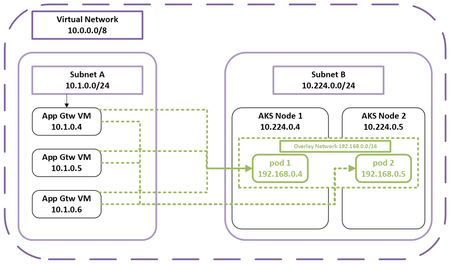
What are Azure CNI Overlay and Application Gateway? Azure CNI Overlay leverages logical network spaces for pod IP assignment management (IPAM). This provides enhanced IP scalability with reduced management responsibilities. Application Gateway for Containers is the latest and most recommended container L7 load-balancing solution. It introduces a new scalable control plane and data plane to address the performance demands and modern workloads being deployed to AKS clusters on Azure. Azure network control plane configures routing between Application Gateway and overlay pods. Why is the feature needed? As businesses increasingly use containerized solutions, managing container networks at scale has become a priority. Within container network management, IP address exhaustion, scalability and application load balancing performance are highly requested and discussed in many forums. Azure CNI Overlay is the default container networking IPAM mode on AKS. In the overlay design, AKS nodes use IPs from Azure virtual network (VNet) IP address range and pods are addressed from an overlay IP address range. The overlay pods can communicate with each other directly via a different routing domain. Overlay IP addresses can be reused across multiple clusters in the same VNet, provisioning a solution for IP exhaustion and increasing IP scale to over 1M. Azure CNI Overlay supporting Application Gateway for Containers provides customers with a more performant, reliable, and scalable container networking solution. Meanwhile, Azure CNI Overlay supporting AGIC provides customers with full feature parity if they choose to upgrade AKS clusters from kubenet to Azure CNI Overlay. Key Benefits High scale with Azure CNI Overlay combined with a high-performance ingress solution Azure CNI Overlay provides direct pod to pod routing with high IP scale using direct azure native routing with no encapsulation overhead. IPs can be reused across clusters in the same VNET allowing customers to conserve IP addresses. Application Gateway for Containers is the latest and most recommended container L7 load-balancing solution. Installing Application Gateway for Containers on AKS clusters with Azure CNI Overlay provides customers with the best solution combination of IP scalability and ingress solution on Azure. Feature parity between kubenet and Azure CNI Overlay With the retirement announcement of kubenet, we expect to see customers upgrade their AKS container networking solution from kubenet to Azure CNI Overlay soon. This feature allows customers to maintain business continuity during the transitioning process. Learn More Read more about Azure CNI Overlay and Application Gateway for Containers. Learn more on how to upgrade AKS clusters’ IPAM to Azure CNI Overlay. Learn more about Azure Kubernetes Service and Application Gateway.834Views2likes0Comments