app
132 TopicsFastTrack for Azure (FTA) program retiring December 2024
ATTENTION: As of December 31st, 2024, the FastTrack for Azure (FTA) program will be retired. FTA will support any projects currently in motion to ensure successful completion by December 31st, 2024, but will no longer accept new nominations. For more information on available programs and resources, visit: Azure Migrate, Modernize, and Innovate | Microsoft Azure1.6KViews1like0CommentsConnecting to Azure SQL Database using SQLAlchemy and Microsoft Entra authentication
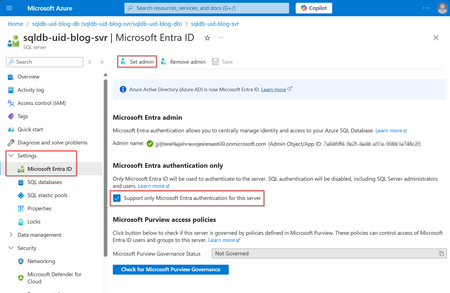
Unlock secure, password-free connections to Azure SQL Database using Microsoft Entra Authentication and SQLAlchemy with this in-depth guide. Learn to configure Microsoft Entra as your SQL Server user and connect seamlessly using Python’s SQLAlchemy library—all without hard-coded credentials. Discover why Microsoft Entra Managed Identity surpasses traditional SQL Authentication by enhancing security, simplifying access management, and centralizing identity controls. Perfect for developers looking to boost data protection and streamline authentication workflows in Azure, this step-by-step solution empowers you to safeguard your database while maximizing efficiency and ease of use, while bringing your solution closer to production readiness. Dive in to elevate your Azure SQL security and performance!11KViews2likes0CommentsMaking Searching and Curating Data Assets in Microsoft Purview easier.
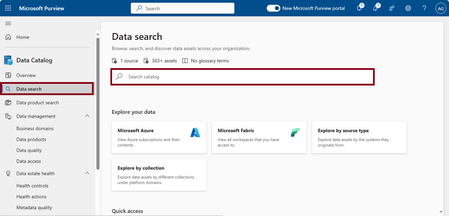
Introduction. Currently, IT infrastructure stores and maintains data assets, even though IT doesn't own or use the data. There's a disconnect between how data needs to be discovered and maintained within the business, and the teams that maintain it. Without standardized procedures for data governance, data handling often relies on manual processes, leading to inefficiencies, data loss, insufficient data protection and higher operational costs. Microsoft Purview is designed to help enterprises get the most value from their existing information assets. The catalog makes data sources easily discoverable and understandable by the users who manage the data. With Purview, organizations can gain insights into data lineage, data usage, and data connections, helping them to comply with regulations such as GDPR, CCPA, and others. Microsoft Purview provides a cloud-based service into which you can register data sources. During registration, the data remains in its existing location, but a copy of its metadata is added to Microsoft Purview, along with a reference to the data source location. After you register a data source, you can scan it and enrich its metadata. Discovering and understanding data sources and their use is the primary purpose of registering the sources. In this article, we describe smart features that allow you to search previously scanned data assets using natural language queries, along with automated metadata enrichment for curating these assets.3.6KViews0likes0CommentsHow to monitor applications by using OpenTelemetry on Azure Container Apps
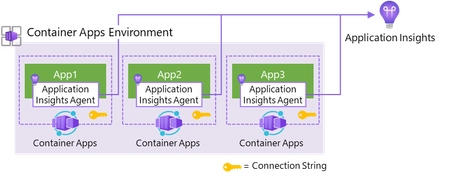
Effectively monitoring your applications on Azure Container Apps is key to ensuring high performance and avoiding outages. With multiple approaches available - from using Application Insights directly to Dapr - this guide will help you navigate the options and choose the best solution for your needs. Discover how you can integrate these powerful tools to gain deep insight into your applications.7.3KViews1like0CommentsDiscover and Assess Your Workloads Before Migrating to Azure with Azure Migrate
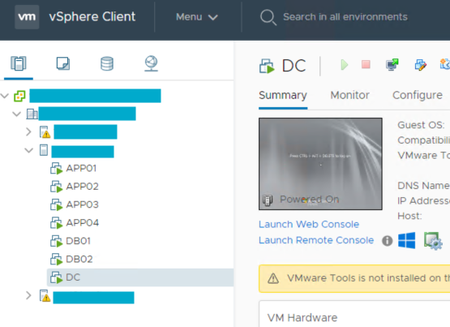
End to End Pattern to migrate simple to complex application workloads. Version 1.0 Public Endpoint Scenario 01: Migrate VMware Guest VM’s to Azure Native VMs using Azure Migrate Appliance Part 1: What we have hosted in on-premises environment <source> Before you can migrate your applications to Azure, you need to understand your current on-premises environment, including the connectivity, dependencies, performance, and configuration of your servers and applications. Details about on-premises environment: Guests hosted on VMware Hypervisor Domain Controller Servers (assume we have minimum CMDB information about server owner and no information about connectivity and apps/DB hosted on each workload and why we hosted the servers and what’s running on it) vSphere Datacenter CMDB: Domain (FFL/DFL): 4. Website URL and DB (assume no idea about this app do – functionality and so on), we will further delve in Discovery and assess phase to connect the dots and migrate the workloads successfully. Part 2: Deploying Azure Migrate appliance for Discovery and Assessment All about Azure Migrate appliance à Azure Migrate documentation | Microsoft Learn CAF Migrate à Migrate overview - Cloud Adoption Framework | Microsoft Learn How to decide which Azure Migrate appliance is right for your environment? - Microsoft Community Hub Scenario: Discovery using appliance – agentless. Read more about it here on prerequisites Once you have created the Azure Migrate Project and configured your appliance as outlined here, you will see the following resources provisioned for Azure Migrate – Azure Migrate Appliance Status (non-domain joined, and selected password never expires for default administrator user, you can domain join and disable default local admin user to be compliant with your company policies): 1. Azure Migrate Appliance Status: 2. Select Resource Group à ‘show hidden types’ 3. Go to your Entra à 4. Azure Key Vault à Certificates Appliance Registered successfully and discovery in progress. Once the discovery is completed, will start deep diving in Discovery, Assess and Planning in the upcoming series. Scenario 2: Discover same source estate and modernize to Azure PaaS than Azure Native VMs Scenario 3: Discover Linux Workloads and migrate to Azure Native VMs / PaaS / AKS Scenario 4: Azure Migrate deployment using Private Endpoints If you have any questions or feedback, please leave a comment below. I would love to hear from you and help you with any topic that you want to learn more about and to make your migrations successful.2.2KViews0likes0Comments