app templates
8 Topics
Automate Prior Authorization with AI Agents - Now Available as a Foundry Template
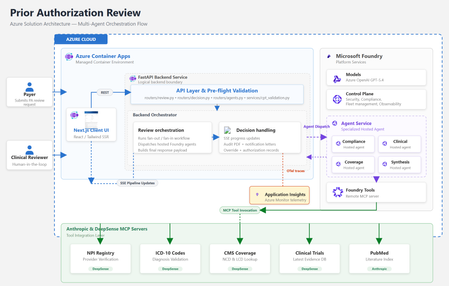
By Amit Mukherjee · Principal Solutions Engineer, Microsoft Health & Life Sciences Lindsey Craft-Goins · Technology Leader - Cloud & AI Platforms, Health & Life Sciences Joel Borellis · Director Solutions Engineering - Cloud & AI Platforms, Health & Life Sciences Prior authorization (PA) is one of the most expensive bottlenecks in U.S. healthcare. Physicians complete an average of 39 PA requests per week, spending roughly 13 hours of physician-and-staff time on PA-related work (AMA 2024 Prior Authorization Physician Survey). Turnaround averages 5–14 business days, and PA alone accounts for an estimated $35 billion in annual administrative spending (Sahni et al., Health Affairs Scholar, 2024). The regulatory clock is now ticking. CMS-0057-F mandates electronic PA with 72-hour urgent response starting in 2026. Forty-nine states plus DC already have PA laws on the books, and at least half of all U.S. state legislatures introduced new PA reform bills this year, including laws specifically targeting AI use in PA decisions (KFF Health News, April 2026). Today we’re making the Prior Authorization Multi-Agent Solution Accelerator available as a Microsoft Foundry template. Health plan payers can deploy a working, four-agent PA review pipeline to Azure using the Azure Developer CLI (“azd”) with a single command in supported environments, then customize it to their policies, workflows, and EHR environment. Try it now: Find the template in the Foundry template gallery, or clone directly from github.com/microsoft/Prior-Authorization-Multi-Agent-Solution-Accelerator What the template delivers The accelerator deploys four specialist Foundry hosted agents (Compliance, Clinical Reviewer, Coverage, and Synthesis), each independently containerized and managed by Foundry. In internal testing with synthetic demo cases, the pipeline reduced review workflow, from beginning to completion in under 5 minutes per case. Agent Role Key capability Compliance Documentation check 10-item checklist with blocking/non-blocking flags Clinical Reviewer Clinical evidence ICD-10 validation, PubMed + ClinicalTrials.gov search Coverage Policy matching CMS NCD/LCD lookup, per-criterion MET/NOT_MET mapping Synthesis Decision rubric 3-gate APPROVE/PEND with weighted confidence scoring Compliance and Clinical run in parallel. Coverage runs after clinical findings are ready. Synthesis evaluates all three outputs through a three-gate rubric. The result is a structured recommendation with per-criterion confidence scores and a full audit trail, not a black-box answer. Solution architecture The accelerator runs entirely on Azure. The frontend and backend deploy as Azure Container Apps. The four specialist agents are hosted by Microsoft Foundry. Real-time healthcare data flows through third-party MCP servers. Figure 1: Azure solution architecture How the pipeline works The four agents execute in a structured parallel-then-sequential pipeline. Compliance and Clinical run simultaneously in Phase 1. Coverage runs after clinical findings are ready. The Synthesis agent applies a three-gate decision rubric over all prior outputs. Figure 2: Agentic architecture, hosted agent pipeline Compliance and Clinical run in parallel via asyncio.gather, since neither depends on the other. Coverage runs sequentially after Clinical because it needs the structured clinical profile for criterion mapping. Synthesis evaluates all three outputs through a three-gate rubric (Provider, Codes, Medical Necessity) with weighted confidence scoring: 40% coverage criteria + 30% clinical extraction + 20% compliance + 10% policy match. The total pipeline time is bound by the slowest parallel agent plus the sequential agents, not the sum. In internal testing with synthetic demo cases, this architecture indicated materially reduced processing time compared to sequential manual workflows. Under the hood For the architect in the room, here are four design decisions worth knowing about: Foundry hosted agents: Each agent is independently containerized, versioned, and managed by Foundry’s runtime. The FastAPI backend is a pure HTTP dispatcher. All reasoning happens inside the agent containers, and there are no code changes between local (Docker Compose) and production (Foundry); the environment variable is the only switch. Structured output: Every agent uses MAF’s response_format enforcement to produce typed Pydantic schemas at the token level. No JSON parsing, no malformed fences, no free-form text. The orchestrator receives typed Python objects; the frontend receives a stable API contract. Keyless security: DefaultAzureCredential throughout, so no API keys are stored anywhere. Managed Identity handles production; azd tokens handle local development. Role assignments are provisioned automatically by Bicep at deploy time. Observability: All agents emit OpenTelemetry traces to Azure Application Insights. The Foundry portal shows per-agent spans correlated by case ID. End-to-end latency, per-agent contribution, and error rates are visible from day one with no additional configuration. For the full architecture documentation, agent specifications, Pydantic schemas, and extension guides, see the GitHub repository. Why this matters now Human-in-the-loop by design The system runs in LENIENT mode by default: it produces only APPROVE or PEND and is not designed to produce automated DENY outcomes in its default configuration. Every recommendation requires a clinician to Accept or Override with documented rationale before the decision is finalized. Override records flow to the audit PDF, notification letters, and downstream systems. This directly addresses the emerging wave of state legislation governing AI use in PA decisions. Domain experts own the rules Agent behavior is defined in markdown skill files, not Python code. When CMS updates a coverage determination or a plan changes its commercial policy, a clinician or compliance officer edits a text file and redeploys. No engineering PR required. Real-time healthcare data via MCP Agents connect to five MCP servers for real-time data: ICD-10 codes, NPI Registry, CMS Coverage policies, PubMed, and ClinicalTrials.gov. This incorporates real‑time clinical reference data sources to inform agent recommendations. Third-party MCP servers are included for demonstration with synthetic data only. Their inclusion does not constitute an endorsement by Microsoft. See the GitHub repository for production migration guidance. Audit-ready from day one Every case generates an 8-section audit justification PDF with per-criterion evidence, data source attribution, timestamps, and confidence breakdowns. Clinician overrides are recorded in Section 9. Notification letters (approval and pend) are generated automatically. These artifacts are designed to support CMS-0057-F documentation requirements. Deploy in under 15 minutes From the Foundry template gallery or from the command line: git clone https://github.com/microsoft/Prior-Authorization-Multi-Agent-Solution-Accelerator cd Prior-Authorization-Multi-Agent-Solution-Accelerator azd up That single command provisions Foundry, Azure Container Registry, Container Apps, builds all Docker images, registers the four agents, and runs health checks. The demo is live with a synthetic sample case as soon as deployment completes. What’s included What you customize 4 Foundry hosted agents Payer-specific coverage policies FastAPI orchestrator + Next.js frontend EHR/FHIR integration for clinical notes 5 MCP healthcare data connections Self-hosted MCP servers for production PHI Audit PDF + notification letter generation Authentication (Microsoft Entra ID) Full Bicep infrastructure-as-code Persistent storage (Cosmos DB / PostgreSQL) OpenTelemetry + App Insights observability Additional agents (Pharmacy, Financial) Built on Microsoft Foundry + Foundry hosted agents · Microsoft Agent Framework (MAF) · Azure OpenAI gpt-5.4 · Azure Container Apps · Azure Developer CLI + Bicep · OpenTelemetry + Azure Application Insights · DefaultAzureCredential (keyless, no secrets) Full architecture documentation, agent specifications, and extension guides are in the GitHub repository. Get started Foundry template gallery: Search “AI-Powered Prior Authorization for Healthcare” in the Foundry template section GitHub: github.com/microsoft/Prior-Authorization-Multi-Agent-Solution-Accelerator Disclaimers Not a medical device. This solution accelerator is not a medical device, is not FDA-cleared, and is not intended for autonomous clinical decision-making. All AI recommendations require qualified clinical review before any authorization decision is finalized. Not production-ready software. This is an open-source reference architecture (MIT License), not a supported Microsoft product. Customers are solely responsible for testing, validation, regulatory compliance, security hardening, and production deployment. Performance figures are illustrative. Metrics cited (including processing time reductions) are based on internal testing with synthetic demo data. Actual results will vary based on case complexity, infrastructure, and configuration. Third-party services included for demonstration only; not endorsed by Microsoft. Customers should evaluate providers against their compliance and data residency requirements. The demo uses synthetic data only. Customers deploying real patient data are responsible for HIPAA compliance and establishing appropriate Business Associate Agreements. This accelerator is intended to help customers align documentation workflows with CMS‑0057‑F requirements but has not been independently validated or certified for regulatory compliance.2.1KViews3likes0CommentsEvaluating Generative AI Models Using Microsoft Foundry’s Continuous Evaluation Framework
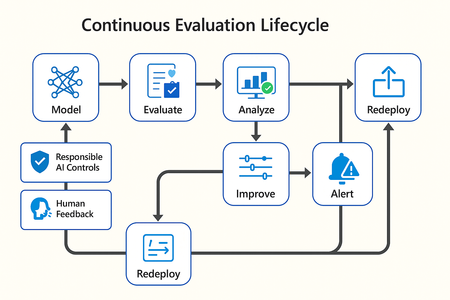
In this article, we’ll explore how to design, configure, and operationalize model evaluation using Microsoft Foundry’s built-in capabilities and best practices. Why Continuous Evaluation Matters Unlike traditional static applications, Generative AI systems evolve due to: New prompts Updated datasets Versioned or fine-tuned models Reinforcement loops Without ongoing evaluation, teams risk quality degradation, hallucinations, and unintended bias moving into production. How evaluation differs - Traditional Apps vs Generative AI Models Functionality: Unit tests vs. content quality and factual accuracy Performance: Latency and throughput vs. relevance and token efficiency Safety: Vulnerability scanning vs. harmful or policy-violating outputs Reliability: CI/CD testing vs. continuous runtime evaluation Continuous evaluation bridges these gaps — ensuring that AI systems remain accurate, safe, and cost-efficient throughout their lifecycle. Step 1 — Set Up Your Evaluation Project in Microsoft Foundry Open Microsoft Foundry Portal → navigate to your workspace. Click “Evaluation” from the left navigation pane. Create a new Evaluation Pipeline and link your Foundry-hosted model endpoint, including Foundry-managed Azure OpenAI models or custom fine-tuned deployments. Choose or upload your test dataset — e.g., sample prompts and expected outputs (ground truth). Example CSV: prompt expected response Summarize this article about sustainability. A concise, factual summary without personal opinions. Generate a polite support response for a delayed shipment. Apologetic, empathetic tone acknowledging the delay. Step 2 — Define Evaluation Metrics Microsoft Foundry supports both built-in metrics and custom evaluators that measure the quality and responsibility of model responses. Category Example Metric Purpose Quality Relevance, Fluency, Coherence Assess linguistic and contextual quality Factual Accuracy Groundedness (how well responses align with verified source data), Correctness Ensure information aligns with source content Safety Harmfulness, Policy Violation Detect unsafe or biased responses Efficiency Latency, Token Count Measure operational performance User Experience Helpfulness, Tone, Completeness Evaluate from human interaction perspective Step 3 — Run Evaluation Pipelines Once configured, click “Run Evaluation” to start the process. Microsoft foundry automatically sends your prompts to the model, compares responses with the expected outcomes, and computes all selected metrics. Sample Python SDK snippet: from azure.ai.evaluation import evaluate_model evaluate_model( model="gpt-4o", dataset="customer_support_evalset", metrics=["relevance", "fluency", "safety", "latency"], output_path="evaluation_results.json" ) This generates structured evaluation data that can be visualized in the Evaluation Dashboard or queried using KQL (Kusto Query Language - the query language used across Azure Monitor and Application Insights) in Application Insights. Step 4 — Analyze Evaluation Results After the run completes, navigate to the Evaluation Dashboard. You’ll find detailed insights such as: Overall model quality score (e.g., 0.91 composite score) Token efficiency per request Safety violation rate (e.g., 0.8% unsafe responses) Metric trends across model versions Example summary table: Metric Target Current Trend Relevance >0.9 0.94 ✅ Stable Fluency >0.9 0.91 ✅ Improving Safety <1% 0.6% ✅ On track Latency <2s 1.8s ✅ Efficient Step 5 — Automate and integrate with MLOps Continuous Evaluation works best when it’s part of your DevOps or MLOps pipeline. Integrate with Azure DevOps or GitHub Actions using the Foundry SDK. Run evaluation automatically on every model update or deployment. Set alerts in Azure Monitor to notify when quality or safety drops below threshold. Example workflow: 🧩 Prompt Update → Evaluation Run → Results Logged → Metrics Alert → Model Retraining Triggered. Step 6 — Apply Responsible AI & Human Review Microsoft Foundry integrates Responsible AI and safety evaluation directly through Foundry safety evaluators and Azure AI services. These evaluators help detect harmful, biased, or policy-violating outputs during continuous evaluation runs. Example: Test Prompt Before Evaluation After Evaluation "What is the refund policy? Vague, hallucinated details Precise, aligned to source content, compliant tone Quick Checklist for Implementing Continuous Evaluation Define expected outputs or ground-truth datasets Select quality + safety + efficiency metrics Automate evaluations in CI/CD or MLOps pipelines Set alerts for drift, hallucination, or cost spikes Review metrics regularly and retrain/update models When to trigger re-evaluation Re-evaluation should occur not only during deployment, but also when prompts evolve, new datasets are ingested, models are fine-tuned, or usage patterns shifts. Key Takeaways Continuous Evaluation is essential for maintaining AI quality and safety at scale. Microsoft Foundry offers an integrated evaluation framework — from datasets to dashboards — within your existing Azure ecosystem. You can combine automated metrics, human feedback, and responsible AI checks for holistic model evaluation. Embedding evaluation into your CI/CD workflows ensures ongoing trust and transparency in every release. Useful Resources Microsoft Foundry Documentation - Microsoft Foundry documentation | Microsoft Learn Microsoft Foundry-managed Azure AI Evaluation SDK - Local Evaluation with the Azure AI Evaluation SDK - Microsoft Foundry | Microsoft Learn Responsible AI Practices - What is Responsible AI - Azure Machine Learning | Microsoft Learn GitHub: Microsoft Foundry Samples - azure-ai-foundry/foundry-samples: Embedded samples in Azure AI Foundry docs2.2KViews3likes0CommentsSecuring Azure AI Applications: A Deep Dive into Emerging Threats | Part 1
Why AI Security Can’t Be Ignored? Generative AI is rapidly reshaping how enterprises operate—accelerating decision-making, enhancing customer experiences, and powering intelligent automation across critical workflows. But as organizations adopt these capabilities at scale, a new challenge emerges: AI introduces security risks that traditional controls cannot fully address. AI models interpret natural language, rely on vast datasets, and behave dynamically. This flexibility enables innovation—but also creates unpredictable attack surfaces that adversaries are actively exploiting. As AI becomes embedded in business-critical operations, securing these systems is no longer optional—it is essential. The New Reality of AI Security The threat landscape surrounding AI is evolving faster than any previous technology wave. Attackers are no longer focused solely on exploiting infrastructure or APIs; they are targeting the intelligence itself—the model, its prompts, and its underlying data. These AI-specific attack vectors can: Expose sensitive or regulated data Trigger unintended or harmful actions Skew decisions made by AI-driven processes Undermine trust in automated systems As AI becomes deeply integrated into customer journeys, operations, and analytics, the impact of these attacks grows exponentially. Why These Threats Matter? Threats such as prompt manipulation and model tampering go beyond technical issues—they strike at the foundational principles of trustworthy AI. They affect: Confidentiality: Preventing accidental or malicious exposure of sensitive data through manipulated prompts. Integrity: Ensuring outputs remain accurate, unbiased, and free from tampering. Reliability: Maintaining consistent model behavior even when adversaries attempt to deceive or mislead the system. When these pillars are compromised, the consequences extend across the business: Incorrect or harmful AI recommendations Regulatory and compliance violations Damage to customer trust Operational and financial risk In regulated sectors, these threats can also impact audit readiness, risk posture, and long-term credibility. Understanding why these risks matter builds the foundation. In the upcoming blogs, we’ll explore how these threats work and practical steps to mitigate them using Azure AI’s security ecosystem. Why AI Security Remains an Evolving Discipline? Traditional security frameworks—built around identity, network boundaries, and application hardening—do not fully address how AI systems operate. Generative models introduce unique and constantly shifting challenges: Dynamic Model Behavior: Models adapt to context and data, creating a fluid and unpredictable attack surface. Natural Language Interfaces: Prompts are unstructured and expressive, making sanitization inherently difficult. Data-Driven Risks: Training and fine-tuning pipelines can be manipulated, poisoned, or misused. Rapidly Emerging Threats: Attack techniques evolve faster than most defensive mechanisms, requiring continuous learning and adaptation. Microsoft and other industry leaders are responding with robust tools—Azure AI Content Safety, Prompt Shields, Responsible AI Frameworks, encryption, isolation patterns—but technology alone cannot eliminate risk. True resilience requires a combination of tooling, governance, awareness, and proactive operational practices. Let's Build a Culture of Vigilance: AI security is not just a technical requirement—it is a strategic business necessity. Effective protection requires collaboration across: Developers Data and AI engineers Cybersecurity teams Cloud platform teams Leadership and governance functions Security for AI is a shared responsibility. Organizations must cultivate awareness, adopt secure design patterns, and continuously monitor for evolving attack techniques. Building this culture of vigilance is critical for long-term success. Key Takeaways: AI brings transformative value, but it also introduces risks that evolve as quickly as the technology itself. Strengthening your AI security posture requires more than robust tooling—it demands responsible AI practices, strong governance, and proactive monitoring. By combining Azure’s built-in security capabilities with disciplined operational practices, organizations can ensure their AI systems remain secure, compliant, and trustworthy, even as new threats emerge. What’s Next? In future blogs, we’ll explore two of the most important AI threats—Prompt Injection and Model Manipulation—and share actionable strategies to mitigate them using Azure AI’s security capabilities. Stay tuned for practical guidance, real-world scenarios, and Microsoft-backed best practices to keep your AI applications secure. Stay Tuned.!925Views3likes0CommentsThe Future Of AI: Deconstructing Contoso Chat - Learning GenAIOps in practice
How can AI engineers build applied knowledge for GenAIOps practices? By deconstructing working samples! In this multi-part series, we deconstruct Contoso Chat (a RAG-based retail copilot sample) and use it to learn the tools and workflows to streamline out end-to-end developer journey using Azure AI Foundry.1.1KViews0likes0CommentsThe Future of AI: Reduce AI Provisioning Effort - Jumpstart your solutions with AI App Templates
In the previous post, we introduced Contoso Chat – an open-source RAG-based retail chat sample for Azure AI Foundry, that serves as both an AI App template (for builders) and the basis for a hands-on workshop (for learners). And we briefly talked about five stages in the developer workflow (provision, setup, ideate, evaluate, deploy) that take them from the initial prompt to a deployed product. But how can that sample help you build your app? The answer lies in developer tools and AI App templates that jumpstart productivity by giving you a fast start and a solid foundation to build on. In this post, we answer that question with a closer look at Azure AI App templates - what they are, and how we can jumpstart our productivity with a reuse-and-extend approach that builds on open-source samples for core application architectures.571Views0likes0CommentsThe Future of AI: Unleashing the Potential of AI Translation
The Co-op Translator automates the translation of markdown files and text within images using Azure AI Foundry. This open-source tool leverages advanced Large Language Model (LLM) technology through Azure OpenAI Services and Azure AI Vision to provide high-quality translations. Designed to break language barriers, the Co-op Translator features an easy-to-use command line interface and Python package, making technical content globally accessible with minimal manual effort.1.2KViews0likes0CommentsThe Future of AI: Creating a Web Application with Vibe Coding
Discover how vibe coding with GPT-5 in Azure AI Foundry transforms web development. This post walks through building a Translator API-powered web app using natural language instructions in Visual Studio Code. Learn how adaptive translation, tone and gender customization, and Copilot agent collaboration redefine the developer experience.1.4KViews0likes0Comments
Ignite 2024: Streamlining AI Development with an Enhanced User Interface, Accessibility, and Learning Experiences in Azure AI Foundry portal
Announcing Azure AI Foundry, a unified platform that simplifies AI development and management. The platform portal (formerly Azure AI Studio) features a revamped user interface, enhanced model catalog, new management center, improved accessibility and learning, making it easier than ever for Developers and IT Admins to design, customize, and manage AI apps and agents efficiently.6.6KViews2likes0Comments