api security
31 Topics
Part 3: Unified Security Intelligence - Orchestrating GenAI Threat Detection with Microsoft Sentinel
Why Sentinel for GenAI Security Observability? Before diving into detection rules, let's address why Microsoft Sentinel is uniquely positioned for GenAI security operations—especially compared to traditional or non-native SIEMs. Native Azure Integration: Zero ETL Overhead The problem with external SIEMs: To monitor your GenAI workloads with a third-party SIEM, you need to: Configure log forwarding from Log Analytics to external systems Set up data connectors or agents for Azure OpenAI audit logs Create custom parsers for Azure-specific log schemas Maintain authentication and network connectivity between Azure and your SIEM Pay data egress costs for logs leaving Azure The Sentinel advantage: Your logs are already in Azure. Sentinel connects directly to: Log Analytics workspace - Where your Container Insights logs already flow Azure OpenAI audit logs - Native access without configuration Azure AD sign-in logs - Instant correlation with identity events Defender for Cloud alerts - Platform-level AI threat detection included Threat intelligence feeds - Microsoft's global threat data built-in Microsoft Defender XDR - AI-driven cybersecurity that unifies threat detection and response across endpoints, email, identities, cloud apps and Sentinel There's no data movement, no ETL pipelines, and no latency from log shipping. Your GenAI security data is queryable in real-time. KQL: Built for Complex Correlation at Scale Why this matters for GenAI: Detecting sophisticated AI attacks requires correlating: Application logs (your code from Part 2) Azure OpenAI service logs (API calls, token usage, throttling) Identity signals (who authenticated, from where) Threat intelligence (known malicious IPs) Defender for Cloud alerts (platform-level anomalies) KQL's advantage: Kusto Query Language is designed for this. You can: Join across multiple data sources in a single query Parse nested JSON (like your structured logs) natively Use time-series analysis functions for anomaly detection and behavior patterns Aggregate millions of events in seconds Extract entities (users, IPs, sessions) automatically for investigation graphs Example: Correlating your app logs with Azure AD sign-ins and Defender alerts takes 10 lines of KQL. In a traditional SIEM, this might require custom scripts, data normalization, and significantly slower performance. User Security Context Flows Natively Remember the user_security_context you pass in extra_body from Part 2? That context: Automatically appears in Azure OpenAI's audit logs Flows into Defender for Cloud AI alerts Is queryable in Sentinel without custom parsing Maps to the same identity schema as Azure AD logs With external SIEMs: You'd need to: Extract user context from your application logs Separately ingest Azure OpenAI logs Write correlation logic to match them Maintain entity resolution across different data sources With Sentinel: It just works. The end_user_id, source_ip, and application_name are already normalized across Azure services. Built-In AI Threat Detection Sentinel includes pre-built detections for cloud and AI workloads: Azure OpenAI anomalous access patterns (out of the box) Unusual token consumption (built-in analytics templates) Geographic anomalies (using Azure's global IP intelligence) Impossible travel detection (cross-referencing sign-ins with AI API calls) Microsoft Defender XDR (correlation with endpoint, email, cloud app signals) These aren't generic "high volume" alerts—they're tuned for Azure AI services by Microsoft's security research team. You can use them as-is or customize them with your application-specific context. Entity Behavior Analytics (UEBA) Sentinel's UEBA automatically builds baselines for: Normal request volumes per user Typical request patterns per application Expected geographic access locations Standard model usage patterns Then it surfaces anomalies: "User_12345 normally makes 10 requests/day, suddenly made 500 in an hour" "Application_A typically uses GPT-3.5, suddenly switched to GPT-4 exclusively" "User authenticated from Seattle, made AI requests from Moscow 10 minutes later" This behavior modeling happens automatically—no custom ML model training required. Traditional SIEMs would require you to build this logic yourself. The Bottom Line For GenAI security on Azure: Sentinel reduces time-to-detection because data is already there Correlation is simpler because everything speaks the same language Investigation is faster because entities are automatically linked Cost is lower because you're not paying data egress fees Maintenance is minimal because connectors are native If your GenAI workloads are on Azure, using anything other than Sentinel means fighting against the platform instead of leveraging it. From Logs to Intelligence: The Complete Picture Your structured logs from Part 2 are flowing into Log Analytics. Here's what they look like: { "timestamp": "2025-10-21T14:32:17.234Z", "level": "INFO", "message": "LLM Request Received", "request_id": "a7c3e9f1-4b2d-4a8e-9c1f-3e5d7a9b2c4f", "session_id": "550e8400-e29b-41d4-a716-446655440000", "prompt_hash": "d3b07384d113edec49eaa6238ad5ff00", "security_check_passed": "PASS", "source_ip": "203.0.113.42", "end_user_id": "user_550e8400", "application_name": "AOAI-Customer-Support-Bot", "model_deployment": "gpt-4-turbo" } These logs are in the ContainerLogv2 table since our application “AOAI-Customer-Support-Bot” is running on Azure Kubernetes Services (AKS). Steps to Setup AKS to stream logs to Sentinel/Log Analytics From Azure portal, navigate to your AKS, then to Monitoring -> Insights Select Monitor Settings Under Container Logs Select the Sentinel-enabled Log Analytics workspace Select Logs and events Check the ‘Enable ContainerLogV2’ and ‘Enable Syslog collection’ options More details can be found at this link Kubernetes monitoring in Azure Monitor - Azure Monitor | Microsoft Learn Critical Analytics Rules: What to Detect and Why Rule 1: Prompt Injection Attack Detection Why it matters: Prompt injection is the GenAI equivalent of SQL injection. Attackers try to manipulate the model by overriding system instructions. Multiple attempts indicate intentional malicious behavior. What to detect: 3+ prompt injection attempts within 10 minutes from similar IP let timeframe = 1d; let threshold = 3; AlertEvidence | where TimeGenerated >= ago(timeframe) and EntityType == "Ip" | where DetectionSource == "Microsoft Defender for AI Services" | where Title contains "jailbreak" or Title contains "prompt injection" | summarize count() by bin (TimeGenerated, 1d), RemoteIP | where count_ >= threshold What the SOC sees: User identity attempting injection Source IP and geographic location Sample prompts for investigation Frequency indicating automation vs. manual attempts Severity: High (these are actual attempts to bypass security) Rule 2: Content Safety Filter Violations Why it matters: When Azure AI Content Safety blocks a request, it means harmful content (violence, hate speech, etc.) was detected. Multiple violations indicate intentional abuse or a compromised account. What to detect: Users with 3+ content safety violations in a 1 hour block during a 24 hour time period. let timeframe = 1d; let threshold = 3; ContainerLogV2 | where TimeGenerated >= ago(timeframe) | where isnotempty(LogMessage.end_user_id) | where LogMessage.security_check_passed == "FAIL" | extend source_ip=tostring(LogMessage.source_ip) | extend end_user_id=tostring(LogMessage.end_user_id) | extend session_id=tostring(LogMessage.session_id) | extend application_name = tostring(LogMessage.application_name) | extend security_check_passed = tostring (LogMessage.security_check_passed) | summarize count() by bin(TimeGenerated, 1h),source_ip,end_user_id,session_id,Computer,application_name,security_check_passed | where count_ >= threshold What the SOC sees: Severity based on violation count Time span showing if it's persistent vs. isolated Prompt samples (first 80 chars) for context Session ID for conversation history review Severity: High (these are actual harmful content attempts) Rule 3: Rate Limit Abuse Why it matters: Persistent rate limit violations indicate automated attacks, credential stuffing, or attempts to overwhelm the system. Legitimate users who hit rate limits don't retry 10+ times in minutes. What to detect: Users blocked by rate limiter 5+ times in 10 minutes let timeframe = 1h; let threshold = 5; AzureDiagnostics | where ResourceProvider == "MICROSOFT.COGNITIVESERVICES" | where OperationName == "Completions" or OperationName contains "ChatCompletions" | extend tokensUsed = todouble(parse_json(properties_s).usage.total_tokens) | summarize totalTokens = sum(tokensUsed), requests = count(), rateLimitErrors = countif(httpstatuscode_s == "429") by bin(TimeGenerated, 1h) | where count_ >= threshold What the SOC sees: Whether it's a bot (immediate retries) or human (gradual retries) Duration of attack Which application is targeted Correlation with other security events from same user/IP Severity: Medium (nuisance attack, possible reconnaissance) Rule 4: Anomalous Source IP for User Why it matters: A user suddenly accessing from a new country or VPN could indicate account compromise. This is especially critical for privileged accounts or after-hours access. What to detect: User accessing from an IP never seen in the last 7 days let lookback = 7d; let recent = 1h; let baseline = IdentityLogonEvents | where Timestamp between (ago(lookback + recent) .. ago(recent)) | where isnotempty(IPAddress) | summarize knownIPs = make_set(IPAddress) by AccountUpn; ContainerLogV2 | where TimeGenerated >= ago(recent) | where isnotempty(LogMessage.source_ip) | extend source_ip=tostring(LogMessage.source_ip) | extend end_user_id=tostring(LogMessage.end_user_id) | extend session_id=tostring(LogMessage.session_id) | extend application_name = tostring(LogMessage.application_name) | extend security_check_passed = tostring (LogMessage.security_check_passed) | extend full_prompt_sample = tostring (LogMessage.full_prompt_sample) | lookup baseline on $left.AccountUpn == $right.end_user_id | where isnull(knownIPs) or IPAddress !in (knownIPs) | project TimeGenerated, source_ip, end_user_id, session_id, Computer, application_name, security_check_passed, full_prompt_sample What the SOC sees: User identity and new IP address Geographic location change Whether suspicious prompts accompanied the new IP Timing (after-hours access is higher risk) Severity: Medium (environment compromise, reconnaissance) Rule 5: Coordinated Attack - Same Prompt from Multiple Users Why it matters: When 5+ users send identical prompts, it indicates a bot network, credential stuffing, or organized attack campaign. This is not normal user behavior. What to detect: Same prompt hash from 5+ different users within 1 hour let timeframe = 1h; let threshold = 5; ContainerLogV2 | where TimeGenerated >= ago(timeframe) | where isnotempty(LogMessage.prompt_hash) | where isnotempty(LogMessage.end_user_id) | extend source_ip=tostring(LogMessage.source_ip) | extend end_user_id=tostring(LogMessage.end_user_id) | extend prompt_hash=tostring(LogMessage.prompt_hash) | extend application_name = tostring(LogMessage.application_name) | extend security_check_passed = tostring (LogMessage.security_check_passed) | project TimeGenerated, prompt_hash, source_ip, end_user_id, application_name, security_check_passed | summarize DistinctUsers = dcount(end_user_id), Attempts = count(), Users = make_set(end_user_id, 100), IpAddress = make_set(source_ip, 100) by prompt_hash, bin(TimeGenerated, 1h) | where DistinctUsers >= threshold What the SOC sees: Attack pattern (single attacker with stolen accounts vs. botnet) List of compromised user accounts Source IPs for blocking Prompt sample to understand attack goal Severity: High (indicates organized attack) Rule 6: Malicious model detected Why it matters: Model serialization attacks can lead to serious compromise. When Defender for Cloud Model Scanning identifies issues with a custom or opensource model that is part of Azure ML Workspace, Registry, or hosted in Foundry, that may be or may not be a user oversight. What to detect: Model scan results from Defender for Cloud and if it is being actively used. What the SOC sees: Malicious model Applications leveraging the model Source IPs and users accessed the model Severity: Medium (can be user oversight) Advanced Correlation: Connecting the Dots The power of Sentinel is correlating your application logs with other security signals. Here are the most valuable correlations: Correlation 1: Failed GenAI Requests + Failed Sign-Ins = Compromised Account Why: Account showing both authentication failures and malicious AI prompts is likely compromised within a 1 hour timeframe l let timeframe = 1h; ContainerLogV2 | where TimeGenerated >= ago(timeframe) | where isnotempty(LogMessage.source_ip) | extend source_ip=tostring(LogMessage.source_ip) | extend end_user_id=tostring(LogMessage.end_user_id) | extend session_id=tostring(LogMessage.session_id) | extend application_name = tostring(LogMessage.application_name) | extend security_check_passed = tostring (LogMessage.security_check_passed) | extend full_prompt_sample = tostring (LogMessage.full_prompt_sample) | extend message = tostring (LogMessage.message) | where security_check_passed == "FAIL" or message contains "WARNING" | join kind=inner ( SigninLogs | where ResultType != 0 // 0 means success, non-zero indicates failure | project TimeGenerated, UserPrincipalName, ResultType, ResultDescription, IPAddress, Location, AppDisplayName ) on $left.end_user_id == $right.UserPrincipalName | project TimeGenerated, source_ip, end_user_id, application_name, full_prompt_sample, prompt_hash, message, security_check_passed Severity: High (High probability of compromise) Correlation 2: Application Logs + Defender for Cloud AI Alerts Why: Defender for Cloud AI Threat Protection detects platform-level threats (unusual API patterns, data exfiltration attempts). When both your code and the platform flag the same user, confidence is very high. let timeframe = 1h; ContainerLogV2 | where TimeGenerated >= ago(timeframe) | where isnotempty(LogMessage.source_ip) | extend source_ip=tostring(LogMessage.source_ip) | extend end_user_id=tostring(LogMessage.end_user_id) | extend session_id=tostring(LogMessage.session_id) | extend application_name = tostring(LogMessage.application_name) | extend security_check_passed = tostring (LogMessage.security_check_passed) | extend full_prompt_sample = tostring (LogMessage.full_prompt_sample) | extend message = tostring (LogMessage.message) | where security_check_passed == "FAIL" or message contains "WARNING" | join kind=inner ( AlertEvidence | where TimeGenerated >= ago(timeframe) and AdditionalFields.Asset == "true" | where DetectionSource == "Microsoft Defender for AI Services" | project TimeGenerated, Title, CloudResource ) on $left.application_name == $right.CloudResource | project TimeGenerated, application_name, end_user_id, source_ip, Title Severity: Critical (Multi-layer detection) Correlation 3: Source IP + Threat Intelligence Feeds Why: If requests come from known malicious IPs (C2 servers, VPN exit nodes used in attacks), treat them as high priority even if behavior seems normal. //This rule correlates GenAI app activity with Microsoft Threat Intelligence feed available in Sentinel and Microsoft XDR for malicious IP IOCs let timeframe = 10m; ContainerLogV2 | where TimeGenerated >= ago(timeframe) | where isnotempty(LogMessage.source_ip) | extend source_ip=tostring(LogMessage.source_ip) | extend end_user_id=tostring(LogMessage.end_user_id) | extend session_id=tostring(LogMessage.session_id) | extend application_name = tostring(LogMessage.application_name) | extend security_check_passed = tostring (LogMessage.security_check_passed) | extend full_prompt_sample = tostring (LogMessage.full_prompt_sample) | join kind=inner ( ThreatIntelIndicators | where IsActive == "true" | where ObservableKey startswith "ipv4-addr" or ObservableKey startswith "network-traffic" | project IndicatorIP = ObservableValue ) on $left.source_ip == $right.IndicatorIP | project TimeGenerated, source_ip, end_user_id, application_name, full_prompt_sample, security_check_passed Severity: High (Known bad actor) Workbooks: What Your SOC Needs to See Executive Dashboard: GenAI Security Health Purpose: Leadership wants to know: "Are we secure?" Answer with metrics. Key visualizations: Security Status Tiles (24 hours) Total Requests Success Rate Blocked Threats (Self detected + Content Safety + Threat Protection for AI) Rate Limit Violations Model Security Score (Red Team evaluation status of currently deployed model) ContainerLogV2 | where TimeGenerated > ago (1d) | extend security_check_passed = tostring (LogMessage.security_check_passed) | summarize SuccessCount=countif(security_check_passed == "PASS"), FailedCount=countif(security_check_passed == "FAIL") by bin(TimeGenerated, 1h) | extend TotalRequests = SuccessCount + FailedCount | extend SuccessRate = todouble(SuccessCount)/todouble(TotalRequests) * 100 | order by SuccessRate 1. Trend Chart: Pass vs. Fail Over Time Shows if attack volume is increasing Identifies attack time windows Validates that defenses are working ContainerLogV2 | where TimeGenerated > ago (14d) | extend security_check_passed = tostring (LogMessage.security_check_passed) | summarize SuccessCount=countif(security_check_passed == "PASS"), FailedCount=countif(security_check_passed == "FAIL") by bin(TimeGenerated, 1d) | render timechart 2. Top 10 Users by Security Events Bar chart of users with most failures ContainerLogV2 | where TimeGenerated > ago (1d) | where isnotempty(LogMessage.end_user_id) | extend end_user_id=tostring(LogMessage.end_user_id) | extend security_check_passed = tostring (LogMessage.security_check_passed) | where security_check_passed == "FAIL" | summarize FailureCount = count() by end_user_id | top 20 by FailureCount | render barchart Applications with most failures ContainerLogV2 | where TimeGenerated > ago (1d) | where isnotempty(LogMessage.application_name) | extend application_name=tostring(LogMessage.application_name) | extend security_check_passed = tostring (LogMessage.security_check_passed) | where security_check_passed == "FAIL" | summarize FailureCount = count() by application_name | top 20 by FailureCount | render barchart 3. Geographic Threat Map Where are attacks originating? Useful for geo-blocking decisions ContainerLogV2 | where TimeGenerated > ago (1d) | where isnotempty(LogMessage.application_name) | extend application_name=tostring(LogMessage.application_name) | extend source_ip=tostring(LogMessage.source_ip) | extend security_check_passed = tostring (LogMessage.security_check_passed) | where security_check_passed == "FAIL" | extend GeoInfo = geo_info_from_ip_address(source_ip) | project sourceip, GeoInfo.counrty, GeoInfo.city Analyst Deep-Dive: User Behavior Analysis Purpose: SOC analyst investigating a specific user or session Key components: 1. User Activity Timeline Every request from the user in time order ContainerLogV2 | where isnotempty(LogMessage.end_user_id) | project TimeGenerated, LogMessage.source_ip, LogMessage.end_user_id, LogMessage. session_id, Computer, LogMessage.application_name, LogMessage.request_id, LogMessage.message, LogMessage.full_prompt_sample | order by tostring(LogMessage_end_user_id), TimeGenerated Color-coded by security status AlertInfo | where DetectionSource == "Microsoft Defender for AI Services" | project TimeGenerated, AlertId, Title, Category, Severity, SeverityColor = case( Severity == "High", "🔴 High", Severity == "Medium", "🟠 Medium", Severity == "Low", "🟢 Low", "⚪ Unknown" ) 2. Session Analysis Table All sessions for the user ContainerLogV2 | where TimeGenerated > ago (1d) | where isnotempty(LogMessage.end_user_id) | extend end_user_id=tostring(LogMessage.end_user_id) | where end_user_id == "<username>" // Replace with actual username | extend application_name=tostring(LogMessage.application_name) | extend source_ip=tostring(LogMessage.source_ip) | extend session_id=tostri1ng(LogMessage.session_id) | extend security_check_passed = tostring (LogMessage.security_check_passed) | project TimeGenerated, session_id, end_user_id, application_name, security_check_passed Failed requests per session ContainerLogV2 | where TimeGenerated > ago (1d) | extend security_check_passed = tostring (LogMessage.security_check_passed) | where security_check_passed == "FAIL" | extend end_user_id=tostring(LogMessage.end_user_id) | extend session_id=tostring(LogMessage.session_id) | extend security_check_passed = tostring (LogMessage.security_check_passed) | summarize Failed_Sessions = count() by end_user_id, session_id | order by Failed_Sessions Session duration ContainerLogV2 | where TimeGenerated > ago (1d) | where isnotempty(LogMessage.session_id) | extend security_check_passed = tostring (LogMessage.security_check_passed) | where security_check_passed == "PASS" | extend end_user_id=tostring(LogMessage.end_user_id) | extend session_id=tostring(LogMessage.session_id) | extend application_name=tostring(LogMessage.application_name) | extend source_ip=tostring(LogMessage.source_ip) | summarize Start=min(TimeGenerated), End=max(TimeGenerated), count() by end_user_id, session_id, source_ip, application_name | extend DurationSeconds = datetime_diff("second", End, Start) 3. Prompt Pattern Detection Unique prompts by hash Frequency of each pattern Detect if user is fuzzing/testing boundaries Sample query for user investigation: ContainerLogV2 | where TimeGenerated > ago (14d) | where isnotempty(LogMessage.prompt_hash) | where isnotempty(LogMessage.full_prompt_sample) | extend prompt_hash=tostring(LogMessage.prompt_hash) | extend full_prompt_sample=tostring(LogMessage.full_prompt_sample) | extend application_name=tostring(LogMessage.application_name) | summarize count() by prompt_hash, full_prompt_sample | order by count_ Threat Hunting Dashboard: Proactive Detection Purpose: Find threats before they trigger alerts Key queries: 1. Suspicious Keywords in Prompts (e.g. Ignore, Disregard, system prompt, instructions, DAN, jailbreak, pretend, roleplay) let suspicious_prompts = externaldata (content_policy:int, content_policy_name:string, q_id:int, question:string) [ @"https://raw.githubusercontent.com/verazuo/jailbreak_llms/refs/heads/main/data/forbidden_question/forbidden_question_set.csv"] with (format="csv", has_header_row=true, ignoreFirstRecord=true); ContainerLogV2 | where TimeGenerated > ago (14d) | where isnotempty(LogMessage.full_prompt_sample) | extend full_prompt_sample=tostring(LogMessage.full_prompt_sample) | where full_prompt_sample in (suspicious_prompts) | extend end_user_id=tostring(LogMessage.end_user_id) | extend session_id=tostring(LogMessage.session_id) | extend application_name=tostring(LogMessage.application_name) | extend source_ip=tostring(LogMessage.source_ip) | project TimeGenerated, session_id, end_user_id, source_ip, application_name, full_prompt_sample 2. High-Volume Anomalies User sending too many requests by a IP or User. Assuming that Foundry Projects are configured to use Azure AD and not API Keys. //50+ requests in 1 hour let timeframe = 1h; let threshold = 50; AzureDiagnostics | where ResourceProvider == "MICROSOFT.COGNITIVESERVICES" | where OperationName == "Completions" or OperationName contains "ChatCompletions" | extend tokensUsed = todouble(parse_json(properties_s).usage.total_tokens) | summarize totalTokens = sum(tokensUsed), requests = count() by bin(TimeGenerated, 1h),CallerIPAddress | where count_ >= threshold 3. Rare Failures (Novel Attack Detection) Rare failures might indicate zero-day prompts or new attack techniques //10 or more failures in 24 hours ContainerLogV2 | where TimeGenerated >= ago (24h) | where isnotempty(LogMessage.security_check_passed) | extend security_check_passed=tostring(LogMessage.security_check_passed) | where security_check_passed == "FAIL" | extend application_name=tostring(LogMessage.application_name) | extend end_user_id=tostring(LogMessage.end_user_id) | extend source_ip=tostring(LogMessage.source_ip) | summarize FailedAttempts = count(), FirstAttempt=min(TimeGenerated), LastAttempt=max(TimeGenerated) by application_name | extend DurationHours = datetime_diff('hour', LastAttempt, FirstAttempt) | where DurationHours >= 24 and FailedAttempts >=10 | project application_name, FirstAttempt, LastAttempt, DurationHours, FailedAttempts Measuring Success: Security Operations Metrics Key Performance Indicators Mean Time to Detect (MTTD): let AppLog = ContainerLogV2 | extend application_name=tostring(LogMessage.application_name) | extend security_check_passed=tostring (LogMessage.security_check_passed) | extend session_id=tostring(LogMessage.session_id) | extend end_user_id=tostring(LogMessage.end_user_id) | extend source_ip=tostring(LogMessage.source_ip) | where security_check_passed=="FAIL" | summarize FirstLogTime=min(TimeGenerated) by application_name, session_id, end_user_id, source_ip; let Alert = AlertEvidence | where DetectionSource == "Microsoft Defender for AI Services" | extend end_user_id = tostring(AdditionalFields.AadUserId) | extend source_ip=RemoteIP | extend application_name=CloudResource | summarize FirstAlertTime=min(TimeGenerated) by AlertId, Title, application_name, end_user_id, source_ip; AppLog | join kind=inner (Alert) on application_name, end_user_id, source_ip | extend DetectionDelayMinutes=datetime_diff('minute', FirstAlertTime, FirstLogTime) | summarize MTTD_Minutes=round(avg (DetectionDelayMinutes),2) by AlertId, Title Target: <= 15 minutes from first malicious activity to alert Mean Time to Respond (MTTR): SecurityIncident | where Status in ("New", "Active") | where CreatedTime >= ago(14d) | extend ResponseDelay = datetime_diff('minute', LastActivityTime, FirstActivityTime) | summarize MTTR_Minutes = round (avg (ResponseDelay),2) by CreatedTime, IncidentNumber | order by CreatedTime, IncidentNumber asc Target: < 4 hours from alert to remediation Threat Detection Rate: ContainerLogV2 | where TimeGenerated > ago (1d) | extend security_check_passed = tostring (LogMessage.security_check_passed) | summarize SuccessCount=countif(security_check_passed == "PASS"), FailedCount=countif(security_check_passed == "FAIL") by bin(TimeGenerated, 1h) | extend TotalRequests = SuccessCount + FailedCount | extend SuccessRate = todouble(SuccessCount)/todouble(TotalRequests) * 100 | order by SuccessRate Context: 1-3% is typical for production systems (most traffic is legitimate) What You've Built By implementing the logging from Part 2 and the analytics rules in this post, your SOC now has: ✅ Real-time threat detection - Alerts fire within minutes of malicious activity ✅ User attribution - Every incident has identity, IP, and application context ✅ Pattern recognition - Detect both volume-based and behavior-based attacks ✅ Correlation across layers - Application logs + platform alerts + identity signals ✅ Proactive hunting - Dashboards for finding threats before they trigger rules ✅ Executive visibility - Metrics showing program effectiveness Key Takeaways GenAI threats need GenAI-specific analytics - Generic rules miss context like prompt injection, content safety violations, and session-based attacks Correlation is critical - The most sophisticated attacks span multiple signals. Correlating app logs with identity and platform alerts catches what individual rules miss. User context from Part 2 pays off - end_user_id, source_ip, and session_id enable investigation and response at scale Prompt hashing enables pattern detection - Detect repeated attacks without storing sensitive prompt content Workbooks serve different audiences - Executives want metrics; analysts want investigation tools; hunters want anomaly detection Start with high-fidelity rules - Content Safety violations and rate limit abuse have very low false positive rates. Add behavioral rules after establishing baselines. What's Next: Closing the Loop You've now built detection and visibility. In Part 4, we'll close the security operations loop with: Part 4: Platform Integration and Automated Response Building SOAR playbooks for automated incident response Implementing automated key rotation with Azure Key Vault Blocking identities in Entra Creating feedback loops from incidents to code improvements The journey from blind spot to full security operations capability is almost complete. Previous: Part 1: Securing GenAI Workloads in Azure: A Complete Guide to Monitoring and Threat Protection - AIO11Y | Microsoft Community Hub Part 2: Part 2: Building Security Observability Into Your Code - Defensive Programming for Azure OpenAI | Microsoft Community Hub Next: Part 4: Platform Integration and Automated Response (Coming soon)The Microsoft Defender for AI Alerts
I will start this blog post by thanking my Secure AI GBB Colleague Hiten Sharma for his contributions to this Tech Blog as a peer-reviewer. Microsoft Defender for AI (part of Microsoft Defender) helps organizations threats to generative AI applications in real time and helps respond to security issues. Microsoft Defender for AI is in General Availability state and covers Azure OpenAI supported models and Azure AI Model Inference service supported models deployed on Azure Commercial Cloud and provides Activity monitoring and prompt evidence for security teams. This blog aims to help the Microsoft Defender for AI (the service) users understand the different alerts generated by the service, what they mean, how they align to the Mitre Att&ck Framework, and how to reduce the potential alert re-occurrences. The 5 Generative AI Security Threats You Need to Know About This section aims to give the reader an overview of the 5 Generative AI Security Threats every security professional needs to know about. For more details, please refer to “The 5 generative AI security threats you need to know about e-book”. Poisoning Attacks Poisoning attacks are adversarial attacks which target the training or fine-tuning data of generative AI models. In a Poisoning Attack, the adversary injects biased or malicious data during the learning process with the intention of affecting the model’s behavior, accuracy, reliability, and ethical boundaries. Evasion Attacks Evasion Attacks are adversarial attacks where the adversary crafts inputs designed to bypass the security controls and model restrictions. This kind of attacks [Evasion Attacks] exploit the generative AI system in the model’s inference stage (In the context of generative AI, this is the stage where the model generates text, images, or other outputs in response to user inputs.). In an Evasion Attack, the adversary does not modify the Generative AI model itself but rather adapts and manipulates prompts to avoid the model safety mechanisms. Functional Extraction Functional Extraction attacks are model extraction attacks where the adversary repeatedly interacts with the Generative AI system and observes the responses. In a Functional Extraction attack, the adversary attempts to reverse-engineer or recreate the generative AI system without direct access to its infrastructure or training data. Inversion Attack Inversion Attacks are adversarial attacks where the adversary repeatedly interacts with the Generative AI system to reconstruct or infer sensitive information about the model and its infrastructure. In an Inversion Attack, the adversary attempts to exploit what the Generative AI model have memorized from its training data. Prompt Injection Attacks Prompt Injection Attacks are evasion attacks where the adversary uses malicious prompts to override or bypass the AI system’s safety rules, policies, and intended behavior. In a Prompt Injection Attack, the adversary embeds malicious instructions in a prompt (or a sequence of prompts) to trick the AI system into ignoring safety filters, generate harmful or restricted contents, or reveal confidential information (i.e. the Do Anything Now (DAN) exploit, which prompts LLMs to “do anything now.” More details about AI Jail Brake attempts, including DAN exploit can be found in this Microsoft Tech Blog Article). The Microsoft Defender for AI Alerts Microsoft Defender for AI works with Azure AI Prompt Shields (more details at Microsoft Foundry Prompt Shields documentation) and utilizes Microsoft’s Threat Intelligence to identify (in real-time) the threats impacting the monitored AI Services. Below is a list of the different alerts Defender for AI generates, what they mean, how they align with the Mitre Att&ck Framework, and suggestion on how to reduce the potential of their re-occurrence. More details about these alerts can be found at Microsoft Defender for AI documentation. Detected credential theft attempts on an Azure AI model deployment Severity: Medium Mitre Tactics: Credential Access, Lateral Movement, Exfiltration Attack Type: Inversion Attack Description: As per Microsoft Documentation “The credential theft alert is designed to notify the SOC when credentials are detected within GenAI model responses to a user prompt, indicating a potential breach. This alert is crucial for detecting cases of credential leak or theft, which are unique to generative AI and can have severe consequences if successful.” How it happens: Credential Leakage in a Generative AI response typically occur because of training the model with data that contains credentials (i.e. Hardcoded secrets, API Keys, passwords, or configuration files that contain such information), this can also occur if the prompt triggers the AI System to retrieve the information from host system tools or memory. How to avoid: The re-occurrence of this alert can be reduced by adapting the following: Training Data Hygiene: Ensure that no credentials exist in the training data, this can be done by scanning for credentials and using secret-detection tools before training or fine-tuning the model(s) in use. Guardrails and Filtering: Implementing output scanning (i.e. credential detectors, filters, etc…) to block responses that contain credentials. This can be addressed using various methods including custom content filters in Azure AI Foundry. Adapt Zero Trust, including least privilege access to the run-time environment for the AI system, ensure that the AI System and its plugins has no access to secrets (more details at Microsoft’s Zero Trust site.) Prompt Injection Defense: In addition to adapting the earlier recommendations, also use Azure AI Prompt Shields to identify and potentially block prompt injection attempts. A Jailbreak attempt on an Azure AI model deployment was blocked by Azure AI Content Safety Prompt Shields Severity: Medium Mitre Tactics: Privilege Escalation, Defense Evasion Attack Type: Prompt Injection Attack Description: As per Microsoft Documentation “The Jailbreak alert, carried out using a direct prompt injection technique, is designed to notify the SOC there was an attempt to manipulate the system prompt to bypass the generative AI’s safeguards, potentially accessing sensitive data or privileged functions. It indicated that such attempts were blocked by Azure Responsible AI Content Safety (also known as Prompt Shields), ensuring the integrity of the AI resources and the data security.” How it happens: This alert indicates that Prompt Shields (more details about prompt shields at Microsoft Foundry Prompt Shields documentation) have identified an attempt by an adversary to use a specially engineered input to trick the AI System into by passing its safety rules, guardrails, or content filters. In the case of this alert, Prompt Shields have detected and blocked the attempt, preventing the AI system from acting differently than its guardrails. How to avoid: While this alert indicates that Prompt Shield has successfully blocked the Jailbreak attempt, additional measures can be taken to reduce the potential impact and re-occurrence of Jailbreak attempts: Use Azure AI Prompt Shields: Real-Time detection is not a single use but rather a continuous use security measure. Continue using it and monitor alerts, (more details at Microsoft Foundry Prompt Shields documentation). Use Retrieval Isolation: Retrieval Isolation separates user prompts from knowledge/retrieval sources (i.e. Knowledge Bases, Databases, Web search Agents, APIs, Documents), this isolation ensures that the model is not directly influencing what contents is retrieved, insures that malicious prompts cannot poison the knowledge/retrieval sources, and reduces the impact of malicious prompts that intend to coerce the system to retrieve sensitive or unsafe data. Continuous testing: Using Red Teaming tools (i.e. Microsoft AI Read Team tools) and exercises, continuously test the AI system against Jail Break patterns and models and adjust security measures according to findings. Adapt Zero Trust, including enforcing strong authentication and authorization measures where you verify explicitly, use least privilege access, and always assume breach to ensure the AI system cannot directly trigger actions, API calls, or sensitive operations without proper validation (more details at Microsoft’s Zero Trust site. A Jailbreak attempt on an Azure AI model deployment was detected by Azure AI Content Safety Prompt Shields Severity: Medium Mitre Tactics: Privilege Escalation, Defense Evasion Attack Type: Prompt Injection Attack Description: As per Microsoft Documentation “The Jailbreak alert, carried out using a direct prompt injection technique, is designed to notify the SOC there was an attempt to manipulate the system prompt to bypass the generative AI’s safeguards, potentially accessing sensitive data or privileged functions. It indicated that such attempts were detected by Azure Responsible AI Content Safety (also known as Prompt Shields), but weren't blocked due to content filtering settings or due to low confidence.” How it happens: This alert indicates that Prompt Shields have identified an attempt by an adversary to use a specially engineered input to trick the AI System into by passing its safety rules, guardrails, or content filters. In the case of this alert, Prompt Shields have detected the attempt but did not block it, the event is not blocked due to either the content filter settings configuration or low confidence. How to avoid: While this alert indicates that Prompt Shield is enabled to protect the AI system and has successfully detected the Jailbreak attempt, additional measures can be taken to reduce the potential impact and re-occurrence of Jailbreak attempts: Use Azure AI Prompt Shields: Real-Time detection is not a single use but rather a continuous use security measure. Continue using it and monitor alerts, (more details at Microsoft Foundry Prompt Shields documentation). Use Retrieval Isolation: Retrieval Isolation separates user prompts from knowledge/retrieval sources (i.e. Knowledge Bases, Databases, Web search Agents, APIs, Documents), this isolation ensures that the model is not directly influencing what contents is retrieved, insures that malicious prompts cannot poison the knowledge/retrieval sources, and reduces the impact of malicious prompts that intend to coerce the system to retrieve sensitive or unsafe data. Continuous testing: Using Red Teaming tools (i.e. Microsoft AI Read Team tools) and exercises, continuously test the AI system against Jail Break patterns and models and adjust security measures according to findings. Adapt Zero Trust, including enforcing strong authentication and authorization measures where you verify explicitly, use least privilege access, and always assume breach to ensure the AI system cannot directly trigger actions, API calls, or sensitive operations without proper validation (more details at Microsoft’s Zero Trust site. Corrupted AI application\model\data directed a phishing attempt at a user Severity: High Mitre Tactics: Impact (Defacement) Attack Type: Poisoning Attack Description: As per Microsoft Documentation “This alert indicates a corruption of an AI application developed by the organization, as it has actively shared a known malicious URL used for phishing with a user. The URL originated within the application itself, the AI model, or the data the application can access.” How it happens: This alert indicates the AI system, its underlying model, or its knowledge sources were corrupted with malicious data and started returning the corrupted data in the form of phishing-style responses to the users. This can occur because of training data poisoning, an earlier successful attack that modified the system knowledge sources, tampered system instructions, or unauthorized access to the AI system itself. How to avoid: This alert needs to be taken seriously and investigated accordingly, the re-occurrence of this alert can be reduced by adapting the following: Strengthen model and data integrity controls, this includes hashing model artifacts (i.e. Model Weights, Tokenizers), signing model packages, and enforcing integrity checks during runtime. Adapt Zero Trust, including enforcing strong authentication and authorization measures where you verify explicitly, across developer environments, CI/CD pipelines, knowledge sources, and deployment endpoints, (more details at Microsoft’s Zero Trust site.) Implement data validation and data poisoning detection strategies on all incoming training and fine-tuning data. Use Retrieval Isolation: Retrieval Isolation separates user prompts from knowledge/retrieval sources (i.e. Knowledge Bases, Databases, Web search Agents, APIs, Documents), this isolation ensures that the model is not directly influencing what contents is retrieved, insures that malicious prompts cannot poison the knowledge/retrieval sources, and reduces the impact of malicious prompts that intend to coerce the system to retrieve sensitive or unsafe data. Continuous testing: Using Red Teaming tools (i.e. Microsoft AI Read Team tools) and exercises, continuously test the AI system against poisoning attempts, prompt injection attacks, and malicious tools invocation scenarios. Phishing URL shared in an AI application Severity: High Mitre Tactics: Impact (Defacement), Collection Attack Type: Prompt Injection Description: As per Microsoft Documentation “This alert indicates a potential corruption of an AI application, or a phishing attempt by one of the end users. The alert determines that a malicious URL used for phishing was passed during a conversation through the AI application, however the origin of the URL (user or application) is unclear.” How it happens: This alert indicates that a phishing URL was present in the interaction between the user and the AI System, this phishing URL might originate from a user prompt, as a result of malicious input in a prompt, generated by them model as a result of an earlier attack, or due to a poisoned knowledge source. How to avoid: This alert needs to be taken seriously and investigated accordingly, the re-occurrence of this alert can be reduced by adapting the following: Adapt URL scanning mechanism prior to returning any URL to users (i.e. check against Threat Intelligence, URL reputation sources) and content scanning mechanisms (This can be done using Azure Prompt Flows, or using Azure Functions). Use Retrieval Isolation: Retrieval Isolation separates user prompts from knowledge/retrieval sources (i.e. Knowledge Bases, Databases, Web search Agents, APIs, Documents), this isolation ensures that the model is not directly influencing what contents is retrieved, insures that malicious prompts cannot poison the knowledge/retrieval sources, and reduces the impact of malicious prompts that intend to coerce the system to retrieve sensitive or unsafe data. Filter and sanitize user prompts to prevent harmful or malicious URLs from being used or amplified by the AI system (This can be done using Azure Prompt Flows, or using Azure Functions). Phishing attempt detected in an AI application Severity: High Mitre Tactics: Collection Attack Type: Prompt Injection, Poisoning Attack Description: As per Microsoft Documentation “This alert indicates a URL used for phishing attack was sent by a user to an AI application. The content typically lures visitors into entering their corporate credentials or financial information into a legitimate looking website. Sending this to an AI application might be for the purpose of corrupting it, poisoning the data sources it has access to, or gaining access to employees or other customers via the application's tools.” How it happens: This alert indicates that a phishing URL was present in a prompt sent from the user to the AI System. When a user uses a phishing URL in a prompt, this can be an indicator of a user who is attempting to corrupt the AI system, corrupt its knowledge sources to compromise other users of the AI system, or a user who is trying to manipulate the AI system to use stored data, stored credentials or system tools in the phishing URL. How to avoid: This alert needs to be taken seriously and investigated accordingly, the re-occurrence of this alert can be reduced by adapting the following: Filter and sanitize user prompts to prevent harmful or malicious URLs from being used or amplified by the AI system (This can be done using Azure Prompt Flows, or using Azure Functions). Use Retrieval Isolation: Retrieval Isolation separates user prompts from knowledge/retrieval sources (i.e. Knowledge Bases, Databases, Web search Agents, APIs, Documents), this isolation ensures that the model is not directly influencing what contents is retrieved, insures that malicious prompts cannot poison the knowledge/retrieval sources, and reduces the impact of malicious prompts that intend to coerce the system to retrieve sensitive or unsafe data. Monitor anomalous behavior originating from the sources that have common connection characteristics. Suspicious user agent detected Severity: Medium Mitre Tactics: Execution, Reconnaissance, Initial access Attack Type: Multiple Description: As per Microsoft Documentation “The user agent of a request accessing one of your Azure AI resources contained anomalous values indicative of an attempt to abuse or manipulate the resource. The suspicious user agent in question has been mapped by Microsoft threat intelligence as suspected of malicious intent and hence your resources were likely compromised.” How it happens: This alert indicates that a user agent of a request that is accessing one of your Azure AI resources contains values that were mapped by Microsoft Threat Intelligence as suspected of Malicious intent. When this alert is present, it is indicative of an abuse or manipulation attempt. This does not necessarily mean that your AI System has been breached, however its an indication that an attack is being attempted and underway, or the AI system was already compromised. How to avoid: Indicators from this alert need to reviewed, including other alerts that might help formulate a full understanding of the sequence of events taking place. Impact and re-occurrence of this alert can be reduced by adapting the following: Review impacted AI systems to assess impact of the event on these systems. Adapt Zero Trust, including enforcing strong authentication and authorization measures where you verify explicitly, use least privilege access, and always assume breach (more details at Microsoft’s Zero Trust site.) Applying rate limiting and bot detection measures using services like Azure Management Gateway. Apply comprehensive user agent filtering and restriction measures to protect your AI System from suspicious or malicious clients by enforcing user-agent filtering at the edge (i.e. using Azure Front door), the gateway (i.e. using Azure API Management), and identity layers to ensure only trusted, verified applications and devices can access your GenAI endpoints. Enable Network Protection Measures (i.e. WAF, Reputation Filters, Geo Restrictions) to filter out traffic from IP addresses associated with Malicious actors and their infrastructure, to avoid traffic from geographies and locations known to be associated with malicious actors, and to eliminate traffic with other highly suspicious characteristics. This can be done using services like Azure Front Door, or Azure Web Application Firewall. ASCII Smuggling prompt injection detected Severity: Medium Mitre Tactics: Execution, Reconnaissance, Initial access Attack Type: Evasion Attack, Prompt Injection Description: As per Microsoft Documentation “ASCII smuggling technique allows an attacker to send invisible instructions to an AI model. These attacks are commonly attributed to indirect prompt injections, where the malicious threat actor is passing hidden instructions to bypass the application and model guardrails. These attacks are usually applied without the user's knowledge given their lack of visibility in the text and can compromise the application tools or connected data sets.” How it happens: This alert indicates an AI system has received a request that a attempted to circumvent system guardrails by embedding harmful instructions by using ASCII characters commonly used for prompt injection attacks. This alert can be caused by multiple reasons including: a malicious user who is attempting prompt manipulation, by an innocent user who is pasting a prompt that contains malicious hidden ASCII characters or instructions, or a knowledge source connected to the AI System that is adding the malicious ASCII characters to the user prompt. How to avoid: Indicators from this alert should be reviewed, including other alerts that might help formulate a full understanding of the sequence of events taking place. Impact and re-occurrence of this alert can be reduced by adapting the following: If the user involved in the incident is known, review their access grant (in Microsoft Entra), and ensure their device and accounts are not compromised starting with reviewing incidents and evidences in Microsoft Defender. Normalize user input before sending it to the models of the AI system, this can be performed using a pre-processing ( i.e. using Azure Prompt Flows, or using Azure Functions, or using Azure API Management). Strip (or block) suspicious ASCII patterns and hidden characters using a pre-processing layer (i.e. using Azure Prompt Flows, or using Azure Functions). Use retrieval isolation to prevent smuggled ASCII from propagating to knowledge sources and tools, multiple retrieval isolation strategies can be adapted including separating user’s raw-input from system-safe input and utilizing the system-safe inputs as bases to build queries and populate fields (i.e. arguments) to invoke tools the AI System interacts with. Using Red Teaming tools (i.e. Microsoft AI Read Team tools) and exercises, continuously test the AI system against ASCII smuggling attempts. Access from a Tor IP Severity: High Mitre Tactics: Execution Attack Type: Multiple Description: As per Microsoft Documentation “An IP address from the Tor network accessed one of the AI resources. Tor is a network that allows people to access the Internet while keeping their real IP hidden. Though there are legitimate uses, it is frequently used by attackers to hide their identity when they target people's systems online.” How it happens: This alert indicates that a user attempted to access the AI System using a TOR exit node. This can be an indicator of a malicious user attempting to hide the true origin of there connection source, whether to avoid geo fencing, or to conceal their identity while carrying on an attack against the AI system. How to avoid: Impact and re-occurrence of this alert can be reduced by adapting the following: Adapt Zero Trust, including enforcing strong authentication and authorization measures where you verify explicitly, use least privilege access, and always assume breach (more details at Microsoft’s Zero Trust site.) Enable Network Protection Measures (i.e. WAF, Reputation Filters, Geo Restrictions) to prevent traffic from TOR exit nodes from reaching the AI System. This can be done using services like Azure Front Door, or Azure Web Application Firewall. Access from a suspicious IP Severity: High Mitre Tactics: Execution Attack Type: Multiple Description: As per Microsoft Documentation “An IP address accessing one of your AI services was identified by Microsoft Threat Intelligence as having a high probability of being a threat. While observing malicious Internet traffic, this IP came up as involved in attacking other online targets.” How it happens: This alert indicates that a user attempted to access the AI System from an IP address that was identified by Microsoft Threat Intelligence as suspicious. This can be an indicator of a malicious user or a malicious tool carrying on an attack against the AI system. How to avoid: Impact and re-occurrence of this alert can be reduced by adapting the following: Adapt Zero Trust, including enforcing strong authentication and authorization measures where you verify explicitly, use least privilege access, and always assume breach (more details at Microsoft’s Zero Trust site.) Enable Network Protection Measures (i.e. WAF, Reputation Filters, Geo Restrictions) to prevent traffic from suspicious IP addresses from reaching the AI System. This can be done using services like Azure Front Door, or Azure Web Application Firewall. Suspected wallet attack - recurring requests Severity: Medium Mitre Tactics: Impact Attack Type: Wallet Attack Description: As per Microsoft Documentation “Wallet attacks are a family of attacks common for AI resources that consist of threat actors excessively engage with an AI resource directly or through an application in hopes of causing the organization large financial damages. This detection tracks high volumes of identical requests targeting the same AI resource which may be caused due to an ongoing attack.” How it happens: Wallet attacks are a category of attacks that attempt to exploit the usage-based billing, quota limits, or token-consumption of the AI System to inflect financial or operational harm on the AI system. This alert is an indicator of the AI System receiving repeated, or high-frequency, or patterned requests that are consistent with wallet attack attempts. How to avoid: Impact and re-occurrence of this alert can be reduced by adapting the following: Adapt Zero Trust, including enforcing strong authentication and authorization measures where you verify explicitly, use least privilege access, and always assume breach (more details at Microsoft’s Zero Trust site.) Enable Network Protection Measures (i.e. WAF, Reputation Filters, Geo Restrictions) to prevent traffic from known malicious actors known IP addresses and infrastructure from reaching the AI System. This can be done using services like Azure Front Door, or Azure Web Application Firewall. Apply rate-limiting and throttling to connection attempts to the AI System using Azure API Management. Enable Quotas, strict usage caps, and cost guardrails using Azure API Management, using Azure Foundry Limits and Quotas, and Azure cost management. Implement client-side security measures (i.e. tokens, signed requests) to prevent bots from imitating legitimate users. There are multiple approaches to adapt (collectively) to achieve this, for example by using Entra ID Tokens for authentication instead of using a simple API key from the front end. Suspected wallet attack - volume anomaly Severity: Medium Mitre Tactics: Impact Attack Type: Wallet Attack Description: As per Microsoft Documentation “Wallet attacks are a family of attacks common for AI resources that consist of threat actors excessively engage with an AI resource directly or through an application in hopes of causing the organization large financial damages. This detection tracks high volumes of requests and responses by the resource that are inconsistent with its historical usage patterns.” How it happens: Wallet attacks are a category of attacks that attempt to exploit the usage-based billing, quota limits, or token-consumption of the AI System to inflect financial or operational harm on the AI system. This alert is an indicator of the AI system experiencing an abnormal volume of interactions exceeding normal usage patterns, which can be caused by automated scripts, bots, or coordinated efforts that are attempting to impose financial and / or operational harm on the AI System. How to avoid: Impact and re-occurrence of this alert can be reduced by adapting the following: Adapt Zero Trust, including enforcing strong authentication and authorization measures where you verify explicitly, use least privilege access, and always assume breach (more details at Microsoft’s Zero Trust site.) Enable Network Protection Measures (i.e. WAF, Reputation Filters, Geo Restrictions) to prevent traffic from known malicious actors known IP addresses and infrastructure from reaching the AI System. This can be done using services like Azure Front Door, or Azure Web Application Firewall. Apply rate-limiting and throttling to connection attempts to the AI System using Azure API Management. Enable Quotas, strict usage caps, and cost guardrails using Azure API Management, using Azure Foundry Limits and Quotas and Azure cost management. Implement client-side security measures (i.e. tokens, signed requests) to prevent bots from imitating legitimate users. There are multiple approaches to adapt (collectively) to achieve this, for example by using Entra ID Tokens for authentication instead of using a simple API key from the front end. Access anomaly in AI resource Severity: Medium Mitre Tactics: Execution, Reconnaissance, Initial access Attack Type: Multiple Description: As per Microsoft Documentation “This alert track anomalies in access patterns to an AI resource. Changes in request parameters by users or applications such as user agents, IP ranges, authentication methods. can indicate a compromised resource that is now being accessed by malicious actors. This alert may trigger when requests are valid if they represent significant changes in the pattern of previous access to a certain resource.” How it happens: This alert indicates that a shift in connection and interaction patterns was detected compared to the established baseline of connections and interactions with the AI Systems. This alert can be an indicator of probing events or can be an indicator of a compromised AI System that is now being abused by the malicious actor. How to avoid: Impact and re-occurrence of this alert can be reduced by adapting the following: Adapt Zero Trust, including enforcing strong authentication and authorization measures where you verify explicitly, use least privilege access, and always assume breach (more details at Microsoft’s Zero Trust site.) If exposure is suspected, rotate API Keys and Secrets (more details on how to rotate API Keys in Azure Foundry Documentation). Enable Network Protection Measures (i.e. WAF, Reputation Filters, Geo Restrictions, Conditional Access Controls) to prevent similar traffic from reaching the AI System. Restrictions can be implemented using services like Azure Front Door, or Azure Web Application Firewall. Apply rate-limiting and anomaly detection measures to block unusual request bursts or abnormal access patterns. Rate limiting can be implemented using Azure API Management, Anomaly detection can be performed using AI Real-Time monitoring tools like Microsoft Defender for AI and Security Operations platforms like Microsoft Sentinel where rules can later be created to trigger automations and playbooks that can update the Azure WAF and APIM to block or rate limit traffic from a certain origin. Suspicious invocation of a high-risk 'Initial Access' operation by a service principal detected (AI resources) Severity: Medium Mitre Tactics: Initial access Attack Type: Identity-based Initial Access Attack Description: As per Microsoft Documentation “This alert detects a suspicious invocation of a high-risk operation in your subscription, which might indicate an attempt to access restricted resources. The identified AI-resource related operations are designed to allow administrators to efficiently access their environments. While this activity might be legitimate, a threat actor might utilize such operations to gain initial access to restricted AI resources in your environment. This can indicate that the service principal is compromised and is being used with malicious intent.” How it happens: This alert indicates that an AI System was involved in a highly privileged operation against the run-time environment of the AI System using legitimate credentials. While this might be an intended behavior (regardless of the validity of this design from a security standpoint), this can also be an indicator of an attack against the AI system where the malicious actor has successfully circumvented the AI System guardrails and influenced the AI System to operate beyond its intended behavior. When performed by a malicious actor, this event is expected to be a part of a multi-stage attack against the AI System. How to avoid: Impact and re-occurrence of this alert can be reduced by adapting the following: Upon detection, immediately rotate impacted accounts secrets and certificates. To ensure the AI system cannot directly trigger actions, API calls, or sensitive operations without proper validation, Adapt Zero Trust, including enforcing strong authentication and authorization measures where you verify explicitly, use least privilege access, and always assume breach (more details at Microsoft’s Zero Trust site.). As a part of adapting Zero Trust strategy, enforce managed identities usage instead of relying on long-lived credentials, such as Entra managed IDs for Azure. Use conditional access measures (i.e. Entra conditional access) to limit where and how service principals can authenticate into the system. Enforce a training data hygiene practice to ensure that no credentials exist in the training data, this can be done by scanning for credentials and using secret-detection tools before training or fine-tuning the model(s) in use. Use retrieval isolation to prevent similar events from propagating to knowledge sources and tools, multiple retrieval isolation strategies can be adapted including separating user’s raw-input from system-safe input and utilizing the system-safe inputs as bases to build queries and populate fields (i.e. arguments) to invoke tools the AI System interacts with. Anomalous tool invocation Severity: Low Mitre Tactics: Execution Attack Type: Prompt Injection, Evasion Attack Description: As per Microsoft Documentation “This alert analyzes anomalous activity from an AI application connected to an Azure OpenAI model deployment. The application attempted to invoke a tool in a manner that deviates from expected behavior. This behavior may indicate potential misuse or an attempted attack through one of the tools available to the application.” How it happens: This alert indicates that the AI System has invoked a tool or a downstream capability in behavior pattern that deviates from its expected behavior. This event can be an indicator that a malicious user have managed to provide a prompt (or series of prompts) that have circumvented the AI System defenses and guardrails and as a result caused the AI System to call tools it should not call or caused it to use tools it has access to in an abnormal way. How to avoid: Impact and re-occurrence of this alert can be reduced by adapting the following: Adapt Zero Trust, including enforcing strong authentication and authorization measures where you verify explicitly, use least privilege access, and always assume breach (more details at Microsoft’s Zero Trust site.) In addition to Prompt Shields, use input sanitization in the AI System to block malicious prompts and sanitize ASCII smuggling attempts using a pre-processing layer (i.e. using Azure Prompt Flows, or using Azure Functions). Use retrieval isolation to prevent similar events from propagating to knowledge sources and tools, multiple retrieval isolation strategies can be adapted including separating user’s raw-input from system-safe input and utilizing the system-safe inputs as bases to build queries and populate fields (i.e. arguments) to invoke tools the AI System interacts with. Implement functional guardrails to separate model reasoning from tool-execution, multiple strategies can be adapted to implement function guardrails including retrieval isolation (discussed earlier) and separating the decision making layer to call a tool from the LLM itself. In this case, the LLM will receive the user prompt (request and context) and will then reason that it need to invoke a specific tool, then the request is sent to an orchestration layer that will validate the request and run policy and safety checks, and then initiates the tool execution. Suggested Additional Reading: Microsoft Azure Functions Documentation https://aka.ms/azureFunctionsDocs Microsoft Azure AI Content Safety https://aka.ms/aiContentSafety Microsoft Azure AI Content Safety Prompt Shields https://aka.ms/aiPromptShields Microsoft AI Red Team https://aka.ms/aiRedTeam Microsoft Azure API Management Documentation https://aka.ms/azureAPIMDocs Microsoft Azure Front Door https://aka.ms/azureFrontDoorDocs Microsoft Azure Machine Learning Prompt Flow https://aka.ms/azurePromptFlowDocs Microsoft Azure Web Application Firewall https://aka.ms/azureWAF Microsoft Defender for AI Alerts https://aka.ms/d4aiAlerts Microsoft Defender for AI Documentation Homepage https://aka.ms/d4aiDocs Microsoft Entra Conditional Access Documentation https://aka.ms/EntraConditionalAccess Microsoft Foundry Models quotas and limits https://aka.ms/FoundryQuotas Microsoft Sentinel Documentation Home page: https://aka.ms/SentinelDocs Protect and modernize your organization with a Zero Trust strategy: https://aka.ms/ZeroTrust. The 5 generative AI security threats you need to know about e-book https://aka.ms/genAItop5Threats Microsoft’s open automation framework to red team generative AI Systems https://aka.ms/PyRITUnlocking API visibility: Defender for Cloud Expands API security to Function Apps and Logic Apps
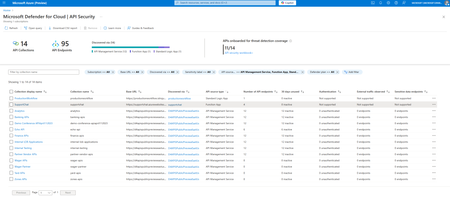
APIs are the front door to modern cloud applications and increasingly, a top target for attackers. According to the May 2024 Gartner® Market Guide for API Protection: “Current data indicates that the average API breach leads to at least 10 times more leaked data than the average security breach.” This makes comprehensive API visibility and governance a critical priority for security teams and cloud-first enterprises. We’re excited to announce that Microsoft Defender for Cloud now supports API discovery and security posture management for APIs hosted in Azure App Services, including Function Apps and Logic Apps. In addition to securing APIs published behind Azure API Management (APIM), Defender for Cloud can now automatically discover and provide posture insights for APIs running within serverless functions and Logic App workflows. Enhancing API security coverage across Azure This new capability builds on existing support for APIs behind Azure API Management by extending discovery and posture management to APIs hosted directly in compute environments like Azure Functions and Logic Apps, areas that often lack centralized visibility. By covering these previously unmonitored endpoints, security teams gain a unified view of their entire API landscape, eliminating blind spots outside of the API gateway. Key capabilities API discovery and inventory Automatically detect and catalog APIs hosted in Function Apps and Logic Apps, providing a unified inventory of APIs across your Azure environment. Shadow API identification Uncover undocumented or unmanaged APIs that lack visibility and governance—often the most vulnerable entry points for attackers. Security posture assessment Continuously assess APIs for misconfigurations and weaknesses. Identify unused or unencrypted APIs that could increase risk exposure. Cloud Security Explorer integration Investigate API posture and prioritize risks using contextual insights from Defender for Cloud’s Cloud Security Explorer. Why API discovery and security are critical for CNAPP For security leaders and architects, understanding and reducing the cloud attack surface is paramount. APIs, especially those deployed outside of centralized gateways, can become dangerous blind spots if they’re not discovered and governed. Modern cloud-native applications rely heavily on APIs, so a Cloud-Native Application Protection Platform (CNAPP) must include API visibility and posture management to be truly effective. By integrating API discovery and security into the Defender for Cloud CNAPP platform, this new capability helps organizations: Illuminate hidden risks by discovering APIs that were previously unmanaged or unknown. Reduce the attack surface by identifying and decommissioning unused or dormant APIs. Strengthen governance by extending API visibility beyond traditional API gateways. Advance to holistic CNAPP coverage by securing APIs alongside infrastructure, workloads, identities, and data. Availability and getting started This new API security capability is available in public preview to all Microsoft Defender for Cloud Security Posture Management (CSPM) customers at no additional cost. If you’re already using Defender for Cloud’s CSPM features, you can start taking advantage of API discovery and posture management right away. To get started, simply enable the API Security Posture Management extension in your Defender for Cloud CSPM settings. When enabled, Defender for Cloud scans Function App and Logic App APIs in your subscriptions, presenting relevant findings such as security recommendations and posture insights in the Defender for Cloud portal. Helpful resources Enable the API security posture extension Learn more in the Defender for Cloud documentation1.3KViews2likes0CommentsRSAC™ 2025: Unveiling new innovations in cloud and AI security
The world is transforming with AI right in front of our eyes — reshaping how we work, build, and defend. But as AI accelerates innovation, it’s also amplifying the threat landscape. The rise of adversarial AI is empowering attackers with more sophisticated, automated, and evasive tactics, while cloud environments continue to be a prime target due to their complexity and scale. From prompt injection and model manipulation in AI apps to misconfigurations and identity misuse in multi-cloud deployments, security teams face a growing list of risks that traditional tools can’t keep up with. As enterprises increasingly build and deploy more AI applications in the cloud, it becomes crucial to secure not just the AI models and platforms, but also the underlying cloud infrastructure, APIs, sensitive data, and application layers. This new era of AI requires integrated, intelligent security that continuously adapts—protecting every layer of the modern cloud and AI platform in real time. This is where Microsoft Defender for Cloud comes in. Defender for Cloud is an integrated cloud native application protection platform (CNAPP) that helps unify security across the entire cloud app lifecycle, using industry-leading GenAI and threat intelligence. Providing comprehensive visibility, real-time cloud detection and response, and proactive risk prioritization, it protects your modern cloud and AI applications from code to runtime. Today at RSAC™ 2025, we’re thrilled to unveil innovations that further bolster our cloud-native and AI security capabilities in Defender for Cloud. Extend support to Google Vertex AI: multi-model, multi-cloud AI posture management In today’s fast-evolving AI landscape, organizations often deploy AI models across multiple cloud providers to optimize cost, enhance performance, and leverage specialized capabilities. This creates new challenges in managing security posture across multi-model, multi-cloud environments. Defender for Cloud already helps manage the security posture of AI workloads on Azure OpenAI Service, Azure Machine Learning, and Amazon Bedrock. Now, we’re expanding those AI security posture management (AI-SPM) capabilities to include Google Vertex AI models and broader support for the Azure AI Foundry model catalog and custom models — as announced at Microsoft Secure. These updates make it easier for security teams to discover AI assets, find vulnerabilities, analyze attack paths, and reduce risk across multi-cloud AI environments. Support for Google Vertex AI will be in public preview starting May 1, with expanded Azure AI Foundry model support available now. Strengthen AI security with a unified dashboard and real-time threat protection At Microsoft Secure, we also introduced a new data and AI security dashboard, offering a unified view of AI services and datastores, prioritized recommendations, and critical attack paths across multi-cloud environments. Already available in preview, this dashboard simplifies risk management by providing actionable insights that help security teams quickly identify and address the most urgent issues. The new data & AI security dashboard in Microsoft Defender for Cloud provides a comprehensive overview of your data and AI security posture. As AI applications introduce new security risks like prompt injection, sensitive data exposure, and resource abuse, Defender for Cloud has also added new threat protection capabilities for AI services. Based on the OWASP Top 10 for LLMs, these capabilities help detect emerging AI-specific threats including direct and indirect prompt injections, ASCII smuggling, malicious URLs, and other threats in user prompts and AI responses. Integrated with Microsoft Defender XDR, the new suite of detections equips SOC teams with evidence-based alerts and AI-powered insights for faster, more effective incident response. These capabilities will be generally available starting May 1. To learn more about our AI security innovations, see our Microsoft Secure announcement. Unlock next level prioritization for cloud-to-code remediation workflows with expanded AppSec partnerships As we continue to expand our existing partner ecosystem, we’re thrilled to announce our new integration between Defender for Cloud and Mend.io — a major leap forward in streamlining open source risk management within cloud-native environments. By embedding Mend.io’s intelligent Software Composition Analysis (SCA) and reachability insights directly into Defender for Cloud, organizations can now prioritize and remediate the vulnerabilities that matter most—without ever leaving Defender for Cloud. This integration gives security teams the visibility and context they need to focus on the most critical risks. From seeing SCA findings within the Cloud Security Explorer, to visualizing exploitability within runtime-aware attack paths, teams can confidently trace vulnerabilities from code to runtime. Whether you work in security, DevOps, or development, this collaboration brings a unified, intelligent view of open source risk — reducing noise, accelerating remediation, and making cloud-native security smarter and more actionable than ever. Advance cloud-native defenses with security guardrails and agentless vulnerability assessment Securing containerized runtime environments requires a proactive approach, ensuring every component — services, plugins, and networking layers — is safeguarded against vulnerabilities. If ignored, security gaps in Kubernetes runtime can lead to breaches that disrupt operations and compromise sensitive data. To help security teams mitigate these risks proactively, we are introducing Kubernetes gated deployments in public preview. Think of it as security guardrails that prevent risky and non-compliant images from reaching production, based on your organizational policies. This proactive approach not only safeguards your environment but also instills confidence in the security of your deployments, ensuring that every image reaching production is fortified against vulnerabilities in Azure. Learn more about these new capabilities here. Additionally, we’ve enhanced our agentless vulnerability assessment, now in public preview, to provide comprehensive monitoring and remediation for container images, regardless of their registry source. This enables organizations using Azure Kubernetes Service (AKS) to gain deeper visibility into their runtime security posture, identifying risks before they escalate into breaches. By enabling registry-agnostic assessments of all container images deployed to AKS we are expanding our coverage to ensure that every deployment remains secure. With this enhancement, security teams can confidently run containers in the cloud, knowing their environments are continuously monitored and protected. For more details, visit this page. Security teams can audit or block vulnerable container images in Azure. Uncover deeper visibility into API-led attack paths APIs are the gateway to modern cloud and AI applications. If left unchecked, they can expose critical functionality and sensitive data, making them prime targets for attackers exploiting weak authentication, improper access controls, and logic flaws. Today, we’re announcing new capabilities that uncover deeper visibility into API risk factors and API-led attack paths by connecting the dots between APIs and compute resources. These new capabilities help security teams to quickly catch critical API misconfigurations early on to proactively address lateral movement and data exfiltration risks. Additionally, Security Copilot in Defender for Cloud will be generally available starting May 1, helping security teams accelerate remediation with AI-assisted guidance. Learn more Defender for Cloud streamlines security throughout the cloud and AI app lifecycle, enabling faster and safer innovation. To learn more about Defender for Cloud and our latest innovations, you can: Visit our Cloud Security solution page. Join us at RSAC™ and visit our booth N - 5744. Learn how you can unlock business value with Defender for Cloud. Get a comprehensive guide to cloud security. Start a 30-day free trial.Boost Security with API Security Posture Management
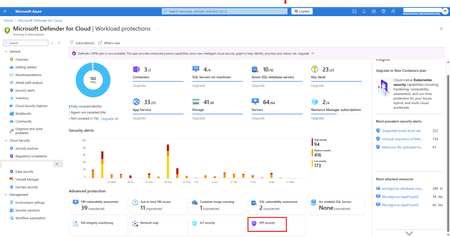
API security posture management is now natively integrated into Defender CSPM and available in public preview at no additional cost. This integration provides comprehensive visibility, proactive API risk analysis, and security best practice recommendations for Azure API Management APIs. Security teams can use these insights to identify unauthenticated, inactive, dormant, or externally exposed APIs, and receive risk-based security recommendations to prioritize and implement API security best practices.Proactively harden your cloud security posture in the age of AI with CSPM innovations
Generative AI applications have rapidly transformed industries, from marketing and content creation to personalized customer experiences. These applications, powered by sophisticated models, bring unprecedented capabilities—but also unique security challenges. As developers build generative AI systems, they increasingly rely on containers and APIs to streamline deployment, scale effectively, and ensure consistent performance. However, the very tools that facilitate agile development also introduce new security risks. Containers, essential for packaging AI models and their dependencies, are susceptible to misconfigurations and can expose entire systems to attacks if not properly secured. APIs, which allow seamless integration of AI functionalities into various platforms, can be compromised if they lack robust access controls or encryption. As generative AI becomes more integrated into critical business processes, security admins are challenged with continuously hardening the security posture of the foundation for AI application. Ensuring core workloads, like containers and APIs, are protected is vital to safeguard sensitive data of any application. And when introducing generative AI, remediating vulnerabilities and misconfigurations efficiently, ensures a strong security posture to maintain the integrity of AI models and trust in their outputs. New cloud security posture innovations in Microsoft Defender Cloud Security Posture Management (CSPM) help security teams modernize how they proactively protect their cloud-native applications in a unified experience from code to runtime. API security posture management is now natively available in Defender CSPM We're excited to announce that API security posture management is now natively integrated into Defender CSPM and available in public preview at no additional cost. This integration provides comprehensive visibility, proactive API risk analysis, and security best practice recommendations for Azure API Management APIs. Security teams can use these insights to identify unauthenticated, inactive, dormant, or externally exposed APIs, along and receive risk-based security recommendations to prioritize and implement API security best practices. Additionally, security teams can now assess their API exposure risks within the context of their overall application by mapping APIs to their backend compute hosts and visualizing the topology powered by cloud security explorer. This mapping now enables end-to-end API-led attack path analysis, helping security teams proactively identify and triage lateral movement and data exfiltration risks. We’ve also enhanced API security posture capabilities by expanding sensitive data discovery beyond request and response payloads to now include API URLs, path, query parameters, and the sources of data exposure in APIs. This allows security teams to track and mitigate sensitive data exposure across cloud applications efficiently. In addition, the new support for API revisions enables automatic onboarding of all APIs, including tagged revisions, security insights assessments, and multi-regional gateway support for Azure API Management premium customers. Enhanced container security posture across the development lifecycle While containers offer flexibility and ease of deployment, they also introduce unique security challenges that need proactive management at every stage to prevent vulnerabilities from becoming exploited threats. That’s why we’re excited to share new container security and compliance posture capabilities in Defender CSPM, expanding current risk visibility across the development lifecycle: It's crucial to validate the security of container images during the build phase and block the build if vulnerabilities are found, helping security teams prevent issues at the source. To support this, we’re thrilled to share container image vulnerability scanning for any CI/CD pipeline is now in public preview. The expanded capability offers a command-line interface (CLI) tool that allows seamless CI/CD integration and enables users to perform container image vulnerability scanning during the build stage, providing visibility into vulnerabilities at build. After integrating their CI/CD pipelines, organizations can use the cloud security explorer to view container images pushed by their pipelines. Once the container image is built, scanned for vulnerabilities, it is pushed to a container registry until ready to be deployed to runtime environments. Organizations rely on cloud and third-party registries to pull container images, making these registries potential gateways for vulnerabilities to enter their environment. To minimize this, container image vulnerability scanning is now available for third-party private registries, starting with Docker Hub and JFrog Artifactory. The scan results are immediately available to both the security teams and developers to expedite patches or image updates before the container image is pushed to production. In addition to container security posture capabilities, security admins can also strengthen the compliance posture of Kubernetes across clouds. Now in public preview, security teams can leverage multicloud regulatory compliance assessments with support for CIS Kubernetes Benchmarks for Amazon Elastic Kubernetes Service (EKS), Azure Kubernetes Service, and Google Kubernetes Engine (GKE). AI security posture management (AI-SPM) is now generally available Discover vulnerability and misconfiguration of generative AI apps using Azure OpenAI Service, Azure Machine Learning, and Amazon Bedrock to reduce risks associated with AI-related artifacts, components, and connectors built into the apps and provide recommended actions to proactively improve security posture with Defender CSPM. New enhancements in GA include: Expanded support of Amazon Bedrock provides deeper discovery of AWS AI technologies, new recommendations, and attack paths. Additional support for AWS such as Amazon OpenSearch (service domains and service collections), Amazon Bedrock Agents, and Amazon Bedrock Knowledge Bases. New AI grounding data insights provides resource context to its use as a grounding source within an AI application. Grounding is the invisible line between organizational data and AI applications. Ensuring the right data is used – and correctly configured in the application – for grounding can reduce hallucinations, prevent sensitive data loss, and reduce the risk of grounding data poisoning and malicious outputs. Customers can use the cloud security explorer to query multicloud data used for AI grounding. New ‘used for AI grounding’ risk factor in recommendations and attack paths can also help security teams prioritize risks to datastores. Thousands of organizations are already reaping the benefits of AI-SPM in Defender CSPM, like Mia Labs, an innovative startup that is securely delivering customer service through their AI assistant with the help of Defender for Cloud. “Defender for Cloud shows us how to design our processes with optimal security and monitor where jailbreak attempts may have originated.” Marwan Kodeih, Chief Product Officer, Mia Labs, Inc. New innovations to find and fix issues in code with new DevOps security innovations Addressing risks at runtime is only part of the picture. Remediating risks in the Continuous Integration/Continuous Deployment (CI/CD) pipeline is equally critical, as vulnerabilities introduced in development can persist into production, where they become much harder—and costlier—to fix. Insecure DevOps practices, like using untrusted images or failing to scan for vulnerabilities, can inadvertently introduce risks before deployment even begins. New innovations include: Agentless code scanning, now in public preview, empowers security teams to quickly gain visibility into their Azure DevOps repositories and initiate an agentless scan of their code immediately after onboarding to Defender CSPM. The results are provided as recommendations for exposed Infrastructure-as-Code misconfigurations and code vulnerabilities. End-to-end secrets mapping, now in public preview, helps customers understand how a leaked credential in code impacts deployed resources in runtime. It provides deeper risk insights by tracing exposed secrets back to code repositories where it originated, with both secret validation and mapping to accessible resources. Defender CSPM now highlights which secrets could cause the most damage to systems and data if compromised. Additional CSPM enhancements [General Availability] Critical asset protection: Enables security admins to prioritize remediation efforts with the ability to identify their ‘crown jewels’ by defining critical asset rules in Microsoft Security Exposure Management and applying them to their cloud workloads in Defender for Cloud. As a result, the risk levels of recommendations and attack paths consider the resource criticality tags, streamlining prioritization above other un-tagged resources. In addition to the General Availability release, we are also extending support for tagging Kubernetes and non-human identity resources. [Public Preview] Simplified API security testing integration: Integrating API security testing results into Defender for Cloud is now easier than ever. Security teams can now seamlessly integrate results from supported API security testing providers into Defender for Cloud without needing a GitHub Advanced Security license. Explore additional resources to strengthen your cloud security posture With these innovations, Defender CSPM users are empowered to enhance their security posture from code to runtime and prepared to protect their AI applications. Below are additional resources that expand on our innovations and help you incorporate them in your operations: Learn more about container security innovations in Defender for Cloud. Enable the API security posture extension in Environment Settings. Get started with AI security posture management for your Azure OpenAI, Azure Machine Learning, and Amazon Bedrock deployments. RSVP to join us on December 3rd the Microsoft Tech Community AMA to get your questions answered.Cloud security innovations: strengthening defenses against modern cloud and AI threats
In today’s fast-paced digital world, attackers are more relentless than ever, exploiting vulnerabilities and targeting cloud environments with unprecedented speed and sophistication. They are taking advantage of the dynamic nature of cloud environments and silos across security tools to strike opportunistically and bypass boundaries between endpoints, on-premises and cloud environments. With the rise of Gen AI, security complexities are only growing, further testing the limits of traditional cloud security measures and strategies. Protecting multicloud environments requires vigilance not only within each cloud instance but also across interconnected networks and systems. For defenders, the challenge lies in keeping pace with attackers who operate with lightning speed. To stay ahead, they need tools that enable rapid risk prioritization and targeted remediation, reducing unnecessary toil and aligning security efforts with business objectives. The key to defending today’s cloud landscapes is a risk-driven approach and a unified security platform that spans all domains across their organization. This approach integrates automation to streamline security operations, allowing teams to focus on critical threats. With these capabilities, defenders can protect dynamic multicloud environments with the agility and insight needed to counter the sophisticated and evolving tactics of modern attackers. Our integrated cloud-native application platform (CNAPP) provides complete security and compliance from code to runtime. Enhanced by generative AI and threat intelligence, it helps protect your hybrid and multicloud environments. Organizations can enable secure development, minimize risks with contextual posture management, and protect workloads and applications from modern threats in Microsoft’s unified security operations platform. Today, we’re thrilled to announce new innovations in Defender for Cloud to accelerate comprehensive protection with a multi-layered risk-driven approach allowing security teams to focus on the most critical threats. We’re also excited to introduce new features that make SecOps teams more efficient, allowing them to detect and respond to cloud threats in near real-time with the enhanced Defender XDR integration. Unlock advanced risk prioritization with true code-to-runtime reachability As we continue to expand our existing partner ecosystem, Microsoft Defender for Cloud’s integration with Endor Labs brings code reachability analysis directly to the Defender for Cloud portal, advancing code-to-runtime context and risk prioritization efforts significantly. Traditional AppSec tools generate hundreds to thousands of vulnerability findings, while less than 9.5% are truly exploitable within an application’s context, according to a recent study conducted by Endor Labs. These vulnerabilities belong to parts of the code that can be accessed and executed in runtime – aka reachable code vulnerabilities. Without this precise context of what is reachable, teams face an unsustainable choice: spend extensive time researching each finding or attempt to fix all vulnerabilities, leading to inefficiencies. Endor Labs provides a reachability-based Software Composition Analysis (SCA), and with the Defender for Cloud integration, deploying and configuring this SCA is streamlined. Once active, security engineers gain access to code-level reachability analysis for every vulnerability, from build to production, including visibility into reachable findings where an attack path exists from the developer’s code through open-source dependencies to a vulnerable library or function. With these insights, security teams can accurately identify true threats, prioritizing remediation based on the likelihood and impact of exploitation. Defender for Cloud already has robust risk prioritization based on multiple risk factors including internet exposure, sensitive data exposure, access and identity privileges, business risk and more. Endor Lab’s code reachability adds another robust layer of risk prioritization to reduce noise and productivity tax associated with maintaining multiple security platforms, offering streamlined and efficient protection for today’s complex multicloud environments. Figure 1: Risk prioritization with an additional layer of code reachability analysis New enhancements to cloud security posture management with additional API, Containers, and AI grounding data insights Defender for Cloud has made a series of enhancements to its cloud security posture management (CSPM) capabilities, starting with the general availability of AI Security Posture Management (AI-SPM). AI-SPM capabilities help identify vulnerabilities and misconfigurations in generative AI applications using Azure OpenAI, Azure Machine Learning, and Amazon Bedrock. We have also added expanded support for AWS AI technologies, new recommendations, and detailed attack paths, enhancing the discovery and mitigation of AI-related risks. Additionally, enriched AI grounding data insights provide context to data in AI applications, helping prioritize risks to datastores through tailored recommendations and attack paths. We have also included API security posture management in Defender CSPM at no additional cost. With these new capabilities, security teams can automatically map APIs to their backend compute hosts, helping organizations to visualize their API topology and understand the flow of data through APIs to identify sensitive data exposure risks. This allows security teams to see full API-led attack paths and take proactive measures against potential threats such as lateral movement and data exfiltration risks. Additionally, expanded sensitive data classification now includes API URL paths and query parameters, enhancing the ability to track and mitigate data-in-transit risks. Alongside API security enhancements, Defender for Cloud has also bolstered its container security posture capabilities. These advancements ensure continuous visibility into vulnerabilities and compliance from development through deployment. Security teams can shift left by scanning container images for vulnerabilities early in the CI/CD pipeline across multicloud and private registries, including Docker Hub and JFrog Artifactory. Additionally, the public preview of full multicloud regulatory compliance assessment for CIS Kubernetes Benchmarks across Amazon EKS, Azure Kubernetes Service, and Google Kubernetes Engine provides a robust framework for securing Kubernetes environments. Elevate cloud detection and response capabilities with enhanced monitoring, forensics, and cloud-native response actions The latest advancements in the integration between Defender for Cloud and Defender XDR bring a new level of protection against sophisticated threats. One notable feature is the near real-time detection for containers, which provides a detailed view of every step an attacker takes before initiating malicious activities like crypto mining or sensitive data exfiltration. Additionally, the Microsoft Kubernetes threat matrix, developed by Microsoft security researchers, provides valuable insights into specific attack techniques, enhancing the overall security incident triaging. To complement real-time detection, we are introducing a new threat analytics report that offers a comprehensive investigation of container-related incidents, helping security teams understand the potential attack methods that attackers could leverage to infiltrate containers. It also contains threat remediation suggestions and advanced hunting techniques. Figure 2. Cloud detection and response with Defender for Cloud and Defender XDR integration The introduction of new cloud-native response actions significantly aids in putting the investigation results into action or remediation. With a single click, analysts can isolate or terminate compromised Kubernetes pods, with all actions tracked in the Investigation Action Center for transparency and accountability. The new Security Copilot assisted triage and response actions helps analysts make informed decisions faster during an investigation. In all, these advancements, coupled with the seamless integration of cloud process events for threat hunting, empower security teams to respond quickly and effectively to threats, ensuring robust protection for their digital environments. Empowering defenders to stay ahead Defender for Cloud empowers security teams to stay ahead of attackers with a comprehensive code to runtime protection. With a focus on speed, efficiency, and efficacy, defenders can keep their cloud environments secure and resilient in the face of evolving threats. To learn more about Defender for Cloud and our new innovations, you can: Check out our cloud security solution page. Join us at Ignite. Learn how you can unlock business value with Defender for Cloud. See it in action with a cloud detection and response use-case. Start a 30-day free trial.3.6KViews2likes0Comments