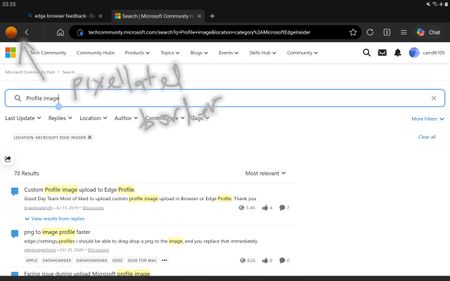
android, bug, address, bar, bottom
1 Topic
Edge Sync stuck in Initializing with Backend Uninitialized
Hello, I am hoping to get feedback from people familiar with Edge Sync internals, synchronization failures, or similar cases. OVERVIEW Around October 13, 2026, I discovered that my Favorites and saved Passwords were no longer visible in Microsoft Edge. The issue is present on both my desktop PC and my laptop using the same personal Microsoft account. Approximately two weeks later, the issue remains unchanged. What makes this case unusual is that authentication appears to work correctly, Edge Sync servers respond successfully, and encryption keys download successfully, yet the sync engine never completes initialization. ENVIRONMENT Microsoft Edge Windows 11 Personal Microsoft account Desktop PC Laptop The same symptoms occur on both devices. SYNC INTERNALS edge://sync-internals consistently reports: Transport State = Initializing Sync Engine State = Stopped Backend Status = Uninitialized Sync Feature Enabled = True Bookmarks = 0 Passwords = 0 Additional values: Download Key Result = Fail Set Key Result = Fail SIGN-IN STATUS edge://signin-internals reports: Successful authentication Successful token retrieval No authentication errors There is no indication of a Microsoft account sign-in problem. SYNC DIAGNOSTICS sync_diagnostic.log repeatedly shows: SyncState after authenticated = FeatureCanStart Try to start sync engine Load and connect Nigori controller Update key data credentials Reset engine The sync engine repeatedly attempts initialization but never reaches a running state. SERVER COMMUNICATION cv_debug.log reports: SYNC_SERVER_OK EncryptionKeysFetcher.DownloadKeys = Success Key count = 10 SetEncryptionKeys = Success This confirms that sync servers respond and encryption keys can be downloaded successfully. One unusual observation is that Sync Internals reports: Download Key Result = Fail Set Key Result = Fail while the logs simultaneously report successful key download and processing. PROFILE VERIFICATION Active profile: ...\Microsoft\Edge\User Data\Default During troubleshooting, a file named "Bookmarks" could not be located within the active profile. The following sync-related components remain present: Sync Data LevelDB Nigori.bin Logs MULTI-DEVICE IMPACT The same behavior is present on both desktop and laptop using the same Microsoft account. This makes a single-device profile corruption scenario seem less likely. NEW OBSERVATION After the initial failure, I created a new Favorites folder named: After Edge Sync Failure 20261013 The folder appeared correctly in the Favorites Bar. After Microsoft Edge and Windows were closed and restarted, the folder was no longer present. This suggests the issue may still be actively affecting local Favorites persistence and is not limited to historical sync data. ACTIONS NOT PERFORMED Based on recommendations received in Microsoft Q&A, I have intentionally avoided: Reset Sync Deleting the Edge profile Clearing all Edge data Reinstalling Edge The goal has been to avoid overwriting potentially recoverable sync data. PRIMARY QUESTION My main question is not whether synchronization currently works. My main question is whether the original Favorites and Password records may still exist within the Edge Sync service and whether there is any supported way to determine that before attempting potentially destructive recovery actions. QUESTIONS Has anyone seen this exact combination of Transport State = Initializing, Sync Engine State = Stopped, and Backend Status = Uninitialized persisting for weeks? Can a corrupted Nigori or encryption-key state cause Favorites and Passwords to report zero items despite successful authentication and successful key download? Has anyone recovered Favorites or Passwords after a similar state? Is there any supported method to determine whether the original sync data still exists on the sync backend before attempting Reset Sync? Does this pattern suggest an account-level sync corruption, backend corruption, or another known Edge Sync failure mode? Any technical insight would be greatly appreciated. Thank you.121Views0likes1CommentCloudflare captcha endless loop
Just wondering if anyone is experiencing the issue on Edge Dev 158.0.4344.0 or higher where Cloudflare captcha verification is stuck in an endless loop? It still works on Edge stable. You can check on this site: https://debug.challenges.cloudflare.com/ The verification on Edge Dev fails with Error: 600010 (Unknown) but will pass successfully on Edge stable.Solved239Views0likes8Comments
Edge on Android: Syncs personal data (e.g. history, payment methods), despite me turning them off
Sync settings chosen during first-run setup are ignored. All sync types get turned on. Steps taken Install Outlook. (Link: https://play.google.com/store/apps/details?id=com.microsoft.office.outlook ) Sign in to Outlook. Uninstall and re-install Edge. (Link: https://play.google.com/store/apps/details?id=com.microsoft.emmx ) Choose whether to set Edge as default browser. Tap the tiny blue text, which says "Sync settings". (Not the tiny blue text immediately underneath, which says "Microsoft Privacy Statement"). All sync types are turned on by default. Turn off all sync items except one, e.g. Passwords. Dismiss "Sync settings" Re-open "Sync settings", to confirm your settings are still there. Then dismiss it again. Sign in, or "Continue". Continue setting up Edge. Open the Edge menu. Tap your account Tap Sync. Result: ALL sync items are turned on, despite having turned them off in step 6. Request Is this bug fixed, in a later version of Edge? Note: This bug does not fit in the official feedback method for Edge for Android. I am hoping the helpful elves at the other end of the Edge feedback form are reading this question. Because I have sent them the link to https://learn.microsoft.com/en-us/answers/questions/6035494/edge-on-android-syncs-personal-data-history-paymen. My environment Google Pixel 10a Android 17 Edge version 155.0.4283.48 (also reproduced with earlier version: 154.0.4258.38) OR Edge Canary version 157.0.4338.0 (Downloaded 2026-10-19)56Views0likes0CommentsDev 155.0.4268.0 - HEVC cannot be played via hardware
Starting with Dev build 155.0.4268.0, HEVC content fails to playback throwing an error. This is attempting to use any hardware acceleration (NVIDIA, Intel, Qualcomm, etc). On the Stable channel, it still works as intended. I submitted feedback, but this is a rather impactful issue since a lot of websites use HEVC content.Solved880Views0likes15Comments
Crash when submitting web page input fields with soft keyboard Enter
### Summary Microsoft Edge Canary for Android crashes when submitting web page input fields using the Android soft keyboard Enter key. GitHub search is one stable reproduction case, but this is not GitHub-specific. I have also reproduced similar crashes on other websites with text input/search fields. ### Environment - App: Microsoft Edge Canary for Android - Package: `com.microsoft.emmx.canary` - Version: `152.0.4142.0` - Version code: `414200023` - Device: vivo V2417A - Android SDK: 36 - ABI: arm64-v8a ### Reproduction case 1. Open Microsoft Edge Canary on Android. 2. Navigate to `https://github.com/`. 3. Tap the GitHub search box. 4. Type any text. 5. Press Enter on the Android soft keyboard. ### Expected behavior The input/search action should be submitted normally. ### Actual behavior Edge Canary crashes immediately after pressing Enter. ### Scope This does not appear to be specific to GitHub. The same type of crash can also be triggered on other websites when submitting text input/search fields using the Android soft keyboard Enter key. GitHub is used here as a minimal stable repro because it is easy to test. ### Crash information Exception: ```text java.lang.IndexOutOfBoundsException: Index 24 out of bounds for length 0 ``` Relevant stack trace: ```text java.util.ArrayList.get(ArrayList.java:434) android.view.ViewGroup.getAndVerifyPreorderedView(ViewGroup.java:3873) android.view.ViewGroup.gatherTransparentRegion(ViewGroup.java:7438) android.view.ViewRootImpl.performTraversals(ViewRootImpl.java:5207) android.view.Choreographer.doFrame(...) ``` ### Notes - Reproduced directly on the Android phone. - Trigger appears related to submitting web page input/search fields via the Android soft keyboard Enter key.363Views0likes3Comments
Edge not functioning properly after playing games?
After I have played a video game, I noticed Edge has forgotten all my website and cache data? No website icons and logged out of websites. This only happens after I've played a video game, never has it happened from just opening it up.132Views0likes1Comment
Picture-in-Picture seek controls bypass MediaSession ad restrictions on YouTube
In Microsoft Edge, the Picture-in-Picture overlay exposes functional +10s/-10s seek controls during YouTube ad playback. The seek action advances the ad playhead even when YouTube has declared the seekforward action as unavailable via the Media Session API. Repro: InPrivate window, logged out of YouTube Play any video on youtube.com When pre-roll ad starts, click the in-player PiP icon Press +10s seek-forward on the PiP overlay Observed: a non-skippable NPCI ad followed by a Maggi ad were both bypassed in ~10 seconds of wall-clock time. The main <video> element briefly buffers during seek, consistent with HTMLMediaElement.currentTime being mutated directly rather than dispatched through the page's registered MediaSession action handlers. Cross-browser: verified the same flow in Google Chrome on the same Windows install. Seek-forward during ad playback does NOT advance the playhead, confirming YouTube's MediaSession setup is correct and isolating the issue to Edge's PiP implementation. Impact: affects any site using the Media Session API to restrict seek — live streams, DRM-protected content, ad-bound playback. Not YouTube-specific. Environment: Edge version: latest stable channel OS: Windows 11 - Chrome compared: latest stable channel155Views0likes0Comments