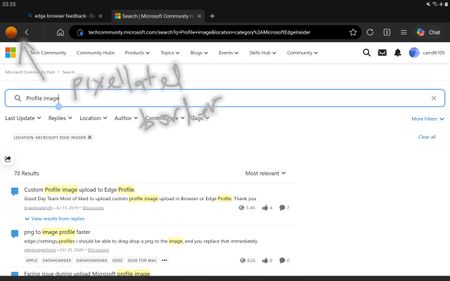
android, bug, address, bar, bottom
1 TopicDev 155.0.4268.0 - HEVC cannot be played via hardware
Starting with Dev build 155.0.4268.0, HEVC content fails to playback throwing an error. This is attempting to use any hardware acceleration (NVIDIA, Intel, Qualcomm, etc). On the Stable channel, it still works as intended. I submitted feedback, but this is a rather impactful issue since a lot of websites use HEVC content.84Views0likes2Comments
[Wayland] PWAs no longer appear as separate app windows — all group under main Edge icon
Hi, Since around 2025-09-07 to 2025-09-10, I’ve noticed that on GNOME (Wayland) all installed PWAs (even across different profiles) now appear grouped under the main Edge browser icon in the GNOME Shell dash/taskbar. Previously, each PWA would open in its own window group with its own icon. This is still the behavior in Chromium/Brave/Chrome, and can be restored there by editing the PWA’s .desktop file to set: StartupWMClass=<same value as Icon> However, Edge now seems to ignore StartupWMClass completely on Wayland, breaking workspace separation and making task switching hard. Environment: Ubuntu 25.04 GNOME 48.0 / Mutter (Wayland) Kernel 6.14.0-29 Intel Iris Xe GPU Edge (latest stable, observed post 2025-09-13) Repro steps: Install any PWA (e.g. Outlook, Teams, Spotify) from Edge Launch it (from any profile) Observe that it appears grouped under the main Edge browser icon Expected: PWA shows under its own icon and window group like in Chromium-based browsers Actual: All PWAs are bundled into the main Edge window group Editing StartupWMClass in the .desktop file no longer helps This regression makes PWAs much harder to manage on Wayland. Please route to the Linux/Wayland team if possible. Thanks!4.3KViews13likes20Comments
Crash when submitting web page input fields with soft keyboard Enter
### Summary Microsoft Edge Canary for Android crashes when submitting web page input fields using the Android soft keyboard Enter key. GitHub search is one stable reproduction case, but this is not GitHub-specific. I have also reproduced similar crashes on other websites with text input/search fields. ### Environment - App: Microsoft Edge Canary for Android - Package: `com.microsoft.emmx.canary` - Version: `152.0.4142.0` - Version code: `414200023` - Device: vivo V2417A - Android SDK: 36 - ABI: arm64-v8a ### Reproduction case 1. Open Microsoft Edge Canary on Android. 2. Navigate to `https://github.com/`. 3. Tap the GitHub search box. 4. Type any text. 5. Press Enter on the Android soft keyboard. ### Expected behavior The input/search action should be submitted normally. ### Actual behavior Edge Canary crashes immediately after pressing Enter. ### Scope This does not appear to be specific to GitHub. The same type of crash can also be triggered on other websites when submitting text input/search fields using the Android soft keyboard Enter key. GitHub is used here as a minimal stable repro because it is easy to test. ### Crash information Exception: ```text java.lang.IndexOutOfBoundsException: Index 24 out of bounds for length 0 ``` Relevant stack trace: ```text java.util.ArrayList.get(ArrayList.java:434) android.view.ViewGroup.getAndVerifyPreorderedView(ViewGroup.java:3873) android.view.ViewGroup.gatherTransparentRegion(ViewGroup.java:7438) android.view.ViewRootImpl.performTraversals(ViewRootImpl.java:5207) android.view.Choreographer.doFrame(...) ``` ### Notes - Reproduced directly on the Android phone. - Trigger appears related to submitting web page input/search fields via the Android soft keyboard Enter key.161Views0likes3Comments
Edge not functioning properly after playing games?
After I have played a video game, I noticed Edge has forgotten all my website and cache data? No website icons and logged out of websites. This only happens after I've played a video game, never has it happened from just opening it up.72Views0likes1Comment
Picture-in-Picture seek controls bypass MediaSession ad restrictions on YouTube
In Microsoft Edge, the Picture-in-Picture overlay exposes functional +10s/-10s seek controls during YouTube ad playback. The seek action advances the ad playhead even when YouTube has declared the seekforward action as unavailable via the Media Session API. Repro: InPrivate window, logged out of YouTube Play any video on youtube.com When pre-roll ad starts, click the in-player PiP icon Press +10s seek-forward on the PiP overlay Observed: a non-skippable NPCI ad followed by a Maggi ad were both bypassed in ~10 seconds of wall-clock time. The main <video> element briefly buffers during seek, consistent with HTMLMediaElement.currentTime being mutated directly rather than dispatched through the page's registered MediaSession action handlers. Cross-browser: verified the same flow in Google Chrome on the same Windows install. Seek-forward during ad playback does NOT advance the playhead, confirming YouTube's MediaSession setup is correct and isolating the issue to Edge's PiP implementation. Impact: affects any site using the Media Session API to restrict seek — live streams, DRM-protected content, ad-bound playback. Not YouTube-specific. Environment: Edge version: latest stable channel OS: Windows 11 - Chrome compared: latest stable channel84Views0likes0Comments