ai workloads
2 TopicsClosing the loop on container security: From code to runtime in the AI era
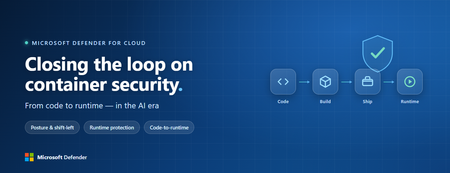
Containers are the backbone of modern cloud-native apps — and increasingly, the infrastructure powering AI, from AI assistants to a new wave of intelligent agents. They also blur the line between build, deploy, and runtime: a single code change can become a running workload in minutes. A misconfiguration committed in the morning can be deployed in minutes and exploited before noon. At that speed, container security can no longer be a point-in-time check, it has to work as one continuous loop. The numbers back this up. For the first time, 31% of breaches now begin with an attacker exploiting a software vulnerability — overtaking stolen credentials as the most common way in — and 15% of attack techniques are now accelerated by generative AI, with adversaries using it to find gaps and write malware faster at every stage. Source: Verizon 2026 Data Breach Investigations Report (incidents Nov 2024–Oct 2025). Over the last few quarters, Microsoft Defender for Cloud has been evolving to offer you this continuous security, end to end. Explore container security’s new capabilities across posture, shift-left, runtime, multicloud coverage, and operations. Collectively they form a more comprehensive approach to container security — one that offers security right during developing a code to a running pod across Azure, AWS, and GCP. There is a second reason why container security matters more in 2026: containers are increasingly where AI runs. Many AI workloads — from model-serving APIs to retrieval systems and intelligent agents — now live as pods on AKS, EKS, and GKE (the managed Kubernetes services from Azure, AWS, and Google), often connected to some of an organization’s most sensitive models and data. As those crown jewels move into the cluster, the same posture, code‑to‑runtime, and runtime protections described in this post extend to AI workloads. The contest is increasingly AI against AI: attackers use it to find and reach the cluster faster, while defenders use it to push back — surfacing the risks that matter most and turning runtime findings into AI‑assisted code fixes. One platform, code to runtime A container finding is not treated as an isolated issue; it is connected to the identity it runs under, the registry and code repository it came from, and the cluster where it is running - all unified under one Microsoft Defender platform. Container posture and shift-left security are now redesigned for least vulnerabilities in production Conventional container security posture offered challenges to scale: a single grouped recommendation could stack thousands of findings under one bucket, making ownership, exemptions, and risk scoring too coarse to act on. That experience is now evolved. We have rebuilt the experience so that each finding is its own recommendation — per software, per image, per container. If two CVEs in the same image belong to two different teams, they can now be triaged, exempted, and reported separately. The grouped recommendations are deprecated and will be removed on July 30, 2026, We suggest updating any automation, export rules, and ServiceNow integrations to target the new per-finding recommendations before that date. That per-finding precision becomes even more powerful once you connect each finding to its source code and to the runtime resources it impacts. Defender for Cloud — part of Microsoft Defender suite — connects this code-to-runtime chain end-to-end. For example, an image built through Azure DevOps or GitHub, pushed to ACR, ECR, Google Artifact Registry, Docker Hub, or JFrog, and pulled by AKS, EKS, or GKE is one continuous evidence chain — traceable from a running container back to the pull request (PR) and line of code that introduced the risk. With GitHub Advanced Security integrated (GA), secrets, code, and dependency findings join the same attack story. The developer-first Defender for Cloud CLI runs the same scanner locally or in any CI/CD pipeline, with consistent exit codes for gating. In this diagram, you can see how we have embedded container security at every stage of the software development lifecycle (SDLC), not just the endpoints. At Code, GitHub Advanced Security and the Defender for Cloud CLI catch secrets, vulnerable dependencies, and insecure code before commit. At Build, the same scanner runs as a CI/CD gate — in GitHub Actions, Azure DevOps, Jenkins, or Bitbucket — failing the pipeline on critical findings. At Ship, registry scanning and Gated Deployment block risky or misconfigured images at the cluster door. And at Runtime, the sensor enforces anti-malware and binary-drift policy on the live workload. No stage is left as a blind spot, and a finding can be traced forward to the running pod or backward to the developer who introduced it. Visibility without enforcement only creates backlog. Gated Deployment — a Kubernetes admission controller — uses the same vulnerability signal, you trust, to block risky images at the cluster level. It supports phased rollout (audit, then deny), targets rules by cluster, namespace, pod, image, or label, and runs across AKS (including AKS Automatic), EKS, and GKE. A newer extension gates on Kubernetes misconfigurations too. Posture practitioners also get KSPM at container granularity — Kubernetes security posture management, available through both Defender for Containers and Defender CSPM — and, on Azure, a new actionable recommendation, Upgrade Azure Kubernetes Service Version (preview), that helps you remediate vulnerabilities in AKS-managed system pods. Coverage that matches containers’ evolution Historically, many container security programs concentrated on managed Kubernetes clusters in AKS, EKS, and GKE. The 2026 reality is broader: a growing share of production runs on serverless container platforms that abstract the cluster away, many sensitive workloads sit behind private, network-isolated clusters, and platform teams increasingly standardize on hardened or distroless base images. The surfaces that were blind spots are now part of the same posture graph as everything else. Serverless compute posture is now generally available across AWS Lambda, Azure Functions, and Web Apps, while Serverless containers posture (preview) takes the same idea to Azure Container Apps, ACI, and AWS Fargate. Together, they bring more of today’s cloud-native production footprint into the same posture graph. Coverage also improves where platform teams are standardizing on locked-down environments. The long-standing gap around private EKS and GKE clusters is closed, bringing some of the hardest-to-reach environments into the same security model. Scanning now works on hardened images from Docker Hardened or Minimus, and runtime protection supports BottleRocket on EKS — with the full feature set also available in Azure Government, which matters for teams running regulated workloads. Runtime threat protection that prevents, not just detects Posture closes the door on attackers; runtime threat protection guards the room if they still succeed. The key shift is that the Defender for Containers sensor now adds prevention on top of detection. The goal is simple: stop malicious code before it runs. Anti-malware detection and prevention (GA) scans container workloads and Kubernetes nodes and, based on the policies you define, blocks malicious execution instead of only alerting. Those alerts then flow into Microsoft Defender XDR’s unified incident model. The second is binary drift detection and prevention (preview). Containers are meant to be immutable. When a process starts from a binary that was not part of the original image, that is drift — and one of the highest-signal indicators of compromise in cloud-native workloads. Defender detects drifts and, with policy enabled, can now also block the drifted process before it executes. Anti-malware and Drift policies can be scoped by cloud, cluster, namespace, image, or label, with allow-lists for legitimate cases. Anti-malware policies can alert, block, or ignore — scoped to clusters, namespaces, pods, labels, or images. Rounding out runtime protection, DNS-based threat detection (GA) catches command-and-control beaconing, DGA traffic, and exfiltration over DNS. A unified approach to container security Step back, and the bigger picture is simple. The same platform that secured your VMs and identities now extends across AKS, EKS, GKE, private clusters, serverless containers, and serverless compute. The same Code-to-Runtime chain that once tied Infrastructure as Code (IaC) findings to running infrastructure now connects Dockerfile commits — through CI/CD and any major registry — to the running pod. Admission control turns posture findings into prevention at deploy time, and runtime protection actively blocks. That is a continuous container security loop living inside Microsoft Defender — not a checklist bolted onto Kubernetes. And it rebalances the fight: as attackers use AI to find and exploit gaps faster, the durable answer is security teams using AI of their own — protecting and triaging at machine speed. If you’ve already enabled container security with Microsoft, the clearest next step is to strengthen the core lifecycle stages first: Code + build: connect GitHub Advanced Security and integrate the Defender for Cloud CLI into your pipelines so findings are caught early and CI/CD gates can fail builds before an image is pushed. Ship: stand up Gated Deployment in audit mode on a non-production cluster, tune it, then flip to deny; extend it to Kubernetes misconfigurations. Run: enable the Defender for Containers sensor, extend it to private EKS and GKE clusters, then tune anti-malware and binary-drift rules in Block mode — starting with your crown-jewel namespaces. Extend protection: turn on serverless compute posture for Lambda, Functions, and Web Apps, and enable serverless container posture for Container Apps, ACI, or Fargate.1.1KViews3likes2CommentsDefending the AI Era: New Microsoft Capabilities to Protect AI
As enterprises rapidly adopt AI to drive productivity, automate decisions, and power intelligent agents, a new attack surface is emerging—one that traditional security controls were never designed to protect. AI models, training pipelines, plugins, and autonomous agents now sit directly in the path of sensitive data, business logic, and critical workflows. Organizations must protect the AI supply chain from model development and deployment to runtime behavior, tool access, and downstream actions. At the same time, AI agents operating with broad privileges require runtime monitoring to ensure every tool invocation and action is safe. By combining proactive model scanning across the AI lifecycle with runtime enforcement that monitors and blocks risky agent behavior, security teams gain the visibility and control needed to prevent data exfiltration, misuse of automation, and silent manipulation of outcomes at machine speed. Microsoft Defender helps organizations protect AI investments end-to-end by proactively identifying risks, detecting AI-specific attacks, and enabling investigation and response efforts. New innovations in Defender continue to build upon this value with new threat protection and visibility capabilities for agents through Agent 365 and AI model scanning. Protect AI agents in Agent 365 from emerging threats As AI agents become embedded in core business workflows, they introduce a new class of operational risk that traditional security controls were never designed to manage. AI agents don’t just process data—they take actions, invoke tools, and make decisions, often with broad access to sensitive systems and information. Without continuous visibility and protection of agent activity at runtime, organizations risk silent data exfiltration, misuse of automation, and manipulated outcomes that can directly impact business integrity, compliance, and trust. Real-time protection integrates Microsoft Defender directly into Agent 365’s tools gateway (ATG) to evaluate every agent tool invocation before it executes. The new capabilities provide critical runtime scrutiny to catch unsafe or manipulated actions that traditional build-time checks cannot. It focuses on high confidence threats such as attempts to extract system instructions, access or leak sensitive data, misuse internal only tools, or route information to untrusted destinations If an action is determined to be risky, Defender blocks it immediately, before tool invocation, preventing any data access or leak, and harmful action. When there is a block of a risky action, a comprehensive, SOC-ready alert is generated that explains what was stopped, why it was considered risky, and which agent, user, and tool were involved. Identify risks across the AI model lifecycle When we talk about securing AI, we need to start with the model itself. AI models go through a lifecycle from data sourcing and training, through packaging and deployment, all the way to production. At each stage, there are security risks that traditional application security doesn't address. Understanding where those risks live is the first step toward building the right controls. Before any training begins, teams are pulling in pretrained models from registries like Hugging Face, consuming third-party datasets, and importing ML frameworks into their pipelines. A compromised pretrained model can carry embedded malware or backdoors that activate only under specific conditions. If models are consumed from external sources without scanning them, they are trusting unknown actors with access to our environment. AI model scanning in Microsoft Defender now provides scanning for models stored in Azure ML registries and workspaces covering malware, unsafe operators, and backdoors across common model formats. For security teams, recurring scanning results in security recommendations tied to the specific model resource enable quick remediation. Additionally, high-confidence malware detections now generate Defender alerts that flow directly into SOC workflows via Defender XDR. For developers, a new CLI integration enables in-pipeline on-demand scanning of model artifacts during the build process identifies risks down the single line of code. Additionally, gating capabilities in CI/CD pipelines help prevent unsafe models from ever reaching a registry. If a model hasn't been scanned, it shouldn't be pushed. Visibility across the lifecycle ties it all together. The AI model lifecycle requires controls at every stage: supply chain integrity verification, artifact validation during development, automated scanning before deployment, runtime threat detection in production, and discovery and cleanup at end of life. The organizations that treat this as a continuous discipline not a one-time checkpoint are the ones building the foundation to scale AI securely.