ai search
1 TopicTransforming Enterprise Documents into AI Knowledge with Agentic RAG
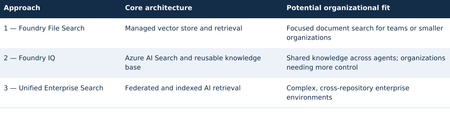
TECHNICAL RESEARCH PAPER Research Disclaimer This article is a technical research paper intended solely for educational, research, and illustrative purposes. It reflects the author’s personal technical perspectives. All concepts, architectural designs, diagrams, and implementation approaches are provided “AS IS” for technical exploration and review, not as production-ready development guidance. Organizations considering implementing these approaches should consult their internal software development standards, enterprise architecture teams, corporate security policies, and governance requirements. Any production implementation must undergo appropriate end-to-end architectural, security, privacy, compliance, and responsible AI or ethics reviews, along with necessary testing and organizational approvals before deployment. Enterprise Agentic Search Master Research Plan and Technical Architecture | Three Independent Agentic RAG Approaches Using Microsoft Technologies Three independent architectural approaches — overview 1. Executive summary This research paper explores three independent approaches to transforming enterprise documents and knowledge repositories into AI-powered search experiences using Agentic Retrieval-Augmented Generation (RAG), Microsoft Foundry, and ASP.NET Core. Organizations can evaluate and adopt any one approach independently according to their business requirements, organizational size, document volume, technical complexity, available resources, and security considerations. Approach 1 — Microsoft Foundry File Search: A streamlined option with managed ingestion, vector storage, retrieval, and an optional ASP.NET Core/Blazor conversational web interface. It may be a sufficient standalone solution for focused document-search needs. Approach 2 — Microsoft Foundry IQ: A knowledge-centric option built around Azure AI Search and reusable knowledge bases, suitable for applications that need more configurable retrieval or shared knowledge across authorized agents. It does not require Approach 1 to be implemented first. Approach 3 — Unified Enterprise Agentic Search: A broader design combining federated and indexed retrieval across approved enterprise repositories, for organizations with extensive integration, authorization, governance, and cross-source search requirements. These are alternatives, not mandatory sequential stages. Approaches 1 and 2 may each be complete solutions. Organizations considering Approach 3 may optionally pilot Approach 1 or 2 to assess retrieval quality, citations, user experience, and operational readiness, but neither pilot is a prerequisite. The examples are research illustrations, not production-ready implementation instructions. 2. Three independent architectural approaches Select an approach based on organizational needs rather than following a required progression: Optional evaluation path: An enterprise exploring Approach 3 can run a focused File Search or Foundry IQ POC first. A small organization may stop at Approach 1 or 2 if its requirements are met. 3. How documents become AI-searchable For indexed sources, the broad workflow is similar across managed File Search and Foundry IQ-backed Azure AI Search, although ingestion details, formats, and service capabilities differ. Federated retrieval may query existing repositories without creating new embeddings. Indexed document processing and agent retrieval workflow The original document is not replaced by vectors alone: searchable text and source references are retained. Scanned PDFs and images may need OCR or multimodal processing. 3.1 Example: what happens to one PDF? Source: IIS-AppPool-Troubleshooting.pdf. Example passage: “If an IIS application pool repeatedly terminates, examine WAS events and investigate rapid-fail protection.” Illustrative document chunk, vector, and metadata A query such as “Why does my IIS application pool keep crashing?” may retrieve the relevant passage through semantic similarity. The agent uses the readable retrieved content to explain the issue and cite its source. Architecture note: This paper targets the new Microsoft Foundry Agent Service (Responses API-based), not classic Foundry agents or legacy Assistants API implementations. 4. Approach 1 — Microsoft Foundry File Search 4.1 Objective Explore a potentially standalone AI-powered search solution over 20 approved technical documents with limited ingestion configuration. Evaluate one Foundry File Search-enabled agent through the built-in Playground and/or a custom conversational web application. 4.2 Architecture flow Approach 1 — Microsoft Foundry File Search architecture 4.3 What is a managed vector store? A managed vector store exposes searchable passages, embeddings, and metadata while abstracting ingestion and retrieval. In standard Foundry Agent Service setup, files can remain in customer-managed Azure Storage and Azure AI Search can back the vector store; basic setup uses Microsoft-managed resources. Where supported, multiple agents in the same project can reference the same vector store ID through File Search tool configuration, subject to API and permission boundaries. 4.4 User experience options Option 1: Use the Foundry Agent Playground to ask questions, inspect citations, and evaluate multi-document synthesis. Option 2: Build an ASP.NET Core/Blazor portal using supported APIs/SDKs with multi-turn chat, streaming where supported, clickable citations, error handling, and Microsoft Entra ID sign-in. Keep privileged credentials on the server. 4.5 Illustrative implementation and deliverables • Prepare 20 approved documents and a fixed question set. • Configure a compatible Foundry project, model, agent, and File Search tool. • Upload files; verify managed processing and retrieval quality. • Test in the Playground; optionally implement and test the Blazor portal. • Evaluate answer grounding, citations, latency, ingestion behavior, and costs. Possible standalone deliverable: File Search agent, managed vector store, working selected interface(s), and an evaluation report. The custom portal is optional; Approach 2 is not required. 5. Approach 2 — Microsoft Foundry IQ 5.1 Objective Evaluate a reusable knowledge-base architecture with Azure AI Search-backed retrieval. This is an independent option: it can be built directly without first implementing Foundry File Search. For a comparative research exercise, the same 20 documents and questions may be reused. 5.2 Architecture flow Approach 2 — Microsoft Foundry IQ architecture 5.3 What is an Azure AI Search index? An Azure AI Search index is a structured, searchable collection of content extracted from enterprise data sources, including documents, websites, and other supported repositories. It stores searchable text, vector embeddings, metadata, and source references, enabling keyword, vector, hybrid, and semantic search to retrieve relevant information efficiently. During ingestion, documents can be processed, divided into smaller chunks, and converted into vector embeddings that represent their semantic meaning. When a user submits a natural-language question, Azure AI Search can combine keyword matching with vector similarity and semantic ranking to identify relevant passages, which an AI agent can use to generate grounded responses with citations to the original sources. 5.4 What Foundry IQ adds? Microsoft Foundry IQ builds on Azure AI Search by providing reusable knowledge bases and agentic retrieval capabilities across supported enterprise data sources. Multiple authorized AI agents can access the same knowledge base without duplicating document ingestion, while agentic retrieval can intelligently plan and execute searches to identify relevant information. Supported remote SharePoint knowledge sources can also be queried through the Copilot Retrieval API without creating a separate local vector index. This capability may require eligible Microsoft 365 Copilot licensing for end users, with access governed by source-specific permissions. For indexed content, document-level security trimming depends on supported knowledge-source capabilities and properly configured access control lists (ACLs) or security filters. 5.5 User experience and optional comparison A Foundry IQ solution may use the Agent Playground and/or its own ASP.NET Core/Blazor application. If an organization is comparing Approaches 1 and 2, it can optionally reuse a common web UI and provide an agent selector. Reusing Approach 1 is not a dependency. 5.6 Illustrative implementation and deliverables • Provision compatible Azure AI Search and Foundry resources. • Create the knowledge base and supported knowledge source; validate ingestion. • Connect a Foundry agent; evaluate retrieval and citations in the Playground. • Optionally build or reuse a Blazor interface for the same agent. • Measure relevance, knowledge reuse, latency, costs, and operational complexity. Direct-file ingestion may depend on preview, region, or API availability; Azure Blob ingestion may be needed. Possible standalone deliverable: reusable knowledge base, index, connected agent, selected interface(s), and evaluation report. 6. Foundry File Search versus Foundry IQ Section 6 — Foundry File Search versus Foundry IQ Key takeaway: Both File Search and Foundry IQ can support keyword, vector, and semantic relevance, with hybrid retrieval where supported. File Search emphasizes managed processing and search behavior; Foundry IQ provides reusable knowledge bases and more configurable Azure AI Search-backed sources. The distinction is control, source integration, and operations—not whether embeddings or semantic relevance exist. Both may be standalone solutions. 7. Approach 3 — Unified Enterprise Agentic Search 7.1 Objective Explore a comprehensive architecture for organizations requiring search across multiple repositories, with both federated and indexed retrieval, grounded answers, citations, and permission-aware access. This approach can be evaluated directly; smaller POCs are optional validation exercises, not prerequisites. 7.2 Unified enterprise architecture flow Section 7 — Unified Enterprise Agentic Search architecture 7.3 Option A — Federated enterprise search Query approved repositories through source APIs/connectors while retaining documents in place. Delegated access and source-native ACLs must be enforced for each connector. Remote SharePoint retrieval through Copilot Retrieval can require Microsoft 365 Copilot licenses for end users; source-specific permission behavior must be validated. Other repositories may require custom connectors or indexing. 7.4 Option B — Indexed enterprise AI search Index approved extracted text, vectors, metadata, and source references in Azure AI Search. Foundry IQ can provide reusable knowledge retrieval. OCR and complex layout extraction are not guaranteed by default File Search or every Foundry IQ knowledge source: test each format and add Azure AI Search OCR/Document Intelligence layout skills or other processing where needed. Derived indexed content requires explicit authorization and security trimming. 7.5 Combined example For “Find documentation explaining HTTP 503 errors in IIS and compare it with internal troubleshooting procedures,” the agent could retrieve current SharePoint guidance through Option A and indexed engineering articles through Option B, synthesize findings, and cite original sources. 8. A Unified UI for All Three Approaches: ASP.NET Core / Blazor Conversational Portal Section 8 — Unified ASP.NET Core/Blazor conversational portal for all three approaches The shared Blazor UI and ASP.NET Core backend can route requests to any of the three independent approaches. Approach 3 additionally coordinates federated and indexed retrieval; all paths return grounded answers and source citations. The retrieval router shown in the diagram is custom ASP.NET Core application/BFF logic, not a standalone Microsoft product. It selects the configured File Search, Foundry IQ, or federated/indexed enterprise path and normalizes citations. The architecture targets the new Microsoft Foundry Agent Service (Responses API-based). 9. Security and governance Section 9 — Security and governance Use approved noncustomer documents for initial research. Validate source permissions and prevent restricted content disclosure. Azure AI Search does not automatically preserve original repository ACLs when content is copied into an index. Indexed security trimming requires appropriate ACL fields and identity-aware filters or supported permission integration; not every knowledge source provides user-level trimming out of the box. Customer data requires organizational approvals. 10. Independent POC evaluation and success criteria Evaluate only the approach or approaches an organization is considering. A side-by-side comparison is optional, not a required sequence. If comparing File Search and Foundry IQ, use identical documents, questions, models, and prompts where possible. Section 10 — Independent POC evaluation and success criteria Illustrative acceptance target: at least 90% correct retrieval on a curated test set, valid citations for grounded responses, and reliable operation through the selected interface(s). These are proposed research criteria, not platform guarantees. Approach 3 additionally requires source-permission, cross-repository, and governance validation. 11. Independent estimates and potential deliverables Section 11 — Independent estimates and potential deliverables These are independent, illustrative POC estimates, not a cumulative rollout schedule. The Approach 2 estimate assumes compatible resources and an existing interface or Playground-only evaluation; building a new custom application can add effort. Approach 3 needs a separately scoped plan for connectors, access control, compliance reviews, testing, deployment, and operational readiness. 12. Research findings and needs-based architectural direction Approach 1: Consider Foundry File Search where a manageable document collection and simpler managed retrieval meet the organization’s requirements. Approach 2: Consider Foundry IQ where reusable knowledge, multiple agents, or greater search configurability are important. Approach 3: Consider unified enterprise retrieval where many systems, security boundaries, and content types must be integrated. No approach is universally preferred, and organization size alone is not a definitive selection criterion. A smaller organization may need advanced governance, while a large enterprise team may only need a focused File Search solution. Optional POCs using Approach 1 or 2 can inform an Approach 3 decision without becoming mandatory prerequisites. Envisioned outcome: A needs-appropriate, citation-grounded enterprise knowledge search experience built with Microsoft technologies, subject to technical validation, organizational security and privacy review, and responsible AI governance. The architectures remain independent research options rather than an endorsed implementation sequence. 13. Implementation notes and service lifecycle Current agent runtime: Target the current Microsoft Foundry Agent Service, not classic agents. Classic agents are deprecated and scheduled for retirement on March 31, 2027. Agentic retrieval: Foundry IQ query planning uses a supported model at low/medium reasoning effort. Minimal effort skips LLM query planning; model and API support must be checked. Availability and previews: Verify regional support, RBAC, API version, and GA-versus-preview status for File Search, Foundry IQ knowledge sources, and portal features before implementation. POC schedule: The illustrative estimates assume ready resources and a working Playground or reusable UI; region, permissions, and unsupported document formats can extend delivery. Technical validation: Microsoft Learn — Foundry File Search; Foundry IQ FAQ; Agentic Retrieval; Foundry Agent Service (classic) migration; Azure AI Search OCR and Document Layout skills.214Views0likes0Comments