ai for security
18 Topics
Evolving identity security: How the Conditional Access Optimization Agent helps you adapt
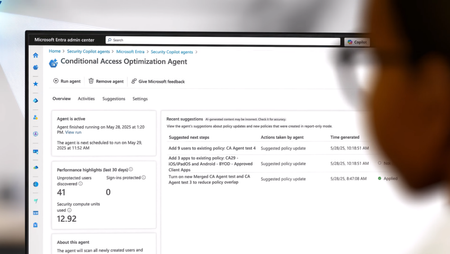
Organizations are expanding Zero Trust across more users, applications, and now a growing population of AI agent identities, making it even more challenging to maintain visibility and control at scale. As environments grow more complex and change daily, static best-practice approaches can’t keep up. Security teams are left trying to reason across dozens of access policies, shifting conditions, and evolving risks, often without clear visibility into where gaps exist. That’s exactly what we’re hearing from customers. “The recommendations are great, but they don’t always match how our organization works.” With this latest set of enhancements, the Conditional Access Optimization Agent moves beyond static guidance to continuous, context-aware identity posture optimization. The agent now understands your organization’s business context, surfaces gaps that manual reviews miss, helps you act on insights safely, and proves the impact of your improvements—all as part of a new operating model for identity security. Here’s a quick look at what’s new in the Conditional Access Optimization Agent, now in public preview: Context-aware recommendations tailored to your environment. Continuous deep gap analysis to identify persistent or emerging policy gaps. Automated least-privilege enforcement to reduce unnecessary permissions. Enhanced phased rollout for gradual, controlled deployment. Passkey deployment campaigns that streamline phishing-resistant authentication rollout. Zero Trust posture reporting that helps demonstrate measurable improvements. These new capabilities are designed to work together as part of a continuous operating model for identity security. To make this concrete, let’s walk through how the agent works in practice across four key steps – from tailoring recommendations to your environment, to identifying gaps, safely deploying changes, and measurable impact. This is a view of the agent overview dashboard, showing analyzed coverage, identified gaps, and recommended actions to strengthen your access policies. Step 1: Make recommendations match your reality Every organization runs Conditional Access a little differently. Naming conventions, policy design patterns, and exception processes – these all vary across environments. Until now, the agent's recommendations were based on industry and Microsoft best practices, sign-in data, and your Conditional Access policies. However, guidance needs to reflect how your organizations actually operate. Context-aware policy recommendations – teach the agent your standards With context-aware policy recommendations, you can upload internal documentation directly to the agent. Think about the guidance your team already relies on, such as documents that outline authentication strength requirements, device compliance baselines, and internal or external policy standards. These often live as PDFs, wiki pages, or long policy docs that admins manually cross-reference during periodic reviews. The agent securely uses that context to tailor recommendations for your organization, so they align with how your team designs and manages Conditional Access. For example, the Australian government publishes Conditional Access guidance for organizations operating in regulated environments. The agent is able to reason over this guidance and produce recommendations aligned to Australian compliance standards. In the agent’s settings page, you can upload organization-specific policies and guidance so the agent can tailor recommendations to your environment Step 2: Surface gaps humans can’t easily see As environments grow more complex, Conditional Access policies become increasingly difficult to reason over. Organizations often manage dozens, or even hundreds, of policies across user groups, applications, authentication strengths, and device requirements, making it hard to fully understand how they interact. Continuous deep gap analysis Enterprise customers average 83 Conditional Access policies. The number of possible interactions between those policies – layers, overlaps, and coverage gaps – is challenging to reason over. Manual review typically focuses on recently changed policies. But some of the most critical gaps have been there all along. They are persistent configuration issues that have existed for years. The agent evaluates how policies interact with one another, understands how authentication requirements are enforced across the policies, and identifies gaps where coverage falls short. This means it can detect: newly introduced gaps caused by policy changes or configuration drift persistent structural gaps cause by policy overlap, constantly evolving exceptions, and more Instead of reviewing policies one by one, the agent evaluates the entire access control system as a whole. The agent identifies uncovered users and policy gaps by analyzing how Conditional Access policies interact across your environment. Zero Trust least-privileged enforcement for agent identities Nowadays, access is no longer just about people. Gartner stated that by 2029, most secure access requests will come from non-human identities—up from less than 5% today. As AI agents become a rapidly growing part of the workforce, they also introduce new risks. Many of these identities can be over-privileged, making them attractive targets for attackers! The Conditional Access Optimization Agent identifies agent identities with excessive or unused permissions and recommends least-privilege adjustments. This extends continuous Zero Trust enforcement beyond workforce identities to the fastest-growing population in your environment. Step 3: Turn insight into action without breaking things Finding gaps is important. Fixing them safely is where the real operational challenge begins. We all know the risk of making access policy changes without understanding their real-world impact. A single misconfigured policy can lock out users or disrupt critical applications. These enhancements help your teams move from insight to execution with confidence. Phased rollout for any Conditional Access policy With our updated Phased Rollout capability, you can now deploy any Conditional Access policy gradually, not only agent-recommended ones like in our previous release. For each rollout, the agent proposes low-impact phases, monitors real user impact at every stage, and intelligently suggests progression or roll back so you can easily deploy policies while minimizing end-user impact. This means your team no longer needs to manually move policies from report only to enabled. The agent handles that progression for you. This allows your team to strengthen access protections in a way that works for your business, without widespread lockouts, helpdesk spikes, or disruption to critical workflows. The agent creates a phased rollout plan, allowing policies to be deployed gradually while monitoring user impact and minimizing disruption. Passkey deployment campaigns – structured adoption of phishing-resistant authentication Phishing-resistant authentication is one of the most important steps organizations can take to strengthen identity security – and passkeys deliver both security and usability. The challenge isn't whether to adopt passkeys, but how to roll them out without creating operational friction. Microsoft data shows consumer users are 3× more successful signing in with passkeys compared to legacy authentication methods. That's where the agent's passkey campaign experience comes in, helping you run structured adoption campaigns across your organization. Start with your highest-impact users such as administrators, executives, or employees most targeted by phishing. The agent tracks registration progress, identifies users that haven’t enrolled yet, communicates with them via teams, and helps you expand adoption wave by wave. No more ad hoc enforcement or spreadsheet-driven tracking across teams. The agent guides passkey adoption with structured campaigns, targeting users, tracking progress, and expanding rollout in stages. Step 4: Prove progress and communicate impact Closing gaps is only just a piece of the whole story. Security leaders increasingly need to demonstrate measurable progress, to both internal stakeholders and your executive leadership. The built-in reporting dashboard provides a clear summary of posture improvements driven by you and the agent. You can track: Exactly how many Conditional Access policy gaps the agent has discovered Users, Apps, and Agent IDs you have improved policy coverage for Remaining users, apps, and agent IDs requiring additional coverage This makes it easier to demonstrate the value of your Zero Trust investments and communicate progress to your leadership. The reporting dashboard tracks Conditional Access posture improvements, showing gaps closed, coverage gained, and remaining areas to address. The new operating model for identity security These enhancements aren't incremental improvements to a recommendation engine. They represent a shift in how identity security operations work. Moving from static rule management to continuous, context-aware optimization leveraging the power of AI. Identity security is no longer a periodic audit exercise. It becomes a continuous operational capability - helping you secure both human and non-human identities across authentication, access, and risk. Get started today If you have Microsoft 365 E5, the Conditional Access Optimization Agent will become available through a phased rollout. Once available in your tenant, you can enable it directly in the Microsoft Entra admin center and start using it right away. We are continuing to expand these capabilities and will evolve the agent based on your feedback. Enable the Conditional Access Optimization Agent → Security Copilot agents - Microsoft Entra admin center Swaroop Krishnamurthy Principal Product Manager, Microsoft Entra Swaroop Krishnamurthy | LinkedIn Additional resources Microsoft Entra Conditional Access optimization agent | Microsoft Learn Conditional Access Optimization Agent knowledge base (Preview) | Microsoft Learn Conditional Access Optimization Agent phased rollout | Microsoft Learn Learn more about Microsoft Entra Prevent identity attacks, ensure least privilege access, unify access controls, and improve the experience for users with comprehensive identity and network access solutions across on-premises and clouds. Microsoft Entra News and Insights | Microsoft Security Blog Microsoft Entra blog | Tech Community Microsoft Entra documentation | Microsoft Learn Microsoft Entra discussions | Microsoft Community5KViews0likes0CommentsIntroducing Microsoft Security Store
Security is being reengineered for the AI era—moving beyond static, rulebound controls and after-the-fact response toward platform-led, machine-speed defense. We recognize that defending against modern threats requires the full strength of an ecosystem, combining our unique expertise and shared threat intelligence. But with so many options out there, it’s tough for security professionals to cut through the noise, and even tougher to navigate long procurement cycles and stitch together tools and data before seeing meaningful improvements. That’s why we built Microsoft Security Store - a storefront designed for security professionals to discover, buy, and deploy security SaaS solutions and AI agents from our ecosystem partners such as Darktrace, Illumio, and BlueVoyant. Security SaaS solutions and AI agents on Security Store integrate with Microsoft Security products, including Sentinel platform, to enhance end-to-end protection. These integrated solutions and agents collaborate intelligently, sharing insights and leveraging AI to enhance critical security tasks like triage, threat hunting, and access management. In Security Store, you can: Buy with confidence – Explore solutions and agents that are validated to integrate with Microsoft Security products, so you know they’ll work in your environment. Listings are organized to make it easy for security professionals to find what’s relevant to their needs. For example, you can filter solutions based on how they integrate with your existing Microsoft Security products. You can also browse listings based on their NIST Cybersecurity Framework functions, covering everything from network security to compliance automation — helping you quickly identify which solutions strengthen the areas that matter most to your security posture. Simplify purchasing – Buy solutions and agents with your existing Microsoft billing account without any additional payment setup. For Azure benefit-eligible offers, eligible purchases contribute to your cloud consumption commitments. You can also purchase negotiated deals through private offers. Accelerate time to value – Deploy agents and their dependencies in just a few steps and start getting value from AI in minutes. Partners offer ready-to-use AI agents that can triage alerts at scale, analyze and retrieve investigation insights in real time, and surface posture and detection gaps with actionable recommendations. A rich ecosystem of solutions and AI agents to elevate security posture In Security Store, you’ll find solutions covering every corner of cybersecurity—threat protection, data security and governance, identity and device management, and more. To give you a flavor of what is available, here are some of the exciting solutions on the store: Darktrace’s ActiveAI Security SaaS solution integrates with Microsoft Security to extend self-learning AI across a customer's entire digital estate, helping detect anomalies and stop novel attacks before they spread. The Darktrace Email Analysis Agent helps SOC teams triage and threat hunt suspicious emails by automating detection of risky attachments, links, and user behaviors using Darktrace Self-Learning AI, integrated with Microsoft Defender and Security Copilot. This unified approach highlights anomalous properties and indicators of compromise, enabling proactive threat hunting and faster, more accurate response. Illumio for Microsoft Sentinel combines Illumio Insights with Microsoft Sentinel data lake and Security Copilot to enhance detection and response to cyber threats. It fuses data from Illumio and all the other sources feeding into Sentinel to deliver a unified view of threats across millions of workloads. AI-driven breach containment from Illumio gives SOC analysts, incident responders, and threat hunters unified visibility into lateral traffic threats and attack paths across hybrid and multi-cloud environments, to reduce alert fatigue, prioritize threat investigation, and instantly isolate workloads. Netskope’s Security Service Edge (SSE) platform integrates with Microsoft M365, Defender, Sentinel, Entra and Purview for identity-driven, label-aware protection across cloud, web, and private apps. Netskope's inline controls (SWG, CASB, ZTNA) and advanced DLP, with Entra signals and Conditional Access, provide real-time, context-rich policies based on user, device, and risk. Telemetry and incidents flow into Defender and Sentinel for automated enrichment and response, ensuring unified visibility, faster investigations, and consistent Zero Trust protection for cloud, data, and AI everywhere. PERFORMANTA Email Analysis Agent automates deep investigations into email threats, analyzing metadata (headers, indicators, attachments) against threat intelligence to expose phishing attempts. Complementing this, the IAM Supervisor Agent triages identity risks by scrutinizing user activity for signs of credential theft, privilege misuse, or unusual behavior. These agents deliver unified, evidence-backed reports directly to you, providing instant clarity and slashing incident response time. Tanium Autonomous Endpoint Management (AEM) pairs realtime endpoint visibility with AI-driven automation to keep IT environments healthy and secure at scale. Tanium is integrated with the Microsoft Security suite—including Microsoft Sentinel, Defender for Endpoint, Entra ID, Intune, and Security Copilot. Tanium streams current state telemetry into Microsoft’s security and AI platforms and lets analysts pivot from investigation to remediation without tool switching. Tanium even executes remediation actions from the Sentinel console. The Tanium Security Triage Agent accelerates alert triage, enabling security teams to make swift, informed decisions using Tanium Threat Response alerts and real-time endpoint data. Walkthrough of Microsoft Security Store Now that you’ve seen the types of solutions available in Security Store, let’s walk through how to find the right one for your organization. You can get started by going to the Microsoft Security Store portal. From there, you can search and browse solutions that integrate with Microsoft Security products, including a dedicated section for AI agents—all in one place. If you are using Microsoft Security Copilot, you can also open the store from within Security Copilot to find AI agents - read more here. Solutions are grouped by how they align with industry frameworks like NIST CSF 2.0, making it easier to see which areas of security each one supports. You can also filter by integration type—e.g., Defender, Sentinel, Entra, or Purview—and by compliance certifications to narrow results to what fits your environment. To explore a solution, click into its detail page to view descriptions, screenshots, integration details, and pricing. For AI agents, you’ll also see the tasks they perform, the inputs they require, and the outputs they produce —so you know what to expect before you deploy. Every listing goes through a review process that includes partner verification, security scans on code packages stored in a secure registry to protect against malware, and validation that integrations with Microsoft Security products work as intended. Customers with the right permissions can purchase agents and SaaS solutions directly through Security Store. The process is simple: choose a partner solution or AI agent and complete the purchase in just a few clicks using your existing Microsoft billing account—no new payment setup required. Qualifying SaaS purchases also count toward your Microsoft Azure Consumption Commitment (MACC), helping accelerate budget approvals while adding the security capabilities your organization needs. Security and IT admins can deploy solutions directly from Security Store in just a few steps through a guided experience. The deployment process automatically provisions the resources each solution needs—such as Security Copilot agents and Microsoft Sentinel data lake notebook jobs—so you don’t have to do so manually. Agents are deployed into Security Copilot, which is built with security in mind, providing controls like granular agent permissions and audit trails, giving admins visibility and governance. Once deployment is complete, your agent is ready to configure and use so you can start applying AI to expand detection coverage, respond faster, and improve operational efficiency. Security and IT admins can view and manage all purchased solutions from the “My Solutions” page and easily navigate to Microsoft Cost Management tools to track spending and manage subscriptions. Partners: grow your business with Microsoft For security partners, Security Store opens a powerful new channel to reach customers, monetize differentiated solutions, and grow with Microsoft. We will showcase select solutions across relevant Microsoft Security experiences, starting with Security Copilot, so your offerings appear in the right context for the right audience. You can monetize both SaaS solutions and AI agents through built-in commerce capabilities, while tapping into Microsoft’s go-to-market incentives. For agent builders, it’s even simpler—we handle the entire commerce lifecycle, including billing and entitlement, so you don’t have to build any infrastructure. You focus on embedding your security expertise into the agent, and we take care of the rest to deliver a seamless purchase experience for customers. Security Store is built on top of Microsoft Marketplace, which means partners publish their solution or agent through the Microsoft Partner Center - the central hub for managing all marketplace offers. From there, create or update your offer with details about how your solution integrates with Microsoft Security so customers can easily discover it in Security Store. Next, upload your deployable package to the Security Store registry, which is encrypted for protection. Then define your license model, terms, and pricing so customers know exactly what to expect. Before your offer goes live, it goes through certification checks that include malware and virus scans, schema validation, and solution validation. These steps help give customers confidence that your solutions meet Microsoft’s integration standards. Get started today By creating a storefront optimized for security professionals, we are making it simple to find, buy, and deploy solutions and AI agents that work together. Microsoft Security Store helps you put the right AI‑powered tools in place so your team can focus on what matters most—defending against attackers with speed and confidence. Get started today by visiting Microsoft Security Store. If you’re a partner looking to grow your business with Microsoft, start by visiting Microsoft Security Store - Partner with Microsoft to become a partner. Partners can list their solution or agent if their solution has a qualifying integration with Microsoft Security products, such as a Sentinel connector or Security Copilot agent, or another qualifying MISA solution integration. You can learn more about qualifying integrations and the listing process in our documentation here.