agents
158 TopicsIntegrating Microsoft Foundry with OpenClaw: Step by Step Model Configuration
Step 1: Deploying Models on Microsoft Foundry Let us kick things off in the Azure portal. To get our OpenClaw agent thinking like a genius, we need to deploy our models in Microsoft Foundry. For this guide, we are going to focus on deploying gpt-5.2-codex on Microsoft Foundry with OpenClaw. Navigate to your AI Hub, head over to the model catalog, choose the model you wish to use with OpenClaw and hit deploy. Once your deployment is successful, head to the endpoints section. Important: Grab your Endpoint URL and your API Keys right now and save them in a secure note. We will need these exact values to connect OpenClaw in a few minutes. Step 2: Installing and Initializing OpenClaw Next up, we need to get OpenClaw running on your machine. Open up your terminal and run the official installation script: curl -fsSL https://openclaw.ai/install.sh | bash The wizard will walk you through a few prompts. Here is exactly how to answer them to link up with our Azure setup: First Page (Model Selection): Choose "Skip for now". Second Page (Provider): Select azure-openai-responses. Model Selection: Select gpt-5.2-codex , For now only the models listed (hosted on Microsoft Foundry) in the picture below are available to be used with OpenClaw. Follow the rest of the standard prompts to finish the initial setup. Step 3: Editing the OpenClaw Configuration File Now for the fun part. We need to manually configure OpenClaw to talk to Microsoft Foundry. Open your configuration file located at ~/.openclaw/openclaw.json in your favorite text editor. Replace the contents of the models and agents sections with the following code block: { "models": { "providers": { "azure-openai-responses": { "baseUrl": "https://<YOUR_RESOURCE_NAME>.openai.azure.com/openai/v1", "apiKey": "<YOUR_AZURE_OPENAI_API_KEY>", "api": "openai-responses", "authHeader": false, "headers": { "api-key": "<YOUR_AZURE_OPENAI_API_KEY>" }, "models": [ { "id": "gpt-5.2-codex", "name": "GPT-5.2-Codex (Azure)", "reasoning": true, "input": ["text", "image"], "cost": { "input": 0, "output": 0, "cacheRead": 0, "cacheWrite": 0 }, "contextWindow": 400000, "maxTokens": 16384, "compat": { "supportsStore": false } }, { "id": "gpt-5.2", "name": "GPT-5.2 (Azure)", "reasoning": false, "input": ["text", "image"], "cost": { "input": 0, "output": 0, "cacheRead": 0, "cacheWrite": 0 }, "contextWindow": 272000, "maxTokens": 16384, "compat": { "supportsStore": false } } ] } } }, "agents": { "defaults": { "model": { "primary": "azure-openai-responses/gpt-5.2-codex" }, "models": { "azure-openai-responses/gpt-5.2-codex": {} }, "workspace": "/home/<USERNAME>/.openclaw/workspace", "compaction": { "mode": "safeguard" }, "maxConcurrent": 4, "subagents": { "maxConcurrent": 8 } } } } You will notice a few placeholders in that JSON. Here is exactly what you need to swap out: Placeholder Variable What It Is Where to Find It <YOUR_RESOURCE_NAME> The unique name of your Azure OpenAI resource. Found in your Azure Portal under the Azure OpenAI resource overview. <YOUR_AZURE_OPENAI_API_KEY> The secret key required to authenticate your requests. Found in Microsoft Foundry under your project endpoints or Azure Portal keys section. <USERNAME> Your local computer's user profile name. Open your terminal and type whoami to find this. Step 4: Restart the Gateway After saving the configuration file, you must restart the OpenClaw gateway for the new Foundry settings to take effect. Run this simple command: openclaw gateway restart Configuration Notes & Deep Dive If you are curious about why we configured the JSON that way, here is a quick breakdown of the technical details. Authentication Differences Azure OpenAI uses the api-key HTTP header for authentication. This is entirely different from the standard OpenAI Authorization: Bearer header. Our configuration file addresses this in two ways: Setting "authHeader": false completely disables the default Bearer header. Adding "headers": { "api-key": "<key>" } forces OpenClaw to send the API key via Azure's native header format. Important Note: Your API key must appear in both the apiKey field AND the headers.api-key field within the JSON for this to work correctly. The Base URL Azure OpenAI's v1-compatible endpoint follows this specific format: https://<your_resource_name>.openai.azure.com/openai/v1 The beautiful thing about this v1 endpoint is that it is largely compatible with the standard OpenAI API and does not require you to manually pass an api-version query parameter. Model Compatibility Settings "compat": { "supportsStore": false } disables the store parameter since Azure OpenAI does not currently support it. "reasoning": true enables the thinking mode for GPT-5.2-Codex. This supports low, medium, high, and xhigh levels. "reasoning": false is set for GPT-5.2 because it is a standard, non-reasoning model. Model Specifications & Cost Tracking If you want OpenClaw to accurately track your token usage costs, you can update the cost fields from 0 to the current Azure pricing. Here are the specs and costs for the models we just deployed: Model Specifications Model Context Window Max Output Tokens Image Input Reasoning gpt-5.2-codex 400,000 tokens 16,384 tokens Yes Yes gpt-5.2 272,000 tokens 16,384 tokens Yes No Current Cost (Adjust in JSON) Model Input (per 1M tokens) Output (per 1M tokens) Cached Input (per 1M tokens) gpt-5.2-codex $1.75 $14.00 $0.175 gpt-5.2 $2.00 $8.00 $0.50 Conclusion: And there you have it! You have successfully bridged the gap between the enterprise-grade infrastructure of Microsoft Foundry and the local autonomy of OpenClaw. By following these steps, you are not just running a chatbot; you are running a sophisticated agent capable of reasoning, coding, and executing tasks with the full power of GPT-5.2-codex behind it. The combination of Azure's reliability and OpenClaw's flexibility opens up a world of possibilities. Whether you are building an automated devops assistant, a research agent, or just exploring the bleeding edge of AI, you now have a robust foundation to build upon. Now it is time to let your agent loose on some real tasks. Go forth, experiment with different system prompts, and see what you can build. If you run into any interesting edge cases or come up with a unique configuration, let me know in the comments below. Happy coding!2.8KViews1like2CommentsMCP vs mcp-cli: Dynamic Tool Discovery for Token-Efficient AI Agents
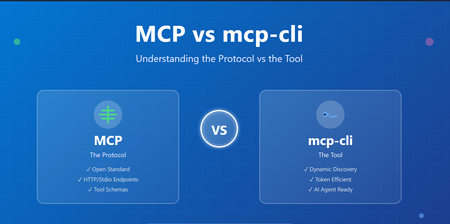
Introduction The AI agent ecosystem is evolving rapidly, and with it comes a scaling challenge that many developers are hitting context window bloat. When building systems that integrate with multiple MCP (Model Context Protocol) servers, you're forced to load all tool definitions upfront—consuming thousands of tokens just to describe what tools could be available. mcp-cli: a lightweight tool that changes how we interact with MCP servers. But before diving into mcp-cli, it's essential to understand the foundational protocol itself, the design trade-offs between static and dynamic approaches, and how they differ fundamentally. Part 1: Understanding MCP (Model Context Protocol) What is MCP? The Model Context Protocol (MCP) is an open standard for connecting AI agents and applications to external tools, APIs, and data sources. Think of it as a universal interface that allows: AI Agents (Claude, Gemini, etc.) to discover and call tools Tool Providers to expose capabilities in a standardized way Seamless Integration between diverse systems without custom adapters New to MCP see https://aka.ms/mcp-for-beginners How MCP Works MCP operates on a simple premise: define tools with clear schemas and let clients discover and invoke them. Basic MCP Flow: Tool Provider (MCP Server) ↓ [Tool Definitions + Schemas] ↓ AI Agent / Client ↓ [Discover Tools] → [Invoke Tools] → [Get Results] Example: A GitHub MCP server exposes tools like: search_repositories - Search GitHub repos create_issue - Create a GitHub issue list_pull_requests - List open PRs Each tool comes with a JSON schema describing its parameters, types, and requirements. The Static Integration Problem Traditionally, MCP integration works like this: Startup: Load ALL tool definitions from all servers Context Window: Send every tool schema to the AI model Invocation: Model chooses which tool to call Execution: Tool is invoked and result returned The Problem: When you have multiple MCP servers, the token cost becomes substantial: Scenario Token Count 6 MCP Servers, 60 tools (static loading) ~47,000 tokens After dynamic discovery ~400 tokens Token Reduction 99% 🚀 For a production system with 10+ servers exposing 100+ tools, you're burning through thousands of tokens just describing capabilities, leaving less context for actual reasoning and problem-solving. Key Issues: ❌ Reduced effective context length for actual work ❌ More frequent context compactions ❌ Hard limits on simultaneous MCP servers ❌ Higher API costs Part 2: Enter mcp-cli – Dynamic Context Discovery What is mcp-cli? mcp-cli is a lightweight CLI tool (written in Bun, compiled to a single binary) that implements dynamic context discovery for MCP servers. Instead of loading everything upfront, it pulls in information only when needed. Static vs. Dynamic: The Paradigm Shift Traditional MCP (Static Context): AI Agent Says: "Load all tool definitions from all servers" ↓ Context Window Bloat ❌ ↓ Limited space for reasoning mcp-cli (Dynamic Discovery): AI Agent Says: "What servers exist?" ↓ mcp-cli responds AI Agent Says: "What are the params for tool X?" ↓ mcp-cli responds AI Agent Says: "Execute tool X" mcp-cli executes and responds Result: You only pay for information you actually use. ✅ Core Capabilities mcp-cli provides three primary commands: 1. Discover - What servers and tools exist? mcp-cli Lists all configured MCP servers and their tools. 2. Inspect - What does a specific tool do? mcp-cli info <server> <tool> Returns the full JSON schema for a tool (parameters, descriptions, types). 3. Execute - Run a tool mcp-cli call <server> <tool> '{"arg": "value"}' Executes the tool and returns results. Key Features of mcp-cli Feature Benefit Stdio & HTTP Support Works with both local and remote MCP servers Connection Pooling Lazy-spawn daemon avoids repeated startup overhead Tool Filtering Control which tools are available via allowedTools/disabledTools Glob Searching Find tools matching patterns: mcp-cli grep "*mail*" AI Agent Ready Designed for use in system instructions and agent skills Lightweight Single binary, minimal dependencies Part 3: Detailed Comparison Table Aspect Traditional MCP mcp-cli Protocol HTTP/REST or Stdio Stdio/HTTP (via CLI) Context Loading Static (upfront) Dynamic (on-demand) Tool Discovery All at once Lazy enumeration Schema Inspection Pre-loaded On-request Token Usage High (~47k for 60 tools) Low (~400 for 60 tools) Best For Direct server integration AI agent tool use Implementation Server-side focus CLI-side focus Complexity Medium Low (CLI handles it) Startup Time One call Multiple calls (optimized) Scaling Limited by context Unlimited (pay per use) Integration Custom implementation Pre-built mcp-cli Part 4: When to Use Each Approach Use Traditional MCP (HTTP Endpoints) when: ✅ Building a direct server integration ✅ You have few tools (< 10) and don't care about context waste ✅ You need full control over HTTP requests/responses ✅ You're building a specialized integration (not AI agents) ✅ Real-time synchronous calls are required Use mcp-cli when: ✅ Integrating with AI agents (Claude, Gemini, etc.) ✅ You have multiple MCP servers (> 2-3) ✅ Token efficiency is critical ✅ You want a standardized, battle-tested tool ✅ You prefer CLI-based automation ✅ Connection pooling and lazy loading are beneficial ✅ You're building agent skills or system instructions Conclusion MCP (Model Context Protocol) defines the standard for tool sharing and discovery. mcp-cli is the practical tool that makes MCP efficient for AI agents by implementing dynamic context discovery. The fundamental difference: MCP mcp-cli What The protocol standard The CLI tool Where Both server and client Client-side CLI Problem Solved Tool standardization Context bloat Architecture Protocol Implementation Think of it this way: MCP is the language, mcp-cli is the interpreter that speaks fluently. For AI agent systems, dynamic discovery via mcp-cli is becoming the standard. For direct integrations, traditional MCP HTTP endpoints work fine. The choice depends on your use case, but increasingly, the industry is trending toward mcp-cli for its efficiency and scalability. Resources MCP Specification mcp-cli GitHub New to MCP see https://aka.ms/mcp-for-beginners Practical demo: AnveshMS/mcp-cli-example
Building High-Performance Agentic Systems
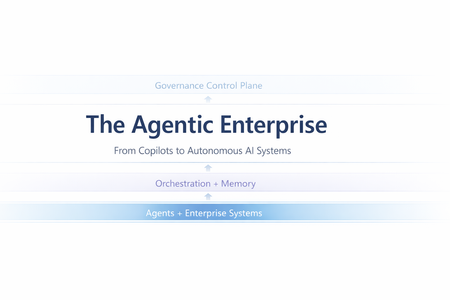
Most enterprise chatbots fail in the same quiet way. They answer questions. They impress in demos. And then they stall in production. Knowledge goes stale. Answers cannot be audited. The system cannot act beyond generating text. When workflows require coordination, execution, or accountability, the chatbot stops being useful. Agentic systems exist because that model is insufficient. Instead of treating the LLM as the product, agentic architecture embeds it inside a bounded control loop: plan → act (tools) → observe → refine The model becomes one component in a runtime system with explicit state management, safety policies, identity enforcement, and operational telemetry. This shift is not speculative. A late-2025 MIT Sloan Management Review / BCG study reports that 35% of organizations have already adopted AI agents, with another 44% planning deployment. Microsoft is advancing open protocols for what it calls the “agentic web,” including Agent-to-Agent (A2A) interoperability and Model Context Protocol (MCP), with integration paths emerging across Copilot Studio and Azure AI Foundry. The real question is no longer whether agents are coming. It is whether enterprise architecture is ready for them. This article translates “agentic” into engineering reality: the runtime layers, latency and cost levers, orchestration patterns, and governance controls required for production deployment. The Core Capabilities of Agentic AI What makes an AI “agentic” is not a single feature—it’s the interaction of different capabilities. Together, they form the minimum set needed to move from “answering” to “operating”. Autonomy – Goal-Driven Task Completion Traditional bots are reactive: they wait for a prompt and produce output. Autonomy introduces a goal state and a control loop. The agent is given an objective (or a trigger) and it can decide the next step without being micromanaged. The critical engineering distinction is that autonomy must be bounded: in production, you implement it with explicit budgets and stop conditions—maximum tool calls, maximum retries, timeouts, and confidence thresholds. The typical execution shape is a loop: plan → act → observe → refine. A project-management agent, for example, doesn’t just answer “what’s the status?” It monitors signals (work items, commits, build health), detects a risk pattern (slippage, dependency blockage), and then either surfaces an alert or prepares a remediation action (re-plan milestones, notify owners). In high-stakes environments, autonomy is usually human-in-the-loop by design: the agent can draft changes, propose next actions, and only execute after approval. Over time, teams expand the autonomy envelope for low-risk actions while keeping approvals for irreversible or financially sensitive operations. Tool Integration – Taking Action and Staying Current A standalone LLM cannot fetch live enterprise state and cannot change it. Tool integration is how an agent becomes operational: it can query systems of record, call APIs, trigger workflows, and produce outputs that reflect the current world rather than the model’s pretraining snapshot. There are two classes of tools that matter in enterprise agents: Retrieval tools (grounding / RAG)When the agent needs facts, it retrieves them. This is the backbone of reducing hallucination: instead of guessing, the agent pulls authoritative content (SharePoint, Confluence, policy repositories, CRM records, Fabric datasets) and uses it as evidence. In practice, retrieval works best when it is engineered as a pipeline: query rewrite (optional) → hybrid search (keyword + vector) → filtering (metadata/ACL) → reranking → compact context injection. The point is not “stuff the prompt with documents,” but “inject only the minimum evidence required to answer accurately.” Action tools (function calling / connectors) These are the hands of the agent: update a CRM record, create a ticket, send an email, schedule a meeting, generate a report, run a pipeline. Tool integration shifts value from “advice” to “execution,” but also introduces risk—so action tools need guardrails: least-privilege permissions, input validation, idempotency keys, and post-condition checks (confirm the update actually happened). In Microsoft ecosystems, this tool plane often maps to Graph actions + business connectors (via Logic Apps/Power Automate) + custom APIs, with Copilot Studio (low code) or Foundry-style runtimes (pro code) orchestrating the calls. Memory (Context & Learning) – Context Awareness and Adaptation “Memory” is not just a long prompt. In agentic systems, memory is an explicit state strategy: Working memory: what the agent has learned during the current run (intermediate tool results, constraints, partial plans). Session memory: what should persist across turns (user preferences, ongoing tasks, summarized history). Long-term memory: enterprise knowledge the agent can retrieve (indexed documents, structured facts, embeddings + metadata). Short-term memory enables multi-step workflows without repeating questions. An HR onboarding agent can carry a new hire’s details from intake through provisioning without re-asking, because the workflow state is persisted and referenced. Long-term “learning” is typically implemented through feedback loops rather than real-time model weight updates: capturing corrections, storing validated outcomes, and periodically improving prompts, routing logic, retrieval configuration, or (where appropriate) fine-tuning. The key design rule is that memory must be policy-aware: retention rules, PII handling, and permission trimming apply to stored state as much as they apply to retrieved documents. Orchestration – Coordinating Multi-Agent Teams Complex enterprise work is rarely single-skill. Orchestration is how agentic systems scale capability without turning one agent into an unmaintainable monolith. The pattern is “manager + specialists”: an orchestrator decomposes the goal into subtasks, routes each to the best tool or sub-agent, and then composes a final response. This can be done sequentially or in parallel. Employee onboarding is a classic: HR intake, IT account creation, equipment provisioning, and training scheduling can run in parallel where dependencies allow. The engineering challenge is making orchestration reliable: defining strict input/output contracts between agents (often structured JSON), handling failures (timeouts, partial completion), and ensuring only one component has authority to send the final user-facing message to avoid conflicting outputs. In Microsoft terms, orchestration can be implemented as agentic flows in Copilot Studio, connected-agent patterns in Foundry, or explicit orchestrators in code using structured tool schemas and shared state. Strategic Impact – How Agentic AI Changes Knowledge Work Agentic AI is no longer an experimental overlay to enterprise systems. It is becoming an embedded operational layer inside core workflows. Unlike earlier chatbot deployments that answered isolated questions, modern enterprise agents execute end-to-end processes, interact with structured systems, maintain context, and operate within governed boundaries. The shift is not about conversational intelligence alone; it is about workflow execution at scale. The transformation becomes clearer when examining real implementations across industries. In legal services, agentic systems have moved beyond document summarization into operational case automation. Assembly Software’s NeosAI, built on Azure AI infrastructure, integrates directly into legal case management systems and automates document analysis, structured data extraction, and first-draft generation of legal correspondence. What makes this deployment impactful is not merely the generative drafting capability, but the integration architecture. NeosAI is not an isolated chatbot; it operates within the same document management systems, billing systems, and communication platforms lawyers already use. Firms report time savings of up to 25 hours per case, with document drafting cycles reduced from days to minutes for first-pass outputs. Importantly, the system runs within secure Azure environments with zero data retention policies, addressing one of the most sensitive concerns in legal AI adoption: client confidentiality. JPMorgan’s COiN platform represents another dimension of legal and financial automation. Instead of conversational assistance, COiN performs structured contract intelligence at production scale. It analyzes more than 12,000 commercial loan agreements annually, extracting over 150 clause attributes per document. Work that previously required approximately 360,000 human hours now executes in seconds. The architecture emphasizes structured NLP pipelines, taxonomy-based clause classification, and private cloud deployment for regulatory compliance. Rather than replacing legal professionals, the system flags unusual clauses for human review, maintaining oversight while dramatically accelerating analysis. Over time, COiN has also served as a knowledge retention mechanism, preserving institutional contract intelligence that would otherwise be lost with employee turnover. In financial services, the impact is similarly structural. Morgan Stanley’s internal AI Assistant allows wealth advisors to query over 100,000 proprietary research documents using natural language. Adoption has reached nearly universal usage across advisor teams, not because it replaces expertise, but because it compresses research time and surfaces insights instantly. Building on this foundation, the firm introduced an AI meeting debrief agent that transcribes client conversations using speech-to-text models and generates CRM notes and follow-up drafts through GPT-based reasoning. Advisors review outputs before finalization, preserving human judgment. The result is faster client engagement and measurable productivity improvements. What differentiates Morgan Stanley’s approach is not only deployment scale, but disciplined evaluation before release. The firm established rigorous benchmarking frameworks to test model outputs against expert standards for accuracy, compliance, and clarity. Only after meeting defined thresholds were systems expanded firmwide. This pattern—evaluation before scale—is becoming a defining trait of successful enterprise agent deployment. Human Resources provides a different perspective on agentic AI. Johnson Controls deployed an AI HR assistant inside Slack to manage policy questions, payroll inquiries, and onboarding support across a global workforce exceeding 100,000 employees. By embedding the agent in a channel employees already use, adoption barriers were reduced significantly. The result was a 30–40% reduction in live HR call volume, allowing HR teams to redirect focus toward strategic workforce initiatives. Similarly, Ciena integrated an AI assistant directly into Microsoft Teams, unifying HR and IT support through a single conversational interface. Employees no longer navigate separate portals; the agent orchestrates requests across backend systems such as Workday and ServiceNow. The technical lesson here is clear: integration breadth drives usability, and usability drives adoption. Engineering and IT operations reveal perhaps the most technically sophisticated application of agentic AI: multi-agent orchestration. In a proof-of-concept developed through collaboration between Microsoft and ServiceNow, an AI-driven incident response system coordinates multiple agents during high-priority outages. Microsoft 365 Copilot transcribes live war-room discussions and extracts action items, while ServiceNow’s Now Assist executes operational updates within IT service management systems. A Semantic Kernel–based manager agent maintains shared context and synchronizes activity across platforms. This eliminates the longstanding gap between real-time discussion and structured documentation, automatically generating incident reports while freeing engineers to focus on remediation rather than clerical tasks. The system demonstrates that orchestration is not conceptual—it is operational. Across these examples, the pattern is consistent. Agentic AI changes knowledge work by absorbing structured cognitive labor: document parsing, compliance classification, research synthesis, workflow routing, transcription, and task coordination. Humans remain essential for judgment, ethics, and accountability, but the operational layer increasingly runs through AI-mediated execution. The result is not incremental productivity improvement; it is structural acceleration of knowledge processes. Design and Governance Challenges – Managing the Risks As agentic AI shifts from answering questions to executing workflows, governance must mature accordingly. These systems retrieve enterprise data, invoke APIs, update records, and coordinate across platforms. That makes them operational actors inside your architecture—not just assistants. The primary shift is this: autonomy increases responsibility. Agents must be observable. Every retrieval, reasoning step, and tool invocation should be traceable. Without structured telemetry and audit trails, enterprises lose visibility into why an agent acted the way it did. Agents must also operate within scoped authority. Least-privilege access, role-based identity, and bounded credentials are essential. An HR agent should not access finance systems. A finance agent should not modify compliance data without policy constraints. Autonomy only works when it is deliberately constrained. Execution boundaries are equally critical. High-risk actions—financial approvals, legal submissions, production changes—should include embedded thresholds or human approval gates. Autonomy should be progressive, not absolute. Cost and performance must be governed just like cloud infrastructure. Agentic systems can trigger recursive calls and model loops. Without usage monitoring, rate limits, and model-tier routing, compute consumption can escalate unpredictably. Finally, agentic systems require continuous evaluation. Real-world testing, live monitoring, and drift detection ensure the system remains aligned with business rules and compliance requirements. These are not “set and forget” deployments. In short, agentic AI becomes sustainable only when autonomy is paired with observability, scoped authority, embedded guardrails, cost control, and structured oversight. Conclusion – Towards the Agentic Enterprise The organizations achieving meaningful returns from agentic AI share a common pattern. They do not treat AI agents as experimental tools. They design them as production systems with defined roles, scoped authority, measurable KPIs, embedded observability, and formal governance layers. When autonomy is paired with integration, memory, orchestration, and governance discipline, agentic AI becomes more than automation—it becomes an operational architecture. Enterprises that master this architecture are not merely reducing costs; they are redefining how knowledge work is executed. In this emerging model, human professionals focus on strategic judgment and innovation, while AI agents manage structured cognitive execution at scale. The competitive advantage will not belong to those who deploy the most AI, but to those who deploy it with architectural rigor and governance maturity. Before we rush to deploy more agents, a few questions are worth asking: If an AI agent executes a workflow in your enterprise today, can you trace every reasoning step and tool invocation behind that decision? Does your architecture treat AI as a conversational layer - or as an operational actor with scoped identity, cost controls, and policy enforcement? Where should autonomy stop in your organization - and who defines that boundary? Agentic AI is not just a capability shift. It is an architectural decision. Curious to hear how others are designing their control planes and orchestration layers. References MIT Sloan – “Agentic AI, Explained” by Beth Stackpole: A foundational overview of agentic AI, its distinction from traditional generative AI, and its implications for enterprise workflows, governance, and strategy. Microsoft TechCommunity – “Introducing Multi-Agent Orchestration in Foundry Agent Service”: Details Microsoft’s multi-agent orchestration capabilities, including Connected Agents, Multi-Agent Workflows, and integration with A2A and MCP protocols. Microsoft Learn – “Extend the Capabilities of Your Agent – Copilot Studio”: Explains how to build and extend custom agents in Microsoft Copilot Studio using tools, connectors, and enterprise data sources. Assembly Software’s NeosAI case – Microsoft Customer Stories JPMorgan COiN platform – GreenData Case Study HR support AI (Johnson Controls, Ciena, Databricks) – Moveworks case studies ServiceNow & Semantic Kernel multi-agent P1 Incident – Microsoft Semantic Kernel Blog
Building Generative Pages in Power Platform
Artificial Intelligence is now embedded across the Power Platform, and Generative Pages are among its most significant innovations. Instead of manually arranging controls, configuring forms, linking views, or writing Power Fx expressions, creators can now describe their requirements in plain language. Power Apps then converts those instructions into a complete, responsive, and data-enabled page. This article explains how to build Generative Pages step by step, explores the technology behind them, shares practical prompt-writing tips, and compares them with conventional page designs. Understanding Generative Pages Generative Pages offer an AI-powered way to design pages in model-driven apps. Using natural language, makers can request complete layouts that automatically connect to Dataverse tables. An intelligent agent analyses the request and selects suitable React-based components and logic to match the intended purpose. For example, you might write: “Design a card gallery that displays account names, images, email addresses, websites, and phone numbers.” Based on this input, the system produces the structure, visual layout, and functional logic, optimized for performance and usability. Main Features Page creation using conversational language Native integration with Dataverse, supporting create, read, update, and delete actions (up to six tables per page) Automatically generated React code visible in the designer Support for uploading wireframes, screenshots, or sketches Interactive refinement through ongoing conversations with Copilot. Requirements for Getting Started Before using Generative Pages, make sure the following conditions are met: Your Power Platform environment is hosted in the US region. Copilot and AI features are enabled in environment settings. You are working within a model-driven app (canvas apps are not supported yet). Creating a Generative Page: Step-by-Step Guide Step 1: Open the App Designer Visit make.powerapps.com, sign in, and open your model-driven app in edit mode. Step 2: Start a New Generative Page In the designer, choose: Add a page → Describe a page This launches the AI-driven page creation interface. Step 3: Write Your Prompt Describe the goal, layout, and functionality of the page. Example: “Create a responsive page with a three-column card layout showing account records. Include name, image, website, email, and phone. Add search and filtering options. Optimize for mobile devices.” Clear and detailed prompts lead to better results. Step 4: Connect Dataverse Tables Select Add data → Add table and choose up to six tables, such as Account, Contact, or Opportunity. Step 5: Upload a Design Reference (Optional) Attach a wireframe or mock-up to help guide the layout. Even simple sketches improve visual accuracy. Step 6: Generate and Improve After generation, Power Apps displays the page and its underlying React structure. You can refine it with requests such as: “Increase card size” “Add a status badge” “Enable dark mode” “Sort by last activity date” All updates are handled through conversational prompts. Step 7: Publish the Page Each Generative Page must be published separately. Publishing the app alone does not activate newly generated pages. Writing Better Prompts: Practical Tips To get the best outcomes, follow these guidelines: Start With Data Details Mention tables, columns, relationships, and filters. Example: “Display active accounts only and sort by last modified date.” Be Specific About Layout Describe how elements should appear across devices. Example: “Use a three-column grid on desktop and a single column on mobile.” Use Visual References Upload sketches or screenshots to clarify expectations. Make Small, Gradual Changes Request improvements in stages instead of all at once. Example: “Add a search box that filters by account name.” Plan for Application Lifecycle Management Include Generative Pages in solutions when moving between environments. Known Limitations Although powerful, Generative Pages currently have some known limitations: Limited to Dataverse data sources (external connectors are only available through virtual tables) Availability restricted to US regions during early rollout Individual publishing is required Direct editing of generated React code is not supported Generative Pages vs. Traditional Pages Category Generative Pages Standard Pages (Forms, Views, Custom Pages) Creation method AI-driven natural language Manual setup with drag-and-drop and Power Fx Technology Auto-generated React components Native model-driven or canvas components Data sources Dataverse only Dataverse plus hundreds of connectors Development speed Very fast Moderate to slow Customization AI-guided refinements Full manual control Performance Optimized React rendering Depends on implementation ALM support Developing Enterprise-ready and mature When to Use Each Approach Choose Generative Pages If You Need: Rapid interface development Modern designs with minimal effort Dataverse-centred applications Quick creation of dashboards, lists, and task views Choose Standard Pages If You Need: Advanced customization Access to non-Dataverse data Stable and predictable ALM processes Detailed control over rules, forms, and formulas Conclusion Generative Pages significantly reduce the time required to design user interfaces in model-driven apps. Tasks that once took hours can now be completed in minutes. While they do not replace traditional pages, they provide a powerful starting point that allows developers to focus more on optimization and user experience. With AI-generated React components, built-in Dataverse intelligence, and conversational customization, Generative Pages are emerging as one of the fastest ways to create polished applications in Power Apps. As the technology matures, broader regional availability and deeper platform integration are expected. References: Generate a page using natural language with model-driven apps in Power Apps - Power Apps | Microsoft Learn Power Apps Developer Plan | Microsoft Power PlatformGiving Your AI Agents Reliable Skills with the Agent Skills SDK
AI agents are becoming increasingly capable, but they often do not have the context they need to do real work reliably. Your agent can reason well, but it does not actually know how to do the specific things your team needs it to do. For example, it cannot follow your company's incident response playbook, it does not know your escalation policy, and it has no idea how to page the on-call engineer at 3 AM. There are many ways to close this gap, from RAG to custom tool implementations. Agent Skills is one approach that stands out because it is designed around portability and progressive disclosure, keeping context window usage minimal while giving agents access to deep expertise on demand. What is Agent Skills? Agent Skills is an open format for giving agents new capabilities and expertise. The format was originally developed by Anthropic and released as an open standard. It is now supported by a growing list of agent products including Claude Code, VS Code, GitHub, OpenAI Codex, Cursor, Gemini CLI, and many others. As defined in the spec, a skill is a folder on disk containing a SKILL.md file with metadata and instructions, plus optional scripts, references, and assets: incident-response/ SKILL.md # Required: instructions + metadata references/ # Optional: additional documentation severity-levels.md escalation-policy.md scripts/ # Optional: executable code page-oncall.sh assets/ # Optional: templates, diagrams, data files The SKILL.md file has YAML frontmatter with a name and description (so agents know when the skill is relevant), followed by markdown instructions that tell the agent how to perform the task. The format is intentionally simple: self-documenting, extensible, and portable. What makes this design practical is progressive disclosure. The spec is built around the idea that agents should not load everything at once. It works in three stages: Discovery: At startup, agents load only the name and description of each available skill, just enough to know when it might be relevant. Activation: When a task matches a skill's description, the agent reads the full SKILL.md instructions into context. Execution: The agent follows the instructions, optionally loading referenced files or executing bundled scripts as needed. This keeps agents fast while giving them access to deep context on demand. The format is well-designed and widely adopted, but if you want to use skills from your own agents, there is a gap between the spec and a working implementation. The Agent Skills SDK Conceptually, a skill is more than a folder. It is a unit of expertise: a name, a description, a body of instructions, and a set of supporting resources. The file layout is one way to represent that, but there is nothing about the concept that requires a filesystem. The Agent Skills SDK is an open-source Python library built around that idea, treating skills as abstract units of expertise that can be stored anywhere and consumed by any agent framework. It does this by addressing two challenges that come up when you try to use the format from your own agents. The first is where skills live. The spec defines skills as folders on disk, and the tools that support the format today all assume skills are local files. Files are inherently portable, and that is one of the format's strengths. But in the real world, not every team can or wants to serve skills from the filesystem. Maybe your team keeps them in an S3 bucket. Maybe they are in Azure Blob Storage behind your CDN. Maybe they live in a database alongside the rest of your application data. At the moment, if your skills are not on the local filesystem, you are on your own. The SDK changes where skills are served from, not how they are authored. The content and format stay the same regardless of the storage backend, so skills remain portable across providers. The second is how agents consume them. The spec defines the progressive disclosure pattern but actually implementing it in your agent requires real work. You need to figure out how to validate skills against the spec, generate a catalog for the system prompt, expose the right tools for on-demand content retrieval, and handle the back-and-forth of the agent requesting metadata, then the body, then individual references or scripts. That is a lot of plumbing regardless of where the skills are stored, and the work multiplies if you want to support more than one agent framework. The SDK solves both by separating where skills come from (providers) from how agents use them (integrations), so you can mix and match freely. Load skills from the filesystem today, move them to an HTTP server tomorrow, swap in a custom database provider next month, and your agent code does not change at all. How the SDK works The SDK is a set of Python packages organized around two ideas: storage-agnostic providers and progressive disclosure. The provider abstraction means your skills can live anywhere. The SDK ships with providers for the local filesystem and static HTTP servers, but the SkillProvider interface is simple enough that you can write your own in a few methods. A Cosmos DB provider, a Git provider, a SharePoint provider, whatever makes sense for your team. The rest of the SDK does not care where the data comes from. On top of that, the SDK implements the progressive disclosure pattern from the spec as a set of tools that any LLM agent can use. At startup, the SDK generates a skills catalog containing each skill's name and description. Your agent injects this catalog into its system prompt so it knows what is available. Then, during a conversation, the agent calls tools to retrieve content on demand, following the same discovery-activation-execution flow the spec describes. Here is the flow in practice: You register skills from any source (local files, an HTTP server, your own database). The SDK generates a catalog and tool usage instructions, which you inject into the system prompt. The agent calls tools to retrieve content on demand. This matters because context windows are finite. An incident response skill might have a main body, three reference documents, two scripts, and a flowchart. The agent should not load all of that upfront. It should read the body first, then pull the escalation policy only when the conversation actually gets to escalation. A quick example Here is what it looks like in practice. Start by loading a skill from the filesystem: from pathlib import Path from agentskills_core import SkillRegistry from agentskills_fs import LocalFileSystemSkillProvider provider = LocalFileSystemSkillProvider(Path("my-skills")) registry = SkillRegistry() await registry.register("incident-response", provider) Now wire it into a LangChain agent: from langchain.agents import create_agent from agentskills_langchain import get_tools, get_tools_usage_instructions tools = get_tools(registry) skills_catalog = await registry.get_skills_catalog(format="xml") tool_usage_instructions = get_tools_usage_instructions() system_prompt = ( "You are an SRE assistant. Use the available skill tools to look up " "incident response procedures, severity definitions, and escalation " "policies. Always cite which reference document you used.\n\n" f"{skills_catalog}\n\n" f"{tool_usage_instructions}" ) agent = create_agent( llm, tools, system_prompt=system_prompt, ) That is it. The agent now knows what skills are available and has tools to fetch their content. When a user asks "How do I handle a SEV1 incident?", the agent will call get_skill_body to read the instructions, then get_skill_reference to pull the severity levels document, all without you writing any of that retrieval logic. The same pattern works with Microsoft Agent Framework: from agentskills_agentframework import get_tools, get_tools_usage_instructions tools = get_tools(registry) skills_catalog = await registry.get_skills_catalog(format="xml") tool_usage_instructions = get_tools_usage_instructions() system_prompt = ( "You are an SRE assistant. Use the available skill tools to look up " "incident response procedures, severity definitions, and escalation " "policies. Always cite which reference document you used.\n\n" f"{skills_catalog}\n\n" f"{tool_usage_instructions}" ) agent = Agent( client=client, instructions=system_prompt, tools=tools, ) What is in the SDK The SDK is split into small, composable packages so you only install what you need: agentskills-core handles registration, validation, the skills catalog, and the progressive disclosure API. It also defines the SkillProvider interface that all providers implement. agentskills-fs and agentskills-http are the two built-in providers. The filesystem provider loads skills from local directories. The HTTP provider loads them from any static file host: S3, Azure Blob Storage, GitHub Pages, a CDN, or anything that serves files over HTTP. agentskills-langchain and agentskills-agentframework generate framework-native tools and tool usage instructions from a skill registry. agentskills-mcp-server spins up an MCP server that exposes skill tool access and usage as tools and resources, so any MCP-compatible client can use them. Because providers and integrations are separate packages, you can combine them however you want. Use the filesystem provider during development, switch to the HTTP provider in production, or write a custom provider that reads skills from your own database. The integration layer does not need to know or care. Where to go from here The full source, working examples, and detailed API docs are on GitHub: github.com/pratikxpanda/agentskills-sdk The repo includes end-to-end examples for both LangChain and Microsoft Agent Framework, covering filesystem providers, HTTP providers, and MCP. There is also a sample incident-response skill you can use to try things out. A proposal to contribute this SDK to the official agentskills repository has been submitted. If you find it useful, feel free to show your support on the GitHub issue. To learn more about the Agent Skills format itself: What are skills? covers the format and why it matters. Specification is the complete format reference for SKILL.md files. Integrate skills explains how to add skills support to your agent. Example skills on GitHub are a good starting point for writing your own. The SDK is MIT licensed and contributions are welcome. If you have questions or ideas, post a question here or open an issue on the repo.Microsoft 365 & Power Platform product updates call
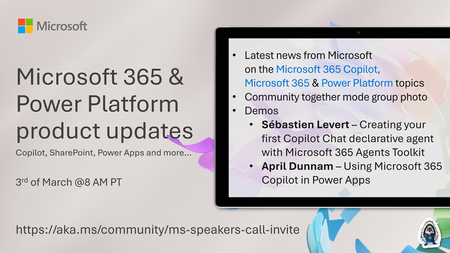
💡Microsoft 365 & Power Platform product updates call concentrates on the different use cases and features within the Microsoft 365 and in Power Platform. Call includes topics like Microsoft 365 Copilot, Copilot Studio, Microsoft Teams, Power Platform, Microsoft Graph, Microsoft Viva, Microsoft Search, Microsoft Lists, SharePoint, Power Automate, Power Apps and more. 👏 Weekly Tuesday call is for all community members to see Microsoft PMs, engineering and Cloud Advocates showcasing the art of possible with Microsoft 365 and Power Platform. 📅 On the 3rd of March we'll have following agenda: News and updates from Microsoft Together mode group photo Sébastien Levert – Creating your first Copilot Chat declarative agent with Microsoft 365 Agents Toolkit April Dunnam – Using Microsoft 365 Copilot in Power Apps 📞 & 📺 Join the Microsoft Teams meeting live at https://aka.ms/community/ms-speakers-call-join 🗓️ Download recurrent invite for this weekly call from https://aka.ms/community/ms-speakers-call-invite 👋 See you in the call! 💡 Building something cool for Microsoft 365 or Power Platform (Copilot, SharePoint, Power Apps, etc)? We are always looking for presenters - Volunteer for a community call demo at https://aka.ms/community/request/demo 📖 Resources: Previous community call recordings and demos from the Microsoft Community Learning YouTube channel at https://aka.ms/community/youtube Microsoft 365 & Power Platform samples from Microsoft and community - https://aka.ms/community/samples Microsoft 365 & Power Platform community details - https://aka.ms/community/home 🧡 Sharing is caring!70Views0likes0Comments🚀 AI Toolkit for VS Code — February 2026 Update
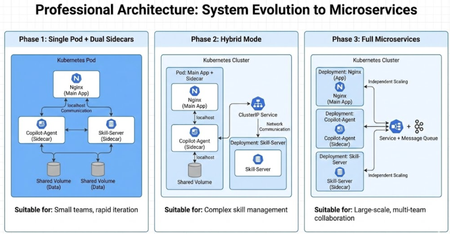
February brings a major milestone for AI Toolkit. Version 0.30.0 is packed with new capabilities that make agent development more discoverable, debuggable, and production-ready—from a brand-new Tool Catalog, to an end-to-end Agent Inspector, to treating evaluations as first-class tests. 🔧 New in v0.30.0 🧰 Tool Catalog: One place to discover and manage agent tools The new Tool Catalog is a centralized hub for discovering, configuring, and integrating tools into your AI agents. Instead of juggling scattered configs and definitions, you now get a unified experience for tool management: Browse, search, and filter tools from the public Foundry catalog and local stdio MCP servers Configure connection settings for each tool directly in VS Code Add tools to agents seamlessly via Agent Builder Manage the full tool lifecycle: add, update, or remove tools with confidence Why it matters: expanding your agent’s capabilities is now a few clicks away—and stays manageable as your agent grows. 🕵️ Agent Inspector: Debug agents like real software The new Agent Inspector turns agent debugging into a first-class experience inside VS Code. Just press F5 and launch your agent with full debugger support. Key highlights: One-click F5 debugging with breakpoints, variable inspection, and step-through execution Copilot auto-configuration that scaffolds agent code, endpoints, and debugging setup Production-ready code generated using the Hosted Agent SDK, ready for Microsoft Foundry Real-time visualization of streaming responses, tool calls, and multi-agent workflows Quick code navigation—double-click workflow nodes to jump straight to source Unified experience combining chat and workflow visualization in one view Why it matters: agents are no longer black boxes—you can see exactly what’s happening, when, and why. 🧪 Evaluation as Tests: Treat quality like code With Evaluation as Tests, agent quality checks now fit naturally into existing developer workflows. What’s new: Define evaluations as test cases using familiar pytest syntax and Eval Runner SDK annotations Run evaluations directly from VS Code Test Explorer, mixing and matching test cases Analyze results in a tabular view with Data Wrangler integration Submit evaluation definitions to run at scale in Microsoft Foundry Why it matters: evaluations are no longer ad-hoc scripts—they’re versioned, repeatable, and CI-friendly. 🔄 Improvements across the Toolkit 🧱 Agent Builder Agent Builder received a major usability refresh: Redesigned layout for better navigation and focus Quick switcher to move between agents effortlessly Support for authoring, running, and saving Foundry prompt agents Add tools to Foundry prompt agents directly from the Tool Catalog or built-in tools New Inspire Me feature to help you get started when drafting agent instructions Numerous performance and stability improvements 🤖 Model Catalog Added support for models using the OpenAI Response API, including gpt-5.2-codex General performance and reliability improvements 🧠 Build Agent with GitHub Copilot New Workflow entry point to quickly generate multi-agent workflows with Copilot Ability to orchestrate workflows by selecting prompt agents from Foundry 🔁 Conversion & Profiling Generate interactive playgrounds for history models Added Qualcomm GPU recipes Show resource usage for Phi Silica directly in Model Playground ✨ Wrapping up Version 0.30.0 is a big step forward for AI Toolkit. With better discoverability, real debugging, structured evaluation, and deeper Foundry integration, building AI agents in VS Code now feels much closer to building production software. As always, we’d love your feedback—keep it coming, and happy agent building! 🚀Building a Dual Sidecar Pod: Combining GitHub Copilot SDK with Skill Server on Kubernetes
Why the Sidecar Pattern? In Kubernetes, a Pod is the smallest deployable unit — a single Pod can contain multiple containers that share the same network namespace and storage volumes. The Sidecar pattern places auxiliary containers alongside the main application container within the same Pod. These Sidecar containers extend or enhance the main container's functionality without modifying it. 💡 Beginner Tip: If you're new to Kubernetes, think of a Pod as a shared office — everyone in the room (containers) has their own desk (process), but they share the same network (IP address), the same file cabinet (storage volumes), and can communicate without leaving the room (localhost communication). The Sidecar pattern is not a new concept. As early as 2015, the official Kubernetes blog described this pattern in a post about Composite Containers. Service mesh projects like Envoy, Istio, and Linkerd extensively use Sidecar containers for traffic management, observability, and security policies. In the AI application space, we are now exploring how to apply this proven pattern to new scenarios. Why does this matter? There are three fundamental reasons: 1. Separation of Concerns Each container in a Pod has a single, well-defined responsibility. The main application container doesn't need to know how AI content is generated or how skills are managed — it only serves the results. This separation allows each component to be independently tested, debugged, and replaced, aligning with the Unix philosophy of "do one thing well." In practice, this means: the frontend team can iterate on Nginx configuration without affecting AI logic; AI engineers can upgrade the Copilot SDK version without touching skill management code; and operations staff can adjust skill configurations without notifying the development team. 2. Shared Localhost Network All containers in a Pod share the same network namespace, with the same 127.0.0.1. This means communication between Sidecars is just a simple localhost HTTP call — no service discovery, no DNS resolution, no cross-node network hops. From a performance perspective, localhost communication traverses the kernel's loopback interface, with latency typically in the microsecond range. In contrast, cross-Pod ClusterIP Service calls require routing through kube-proxy's iptables/IPVS rules, with latency typically in the millisecond range. For AI agent scenarios that require frequent interaction, this difference is meaningful. From a security perspective, localhost communication doesn't traverse any network interface, making it inherently immune to eavesdropping by other Pods in the cluster. Unless a Service is explicitly configured, Sidecar ports are not exposed outside the Pod. 3. Efficient Data Transfer via Shared Volumes Kubernetes emptyDir volumes allow containers within the same Pod to share files on disk. Once a Sidecar writes a file, the main container can immediately read and serve it — no message queues, no additional API calls, no databases. This is ideal for workflows where one container produces artifacts (such as generated blog posts) and another consumes them. ⚠️ Technical Precision Note: "Efficient" here means eliminating the overhead of network serialization/deserialization and message middleware. However, emptyDir fundamentally relies on standard file system I/O (disk read/write or tmpfs) and is not equivalent to OS-level "Zero-Copy" (such as the sendfile() system call or DMA direct memory access). For blog content generation — a file-level data transfer use case — filesystem sharing is already highly efficient and sufficiently simple. In the gh-cli-blog-agent project, we take this pattern to its fullest extent by using two Sidecars within a single Pod: A Note on Kubernetes Native Sidecar Containers It is worth noting that Kubernetes 1.28 (August 2023) introduced native Sidecar container support via KEP-753, which reached GA (General Availability) in Kubernetes 1.33 (April 2025). Native Sidecars are implemented by setting restartPolicy: Always on initContainers, providing capabilities that the traditional approach lacks: Deterministic startup order: init containers start in declaration order; main containers only start after Sidecar containers are ready Non-blocking Pod termination: Sidecars are automatically cleaned up after main containers exit, preventing Jobs/CronJobs from being stuck Probe support: Sidecars can be configured with startup, readiness, and liveness probes to signal their operational state This project currently uses the traditional approach of deploying Sidecars as regular containers, with application-level health check polling (wait_for_skill_server) to handle startup dependencies. This approach is compatible with all Kubernetes versions (1.24+), making it suitable for scenarios requiring broad compatibility. If your cluster version is ≥ 1.29 (or ≥ 1.33 for GA stability), we strongly recommend migrating to native Sidecars for platform-level startup order guarantees and more graceful lifecycle management. Migration example: # Native Sidecar syntax (Kubernetes 1.29+) initContainers: - name: skill-server image: blog-agent-skill restartPolicy: Always # Key: marks this as a Sidecar ports: - containerPort: 8002 startupProbe: # Platform-level startup readiness signal httpGet: path: /health port: 8002 periodSeconds: 2 failureThreshold: 30 - name: copilot-agent image: blog-agent-copilot restartPolicy: Always ports: - containerPort: 8001 containers: - name: blog-app # Main container starts last; Sidecars are ready image: blog-agent-main ports: - containerPort: 80 Architecture Overview The deployment defines three containers and three volumes: Container Image Port Role blog-app blog-agent-main 80 Nginx — serves Web UI and reverse proxies to Sidecars copilot-agent blog-agent-copilot 8001 FastAPI — AI blog generation powered by GitHub Copilot SDK skill-server blog-agent-skill 8002 FastAPI — skill file management and synchronization Volume Type Purpose blog-data emptyDir Copilot agent writes generated blogs; Nginx serves them skills-shared emptyDir Skill server writes skill files; Copilot agent reads them skills-source ConfigMap Kubernetes-managed skill definition files (read-only) 💡 Design Insight: The three-volume design embodies the "least privilege" principle — blog-data is shared only between the Copilot agent (write) and Nginx (read); skills-shared is shared only between the skill server (write) and the Copilot agent (read). skills-source provides read-only skill definition sources via ConfigMap, forming a unidirectional data flow: ConfigMap → skill-server → shared volume → copilot-agent. The Kubernetes deployment YAML clearly describes this structure: volumes: - name: blog-data emptyDir: sizeLimit: 256Mi # Production best practice: always set sizeLimit to prevent disk exhaustion - name: skills-shared emptyDir: sizeLimit: 64Mi # Skill files are typically small - name: skills-source configMap: name: blog-agent-skill ⚠️ Production Recommendation: The original configuration used emptyDir: {} without a sizeLimit. In production, an unrestricted emptyDir can grow indefinitely until it exhausts the node's disk space, triggering a node-level DiskPressure condition and causing other Pods to be evicted. Always setting a reasonable sizeLimit for emptyDir is part of the Kubernetes security baseline. Community tools like Kyverno can enforce this practice at the cluster level. Nginx reverse proxies route requests to Sidecars via localhost: # Reverse proxy to copilot-agent sidecar (localhost:8001 within the same Pod) location /agent/ { proxy_pass http://127.0.0.1:8001/; proxy_set_header Host $host; proxy_set_header X-Request-ID $request_id; # Enables cross-container request tracing proxy_read_timeout 600s; # AI generation may take a while } # Reverse proxy to skill-server sidecar (localhost:8002 within the same Pod) location /skill/ { proxy_pass http://127.0.0.1:8002/; proxy_set_header Host $host; } Since all three containers share the same network namespace, 127.0.0.1:8001 and 127.0.0.1:8002 are directly accessible — no ClusterIP Service is needed for intra-Pod communication. This is a core feature of the Kubernetes Pod networking model: all containers within the same Pod share a single network namespace, including IP address and port space. Advantage 1: GitHub Copilot SDK as a Sidecar Encapsulating the GitHub Copilot SDK as a Sidecar, rather than embedding it in the main application, provides several architectural advantages. Understanding the GitHub Copilot SDK Architecture Before diving deeper, let's understand how the GitHub Copilot SDK works. The SDK entered technical preview in January 2026, exposing the production-grade agent runtime behind GitHub Copilot CLI as a programmable SDK supporting Python, TypeScript, Go, and .NET. The SDK's communication architecture is as follows: The SDK client communicates with a locally running Copilot CLI process via the JSON-RPC protocol. The CLI handles model routing, authentication management, MCP server integration, and other low-level details. This means you don't need to build your own planner, tool loop, and runtime — these are all provided by an engine that has been battle-tested in production at GitHub's scale. The benefit of encapsulating this SDK in a Sidecar container is: containerization isolates the CLI process's dependencies and runtime environment, preventing dependency conflicts with the main application or other components. Cross-Platform Node.js Installation in the Container A notable implementation detail is how Node.js (required by the Copilot CLI) is installed inside the container. Rather than relying on third-party APT repositories like NodeSource — which can introduce DNS resolution failures and GPG key management issues in restricted network environments — the Dockerfile downloads the official Node.js binary directly from nodejs.org with automatic architecture detection: # Install Node.js 20+ (official binary, no NodeSource APT repo needed) ARG NODE_VERSION=20.20.0 RUN DPKG_ARCH=$(dpkg --print-architecture) \ && case "${DPKG_ARCH}" in amd64) ARCH=x64;; arm64) ARCH=arm64;; armhf) ARCH=armv7l;; *) ARCH=${DPKG_ARCH};; esac \ && curl -fsSL "https://nodejs.org/dist/v${NODE_VERSION}/node-v${NODE_VERSION}-linux-${ARCH}.tar.xz" -o node.tar.xz \ && tar -xJf node.tar.xz -C /usr/local --strip-components=1 --no-same-owner \ && rm -f node.tar.xz The case statement maps Debian's architecture identifiers (amd64, arm64, armhf) to Node.js's naming convention (x64, arm64, armv7l). This ensures the same Dockerfile works seamlessly on both linux/amd64 (Intel/AMD) and linux/arm64 (Apple Silicon, AWS Graviton) build platforms — an important consideration given the growing adoption of ARM-based infrastructure. Independent Lifecycle and Resource Management The Copilot agent is the most resource-intensive component — it needs to run the Copilot CLI process, manage JSON-RPC communication, and handle streaming responses. By isolating it in its own container, we can assign dedicated CPU and memory limits without affecting the lightweight Nginx container: # copilot-agent: needs more resources for AI inference coordination resources: requests: cpu: 250m memory: 512Mi limits: cpu: "1" memory: 2Gi # blog-app: lightweight Nginx with minimal resource needs resources: requests: cpu: 50m memory: 64Mi limits: cpu: 200m memory: 128Mi This resource isolation delivers two key benefits: Fault isolation: If the Copilot agent crashes due to a timeout or memory spike (OOMKilled), Kubernetes only restarts that container — the Nginx frontend continues running and serving previously generated content. Users see "generation feature temporarily unavailable" rather than "entire site is down." Fine-grained resource scheduling: The Kubernetes scheduler selects nodes based on the sum of Pod-level resource requests. Distributing resource requests across containers allows kubelet to more precisely track each component's actual resource consumption, helping HPA (Horizontal Pod Autoscaler) make better scaling decisions. Graceful Startup Coordination In a multi-Sidecar Pod, regular containers start concurrently (note: this is precisely one of the issues that native Sidecars, discussed earlier, can solve). The Copilot agent handles this through application-level startup dependency checks — it waits for the skill server to become healthy before initializing the CopilotClient: async def wait_for_skill_server(url: str, retries: int = 30, delay: float = 2.0): """Wait for the skill-server sidecar to become healthy. In traditional Sidecar deployments (regular containers), containers start concurrently with no guaranteed startup order. This function implements application-level readiness waiting. If using Kubernetes native Sidecars (initContainers + restartPolicy: Always), the platform guarantees Sidecars start before main containers, which can simplify this logic. """ async with httpx.AsyncClient() as client: for i in range(retries): try: resp = await client.get(f"{url}/health", timeout=5.0) if resp.status_code == 200: logger.info(f"Skill server is healthy at {url}") return True except Exception: pass logger.info(f"Waiting for skill server... ({i + 1}/{retries})") await asyncio.sleep(delay) raise RuntimeError(f"Skill server at {url} did not become healthy") This pattern is critical in traditional Sidecar architectures: you cannot assume startup order, so explicit readiness checks are necessary. The wait_for_skill_server function polls http://127.0.0.1:8002/health at 2-second intervals up to 30 times (maximum total wait of 60 seconds) — simple, effective, and resilient. 💡 Comparison: With native Sidecars, the skill-server would be declared as an initContainer with a startupProbe. Kubernetes would ensure the skill-server is ready before starting the copilot-agent. In that case, wait_for_skill_server could be simplified to a single health check confirmation rather than a retry loop. SDK Configuration via Environment Variables All Copilot SDK configuration is passed through Kubernetes-native primitives, reflecting the 12-Factor App principle of externalized configuration: env: - name: SKILL_SERVER_URL value: "http://127.0.0.1:8002" - name: SKILLS_DIR value: "/skills-shared/blog/SKILL.md" - name: COPILOT_GITHUB_TOKEN valueFrom: secretKeyRef: name: blog-agent-secret key: copilot-github-token Key design decisions explained: COPILOT_GITHUB_TOKEN is stored in a Kubernetes Secret — never baked into images or passed as build arguments. Using the GitHub Copilot SDK requires a valid GitHub Copilot subscription (unless using BYOK mode, i.e., Bring Your Own Key), making secure management of this token critical. SKILLS_DIR points to skill files synchronized to a shared volume by the other Sidecar. This means the Copilot agent container image is completely stateless and can be reused across different skill configurations. SKILL_SERVER_URL uses 127.0.0.1 instead of a service name — since this is intra-Pod communication, DNS resolution is unnecessary. 🔐 Production Security Tip: For stricter security requirements, consider using External Secrets Operator to sync Secrets from AWS Secrets Manager, Azure Key Vault, or HashiCorp Vault, rather than managing them directly in Kubernetes. Native Kubernetes Secrets are only Base64-encoded by default, not encrypted at rest (unless Encryption at Rest is enabled). CopilotClient Sessions and Skill Integration The core of the Copilot Sidecar lies in how it creates sessions with skill directories. When a blog generation request is received, it creates a session with access to skill definitions: session = await copilot_client.create_session({ "model": "claude-sonnet-4-5-20250929", "streaming": True, "skill_directories": [SKILLS_DIR] }) The skill_directories parameter points to files on the shared volume — files placed there by the skill-server sidecar. This is the handoff point: the skill server manages which skills are available, and the Copilot agent consumes them. Neither container needs to know about the other's internal implementation — they are coupled only through the filesystem as an implicit contract. 💡 About Copilot SDK Skills: The GitHub Copilot SDK allows you to define custom Agents, Skills, and Tools. Skills are essentially instruction sets written in Markdown format (typically named SKILL.md) that define the agent's behavior, constraints, and workflows in a specific domain. This is consistent with the .copilot_skills/ directory mechanism in GitHub Copilot CLI. File-Based Output to Shared Volumes Generated blog posts are written to the blog-data shared volume, which is simultaneously mounted in the Nginx container: BLOG_DIR = os.path.join(WORK_DIR, "blog") # ... # Blog saved as blog-YYYY-MM-DD.md # Nginx can serve it immediately from /blog/ without any restart The Nginx configuration auto-indexes this directory: location /blog/ { alias /usr/share/nginx/html/blog/; autoindex on; } The moment the Copilot agent writes a file, it's immediately accessible through the Nginx Web UI. No API calls, no database writes, no cache invalidation — just a shared filesystem. This file-based data transfer has an additional benefit: natural persistence and auditability. Each blog exists as an independent Markdown file with a date-timestamp in its name, making it easy to trace generation history. (Note, however, that emptyDir lifecycle is tied to the Pod — data is lost when the Pod is recreated. For persistence needs, see the "Production Recommendations" section below.) Advantage 2: Skill Server as a Sidecar The skill server is the second Sidecar — a lightweight FastAPI service responsible for managing the skill definitions used by the Copilot agent. Separating skill management into its own container offers clear advantages. Decoupled Skill Lifecycle Skill definitions are stored in a Kubernetes ConfigMap: apiVersion: v1 kind: ConfigMap metadata: name: blog-agent-skill data: SKILL.md: | # Blog Generator Skill Instructions You are a professional technical evangelist... ## Key Requirements 1. Outline generation 2. Mandatory online research (DeepSearch) 3. Technical evangelist perspective ... ConfigMaps can be updated independently of any container image. When you run kubectl apply to update a ConfigMap, Kubernetes synchronizes the change to the volumes mounted in the Pod. ⚠️ Important Detail: ConfigMap volume updates do not take effect immediately. The kubelet detects ConfigMap changes through periodic synchronization, with a default sync period controlled by --sync-frequency (default: 1 minute), plus the ConfigMap cache TTL. The actual propagation delay can be 1–2 minutes. If immediate effect is needed, you must actively call the /sync endpoint to trigger a file synchronization: def sync_skills(): """Copy skill files from ConfigMap source to the shared volume.""" source = Path(SKILLS_SOURCE_DIR) dest = Path(SKILLS_SHARED_DIR) / "blog" dest.mkdir(parents=True, exist_ok=True) synced = 0 for skill_file in source.iterdir(): if skill_file.is_file(): target = dest / skill_file.name shutil.copy2(str(skill_file), str(target)) synced += 1 return synced This design means: updating AI behavior requires no container image rebuilds or redeployments. You simply update the ConfigMap, trigger a sync, and the agent's behavior changes. This is a tremendous operational advantage for iterating on prompts and skills in production. 💡 Advanced Thought: Why not mount the ConfigMap directly to the copilot-agent's SKILLS_DIR path? While technically feasible, introducing the skill-server as an intermediary provides the triple value of validation, API access, and extensibility (see "Why Not Embed Skills in the Copilot Agent" below). Minimal Resource Footprint The skill server does one thing — serve and sync files. Its resource requirements reflect this: resources: requests: cpu: 50m memory: 64Mi limits: cpu: 200m memory: 256Mi Compared to the Copilot agent's 2Gi memory limit, the skill server costs a fraction of the resources. This is the beauty of the Sidecar pattern — you can add lightweight containers for auxiliary functionality without significantly increasing the Pod's total resource consumption. REST API for Skill Introspection The skill server provides a simple REST API that allows external systems or operators to query available skills: .get("/skills") async def list_skills(): """List all available skills.""" source = Path(SKILLS_SOURCE_DIR) skills = [] for f in sorted(source.iterdir()): if f.is_file(): skills.append({ "name": f.stem, "filename": f.name, "size": f.stat().st_size, "url": f"/skill/{f.name}", }) return {"skills": skills, "total": len(skills)} @app.get("/skill/{filename}") async def get_skill(filename: str): """Get skill content by filename.""" file_path = Path(SKILLS_SOURCE_DIR) / filename if not file_path.exists() or not file_path.is_file(): raise HTTPException(status_code=404, detail=f"Skill '{filename}' not found") return {"filename": filename, "content": file_path.read_text(encoding="utf-8")} This API serves multiple purposes: Debugging: Verify which skills are currently loaded without needing to kubectl exec into the container, significantly lowering the troubleshooting barrier. Monitoring: External tools can poll /skills to ensure the expected skill set is deployed. Combined with Prometheus Blackbox Exporter, you can implement configuration drift detection. Extensibility: Future systems can dynamically register or update skills via the API, providing a foundation for A/B testing different prompt strategies. Why Not Embed Skills in the Copilot Agent? Mounting the ConfigMap directly into the Copilot agent container seems simpler. But separating it into a dedicated Sidecar has the following advantages: Validation layer: The skill server can validate skill file format and content before synchronization, preventing invalid skill definitions from causing Copilot SDK runtime errors. API access: Skills become queryable and manageable through a REST interface, supporting operational automation. Independent evolution of logic: If skill management becomes more complex (e.g., dynamic skill registration, version management, prompt A/B testing, role-based skill distribution), the skill server can evolve independently without affecting the Copilot agent. Clear data flow: ConfigMap → skill-server → shared volume → copilot-agent. Each arrow is an explicit, observable step. When something goes wrong, you can pinpoint exactly which stage failed. 💡 Architectural Trade-off: For small-scale deployments or PoC (Proof of Concept) work, directly mounting the ConfigMap to the Copilot agent is a perfectly reasonable choice — fewer components means lower operational overhead. The Sidecar approach's value becomes fully apparent in medium-to-large-scale production environments. Architectural decisions should always align with team size, operational maturity, and business requirements. End-to-End Workflow Here is the complete data flow when a user requests a blog post generation: Every step uses intra-Pod communication — localhost HTTP calls or shared filesystem reads. No external network calls are needed between components. The only external dependency is the Copilot SDK's connection to GitHub authentication services and AI model endpoints via the Copilot CLI. The Kubernetes Service exposes three ports for external access: ports: - name: http # Nginx UI + reverse proxy port: 80 nodePort: 30081 - name: agent-api # Direct access to Copilot Agent port: 8001 nodePort: 30082 - name: skill-api # Direct access to Skill Server port: 8002 nodePort: 30083 ⚠️ Security Warning: In production, it is not recommended to directly expose the agent-api and skill-api ports via NodePort. These two APIs should only be accessible through the Nginx reverse proxy (/agent/ and /skill/ paths), with authentication and rate limiting configured at the Nginx layer. Directly exposing Sidecar ports bypasses the reverse proxy's security controls. Recommended configuration: # Production recommended: only expose the Nginx port ports: - name: http port: 80 targetPort: 80 # Combine with NetworkPolicy to restrict inter-Pod communication Production Recommendations and Architecture Extensions When moving this architecture from a development/demo environment to production, the following areas deserve attention: Cross-Platform Build and Deployment The project's Makefile auto-detects the host architecture to select the appropriate Docker build platform, eliminating the need for manual configuration: ARCH := $(shell uname -m) ifeq ($(ARCH),x86_64) DOCKER_PLATFORM ?= linux/amd64 else ifeq ($(ARCH),aarch64) DOCKER_PLATFORM ?= linux/arm64 else ifeq ($(ARCH),arm64) DOCKER_PLATFORM ?= linux/arm64 else DOCKER_PLATFORM ?= linux/amd64 endif Both macOS and Linux are supported as development environments with dedicated tool installation targets: # macOS (via Homebrew) make install-tools-macos # Linux (downloads official binaries to /usr/local/bin) make install-tools-linux The Linux installation target downloads kubectl and kind binaries directly from upstream release URLs with architecture-aware selection, avoiding dependency on any package manager beyond curl and sudo. This makes the setup portable across different Linux distributions (Ubuntu, Debian, Fedora, etc.). Health Checks and Probe Configuration Configure complete probes for each container to ensure Kubernetes can properly manage container lifecycles: # copilot-agent probe example livenessProbe: httpGet: path: /health port: 8001 initialDelaySeconds: 10 periodSeconds: 30 timeoutSeconds: 5 readinessProbe: httpGet: path: /health port: 8001 periodSeconds: 10 startupProbe: # AI agent startup may be slow httpGet: path: /health port: 8001 periodSeconds: 5 failureThreshold: 30 # Allow up to 150 seconds for startup Data Persistence The emptyDir lifecycle is tied to the Pod. If generated blogs need to survive Pod recreation, consider these approaches: PersistentVolumeClaim (PVC): Replace the blog-data volume with a PVC; data persists independently of Pod lifecycle Object storage upload: After the Copilot agent generates a blog, asynchronously upload to S3/Azure Blob/GCS Git repository push: Automatically commit and push generated Markdown files to a Git repository for versioned management Security Hardening # Set security context for each container securityContext: runAsNonRoot: true runAsUser: 1000 readOnlyRootFilesystem: true # Only write through emptyDir allowPrivilegeEscalation: false capabilities: drop: ["ALL"] Observability Extensions The Sidecar pattern is naturally suited for adding observability components. You can add a third (or fourth) Sidecar to the same Pod for log collection, metrics export, or distributed tracing: Horizontal Scaling Strategy Since containers within a Pod scale together, HPA scaling granularity is at the Pod level. This means: If the Copilot agent is the bottleneck, scaling Pod replicas also scales Nginx and skill-server (minimal waste since they are lightweight) If skill management becomes compute-intensive in the future, consider splitting the skill-server from a Sidecar into an independent Deployment + ClusterIP Service for independent scaling Evolution Path from Sidecar to Microservices The dual Sidecar architecture provides a clear path for future migration to microservices: Each migration step only requires changing the communication method (localhost → Service DNS); business logic remains unchanged. This is the architectural flexibility that good separation of concerns provides. sample code - https://github.com/kinfey/Multi-AI-Agents-Cloud-Native/tree/main/code/GitHubCopilotSideCar Summary The dual Sidecar pattern in this project demonstrates a clean cloud-native AI application architecture: Main container (Nginx) stays lean and focused — it only serves HTML and proxies requests. It knows nothing about AI or skills. Sidecar 1 (Copilot Agent) encapsulates all AI logic. It uses the GitHub Copilot SDK, manages sessions, and generates content. Its only coupling to the rest of the Pod is through environment variables and shared volumes. The container image is built with cross-platform support — Node.js is installed from official binaries with automatic architecture detection, ensuring the same Dockerfile works on both amd64 and arm64 platforms. Sidecar 2 (Skill Server) provides a dedicated management layer for AI skill definitions. It bridges Kubernetes-native configuration (ConfigMap) with the Copilot SDK's runtime needs. This separation gives you independent deployability, isolated failure domains, and — most importantly — the ability to change AI behavior (skills, prompts, models) without rebuilding any container images. The Sidecar pattern is more than an architectural curiosity; it is a practical approach to composing AI services in Kubernetes, allowing each component to evolve at its own pace. With cross-platform build support (macOS and Linux, amd64 and arm64), Kubernetes native Sidecars reaching GA in 1.33, and AI development tools like the GitHub Copilot SDK maturing, we anticipate this "AI agent + Sidecar" combination pattern will see validation and adoption in more production environments. References GitHub Copilot SDK Repository — Official SDK supporting Python/TypeScript/Go/.NET KEP-753: Sidecar Containers — Kubernetes native Sidecar container proposal Kubernetes v1.33 Release: Sidecar Containers GA — Sidecar container GA announcement The Distributed System Toolkit: Patterns for Composite Containers — Classic early Kubernetes article on the Sidecar pattern 12-Factor App: Config — Externalized configuration principlesThe JavaScript AI Build-a-thon Season 2 starts March 2!
The JavaScript AI Build-a-thon is a free, hands-on program designed to close that gap. Over the course of four weeks (March 2 - March 31, 2026), you'll move from running AI 100% on-device (Local AI), to designing multi-service, multi-agentic systems, all in JavaScript/ TypeScript and using tools you are already familiar with. The series will culminate in a hackathon, where you will create, compete and turn what you'll have learnt into working projects you can point to, talk about and extend.