agents
152 TopicsBuilding a Dual Sidecar Pod: Combining GitHub Copilot SDK with Skill Server on Kubernetes
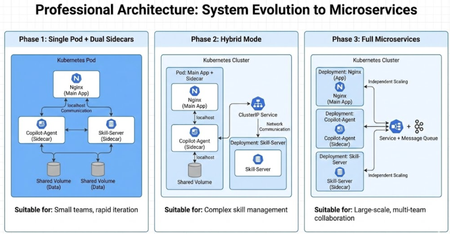
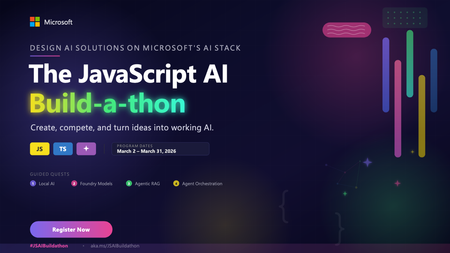
Why the Sidecar Pattern? In Kubernetes, a Pod is the smallest deployable unit — a single Pod can contain multiple containers that share the same network namespace and storage volumes. The Sidecar pattern places auxiliary containers alongside the main application container within the same Pod. These Sidecar containers extend or enhance the main container's functionality without modifying it. 💡 Beginner Tip: If you're new to Kubernetes, think of a Pod as a shared office — everyone in the room (containers) has their own desk (process), but they share the same network (IP address), the same file cabinet (storage volumes), and can communicate without leaving the room (localhost communication). The Sidecar pattern is not a new concept. As early as 2015, the official Kubernetes blog described this pattern in a post about Composite Containers. Service mesh projects like Envoy, Istio, and Linkerd extensively use Sidecar containers for traffic management, observability, and security policies. In the AI application space, we are now exploring how to apply this proven pattern to new scenarios. Why does this matter? There are three fundamental reasons: 1. Separation of Concerns Each container in a Pod has a single, well-defined responsibility. The main application container doesn't need to know how AI content is generated or how skills are managed — it only serves the results. This separation allows each component to be independently tested, debugged, and replaced, aligning with the Unix philosophy of "do one thing well." In practice, this means: the frontend team can iterate on Nginx configuration without affecting AI logic; AI engineers can upgrade the Copilot SDK version without touching skill management code; and operations staff can adjust skill configurations without notifying the development team. 2. Shared Localhost Network All containers in a Pod share the same network namespace, with the same 127.0.0.1. This means communication between Sidecars is just a simple localhost HTTP call — no service discovery, no DNS resolution, no cross-node network hops. From a performance perspective, localhost communication traverses the kernel's loopback interface, with latency typically in the microsecond range. In contrast, cross-Pod ClusterIP Service calls require routing through kube-proxy's iptables/IPVS rules, with latency typically in the millisecond range. For AI agent scenarios that require frequent interaction, this difference is meaningful. From a security perspective, localhost communication doesn't traverse any network interface, making it inherently immune to eavesdropping by other Pods in the cluster. Unless a Service is explicitly configured, Sidecar ports are not exposed outside the Pod. 3. Efficient Data Transfer via Shared Volumes Kubernetes emptyDir volumes allow containers within the same Pod to share files on disk. Once a Sidecar writes a file, the main container can immediately read and serve it — no message queues, no additional API calls, no databases. This is ideal for workflows where one container produces artifacts (such as generated blog posts) and another consumes them. ⚠️ Technical Precision Note: "Efficient" here means eliminating the overhead of network serialization/deserialization and message middleware. However, emptyDir fundamentally relies on standard file system I/O (disk read/write or tmpfs) and is not equivalent to OS-level "Zero-Copy" (such as the sendfile() system call or DMA direct memory access). For blog content generation — a file-level data transfer use case — filesystem sharing is already highly efficient and sufficiently simple. In the gh-cli-blog-agent project, we take this pattern to its fullest extent by using two Sidecars within a single Pod: A Note on Kubernetes Native Sidecar Containers It is worth noting that Kubernetes 1.28 (August 2023) introduced native Sidecar container support via KEP-753, which reached GA (General Availability) in Kubernetes 1.33 (April 2025). Native Sidecars are implemented by setting restartPolicy: Always on initContainers, providing capabilities that the traditional approach lacks: Deterministic startup order: init containers start in declaration order; main containers only start after Sidecar containers are ready Non-blocking Pod termination: Sidecars are automatically cleaned up after main containers exit, preventing Jobs/CronJobs from being stuck Probe support: Sidecars can be configured with startup, readiness, and liveness probes to signal their operational state This project currently uses the traditional approach of deploying Sidecars as regular containers, with application-level health check polling (wait_for_skill_server) to handle startup dependencies. This approach is compatible with all Kubernetes versions (1.24+), making it suitable for scenarios requiring broad compatibility. If your cluster version is ≥ 1.29 (or ≥ 1.33 for GA stability), we strongly recommend migrating to native Sidecars for platform-level startup order guarantees and more graceful lifecycle management. Migration example: # Native Sidecar syntax (Kubernetes 1.29+) initContainers: - name: skill-server image: blog-agent-skill restartPolicy: Always # Key: marks this as a Sidecar ports: - containerPort: 8002 startupProbe: # Platform-level startup readiness signal httpGet: path: /health port: 8002 periodSeconds: 2 failureThreshold: 30 - name: copilot-agent image: blog-agent-copilot restartPolicy: Always ports: - containerPort: 8001 containers: - name: blog-app # Main container starts last; Sidecars are ready image: blog-agent-main ports: - containerPort: 80 Architecture Overview The deployment defines three containers and three volumes: Container Image Port Role blog-app blog-agent-main 80 Nginx — serves Web UI and reverse proxies to Sidecars copilot-agent blog-agent-copilot 8001 FastAPI — AI blog generation powered by GitHub Copilot SDK skill-server blog-agent-skill 8002 FastAPI — skill file management and synchronization Volume Type Purpose blog-data emptyDir Copilot agent writes generated blogs; Nginx serves them skills-shared emptyDir Skill server writes skill files; Copilot agent reads them skills-source ConfigMap Kubernetes-managed skill definition files (read-only) 💡 Design Insight: The three-volume design embodies the "least privilege" principle — blog-data is shared only between the Copilot agent (write) and Nginx (read); skills-shared is shared only between the skill server (write) and the Copilot agent (read). skills-source provides read-only skill definition sources via ConfigMap, forming a unidirectional data flow: ConfigMap → skill-server → shared volume → copilot-agent. The Kubernetes deployment YAML clearly describes this structure: volumes: - name: blog-data emptyDir: sizeLimit: 256Mi # Production best practice: always set sizeLimit to prevent disk exhaustion - name: skills-shared emptyDir: sizeLimit: 64Mi # Skill files are typically small - name: skills-source configMap: name: blog-agent-skill ⚠️ Production Recommendation: The original configuration used emptyDir: {} without a sizeLimit. In production, an unrestricted emptyDir can grow indefinitely until it exhausts the node's disk space, triggering a node-level DiskPressure condition and causing other Pods to be evicted. Always setting a reasonable sizeLimit for emptyDir is part of the Kubernetes security baseline. Community tools like Kyverno can enforce this practice at the cluster level. Nginx reverse proxies route requests to Sidecars via localhost: # Reverse proxy to copilot-agent sidecar (localhost:8001 within the same Pod) location /agent/ { proxy_pass http://127.0.0.1:8001/; proxy_set_header Host $host; proxy_set_header X-Request-ID $request_id; # Enables cross-container request tracing proxy_read_timeout 600s; # AI generation may take a while } # Reverse proxy to skill-server sidecar (localhost:8002 within the same Pod) location /skill/ { proxy_pass http://127.0.0.1:8002/; proxy_set_header Host $host; } Since all three containers share the same network namespace, 127.0.0.1:8001 and 127.0.0.1:8002 are directly accessible — no ClusterIP Service is needed for intra-Pod communication. This is a core feature of the Kubernetes Pod networking model: all containers within the same Pod share a single network namespace, including IP address and port space. Advantage 1: GitHub Copilot SDK as a Sidecar Encapsulating the GitHub Copilot SDK as a Sidecar, rather than embedding it in the main application, provides several architectural advantages. Understanding the GitHub Copilot SDK Architecture Before diving deeper, let's understand how the GitHub Copilot SDK works. The SDK entered technical preview in January 2026, exposing the production-grade agent runtime behind GitHub Copilot CLI as a programmable SDK supporting Python, TypeScript, Go, and .NET. The SDK's communication architecture is as follows: The SDK client communicates with a locally running Copilot CLI process via the JSON-RPC protocol. The CLI handles model routing, authentication management, MCP server integration, and other low-level details. This means you don't need to build your own planner, tool loop, and runtime — these are all provided by an engine that has been battle-tested in production at GitHub's scale. The benefit of encapsulating this SDK in a Sidecar container is: containerization isolates the CLI process's dependencies and runtime environment, preventing dependency conflicts with the main application or other components. Cross-Platform Node.js Installation in the Container A notable implementation detail is how Node.js (required by the Copilot CLI) is installed inside the container. Rather than relying on third-party APT repositories like NodeSource — which can introduce DNS resolution failures and GPG key management issues in restricted network environments — the Dockerfile downloads the official Node.js binary directly from nodejs.org with automatic architecture detection: # Install Node.js 20+ (official binary, no NodeSource APT repo needed) ARG NODE_VERSION=20.20.0 RUN DPKG_ARCH=$(dpkg --print-architecture) \ && case "${DPKG_ARCH}" in amd64) ARCH=x64;; arm64) ARCH=arm64;; armhf) ARCH=armv7l;; *) ARCH=${DPKG_ARCH};; esac \ && curl -fsSL "https://nodejs.org/dist/v${NODE_VERSION}/node-v${NODE_VERSION}-linux-${ARCH}.tar.xz" -o node.tar.xz \ && tar -xJf node.tar.xz -C /usr/local --strip-components=1 --no-same-owner \ && rm -f node.tar.xz The case statement maps Debian's architecture identifiers (amd64, arm64, armhf) to Node.js's naming convention (x64, arm64, armv7l). This ensures the same Dockerfile works seamlessly on both linux/amd64 (Intel/AMD) and linux/arm64 (Apple Silicon, AWS Graviton) build platforms — an important consideration given the growing adoption of ARM-based infrastructure. Independent Lifecycle and Resource Management The Copilot agent is the most resource-intensive component — it needs to run the Copilot CLI process, manage JSON-RPC communication, and handle streaming responses. By isolating it in its own container, we can assign dedicated CPU and memory limits without affecting the lightweight Nginx container: # copilot-agent: needs more resources for AI inference coordination resources: requests: cpu: 250m memory: 512Mi limits: cpu: "1" memory: 2Gi # blog-app: lightweight Nginx with minimal resource needs resources: requests: cpu: 50m memory: 64Mi limits: cpu: 200m memory: 128Mi This resource isolation delivers two key benefits: Fault isolation: If the Copilot agent crashes due to a timeout or memory spike (OOMKilled), Kubernetes only restarts that container — the Nginx frontend continues running and serving previously generated content. Users see "generation feature temporarily unavailable" rather than "entire site is down." Fine-grained resource scheduling: The Kubernetes scheduler selects nodes based on the sum of Pod-level resource requests. Distributing resource requests across containers allows kubelet to more precisely track each component's actual resource consumption, helping HPA (Horizontal Pod Autoscaler) make better scaling decisions. Graceful Startup Coordination In a multi-Sidecar Pod, regular containers start concurrently (note: this is precisely one of the issues that native Sidecars, discussed earlier, can solve). The Copilot agent handles this through application-level startup dependency checks — it waits for the skill server to become healthy before initializing the CopilotClient: async def wait_for_skill_server(url: str, retries: int = 30, delay: float = 2.0): """Wait for the skill-server sidecar to become healthy. In traditional Sidecar deployments (regular containers), containers start concurrently with no guaranteed startup order. This function implements application-level readiness waiting. If using Kubernetes native Sidecars (initContainers + restartPolicy: Always), the platform guarantees Sidecars start before main containers, which can simplify this logic. """ async with httpx.AsyncClient() as client: for i in range(retries): try: resp = await client.get(f"{url}/health", timeout=5.0) if resp.status_code == 200: logger.info(f"Skill server is healthy at {url}") return True except Exception: pass logger.info(f"Waiting for skill server... ({i + 1}/{retries})") await asyncio.sleep(delay) raise RuntimeError(f"Skill server at {url} did not become healthy") This pattern is critical in traditional Sidecar architectures: you cannot assume startup order, so explicit readiness checks are necessary. The wait_for_skill_server function polls http://127.0.0.1:8002/health at 2-second intervals up to 30 times (maximum total wait of 60 seconds) — simple, effective, and resilient. 💡 Comparison: With native Sidecars, the skill-server would be declared as an initContainer with a startupProbe. Kubernetes would ensure the skill-server is ready before starting the copilot-agent. In that case, wait_for_skill_server could be simplified to a single health check confirmation rather than a retry loop. SDK Configuration via Environment Variables All Copilot SDK configuration is passed through Kubernetes-native primitives, reflecting the 12-Factor App principle of externalized configuration: env: - name: SKILL_SERVER_URL value: "http://127.0.0.1:8002" - name: SKILLS_DIR value: "/skills-shared/blog/SKILL.md" - name: COPILOT_GITHUB_TOKEN valueFrom: secretKeyRef: name: blog-agent-secret key: copilot-github-token Key design decisions explained: COPILOT_GITHUB_TOKEN is stored in a Kubernetes Secret — never baked into images or passed as build arguments. Using the GitHub Copilot SDK requires a valid GitHub Copilot subscription (unless using BYOK mode, i.e., Bring Your Own Key), making secure management of this token critical. SKILLS_DIR points to skill files synchronized to a shared volume by the other Sidecar. This means the Copilot agent container image is completely stateless and can be reused across different skill configurations. SKILL_SERVER_URL uses 127.0.0.1 instead of a service name — since this is intra-Pod communication, DNS resolution is unnecessary. 🔐 Production Security Tip: For stricter security requirements, consider using External Secrets Operator to sync Secrets from AWS Secrets Manager, Azure Key Vault, or HashiCorp Vault, rather than managing them directly in Kubernetes. Native Kubernetes Secrets are only Base64-encoded by default, not encrypted at rest (unless Encryption at Rest is enabled). CopilotClient Sessions and Skill Integration The core of the Copilot Sidecar lies in how it creates sessions with skill directories. When a blog generation request is received, it creates a session with access to skill definitions: session = await copilot_client.create_session({ "model": "claude-sonnet-4-5-20250929", "streaming": True, "skill_directories": [SKILLS_DIR] }) The skill_directories parameter points to files on the shared volume — files placed there by the skill-server sidecar. This is the handoff point: the skill server manages which skills are available, and the Copilot agent consumes them. Neither container needs to know about the other's internal implementation — they are coupled only through the filesystem as an implicit contract. 💡 About Copilot SDK Skills: The GitHub Copilot SDK allows you to define custom Agents, Skills, and Tools. Skills are essentially instruction sets written in Markdown format (typically named SKILL.md) that define the agent's behavior, constraints, and workflows in a specific domain. This is consistent with the .copilot_skills/ directory mechanism in GitHub Copilot CLI. File-Based Output to Shared Volumes Generated blog posts are written to the blog-data shared volume, which is simultaneously mounted in the Nginx container: BLOG_DIR = os.path.join(WORK_DIR, "blog") # ... # Blog saved as blog-YYYY-MM-DD.md # Nginx can serve it immediately from /blog/ without any restart The Nginx configuration auto-indexes this directory: location /blog/ { alias /usr/share/nginx/html/blog/; autoindex on; } The moment the Copilot agent writes a file, it's immediately accessible through the Nginx Web UI. No API calls, no database writes, no cache invalidation — just a shared filesystem. This file-based data transfer has an additional benefit: natural persistence and auditability. Each blog exists as an independent Markdown file with a date-timestamp in its name, making it easy to trace generation history. (Note, however, that emptyDir lifecycle is tied to the Pod — data is lost when the Pod is recreated. For persistence needs, see the "Production Recommendations" section below.) Advantage 2: Skill Server as a Sidecar The skill server is the second Sidecar — a lightweight FastAPI service responsible for managing the skill definitions used by the Copilot agent. Separating skill management into its own container offers clear advantages. Decoupled Skill Lifecycle Skill definitions are stored in a Kubernetes ConfigMap: apiVersion: v1 kind: ConfigMap metadata: name: blog-agent-skill data: SKILL.md: | # Blog Generator Skill Instructions You are a professional technical evangelist... ## Key Requirements 1. Outline generation 2. Mandatory online research (DeepSearch) 3. Technical evangelist perspective ... ConfigMaps can be updated independently of any container image. When you run kubectl apply to update a ConfigMap, Kubernetes synchronizes the change to the volumes mounted in the Pod. ⚠️ Important Detail: ConfigMap volume updates do not take effect immediately. The kubelet detects ConfigMap changes through periodic synchronization, with a default sync period controlled by --sync-frequency (default: 1 minute), plus the ConfigMap cache TTL. The actual propagation delay can be 1–2 minutes. If immediate effect is needed, you must actively call the /sync endpoint to trigger a file synchronization: def sync_skills(): """Copy skill files from ConfigMap source to the shared volume.""" source = Path(SKILLS_SOURCE_DIR) dest = Path(SKILLS_SHARED_DIR) / "blog" dest.mkdir(parents=True, exist_ok=True) synced = 0 for skill_file in source.iterdir(): if skill_file.is_file(): target = dest / skill_file.name shutil.copy2(str(skill_file), str(target)) synced += 1 return synced This design means: updating AI behavior requires no container image rebuilds or redeployments. You simply update the ConfigMap, trigger a sync, and the agent's behavior changes. This is a tremendous operational advantage for iterating on prompts and skills in production. 💡 Advanced Thought: Why not mount the ConfigMap directly to the copilot-agent's SKILLS_DIR path? While technically feasible, introducing the skill-server as an intermediary provides the triple value of validation, API access, and extensibility (see "Why Not Embed Skills in the Copilot Agent" below). Minimal Resource Footprint The skill server does one thing — serve and sync files. Its resource requirements reflect this: resources: requests: cpu: 50m memory: 64Mi limits: cpu: 200m memory: 256Mi Compared to the Copilot agent's 2Gi memory limit, the skill server costs a fraction of the resources. This is the beauty of the Sidecar pattern — you can add lightweight containers for auxiliary functionality without significantly increasing the Pod's total resource consumption. REST API for Skill Introspection The skill server provides a simple REST API that allows external systems or operators to query available skills: .get("/skills") async def list_skills(): """List all available skills.""" source = Path(SKILLS_SOURCE_DIR) skills = [] for f in sorted(source.iterdir()): if f.is_file(): skills.append({ "name": f.stem, "filename": f.name, "size": f.stat().st_size, "url": f"/skill/{f.name}", }) return {"skills": skills, "total": len(skills)} @app.get("/skill/{filename}") async def get_skill(filename: str): """Get skill content by filename.""" file_path = Path(SKILLS_SOURCE_DIR) / filename if not file_path.exists() or not file_path.is_file(): raise HTTPException(status_code=404, detail=f"Skill '{filename}' not found") return {"filename": filename, "content": file_path.read_text(encoding="utf-8")} This API serves multiple purposes: Debugging: Verify which skills are currently loaded without needing to kubectl exec into the container, significantly lowering the troubleshooting barrier. Monitoring: External tools can poll /skills to ensure the expected skill set is deployed. Combined with Prometheus Blackbox Exporter, you can implement configuration drift detection. Extensibility: Future systems can dynamically register or update skills via the API, providing a foundation for A/B testing different prompt strategies. Why Not Embed Skills in the Copilot Agent? Mounting the ConfigMap directly into the Copilot agent container seems simpler. But separating it into a dedicated Sidecar has the following advantages: Validation layer: The skill server can validate skill file format and content before synchronization, preventing invalid skill definitions from causing Copilot SDK runtime errors. API access: Skills become queryable and manageable through a REST interface, supporting operational automation. Independent evolution of logic: If skill management becomes more complex (e.g., dynamic skill registration, version management, prompt A/B testing, role-based skill distribution), the skill server can evolve independently without affecting the Copilot agent. Clear data flow: ConfigMap → skill-server → shared volume → copilot-agent. Each arrow is an explicit, observable step. When something goes wrong, you can pinpoint exactly which stage failed. 💡 Architectural Trade-off: For small-scale deployments or PoC (Proof of Concept) work, directly mounting the ConfigMap to the Copilot agent is a perfectly reasonable choice — fewer components means lower operational overhead. The Sidecar approach's value becomes fully apparent in medium-to-large-scale production environments. Architectural decisions should always align with team size, operational maturity, and business requirements. End-to-End Workflow Here is the complete data flow when a user requests a blog post generation: Every step uses intra-Pod communication — localhost HTTP calls or shared filesystem reads. No external network calls are needed between components. The only external dependency is the Copilot SDK's connection to GitHub authentication services and AI model endpoints via the Copilot CLI. The Kubernetes Service exposes three ports for external access: ports: - name: http # Nginx UI + reverse proxy port: 80 nodePort: 30081 - name: agent-api # Direct access to Copilot Agent port: 8001 nodePort: 30082 - name: skill-api # Direct access to Skill Server port: 8002 nodePort: 30083 ⚠️ Security Warning: In production, it is not recommended to directly expose the agent-api and skill-api ports via NodePort. These two APIs should only be accessible through the Nginx reverse proxy (/agent/ and /skill/ paths), with authentication and rate limiting configured at the Nginx layer. Directly exposing Sidecar ports bypasses the reverse proxy's security controls. Recommended configuration: # Production recommended: only expose the Nginx port ports: - name: http port: 80 targetPort: 80 # Combine with NetworkPolicy to restrict inter-Pod communication Production Recommendations and Architecture Extensions When moving this architecture from a development/demo environment to production, the following areas deserve attention: Cross-Platform Build and Deployment The project's Makefile auto-detects the host architecture to select the appropriate Docker build platform, eliminating the need for manual configuration: ARCH := $(shell uname -m) ifeq ($(ARCH),x86_64) DOCKER_PLATFORM ?= linux/amd64 else ifeq ($(ARCH),aarch64) DOCKER_PLATFORM ?= linux/arm64 else ifeq ($(ARCH),arm64) DOCKER_PLATFORM ?= linux/arm64 else DOCKER_PLATFORM ?= linux/amd64 endif Both macOS and Linux are supported as development environments with dedicated tool installation targets: # macOS (via Homebrew) make install-tools-macos # Linux (downloads official binaries to /usr/local/bin) make install-tools-linux The Linux installation target downloads kubectl and kind binaries directly from upstream release URLs with architecture-aware selection, avoiding dependency on any package manager beyond curl and sudo. This makes the setup portable across different Linux distributions (Ubuntu, Debian, Fedora, etc.). Health Checks and Probe Configuration Configure complete probes for each container to ensure Kubernetes can properly manage container lifecycles: # copilot-agent probe example livenessProbe: httpGet: path: /health port: 8001 initialDelaySeconds: 10 periodSeconds: 30 timeoutSeconds: 5 readinessProbe: httpGet: path: /health port: 8001 periodSeconds: 10 startupProbe: # AI agent startup may be slow httpGet: path: /health port: 8001 periodSeconds: 5 failureThreshold: 30 # Allow up to 150 seconds for startup Data Persistence The emptyDir lifecycle is tied to the Pod. If generated blogs need to survive Pod recreation, consider these approaches: PersistentVolumeClaim (PVC): Replace the blog-data volume with a PVC; data persists independently of Pod lifecycle Object storage upload: After the Copilot agent generates a blog, asynchronously upload to S3/Azure Blob/GCS Git repository push: Automatically commit and push generated Markdown files to a Git repository for versioned management Security Hardening # Set security context for each container securityContext: runAsNonRoot: true runAsUser: 1000 readOnlyRootFilesystem: true # Only write through emptyDir allowPrivilegeEscalation: false capabilities: drop: ["ALL"] Observability Extensions The Sidecar pattern is naturally suited for adding observability components. You can add a third (or fourth) Sidecar to the same Pod for log collection, metrics export, or distributed tracing: Horizontal Scaling Strategy Since containers within a Pod scale together, HPA scaling granularity is at the Pod level. This means: If the Copilot agent is the bottleneck, scaling Pod replicas also scales Nginx and skill-server (minimal waste since they are lightweight) If skill management becomes compute-intensive in the future, consider splitting the skill-server from a Sidecar into an independent Deployment + ClusterIP Service for independent scaling Evolution Path from Sidecar to Microservices The dual Sidecar architecture provides a clear path for future migration to microservices: Each migration step only requires changing the communication method (localhost → Service DNS); business logic remains unchanged. This is the architectural flexibility that good separation of concerns provides. sample code - https://github.com/kinfey/Multi-AI-Agents-Cloud-Native/tree/main/code/GitHubCopilotSideCar Summary The dual Sidecar pattern in this project demonstrates a clean cloud-native AI application architecture: Main container (Nginx) stays lean and focused — it only serves HTML and proxies requests. It knows nothing about AI or skills. Sidecar 1 (Copilot Agent) encapsulates all AI logic. It uses the GitHub Copilot SDK, manages sessions, and generates content. Its only coupling to the rest of the Pod is through environment variables and shared volumes. The container image is built with cross-platform support — Node.js is installed from official binaries with automatic architecture detection, ensuring the same Dockerfile works on both amd64 and arm64 platforms. Sidecar 2 (Skill Server) provides a dedicated management layer for AI skill definitions. It bridges Kubernetes-native configuration (ConfigMap) with the Copilot SDK's runtime needs. This separation gives you independent deployability, isolated failure domains, and — most importantly — the ability to change AI behavior (skills, prompts, models) without rebuilding any container images. The Sidecar pattern is more than an architectural curiosity; it is a practical approach to composing AI services in Kubernetes, allowing each component to evolve at its own pace. With cross-platform build support (macOS and Linux, amd64 and arm64), Kubernetes native Sidecars reaching GA in 1.33, and AI development tools like the GitHub Copilot SDK maturing, we anticipate this "AI agent + Sidecar" combination pattern will see validation and adoption in more production environments. References GitHub Copilot SDK Repository — Official SDK supporting Python/TypeScript/Go/.NET KEP-753: Sidecar Containers — Kubernetes native Sidecar container proposal Kubernetes v1.33 Release: Sidecar Containers GA — Sidecar container GA announcement The Distributed System Toolkit: Patterns for Composite Containers — Classic early Kubernetes article on the Sidecar pattern 12-Factor App: Config — Externalized configuration principlesThe JavaScript AI Build-a-thon Season 2 starts March 2!
The JavaScript AI Build-a-thon is a free, hands-on program designed to close that gap. Over the course of four weeks (March 2 - March 31, 2026), you'll move from running AI 100% on-device (Local AI), to designing multi-service, multi-agentic systems, all in JavaScript/ TypeScript and using tools you are already familiar with. The series will culminate in a hackathon, where you will create, compete and turn what you'll have learnt into working projects you can point to, talk about and extend.Integrating Microsoft Foundry with OpenClaw: Step by Step Model Configuration
Step 1: Deploying Models on Microsoft Foundry Let us kick things off in the Azure portal. To get our OpenClaw agent thinking like a genius, we need to deploy our models in Microsoft Foundry. For this guide, we are going to focus on deploying gpt-5.2-codex on Microsoft Foundry with OpenClaw. Navigate to your AI Hub, head over to the model catalog, choose the model you wish to use with OpenClaw and hit deploy. Once your deployment is successful, head to the endpoints section. Important: Grab your Endpoint URL and your API Keys right now and save them in a secure note. We will need these exact values to connect OpenClaw in a few minutes. Step 2: Installing and Initializing OpenClaw Next up, we need to get OpenClaw running on your machine. Open up your terminal and run the official installation script: curl -fsSL https://openclaw.ai/install.sh | bash The wizard will walk you through a few prompts. Here is exactly how to answer them to link up with our Azure setup: First Page (Model Selection): Choose "Skip for now". Second Page (Provider): Select azure-openai-responses. Model Selection: Select gpt-5.2-codex , For now only the models listed (hosted on Microsoft Foundry) in the picture below are available to be used with OpenClaw. Follow the rest of the standard prompts to finish the initial setup. Step 3: Editing the OpenClaw Configuration File Now for the fun part. We need to manually configure OpenClaw to talk to Microsoft Foundry. Open your configuration file located at ~/.openclaw/openclaw.json in your favorite text editor. Replace the contents of the models and agents sections with the following code block: { "models": { "providers": { "azure-openai-responses": { "baseUrl": "https://<YOUR_RESOURCE_NAME>.openai.azure.com/openai/v1", "apiKey": "<YOUR_AZURE_OPENAI_API_KEY>", "api": "openai-responses", "authHeader": false, "headers": { "api-key": "<YOUR_AZURE_OPENAI_API_KEY>" }, "models": [ { "id": "gpt-5.2-codex", "name": "GPT-5.2-Codex (Azure)", "reasoning": true, "input": ["text", "image"], "cost": { "input": 0, "output": 0, "cacheRead": 0, "cacheWrite": 0 }, "contextWindow": 400000, "maxTokens": 16384, "compat": { "supportsStore": false } }, { "id": "gpt-5.2", "name": "GPT-5.2 (Azure)", "reasoning": false, "input": ["text", "image"], "cost": { "input": 0, "output": 0, "cacheRead": 0, "cacheWrite": 0 }, "contextWindow": 272000, "maxTokens": 16384, "compat": { "supportsStore": false } } ] } } }, "agents": { "defaults": { "model": { "primary": "azure-openai-responses/gpt-5.2-codex" }, "models": { "azure-openai-responses/gpt-5.2-codex": {} }, "workspace": "/home/<USERNAME>/.openclaw/workspace", "compaction": { "mode": "safeguard" }, "maxConcurrent": 4, "subagents": { "maxConcurrent": 8 } } } } You will notice a few placeholders in that JSON. Here is exactly what you need to swap out: Placeholder Variable What It Is Where to Find It <YOUR_RESOURCE_NAME> The unique name of your Azure OpenAI resource. Found in your Azure Portal under the Azure OpenAI resource overview. <YOUR_AZURE_OPENAI_API_KEY> The secret key required to authenticate your requests. Found in Microsoft Foundry under your project endpoints or Azure Portal keys section. <USERNAME> Your local computer's user profile name. Open your terminal and type whoami to find this. Step 4: Restart the Gateway After saving the configuration file, you must restart the OpenClaw gateway for the new Foundry settings to take effect. Run this simple command: openclaw gateway restart Configuration Notes & Deep Dive If you are curious about why we configured the JSON that way, here is a quick breakdown of the technical details. Authentication Differences Azure OpenAI uses the api-key HTTP header for authentication. This is entirely different from the standard OpenAI Authorization: Bearer header. Our configuration file addresses this in two ways: Setting "authHeader": false completely disables the default Bearer header. Adding "headers": { "api-key": "<key>" } forces OpenClaw to send the API key via Azure's native header format. Important Note: Your API key must appear in both the apiKey field AND the headers.api-key field within the JSON for this to work correctly. The Base URL Azure OpenAI's v1-compatible endpoint follows this specific format: https://<your_resource_name>.openai.azure.com/openai/v1 The beautiful thing about this v1 endpoint is that it is largely compatible with the standard OpenAI API and does not require you to manually pass an api-version query parameter. Model Compatibility Settings "compat": { "supportsStore": false } disables the store parameter since Azure OpenAI does not currently support it. "reasoning": true enables the thinking mode for GPT-5.2-Codex. This supports low, medium, high, and xhigh levels. "reasoning": false is set for GPT-5.2 because it is a standard, non-reasoning model. Model Specifications & Cost Tracking If you want OpenClaw to accurately track your token usage costs, you can update the cost fields from 0 to the current Azure pricing. Here are the specs and costs for the models we just deployed: Model Specifications Model Context Window Max Output Tokens Image Input Reasoning gpt-5.2-codex 400,000 tokens 16,384 tokens Yes Yes gpt-5.2 272,000 tokens 16,384 tokens Yes No Current Cost (Adjust in JSON) Model Input (per 1M tokens) Output (per 1M tokens) Cached Input (per 1M tokens) gpt-5.2-codex $1.75 $14.00 $0.175 gpt-5.2 $2.00 $8.00 $0.50 Conclusion: And there you have it! You have successfully bridged the gap between the enterprise-grade infrastructure of Microsoft Foundry and the local autonomy of OpenClaw. By following these steps, you are not just running a chatbot; you are running a sophisticated agent capable of reasoning, coding, and executing tasks with the full power of GPT-5.2-codex behind it. The combination of Azure's reliability and OpenClaw's flexibility opens up a world of possibilities. Whether you are building an automated devops assistant, a research agent, or just exploring the bleeding edge of AI, you now have a robust foundation to build upon. Now it is time to let your agent loose on some real tasks. Go forth, experiment with different system prompts, and see what you can build. If you run into any interesting edge cases or come up with a unique configuration, let me know in the comments below. Happy coding!965Views1like1CommentLevel up your Python + AI skills with our complete series
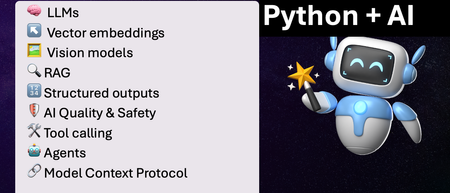
We've just wrapped up our live series on Python + AI, a comprehensive nine-part journey diving deep into how to use generative AI models from Python. The series introduced multiple types of models, including LLMs, embedding models, and vision models. We dug into popular techniques like RAG, tool calling, and structured outputs. We assessed AI quality and safety using automated evaluations and red-teaming. Finally, we developed AI agents using popular Python agents frameworks and explored the new Model Context Protocol (MCP). To help you apply what you've learned, all of our code examples work with GitHub Models, a service that provides free models to every GitHub account holder for experimentation and education. Even if you missed the live series, you can still access all the material using the links below! If you're an instructor, feel free to use the slides and code examples in your own classes. If you're a Spanish speaker, check out the Spanish version of the series. Python + AI: Large Language Models 📺 Watch recording In this session, we explore Large Language Models (LLMs), the models that power ChatGPT and GitHub Copilot. We use Python to interact with LLMs using popular packages like the OpenAI SDK and LangChain. We experiment with prompt engineering and few-shot examples to improve outputs. We also demonstrate how to build a full-stack app powered by LLMs and explain the importance of concurrency and streaming for user-facing AI apps. Slides for this session Code repository with examples: python-openai-demos Python + AI: Vector embeddings 📺 Watch recording In our second session, we dive into a different type of model: the vector embedding model. A vector embedding is a way to encode text or images as an array of floating-point numbers. Vector embeddings enable similarity search across many types of content. In this session, we explore different vector embedding models, such as the OpenAI text-embedding-3 series, through both visualizations and Python code. We compare distance metrics, use quantization to reduce vector size, and experiment with multimodal embedding models. Slides for this session Code repository with examples: vector-embedding-demos Python + AI: Retrieval Augmented Generation 📺 Watch recording In our third session, we explore one of the most popular techniques used with LLMs: Retrieval Augmented Generation. RAG is an approach that provides context to the LLM, enabling it to deliver well-grounded answers for a particular domain. The RAG approach works with many types of data sources, including CSVs, webpages, documents, and databases. In this session, we walk through RAG flows in Python, starting with a simple flow and culminating in a full-stack RAG application based on Azure AI Search. Slides for this session Code repository with examples: python-openai-demos Python + AI: Vision models 📺 Watch recording Our fourth session is all about vision models! Vision models are LLMs that can accept both text and images, such as GPT-4o and GPT-4o mini. You can use these models for image captioning, data extraction, question answering, classification, and more! We use Python to send images to vision models, build a basic chat-with-images app, and create a multimodal search engine. Slides for this session Code repository with examples: openai-chat-vision-quickstart Python + AI: Structured outputs 📺 Watch recording In our fifth session, we discover how to get LLMs to output structured responses that adhere to a schema. In Python, all you need to do is define a Pydantic BaseModel to get validated output that perfectly meets your needs. We focus on the structured outputs mode available in OpenAI models, but you can use similar techniques with other model providers. Our examples demonstrate the many ways you can use structured responses, such as entity extraction, classification, and agentic workflows. Slides for this session Code repository with examples: python-openai-demos Python + AI: Quality and safety 📺 Watch recording This session covers a crucial topic: how to use AI safely and how to evaluate the quality of AI outputs. There are multiple mitigation layers when working with LLMs: the model itself, a safety system on top, the prompting and context, and the application user experience. We focus on Azure tools that make it easier to deploy safe AI systems into production. We demonstrate how to configure the Azure AI Content Safety system when working with Azure AI models and how to handle errors in Python code. Then we use the Azure AI Evaluation SDK to evaluate the safety and quality of output from your LLM. Slides for this session Code repository with examples: ai-quality-safety-demos Python + AI: Tool calling 📺 Watch recording In the final part of the series, we focus on the technologies needed to build AI agents, starting with the foundation: tool calling (also known as function calling). We define tool call specifications using both JSON schema and Python function definitions, then send these definitions to the LLM. We demonstrate how to properly handle tool call responses from LLMs, enable parallel tool calling, and iterate over multiple tool calls. Understanding tool calling is absolutely essential before diving into agents, so don't skip over this foundational session. Slides for this session Code repository with examples: python-openai-demos Python + AI: Agents 📺 Watch recording In the penultimate session, we build AI agents! We use Python AI agent frameworks such as the new agent-framework from Microsoft and the popular LangGraph framework. Our agents start simple and then increase in complexity, demonstrating different architectures such as multiple tools, supervisor patterns, graphs, and human-in-the-loop workflows. Slides for this session Code repository with examples: python-ai-agent-frameworks-demos Python + AI: Model Context Protocol 📺 Watch recording In the final session, we dive into the hottest technology of 2025: MCP (Model Context Protocol). This open protocol makes it easy to extend AI agents and chatbots with custom functionality, making them more powerful and flexible. We demonstrate how to use the Python FastMCP SDK to build an MCP server running locally and consume that server from chatbots like GitHub Copilot. Then we build our own MCP client to consume the server. Finally, we discover how easy it is to connect AI agent frameworks like LangGraph and Microsoft agent-framework to MCP servers. With great power comes great responsibility, so we briefly discuss the security risks that come with MCP, both as a user and as a developer. Slides for this session Code repository with examples: python-mcp-demo5.2KViews2likes0CommentsUpcoming webinar: Maximize the Cost Efficiency of AI Agents on Azure
AI agents are quickly becoming central to how organizations automate work, engage customers, and unlock new insights. But as adoption accelerates, so do questions about cost, ROI, and long-term sustainability. That’s exactly what the Maximize the Cost Efficiency of AI Agents on Azure webinar is designed to address. The webinar will provide practical guidance on building and scaling AI agents on Azure with financial discipline in mind. Rather than focusing only on technology, the session helps learners connect AI design decisions to real business outcomes—covering everything from identifying high-impact use cases and understanding cost drivers to forecasting ROI. Whether you’re just starting your AI journey or expanding AI agents across the enterprise, the session will equip you with strategies to make informed, cost-conscious decisions at every stage—from architecture and model selection to ongoing optimization and governance. Who should attend? If you are in one of these roles and are a decision maker or can influence decision makers in AI decisions or need to show ROI metrics on AI, this session is for you. Developer Administrator Solution Architect AI Engineer Business Analyst Business User Technology Manager Why attending the webinar? In the webinar, you’ll hear how to translate theory into real-world scenarios, walk through common cost pitfalls, and show how organizations are applying these principles in practice. Most importantly, the webinar helps you connect the dots faster, turning what you’ve learned into actionable insights you can apply immediately, ask questions live, and gain clarity on how to maximize ROI while scaling AI responsibly. If you care about building AI agents that are not only innovative but also efficient, governable, and financially sustainable, this training—and this webinar that complements it—are well worth your time. Register for the free webinar today for the event on March 5, 2026, 8:00 AM - 9:00 AM (UTC-08:00) Pacific Time (US & Canada). Who will speak at the webinar? Your speakers will be: Carlotta Castelluccio: Carlotta is a Senior AI Advocate with the mission of helping every developer to succeed with AI, by building innovative solutions responsibly. To achieve this goal, she develops technical content, and she hosts skilling sessions, enabling her audience to take the most out of AI technologies and to have an impact on Microsoft AI products’ roadmap. Nitya Narasimhan: Nitya is a PhD and Polyglot with 25+ years of software research & development experience spanning mobile, web, cloud and AI. She is an innovator (12+ patents), a visual storyteller (@sketchtedocs), and an experienced community builder in the Greater New York area. As a senior AI Advocate on the Core AI Developer Relations team, she acts as "developer 0" for the Microsoft Foundry platform, providing product feedback and empowering AI developers to build trustworthy AI solutions with code samples, open-source curricula and content-initiatives like Model Mondays. Prior to joining Microsoft, she spent a decade in Motorola Labs working on ubiquitous & mobile computing research, founded Google Developer Groups in New York, and consulted for startups building real-time experiences for enterprise. Her current interests span Model understanding & customization, E2E Observability & Safety, and agentic AI workflows for maintainable software. Moderator Lee Stott is a Principal Cloud Advocate at Microsoft, working in the Core AI Developer Relations Team. He helps developers and organizations build responsibly with AI and cloud technologies through open-source projects, technical guidance, and global developer programs. Based in the UK, Lee brings deep hands-on experience across AI, Azure, and developer tooling. .🚀 AI Toolkit for VS Code — February 2026 Update
February brings a major milestone for AI Toolkit. Version 0.30.0 is packed with new capabilities that make agent development more discoverable, debuggable, and production-ready—from a brand-new Tool Catalog, to an end-to-end Agent Inspector, to treating evaluations as first-class tests. 🔧 New in v0.30.0 🧰 Tool Catalog: One place to discover and manage agent tools The new Tool Catalog is a centralized hub for discovering, configuring, and integrating tools into your AI agents. Instead of juggling scattered configs and definitions, you now get a unified experience for tool management: Browse, search, and filter tools from the public Foundry catalog and local stdio MCP servers Configure connection settings for each tool directly in VS Code Add tools to agents seamlessly via Agent Builder Manage the full tool lifecycle: add, update, or remove tools with confidence Why it matters: expanding your agent’s capabilities is now a few clicks away—and stays manageable as your agent grows. 🕵️ Agent Inspector: Debug agents like real software The new Agent Inspector turns agent debugging into a first-class experience inside VS Code. Just press F5 and launch your agent with full debugger support. Key highlights: One-click F5 debugging with breakpoints, variable inspection, and step-through execution Copilot auto-configuration that scaffolds agent code, endpoints, and debugging setup Production-ready code generated using the Hosted Agent SDK, ready for Microsoft Foundry Real-time visualization of streaming responses, tool calls, and multi-agent workflows Quick code navigation—double-click workflow nodes to jump straight to source Unified experience combining chat and workflow visualization in one view Why it matters: agents are no longer black boxes—you can see exactly what’s happening, when, and why. 🧪 Evaluation as Tests: Treat quality like code With Evaluation as Tests, agent quality checks now fit naturally into existing developer workflows. What’s new: Define evaluations as test cases using familiar pytest syntax and Eval Runner SDK annotations Run evaluations directly from VS Code Test Explorer, mixing and matching test cases Analyze results in a tabular view with Data Wrangler integration Submit evaluation definitions to run at scale in Microsoft Foundry Why it matters: evaluations are no longer ad-hoc scripts—they’re versioned, repeatable, and CI-friendly. 🔄 Improvements across the Toolkit 🧱 Agent Builder Agent Builder received a major usability refresh: Redesigned layout for better navigation and focus Quick switcher to move between agents effortlessly Support for authoring, running, and saving Foundry prompt agents Add tools to Foundry prompt agents directly from the Tool Catalog or built-in tools New Inspire Me feature to help you get started when drafting agent instructions Numerous performance and stability improvements 🤖 Model Catalog Added support for models using the OpenAI Response API, including gpt-5.2-codex General performance and reliability improvements 🧠 Build Agent with GitHub Copilot New Workflow entry point to quickly generate multi-agent workflows with Copilot Ability to orchestrate workflows by selecting prompt agents from Foundry 🔁 Conversion & Profiling Generate interactive playgrounds for history models Added Qualcomm GPU recipes Show resource usage for Phi Silica directly in Model Playground ✨ Wrapping up Version 0.30.0 is a big step forward for AI Toolkit. With better discoverability, real debugging, structured evaluation, and deeper Foundry integration, building AI agents in VS Code now feels much closer to building production software. As always, we’d love your feedback—keep it coming, and happy agent building! 🚀Microsoft 365 & Power Platform product updates call
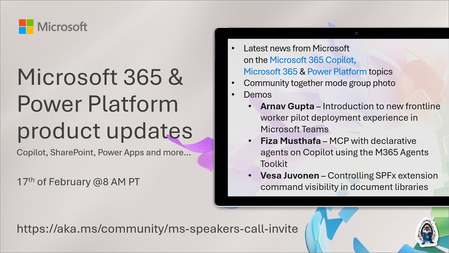
💡Microsoft 365 & Power Platform product updates call concentrates on the different use cases and features within the Microsoft 365 and in Power Platform. Call includes topics like Microsoft 365 Copilot, Copilot Studio, Microsoft Teams, Power Platform, Microsoft Graph, Microsoft Viva, Microsoft Search, Microsoft Lists, SharePoint, Power Automate, Power Apps and more. 👏 Weekly Tuesday call is for all community members to see Microsoft PMs, engineering and Cloud Advocates showcasing the art of possible with Microsoft 365 and Power Platform. 📅 On the 17th of February we'll have following agenda: News and updates from Microsoft Together mode group photo Arnav Gupta – Introduction to new frontline worker pilot deployment experience in Microsoft Teams Fiza Musthafa – MCP with declarative agents on Copilot using the M365 Agents Toolkit Vesa Juvonen – Controlling SPFx extension command visibility in document libraries 📞 & 📺 Join the Microsoft Teams meeting live at https://aka.ms/community/ms-speakers-call-join 🗓️ Download recurrent invite for this weekly call from https://aka.ms/community/ms-speakers-call-invite 👋 See you in the call! 💡 Building something cool for Microsoft 365 or Power Platform (Copilot, SharePoint, Power Apps, etc)? We are always looking for presenters - Volunteer for a community call demo at https://aka.ms/community/request/demo 📖 Resources: Previous community call recordings and demos from the Microsoft Community Learning YouTube channel at https://aka.ms/community/youtube Microsoft 365 & Power Platform samples from Microsoft and community - https://aka.ms/community/samples Microsoft 365 & Power Platform community details - https://aka.ms/community/home 🧡 Sharing is caring!72Views0likes0CommentsAgents League: Join the Reasoning Agents Track
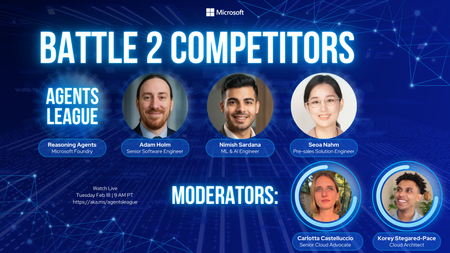
In a previous blog post, we introduced Agents League, a two‑week AI agent challenge running February 16–27, and gave an overview of the three available tracks. In this post, we’ll zoom in on one of them in particular:🧠 The Reasoning Agents track, built on Microsoft Foundry. If you’re interested in multi‑step reasoning, planning, verification, and multi‑agent collaboration, this is the track designed for you. What Do We Mean by “Reasoning Agents”? Reasoning agents go beyond simple prompt–response interactions. They are agents that can: Plan how to approach a task Break problems into steps Reason across intermediate results Verify or critique their own outputs Collaborate with other agents to solve more complex problems With Microsoft Foundry (via UI or SDK) and/or the Microsoft Agent Framework, you can design agent systems that reflect real‑world decision‑making patterns—closer to how teams of humans work together. Why Build Reasoning Agents on Microsoft Foundry? Microsoft Foundry provides production‑ready building blocks for agentic systems, without locking you into a single way of working. For the Reasoning Agents track, Foundry enables you to: Define agent roles (planner, executor, verifier, critic, etc.) Orchestrate multi‑agent workflows Integrate tools, APIs, and MCP servers Apply structured reasoning patterns Observe and debug agent behavior as it runs You can work visually in the Foundry UI, programmatically via the SDK, or mix both approaches depending on your project. How to get started? Your first step to enter the arena is registering to the Agents League challenge: https://aka.ms/agentsleague/register. After you registered, navigate to the Reasoning Agent Starter Kit, to get more context about the challenge scenario, an example of multi-agent architecture to address it, along with some guidelines on the tech stack to use and useful resources to get started. There’s no single “correct” project, feel free to unleash your creativity and leverage AI-assisted development tools to accelerate your build process (e.g. GitHub Copilot). 👉 View the Reasoning Agents starter kit: https://github.com/microsoft/agentsleague/starter-kits Live Coding Battle: Reasoning Agents 📽️ Wednesday, Feb 18 – 9:00 AM PT During Week 1, we’re hosting a live coding battle dedicated entirely to the Reasoning Agents track. You’ll watch experienced developers from the community: Design agent architectures live Explain reasoning strategies and trade‑offs Make real‑time decisions about agent roles, tools, and flows The session is streamed on Microsoft Reactor and recorded, so you can watch it live (highly recommended for the best experience!) or later at your convenience. AMA Session on Discord 💬 Wednesday, Feb 25 – 9:00 AM PT In Week 2, it’s your turn to build—and ask questions. Join the Reasoning Agents AMA on Discord to: Ask about agent architecture and reasoning patterns Get clarification on Foundry capabilities Discuss MCP integration and multi‑agent design Get unstuck when your agent doesn’t behave as expected Prizes, Badges, and Recognition 🏆 $500 for the Reasoning Agents track winner 🎖️ Digital badge for everyone who registers and submits a project Important reminder: 👉 You must register before submitting to be eligible for prizes and the badge. Beyond the rewards, every participant receives feedback from Microsoft product teams, which is often the most valuable prize of all. Ready to Build Agents That Reason? If you’ve been curious about: Agentic architectures Multi‑step reasoning Verification and self‑reflection Building AI systems that explain their thinking …then the Reasoning Agents track is your arena. 📝 Register here: https://aka.ms/agentsleague/register 💬 Join Discord: https://aka.ms/agentsleague/discord 📽️ Watch live battles: https://aka.ms/agentsleague/battles The league starts February 16. The reasoning begins now.Building Interactive Agent UIs with AG-UI and Microsoft Agent Framework
Introduction Picture this: You've built an AI agent that analyzes financial data. A user uploads a quarterly report and asks: "What are the top three expense categories?" Behind the scenes, your agent parses the spreadsheet, aggregates thousands of rows, and generates visualizations. All in 20 seconds. But the user? They see a loading spinner. Nothing else. No "reading file" message, no "analyzing data" indicator, no hint that progress is being made. They start wondering: Is it frozen? Should I refresh? The problem isn't the agent's capabilities - it's the communication gap between the agent running on the backend and the user interface. When agents perform multi-step reasoning, call external APIs, or execute complex tool chains, users deserve to see what's happening. They need streaming updates, intermediate results, and transparent progress indicators. Yet most agent frameworks force developers to choose between simple request/response patterns or building custom solutions to stream updates to their UIs. This is where AG-UI comes in. AG-UI is a fairly new event-based protocol that standardizes how agents communicate with user interfaces. Instead of every framework and development team inventing their own streaming solution, AG-UI provides a shared vocabulary of structured events that work consistently across different agent implementations. When an agent starts processing, calls a tool, generates text, or encounters an error, the UI receives explicit, typed events in real time. The beauty of AG-UI is its framework-agnostic design. While this blog post demonstrates integration with Microsoft Agent Framework (MAF), the same AG-UI protocol works with LangGraph, CrewAI, or any other compliant framework. Write your UI code once, and it works with any AG-UI-compliant backend. (Note: MAF supports both Python and .NET - this blog post focuses on the Python implementation.) TL;DR The Problem: Users don't get real-time updates while AI agents work behind the scenes - no progress indicators, no transparency into tool calls, and no insight into what's happening. The Solution: AG-UI is an open, event-based protocol that standardizes real-time communication between AI agents and user interfaces. Instead of each development team and framework inventing custom streaming solutions, AG-UI provides a shared vocabulary of structured events (like TOOL_CALL_START, TEXT_MESSAGE_CONTENT, RUN_FINISHED) that work across any compliant framework. Key Benefits: Framework-agnostic - Write UI code once, works with LangGraph, Microsoft Agent Framework, CrewAI, and more Real-time observability - See exactly what your agent is doing as it happens Server-Sent Events - Built on standard HTTP for universal compatibility Protocol-managed state - No manual conversation history tracking In This Post: You'll learn why AG-UI exists, how it works, and build a complete working application using Microsoft Agent Framework with Python - from server setup to client implementation. What You'll Learn This blog post walks through: Why AG-UI exists - how agent-UI communication has evolved and what problems current approaches couldn't solve How the protocol works - the key design choices that make AG-UI simple, reliable, and framework-agnostic Protocol architecture - the generic components and how AG-UI integrates with agent frameworks Building an AG-UI application - a complete working example using Microsoft Agent Framework with server, client, and step-by-step setup Understanding events - what happens under the hood when your agent runs and how to observe it Thinking in events - how building with AG-UI differs from traditional APIs, and what benefits this brings Making the right choice - when AG-UI is the right fit for your project and when alternatives might be better Estimated reading time: 15 minutes Who this is for: Developers building AI agents who want to provide real-time feedback to users, and teams evaluating standardized approaches to agent-UI communication To appreciate why AG-UI matters, we need to understand the journey that led to its creation. Let's trace how agent-UI communication has evolved through three distinct phases. The Evolution of Agent-UI Communication AI agents have become more capable over time. As they evolved, the way they communicated with user interfaces had to evolve as well. Here's how this evolution unfolded. Phase 1: Simple Request/Response In the early days of AI agent development, the interaction model was straightforward: send a question, wait for an answer, display the result. This synchronous approach mirrored traditional API calls and worked fine for simple scenarios. # Simple, but limiting response = agent.run("What's the weather in Paris?") display(response) # User waits... and waits... Works for: Quick queries that complete in seconds, simple Q&A interactions where immediate feedback and interactivity aren't critical. Breaks down: When agents need to call multiple tools, perform multi-step reasoning, or process complex queries that take 30+ seconds. Users see nothing but a loading spinner, with no insight into what's happening or whether the agent is making progress. This creates a poor user experience and makes it impossible to show intermediate results or allow user intervention. Recognizing these limitations, development teams began experimenting with more sophisticated approaches. Phase 2: Custom Streaming Solutions As agents became more sophisticated, teams recognized the need for incremental feedback and interactivity. Rather than waiting for the complete response, they implemented custom streaming solutions to show partial results as they became available. # Every team invents their own format for chunk in agent.stream("What's the weather?"): display(chunk) # But what about tool calls? Errors? Progress? This was a step forward for building interactive agent UIs, but each team solved the problem differently. Also, different frameworks had incompatible approaches - some streamed only text tokens, others sent structured JSON, and most provided no visibility into critical events like tool calls or errors. The problem: No standardization across frameworks - client code that works with LangGraph won't work with Crew AI, requiring separate implementations for each agent backend Each implementation handles tool calls differently - some send nothing during tool execution, others send unstructured messages Complex state management - clients must track conversation history, manage reconnections, and handle edge cases manually The industry needed a better solution - a common protocol that could work across all frameworks while maintaining the benefits of streaming. Phase 3: Standardized Protocol (AG-UI) AG-UI emerged as a response to the fragmentation problem. Instead of each framework and development team inventing their own streaming solution, AG-UI provides a shared vocabulary of events that work consistently across different agent implementations. # Standardized events everyone understands async for event in agent.run_stream("What's the weather?"): if event.type == "TEXT_MESSAGE_CONTENT": display_text(event.delta) elif event.type == "TOOL_CALL_START": show_tool_indicator(event.tool_name) elif event.type == "TOOL_CALL_RESULT": show_tool_result(event.result) The key difference is structured observability. Rather than guessing what the agent is doing from unstructured text, clients receive explicit events for every stage of execution: when the agent starts, when it generates text, when it calls a tool, when that tool completes, and when the entire run finishes. What's different: A standardized vocabulary of event types, complete observability into agent execution, and framework-agnostic clients that work with any AG-UI-compliant backend. You write your UI code once, and it works whether the backend uses Microsoft Agent Framework, LangGraph, or any other framework that speaks AG-UI. Now that we've seen why AG-UI emerged and what problems it solves, let's examine the specific design decisions that make the protocol work. These choices weren't arbitrary - each one addresses concrete challenges in building reliable, observable agent-UI communication. The Design Decisions Behind AG-UI Why Server-Sent Events (SSE)? Aspect WebSockets SSE (AG-UI) Complexity Bidirectional Unidirectional (simpler) Firewall/Proxy Sometimes blocked Standard HTTP Reconnection Manual implementation Built-in browser support Use case Real-time games, chat Agent responses (one-way) For agent interactions, you typically only need server→client communication, making SSE a simpler choice. SSE solves the transport problem - how events travel from server to client. But once connected, how does the protocol handle conversation state across multiple interactions? Why Protocol-Managed Threads? # Without protocol threads (client manages): conversation_history = [] conversation_history.append({"role": "user", "content": message}) response = agent.complete(conversation_history) conversation_history.append({"role": "assistant", "content": response}) # Complex, error-prone, doesn't work with multiple clients # With AG-UI (protocol manages): thread = agent.get_new_thread() # Server creates and manages thread agent.run_stream(message, thread=thread) # Server maintains context # Simple, reliable, shareable across clients With transport and state management handled, the final piece is the actual messages flowing through the connection. What information should the protocol communicate, and how should it be structured? Why Standardized Event Types? Instead of parsing unstructured text, clients get typed events: RUN_STARTED - Agent begins (start loading UI) TEXT_MESSAGE_CONTENT - Text chunk (stream to user) TOOL_CALL_START - Tool invoked (show "searching...", "calculating...") TOOL_CALL_RESULT - Tool finished (show result, update UI) RUN_FINISHED - Complete (hide loading) This lets UIs react intelligently without custom parsing logic. Now that we understand the protocol's design choices, let's see how these pieces fit together in a complete system. Architecture Overview Here's how the components interact: The communication between these layers relies on a well-defined set of event types. Here are the core events that flow through the SSE connection: Core Event Types AG-UI provides a standardized set of event types to describe what's happening during an agent's execution: RUN_STARTED - agent begins execution TEXT_MESSAGE_START, TEXT_MESSAGE_CONTENT, TEXT_MESSAGE_END - streaming segments of text TOOL_CALL_START, TOOL_CALL_ARGS, TOOL_CALL_END, TOOL_CALL_RESULT - tool execution events RUN_FINISHED - agent has finished execution RUN_ERROR - error information This model lets the UI update as the agent runs, rather than waiting for the final response. The generic architecture above applies to any AG-UI implementation. Now let's see how this translates to Microsoft Agent Framework. AG-UI with Microsoft Agent Framework While AG-UI is framework-agnostic, this blog post demonstrates integration with Microsoft Agent Framework (MAF) using Python. MAF is available in both Python and .NET, giving you flexibility to build AG-UI applications in your preferred language. Understanding how MAF implements the protocol will help you build your own applications or work with other compliant frameworks. Integration Architecture The Microsoft Agent Framework integration involves several specialized layers that handle protocol translation and execution orchestration: Understanding each layer: FastAPI Endpoint - Handles HTTP requests and establishes SSE connections for streaming AgentFrameworkAgent - Protocol wrapper that translates between AG-UI events and Agent Framework operations Orchestrators - Manage execution flow, coordinate tool calling sequences, and handle state transitions ChatAgent - Your agent implementation with instructions, tools, and business logic ChatClient - Interface to the underlying language model (Azure OpenAI, OpenAI, or other providers) The good news? When you call add_agent_framework_fastapi_endpoint, all the middleware layers are configured automatically. You simply provide your ChatAgent, and the integration handles protocol translation, event streaming, and state management behind the scenes. Now that we understand both the protocol architecture and the Microsoft Agent Framework integration, let's build a working application. Hands-On: Building Your First AG-UI Application This section demonstrates how to build an AG-UI server and client using Microsoft Agent Framework and FastAPI. Prerequisites Before building your first AG-UI application, ensure you have: Python 3.10 or later installed Basic understanding of async/await patterns in Python Azure CLI installed and authenticated (az login) Azure OpenAI service endpoint and deployment configured (setup guide) Cognitive Services OpenAI Contributor role for your Azure OpenAI resource You'll also need to install the AG-UI integration package: pip install agent-framework-ag-ui --pre This automatically installs agent-framework-core, fastapi, and uvicorn as dependencies. With your environment configured, let's create the server that will host your agent and expose it via the AG-UI protocol. Building the Server Let's create a FastAPI server that hosts an AI agent and exposes it via AG-UI: # server.py import os from typing import Annotated from dotenv import load_dotenv from fastapi import FastAPI from pydantic import Field from agent_framework import ChatAgent, ai_function from agent_framework.azure import AzureOpenAIChatClient from agent_framework_ag_ui import add_agent_framework_fastapi_endpoint from azure.identity import DefaultAzureCredential # Load environment variables from .env file load_dotenv() # Validate environment configuration openai_endpoint = os.getenv("AZURE_OPENAI_ENDPOINT") model_deployment = os.getenv("AZURE_OPENAI_DEPLOYMENT_NAME") if not openai_endpoint: raise RuntimeError("Missing required environment variable: AZURE_OPENAI_ENDPOINT") if not model_deployment: raise RuntimeError("Missing required environment variable: AZURE_OPENAI_DEPLOYMENT_NAME") # Define tools the agent can use @ai_function def get_order_status( order_id: Annotated[str, Field(description="The order ID to look up (e.g., ORD-001)")] ) -> dict: """Look up the status of a customer order. Returns order status, tracking number, and estimated delivery date. """ # Simulated order lookup orders = { "ORD-001": {"status": "shipped", "tracking": "1Z999AA1", "eta": "Jan 25, 2026"}, "ORD-002": {"status": "processing", "tracking": None, "eta": "Jan 23, 2026"}, "ORD-003": {"status": "delivered", "tracking": "1Z999AA3", "eta": "Delivered Jan 20"}, } return orders.get(order_id, {"status": "not_found", "message": "Order not found"}) # Initialize Azure OpenAI client chat_client = AzureOpenAIChatClient( credential=DefaultAzureCredential(), endpoint=openai_endpoint, deployment_name=model_deployment, ) # Configure the agent with custom instructions and tools agent = ChatAgent( name="CustomerSupportAgent", instructions="""You are a helpful customer support assistant. You have access to a get_order_status tool that can look up order information. IMPORTANT: When a user mentions an order ID (like ORD-001, ORD-002, etc.), you MUST call the get_order_status tool to retrieve the actual order details. Do NOT make up or guess order information. After calling get_order_status, provide the actual results to the user in a friendly format.""", chat_client=chat_client, tools=[get_order_status], ) # Initialize FastAPI application app = FastAPI( title="AG-UI Customer Support Server", description="Interactive AI agent server using AG-UI protocol with tool calling" ) # Mount the AG-UI endpoint add_agent_framework_fastapi_endpoint(app, agent, path="/chat") def main(): """Entry point for the AG-UI server.""" import uvicorn print("Starting AG-UI server on http://localhost:8000") uvicorn.run(app, host="0.0.0.0", port=8000, log_level="info") # Run the application if __name__ == "__main__": main() What's happening here: We define a tool: get_order_status with the AI_function decorator Use Annotated and Field for parameter descriptions to help the agent understand when and how to use the tool We create an Azure OpenAI chat client with credential authentication The ChatAgent is configured with domain-specific instructions and the tools parameter add_agent_framework_fastapi_endpoint automatically handles SSE streaming and tool execution The server exposes the agent at the /chat endpoint Note: This example uses Azure OpenAI, but AG-UI works with any chat model. You can also integrate with Azure AI Foundry's model catalog or use other LLM providers. Tool calling is supported by most modern LLMs including GPT-4, GPT-4o, and Claude models. To run this server: # Set your Azure OpenAI credentials export AZURE_OPENAI_ENDPOINT="https://your-resource.openai.azure.com/" export AZURE_OPENAI_DEPLOYMENT_NAME="gpt-4o" # Start the server python server.py With your server running and exposing the AG-UI endpoint, the next step is building a client that can connect and consume the event stream. Streaming Results to Clients With the server running, clients can connect and stream events as the agent processes requests. Here's a Python client that demonstrates the streaming capabilities: # client.py import asyncio import os from dotenv import load_dotenv from agent_framework import ChatAgent, FunctionCallContent, FunctionResultContent from agent_framework_ag_ui import AGUIChatClient # Load environment variables from .env file load_dotenv() async def interactive_chat(): """Interactive chat session with streaming responses.""" # Connect to the AG-UI server base_url = os.getenv("AGUI_SERVER_URL", "http://localhost:8000/chat") print(f"Connecting to: {base_url}\n") # Initialize the AG-UI client client = AGUIChatClient(endpoint=base_url) # Create a local agent representation agent = ChatAgent(chat_client=client) # Start a new conversation thread conversation_thread = agent.get_new_thread() print("Chat started! Type 'exit' or 'quit' to end the session.\n") try: while True: # Collect user input user_message = input("You: ") # Handle empty input if not user_message.strip(): print("Please enter a message.\n") continue # Check for exit commands if user_message.lower() in ["exit", "quit", "bye"]: print("\nGoodbye!") break # Stream the agent's response print("Agent: ", end="", flush=True) # Track tool calls to avoid duplicate prints seen_tools = set() async for update in agent.run_stream(user_message, thread=conversation_thread): # Display text content if update.text: print(update.text, end="", flush=True) # Display tool calls and results for content in update.contents: if isinstance(content, FunctionCallContent): # Only print each tool call once if content.call_id not in seen_tools: seen_tools.add(content.call_id) print(f"\n[Calling tool: {content.name}]", flush=True) elif isinstance(content, FunctionResultContent): # Only print each result once result_id = f"result_{content.call_id}" if result_id not in seen_tools: seen_tools.add(result_id) result_text = content.result if isinstance(content.result, str) else str(content.result) print(f"[Tool result: {result_text}]", flush=True) print("\n") # New line after response completes except KeyboardInterrupt: print("\n\nChat interrupted by user.") except ConnectionError as e: print(f"\nConnection error: {e}") print("Make sure the server is running.") except Exception as e: print(f"\nUnexpected error: {e}") def main(): """Entry point for the AG-UI client.""" asyncio.run(interactive_chat()) if __name__ == "__main__": main() Key features: The client connects to the AG-UI endpoint using AGUIChatClient with the endpoint parameter run_stream() yields updates containing text and content as they arrive Tool calls are detected using FunctionCallContent and displayed with [Calling tool: ...] Tool results are detected using FunctionResultContent and displayed with [Tool result: ...] Deduplication logic (seen_tools set) prevents printing the same tool call multiple times as it streams Thread management maintains conversation context across messages Graceful error handling for connection issues To use the client: # Optional: specify custom server URL export AGUI_SERVER_URL="http://localhost:8000/chat" # Start the interactive chat python client.py Example Session: Connecting to: http://localhost:8000/chat Chat started! Type 'exit' or 'quit' to end the session. You: What's the status of order ORD-001? Agent: [Calling tool: get_order_status] [Tool result: {"status": "shipped", "tracking": "1Z999AA1", "eta": "Jan 25, 2026"}] Your order ORD-001 has been shipped! - Tracking Number: 1Z999AA1 - Estimated Delivery Date: January 25, 2026 You can use the tracking number to monitor the delivery progress. You: Can you check ORD-002? Agent: [Calling tool: get_order_status] [Tool result: {"status": "processing", "tracking": null, "eta": "Jan 23, 2026"}] Your order ORD-002 is currently being processed. - Status: Processing - Estimated Delivery: January 23, 2026 Your order should ship soon, and you'll receive a tracking number once it's on the way. You: exit Goodbye! The client we just built handles events at a high level, abstracting away the details. But what's actually flowing through that SSE connection? Let's peek under the hood. Event Types You'll See As the server streams back responses, clients receive a series of structured events. If you were to observe the raw SSE stream (e.g., using curl), you'd see events like: curl -N http://localhost:8000/chat \ -H "Content-Type: application/json" \ -H "Accept: text/event-stream" \ -d '{"messages": [{"role": "user", "content": "What'\''s the status of order ORD-001?"}]}' Sample event stream (with tool calling): data: {"type":"RUN_STARTED","threadId":"eb4d9850-14ef-446c-af4b-23037acda9e8","runId":"chatcmpl-xyz"} data: {"type":"TEXT_MESSAGE_START","messageId":"e8648880-a9ff-4178-a17d-4a6d3ec3d39c","role":"assistant"} data: {"type":"TOOL_CALL_START","toolCallId":"call_GTWj2N3ZyYiiQIjg3fwmiQ8y","toolCallName":"get_order_status","parentMessageId":"e8648880-a9ff-4178-a17d-4a6d3ec3d39c"} data: {"type":"TOOL_CALL_ARGS","toolCallId":"call_GTWj2N3ZyYiiQIjg3fwmiQ8y","delta":"{\""} data: {"type":"TOOL_CALL_ARGS","toolCallId":"call_GTWj2N3ZyYiiQIjg3fwmiQ8y","delta":"order"} data: {"type":"TOOL_CALL_ARGS","toolCallId":"call_GTWj2N3ZyYiiQIjg3fwmiQ8y","delta":"_id"} data: {"type":"TOOL_CALL_ARGS","toolCallId":"call_GTWj2N3ZyYiiQIjg3fwmiQ8y","delta":"\":\""} data: {"type":"TOOL_CALL_ARGS","toolCallId":"call_GTWj2N3ZyYiiQIjg3fwmiQ8y","delta":"ORD"} data: {"type":"TOOL_CALL_ARGS","toolCallId":"call_GTWj2N3ZyYiiQIjg3fwmiQ8y","delta":"-"} data: {"type":"TOOL_CALL_ARGS","toolCallId":"call_GTWj2N3ZyYiiQIjg3fwmiQ8y","delta":"001"} data: {"type":"TOOL_CALL_ARGS","toolCallId":"call_GTWj2N3ZyYiiQIjg3fwmiQ8y","delta":"\"}"} data: {"type":"TOOL_CALL_END","toolCallId":"call_GTWj2N3ZyYiiQIjg3fwmiQ8y"} data: {"type":"TOOL_CALL_RESULT","messageId":"f048cb0a-a049-4a51-9403-a05e4820438a","toolCallId":"call_GTWj2N3ZyYiiQIjg3fwmiQ8y","content":"{\"status\": \"shipped\", \"tracking\": \"1Z999AA1\", \"eta\": \"Jan 25, 2026\"}","role":"tool"} data: {"type":"TEXT_MESSAGE_START","messageId":"8215fc88-8cb6-4ce4-8bdb-a8715dcd26cf","role":"assistant"} data: {"type":"TEXT_MESSAGE_CONTENT","messageId":"8215fc88-8cb6-4ce4-8bdb-a8715dcd26cf","delta":"Your"} data: {"type":"TEXT_MESSAGE_CONTENT","messageId":"8215fc88-8cb6-4ce4-8bdb-a8715dcd26cf","delta":" order"} data: {"type":"TEXT_MESSAGE_CONTENT","messageId":"8215fc88-8cb6-4ce4-8bdb-a8715dcd26cf","delta":" ORD"} data: {"type":"TEXT_MESSAGE_CONTENT","messageId":"8215fc88-8cb6-4ce4-8bdb-a8715dcd26cf","delta":"-"} data: {"type":"TEXT_MESSAGE_CONTENT","messageId":"8215fc88-8cb6-4ce4-8bdb-a8715dcd26cf","delta":"001"} data: {"type":"TEXT_MESSAGE_CONTENT","messageId":"8215fc88-8cb6-4ce4-8bdb-a8715dcd26cf","delta":" has"} data: {"type":"TEXT_MESSAGE_CONTENT","messageId":"8215fc88-8cb6-4ce4-8bdb-a8715dcd26cf","delta":" been"} data: {"type":"TEXT_MESSAGE_CONTENT","messageId":"8215fc88-8cb6-4ce4-8bdb-a8715dcd26cf","delta":" shipped"} data: {"type":"TEXT_MESSAGE_CONTENT","messageId":"8215fc88-8cb6-4ce4-8bdb-a8715dcd26cf","delta":"!"} ... (additional TEXT_MESSAGE_CONTENT events streaming the response) ... data: {"type":"TEXT_MESSAGE_END","messageId":"8215fc88-8cb6-4ce4-8bdb-a8715dcd26cf"} data: {"type":"RUN_FINISHED","threadId":"eb4d9850-14ef-446c-af4b-23037acda9e8","runId":"chatcmpl-xyz"} Understanding the flow: RUN_STARTED - Agent begins processing the request TEXT_MESSAGE_START - First message starts (will contain tool calls) TOOL_CALL_START - Agent invokes the get_order_status tool Multiple TOOL_CALL_ARGS events - Arguments stream incrementally as JSON chunks ({"order_id":"ORD-001"}) TOOL_CALL_END - Tool invocation structure complete TOOL_CALL_RESULT - Tool execution finished with result data TEXT_MESSAGE_START - Second message starts (the final response) Multiple TEXT_MESSAGE_CONTENT events - Response text streams word-by-word TEXT_MESSAGE_END - Response message complete RUN_FINISHED - Entire run completed successfully This granular event model enables rich UI experiences - showing tool execution indicators ("Searching...", "Calculating..."), displaying intermediate results, and providing complete transparency into the agent's reasoning process. Seeing the raw events helps, but truly working with AG-UI requires a shift in how you think about agent interactions. Let's explore this conceptual change. The Mental Model Shift Traditional API Thinking # Imperative: Call and wait response = agent.run("What's 2+2?") print(response) # "The answer is 4" Mental model: Function call with return value AG-UI Thinking # Reactive: Subscribe to events async for event in agent.run_stream("What's 2+2?"): match event.type: case "RUN_STARTED": show_loading() case "TEXT_MESSAGE_CONTENT": display_chunk(event.delta) case "RUN_FINISHED": hide_loading() Mental model: Observable stream of events This shift feels similar to: Moving from synchronous to async code Moving from REST to event-driven architecture Moving from polling to pub/sub This mental shift isn't just philosophical - it unlocks concrete benefits that weren't possible with request/response patterns. What You Gain Observability # You can SEE what the agent is doing TOOL_CALL_START: "get_order_status" TOOL_CALL_ARGS: {"order_id": "ORD-001"} TOOL_CALL_RESULT: {"status": "shipped", "tracking": "1Z999AA1", "eta": "Jan 25, 2026"} TEXT_MESSAGE_START: "Your order ORD-001 has been shipped..." Interruptibility # Future: Cancel long-running operations async for event in agent.run_stream(query): if user_clicked_cancel: await agent.cancel(thread_id, run_id) break Transparency # Users see the reasoning process "Looking up order ORD-001..." "Order found: Status is 'shipped'" "Retrieving tracking information..." "Your order has been shipped with tracking number 1Z999AA1..." To put these benefits in context, here's how AG-UI compares to traditional approaches across key dimensions: AG-UI vs. Traditional Approaches Aspect Traditional REST Custom Streaming AG-UI Connection Model Request/Response Varies Server-Sent Events State Management Manual Manual Protocol-managed Tool Calling Invisible Custom format Standardized events Framework Varies Framework-locked Framework-agnostic Browser Support Universal Varies Universal Implementation Simple Complex Moderate Ecosystem N/A Isolated Growing You've now seen AG-UI's design principles, implementation details, and conceptual foundations. But the most important question remains: should you actually use it? Conclusion: Is AG-UI Right for Your Project? AG-UI represents a shift toward standardized, observable agent interactions. Before adopting it, understand where the protocol stands and whether it fits your needs. Protocol Maturity The protocol is stable enough for production use but still evolving: Ready now: Core specification stable, Microsoft Agent Framework integration available, FastAPI/Python implementation mature, basic streaming and threading work reliably. Choose AG-UI If You Building new agent projects - No legacy API to maintain, want future compatibility with emerging ecosystem Need streaming observability - Multi-step workflows where users benefit from seeing each stage of execution Want framework flexibility - Same client code works with any AG-UI-compliant backend Comfortable with evolving standards - Can adapt to protocol changes as it matures Stick with Alternatives If You Have working solutions - Custom streaming working well, migration cost not justified Need guaranteed stability - Mission-critical systems where breaking changes are unacceptable Build simple agents - Single-step request/response without tool calling or streaming needs Risk-averse environment - Large existing implementations where proven approaches are required Beyond individual project decisions, it's worth considering AG-UI's role in the broader ecosystem. The Bigger Picture While this blog post focused on Microsoft Agent Framework, AG-UI's true power lies in its broader mission: creating a common language for agent-UI communication across the entire ecosystem. As more frameworks adopt it, the real value emerges: write your UI once, work with any compliant agent framework. Think of it like GraphQL for APIs or OpenAPI for REST - a standardization layer that benefits the entire ecosystem. The protocol is young, but the problem it solves is real. Whether you adopt it now or wait for broader adoption, understanding AG-UI helps you make informed architectural decisions for your agent applications. Ready to dive deeper? Here are the official resources to continue your AG-UI journey. Resources AG-UI & Microsoft Agent Framework Getting Started with AG-UI (Microsoft Learn) - Official tutorial AG-UI Integration Overview - Architecture and concepts AG-UI Protocol Specification - Official protocol documentation Backend Tool Rendering - Adding function tools Security Considerations - Production security guidance Microsoft Agent Framework Documentation - Framework overview AG-UI Dojo Examples - Live demonstrations UI Components & Integration CopilotKit for Microsoft Agent Framework - React component library Community & Support Microsoft Q&A - Community support Agent Framework GitHub - Source code and issues Related Technologies Azure AI Foundry Documentation - Azure AI platform FastAPI Documentation - Web framework Server-Sent Events (SSE) Specification - Protocol standard This blog post introduces AG-UI with Microsoft Agent Framework, focusing on fundamental concepts and building your first interactive agent application.