agentless scanning
25 TopicsMicrosoft Defender for Cloud Customer Newsletter
What's new in Defender for Cloud? Microsoft Defender for Open-Source Relational Databases is now generally available for Amazon Web Services Relational Database Service (AWS RDS) instances. Receive database threat protection and sensitive data discovery insights for supported open-source relational databases, including Aurora PostgreSQL, Aurora MySQL, PostgreSQL, MySQL, and MariaDB on AWS RDS. For more information, see our public documentation. Expanded multicloud security coverage now GA Microsoft Defender for Cloud's expanded multicloud security coverage is now generally available. This release significantly broadens posture assessment for AWS and GCP environments, adding support for about 90 new resource types and over 200 new security recommendations across data, identity and access, networking, compute, and container categories. For more details, please refer to this documentation. Check out other updates from last month here! Check out monthly news for the rest of the MTP suite here! Blogs of the month In June, our team published the following blog posts we would like to share: Now Generally Available: Microsoft Defender for open source relational databases on AWS RDS Start Secure, Stay Secure: How Microsoft is Closing the Gap from Code to Runtime The end of patching era for containers: Microsoft Defender for Cloud expands hardened image support Closing the loop on container security: From code to runtime in the AI era Microsoft Defender for Cloud expands multicloud coverage across AWS and Google Cloud Defender for Cloud in the field Watch the latest Defender for Cloud in the Field YouTube episode here: Stay Secure: AI-powered Faster fixes Visit our YouTube page GitHub Community Check out Defender for Cloud GitHub lab module 25. It walks through the integration between Defender for Cloud and XDR to provide a comprehensive CDR solution. Module 25 - MDC and Defender portal integration Visit our GitHub page Customer journey Discover how other organizations successfully use Microsoft Defender for Cloud to protect their cloud workloads. This month we are featuring Hassan Allam Holding. Hassan Allam Holding is an Egyptian private-sector company with operations spanning engineering, construction, and infrastructure investment and was facing operational complexity. To overcome, they leveraged an end-to-end Microsoft Security ecosystem with Defender XDR, which integrates with Defender for Cloud and other products to centralize detection and signals across endpoint, identity, email and cloud workloads. As a result, alert noise reduce by up to 90%, and Hassan Allam Holding is able to respond faster with far less complexity. Join our community! We offer several customer connection programs within our private communities. By signing up, you can help us shape our products through activities such as reviewing product roadmaps, participating in co-design, previewing features, and staying up-to-date with announcements. Sign up at aka.ms/JoinCCP. We greatly value your input on the types of content that enhance your understanding of our security products. Your insights are crucial in guiding the development of our future public content. We aim to deliver material that not only educates but also resonates with your daily security challenges. Whether it’s through in-depth live webinars, real-world case studies, comprehensive best practice guides through blogs, or the latest product updates, we want to ensure our content meets your needs. Please submit your feedback on which of these formats do you find most beneficial and are there any specific topics you’re interested in https://aka.ms/PublicContentFeedback. Note: If you want to stay current with Defender for Cloud and receive updates in your inbox, please consider subscribing to our monthly newsletter: https://aka.ms/MDCNewsSubscribeClosing the loop on container security: From code to runtime in the AI era
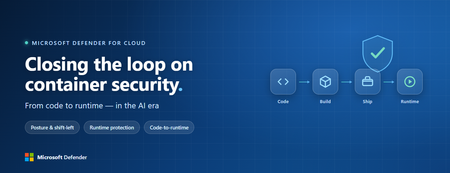
Containers are the backbone of modern cloud-native apps — and increasingly, the infrastructure powering AI, from AI assistants to a new wave of intelligent agents. They also blur the line between build, deploy, and runtime: a single code change can become a running workload in minutes. A misconfiguration committed in the morning can be deployed in minutes and exploited before noon. At that speed, container security can no longer be a point-in-time check, it has to work as one continuous loop. The numbers back this up. For the first time, 31% of breaches now begin with an attacker exploiting a software vulnerability — overtaking stolen credentials as the most common way in — and 15% of attack techniques are now accelerated by generative AI, with adversaries using it to find gaps and write malware faster at every stage. Source: Verizon 2026 Data Breach Investigations Report (incidents Nov 2024–Oct 2025). Over the last few quarters, Microsoft Defender for Cloud has been evolving to offer you this continuous security, end to end. Explore container security’s new capabilities across posture, shift-left, runtime, multicloud coverage, and operations. Collectively they form a more comprehensive approach to container security — one that offers security right during developing a code to a running pod across Azure, AWS, and GCP. There is a second reason why container security matters more in 2026: containers are increasingly where AI runs. Many AI workloads — from model-serving APIs to retrieval systems and intelligent agents — now live as pods on AKS, EKS, and GKE (the managed Kubernetes services from Azure, AWS, and Google), often connected to some of an organization’s most sensitive models and data. As those crown jewels move into the cluster, the same posture, code‑to‑runtime, and runtime protections described in this post extend to AI workloads. The contest is increasingly AI against AI: attackers use it to find and reach the cluster faster, while defenders use it to push back — surfacing the risks that matter most and turning runtime findings into AI‑assisted code fixes. One platform, code to runtime A container finding is not treated as an isolated issue; it is connected to the identity it runs under, the registry and code repository it came from, and the cluster where it is running - all unified under one Microsoft Defender platform. Container posture and shift-left security are now redesigned for least vulnerabilities in production Conventional container security posture offered challenges to scale: a single grouped recommendation could stack thousands of findings under one bucket, making ownership, exemptions, and risk scoring too coarse to act on. That experience is now evolved. We have rebuilt the experience so that each finding is its own recommendation — per software, per image, per container. If two CVEs in the same image belong to two different teams, they can now be triaged, exempted, and reported separately. The grouped recommendations are deprecated and will be removed on July 30, 2026, We suggest updating any automation, export rules, and ServiceNow integrations to target the new per-finding recommendations before that date. That per-finding precision becomes even more powerful once you connect each finding to its source code and to the runtime resources it impacts. Defender for Cloud — part of Microsoft Defender suite — connects this code-to-runtime chain end-to-end. For example, an image built through Azure DevOps or GitHub, pushed to ACR, ECR, Google Artifact Registry, Docker Hub, or JFrog, and pulled by AKS, EKS, or GKE is one continuous evidence chain — traceable from a running container back to the pull request (PR) and line of code that introduced the risk. With GitHub Advanced Security integrated (GA), secrets, code, and dependency findings join the same attack story. The developer-first Defender for Cloud CLI runs the same scanner locally or in any CI/CD pipeline, with consistent exit codes for gating. In this diagram, you can see how we have embedded container security at every stage of the software development lifecycle (SDLC), not just the endpoints. At Code, GitHub Advanced Security and the Defender for Cloud CLI catch secrets, vulnerable dependencies, and insecure code before commit. At Build, the same scanner runs as a CI/CD gate — in GitHub Actions, Azure DevOps, Jenkins, or Bitbucket — failing the pipeline on critical findings. At Ship, registry scanning and Gated Deployment block risky or misconfigured images at the cluster door. And at Runtime, the sensor enforces anti-malware and binary-drift policy on the live workload. No stage is left as a blind spot, and a finding can be traced forward to the running pod or backward to the developer who introduced it. Visibility without enforcement only creates backlog. Gated Deployment — a Kubernetes admission controller — uses the same vulnerability signal, you trust, to block risky images at the cluster level. It supports phased rollout (audit, then deny), targets rules by cluster, namespace, pod, image, or label, and runs across AKS (including AKS Automatic), EKS, and GKE. A newer extension gates on Kubernetes misconfigurations too. Posture practitioners also get KSPM at container granularity — Kubernetes security posture management, available through both Defender for Containers and Defender CSPM — and, on Azure, a new actionable recommendation, Upgrade Azure Kubernetes Service Version (preview), that helps you remediate vulnerabilities in AKS-managed system pods. Coverage that matches containers’ evolution Historically, many container security programs concentrated on managed Kubernetes clusters in AKS, EKS, and GKE. The 2026 reality is broader: a growing share of production runs on serverless container platforms that abstract the cluster away, many sensitive workloads sit behind private, network-isolated clusters, and platform teams increasingly standardize on hardened or distroless base images. The surfaces that were blind spots are now part of the same posture graph as everything else. Serverless compute posture is now generally available across AWS Lambda, Azure Functions, and Web Apps, while Serverless containers posture (preview) takes the same idea to Azure Container Apps, ACI, and AWS Fargate. Together, they bring more of today’s cloud-native production footprint into the same posture graph. Coverage also improves where platform teams are standardizing on locked-down environments. The long-standing gap around private EKS and GKE clusters is closed, bringing some of the hardest-to-reach environments into the same security model. Scanning now works on hardened images from Docker Hardened or Minimus, and runtime protection supports BottleRocket on EKS — with the full feature set also available in Azure Government, which matters for teams running regulated workloads. Runtime threat protection that prevents, not just detects Posture closes the door on attackers; runtime threat protection guards the room if they still succeed. The key shift is that the Defender for Containers sensor now adds prevention on top of detection. The goal is simple: stop malicious code before it runs. Anti-malware detection and prevention (GA) scans container workloads and Kubernetes nodes and, based on the policies you define, blocks malicious execution instead of only alerting. Those alerts then flow into Microsoft Defender XDR’s unified incident model. The second is binary drift detection and prevention (preview). Containers are meant to be immutable. When a process starts from a binary that was not part of the original image, that is drift — and one of the highest-signal indicators of compromise in cloud-native workloads. Defender detects drifts and, with policy enabled, can now also block the drifted process before it executes. Anti-malware and Drift policies can be scoped by cloud, cluster, namespace, image, or label, with allow-lists for legitimate cases. Anti-malware policies can alert, block, or ignore — scoped to clusters, namespaces, pods, labels, or images. Rounding out runtime protection, DNS-based threat detection (GA) catches command-and-control beaconing, DGA traffic, and exfiltration over DNS. A unified approach to container security Step back, and the bigger picture is simple. The same platform that secured your VMs and identities now extends across AKS, EKS, GKE, private clusters, serverless containers, and serverless compute. The same Code-to-Runtime chain that once tied Infrastructure as Code (IaC) findings to running infrastructure now connects Dockerfile commits — through CI/CD and any major registry — to the running pod. Admission control turns posture findings into prevention at deploy time, and runtime protection actively blocks. That is a continuous container security loop living inside Microsoft Defender — not a checklist bolted onto Kubernetes. And it rebalances the fight: as attackers use AI to find and exploit gaps faster, the durable answer is security teams using AI of their own — protecting and triaging at machine speed. If you’ve already enabled container security with Microsoft, the clearest next step is to strengthen the core lifecycle stages first: Code + build: connect GitHub Advanced Security and integrate the Defender for Cloud CLI into your pipelines so findings are caught early and CI/CD gates can fail builds before an image is pushed. Ship: stand up Gated Deployment in audit mode on a non-production cluster, tune it, then flip to deny; extend it to Kubernetes misconfigurations. Run: enable the Defender for Containers sensor, extend it to private EKS and GKE clusters, then tune anti-malware and binary-drift rules in Block mode — starting with your crown-jewel namespaces. Extend protection: turn on serverless compute posture for Lambda, Functions, and Web Apps, and enable serverless container posture for Container Apps, ACI, or Fargate.
Defending Container Runtime from Malware with Microsoft Defender for Containers
In cloud-native environments, malware protection is no longer traditional antivirus — it is runtime workload security, ensuring containerized applications remain safe throughout their lifecycle. Many organizations focus on scanning container images before deployment. While image scanning is important, this does not stop runtime attacks. Image scanning protects before deployment, but malware detection protects during execution. Malware can enter cloud environments through container images, compromised CI/CD pipelines, exposed services, or misuse of legitimate administrative tools, making runtime malware detection an essential security control rather than an optional enhancement. Runtime Malware detection and Prevention acts as the last line of defence when preventive controls fail. If malware executes successfully inside a container, it may attempt Privilege escalation, Container escape and Host compromise. Antimalware in Defender for Containers Defender for Containers antimalware, powered by Microsoft Defender Antivirus cloud protection, near-real-time malware detection directly into container environments. The antimalware feature is available via Helm with sensor version 0.10.2 for AKS, GKE, and EKS. Defender for Containers Sensor Defender for Containers Antimalware provides: Runtime monitoring of container activity Malware detection on Container Workloads Malware detection for Kubernetes nodes Alerts integrated into Defender XDR Anti-malware detection and blocking - Microsoft Defender for Cloud | Microsoft Learn Container antimalware protection in Defender for Containers is powered by three main components: 1) Defender Sensor - version 0.10.2 installed via Helm or arc-extension The Defender sensor runs inside the Kubernetes cluster and monitors workload activity in real time. It provides: Runtime visibility into container processes Binary execution monitoring Behavioral inspection Alert and Block Malware execution Multicloud Support (Azure Kubernetes Service, AWS EKS, GCP GKE) Prerequisites: Ensure the following components of the Defender for containers plan are enabled: Defender sensor Security findings Registry access Kubernetes API access To Install Defender Sensor for Antimalware, ensure there are sufficient resources on your Kubernetes Cluster and outbound connectivity. In addition to the core sensor memory and CPU requirements, you need: Component Request Limit CPU 50m 300m Memory 128Mi 500Mi All sensor components use outbound-only connectivity (no inbound access required). To install Defender for Containers sensor follow the guidance here To Verify the sensor deployed successfully on all nodes, use the commands as screenshot below: You should see the collectors pods in Running state with 3/3 containers. 2) Antimalware Policy Engine Policies define what happens when malware is detected: Alert only Block execution Ignore (allowlisted cases) Policies can be scoped to Azure subscriptions, AWS Accounts and GCP Projects and also to Specific clusters, Namespaces, Pods, Images, Labels or workloads. This allows organizations to reduce false positives while enforcing strict security where needed. Host vs Workload Protection — How Sensor Covers Both Antimalware Rules can be applied to Resource scopes: Scope What Is Protected Workload (Container) Processes inside containers Host (Node) Kubernetes node OS and runtime Default rules include: Default antimalware workload rule Default antimalware host rule This matters because attackers often escape containers and target kubelet, container runtime, and node filesystem. Blocking malware at both workload and host layers prevents cluster takeover. To configure the Antimalware policy follow the guidance here To verify the antimalware policy is deployed to the cluster, login to your K8s cluster and use the commands as screenshot below: 3) Cloud Protection (Microsoft Defender Antivirus Cloud) Defender for Containers Sensor integrates with Microsoft Defender Antivirus cloud protection, which provides Global threat intelligence, Machine learning classification, Reputation scoring, Zero-day detection. When suspicious binaries appear, cloud analysis determines whether they should be allowed or blocked. To test Malware detection and blocking, upload an EICAR file to a running Container on your cluster. If policy action = Block Malware, the sensor performs enforcement. Blocking actions include, Killing malicious process and Generates Defender for Cloud alert as below: The malware is detected and execution is blocked. Defender for Cloud Alerts are also available in Defender XDR portal. Security Operations teams can further investigate the infected file by navigating to the Incidents and Alerts section in the Defender portal. When a container or pod is determined to be compromised, Defender XDR enables Security Operations Team to take response actions. For more details : Investigate and respond to container threats in the Microsoft Defender portal Binary Drift Detection and Prevention : Containers are expected to be immutable. Running containers should only execute binaries that came from the original container image. This is extremely important because most container attacks involve Curl/wget downloading malware, Crypto miners dropped post-compromise, Attack tools installed dynamically. For more details refer Binary drift detection and blocking Defender detects runtime drift, such as New binaries downloaded after deployment Files written into container filesystem Tools installed via reverse shell Payloads dropped by attackers To Configure drift detection and prevention policy follow the guidance here . When a drift is detected on a container workload, Defender for Container sensor detects drift and prevents it from being drifted. To test drift prevention, deploy a container and introduce a drift in the running container. The drift will be detected by the sensor and prevents drift, and alert is generated as shown in the screenshot below: References: Anti-malware detection and blocking Install Defender for Containers sensor using Helm Binary drift detection and blocking Investigate and respond to container threats in the Microsoft Defender portal Reviewed by: Eyal Gur, Principal Product Manager, Microsoft Defender for CloudGuarding Kubernetes Deployments: Runtime Gating for Vulnerable Images Now Generally Available
Cloud-native development has made containerization vital, but it has also brought about new risks. In dynamic Kubernetes environments, a single vulnerable container image can open the door to an attack. Organizations need proactive controls to prevent unsafe workloads from running. Although security professionals recognize these risks, traditional security checks typically occur after deployment, relying on scans and alerts that only identify issues once workloads are already running, leaving teams scrambling to respond. Kubernetes runtime gating within Microsoft Defender for Cloud effectively addresses these challenges. Now generally available, gated deployment for Kubernetes container images introduces a proactive, automated checkpoint at the moment of deployment. Getting Started: Setting Up Kubernetes Gated Deployment The process starts with enabling the required components for gated deployment. When Security Gating is enabled, the defender admission controller pod is deployed to the Kubernetes cluster. Organizations can create rules for gated deployment which will define the criteria that container images must meet to be permitted to the cluster. With the admission controller and policies in place, the system is ready to evaluate deployment requests against the defined rules. How Kubernetes Gated Deployment Works Vulnerability Scanning Defender for Cloud performs agentless vulnerability scanning on container images stored in the registry. Scan results are saved as security artifacts in the registry, detailing each image’s vulnerabilities. Security artifacts are signed with Microsoft signature to verify authenticity. Deployment Evaluation During deployment, the admission controller reads both the stored security policies and vulnerability assessment artifacts. Each container image is evaluated against the organization’s defined policies. Enforcement Modes Audit Mode: Deployments are allowed, but any policy violations are logged for review. This helps teams refine policies without disrupting workflows. Deny Mode: Non-compliant images are blocked from deployment, ensuring only secure containers reach production. Practical Guidance: Using Gating to Advance DevSecOps Leveraging gated deployment requires thoughtful coordination between several teams, with security professionals working closely alongside platform, DevOps, and application teams to define policies, enforce risk thresholds, and ensure compliance throughout the deployment process. To maximize the effectiveness of gated deployment, organizations should take a strategic approach to policy enforcement. Work with platform teams to define risk thresholds and deploy in audit mode during rollout - then move to deny mode when ready. Continuously tune policies based on audit logs and incident findings to adapt to new threats and business requirements. Educate DevOps and application teams on policy requirements and violation remediation, fostering a culture of shared responsibility. Consider best practices for rule design. Use Cases and Real-World Examples Gated deployment is designed to meet the diverse needs of modern enterprises. Here are several use cases that illustrate its' effectiveness in protecting workloads and streamlining cloud operations: Ensuring Compliance in Regulated Industries: Organizations in sectors like finance, healthcare, and government often have strict compliance mandates (e.g. no use of software with known critical vulnerabilities). Gated deployment provides an automated way to enforce these mandates. For example, a bank can define rules to block any container image that has a critical vulnerability or that lacks the required security scan metadata. The admission controller will automatically prevent non-compliant deployments, ensuring the production environment is continuously compliant with the bank’s security policy. This not only reduces the risk of costly security incidents but also creates an audit trail of compliance – every blocked deployment is logged, which can be shown to auditors as proof that proactive controls are in place. In short, gated deployment helps organizations maintain compliance as they deploy cloud-native applications. Reducing Risk in Multi-Team DevOps Environments: In large enterprises with multiple development teams pushing code to shared Kubernetes clusters, it can be challenging to enforce consistent security standards. Gated deployment acts as a safety net across all teams. Imagine a scenario with dozens of microservices and dev teams: even if one team attempts to deploy an outdated base image with known vulnerabilities, the gating feature will catch it. This is especially useful in multi-cloud setups – e.g., your company runs some workloads on Azure Kubernetes Service (AKS) and others on Elastic Kubernetes Service (EKS). With gated deployment in Defender for Cloud, you can apply the same security rules to both, and the system will uniformly block non-compliant images on Azure or Amazon Web Services (AWS) clusters alike. This consistency simplifies governance. It also fosters a DevSecOps culture: developers get immediate feedback if their deployment is flagged, which raises awareness of security requirements. Over time, teams learn to integrate security earlier (shifting left) to avoid tripping the gate. Yet, because you can start in audit mode, there is an educational grace period – developers see warnings in logs about policy violations before those violations cause deployment failures. This leads to collaborative remediation rather than abrupt disruption. Protecting Against Known Threats in Production: Zero-day vulnerabilities in popular containers (like database images or open-source services) are regularly discovered. Organizations often scramble to patch or update once a new CVE is announced. Gated deployment can serve as an automatic shield against known issues. For instance, if a critical CVE in Nginx is published, any container image still carrying that vulnerability would be denied at deployment until it is patched. If an attacker attempts to deploy a backdoored container image in your environment, the admission rules can stop it if it does not meet the security criteria. In this way, gating provides a form of runtime admission control that complements runtime threat detection: rather than detecting malicious activity after a container is running, it tries to prevent potentially unsafe containers from ever running at all. Streamlining Cloud Deployment Workflows with Security Built-In: Enterprises embracing cloud-native development want to move fast but safely. Gated deployment lets security teams define guardrails, and then developers can operate within those guardrails without constant oversight. For example, a company can set a policy “all images must be scanned and free of critical vulnerabilities before deployment.” Once that rule is in place, developers simply get an error if they try to deploy something out-of-bounds – they know to go back and fix it and then redeploy. This removes the need for manual ticketing or approvals for each deployment; the system itself enforces the policy. That increases operational efficiency and ensures a consistent baseline of security across all services. Gated deployment operationalizes the concept of “secure by default” for Kubernetes workloads: every deployment is vetted, with no extra steps required by end-users beyond what they normally do. oyment. Part of a Broader Security Strategy Kubernetes gated deployment is a key piece of Microsoft’s larger vision for container security and secure supply chain at large. While runtime gating is a powerful tool on its own, its' value multiplies when seen as part of Microsoft Defender for Cloud’s holistic container security offering. It complements and enhances the other security layers that are available for containerized applications, covering the full lifecycle of container workloads from development to runtime. Let’s put gated deployment in context of this broader story: During development and build phases, Defender for Cloud offers tools like CI/CD pipeline scanning (for example, a CLI that scans images during the build process). Agentless discovery, inventory and continuous monitoring of cloud resources to detect misconfigurations, contextual risk assessment, enhanced risk hunting and more. Continuous agentless vulnerability scanning takes place at both the registry and runtime level. Runtime Gating prevents those known issues from ever running and logs all non-compliant attempts at deployment. Threat Detection surfaces anomalies or malicious activities by monitoring Kubernetes audit logs and live workloads. Using integration with Defender XDR, organizations can further investigate these threats or implement response actions. Conclusion: Raising the Bar for Multi-Cloud Container Security With Kubernetes Gating now generally available in Defender for Cloud, technical leaders and security teams can audit or block vulnerable containers across any cloud platform. Integrating automated controls and best practices improves compliance and reduces risk within cloud-native environments. This strengthens Kubernetes clusters by preventing unsafe deployments, ensuring ongoing compliance, and supporting innovation without sacrificing security. Runtime gating helps teams balance rapid delivery with robust protection. Additional Resources to Learn More: Release Notes Overview of Gated Deployment Enable Gated Deployment Troubleshooting FAQ Test Gated Deployment in Your Own Environment Reviewers: Maya Herskovic, Principal Product Manager Dolev Tsuberi, Senior Software EngineerMicrosoft Defender for Cloud Customer Newsletter
What's new in Defender for Cloud? Now in public preview, DCSPM (Defender for Cloud Security Posture Management) extends its capabilities to cover serverless workloads in both Azure and AWS, like Azure Web Apps and AWS Lambda. For more information, see our public documentation. Defender for Cloud’s integration with Endor Labs is now GA Focus on exploitable open-source vulnerabilities across the application lifecycle with Defender for Cloud and Endor Lab integration. This feature is now generally available! For more details, please refer to this documentation. Blogs of the month In December, our team published the following blog posts: Defender for AI Alerts Demystifying AI Security Posture Management Breaking down security silos: Defender for Cloud expands into the Defender portal Part 3: Unified Security Intelligence – Orchestrating Gen AI Threat Detection with Microsoft Sentinel Defender for Cloud in the field Watch the latest Defender for Cloud in the Field YouTube episode here: Malware Automated Remediation New Secure score in Defender for Cloud GitHub Community Check out Module 27 in the Defender for Cloud lab on GitHub. This module covers gating mechanisms to enforce security policies and prevent deployment of insecure container images. Click here for MDC Github lab module 27 Customer journeys Discover how other organizations successfully use Microsoft Defender for Cloud to protect their cloud workloads. This month we are featuring Ford Motor Company. Ford Motor Company, an American multinational automobile manufacturer, and its innovative and evolving technology footprint and infrastructure needed equally sophisticated security. With Defender and other Microsoft products like Purview, Sentinel and Entra, Ford was able to modernize and deploy end-to-end protection, with Zero-trust architecture, and reduce vulnerabilities across the enterprise. Additionally, Ford’s SOC continues to respond with speed and precision with the help of Defender XDR. Join our community! JANUARY 20 (8:00 AM- 9:00 AM PT) What's new in Microsoft Defender CSPM We offer several customer connection programs within our private communities. By signing up, you can help us shape our products through activities such as reviewing product roadmaps, participating in co-design, previewing features, and staying up-to-date with announcements. Sign up at aka.ms/JoinCCP. We greatly value your input on the types of content that enhance your understanding of our security products. Your insights are crucial in guiding the development of our future public content. We aim to deliver material that not only educates but also resonates with your daily security challenges. Whether it’s through in-depth live webinars, real-world case studies, comprehensive best practice guides through blogs, or the latest product updates, we want to ensure our content meets your needs. Please submit your feedback on which of these formats do you find most beneficial and are there any specific topics you’re interested in https://aka.ms/PublicContentFeedback. Note: If you want to stay current with Defender for Cloud and receive updates in your inbox, please consider subscribing to our monthly newsletter: https://aka.ms/MDCNewsSubscribe968Views0likes2CommentsGeneral Availability of on-demand scanning in Defender for Storage
When malware protection was initially introduced in Microsoft Defender for Storage, security administrators gained the ability to safeguard their storage accounts against malicious attacks during blob uploads. This means that any time a blob is uploaded—whether from a web application, server, or user—into an Azure Blob storage account, malware scanning powered by Microsoft Defender Antivirus examines the content for any malicious elements within the blob, including images, documents, zip files and more. 🎉In addition to on-upload malware protection, on-demand malware protection is now generally available in Defender for Storage. This article will focus on the recent general availability release of on-demand scanning, its benefits, and how security administrators can begin utilizing this feature today. 🐞What is on-demand scanning? Unlike on-upload scanning, which is a security feature that automatically scan blobs for malware when they are uploaded or modified in cloud storage environments, on-demand scanning enables security administrators to manually initiate scans of entire storage accounts for malware. This scanning method is particularly beneficial for targeted security inspections, incident response, creating security baselines for specific storage accounts and compliance with regulatory requirements. Scanning all existing blobs in a storage account can be performed via the API and Azure portal user interface. Let's explore some use case scenarios and reasons why an organization might need on-demand scanning. Contoso IT Department has received a budget to enhance the security of their organization following the acquisition of Company Z. Company Z possesses numerous storage accounts containing dormant data that have not undergone malware scanning. To integrate these data blobs into the parent organization, it is essential that they first be scanned for malware. Contoso Health Department is mandated by state law to conduct a scheduled quarterly audit of the storage accounts. This audit ensures data integrity and provides documented assurance of security controls for compliance. It involves verifying that important cloud-hosted documents are secure and free from malware. Contoso Legal Corporation experienced a recent breach where the attacker accessed several storage accounts. Post-breach, Contoso Legal Corporation must assure their stakeholders that the storage accounts are free of malware. 💪Benefits of on-demand scanning On-demand scanning offers numerous advantages that security administrators can leverage to safeguard their cloud storage. This section details some of the primary benefits associated with on-demand scanning. Native scan experience: Malware scanning within Defender for Storage is an agentless solution that requires no additional infrastructure. Security administrators can enable malware protection easily and observe its benefits immediately. Respond to security events: Immediately scan storage accounts when security alerts or suspicious activities are detected. Security audits and maintenance: Performing on-demand scans is crucial during security audits or routine system maintenance to ensure that all potential issues are identified and addressed. Latest malware signatures: On-demand scanning ensures that the most recent malware signatures are utilized. Blobs that may have previously evaded detection by previous malware scans can be identified during a manual scan. 🫰On-demand scanning cost estimation Organizations frequently possess extensive amounts of data and require scanning for malware due to various security considerations. A lack of understanding regarding the precise cost of this operation can hinder security leaders from effectively safeguarding their organization. To address this issue, Defender for Storage offers an integrated cost estimation tool within the Azure portal user interface for on-demand scanning. This new UI will display the size of the blob storage and provide estimated costs for scans based on the volume of data. Access to this crucial information facilitates budgeting processes. 🤔On-upload or on-demand scanning In the current configuration of malware protection within Defender for Storage, it is required to have on-upload malware scanning enabled to use the on-demand functionality. On-demand scanning is offered as an additional option. On-upload scanning ensures that incoming blobs are free from malware, while on-demand scanning provides malware baselines and verifies blob health using the latest malware signatures. On-upload and on-demand scanning have distinct triggers. On-upload scanning is automatically performed when new blobs are uploaded to a blob-based storage account, whereas on-demand scanning is manually triggered by a user or an API call. On-demand scanning can also be initiated by workflow automation, such as using a logic app within Azure for scheduled scans. 👟Start scanning your blobs with on-demand scanning Prerequisites Malware protection in Defender for Storage is exclusively available in the per-storage account plan. If your organization is still using the classic Defender for Storage plan, we highly recommend upgrading to take advantage of the full range of security benefits and the latest features. To get started with this agentless solution, please look at the prerequisites in our public documentation here. Test on-demand Malware Scanning Within the Microsoft Defender for Cloud Ninja Training available on GitHub, security administrators can utilize Exercise 12: Test On-demand Malware Scanning in Module 19. The exercise includes detailed instructions and screenshots for testing on-demand malware scanning. This test can be performed using the Azure Portal User Interface or API. Best Practices To maximize the effectiveness of on-demand malware scanning in Microsoft Defender for Storage, please take a look at the best practices that are outlined in our public documentation here. 📖 Conclusion In this article we have explored the newly available on-demand scanning feature in Defender for Storage, which complements existing on-upload scanning capabilities by allowing security administrators to manually initiate malware scans for storage accounts. This feature is particularly useful for targeted security checks, incident response, creating security baseline for storage accounts and compliance audits. Additionally, Defender for Storage includes a built-in cost estimation tool to help organizations budget for on-demand scanning based on their data volume. ⚙️Additional Resources Defender for Storage Malware Protection Overview On-demand malware protection in Defender for Storage On-upload malware protection in Defender for Storage We want to hear from you! Please take a moment to fill out this survey to provide direct feedback to the Defender for Storage engineering team.1.1KViews2likes1Comment
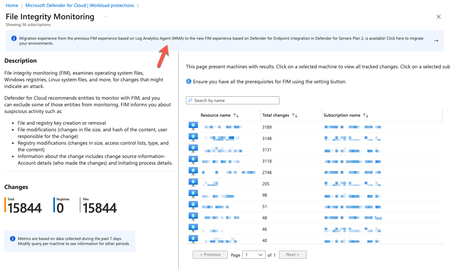
Introducing the new File Integrity Monitoring with Defender for Endpoint integration
As the final and most complex piece of this puzzle is the release of File Integrity Monitoring (FIM) powered by Defender for Endpoint, marks a significant milestone in the Defender for Servers simplification journey. The new FIM solution based on Defender for Endpoint offers real-time monitoring on critical file paths and system files, ensuring that any changes indicating a potential attack are detected immediately. In addition, FIM offers built-in support for relevant security regulatory compliance standards, such as PCI-DSS, CIS, NIST, and others, allowing you to maintain compliance.Agentless code scanning for GitHub and Azure DevOps (preview)
🚀 Start free preview ▶️ Watch a video on agentless code scanning Most security teams want to shift left. But for many developers, "shift left" sounds like "shift pain". Coordination. YAML edits with extra pipeline steps. Build slowdowns. More friction while they're trying to go fast. 🪛 Pipeline friction YAML edits with extra steps ⏱️ Build slowdowns More friction, less speed 🧩 Complex coordination Too many moving parts That's the tension we wanted to solve. With agentless code scanning in Defender for Cloud, you get broad visibility into code and infrastructure risks across GitHub and Azure DevOps - without touching your CI/CD pipelines or installing anything. ✨ Just connect your environment. We handle the rest. Already in preview, here's what's new Agentless code scanning was released in November 2024, and we're expanding the preview with capabilities to make it more actionable, customizable, and scalable: ✅ GitHub & Azure DevOps Connect your GitHub org and scan every repository automatically 🎯 Scoping controls Choose exactly which orgs, projects, and repos to scan 🔍 Scanner selection Enable code scanning, IaC scanning, or both 🧰 UI and REST API Manage at scale, programmatically or in-portal or Cloud portal 🎁 Available for free during the preview under Defender CSPM How agentless code scanning works Agentless code scanning runs entirely outside your pipelines. Once a connector has been created, Defender for Cloud automatically discovers your repositories, pulls the latest code, scans for security issues, and publishes findings as security recommendations - every day. Here's the flow: 1 Discover Repositories in GitHub or Azure DevOps are discovered using a built-in connector. 2 Retrieve The latest commit from the default branch is pulled immediately, then re-scanned daily. 3 Analyze Built-in scanners run in our environment: Code Scanning – looks for insecure patterns, bad crypto, and unsafe functions (e.g., `pickle.loads`, `eval()`) using Bandit and ESLint. Infrastructure as Code (IaC) – detects misconfigurations in Terraform, Bicep, ARM templates, CloudFormation, Kubernetes manifests, Dockerfiles, and more using Checkov and Template Analyzer. 4 Publish Findings appear as Security recommendations in Defender for Cloud, with full context: file path, line number, rule ID, and guidance to fix. Get started in under a minute 1 In Defender for Cloud, go to Environment settings → DevOps Security 2 Add a connector: Azure DevOps – requires Azure Security Admin and ADO Project Collection Admin GitHub – requires Azure Security Admin and GitHub Org Owner to install the Microsoft Security DevOps app 3 Choose your scanning scope and scanners 4 Click Save – and we'll run the first scan immediately s than a minute No pipeline configuration. No agent installed. No developer effort. Do I still need in-pipeline scanning? Short answer: yes - if you want depth and speed in the development workflow. Agentless scanning gives you fast, wide coverage. But Defender for Cloud also supports in-pipeline scanning using Microsoft Security DevOps (MSDO) command line application for Azure DevOps or GitHub Action. Each method has its own strengths. Here's how to think about when to use which - and why many teams choose both: When to use... ☁️ Agentless Scanning 🏗️ In-Pipeline Scanning Visibility Quickly assess all repos at org-level Scans and enforce every PR and commit Setup Requires only a connector Requires pipeline (YAML) edits Dev experience No impact on build time Inline feedback inside PRs and builds Granularity Repo-level control with code and IaC scanners Fine-tuned control per tool or branch Depth Default branch scans, no build context Full build artifact, container, and dependency scanning 💡 Best practice: start broad with agentless. Go deeper with in-pipeline scans where "break the build" makes sense. Already using GitHub Advanced Security (GHAS)? GitHub Advanced Security (GHAS) includes built-in scanning for secrets, CodeQL, and open-source dependencies - directly in GitHub and Azure DevOps. You don't need to choose. Defender for Cloud complements GHAS by: Surfaces GHAS findings inside Defender for Cloud's Security recommendations Adds broader context across code, infrastructure, and identity Requires no extra setup - findings flow in through the connector You get centralized visibility, even if your teams are split across tools. One console. Full picture. Core scenarios you can tackle today 🛡️ Catch IaC misconfigurations early Scan for critical misconfigurations in Terraform, ARM, Bicep, Dockerfiles, and Kubernetes manifests. Flag issues like public storage access or open network rules before they're deployed. 🎯 Bring code risk into context All findings appear in the same portal you use for VM and container security. No more jumping between tools - triage issues by risk, drill into the affected repository and file, and route them to the right owner. 🔍 Focus on what matters Customize which scanners run and where. Continuously scan production repositories. Skip forks. Run scoped PoCs. Keep pace as repositories grow - new ones are auto-discovered. What you'll see - and where All detected security issues show up as security recommendations in the recommendations and DevOps Security blades in Defender for Cloud. Every recommendation includes: ✅ Affected repository, branch, file path, and line number 🛠️ The scanner that found it 💡 Clear guidance to fix What's next We're not stopping here. These are already in development: 🔐 Secret scanning Identify leaked credentials alongside code and IaC findings 📦 Dependency scanning Open-source dependency scanning (SCA) 🌿 Multi-branch support Scan protected and non-default branches Follow updates in our Tech Community and release notes. Try it now - and help us shape what comes next Connect GitHub or Azure DevOps to Defender for Cloud (free during preview) and enable agentless code scanning View your discovered DevOps resources in the Inventory or DevOps Security blades Enable scanning and review recommendations Microsoft Defender for Cloud → Recommendations Shift left without slowing down. Start scanning smarter with agentless code scanning today. Helpful resources to learn more Learn more in the Defender for Cloud in the Field episode on agentless code scanning Overview of Microsoft Defender for Cloud DevOps security Agentless code scanning - configuration, capabilities, and limitations Set up in-pipeline scanning in: Azure DevOps GitHub action Other CI/CD pipeline tools (Jenkins, BitBucket Pipelines, Google Cloud Build, Bamboo, CircleCI, and more)Unlocking API visibility: Defender for Cloud Expands API security to Function Apps and Logic Apps
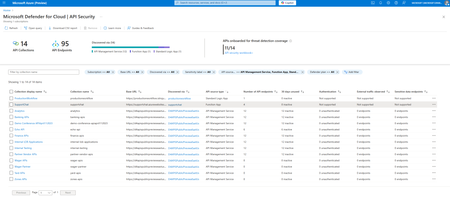
APIs are the front door to modern cloud applications and increasingly, a top target for attackers. According to the May 2024 Gartner® Market Guide for API Protection: “Current data indicates that the average API breach leads to at least 10 times more leaked data than the average security breach.” This makes comprehensive API visibility and governance a critical priority for security teams and cloud-first enterprises. We’re excited to announce that Microsoft Defender for Cloud now supports API discovery and security posture management for APIs hosted in Azure App Services, including Function Apps and Logic Apps. In addition to securing APIs published behind Azure API Management (APIM), Defender for Cloud can now automatically discover and provide posture insights for APIs running within serverless functions and Logic App workflows. Enhancing API security coverage across Azure This new capability builds on existing support for APIs behind Azure API Management by extending discovery and posture management to APIs hosted directly in compute environments like Azure Functions and Logic Apps, areas that often lack centralized visibility. By covering these previously unmonitored endpoints, security teams gain a unified view of their entire API landscape, eliminating blind spots outside of the API gateway. Key capabilities API discovery and inventory Automatically detect and catalog APIs hosted in Function Apps and Logic Apps, providing a unified inventory of APIs across your Azure environment. Shadow API identification Uncover undocumented or unmanaged APIs that lack visibility and governance—often the most vulnerable entry points for attackers. Security posture assessment Continuously assess APIs for misconfigurations and weaknesses. Identify unused or unencrypted APIs that could increase risk exposure. Cloud Security Explorer integration Investigate API posture and prioritize risks using contextual insights from Defender for Cloud’s Cloud Security Explorer. Why API discovery and security are critical for CNAPP For security leaders and architects, understanding and reducing the cloud attack surface is paramount. APIs, especially those deployed outside of centralized gateways, can become dangerous blind spots if they’re not discovered and governed. Modern cloud-native applications rely heavily on APIs, so a Cloud-Native Application Protection Platform (CNAPP) must include API visibility and posture management to be truly effective. By integrating API discovery and security into the Defender for Cloud CNAPP platform, this new capability helps organizations: Illuminate hidden risks by discovering APIs that were previously unmanaged or unknown. Reduce the attack surface by identifying and decommissioning unused or dormant APIs. Strengthen governance by extending API visibility beyond traditional API gateways. Advance to holistic CNAPP coverage by securing APIs alongside infrastructure, workloads, identities, and data. Availability and getting started This new API security capability is available in public preview to all Microsoft Defender for Cloud Security Posture Management (CSPM) customers at no additional cost. If you’re already using Defender for Cloud’s CSPM features, you can start taking advantage of API discovery and posture management right away. To get started, simply enable the API Security Posture Management extension in your Defender for Cloud CSPM settings. When enabled, Defender for Cloud scans Function App and Logic App APIs in your subscriptions, presenting relevant findings such as security recommendations and posture insights in the Defender for Cloud portal. Helpful resources Enable the API security posture extension Learn more in the Defender for Cloud documentation1.3KViews2likes0CommentsGuidance for handling CVE-2025-31324 using Microsoft Security capabilities
Short Description Recently, a CVSS 10 vulnerability, CVE-2025-31324, affecting the "Visual Composer" component of the SAP NetWeaver application server, has been published, putting organizations at risk. In this blog post, we will show you how to effectively manage this CVE if your organization is affected by it. Exploiting this vulnerability involves sending a malicious POST request to the "/developmentserver/metadatauploader" endpoint of the SAP NetWeaver application server, which allows allow arbitrary file upload and execution. Impact: This vulnerability allows attackers to deploy a webshell and execute arbitrary commands on the SAP server with the same permissions as the SAP service. This specific SAP product is typically used in large organizations, on Linux and Windows servers across on-prem and cloud environments - making the impact of this vulnerability significant. Microsoft have already observed active exploits of this vulnerability in the wild, highlighting the urgency of addressing this issue. Mapping CVE-2025-31324 in Your Organization The first step in managing an incident is to map affected software within your organization’s assets. Using the Vulnerability Page Information on this CVE, including exposed devices and software in your organization, is available from the vulnerability page for CVE-2025-31324. Using Advanced Hunting This query searches software vulnerable to the this CVE and summarizes them by device name, OS version and device ID: DeviceTvmSoftwareVulnerabilities | where CveId == "CVE-2025-31324" | summarize by DeviceName, DeviceId, strcat(OSPlatform, " ", OSVersion), SoftwareName, SoftwareVersion To map the presence of additional, potentially vulnerable SAP NetWeaver servers in your environment, you can use the following Advanced Hunting query: *Results may be incomplete due to reliance on activity data, which means inactive instances of the application - those installed but not currently running, might not be included in the report. DeviceProcessEvents | where (FileName == "disp+work.exe" and ProcessVersionInfoProductName == "SAP NetWeaver") or FileName == "disp+work" | distinct DeviceId, DeviceName, FileName, ProcessVersionInfoProductName, ProcessVersionInfoProductVersion Where available, the ProcessVersionInfoProductVersion field contains the version of the SAP NetWeaver software. Optional: Utilizing software inventory to map devices is advisable even when a CVE hasn’t been officially published or when there’s a specific requirement to upgrade a particular package and version. This query searches for devices that have a vulnerable versions installed (you can use this link to open the query in your environment): DeviceTvmSoftwareInventory | where SoftwareName == "netweaver_application_server_visual_composer" | parse SoftwareVersion with Major:int "." Minor:int "." BuildDate:datetime "." rest:string | extend IsVulnerable = Minor < 5020 or BuildDate < datetime(2025-04-18) | project DeviceId, DeviceName, SoftwareVendor, SoftwareName, SoftwareVersion, IsVulnerable Using a dedicated scanner You can leverage Microsoft’s lightweight scanner to validate if your SAP NetWeaver application is vulnerable. This scanner probes the vulnerable endpoint without actively exploiting it. Recommendations for Mitigation and Best Practices Mitigating risks associated with vulnerabilities requires a combination of proactive measures and real-time defenses. Here are some recommendations: Update NetWeaver to a Non-Vulnerable Version: All NetWeaver 7.x versions are vulnerable. For versions 7.50 and above, support packages SP027 - SP033 have been released and should be installed. Versions 7.40 and below do not receive new support packages and should implement alternative mitigations. JIT (Just-In-Time) Access: Cloud customers using Defender for Servers P2 can utilize our "JIT" feature to protect their environment from unnecessary ports and risks. This feature helps secure your environment by limiting exposure to only the necessary ports. The Microsoft research team has identified common ports that are potential to be used by these components, so you can check or use JIT for these. It is important to mention that JIT can be used for any port, but these are the most common ones. Learn more about the JIT capability Ports commonly used by the vulnerable application as observed by Microsoft: 80, 443, 50000, 50001, 1090, 5000, 8000, 8080, 44300, 44380 Active Exploitations To better support our customers in the event of a breach, we are expanding our detection framework to identify and alert you about the exploitation of this vulnerability across all operating systems (for MDE customers). These detectors, as all Microsoft detections, are also connected to Automatic Attack Disruption, our autonomous protection vehicle. In cases where these alerts, alongside other signals, will allow for high confidence of an ongoing attack, automatic actions will be taken to contain the attack and prevent further progressions of the attack. Coverage and Detections Currently, our solutions support coverage of CVE-2025-31324 for Windows and Linux devices that are onboarded to MDE (in both MDE and MDC subscriptions). To further expand our support, Microsoft Defender Vulnerability management is currently deploying additional detection mechanisms. This blog will be updated with any changes and progress. Conclusion By following these guidelines and utilizing end-to-end integrated Microsoft Security products, organizations can better prepare for, prevent and respond to attacks, ensuring a more secure and resilient environment. While the above process provides a comprehensive approach to protecting your organization, continual monitoring, updating, and adapting to new threats are essential for maintaining robust security.6.6KViews0likes0Comments