admincenter
3 Topics
Locked out of Microsoft 365 Business Tenant
I am the sole global admin for my Microsoft 365 Business tenant and I have been completely locked out due to an MFA issue. I cannot access the admin portal, cannot reset MFA, and cannot verify my identity through the automated system. When I call Microsoft support, the automated system incorrectly states that I am not a global admin and immediately disconnects. All UK support numbers (0800 026 0329, 0344 800 6006, etc.) hang up instantly before reaching an agent. No callbacks have been received despite multiple requests. I now have an open case with the Data Protection team: Microsoft 365 Data Protection – TrackingID#2609030040002192 This situation has caused: Business disruption Financial loss Inability to manage users or services Customer service impact Complete loss of administrative control over our tenant I urgently need escalation to the Data Protection team for identity verification and MFA reset. The normal support channels are not functioning, and I cannot reach a human through any published phone number. Any assistance or escalation from Microsoft moderators or engineers would be greatly appreciated. Thank you.306Views0likes1Comment
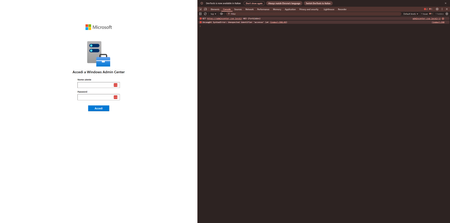
Uncaught SyntaxError in the Italian version of Login Page
Good morning, We've just installed the latest version of Windows Admin Center (2410) and when we try to login from the HTML form, we can't login and we get this error in console: Uncaught SyntaxError: Unexpected identifier 'accesso' (at (index):398:49) In fact, if you go to the exact line there is a syntax error due to the Italian translation of the string that adds a ' character that is not escaped. Is it possible to fix it in order to use the System language? Ty176Views0likes0Comments
Windows Admin Center - Unable to progress past "Check Network adapters" in Azure Stack HCI Cluster
Strange one, I have access to two Admin Center's (Both 2103.2) that are in difference domains. These domains have a forest level two way trust. When I attempt to build An Azure Stack HCI Cluster using an Admin Center that is on the same subnet & domain as the nodes that will be in the Azure Stack HCI Cluster, I cannot progress further then 2.1 Check Network adapters (attached picture). BUT, if i attempt to build using the Admin Center using the Admin Center that is on a different subnet (using the same credentials) & on another domain I can get past 2.1 Check Network adapters.4.5KViews0likes1Comment