well architected
129 TopicsDesigning Reliable Health Check Endpoints for IIS Behind Azure Application Gateway
Why Health Probes Matter in Azure Application Gateway Azure Application Gateway relies entirely on health probes to determine whether backend instances should receive traffic. If a probe: Receives a non‑200 response Times out Gets redirected Requires authentication …the backend is marked Unhealthy, and traffic is stopped—resulting in user-facing errors. A healthy IIS application does not automatically mean a healthy Application Gateway backend. Failure Flow: How a Misconfigured Health Probe Leads to 502 Errors One of the most confusing scenarios teams encounter is when the IIS application is running correctly, yet users intermittently receive 502 Bad Gateway errors. This typically happens when health probes fail, causing Azure Application Gateway to mark backend instances as Unhealthy and stop routing traffic to them. The following diagram illustrates this failure flow. Failure Flow Diagram (Probe Fails → Backend Unhealthy → 502) Key takeaway: Most 502 errors behind Azure Application Gateway are not application failures—they are health probe failures. What’s Happening Here? Azure Application Gateway periodically sends health probes to backend IIS instances. If the probe endpoint: o Redirects to /login o Requires authentication o Returns 401 / 403 / 302 o Times out the probe is considered failed. After consecutive failures, the backend instance is marked Unhealthy. Application Gateway stops forwarding traffic to unhealthy backends. If all backend instances are unhealthy, every client request results in a 502 Bad Gateway—even though IIS itself may still be running. This is why a dedicated, lightweight, unauthenticated health endpoint is critical for production stability. Common Health Probe Pitfalls with IIS Before designing a solution, let’s look at what commonly goes wrong. 1. Probing the Root Path (/) Many IIS applications: Redirect / → /login Require authentication Return 401 / 302 / 403 Application Gateway expects a clean 200 OK, not redirects or auth challenges. 2. Authentication-Enabled Endpoints Health probes do not support authentication headers. If your app enforces: Windows Authentication OAuth / JWT Client certificates …the probe will fail. 3. Slow or Heavy Endpoints Probing a controller that: Calls a database Performs startup checks Loads configuration can cause intermittent failures, especially under load. 4. Certificate and Host Header Mismatch TLS-enabled backends may fail probes due to: Missing Host header Incorrect SNI configuration Certificate CN mismatch Design Principles for a Reliable IIS Health Endpoint A good health check endpoint should be: Lightweight Anonymous Fast (< 100 ms) Always return HTTP 200 Independent of business logic Client Browser | | HTTPS (Public DNS) v +-------------------------------------------------+ | Azure Application Gateway (v2) | | - HTTPS Listener | | - SSL Certificate | | - Custom Health Probe (/health) | +-------------------------------------------------+ | | HTTPS (SNI + Host Header) v +-------------------------------------------------------------------+ | IIS Backend VM | | | | Site Bindings: | | - HTTPS : app.domain.com | | | | Endpoints: | | - /health (Anonymous, Static, 200 OK) | | - /login (Authenticated) | | | +-------------------------------------------------------------------+ Azure Application Gateway health probe architecture for IIS backends using a dedicated /health endpoint. Azure Application Gateway continuously probes a dedicated /health endpoint on each IIS backend instance. The health endpoint is designed to return a fast, unauthenticated 200 OK response, allowing Application Gateway to reliably determine backend health while keeping application endpoints secure. Step 1: Create a Dedicated Health Endpoint Recommended Path 1 /health This endpoint should: Bypass authentication Avoid redirects Avoid database calls Example: Simple IIS Health Page Create a static file: 1 C:\inetpub\wwwroot\website\health\index.html Static Fast Zero dependencies Step 2: Exclude the Health Endpoint from Authentication If your IIS site uses authentication, explicitly allow anonymous access to /health. web.config Example 1 <location path="health"> 2 <system.webServer> 3 <security> 4 <authentication> 5 <anonymousAuthentication enabled="true" /> 6 <windowsAuthentication enabled="false" /> 7 </authentication> 8 </security> 9 </system.webServer> 10 </location> ⚠️ This ensures probes succeed even if the rest of the site is secured. Step 3: Configure Azure Application Gateway Health Probe Recommended Probe Settings Setting Value Protocol HTTPS Path /health Interval 30 seconds Timeout 30 seconds Unhealthy threshold 3 Pick host name from backend Enabled Why “Pick host name from backend” matters This ensures: Correct Host header Proper certificate validation Avoids TLS handshake failures Step 4: Validate Health Probe Behavior From Application Gateway Navigate to Backend health Ensure status shows Healthy Confirm response code = 200 From the IIS VM 1 Invoke-WebRequest https://your-app-domain/health Expected: 1 StatusCode : 200 Troubleshooting Common Failures Probe shows Unhealthy but app works ✔ Check authentication rules ✔ Verify /health does not redirect ✔ Confirm HTTP 200 response TLS or certificate errors ✔ Ensure certificate CN matches backend domain ✔ Enable “Pick host name from backend” ✔ Validate certificate is bound in IIS Intermittent failures ✔ Reduce probe complexity ✔ Avoid DB or service calls ✔ Use static content Production Best Practices Use separate health endpoints per application Never reuse business endpoints for probes Monitor probe failures as early warning signs Test probes after every deployment Keep health endpoints simple and boring Final Thoughts A reliable health check endpoint is not optional when running IIS behind Azure Application Gateway—it is a core part of application availability. By designing a dedicated, authentication‑free, lightweight health endpoint, you can eliminate a large class of false outages and significantly improve platform stability. If you’re migrating IIS applications to Azure or troubleshooting unexplained Application Gateway failures, start with your health probe—it’s often the silent culprit.143Views0likes0Comments
Secure HTTP‑Only AKS Ingress with Azure Front Door Premium, Firewall DNAT, and Private AGIC
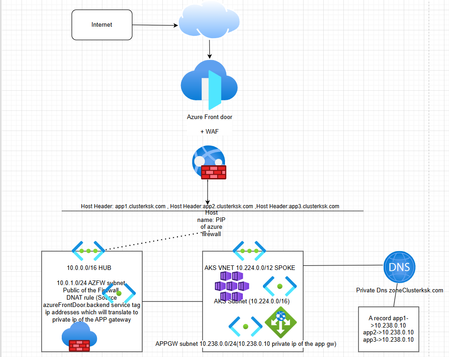
Reference architecture and runbook (Part 1: HTTP-only) for Hub-Spoke networking with private Application Gateway (AGIC), Azure Firewall DNAT, and Azure Front Door Premium (WAF) 0. When and Why to Use This Architecture Series note: This document is Part 1 and uses HTTP to keep the focus on routing and control points. A follow-up Part 2 will extend the same architecture to HTTPS (end-to-end TLS) with the recommended certificate and policy configuration. What this document contains Scope: Architecture overview and traffic flow, build/run steps, sample Kubernetes manifests, DNS configuration, and validation steps for end-to-end connectivity through Azure Front Door → Azure Firewall DNAT → private Application Gateway (AGIC) → AKS. Typical scenarios Private-by-default Kubernetes ingress: You want application ingress without exposing a public Application Gateway or public load balancer for the cluster. Centralized hub ingress and inspection: You need a shared Hub VNet pattern with centralized inbound control (NAT, allow-listing, inspection) for one or more spoke workloads. Global entry point + edge WAF: You want a globally distributed frontend with WAF, bot/rate controls, and consistent L7 policy before traffic reaches your VNets. Controlled origin exposure: You need to ensure only the edge service can reach your origin (firewall public IP), and all other inbound sources are blocked. Key benefits (the “why”) Layered security: WAF blocks common web attacks at the edge; the hub firewall enforces network-level allow lists and DNAT; App Gateway applies L7 routing to AKS. Reduced public attack surface: Application Gateway and AKS remain private; only Azure Front Door and the firewall public IP are internet-facing. Hub-spoke scalability: The hub pattern supports multiple spokes and consistent ingress controls across workloads. Operational clarity: Clear separation of responsibilities (edge policy vs. network boundary vs. app routing) makes troubleshooting and governance easier. When not to use this Simple dev/test exposure: If you only need quick internet access, a public Application Gateway or public AKS ingress may be simpler and cheaper. You require end-to-end TLS in this lab: This runbook is HTTP-only for learning; production designs should use HTTPS throughout. You do not need hub centralization: If there is only one workload and no hub-spoke standardization requirement, the firewall hop may be unnecessary. Prerequisites and assumptions Series scope: Part 1 is HTTP-only to focus on routing and control points. Part 2 will cover HTTPS (end-to-end TLS) and the certificate/policy configuration typically required for production deployments. Permissions: Ability to create VNets, peerings, Azure Firewall + policy, Application Gateway, AKS, and Private DNS (typically Contributor on the subscription/resource groups). Networking: Hub-Spoke VNets with peering configured to allow forwarded traffic, plus name resolution via Private DNS. Tools: Azure CLI, kubectl, and permission to enable the AKS AGIC addon. Architecture Diagram 1. Architecture Components and Workflow Workflow (end-to-end request path) Client → Azure Front Door (WAF + TLS, public endpoint) → Azure Firewall public IP (Hub VNet; DNAT) → private Application Gateway (Spoke VNet; AGIC-managed) → AKS service/pods. 1.1 Network topology (Hub-Spoke) Connectivity Hub and Spoke VNets are connected via VNet peering with forwarded traffic allowed so Azure Front Door traffic can traverse Azure Firewall DNAT to the private Application Gateway, and Hub-based validation hosts can resolve private DNS and reach Spoke private IPs. Hub VNet (10.0.0.0/16) Purpose: Central ingress and shared services. The Hub hosts the security boundary (Azure Firewall) and optional connectivity/management components used to reach and validate private resources in the Spoke. Azure Firewall in AzureFirewallSubnet (10.0.1.0/24); example private IP 10.0.1.4 with a Public IP used as the Azure Front Door origin and for inbound DNAT. Azure Bastion (optional) in AzureBastionSubnet (10.0.2.0/26) for browser-based access to test VMs without public IPs. Test VM subnet (optional) testvm-subnet (10.0.3.0/24) for in-VNet validation (for example, nslookup and curl against the private App Gateway hostname). Spoke VNet (10.224.0.0/12) Purpose: Hosts private application workloads (AKS) and the private layer-7 ingress (Application Gateway) that is managed by AGIC. AKS subnet aks-subnet: 10.224.0.0/16 (node pool subnet for the AKS cluster). Application Gateway subnet appgw-subnet: 10.238.0.0/24 (dedicated subnet for a private Application Gateway; example private frontend IP 10.238.0.10). AKS + AGIC: AGIC programs listeners/rules on the private Application Gateway based on Kubernetes Ingress resources. 1.2 Azure Front Door (Frontend) Role: Public entry point for the application, providing global anycast ingress, TLS termination, and Layer 7 routing to the origin (Azure Firewall public IP) while keeping Application Gateway private. SKU: Use Azure Front Door Premium when you need WAF plus advanced security/traffic controls; Standard also supports WAF, but Premium is typically chosen for broader capabilities and enterprise patterns. WAF support: Azure Front Door supports WAF with managed rule sets and custom rules (for example, allow/deny lists, geo-matching, header-based controls, and rate limiting policies). What WAF brings: Adds edge protection against common web attacks (for example OWASP Top 10 patterns), reduces attack surface before traffic reaches the Hub, and centralizes L7 policy enforcement for all apps onboarded to Front Door. Security note: Apply WAF policy at the edge (managed + custom rules) to block malicious requests early; origin access control is enforced at the Azure Firewall layer (see Section 1.3). 1.3 Azure Firewall Premium (Hub security boundary) Role: Security boundary in the Hub that exposes a controlled public ingress point (Firewall Public IP) for Azure Front Door origins, then performs DNAT to the private Application Gateway in the Spoke. Why Premium: Use Firewall Premium when you need advanced threat protection beyond basic L3/L4 controls, while keeping the origin private. IDPS (intrusion detection and prevention): Premium can add signature-based detection and prevention to help identify and block known threats as traffic traverses the firewall. TLS inspection (optional): Premium supports TLS inspection patterns so you can apply threat detection to encrypted flows when your compliance and certificate management model allows it. Premium feature note (DNAT scenarios): These security features still apply when Azure Firewall is used for DNAT (public IP) scenarios. IDPS operates in all traffic directions; however, Azure Firewall does not perform TLS inspection on inbound internet traffic, so the effectiveness of IDPS for inbound encrypted flows is inherently limited. That said, Threat Intelligence enforcement still applies, so protection against known malicious IPs and domains remains in effect. Hardening guidance: Enforce origin lockdown here by restricting the DNAT listener to AzureFrontDoor.Backend (typically via an IP Group) so only Front Door can reach the firewall public IP; use Front Door WAF as the complementary L7 control plane at the edge. 2. Build Steps (Command Runbook) 2.1 Set variables $HUB_RG="HUB-VNET-Rgp" $AKS_RG="AKS-VNET-RGp" $LOCATION="eastus" $HUB_VNET="Hub-VNet" $SPOKE_VNET="Spoke-AKS-VNet" $APPGW_NAME="spoke-appgw" $APPGW_PRIVATE_IP="10.238.0.10" Note: The commands below are formatted for PowerShell. When capturing output from an az command, use $VAR = (az ...). 2.2 Create resource groups az group create --name $HUB_RG --location $LOCATION az group create --name $AKS_RG --location $LOCATION 2.3 Create Hub VNet + AzureFirewallSubnet + Bastion subnet + VM subnet # Create Hub VNet with AzureFirewallSubnet az network vnet create -g $HUB_RG -n $HUB_VNET -l $LOCATION --address-prefixes 10.0.0.0/16 --subnet-name AzureFirewallSubnet --subnet-prefixes 10.0.1.0/24 # Create Azure Bastion subnet (optional) az network vnet subnet create -g $HUB_RG --vnet-name $HUB_VNET -n "AzureBastionSubnet" --address-prefixes "10.0.2.0/26" # Deploy Bastion (optional; requires AzureBastionSubnet) az network public-ip create -g $HUB_RG -n "bastion-pip" --sku Standard --allocation-method Static az network bastion create -g $HUB_RG -n "hub-bastion" --vnet-name $HUB_VNET --public-ip-address "bastion-pip" -l $LOCATION # Create test VM subnet for validation az network vnet subnet create -g $HUB_RG --vnet-name $HUB_VNET -n "testvm-subnet" --address-prefixes "10.0.3.0/24" # Create a Windows test VM in the Hub (no public IP) $VM_NAME = "win-testvm-hub" $ADMIN_USER = "adminuser" $ADMIN_PASS = "" $NIC_NAME = "win-testvm-nic" az network nic create --resource-group $HUB_RG --location $LOCATION --name $NIC_NAME --vnet-name $HUB_VNET --subnet "testvm-subnet" az vm create --resource-group $HUB_RG --name $VM_NAME --location $LOCATION --nics $NIC_NAME --image MicrosoftWindowsServer:WindowsServer:2022-datacenter-azure-edition:latest --admin-username $ADMIN_USER --admin-password $ADMIN_PASS --size Standard_D2s_v5 2.4 Create Spoke VNet + AKS subnet + App Gateway subnet # Create Spoke VNet az network vnet create -g $AKS_RG -n $SPOKE_VNET -l $LOCATION --address-prefixes 10.224.0.0/12 # Create AKS subnet az network vnet subnet create -g $AKS_RG --vnet-name $SPOKE_VNET -n aks-subnet --address-prefixes 10.224.0.0/16 # Create Application Gateway subnet az network vnet subnet create -g $AKS_RG --vnet-name $SPOKE_VNET -n appgw-subnet --address-prefixes 10.238.0.0/24 2.5 Validate and delegate the App Gateway subnet (required) # Validate subnet exists az network vnet subnet show -g $AKS_RG --vnet-name $SPOKE_VNET -n appgw-subnet az network vnet subnet show -g $AKS_RG --vnet-name $SPOKE_VNET -n appgw-subnet --query addressPrefix -o tsv # Delegate subnet for Application Gateway (required) az network vnet subnet update -g $AKS_RG --vnet-name $SPOKE_VNET -n appgw-subnet --delegations Microsoft.Network/applicationGateways 2.6 Create the private Application Gateway az network application-gateway create -g $AKS_RG -n $APPGW_NAME --sku Standard_v2 --capacity 2 --vnet-name $SPOKE_VNET --subnet appgw-subnet --frontend-port 80 --http-settings-protocol Http --http-settings-port 80 --routing-rule-type Basic --priority 100 --private-ip-address $APPGW_PRIVATE_IP 2.7 Create AKS (public, Azure CNI overlay) $AKS_SUBNET_ID = (az network vnet subnet show -g $AKS_RG --vnet-name $SPOKE_VNET -n aks-subnet --query id -o tsv) $AKS_NAME = "aks-public-overlay" az aks create -g $AKS_RG -n $AKS_NAME -l $LOCATION --enable-managed-identity --network-plugin azure --network-plugin-mode overlay --vnet-subnet-id $AKS_SUBNET_ID --node-count 2 --node-vm-size Standard_DS3_v2 --dns-name-prefix aks-overlay --generate-ssh-keys 2.8 Enable AGIC and attach the existing Application Gateway $APPGW_ID = (az network application-gateway show -g $AKS_RG -n $APPGW_NAME --query id -o tsv) az aks enable-addons -g $AKS_RG -n $AKS_NAME --addons ingress-appgw --appgw-id $APPGW_ID 2.9 Connect to the cluster and validate AGIC az aks get-credentials -g $AKS_RG -n $AKS_NAME --overwrite-existing kubectl get nodes # Validate AGIC is running kubectl get pods -n kube-system | findstr ingress # Inspect AGIC logs (optional) $AGIC_POD = (kubectl get pod -n kube-system -l app=ingress-appgw -o jsonpath="{.items[0].metadata.name}") kubectl logs -n kube-system $AGIC_POD 2.10 Create and link Private DNS zone (Hub) and add an A record Create a Private DNS zone in the Hub, link it to both VNets, then create an A record for app1 pointing to the private Application Gateway IP. $PRIVATE_ZONE = "clusterksk.com" az network private-dns zone create -g $HUB_RG -n $PRIVATE_ZONE $HUB_VNET_ID = (az network vnet show -g $HUB_RG -n $HUB_VNET --query id -o tsv) $SPOKE_VNET_ID = (az network vnet show -g $AKS_RG -n $SPOKE_VNET --query id -o tsv) az network private-dns link vnet create -g $HUB_RG -n "link-hub-vnet" -z $PRIVATE_ZONE -v $HUB_VNET_ID -e false az network private-dns link vnet create -g $HUB_RG -n "link-spoke-aks-vnet" -z $PRIVATE_ZONE -v $SPOKE_VNET_ID -e false az network private-dns record-set a create -g $HUB_RG -z $PRIVATE_ZONE -n "app1" --ttl 30 az network private-dns record-set a add-record -g $HUB_RG -z $PRIVATE_ZONE -n "app1" -a $APPGW_PRIVATE_IP 2.11 Create VNet peering (Hub Spoke) az network vnet peering create -g $HUB_RG --vnet-name $HUB_VNET -n "HubToSpoke" --remote-vnet $SPOKE_VNET_ID --allow-vnet-access --allow-forwarded-traffic az network vnet peering create -g $AKS_RG --vnet-name $SPOKE_VNET -n "SpokeToHub" --remote-vnet $HUB_VNET_ID --allow-vnet-access --allow-forwarded-traffic 2.12 Deploy sample app + Ingress and validate App Gateway programming # Create namespace kubectl create namespace demo # Create Deployment + Service (PowerShell) @' apiVersion: apps/v1 kind: Deployment metadata: name: app1 namespace: demo spec: replicas: 2 selector: matchLabels: app: app1 template: metadata: labels: app: app1 spec: containers: - name: app1 image: hashicorp/http-echo:1.0 args: - "-text=Hello from app1 via AGIC" ports: - containerPort: 5678 --- apiVersion: v1 kind: Service metadata: name: app1-svc namespace: demo spec: selector: app: app1 ports: - port: 80 targetPort: 5678 type: ClusterIP '@ | Set-Content .\app1.yaml kubectl apply -f .\app1.yaml # Create Ingress (PowerShell) @' apiVersion: networking.k8s.io/v1 kind: Ingress metadata: name: app1-ing namespace: demo annotations: kubernetes.io/ingress.class: azure/application-gateway appgw.ingress.kubernetes.io/use-private-ip: "true" spec: rules: - host: app1.clusterksk.com http: paths: - path: / pathType: Prefix backend: service: name: app1-svc port: number: 80 '@ | Set-Content .\app1-ingress.yaml kubectl apply -f .\app1-ingress.yaml # Validate Kubernetes objects kubectl -n demo get deploy,svc,ingress kubectl -n demo describe ingress app1-ing # Validate App Gateway has been programmed by AGIC az network application-gateway show -g $AKS_RG -n $APPGW_NAME --query "{frontendIPConfigs:frontendIPConfigurations[].name,listeners:httpListeners[].name,rules:requestRoutingRules[].name,backendPools:backendAddressPools[].name}" -o json # If rules/listeners are missing, re-check AGIC logs from step 2.9 kubectl logs -n kube-system $AGIC_POD 2.13 Deploy Azure Firewall Premium + policy + public IP Firewall deployment (run after sample Ingress is created) $FWPOL_NAME = "hub-azfw-pol-test" $FW_NAME = "hub-azfw-test" $FW_PIP_NAME = "hub-azfw-pip" $FW_IPCONF_NAME = "azfw-ipconf" # Create Firewall Policy (Premium) az network firewall policy create -g $HUB_RG -n $FWPOL_NAME -l $LOCATION --sku Premium # Create Firewall public IP (Standard) az network public-ip create -g $HUB_RG -n $FW_PIP_NAME -l $LOCATION --sku Standard --allocation-method Static # Deploy Azure Firewall in Hub VNet and associate policy + public IP az network firewall create -g $HUB_RG -n $FW_NAME -l $LOCATION --sku AZFW_VNet --tier Premium --vnet-name $HUB_VNET --conf-name $FW_IPCONF_NAME --public-ip $FW_PIP_NAME --firewall-policy $FWPOL_NAME $FW_PUBLIC_IP = (az network public-ip show -g $HUB_RG -n $FW_PIP_NAME --query ipAddress -o tsv) $FW_PUBLIC_IP 2.14 (Optional) Validate from Hub test VM Optional: From the Hub Windows test VM (created in step 2.3), confirm app1.clusterksk.com resolves privately and the app responds through the private Application Gateway. # DNS should resolve to the private App Gateway IP nslookup app1.clusterksk.com # HTTP request should return the sample response (for example: "Hello from app1 via AGIC") curl http://app1.clusterksk.com # Browser validation (from the VM) # Open: http://app1.clusterksk.com 2.15 Restrict DNAT to Azure Front Door (IP Group + DNAT rule) $IPG_NAME = "ipg-afd-backend" $RCG_NAME = "rcg-dnat" $NATCOLL_NAME = "dnat-afd-to-appgw" $NATRULE_NAME = "afd80-to-appgw80" # 1) Get AzureFrontDoor.Backend IPv4 prefixes and create an IP Group $AFD_BACKEND_IPV4 = (az network list-service-tags --location $LOCATION --query "values[?name=='AzureFrontDoor.Backend'].properties.addressPrefixes[] | [?contains(@, '.')]" -o tsv) az network ip-group create -g $HUB_RG -n $IPG_NAME -l $LOCATION --ip-addresses $AFD_BACKEND_IPV4 # 2) Create a rule collection group for DNAT az network firewall policy rule-collection-group create -g $HUB_RG --policy-name $FWPOL_NAME -n $RCG_NAME --priority 100 # 3) Add NAT collection + DNAT rule (source = AFD IP Group, destination = Firewall public IP, 80 → 80) az network firewall policy rule-collection-group collection add-nat-collection -g $HUB_RG --policy-name $FWPOL_NAME --rule-collection-group-name $RCG_NAME --name $NATCOLL_NAME --collection-priority 1000 --action DNAT --rule-name $NATRULE_NAME --ip-protocols TCP --source-ip-groups $IPG_NAME --destination-addresses $FW_PUBLIC_IP --destination-ports 80 --translated-address $APPGW_PRIVATE_IP --translated-port 80 3. Azure Front Door Configuration In this section, we configure Azure Front Door Premium as the public frontend with WAF, create an endpoint, and route requests over HTTP (port 80) to the Azure Firewall public IP origin while preserving the host header (app1.clusterksk.com) for AGIC-based Ingress routing. Create Front Door profile: Create an Azure Front Door profile and choose Premium. Premium enables enterprise-grade edge features (including WAF and richer traffic/security controls) that you’ll use in this lab. Attach WAF: Enable/associate a WAF policy so requests are inspected at the edge (managed rules + any custom rules) before they’re allowed to reach the Azure Firewall origin. Create an endpoint: Add an endpoint name to create the public Front Door hostname (<endpoint>.azurefd.net) that clients will browse to in this lab. Create an origin group: Create an origin group to define how Front Door health-probes and load-balances traffic to one or more origins (for this lab, it will contain a single origin: the Firewall public IP). Add an origin: Add the Azure Firewall as the origin so Front Door forwards requests to the Hub entry point (Firewall Public IP), which then DNATs to the private Application Gateway. Origin type: Public IP address Public IP address: select the Azure Firewall public IP Origin protocol/port: HTTP, 80 Host header: app1.clusterksk.com Create a route: Create a route to connect the endpoint to the origin group and define the HTTP behaviors (patterns, accepted protocols, and forwarding protocol) used for this lab. Patterns to match: /* Accepted protocols: HTTP Forwarding protocol: HTTP only (this lab is HTTP-only) Then you need to add the Route Review + create, then wait for propagation: Select Review + create (or Create) to deploy the Front Door configuration, wait ~30–40 minutes for global propagation, then browse to http://<endpoint>.azurefd.net/. 4. Validation (Done Criteria) app1.clusterksk.com resolves to 10.238.0.10 from within the Hub/Spoke VNets (Private DNS link working). Azure Front Door can reach the origin over HTTP and returns a 200/expected response (origin health is healthy). Requests to http://app1.clusterksk.com/ (internal) and http://<your-front-door-domain>/ (external) are routed to app1-svc and return the expected http-echo text (Ingress + AGIC wiring correct). Author: Kumar shashi kaushal (Sr Digital cloud solutions architect Microsoft)248Views2likes0Comments
Proactive Reliability Series — Article 1: Fault Types in Azure
Welcome to the Proactive Reliability Series — a collection of articles dedicated to raising awareness about the importance of designing, implementing, and operating reliable solutions in Azure. Each article will focus on a specific area of reliability engineering: from identifying critical flows and setting reliability targets, to designing for redundancy, testing strategies, and disaster recovery. This series draws its foundation from the Reliability pillar of the Azure Well-Architected Framework, Microsoft's authoritative guidance for building workloads that are resilient to malfunction and capable of returning to a fully functioning state after a failure occurs. In the cloud, failures are not a matter of if but when. Whether it is a regional outage, an availability zone going dark, a misconfigured resource, or a downstream service experiencing degradation — your workload will eventually face adverse conditions. The difference between a minor blip and a major incident often comes down to how deliberately you have planned for failure. In this first article, we start with one of the most foundational practices: Fault Mode Analysis (FMA) — and the question that underpins it: what kinds of faults can actually happen in Azure? Disclaimer: The views expressed in this article are my own and do not represent the views or positions of Microsoft. This article is written in a personal capacity and has not been reviewed, endorsed, or approved by Microsoft. Why Fault Mode Analysis Matters Fault Mode Analysis is the practice of systematically identifying potential points of failure within your workload and its associated flows, and then planning mitigation actions accordingly. A key tenet of FMA is that in any distributed system, failures can occur regardless of how many layers of resiliency are applied. More complex environments are simply exposed to more types of failures. Given this reality, FMA allows you to design your workload to withstand most types of failures and recover gracefully within defined recovery objectives. If you skip FMA altogether, or perform an incomplete analysis, your workload is at risk of unpredicted behavior and potential outages caused by suboptimal design. But to perform FMA effectively, you first need to understand what kinds of faults can actually occur in Azure infrastructure — and that is where most teams hit a gap. Sample "Azure Fault Type" Taxonomy Azure infrastructure is complex and distributed, and while Microsoft invests heavily in reliability, faults can and do occur. These faults can range from large-scale global service outages to localized issues affecting a single VM. The following is a sample taxonomy of common Azure infrastructure fault types, categorized by their characteristics, likelihood, and mitigation strategies. The taxonomy is organized from a customer impact perspective — focusing on how fault types affect customer workloads and what mitigation options are available — rather than from an internal Azure engineering perspective. Some of these "faults" may not even be caused by an actual failure in Azure infrastructure. They can be caused by a lack of understanding of Azure service designed behaviors (e.g., underestimating the impact of Azure planned maintenance) or by Azure platform design decisions (e.g., capacity constraints). However, from a customer perspective, they all represent potential failure modes that need to be considered and mitigated when designing for reliability. The following table presents infrastructure fault types from a customer impact perspective: Disclaimer: This is an unofficial taxonomy sample of Azure infrastructure fault types. It is not an official Microsoft publication and is not officially supported, endorsed, or maintained by Microsoft. The fault type definitions, likelihood assessments, and mitigation recommendations are based on publicly available Azure documentation and general cloud architecture best practices, but may not reflect the most current Azure platform behavior. Always refer to official Azure documentation and Azure Service Health for authoritative guidance. The "Likelihood" values below are relative planning heuristics intended to help prioritize resilience investments. They are not statistical probabilities, do not represent Azure SLA commitments, and are not derived from official Azure reliability data. Fault Type Blast Radius Likelihood Mitigation Redundancy Level Requirements Service Fault (Global) Worldwide or Multiple Regions Very Low High Service Fault (Region) Single service in region Medium Region Redundancy Region Fault Single region Very Low Region Redundancy Partial Region Fault Multiple services in a single Region Low Region Redundancy Availability Zone Fault Single AZ within region Low Availability Zone Redundancy Single Resource Fault Single VM/instance High Resource Redundancy Platform Maintenance Fault Variable (resource to region) High Resource Redundancy, Maintenance Schedules Region Capacity Constraint Fault Single region Low Region Redundancy, Capacity Reservations Network POP Location Fault Network hardware Colocation site Low Site Redundancy In future articles we will examine each of these fault types in detail. For this first article, let's take a closer look at one that is often underestimated: the Partial Region Fault. Deep Dive: "Partial Region Fault" A Partial Region Fault is a fault affecting multiple Azure services within a single region simultaneously, typically due to shared regional infrastructure dependencies, regional network issues, or regional platform incidents. Sometimes, the number of affected services may be significant enough to resemble a full region outage — but the key distinction is that it is not a complete loss of the region. Some services may continue to operate normally, while others experience degradation or unavailability. Unlike Natural Disaster caused Region outage, in the documented cases referenced later in this article, such "Partial Region Faults" have historically been resolved within hours. Attribute Description Blast Radius Multiple services within a single region Likelihood Low Typical Duration Minutes to hours Fault Tolerance Options Multi-region architecture; cross-region failover Fault Tolerance Cost High Impact Severe Typical Cause Regional networking infrastructure failure affecting multiple services, regional storage subsystem degradation impacting dependent services, regional control plane issues affecting service management These faults are rare, but they can happen — and when they do, they can have a severe impact on customer solutions that are not architected for multi-region resilience. What makes Partial Region Faults particularly dangerous is that they fall into a blind spot in most teams' resilience planning. When organizations think about regional failures, they tend to think in binary terms: either a region is up or it is down. Disaster recovery runbooks are written around the idea of a full region outage — triggered by a natural disaster or a catastrophic infrastructure event — where the response is to fail over everything to a secondary region. But a Partial Region Fault is not a full region outage. It is something more insidious. A subset of services in the region degrades or becomes unavailable while others continue to function normally. Your VMs might still be running, but the networking layer that connects them is broken. Your compute is fine, but Azure Resource Manager — the control plane through which you manage everything — is unreachable. This partial nature creates several problems that teams rarely plan for: Failover logic may not trigger. Most automated failover mechanisms are designed to detect a complete loss of connectivity to a region. When only some services are affected, health probes may still pass, traffic managers may still route requests to the degraded region, and your failover automation may sit idle — while your users are already experiencing errors. Recovery is more complex. With a full region outage, the playbook is straightforward: fail over to the secondary region. With a partial fault, you may need to selectively fail over some services while others remain in the primary region — a scenario that few teams have tested and most architectures do not support gracefully. The real-world examples below illustrate this clearly. In each case, a shared infrastructure dependency — regional networking, Managed Identities, or Azure Resource Manager — experienced an issue that cascaded into a multi-service fault lasting hours. None of these were full region outages, yet the scope and duration of affected services was significant in each case: Switzerland North — Network Connectivity Impact (BT6W-FX0) A platform issue resulted in an impact to customers in Switzerland North who may have experienced service availability issues for resources hosted in the region. Attribute Value Date September 26–27, 2025 Region Switzerland North Time Window 23:54 UTC on 26 Sep – 21:59 UTC on 27 Sep 2025 Total Duration ~22 hours Services Impacted Multiple (network-dependent services in the region) According to the official Post Incident Review (PIR) published by Microsoft on Azure Status History, a platform issue caused network connectivity degradation affecting multiple network-dependent services across the Switzerland North region, with impact lasting approximately 22 hours. The full root cause analysis, timeline, and remediation steps are documented in the linked PIR below. 🔗 View PIR on Azure Status History East US and West US — Managed Identities and Dependent Services (_M5B-9RZ) A platform issue with the Managed Identities for Azure resources service impacted customers trying to create, update, or delete Azure resources, or acquire Managed Identity tokens in East US and West US regions. Attribute Value Date February 3, 2026 Regions East US, West US Time Window 00:10 UTC – 06:05 UTC on 03 February 2026 Total Duration ~6 hours Services Impacted Managed Identities + dependent services (resource create/update/delete, token acquisition) 🔗 View PIR on Azure Status History Azure Government — Azure Resource Manager Failures (ML7_-DWG) Customers using any Azure Government region experienced failures when attempting to perform service management operations through Azure Resource Manager (ARM). This included operations through the Azure Portal, Azure REST APIs, Azure PowerShell, and Azure CLI. Attribute Value Date December 8, 2025 Regions Azure Government (all regions) Time Window 11:04 EST (16:04 UTC) – 14:13 EST (19:13 UTC) Total Duration ~3 hours Services Impacted 20+ services (ARM and all ARM-dependent services) 🔗 View PIR on Azure Status History Wrapping Up Designing resilient Azure solutions requires understanding the full spectrum of potential infrastructure faults. The Partial Region Fault is just one of many fault types you should account for during your Failure Mode Analysis — but it is a powerful reminder that even within a single region, shared infrastructure dependencies can amplify a single failure into a multi-service outage. Use this taxonomy as a starting point for FMA when designing your Azure architecture. The area is continuously evolving as the Azure platform and industry evolve — watch the space and revisit your fault type analysis periodically. In the next article, we will continue exploring additional fault types from the taxonomy. Stay tuned. Authors & Reviewers Authored by Zoran Jovanovic, Cloud Solutions Architect at Microsoft. Peer Review by Catalina Alupoaie, Cloud Solutions Architect at Microsoft. Peer Review by Stefan Johner, Cloud Solutions Architect at Microsoft. References Azure Well-Architected Framework — Reliability Pillar Failure Mode Analysis Shared Responsibility for Reliability Azure Availability Zones Business Continuity and Disaster Recovery Transient Fault Handling Azure Service Level Agreements Azure Reliability Guidance by Service Azure Status History176Views0likes0CommentsGranting Azure Resources Access to SharePoint Online Sites Using Managed Identity
When integrating Azure resources like Logic Apps, Function Apps, or Azure VMs with SharePoint Online, you often need secure and granular access control. Rather than handling credentials manually, Managed Identity is the recommended approach to securely authenticate to Microsoft Graph and access SharePoint resources. High-level steps: Step 1: Enable Managed Identity (or App Registration) Step 2: Grant Sites.Selected Permission in Microsoft Entra ID Step 3: Assign SharePoint Site-Level Permission Step 1: Enable Managed Identity (or App Registration) For your Azure resource (e.g., Logic App): Navigate to the Azure portal. Go to the resource (e.g., Logic App). Under Identity, enable System-assigned Managed Identity. Note the Object ID and Client ID (you’ll need the Client ID later). Alternatively, use an App Registration if you prefer a multi-tenant or reusable identity. How to register an app in Microsoft Entra ID - Microsoft identity platform | Microsoft Learn Step 2: Grant Sites.Selected Permission in Microsoft Entra Open Microsoft Entra ID > App registrations. Select your Logic App’s managed identity or app registration. Under API permissions, click Add a permission > Microsoft Graph. Select Application permissions and add: Sites.Selected Click Grant admin consent. Note: Sites.Selected ensures least-privilege access — you must explicitly allow site-level access later. Step 3: Assign SharePoint Site-Level Permission SharePoint Online requires site-level consent for apps with Sites.Selected. Use the script below to assign access. Note: You must be a SharePoint Administrator and have the Sites.FullControl.All permission when running this. PowerShell Script: # Replace with your values $application = @{ id = "{ApplicationID}" # Client ID of the Managed Identity displayName = "{DisplayName}" # Display name (optional but recommended) } $appRole = "write" # Can be "read" or "write" $spoTenant = "contoso.sharepoint.com" # Sharepoint site host $spoSite = "{Sitename}" # Sharepoint site name # Site ID format for Graph API $spoSiteId = $spoTenant + ":/sites/" + $spoSite + ":" # Load Microsoft Graph module Import-Module Microsoft.Graph.Sites # Connect with appropriate permissions Connect-MgGraph -Scope Sites.FullControl.All # Grant site-level permission New-MgSitePermission -SiteId $spoSiteId -Roles $appRole -GrantedToIdentities @{ Application = $application } That's it, Your Logic App or Azure resource can now call Microsoft Graph APIs to interact with that specific SharePoint site (e.g., list files, upload documents). You maintain centralized control and least-privilege access, complying with enterprise security standards. By following this approach, you ensure secure, auditable, and scalable access from Azure services to SharePoint Online — no secrets, no user credentials, just managed identity done right.9.6KViews2likes6CommentsResiliency Patterns for Azure Front Door: Field Lessons
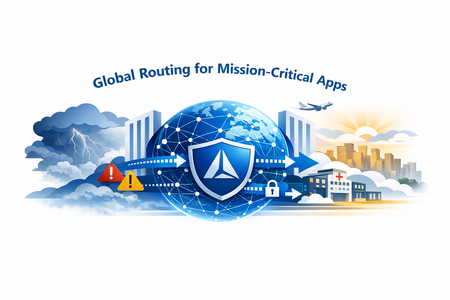
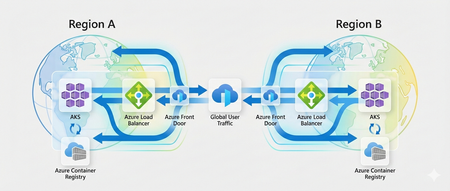
Abstract Azure Front Door (AFD) sits at the edge of Microsoft’s global cloud, delivering secure, performant, and highly available applications to users worldwide. As adoption has grown—especially for mission‑critical workloads—the need for resilient application architectures that can tolerate rare but impactful platform incidents has become essential. This article summarizes key lessons from Azure Front Door incidents in October 2025, outlines how Microsoft is hardening the platform, and—most importantly—describes proven architectural patterns customers can adopt today to maintain business continuity when global load‑balancing services are unavailable. Who this is for This article is intended for: Cloud and solution architects designing mission‑critical internet‑facing workloads Platform and SRE teams responsible for high availability and disaster recovery Security architects evaluating WAF placement and failover trade‑offs Customers running revenue‑impacting workloads on Azure Front Door Introduction Azure Front Door (AFD) operates at massive global scale, serving secure, low‑latency traffic for Microsoft first‑party services and thousands of customer applications. Internally, Microsoft is investing heavily in tenant isolation, independent infrastructure resiliency, and active‑active service architectures to reduce blast radius and speed recovery. However, no global distributed system can completely eliminate risk. Customers hosting mission‑critical workloads on AFD should therefore design for the assumption that global routing services can become temporarily unavailable—and provide alternative routing paths as part of their architecture. Resiliency options for mission‑critical workloads The following patterns are in active use by customers today. Each represents a different trade‑off between cost, complexity, operational maturity, and availability. 1. No CDN with Application Gateway Figure 1: Azure Front Door primary routing with DNS failover When to use: Workloads without CDN caching requirements that prioritize predictable failover. Architecture summary Azure Traffic Manager (ATM) runs in Always Serve mode to provide DNS‑level failover. Web Application Firewall (WAF) is implemented regionally using Azure Application Gateway. App Gateway can be private, provided the AFD premium is used, and is the default path. DNS failover available when AFD is not reachable. When Failover is triggered, one of the steps will be to switch to AppGW IP to Public (ATM can route to public endpoints only) Switch back to AFD route, once AFD resumes service. Pros DNS‑based failover away from the global load balancer Consistent WAF enforcement at the regional layer Application Gateways can remain private during normal operations Cons Additional cost and reduced composite SLA from extra components Application Gateway must be made public during failover Active‑passive pattern requires regular testing to maintain confidence 2. Multi‑CDN for mission‑critical applications Figure 2: Multi‑CDN architecture using Azure Front Door and Akamai with DNS‑based traffic steering When to use: Mission critical Applications with strict availability requirements and heavy CDN usage. Architecture summary Dual CDN setup (for example, Azure Front Door + Akamai) Azure Traffic Manager in Always Serve mode Traffic split (for example, 90/10) to keep both CDN caches warm During failover, 100% of traffic is shifted to the secondary CDN Ensure Origin servers can handle the load of extra hits (Cache misses) Pros Highest resilience against CDN‑specific or control‑plane outages Maintains cache readiness on both providers Cons Expensive and operationally complex Requires origin capacity planning for cache‑miss surges Not suitable if applications rely on CDN‑specific advanced features 3. Multi‑layered CDN (Sequential CDN architecture) Figure 3: Sequential CDN architecture with Akamai as caching layer in front of Azure Front Door When to use: Rare, niche scenarios where a layered CDN approach is acceptable. Not a common approach, Akamai can be a single entry point of failure. However if the AFD isn't available, you can update Akamai properties to directly route to Origin servers. Architecture summary Akamai used as the front caching layer Azure Front Door used as the L7 gateway and WAF During failover, Akamai routes traffic directly to origin services Pros Direct fallback path to origins if AFD becomes unavailable Single caching layer in normal operation Cons Fronting CDN remains a single point of failure Not generally recommended due to complexity Requires a well‑tested operational playbook 4. No CDN – Traffic Manager redirect to origin (with Application Gateway) Figure 4: DNS‑based failover directly to origin via Application Gateway when Azure Front Door is unavailable When to use: Applications that require L7 routing but no CDN caching. Architecture summary Azure Front Door provides L7 routing and WAF Azure Traffic Manager enables DNS failover During an AFD outage, Traffic Manager routes directly to Application Gateway‑protected origins Pros Alternative ingress path to origin services Consistent regional WAF enforcement Cons Additional infrastructure cost Operational dependency on Traffic Manager configuration accuracy 5. No CDN – Traffic Manager redirect to origin (no Application Gateway) Figure 5: Direct DNS failover to origin services without Application Gateway When to use: Cost‑sensitive scenarios with clearly accepted security trade‑offs. Architecture summary WAF implemented directly in Azure Front Door Traffic Manager provides DNS failover During an outage, traffic routes directly to origins Pros Simplest architecture No Application Gateway in the primary path Cons Risk of unscreened traffic during failover Failover operations can be complex if WAF consistency is required Frequently asked questions Is Azure Traffic Manager a single point of failure? No. Traffic Manager operates as a globally distributed service. For extreme resilience requirements, customers can combine Traffic Manager with a backup FQDN hosted in a separate DNS provider. Should every workload implement these patterns? No. These patterns are intended for mission‑critical workloads where downtime has material business impact. Non critical applications do not require multi‑CDN or alternate routing paths. What does Microsoft use internally? Microsoft uses a combination of active‑active regions, multi‑layered CDN patterns, and controlled fail‑away mechanisms, selected based on service criticality and performance requirements. What happened in October 2025 (summary) Two separate Azure Front Door incidents in October 2025 highlighted the importance of architectural resiliency: A control‑plane defect caused erroneous metadata propagation, impacting approximately 26% of global edge sites A later compatibility issue across control‑plane versions resulted in DNS resolution failures Both incidents were mitigated through automated restarts, manual intervention, and controlled failovers. These events accelerated platform‑level hardening investments. How Azure Front Door is being hardened Microsoft has already completed or initiated major improvements, including: Synchronous configuration processing before rollout Control‑plane and data‑plane isolation Reduced configuration propagation times Active‑active fail‑away for major first‑party services Microcell segmentation to reduce blast radius These changes reinforce a core principle: no single tenant configuration should ever impact others, and recovery must be fast and predictable. Key takeaways Global platforms can experience rare outages—architect for them Mission‑critical workloads should include alternate routing paths Multi‑CDN and DNS‑based failover patterns remain the most robust Resiliency is a business decision, not just a technical one References Azure Front Door: Implementing lessons learned following October outages | Microsoft Community Hub Azure Front Door Resiliency Deep Dive and Architecting for Mission Critical - John Savill's deep dive into Azure Front Door resilience and options for mission critical applications Global Routing Redundancy for Mission-Critical Web Applications - Azure Architecture Center | Microsoft Learn Architecture Best Practices for Azure Front Door - Microsoft Azure Well-Architected Framework | Microsoft Learn702Views3likes0CommentsAzure Local LENS workbook—deep insights at scale, in minutes
Azure Local at scale needs fleet-level visibility As Azure Local deployments grow from a handful of instances to hundreds (or even thousands), the operational questions change. You’re no longer troubleshooting a single environment—you’re looking for patterns across your entire fleet: Which sites are trending with a specific health issue? Where are workload deployments increasing over time, do we have enough capacity available? Which clusters are outliers compared to the rest? Today we’re sharing Azure Local LENS: a free, community-driven Azure Workbook designed to help you gain deep insights across a large Azure Local fleet—quickly and consistently—so you can move from reactive troubleshooting to proactive operations. Get the workbook and step-by-step instructions to deploy it here: https://aka.ms/AzureLocalLENS Who is it for? This workbook is especially useful if you manage or support: Large Azure Local fleets distributed across many sites (retail, manufacturing, branch offices, healthcare, etc.). Central operations teams that need standardized health/update views. Architects who want to aggregate data to gain insights in cluster and workload deployment trends over time. What is Azure Local LENS? Azure Local - Lifecycle, Events & Notification Status (or LENS) workbook brings together the signals you need to understand your Azure Local estate through a fleet lens. Instead of jumping between individual resources, you can use a consistent set of views to compare instances, spot outliers, and drill into the focus areas that need attention. Fleet-first design: Start with an estate-wide view, then drill down to a specific site/cluster using the seven tabs in the workbook. Operational consistency: Standard dashboards help teams align on “what good looks like” across environments, update trends, health check results and more. Actionable insights: Identify hotspots and trends early so you can prioritize remediation and plan health remediation, updates and workload capacity with confidence. What insights does it provide? Azure Local LENS is built to help you answer the questions that matter at scale, such as: Fleet scale overview and connection status: How many Azure Local instances do you have, and what are their connection, health and update status? Workload deployment trends: Where have you deployed Azure Local VMs and AKS Arc clusters, how many do you have in total, are they connected and in a healthy state? Top issues to prioritize: What are the common signals across your estate that deserve operational focus, such as update health checks, extension failures or Azure Resource Bridge connectivity issues? Updates: What is your overall update compliance status for Solution and SBE updates? What is the average, standard deviation or 95 th percentile update duration run times for your fleet? Drilldown workflow: After spotting an outlier, what does the instance-level view show, so you can act or link directly to Azure portal for more actions and support? Get started in minutes If you are managing Azure Local instances, give Azure Local LENS a try and see how quickly a fleet-wide view can help with day-to-day management, helping to surface trends & actionable insights. The workbook is an open-source, community-driven project, which can be accessed using a public GitHub repository, which includes full step-by-step instructions for setup at https://aka.ms/AzureLocalLENS. Most teams can deploy the workbook and start exploring insights in a matter of minutes. (depending on your environment). An example of the “Azure Local Instances” tab: How teams are using fleet dashboards like LENS Weekly fleet review: Use a standard set of views to review top outliers and trend shifts, then assign follow-ups. Update planning: Identify clusters with system health check failures, and prioritize resolving the issues based on frequency of the issue category. Update progress: Review clusters update status (InProgress, Failed, Success) and take action based on trends and insights from real-time data. Baseline validation: Spot clusters that consistently differ from the norm—can be a sign of configuration or environmental difference, such as network access, policies, operational procedures or other factors. Feedback and what’s next This workbook is a community driven, open source project intended to be practical and easy to adopt. The project is not a Microsoft‑supported offering. If you encounter any issues, have feedback, or a new feature request, please raise an Issue on the GitHub repository, so we can track discussions, prioritize improvements, and keep updates transparent for everyone. Author Bio Neil Bird is a Principal Program Manager in the Azure Edge & Platform Engineering team at Microsoft. His background is in Azure and hybrid / sovereign cloud infrastructure, specialising in operational excellence and automation. He is passionate about helping customers deploy and manage cloud solutions successfully using Azure and Azure Edge technologies.1.7KViews8likes4CommentsReference Architecture for Highly Available Multi-Region Azure Kubernetes Service (AKS)
Introduction Cloud-native applications often support critical business functions and are expected to stay available even when parts of the platform fail. Azure Kubernetes Service (AKS) already provides strong availability features within a single region, such as availability zones and a managed control plane. However, a regional outage is still a scenario that architects must plan for when running important workloads. This article walks through a reference architecture for running AKS across multiple Azure regions. The focus is on availability and resilience, using practical patterns that help applications continue to operate during regional failures. It covers common design choices such as traffic routing, data replication, and operational setup, and explains the trade-offs that come with each approach. This content is intended for cloud architects, platform engineers, and Site Reliability Engineers (SREs who design and operate Kubernetes platforms on Azure and need to make informed decisions about multi-region deployments. Resilience Requirements and Design Principles Before designing a multi-region Kubernetes platform, it is essential to define resilience objectives aligned with business requirements: Recovery Time Objective (RTO): Maximum acceptable downtime during a regional failure. Recovery Point Objective (RPO): Maximum acceptable data loss. Service-Level Objectives (SLOs): Availability targets for applications and platform services. The architecture described in this article aligns with the Azure Well-Architected Framework Reliability pillar, emphasizing fault isolation, redundancy, and automated recovery. Multi-Region AKS Architecture Overview The reference architecture uses two independent AKS clusters deployed in separate Azure regions, such as West Europe and North Europe. Each region is treated as a separate deployment stamp, with its own networking, compute, and data resources. This regional isolation helps reduce blast radius and allows each environment to be operated and scaled independently. Traffic is routed at a global level using Azure Front Door together with DNS. This setup provides a single public entry point for clients and enables traffic steering based on health checks, latency, or routing rules. If one region becomes unavailable, traffic can be automatically redirected to the healthy region. Each region exposes applications through a regional ingress layer, such as Azure Application Gateway for Containers or an NGINX Ingress Controller. This keeps traffic management close to the workload and allows regional-specific configuration when needed. Data services are deployed with geo-replication enabled to support multi-region access and recovery scenarios. Centralized monitoring and security tooling provides visibility across regions and helps operators detect, troubleshoot, and respond to failures consistently. The main building blocks of the architecture are: Azure Front Door as the global entry point Azure DNS for name resolution An AKS cluster deployed in each region A regional ingress layer (Application Gateway for Containers or NGINX Ingress) Geo-replicated data services Centralized monitoring and security services Deployment Patterns for Multi-Region AKS There is no single “best” way to run AKS across multiple regions. The right deployment pattern depends on availability requirements, recovery objectives, operational maturity, and cost constraints. This section describes three common patterns used in multi-region AKS architectures and highlights the trade-offs associated with each one. Active/Active Deployment Model In an active/active deployment model, AKS clusters in multiple regions serve production traffic at the same time. Global traffic routing distributes requests across regions based on health checks, latency, or weighted rules. If one region becomes unavailable, traffic is automatically shifted to the remaining healthy region. This model provides the highest level of availability and the lowest recovery time, but it requires careful handling of data consistency, state management, and operational coordination across regions. Capability Pros Cons Availability Very high availability with no single active region Requires all regions to be production-ready at all times Failover behavior Near-zero downtime when a region fails More complex to test and validate failover scenarios Data consistency Supports read/write traffic in multiple regions Requires strong data replication and conflict handling Operational complexity Enables full regional redundancy Higher operational overhead and coordination Cost Maximizes resource utilization Highest cost due to duplicated active resources Active/Passive Deployment Model In an active/passive deployment model, one region serves all production traffic, while a second region remains on standby. The passive region is kept in sync but does not receive user traffic until a failover occurs. When the primary region becomes unavailable, traffic is redirected to the secondary region. This model reduces operational complexity compared to active/active and is often easier to operate, but it comes with longer recovery times and underutilized resources. Capability Pros Cons Availability Protects against regional outages Downtime during failover is likely Failover behavior Simpler failover logic Higher RTO compared to active/active Data consistency Easier to manage single write region Requires careful promotion of the passive region Operational complexity Easier to operate and test Manual or semi-automated failover processes Cost Lower cost than active/active Standby resources are mostly idle Deployment Stamps and Isolation Deployment stamps are a design approach rather than a traffic pattern. Each region is deployed as a fully isolated unit, or stamp, with its own AKS cluster, networking, and supporting services. Stamps can be used with both active/active and active/passive models. The goal of deployment stamps is to limit blast radius, enable independent lifecycle management, and reduce the risk of cross-region dependencies. Capability Pros Cons Availability Limits impact of regional or platform failures Requires duplication of platform components Failover behavior Enables clean and predictable failover Failover logic must be implemented at higher layers Data consistency Encourages clear data ownership boundaries Data replication can be more complex Operational complexity Simplifies troubleshooting and isolation More environments to manage Cost Supports targeted scaling per region Increased cost due to duplicated infrastructure Global Traffic Routing and Failover In a multi-region setup, global traffic routing is responsible for sending users to the right region and keeping the application reachable when a region becomes unavailable. In this architecture, Azure Front Door acts as the global entry point for all incoming traffic. Azure Front Door provides a single public endpoint that uses Anycast routing to direct users to the closest available region. TLS termination and Web Application Firewall (WAF) capabilities are handled at the edge, reducing latency and protecting regional ingress components from unwanted traffic. Front Door also performs health checks against regional endpoints and automatically stops sending traffic to a region that is unhealthy. DNS plays a supporting role in this design. Azure DNS or Traffic Manager can be used to define geo-based or priority-based routing policies and to control how traffic is initially directed to Front Door. Health probes continuously monitor regional endpoints, and routing decisions are updated when failures are detected. When a regional outage occurs, unhealthy endpoints are removed from rotation. Traffic is then routed to the remaining healthy region without requiring application changes or manual intervention. This allows the platform to recover quickly from regional failures and minimizes impact to users. Choosing Between Azure Traffic Manager and Azure DNS Both Azure Traffic Manager and Azure DNS can be used for global traffic routing, but they solve slightly different problems. The choice depends mainly on how fast you need to react to failures and how much control you want over traffic behavior. Capability Azure Traffic Manager Azure DNS Routing mechanism DNS-based with built-in health probes DNS-based only Health checks Native endpoint health probing No native health checks Failover speed (RTO) Low RTO (typically seconds to < 1 minute) Higher RTO (depends on DNS TTL, often minutes) Traffic steering options Priority, weighted, performance, geographic Basic DNS records Control during outages Automatic endpoint removal Relies on DNS cache expiration Operational complexity Slightly higher Very low Typical use cases Mission-critical workloads Simpler or cost-sensitive scenarios Data and State Management Across Regions Kubernetes platforms are usually designed to be stateless, which makes scaling and recovery much easier. In practice, most enterprise applications still depend on stateful services such as databases, caches, and file storage. When running across multiple regions, handling this state correctly becomes one of the hardest parts of the architecture. The general approach is to keep application components stateless inside the AKS clusters and rely on Azure managed services for data persistence and replication. These services handle most of the complexity involved in synchronizing data across regions and provide well-defined recovery behaviors during failures. Common patterns include using Azure SQL Database with active geo-replication or failover groups for relational workloads. This allows a secondary region to take over when the primary region becomes unavailable, with controlled failover and predictable recovery behavior. For globally distributed applications, Azure Cosmos DB provides built-in multi-region replication with configurable consistency levels. This makes it easier to support active/active scenarios, but it also requires careful thought around how the application handles concurrent writes and potential conflicts. Caching layers such as Azure Cache for Redis can be geo-replicated to reduce latency and improve availability. These caches should be treated as disposable and rebuilt when needed, rather than relied on as a source of truth. For object and file storage, Azure Blob Storage and Azure Files support geo-redundant options such as GRS and RA-GRS. These options provide data durability across regions and allow read access from secondary regions, which is often sufficient for backup, content distribution, and disaster recovery scenarios. When designing data replication across regions, architects should be clear about trade-offs. Strong consistency across regions usually increases latency and limits scalability, while eventual consistency improves availability but may expose temporary data mismatches. Replication lag, failover behavior, and conflict resolution should be understood and tested before going to production. Security and Governance Considerations In a multi-region setup, security and governance should look the same in every region. The goal is to avoid special cases and reduce the risk of configuration drift as the platform grows. Consistency is more important than introducing region-specific controls. Identity and access management is typically centralized using Azure Entra ID. Access to AKS clusters is controlled through a combination of Azure RBAC and Kubernetes RBAC, allowing teams to manage permissions in a way that aligns with existing Azure roles while still supporting Kubernetes-native access patterns. Network security is enforced through segmentation. A hub-and-spoke topology is commonly used, with shared services such as firewalls, DNS, and connectivity hosted in a central hub and application workloads deployed in regional spokes. This approach helps control traffic flows, limits blast radius, and simplifies auditing. Policy and threat protection are applied at the platform level. Azure Policy for Kubernetes is used to enforce baseline configurations, such as allowed images, pod security settings, and resource limits. Microsoft Defender for Containers provides visibility into runtime threats and misconfigurations across all clusters. Landing zones play a key role in this design. By integrating AKS clusters into a standardized landing zone setup, governance controls such as policies, role assignments, logging, and network rules are applied consistently across subscriptions and regions. This makes the platform easier to operate and reduces the risk of gaps as new regions are added. AKS Observability and Resilience Testing Running AKS across multiple regions only works if you can clearly see what is happening across the entire platform. Observability should be centralized so operators don’t need to switch between regions or tools when troubleshooting issues. Azure Monitor and Log Analytics are typically used as the main aggregation point for logs and metrics from all clusters. This makes it easier to correlate signals across regions and quickly understand whether an issue is local to one cluster or affecting the platform as a whole. Distributed tracing adds another important layer of visibility. By using OpenTelemetry, requests can be traced end to end as they move through services and across regions. This is especially useful in active/active setups, where traffic may shift between regions based on health or latency. Synthetic probes and health checks should be treated as first-class signals. These checks continuously test application endpoints from outside the platform and help validate that routing, failover, and recovery mechanisms behave as expected. Observability alone is not enough. Resilience assumptions must be tested regularly. Chaos engineering and planned failover exercises help teams understand how the system behaves under failure conditions and whether operational runbooks are realistic. These tests should be performed in a controlled way and repeated over time, especially after platform changes. The goal is not to eliminate failures, but to make failures predictable, visible, and recoverable. Conclusion and Next Steps Building a highly available, multi-region AKS platform is mostly about making clear decisions and understanding their impact. Traffic routing, data replication, security, and operations all play a role, and there are always trade-offs between availability, complexity, and cost. The reference architecture described in this article provides a solid starting point for running AKS across regions on Azure. It focuses on proven patterns that work well in real environments and scale as requirements grow. The most important takeaway is that multi-region is not a single feature you turn on. It is a set of design choices that must work together and be tested regularly. Deployment Models Area Active/Active Active/Passive Deployment Stamps Availability Highest High Depends on routing model Failover time Very low Medium Depends on implementation Operational complexity High Medium Medium to high Cost Highest Lower Medium Typical use case Mission-critical workloads Business-critical workloads Large or regulated platforms Traffic Routing and Failover Aspect Azure Front Door + Traffic Manager Azure DNS Health-based routing Yes No Failover speed (RTO) Seconds to < 1 minute Minutes (TTL-based) Traffic steering Advanced Basic Recommended for Production and critical workloads Simple or non-critical workloads Data and State management Data Type Recommended Approach Notes Relational data Azure SQL with geo-replication Clear primary/secondary roles Globally distributed data Cosmos DB multi-region Consistency must be chosen carefully Caching Azure Cache for Redis Treat as disposable Object and file storage Blob / Files with GRS or RA-GRS Good for DR and read scenarios Security and Governance Area Recommendation Identity Centralize with Azure Entra ID Access control Combine Azure RBAC and Kubernetes RBAC Network security Hub-and-spoke topology Policy enforcement Azure Policy for Kubernetes Threat protection Defender for Containers Governance Use landing zones for consistency Observability and Testing Practice Why It Matters Centralized monitoring Faster troubleshooting Metrics, logs, traces Full visibility across regions Synthetic probes Early failure detection Failover testing Validate assumptions Chaos engineering Build confidence in recovery Recommended Next Steps If you want to move from design to implementation, the following steps usually work well: Start with a proof of concept using two regions and a simple workload Define RTO and RPO targets and validate them with tests Create operational runbooks for failover and recovery Automate deployments and configuration using CI/CD and GitOps Regularly test failover and recovery, not just once For deeper guidance, the Azure Well-Architected Framework and the Azure Architecture Center provide additional patterns, checklists, and reference implementations that build on the concepts discussed here.2.7KViews10likes6CommentsUnlocking Advanced Data Analytics & AI with Azure NetApp Files object REST API
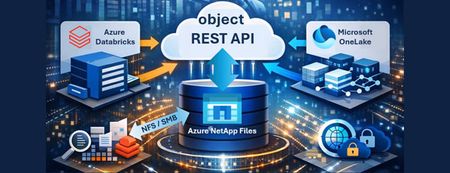
Azure NetApp Files object REST API enables object access to enterprise file data stored on Azure NetApp Files, without copying, moving, or restructuring that data. This capability allows analytics and AI platforms that expect object storage to work directly against existing NFS based datasets, while preserving Azure NetApp Files’ performance, security, and governance characteristics.617Views0likes0Comments
Building a Secure and Compliant Azure AI Landing Zone: Policy Framework & Best Practices
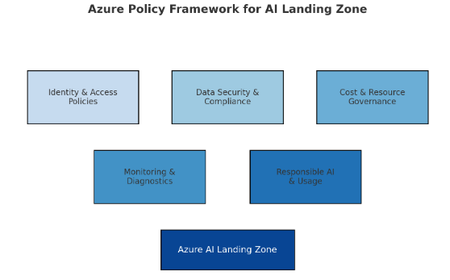
As organizations accelerate their AI adoption on Microsoft Azure, governance, compliance, and security become critical pillars for success. Deploying AI workloads without a structured compliance framework can expose enterprises to data privacy issues, misconfigurations, and regulatory risks. To address this challenge, the Azure AI Landing Zone provides a scalable and secure foundation — bringing together Azure Policy, Blueprints, and Infrastructure-as-Code (IaC) to ensure every resource aligns with organizational and regulatory standards. The Azure Policy & Compliance Framework acts as the governance backbone of this landing zone. It enforces consistency across environments by applying policy definitions, initiatives, and assignments that monitor and remediate non-compliant resources automatically. This blog will guide you through: 🧭 The architecture and layers of an AI Landing Zone 🧩 How Azure Policy as Code enables automated governance ⚙️ Steps to implement and deploy policies using IaC pipelines 📈 Visualizing compliance flows for AI-specific resources What is Azure AI Landing Zone (AI ALZ)? AI ALZ is a foundational architecture that integrates core Azure services (ML, OpenAI, Cognitive Services) with best practices in identity, networking, governance, and operations. To ensure consistency, security, and responsibility, a robust policy framework is essential. Policy & Compliance in AI ALZ Azure Policy helps enforce standards across subscriptions and resource groups. You define policies (single rules), group them into initiatives (policy sets), and assign them with certain scopes & exemptions. Compliance reporting helps surface noncompliant resources for mitigation. In AI workloads, some unique considerations: Sensitive data (PII, models) Model accountability, logging, audit trails Cost & performance from heavy compute usage Preview features and frequent updates Scope This framework covers: Azure Machine Learning (AML) Azure API Management Azure AI Foundry Azure App Service Azure Cognitive Services Azure OpenAI Azure Storage Accounts Azure Databases (SQL, Cosmos DB, MySQL, PostgreSQL) Azure Key Vault Azure Kubernetes Service Core Policy Categories 1. Networking & Access Control Restrict resource deployment to approved regions (e.g., Europe only). Enforce private link and private endpoint usage for all critical resources. Disable public network access for workspaces, storage, search, and key vaults. 2. Identity & Authentication Require user-assigned managed identities for resource access. Disable local authentication; enforce Microsoft Entra ID (Azure AD) authentication. 3. Data Protection Enforce encryption at rest with customer-managed keys (CMK). Restrict public access to storage accounts and databases. 4. Monitoring & Logging Deploy diagnostic settings to Log Analytics for all key resources. Ensure activity/resource logs are enabled and retained for at least one year. 5. Resource-Specific Guardrails Apply built-in and custom policy initiatives for OpenAI, Kubernetes, App Services, Databases, etc. A detailed list of all policies is bundled and attached at the end of this blog. Be sure to check it out for a ready-to-use Excel file—perfect for customer workshops—which includes policy type (Standalone/Initiative), origin (Built-in/Custom), and more. Implementation: Policy-as-Code using EPAC To turn policies from Excel/JSON into operational governance, Enterprise Policy as Code (EPAC) is a powerful tool. EPAC transforms policy artifacts into a desired state repository and handles deployment, lifecycle, versioning, and CI/CD automation. What is EPAC & Why Use It? EPAC is a set of PowerShell scripts / modules to deploy policy definitions, initiatives, assignments, role assignments, exemptions. Enterprise Policy As Code (EPAC) It supports CI/CD integration (GitHub Actions, Azure DevOps) so policy changes can be treated like code. It handles ordering, dependency resolution, and enforcement of a “desired state” — any policy resources not in your repo may be pruned (depending on configuration). It integrates with Azure Landing Zones (including governance baseline) out of the box. References & Further Reading EPAC GitHub Repository Advanced Azure Policy management - Microsoft Learn [Advanced A...Framework] How to deploy Azure policies the DevOps way [How to dep...- Rabobank]2.1KViews1like2Comments
Cross-Region Zero Trust: Connecting Power Platform to Azure PaaS across different regions
In the modern enterprise cloud landscape, data rarely sits in one place. You might face a scenario where your Power Platform environment (Dynamics 365, Power Apps, or Power Automate) is hosted in Region A for centralized management, while your sensitive SQL Databases or Storage Accounts must reside in Region B due to data sovereignty, latency requirements, or legacy infrastructure. Connecting these two worlds usually involves traversing the public internet - a major "red flag" for security teams. The Missing Link in Cloud Security When we talk about enterprise security, "Public Access: Disabled" is the holy grail. But for Power Platform architects, this setting is often followed by a headache. The challenge is simple but daunting: How can a Power Platform Environment (e.g., in Region A) communicate with an Azure PaaS service (e.g., Storage or SQL in Region B) when that resource is completely locked down behind a Private Endpoint? Existing documentation usually covers single-region setups with no firewalls. This post details a "Zero Trust" architecture that bridges this gap. This is a walk through for setting up a Cross-Region Private Link that routes traffic from the Power Platform in Region A, through a secure Azure Hub, and down the Azure Global Backbone to a Private Endpoint in Region B, without a single packet ever touching the public internet. 1. Understanding the Foundation: VNet Support Before we build, we must understand what moves: Power Platform VNet integration is an "Outbound" technology. It allows the platform to connect to data sources secured within an Azure Virtual Network and "inject" its traffic into your Virtual Network, without needing to install or manage an on-premises data gateway. According to Microsoft's official documentation, this integration supports a wide range of services: Dataverse: Plugins and Virtual Tables. Power Automate: Cloud Flows using standard connectors. Power Apps: Canvas Apps calling private APIs. This means once the "tunnel" is built, your entire Power Platform ecosystem can reach your private Azure universe. Virtual Network support overview – Power Platform | Microsoft Learn 2. The Architecture: A Cross-Region Global Bridge Based on the Hub-and-Spoke topology, this architecture relies on four key components working in unison: Source (Region A): The Power Platform environment utilizes VNet Injection. This injects the platform's outbound traffic into a dedicated, delegated subnet within your Region A Spoke VNet. The Hub: A central VNet containing an Azure Firewall. This acts as the regional traffic cop and DNS Proxy, inspecting traffic and resolving private names before allowing packets to traverse the global backbone. The Bridge (Global Backbone): We utilize Global VNet Peering to connect Region A to the Region B Spoke. This keeps traffic on Microsoft's private fiber backbone. Destination (Region B): The Azure PaaS service (e.g. Storage Account) is locked down with Public Access Disabled. It is only accessible via a Private Endpoint. The Architecture: Visualizing the Flow As illustrated in the diagram below, this solution separates the responsibilities into two distinct layers: the Network Admin (Azure Infrastructure) and the Power Platform Admin (Enterprise Policy). 3. The High Availability Constraint: Regional Pairs A common pitfall of these deployments is configuring only a single region. Power Platform environments are inherently redundant. In a geography like Europe, your environment is actually hosted across a Regional Pair (e.g., West Europe and North Europe). Why? If one Azure region in the pair experiences an outage, your Power Platform environment will failover to the second region. If your VNet Policy isn't already there, your private connectivity will break. To maintain High Availability (HA) for your private tunnel, your Azure footprint must mirror this: Two VNets: You must create a Virtual Network in each region of the pair. Two Delegated Subnets: Each VNet requires a subnet delegated specifically to Microsoft.PowerPlatform/enterprisePolicies. Two Network Policies: You must create an Enterprise Policy in each region and link both to your environment to ensure traffic flows even during a regional failover. Ensure your Azure subscription is registered for the Microsoft.PowerPlatform resource provider by running the SetupSubscriptionForPowerPlatform.ps1 script. 4. Solving the DNS Riddle with Azure Firewall In a Hub-and-Spoke model, peering the VNets is only half the battle. If your Power Platform environment in Region A asks for mystorage.blob.core.windows.net, it will receive a public IP by default, and your connection will be blocked. To fix this, we utilize the Azure Firewall as a DNS Proxy: Link the Private DNS Zone: Ensure your Private DNS Zones (e.g., privatelink.blob.core.windows.net) are linked to the Hub VNet. Enable DNS Proxy: Turn on the DNS Proxy feature on your Azure Firewall. Configure Custom DNS: Set the DNS servers of your Spoke VNets (Region A) to the Firewall’s Internal IP. Now, the DNS query flows through the Firewall, which "sees" the Private DNS Zone and returns the Private IP to the Power Platform. 5. Secretless Security with User-Assigned Managed Identity Private networking secures the path, but identity secures the access. Instead of managing fragile Client Secrets, we use User-Assigned Managed Identity (UAMI). Phase A: The Azure Setup Create the Identity: Generate a User-Assigned Managed Identity in your Azure subscription. Assign RBAC Roles: Grant this identity specific permissions on your destination resource. For example, assign the Storage Blob Data Contributor role to allow the identity to manage files in your private storage account. Phase B: The Power Platform Integration To make the environment recognize this identity, you must register it as an Application User: Navigate to the Power Platform Admin Center. Go to Environments > [Your Environment] > Settings > Users + permissions > Application users. Add a new app and select the Managed Identity you created in Azure. 6. Creating Enterprise Policy using PowerShell Scripts One of the most important things to realize is that Enterprise Policies cannot be created manually in the Azure Portal UI. They must be deployed via PowerShell or CLI. While Microsoft provides a comprehensive official GitHub repository with all the necessary templates, it is designed to be highly modular and granular. This means that to achieve a High Availability (HA) setup, an admin usually needs to execute deployments for each region separately and then perform the linking step. To simplify this workflow, I have developed a Simplified Scripts Repository on my GitHub. These scripts use the official Microsoft templates as their foundation but add an orchestration layer specifically for the Regional Pair requirement: Regional Pair Automation: Instead of running separate deployments, my script handles the dual-VNet injection in a single flow. It automates the creation of policies in both regions and links them to your environment in one execution. Focused Scenarios: I’ve distilled the most essential scripts for Network Injection and Encryption (CMK), making it easier for admins to get up and running without navigating the entire modular library. The Goal: To provide a "Fast-Track" experience that follows Microsoft's best practices while reducing the manual steps required to achieve a resilient, multi-region architecture. Owning the Keys with Encryption Policies (CMK) While Microsoft encrypts Dataverse data by default, many enterprise compliance standards require Customer-Managed Keys (CMK). This ensures that you, not Microsoft, control the encryption keys for your environments. - Manage your customer-managed encryption key - Power Platform | Microsoft Learn Key Requirements: Key Vault Configuration: Your Key Vault must have Purge Protection and Soft Delete enabled to prevent accidental data loss. The Identity Bridge: The Encryption Policy uses the User-Assigned Managed Identity (created in Step 5) to authenticate against the Key Vault. Permissions: You must grant the Managed Identity the Key Vault Crypto Service Encryption User role so it can wrap and unwrap the encryption keys. 7. The Final Handshake: Linking Policies to Your Environment Creating the Enterprise Policy in Azure is only the first half of the process. You must now "inform" your Power Platform environment that it should use these policies for its outbound traffic and identity. Linking the Policies to Your Environment: For VNet Injection: In the Admin Center, go to Security > Data and privacy > Azure Virtual Network Policies. Select your environment and link it to the Network Injection policies you created. For Encryption (CMK): Go to Security > Data and privacy > Customer-managed encryption Key. Add the Select the Encryption Enterprise Policy -Edit Policy - Add Environment. Crucial Step: You must first grant the Power Platform service "Get", "List", "Wrap" and "Unwrap" permissions on your specific key within Azure Key Vault before the environment can successfully validate the policy. Verification: The "Smoking Gun" in Log Analytics After successfully reaching a Resource from one of the power platform services you can check if the connection was private. How do you prove its private? Use KQL in Azure Log Analytics to verify the Network Security Perimeter (NSP) ID. The Proof: When you see a GUID in the NetworkPerimeter field, it is cryptographic evidence that the resource accepted the request only because it arrived via your authorized private bridge. In Azure Portal - Navigate to your Resource for example KeyVault - Logs - Use the following KQL: AzureDiagnostics | where ResourceProvider == "MICROSOFT.KEYVAULT" | where OperationName == "KeyGet" or OperationName == "KeyUnwrap" | where ResultType == "Success" | project TimeGenerated, OperationName, VaultName = Resource, ResultType, CallerIP = CallerIPAddress, EnterprisePolicy = identity_claim_xms_mirid_s, NetworkPerimeter = identity_claim_xms_az_nwperimid_s | sort by TimeGenerated desc Result: By implementing the Network, and Encryption Enterprise policy you transition the Power Platform from a public SaaS tool into a fully governed, private extension of your Azure infrastructure. You no longer have to choose between the agility of low-code and the security of a private cloud. To summarize the transformation from public endpoints to a complete Zero Trust architecture across regions, here is the end-to-end workflow: PHASE 1: Azure Infrastructure Foundation Create Network Fabric (HA): Deploy VNets and Delegated Subnets in both regional pairs. Deploy the Hub: Set up the Central Hub VNet with Azure Firewall. Connect Globally: Establish Global VNet Peering between all Spokes and the Hub. Solve DNS: Enable DNS Proxy on the Firewall and link Private DNS Zones to the Hub VNet. ↓ PHASE 2: Identity & Security Prep Create Identity: Generate a User-Assigned Managed Identity (UAMI). Grant Access (RBAC): Give the UAMI permissions on the target PaaS resource (e.g., Storage Contributor). Prepare CMK: Configure Key Vault access policies for the UAMI (Wrap/Unwrap permissions). ↓ PHASE 3: Deploy Enterprise Policies (PowerShell/IaC) Deploy Network Policies: Create "Network Injection" policies in Azure for both regions. Deploy Encryption Policy: Create the "CMK" policy linking to your Key Vault and Identity. ↓ PHASE 4: Power Platform Final Link (Admin Center) Link Network: Associate the Environment with the two Network Policies. Link Encryption: Activate the Customer-Managed Key on the environment. Register User: Add the Managed Identity as an "Application User" in the environment. ↓ PHASE 5: Verification Run Workload: Trigger a Flow or Plugin. Audit Logs: Use KQL in Log Analytics to confirm the presence of the NetworkPerimeter ID.1.1KViews2likes2Comments