vpn
7 Topics
Azure VPN issues - RasMan service - Unknown state
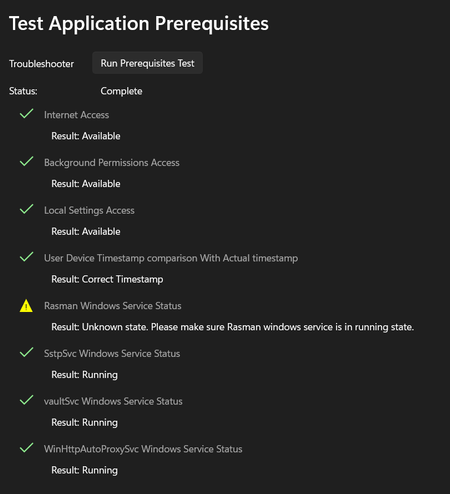
Azure VPN Client stopped working after KB5065813 update – RasMan service Unknown state Environment details: Azure VPN Client version: 4.0.4.0 (Microsoft Store) Windows version: Windows 11 Pro, 23H2 (fully updated) Issue Summary: The Azure VPN Client worked fine from Friday (14 November 2025) until Sunday (16 November 2025). On Sunday, Windows installed updates, and starting Monday morning (17 November 2025), Azure VPN stopped working. When I run the Prerequisites Test in Azure VPN Client, everything passes except: Rasman Windows Service Status Result: Unknown state. Please make sure Rasman windows service is in a running state. However, sRasMan service it's running Registry keys for RasMan exist, and Svchost\netsvcs includes RasMan What changed: I noticed that the update KB5065813 seems to be causing the issue. This KB is installed on my machine, but my colleagues have KB5041655 instead. As part of troubleshooting, I even changed my laptop to a brand-new device with a fresh OS install, and the issue persists after KB5065813 is applied. What I’ve tried: Restarted RasAuto and dependencies Reinstalled Azure VPN Client Installed older versions of Azure VPN Changed my laptop with a brand new one and a fresh OS install Questions: Is KB5065813 confirmed to break Azure VPN Client functionality? Is this related to the October 2025 RasMan vulnerability patch (CVE-2025-59230)? Any official Microsoft steps or scripts to fix this? Screenshots attached for reference.309Views0likes3Comments
Win 10 : VPN disconnecting then redeploying during Intune Sync
We have a IKEv2 user tunnel deployed using an Intune VPN Configuration profile. Every time Intune syncs, The VPN profile gets disconnected. If you obverse Network Connections in Control Panel while Intune Syncs, you can see that the VPN Profile gets removed then re-added in a span of a few seconds. Looking online at similar issues it seems that this used to be an issue on Windows 11 devices but was fixed some time ago. Our fleet is on Windows 10 and I couldn't find any examples of this issue on Win 10 online. is anyone else experiencing this issue? Any fix or workaround?460Views0likes1CommentCheckpoint capsule connect VPN on MacOS
Hey, I'm trying to setup Checkpoint VPN on MacOS with intune. I have found VPN configuration in configuration profiles for MacOS, there was option for CheckPoint Capsule Connect. Issue is that i didn't find install file for Capsule connect on macos. Profile is installing successfully, but obviously fails to start without the application. I assume that there is application for MacOS since it allows configuration for it. I have checked checkpoint site and it is dead easy to configure it for windows or on macos with YAML. Can someone advise on how to set it up?1.1KViews0likes0Comments
how to access internet urls on edge while VPN is ON in android/iOS enrolled device in MS Intune
how to configure the VPN profile for Android and iOS mobile devices to enable them to access the specific internet sites like SharePoint, power bi etc along with access to corporate intranet websites on the managed browser while VPN is turned on, using Microsoft tunnel gateway. please advise any solution to achieve this. How can a proxy configuration or .pac file be used to achieve this, if in case possible.1.7KViews0likes0CommentsMS Tunnel "device-wide connection" option
Hello all, I wan`t to use MS Tunnel and Windows Defender to manage the mobile devices. I wan`t to use MS tunnel on Android and Apple DEvices via split-tunnel. - internal ressources = network traffic directly to the datacenter (over the MS Tunnel VPN) - Internet ressources = network traffic directly to internet (without MS Tunnel VPN) Currently I have the problem, that the network traffic goes only through the ms tunnel vpn. I guess that the problem could be the option "device-wide connection". I don`t know where the options could be configured. Do you know how I can change the option? Thanks a lot. 🙂910Views0likes0Comments
W10 - Configuration Profile - VPN (L2TP)?
Has anyone successfully created a configuration profile for VPN? Specifically L2TP? When I go to assign the profile to my device as a test, I get an error message stating, "Not Applicable." Its a Windows 10 Surface Pro, has all the latest feature and security updates. Unfortunately, the error messages aren't very detailed and there's not much out there on troubleshooting this problem. I'm applying the policy to a group and I have tried to put both my user account and my device in the group to no avail. Thanks in advance.1.4KViews0likes2Comments