ueba
30 TopicsTurn Complexity into Clarity: Introducing the New UEBA Behaviors Layer in Microsoft Sentinel
Security teams today face an overwhelming challenge: every data point is now a potential security signal, and SOCs are drowning in fragmented, high-volume logs from countless sources - firewalls, cloud platforms, identity systems, and more. Analysts spend precious time translating between schemas, manually correlating events, and piecing together timelines across disparate data sources. For custom detections, it’s no different. What if you could transform this noisy complexity into clear, actionable security intelligence? Today, we're thrilled to announce the release of the UEBA Behaviors layer - a breakthrough AI-based UEBA capability in Microsoft Sentinel that fundamentally changes how SOC teams understand and respond to security events. The Behaviors layer translates low-level, noisy telemetry into human-readable behavioral insights that answer the critical question: "Who did what to whom, and why does it matter?" Instead of sifting through thousands of raw CloudTrail events or firewall logs, you get enriched, normalized behaviors - each one mapped to MITRE ATT&CK tactics and techniques, tagged with entity roles, and presented with a clear, natural-language explanation. All behaviors are aggregated and sequenced within a time window or specific trigger, to give you the security story that resides in the logs. What Makes the Behaviors Layer Different? Unlike alerts - which signal potential threats - or anomalies - which flag unusual activity - behaviors are neutral, descriptive observations. They don't decide if something is malicious; they simply describe meaningful actions in a consistent, security-focused way. The Behaviors layer bridges the gap between alerts (work items for the SOC, indicating a breach) and raw logs, providing an abstraction layer that makes sense of what happened without requiring deep familiarity with every log source. While existing UEBA capabilities provide insights and anomalies for a specific event (raw log), behaviors turn clusters of related events – based on time windows or triggers – into security data. The technology behind it: Generative AI powers the Behaviors layer to create and scale the insights it provides. AI is used to develop behavior logic, map entities, perform MITRE mapping, and ensure explainability - all while maintaining quality guardrails. Each behavior is mapped back to raw logs, so you can always trace which events contributed to it. Real-World Impact: We've been working closely with enterprise customers during private preview, and their feedback speaks volumes about the transformative potential of the Behaviors layer: "We're constantly exploring innovative ways to detect anomalous behavior for our detection engineering and incident enrichment. Behaviors adds a powerful new layer that also covers third-party data sources in a multi-cloud environment - seamlessly integrable and packed with rich insights, including MITRE mapping and detailed context for deeper correlation and context-driven investigation." (Glueckkanja) "Microsoft's new AI-powered extension for UEBA enhances behavioral capabilities for PaloAlto logs. By intelligently aggregating and sequencing low-level security events, it elevates them into high-fidelity 'behaviors' - powerful, actionable signals. This enhanced behavioral intelligence significantly can improve your security operations. During investigations, these behaviors are immediately pointing to unusual or suspicious activities and providing a rich, contextual understanding of an entity's actions. They serve as a stable starting point for the analysts, instead of sifting through millions of logs." (BlueVoyant) How It Works: Aggregation and Sequencing The Behaviors layer operates using two powerful patterns: Aggregation Behaviors detect volume-based patterns. For example: "User accessed 50+ AWS resources in 1 hour." These are invaluable for spotting unusual activity levels and turning high-volume logs into actionable security insights. Sequencing Behaviors detect multi-step patterns that surface complex chains invisible in individual events. For example: "Access key created → used from new IP → privileged API calls." This helps you spot sophisticated tactics and procedures across sources. Once enabled, behaviors are aggregated and sequenced based on time windows and triggers tailored to each logic. When the time window closes or a pattern is identified, the behavior log is created immediately - providing near real-time availability. The behaviors are stored as records in Log Analytics. This means each behavior record contributes to your data volume and will be billed according to your Sentinel/Log Analytics data ingestion rates. Use Cases: Empowering Every SOC Persona The new Behaviors layer in Microsoft Sentinel enhances the daily workflows of SOC analysts, threat hunters, and detection engineers by providing a unified, contextual view of security activity across diverse data sources. SOC analysts can now investigate incidents faster by querying behaviors tied to the entities involved in an incident. For example, instead of reviewing 20 separate AWS API calls, a single behavior like “Suspicious mass secret access via AWS IAM” provides immediate clarity and context, with or without filtering on specific MITRE ATT&CK mapping. Simply use the following query (choose the entity you’re investigating): let targetTechniques = dynamic ("Password Guessing (T1110.001)"); // to filter on MITRE ATT&CK let behaviorInfoFiltered = BehaviorInfo | where TimeGenerated > ago(1d) | where AttackTechniques has_any (targetTechniques) | project BehaviorId, AttackTechniques; BehaviorEntities | where TimeGenerated > ago(1d) | where AccountUpn == ("user@domain.com") | join kind=inner (behaviorInfoFiltered) on BehaviorId Threat hunters benefit from the ability to proactively search for behaviors mapped to MITRE tactics or specific patterns, uncovering stealthy activity such as credential enumeration or lateral movement without complex queries. Another use case, is looking for specific entities that move across the MITRE ATT&CK chain within a specific time window, for example: let behaviorInfo = BehaviorInfo | where TimeGenerated > ago(12h) | where Categories has "Persistance" or Categories has "Discovery" // Replace with actual tactics | project BehaviorId, Categories, Title, TimeGenerated; BehaviorEntities | where TimeGenerated > ago(12h) | extend EntityName = coalesce(AccountUpn, DeviceName, CloudResourceId) // Replace with actual entity types | join kind=inner (behaviorInfo) on BehaviorId | summarize BehaviorTypes = make_set(Title), AffectedEntities = dcount(EntityName) by bin(TimeGenerated, 5m) | where AffectedEntities > 5 Detection engineers can build simpler, more explainable rules using normalized, high-fidelity behaviors as building blocks. This enables faster deployment of detections and more reliable automation triggers, such as correlating a new AWS access key creation with privilege escalation within a defined time window. Another example is joining the rarest behaviors with other signals that include the organization’s highest value assets: BehaviorInfo | where TimeGenerated > ago(5d) | summarize Occurrences = dcount(behaviorId), FirstSeen = min(TimeGenerated), LastSeen = max(TimeGenerated) by Title | order by Occurrences asc Supported Data Sources & Coverage This release focuses on most common non-Microsoft data sources that traditionally lack easy behavioral context in Sentinel. Coverage of more behaviors will expand over time - both within each data source and across new sources. Initial supported sources include: CommonSecurityLog - Specific vendors and logs: o Cyber Ark Vault o Palo Alto Threats AWS CloudTrail - Coverage for several AWS services like EC2, IAM, S3, EKS, Secrets Manager (common AWS management activities) GCPAuditLogs Once enabled, two new tables (BehaviorInfo and BehaviorEntities) will populate in your Log Analytics workspace. You can query these tables in Advanced Hunting, use them in detection rules, or view them alongside incidents - just like any other Sentinel data. If you already benefit from Defender behaviors (such as Microsoft Defender for Cloud Apps), the same query will show results for all sources. Ready to Experience the Power of Behaviors? The future of security operations is here. Don't wait to modernize your SOC workflows. Enable the Behaviors layer in Microsoft Sentinel today and start transforming raw telemetry into clear, contextual insights that accelerate detection, investigation, and response. Get started now: Understand pre-requisites, limitations, pricing, and use of AI in Documentation. Navigate to your Sentinel workspace settings, enable the Behaviors layer (a new tab under the UEBA settings) and connect the data sources. This is currently supported for a single workspace per tenant (best chosen by the ingestion of the supported data sources). Once enabled, explore the BehaviorInfo and BehaviorEntities tables in Advanced Hunting. If you already benefit from behaviors in XDR, querying the tables will show results from both XDR and UEBA. Start building detection rules, hunting queries, and automation workflows using the behaviors as building blocks. Share your feedback to help us improve and expand coverage.1.7KViews6likes0Comments
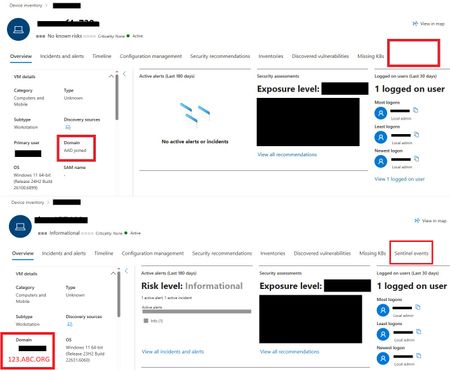
Defender Entity Page w/ Sentinel Events Tab
One device is displaying the Sentinel Events Tab, while the other is not. The only difference observed is that one device is Azure AD (AAD) joined and the other is Domain Joined. Could this difference account for the missing Sentinel events data? Any insight would be appreciated!173Views0likes2Comments
What’s New in Microsoft Sentinel: November 2025
Welcome to our new Microsoft Sentinel blog series! We’re excited to launch a new blog series focused on Microsoft Sentinel. From the latest product innovations and feature updates to industry recognition, success stories, and major events, you’ll find it all here. This first post kicks off the series by celebrating Microsoft’s recognition as a Leader in the 2025 Gartner Magic Quadrant for SIEM 1 . It also introduces the latest innovations designed to deliver measurable impact and empower defenders with adaptable, collaborative tools in an evolving threat landscape. Microsoft is recognized as a Leader in 2025 Gartner Magic Quadrant for Security Information and Event Management (SIEM) Microsoft Sentinel continues to drive security innovation—and the industry is taking notice. Microsoft was named a leader in the 2025 Gartner Magic Quadrant for Security Information and Event Management (SIEM) 1 , published on October 8, 2025. We believe this acknowledgment reinforces our commitment to helping organizations stay secure in a rapidly changing threat landscape. Read blog for more information. Take advantage of M365 E5 benefit and Microsoft Sentinel promotional pricing Microsoft 365 E5 benefit Customers with Microsoft 365 E5, A5, F5, or G5 licenses automatically receive up to 5 MB of free data ingestion per user per day, covering key security data sources like Azure AD sign-in logs and Microsoft Cloud App Security discovery logs—no enrollment required. Read more about M365 benefits for Microsoft Sentinel. New 50GB promotional pricing To make Microsoft Sentinel more accessible to small and mid-sized organizations, we introduced a new 50 GB commitment tier in public preview, with promotional pricing starting October 1, 2025, through March 31, 2026. Customers who choose the 50 GB commitment tier during this period will maintain their promotional rate until March 31, 2027. Available globally with regional variations in regional pricing it is accessible through EA, CSP, and Direct channels. For more information see Microsoft Sentinel pricing page. Partner Integrations: Strengthening TI collaboration and workflow automation Microsoft Sentinel continues to expand its ecosystem with powerful partner integrations that enhance security operations. With Cyware, customers can now share threat intelligence bi-directionally across trusted destinations, ISACs, and multi-tenant environments—enabling real-time intelligence exchange that strengthens defenses and accelerates coordinated response. Learn more about the Cyware integration. Learn more about the Cyware integration here. Meanwhile, BlinkOps integration combined with Sentinel’s SOAR capabilities empowers SOC teams to automate repetitive tasks, orchestrate complex playbooks, and streamline workflows end-to-end. This automation reduces operational overhead, cuts Mean Time to Respond (MTTR) and frees analysts for strategic threat hunting. Learn more about the BlinkOps integration. Learn more about the BlinkOps integration. Harnessing Microsoft Sentinel Innovations Security is being reengineered for the AI era, moving beyond static, rule-based controls and reactive post-breach response toward platform-led, machine-speed defense. To overcome fragmented tools, sprawling signals, and legacy architectures that cannot keep pace with modern attacks, Microsoft Sentinel has evolved into both a SIEM and a unified security platform for agentic defense. These updates introduce architectural enhancements and advanced capabilities that enable AI-driven security operations at scale, helping organizations detect, investigate, and respond with unprecedented speed and precision. Microsoft Sentinel graph – Public Preview Unified graph analytics for deeper context and threat reasoning. Microsoft Sentinel graph delivers an interactive, visual map of entity relationships, helping analysts uncover hidden attack paths, lateral movement, and root causes for pre- and post-breach investigations. Read tech community blog for more details. Microsoft Sentinel Model Context Protocol (MCP) server – Public Preview Context is key to effective security automation. Microsoft Sentinel MCP server introduces a standardized protocol for building context-aware solutions, enabling developers to create smarter integrations and workflows within Sentinel. This opens the door to richer automation scenarios and more adaptive security operations. Read tech community blog for more details. Enhanced UEBA with New Data Sources – Public Preview We are excited to announce support for six new sources in our user entity and behavior analytics algorithm, including AWS, GCP, Okta, and Azure. Now, customers can gain deeper, cross-platform visibility into anomalous behavior for earlier and more confident detection. Read our blog and check out our Ninja Training to learn more. Developer Solutions for Microsoft Sentinel platform – Public Preview Expanded APIs, solution templates, and integration capabilities empower developers to build and distribute custom workflows and apps via Microsoft Security Store. This unlocks faster innovation, streamlined operations, and new revenue opportunities, extending Sentinel beyond out-of-the-box functionality for greater agility and resilience. Read tech community blog for more details. Growing ecosystem of Microsoft Sentinel data connectors We are excited to announce the general availability of four new data connectors: AWS Server Access Logs, Google Kubernetes Engine, Palo Alto CSPM, and Palo Alto Cortex Xpanse. Visit find your Microsoft Sentinel data connector page for the list of data connectors currently supported. We are also inviting Private Previews for four additional connectors: AWS EKS, Qualys VM KB, Alibaba Cloud Network, and Holm Security towards our commitment to expand the breadth and depth to support new data sources. Our customer support team can help you sign up for previews. New agentless data connector for Microsoft Sentinel Solution for SAP applications We’re excited to announce the general availability of a new agentless connector for Microsoft Sentinel solution for SAP applications, designed to simplify integration and enhance security visibility. This connector enables seamless ingestion of SAP logs and telemetry directly into Microsoft Sentinel, helping SOC teams monitor critical business processes, detect anomalies, and respond to threats faster—all while reducing operational overhead. Events, Webinars and Training Stay connected with the latest security innovation and best practices. From global conferences to expert-led sessions, these events offer opportunities to learn, network, and explore how Microsoft is shaping AI-driven, end-to-end security for the modern enterprise. Microsoft Ignite 2025 Security takes center stage at Microsoft Ignite, with dedicated sessions and hands-on experiences for security professionals and leaders. Join us in San Francisco, November 17–21, 2025, or online, to explore our AI-first, end-to-end security platform designed to protect identities, devices, data, applications, clouds, infrastructure—and critically—AI systems and agents. Register today! Microsoft Security Webinars Stay ahead of emerging threats and best practices with expert-led webinars from the Microsoft Security Community. Discover upcoming sessions on Microsoft Sentinel SIEM & platform, Defender, Intune, and more. Sign up today and be part of the conversation that shapes security for everyone. Learn more about upcoming webinars. Onboard Microsoft Sentinel in Defender – Video Series Microsoft leads the industry in both SIEM and XDR, delivering a unified experience that brings these capabilities together seamlessly in the Microsoft Defender portal. This integration empowers security teams to correlate insights, streamline workflows, and strengthen defenses across the entire threat landscape. Ready to get started? Explore our video series to learn how to onboard your Microsoft Sentinel experience and unlock the full potential of integrated security. Watch Microsoft Sentinel is now in Defender video series. MDTI Convergence into Microsoft Sentinel & Defender XDR overview Discover how Microsoft Defender Threat Intelligence Premium is transforming cybersecurity by integrating into Defender XDR, Sentinel, and the Defender portal. Watch this session to learn about new features, expanded access to threat intelligence, and how these updates strengthen your security posture. Partner Sentinel Bootcamp Transform your security team from Sentinel beginners to advanced practitioners. This comprehensive 2-day bootcamp helps participants master architecture design, data ingestion strategies, multi-tenant management, and advanced analytics while learning to leverage Microsoft's AI-first security platform for real-world threat detection and response. Register here for the bootcamp. Looking to dive deeper into Microsoft Sentinel development? Check out the official https://aka.ms/AppAssure_SentinelDeveloper. It’s the central reference for developers and security teams who want to build custom integrations, automate workflows, and extend Sentinel’s capabilities. Bookmark this link as your starting point for hands-on guidance and tools. Stay Connected Check back each month for the latest innovations, updates, and events to ensure you’re getting the most out of Microsoft Sentinel. 1 Gartner® Magic Quadrant™ for Security Information and Event Management, Andrew Davies, Eric Ahlm, Angel Berrios, Darren Livingstone, 8 October 20252.9KViews2likes3Comments
Understand New Sentinel Pricing Model with Sentinel Data Lake Tier
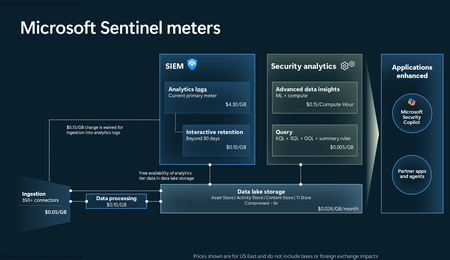
Introduction on Sentinel and its New Pricing Model Microsoft Sentinel is a cloud-native Security Information and Event Management (SIEM) and Security Orchestration, Automation, and Response (SOAR) platform that collects, analyzes, and correlates security data from across your environment to detect threats and automate response. Traditionally, Sentinel stored all ingested data in the Analytics tier (Log Analytics workspace), which is powerful but expensive for high-volume logs. To reduce cost and enable customers to retain all security data without compromise, Microsoft introduced a new dual-tier pricing model consisting of the Analytics tier and the Data Lake tier. The Analytics tier continues to support fast, real-time querying and analytics for core security scenarios, while the new Data Lake tier provides very low-cost storage for long-term retention and high-volume datasets. Customers can now choose where each data type lands—analytics for high-value detections and investigations, and data lake for large or archival types—allowing organizations to significantly lower cost while still retaining all their security data for analytics, compliance, and hunting. Please flow diagram depicts new sentinel pricing model: Now let's understand this new pricing model with below scenarios: Scenario 1A (PAY GO) Scenario 1B (Usage Commitment) Scenario 2 (Data Lake Tier Only) Scenario 1A (PAY GO) Requirement Suppose you need to ingest 10 GB of data per day, and you must retain that data for 2 years. However, you will only frequently use, query, and analyze the data for the first 6 months. Solution To optimize cost, you can ingest the data into the Analytics tier and retain it there for the first 6 months, where active querying and investigation happen. After that period, the remaining 18 months of retention can be shifted to the Data Lake tier, which provides low-cost storage for compliance and auditing needs. But you will be charged separately for data lake tier querying and analytics which depicted as Compute (D) in pricing flow diagram. Pricing Flow / Notes The first 10 GB/day ingested into the Analytics tier is free for 31 days under the Analytics logs plan. All data ingested into the Analytics tier is automatically mirrored to the Data Lake tier at no additional ingestion or retention cost. For the first 6 months, you pay only for Analytics tier ingestion and retention, excluding any free capacity. For the next 18 months, you pay only for Data Lake tier retention, which is significantly cheaper. Azure Pricing Calculator Equivalent Assuming no data is queried or analyzed during the 18-month Data Lake tier retention period: Although the Analytics tier retention is set to 6 months, the first 3 months of retention fall under the free retention limit, so retention charges apply only for the remaining 3 months of the analytics retention window. Azure pricing calculator will adjust accordingly. Scenario 1B (Usage Commitment) Now, suppose you are ingesting 100 GB per day. If you follow the same pay-as-you-go pricing model described above, your estimated cost would be approximately $15,204 per month. However, you can reduce this cost by choosing a Commitment Tier, where Analytics tier ingestion is billed at a discounted rate. Note that the discount applies only to Analytics tier ingestion—it does not apply to Analytics tier retention costs or to any Data Lake tier–related charges. Please refer to the pricing flow and the equivalent pricing calculator results shown below. Monthly cost savings: $15,204 – $11,184 = $4,020 per month Now the question is: What happens if your usage reaches 150 GB per day? Will the additional 50 GB be billed at the Pay-As-You-Go rate? No. The entire 150 GB/day will still be billed at the discounted rate associated with the 100 GB/day commitment tier bucket. Azure Pricing Calculator Equivalent (100 GB/ Day) Azure Pricing Calculator Equivalent (150 GB/ Day) Scenario 2 (Data Lake Tier Only) Requirement Suppose you need to store certain audit or compliance logs amounting to 10 GB per day. These logs are not used for querying, analytics, or investigations on a regular basis, but must be retained for 2 years as per your organization’s compliance or forensic policies. Solution Since these logs are not actively analyzed, you should avoid ingesting them into the Analytics tier, which is more expensive and optimized for active querying. Instead, send them directly to the Data Lake tier, where they can be retained cost-effectively for future audit, compliance, or forensic needs. Pricing Flow Because the data is ingested directly into the Data Lake tier, you pay both ingestion and retention costs there for the entire 2-year period. If, at any point in the future, you need to perform advanced analytics, querying, or search, you will incur additional compute charges, based on actual usage. Even with occasional compute charges, the cost remains significantly lower than storing the same data in the Analytics tier. Realized Savings Scenario Cost per Month Scenario 1: 10 GB/day in Analytics tier $1,520.40 Scenario 2: 10 GB/day directly into Data Lake tier $202.20 (without compute) $257.20 (with sample compute price) Savings with no compute activity: $1,520.40 – $202.20 = $1,318.20 per month Savings with some compute activity (sample value): $1,520.40 – $257.20 = $1,263.20 per month Azure calculator equivalent without compute Azure calculator equivalent with Sample Compute Conclusion The combination of the Analytics tier and the Data Lake tier in Microsoft Sentinel enables organizations to optimize cost based on how their security data is used. High-value logs that require frequent querying, real-time analytics, and investigation can be stored in the Analytics tier, which provides powerful search performance and built-in detection capabilities. At the same time, large-volume or infrequently accessed logs—such as audit, compliance, or long-term retention data—can be directed to the Data Lake tier, which offers dramatically lower storage and ingestion costs. Because all Analytics tier data is automatically mirrored to the Data Lake tier at no extra cost, customers can use the Analytics tier only for the period they actively query data, and rely on the Data Lake tier for the remaining retention. This tiered model allows different scenarios—active investigation, archival storage, compliance retention, or large-scale telemetry ingestion—to be handled at the most cost-effective layer, ultimately delivering substantial savings without sacrificing visibility, retention, or future analytical capabilities.1.2KViews0likes0CommentsMicrosoft Sentinel’s AI-driven UEBA ushers in the next era of behavioral analytics
Co-author - Ashwin Patil Security teams today face an overwhelming challenge: every data point is now a potential security signal and SOCs are drowning in complex logs, trying to find the needle in the haystack. Microsoft Sentinel User and Entity Behavior Analytics (UEBA) brings the power of AI to automatically surface anomalous behaviors, helping analysts cut through the noise, save time, and focus on what truly matters. Microsoft Sentinel UEBA has already helped SOCs uncover insider threats, detect compromised accounts, and reveal subtle attack signals that traditional rule-based methods often miss. These capabilities were previously powered by a core set of high-value data sources - such as sign-in activity, audit logs, and identity signals - that consistently delivered rich context and accurate detections. Today, we’re excited to announce a major expansion: Sentinel UEBA now supports six new data sources including Microsoft first- and third-party platforms like Azure, AWS, GCP, and Okta, bringing deeper visibility, broader context, and more powerful anomaly detection tailored to your environment. This isn’t just about ingesting more logs. It’s about transforming how SOCs understand behavior, detect threats, and prioritize response. With this evolution, analysts gain a unified, cross-platform view of user and entity behavior, enabling them to correlate signals, uncover hidden risks, and act faster with greater confidence. Newly supported data sources are built for real-world security use cases: Authentication activities MDE DeviceLogonEvents – Ideal for spotting lateral movement and unusual access. AADManagedIdentitySignInLogs – Critical for spotting stealthy abuse of non - human identities. AADServicePrincipalSignInLogs - Identifying anomalies in service principal usage such as token theft or over - privileged automation. Cloud platforms & identity management AWS CloudTrail Login Events - Surfaces risky AWS account activity based on AWS CloudTrail ConsoleLogin events and logon related attributes. GCP Audit Logs - Failed IAM Access, Captures denied access attempts indicating reconnaissance, brute force, or privilege misuse in GCP. Okta MFA & Auth Security Change Events – Flags MFA challenges, resets, and policy modifications that may reveal MFA fatigue, session hijacking, or policy tampering. Currently supports the Okta_CL table (unified Okta connector support coming soon). These sources feed directly into UEBA’s entity profiles and baselines - enriching users, devices, and service identities with behavioral context and anomalies that would otherwise be fragmented across platforms. This will complement our existing supported log sources - monitoring Entra ID sign-in logs, Azure Activity logs and Windows Security Events. Due to the unified schema available across data sources, UEBA enables feature-rich investigation and the capability to correlate across data sources, cross platform identities or devices insights, anomalies, and more. AI-powered UEBA that understands your environment Microsoft Sentinel UEBA goes beyond simple log collection - it continuously learns from your environment. By applying AI models trained on your organization’s behavioral data, UEBA builds dynamic baselines and peer groups, enabling it to spot truly anomalous activity. UBEA builds baselines from 10 days (for uncommon activities) to 6 months, both for the user and their dynamically calculated peers. Then, insights are surfaced on the activities and logs - such as an uncommon activity or first-time activity - not only for the user but among peers. Those insights are used by an advanced AI model to identify high confidence anomalies. So, if a user signs in for the first time from an uncommon location, a common pattern in the environment due to reliance on global vendors, for example, then this will not be identified as an anomaly, keeping the noise down. However, in a tightly controlled environment, this same behavior can be an indication of an attack and will surface in the Anomalies table. Including those signals in custom detections can help affect the severity of an alert. So, while logic is maintained, the SOC is focused on the right priorities. How to use UEBA for maximum impact Security teams can leverage UEBA in several key ways. All the examples below leverage UEBA’s dynamic behavioral baselines looking back up to 6 months. Teams can also leverage the hunting queries from the "UEBA essentials" solution in Microsoft Sentinel's Content Hub. Behavior Analytics: Detect unusual logon times, MFA fatigue, or service principal misuse across hybrid environments. Get visibility into geo-location of events and Threat Intelligence insights. Here’s an example of how you can easily discover Accounts authenticating without MFA and from uncommonly connected countries using UEBA behaviorAnalytics table: BehaviorAnalytics | where TimeGenerated > ago(7d) | where EventSource == "AwsConsoleSignIn" | where ActionType == "ConsoleLogin" and ActivityType == "signin.amazonaws.com" | where ActivityInsights.IsMfaUsed == "No" | where ActivityInsights.CountryUncommonlyConnectedFromInTenant == True | evaluate bag_unpack(UsersInsights, "AWS_") | where InvestigationPriority > 0 // Filter noise - uncomment if you want to see low fidelity noise | project TimeGenerated, _WorkspaceId, ActionType, ActivityType, InvestigationPriority, SourceIPAddress, SourceIPLocation, AWS_UserIdentityType, AWS_UserIdentityAccountId, AWS_UserIdentityArn Anomaly detection Identify lateral movement, dormant account reactivation, or brute-force attempts, even when they span cloud platforms. Below are examples of how to discover UEBA Anomalous AwsCloudTrail anomalies via various UEBA activity insights or device insights attributes: Anomalies | where AnomalyTemplateName in ( "UEBA Anomalous Logon in AwsCloudTrail", // AWS ClousTrail anomalies "UEBA Anomalous MFA Failures in Okta_CL", "UEBA Anomalous Activity in Okta_CL", // Okta Anomalies "UEBA Anomalous Activity in GCP Audit Logs", // GCP Failed IAM access anomalies "UEBA Anomalous Authentication" // For Authentication related anomalies ) | project TimeGenerated, _WorkspaceId, AnomalyTemplateName, AnomalyScore, Description, AnomalyDetails, ActivityInsights, DeviceInsights, UserInsights, Tactics, Techniques Alert optimization Use UEBA signals to dynamically adjust alert severity in custom detections—turning noisy alerts into high-fidelity detections. The example below shows all the users with anomalous sign in patterns based on UEBA. Joining the results with any of the AWS alerts with same AWS identity will increase fidelity. BehaviorAnalytics | where TimeGenerated > ago(7d) | where EventSource == "AwsConsoleSignIn" | where ActionType == "ConsoleLogin" and ActivityType == "signin.amazonaws.com" | where ActivityInsights.FirstTimeConnectionViaISPInTenant == True or ActivityInsights.FirstTimeUserConnectedFromCountry == True | evaluate bag_unpack(UsersInsights, "AWS_") | where InvestigationPriority > 0 // Filter noise - uncomment if you want to see low fidelity noise | project TimeGenerated, _WorkspaceId, ActionType, ActivityType, InvestigationPriority, SourceIPAddress, SourceIPLocation, AWS_UserIdentityType, AWS_UserIdentityAccountId, AWS_UserIdentityArn, ActivityInsights | evaluate bag_unpack(ActivityInsights) Another example shows anomalous key vault access from service principal with uncommon source country location. Joining this activity with other alerts from the same service principle increases fidelity of the alerts. You can also join the anomaly UEBA Anomalous Authentication with other alerts from the same identity to bring the full power of UEBA into your detections. BehaviorAnalytics | where TimeGenerated > ago(1d) | where EventSource == "Authentication" and SourceSystem == "AAD" | evaluate bag_unpack(ActivityInsights) | where LogonMethod == "Service Principal" and Resource == "Azure Key Vault" | where ActionUncommonlyPerformedByUser == "True" and CountryUncommonlyConnectedFromByUser == "True" | where InvestigationPriority > 0 Final thoughts This release marks a new chapter for Sentinel UEBA—bringing together AI, behavioral analytics, and cross-cloud and identity management visibility to help defenders stay ahead of threats. If you haven’t explored UEBA yet, now’s the time. Enable it in your workspace settings and don’t forget to enable anomalies as well (in Anomalies settings). And if you’re already using it, these new sources will help you unlock even more value. Stay tuned for our upcoming Ninja show and webinar (register at aka.ms/secwebinars), where we’ll dive deeper into use cases. Until then, explore the new sources, use the UEBA workbook, update your watchlists, and let UEBA do the heavy lifting. UEBA onboarding and setting documentation Identify threats using UEBA UEBA enrichments and insights reference UEBA anomalies reference5.4KViews6likes6Comments
Behavior Analytics, investigation Priority
Hello, Regarding the field investigation Priority in the Behavior Analytics table, what would be the value that Microsoft considers to be high/critical to look into the user's account? By analyzing the logs i would say, 7 or higher, if someone could tell me, and thank you in advance.224Views1like1CommentLevel Up Your Security Skills with the New Microsoft Sentinel Ninja Training!
If you’ve explored our Microsoft Sentinel Ninja Training in the past, it’s time to revisit! Our training program has undergone some exciting changes to keep you ahead of the curve in the ever-evolving cybersecurity landscape. Microsoft Sentinel is a cutting-edge, cloud-native SIEM and SOAR solution designed to help security professionals protect their organizations from today’s complex threats. Our Ninja Training program is here to guide you through every aspect of this powerful tool. So, what’s new? In addition to the structured security roles format, the Ninja Training now offers a more interactive experience with updated modules, hands-on labs, and real-world scenarios. Whether you're focusing on threat detection, incident response, or automation, the training ensures you gain the practical skills needed to optimize your security operations. One of the biggest updates is the integration of Sentinel into the Defender XDR portal, creating a unified security platform. This merger simplifies workflows, speeds up incident response, and minimizes tool-switching, allowing for seamless operations. Other highlights include: Step-by-step guidance through the official Microsoft Sentinel documentation. Exclusive webinars and up-to-date blog posts from Microsoft experts. If you're ready to take your Sentinel skills to the next level or want to revisit the program’s new features, head over to the blog now and dive into the refreshed Microsoft Sentinel Ninja Training! Don’t miss out—your next cybersecurity breakthrough is just a click away!6KViews5likes1Comment