ssma - oracle-dms migration
3 TopicsRelease Announcement of SQL Server Migration Assistant (SSMA) v10.4
We’re excited to announce the release of SQL Server Migration Assistant (SSMA) v10.4, bringing significant enhancements across all SSMA flavors to further streamline your database modernization journey to Azure SQL and SQL Server. This release focuses on deeper platform support, expanded schema conversion capabilities, and new AI-assisted experiences—with more coming soon Support for SQL Server 2025 (Available across all SSMA flavors) With SSMA 10.4, you can now fully discover, assess, convert schema, and migrate data to SQL Server 2025. This includes: Target selection for SQL Server 2025 in the assessment report Updated conversion rules for new SQL Server 2025 features (more to come in future versions) Data migration pipeline compatibility Improved schema and datatype mappings Whether you are modernizing on-premises workloads or planning a hybrid Azure strategy, SSMA 10.4 ensures you're ready for the next SQL Server release. General Availability of Oracle PL/SQL to SQL Code Conversion Copilot The Copilot experience for converting Oracle PL/SQL to T-SQL is now Generally Available (GA). The AI-assisted conversion engine helps accelerate application modernization by generating high-quality error handling of T-SQL from PL/SQL packages, procedures, functions, triggers, and more. We will publish a detailed blog with examples and guidance on how to make the most of this new capability. Microsoft-Managed Endpoint for Copilot Login (Preview) (Full blog coming soon) We are introducing a new Microsoft-managed endpoint that enables SSMA Copilot usage through Microsoft Entra ID authentication, without requiring customers to bring their own Azure OpenAI subscription. This feature is in Public Preview, and more details—including setup guidance—will be shared in an upcoming blog. User-Defined Datatypes (UDTs) support in SSMA for Sybase SSMA for Sybase now supports conversion of User-Defined Datatypes (UDTs) to SQL Server. This enhancement helps teams eliminate manual schema rewrites, reduces migration risk, and improves assessment coverage for complex Sybase ASE schemas. Other Improvements in SSMA 10.4 This release also includes several enhancements across flavors: Rule engine improvements in SSMA for Sybase, enabling more consistent and accurate schema conversion Performance optimizations to reduce assessment and conversion times Security and compliance updates Improved explanations and documentation for project settings to help users better understand configuration options during migration Download Links Get the latest versions of SSMA v10.4 here: SSMA for Oracle SSMA for Db2 SSMA for Sybase SSMA for Access SSMA for MySQLSybase to SQL User Defined Datatype conversion634Views2likes0CommentsRelease Announcement of SQL Server Migration Assistant (SSMA) v 10.1
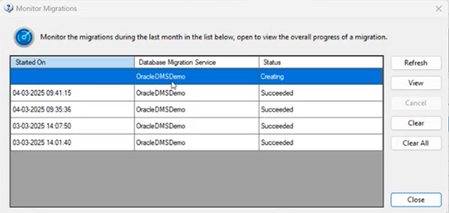
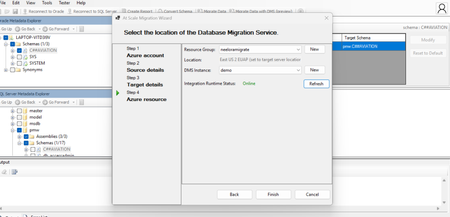
Overview SQL Server Migration Assistant (SSMA) Access, DB2, MySQL, Oracle, and SAP ASE (formerly SAP Sybase ASE) allow users to convert a database schema to a Microsoft SQL Server schema, deploy the schema, and then migrate data to the target SQL Server (see below for supported versions). What’s new? Enhanced monitoring experience for migrations using DMS [ SSMA-Oracle] Migrating Oracle workloads using Azure Database Migration service is in preview, please refer for more details. For Oracle workloads migrating using DMS in SSMA, we are bringing an enhanced monitoring experience through tabular user interface where the users can now view live list of migrations that are in progress or completed phase. Each entry represents a migration activity along with the start time of migration, DMS used for migration and status. Users can view quick brief migration information of individual tables to know more information like Table name, Schema name, copy duration, No. of Rows copied & status real-time. For the sake of users requiring more granular monitoring information about their migration activity, SSMA provides a link to the Azure Database Migration service portal webpage (View Comprehensive Report) where they can view details like Data read, writes, Rows copies, Throughput along with copy duration, etc. Code Conversion Improvements [DB2, Oracle] Conversion enhancements for identity column from Db2 z/OS to SQL Server 2019 Improve conversion of Db2 stored procedure WITH RETURN clause to Azure SQL Database Improve database objects load for Db2 Appropriate error handling for conversion of identifier REPLACE(STRING, CHAR,CHAR) in Db2 Detection of CHAR length in Oracle VARCHAR2 datatype Downloads SSMA for Access SSMA for DB2 SSMA for MySQL SSMA for Oracle SSMA for SAP ASE Supported sources and target versions Source: For the list of supported sources, please review the information on the Download Center for each of the above SQL Server Migration Assistant downloads. Target: SQL Server 2016, SQL Server 2017, SQL Server 2019, Azure SQL Database, an Azure SQL Database managed instance Resources SQL Server Migration Assistant documentation564Views1like0Comments