SQL Server
395 Topics2025 Year in Review: What’s new across SQL Server, Azure SQL and SQL database in Fabric
What a year 2025 has been for SQL! ICYMI and are looking for some hype, might I recommend you start with this blog from Priya Sathy, the product leader for all of SQL at Microsoft: One consistent SQL: The launchpad from legacy to innovation. In this blog post, Priya explains how we have developed and continue to develop one consistent SQL which “unifies your data estate, bringing platform consistency, performance at scale, advanced security, and AI-ready tools together in one seamless experience and creates one home for your SQL workloads in the era of AI.” For the FIFTH(!!) year in a row (my heart is warm with the number, I love SQL and #SQLfamily, and time is flying), I am sharing my annual Year in Review blog with all the SQL Server, Azure SQL and SQL database in Fabric news this year. Of course, you can catch weekly episodes related to what’s new and diving deeper on the Azure SQL YouTube channel at aka.ms/AzureSQLYT. This year, in addition to Data Exposed (52 new episodes and over 70K views!). We saw many new series related to areas like GitHub Copilot, SSMS, VS Code, and Azure SQL Managed Instance land in the channel, in addition to Data Exposed. Microsoft Ignite announcements Of course, if you’re looking for the latest announcements from Microsoft Ignite, Bob Ward and I compiled this slide of highlights. Comprehensive list of 2025 updates You can read this blog (or use AI to reference it later) to get all the updates and references from the year (so much happened at Ignite but before it too!). Here’s all the updates from the year: SQL Server, Arc-enabled SQL Server, and SQL Server on Azure VMs Generally Available SQL Server 2025 is Now Generally Available Backup/Restore capabilities in SQL Server 2025 SQL Server 2025: Deeply Integrated and Feature-rich on Linux Resource Governor for Standard Edition Reimagining Data Excellence: SQL Server 2025 Accelerated by Pure Storage Security Update for SQL Server 2022 RTM CU21 Cumulative Update #22 for SQL Server 2022 RTM Backup/Restore enhancements in SQL Server 2025 Unified configuration and governance Expanding Azure Arc for Hybrid and Multicloud Management US Government Virginia region support I/O Analysis for SQL Server on Azure VMs NVIDIA Nemotron RAG Integration Preview Azure Arc resource discovery in Azure Migrate Multicloud connector support for Google Cloud Migrations Generally Available SQL Server migration in Azure Arc Azure Database Migration Service Hub Experience SQL Server Migration Assistant (SSMA) v10.3, including Db2 SKU recommendation (preview) Database Migration Service: PowerShell, Azure CLI, and Python SDK SQL Server Migration Assistant (SSMA) v10.4, including SQL Server 2025 support, Oracle conversion Copilot Schema migration support in Azure Database Migration Service Preview Azure Arc resource discovery in Azure Migrate Azure SQL Managed Instance Generally Available Next-gen General Purpose Service Tier Improved connectivity types in Azure SQL Managed Instance Improved resiliency with zone redundancy for general purpose, improved log rate for business critical Apply reservation discount for zone redundant Business Critical databases Free offer Windows principals use to simplify migrations Data exfiltration improvements Preview Windows Authentication for Cloud-Native Identities New update policy for Azure SQL Managed Instance Azure SQL Database Generally Available LTR Backup Immutability Free Azure SQL Database Offer updates Move to Hyperscale while preserving existing geo-replication or failover group settings Improve redirect connection type to require only port 1433 and promote to default Bigint support in DATEADD for extended range calculations Restart your database from the Azure portal Replication lag metric Enhanced server audit and server audit action groups Read-access geo-zone redundant storage (RA-GZRS) as a backup storage type for non-Hyperscale Improved cutover experience to Hyperscale SLA-compliant availability metric Use database shrink to reduced allocated space for Hyperscale databases Identify causes of auto-resuming serverless workloads Preview Multiple geo-replicas for Azure SQL Hyperscale Backup immutability for Azure SQL Database LTR backups Updates across SQL Server, Azure SQL and Fabric SQL database Generally Available Regex Support and fuzzy-string matching Geo-replication and Transparent Data Encryption key management Optimized locking v2 Azure SQL hub in the Azure portal UNISTR intrinsic function and ANSI SQL concatenation operator (||) New vector data type JSON index JSON data type and aggregates Preview Stream data to Azure Event Hubs with Change Event Streaming (Azure SQL DB Public Preview/Fabric SQL Private Preview) DiskANN vector indexing SQL database in Microsoft Fabric and Mirroring Generally Available Fabric Databases SQL database in Fabric Unlocking Enterprise ready SQL database in Microsoft Fabric: ALM improvements, Backup customizations and retention, Copilot enhancements & more update details Mirroring for SQL Server Mirroring for Azure SQL Managed Instance in Microsoft Fabric Connect to your SQL database in Fabric using Python Notebook Updates to database development tools for SQL database in Fabric Using Fast Copy for data ingestion Copilot for SQL analytics endpoint Any updates across Microsoft Fabric that apply to the SQL analytics endpoint are generally supported in mirrored databases and Fabric SQL databases via the SQL analytics endpoint. This includes many exciting areas, like Data Agents. See the Fabric blog to get inspired Preview Data virtualization support Workspace level Private Link support (Private Preview) Customer-managed keys in Fabric SQL Database Auditing for Fabric SQL Database Fabric CLI: Create a SQL database in Fabric SQL database workload in Fabric with Terraform Spark Connector for SQL databases Tools and developer Blog to Read: How the Microsoft SQL team is investing in SQL tools and experiences SQL Server Management Studio (SSMS) 22.1 GitHub Copilot Walkthrough (Preview): Guided onboarding from the Copilot badge. Copilot right-click actions (Preview): Document, Explain, Fix, and Optimize. Bring your own model (BYOM) support in Copilot (Preview). Copilot performance: improved response time after the first prompt in a thread. Fixes: addressed Copilot “Run ValidateGeneratedTSQL” loop and other stability issues. SQL Server Management Studio (SSMS) 22 Support for SQL Server 2025 Modern connection dialog as default + Fabric browsing on the Browse tab. Windows Arm64 support (initial) for core scenarios (connect + query). GitHub Copilot in SSMS (Preview) is available via the AI Assistance workload in the VS Installer. T-SQL/UX improvements: open execution plan in new tab, JSON viewer, results grid zooms. New index support: create JSON and Vector indexes from Object Explorer SQL Server Management Studio (SSMS) 21 Installation and automatic updates via Visual Studio Installer. Workloads/components model: smaller footprint + customizable install. Git integration is available via the Code tools workload. Modern connection dialog experience (Preview). New customization options (e.g., vertical tabs, tab coloring, results in grid NULL styling). Always Encrypted Assessment in the Always Encrypted Wizard. Migration assistance via the Hybrid and Migration workload. mssql-python Driver ODBC: Microsoft ODBC Driver 18.5.2.1 for SQL Server OLE DB: Microsoft OLE DB Driver 19.4.1 for SQL Server JDBC (latest train): Microsoft JDBC Driver for SQL Server 13.2.1 Also updated in 2025: supported JDBC branches received multiple servicing updates (including Oct 13, 2025, security fixes). See the same JDBC release notes for the full list. .NET: Microsoft.Data.SqlClient 6.0.2 Related - some notes on drivers released/updated in 2025 (recap): MSSQL extension for VS Code 1.37.0 GitHub Copilot integration : Ask/Agent modes, slash commands, onboarding. Edit Data : interactive grid for editing table data (requires mssql.enableExperimentalFeatures: true). Data-tier Application dialog : deploy/extract .dacpac and import/export .bacpac (requires mssql.enableExperimentalFeatures: true). Publish SQL Project dialog : deploy .sqlproj to an existing DB or a local SQL dev container. Added “What’s New” panel + improved query results grid stability/accessibility. MSSQL extension for VS Code 1.36.0 Fabric connectivity : browse Fabric workspaces and connect to SQL DBs / SQL analytics endpoints. SQL database in Fabric provisioning : create Fabric SQL databases from Deployments. GitHub Copilot slash commands : connection, schema exploration, query tasks. Schema Compare extensibility: new run command for external extensions/SQL Projects (incl. Update Project from Database support). Query results in performance/reliability improvements (incremental streaming, fewer freezes, better settings handling). SqlPackage 170.0.94 release notes (April 2025) Vector: support for vector data type in Azure SQL Database target platform (import/export/extract/deploy/build). SQL projects: default compatibility level for Azure SQL Database and SQL database in Fabric set to 170. Parquet: expanded supported types (including json, xml, and vector) + bcp fallback for unsupported types. Extract: unpack a .dacpac to a folder via /Action:Extract. Platform: Remove .NET 6 support; .NET Framework build updated to 4.7.2. SqlPackage 170.1.61 release notes (July 2025) Data virtualization (Azure SQL DB): added support for data virtualization objects in import/export/extract/publish. Deployment: new publishing properties /p:IgnorePreDeployScript and /p:IgnorePostDeployScript. Permissions: support for ALTER ANY EXTERNAL MIRROR (Azure SQL DB + SQL database in Fabric) for exporting mirrored tables. SQL Server 2025 permissions: support for CREATE ANY EXTERNAL MODEL, ALTER ANY EXTERNAL MODEL, and ALTER ANY INFORMATION PROTECTION. Fixes: improved Fabric compatibility (e.g., avoid deploying unsupported server objects; fixes for Fabric extraction scripting). SqlPackage 170.2.70 release notes (October 2025) External models: support for external models in Azure SQL Database and SQL Server 2025. AI functions: support for AI_GENERATE_CHUNKS and AI_GENERATE_EMBEDDINGS. JSON: support for JSON indexes + functions JSON_ARRAYAGG, JSON_OBJECTAGG, JSON_QUERY. Vector: vector indexes + VECTOR_SEARCH and expanded vector support for SQL Server 2025. Regex: support for REGEXP_LIKE. Microsoft.Build.Sql 1.0.0 (SQL database projects SDK) Breaking: .NET 8 SDK required for dotnet build (Visual Studio build unchanged). Globalization support. Improved SDK/Templates docs (more detailed README + release notes links). Code analyzer template defaults DevelopmentDependency. Build validation: check for duplicate build items. Microsoft.Build.Sql 2.0.0 (SQL database projects SDK) Added SQL Server 2025 target platform (Sql170DatabaseSchemaProvider). Updated DacFx version to 170.2.70. .NET SDK targets imported by default (includes newer .NET build features/fixes; avoids full rebuilds with no changes Azure Data Studio retirement announcement (retirement February 28, 2026) Anna’s Pick of the Month Year It’s hard to pick a highlight representative of the whole year, so I’ll take the cheesy way out: people. I get to work with great people working on a great set of products for great people (like you) solving real world problems for people. So, thank YOU and you’re my pick of the year 🧀 Until next time… That’s it for now! We release new episodes on Thursdays and new #MVPTuesday episodes on the last Tuesday of every month at aka.ms/azuresqlyt. The team has been producing a lot more video content outside of Data Exposed, which you can find at that link too! Having trouble keeping up? Be sure to follow us on twitter to get the latest updates on everything, @AzureSQL. And if you lose this blog, just remember aka.ms/newsupdate2025 We hope to see you next YEAR, on Data Exposed! --Anna and Marisa273Views0likes1Comment
SQL Sever 2025 request with SQL connection
Hello, I installed SQL Server 2025 on a new VM, and I’m using a C# project to initialize my database based on a model (creating tables, foreign keys, default values, etc.). The process is extremely slow on SQL Server 2025: on my SQL Server 2022 environment, it takes about 30 minutes, but my first test on 2025 ran for over 4 hours. I’m connecting to SQL using a SQL authentication login (I tried both SA and a newly created account — same issue). I then tested using a Windows Authentication login, and surprisingly, the performance issue disappeared. Are there any known issues related to SQL authentication in SQL Server 2025?51Views0likes1CommentIntroducing "Backups on Secondary" for SQL Server Always On Availability Groups with SQL Server 2025
We’re excited to announce a major enhancement for SQL Server Always On Availability Groups Backups on Secondary, in SQL Server 2025. Until SQL Server 2022, you could only perform COPY_ONLY full backups and transaction log backups on a secondary replica of an Always On Availability Group. This enhancement in SQL Server 2025 allows you to offload all types of backups—full, differential, and transaction logs - to a secondary replica, significantly improving performance, resource utilization, and operational flexibility. What Is "Backups on Secondary"? Traditionally, backups in an Always On Availability Group were typically performed on the primary replica, which could lead to resource contention and performance degradation for mission-critical workloads. With this update in SQL Server 2025 to the Backups on Secondary feature, you can now configure your environment to perform all backup operations on a designated secondary replica. This includes: Full backups Differential backups Transaction log backups Key Benefits 🔄 Reduced Load on Primary Replica By offloading backup operations to a secondary replica, you free up CPU, memory, and I/O resources on the primary replica, ensuring that your production workloads run more smoothly and efficiently. 🧩 Flexible Backup Strategies You can now design more flexible and resilient backup strategies by leveraging secondary replicas in different geographic locations or data centers. 🛡️ Enhanced High Availability and Disaster Recovery In the event of a failover, backup operations can continue seamlessly on another secondary replica, ensuring continuous data protection. How It Works The feature is easy to configure using T-SQL or SQL Server Management Studio (SSMS). There are two steps to make backups run on secondary: Configure backups to run on secondary replica via the AUTOMATED_BACKUP_PREFERENCE and BACKUP_PRIORITY parameters – refer to Configure backups on secondary replicas of an Always On availability group for prerequisites and detailed steps. Run the T-SQL BACKUP command using one of the tools such as SSMS or SQL Agent jobs or Maintenance plans. These are the same steps that have been currently in place for SQL Server 2022 and for prior versions. In the prior versions this configuration only allowed COPY_ONLY and transaction log backups. Now, starting with SQL Server 2025, with the same configuration in place, you can perform FULL, DIFFERENTIAL and T-LOG backups on a secondary replica and truly offload the backup overhead on to the secondary replica. You can also query system views like sys.dm_hadr_backup_is_preferred_replica to programmatically determine the preferred replica for backups. Final Thoughts The Backups on Secondary feature is a game-changer for organizations looking to optimize their SQL Server environments for performance, availability, and cost. Whether you're managing a large-scale enterprise deployment or a hybrid cloud setup, this feature gives you the flexibility and control you need to build a more efficient and resilient data platform. This feature is available in SQL Server 2025 CTP 2.0. You can download it and try it out today.2.2KViews4likes4CommentsWhats new in the Backup/Restore area in SQL Server 2025
Over the past several months, we’ve heard from countless customers who are eager for more robust options to protect, compress, and safeguard their SQL Server data. Since introducing these features in public preview, organizations of all sizes have validated their value in real-world workloads and provided invaluable feedback. Following are three “hidden gems” (as one of our customers called them), in the Backup/Restore area we announced with SQL Server 2025. Backups on Secondary for Always On Availability Groups, ZSTD Compression, and Immutable Backups for Ransomware Protection. These advancements are now ready for production use, built around the needs and requests of the SQL Server customers. 1. Backups on Secondary for SQL Server Always On Availability Groups Previously in preview, this feature now reaches GA, allowing you to offload backup operations to secondary replicas in Always On Availability Groups. This enhancement optimizes resource utilization and minimizes overhead on primary replicas, ensuring better performance for mission-critical workloads. What’s New in GA: Improved reliability and support for production environments. Key Benefits: Comprehensive support: Full, differential, and transaction log backups are now fully supported on secondary replicas—not just COPY_ONLY and transaction logs. Reduced impact on primary replica performance. Simplified high-availability strategies. Learn more from the original announcement: Introducing Backups on Secondary for SQL Server Always On Availability Groups. 2. ZSTD Compression in SQL Server 2025 The GA of ZSTD compression brings modern, efficient data compression to SQL Server. ZSTD compression introduces industry-leading performance and efficiency, letting you save storage and speed up workloads. What’s New in GA: Full production support for ZSTD across key workloads. Key Benefits: Faster compression and decompression compared to legacy algorithms. Lower storage footprint without sacrificing performance. Choose your algorithm: ZSTD is now a standard option right alongside MS_XPRESS for row, page, and backup compression. Tunable compression levels: Administrators can select from LOW, MEDIUM, or HIGH to balance resource use and savings. Ideal for large-scale data environments. Explore the preview details: ZSTD Compression in SQL Server 2025. 3. Backups to immutable storage: A Powerful Shield Against Ransomware Your backups are now safer than ever. Thanks to native support for immutability with Azure Blob Storage, backup files can be rendered tamper-proof—protecting them from ransomware or even accidental deletion. Key Benefits: Strong defense against ransomware and malicious tampering. Compliance with regulatory requirements for data integrity. Peace of mind for critical backup strategies. Read the detailed use-case and how-to: Immutability: A Powerful Shield Against Ransomware in SQL Environments. These features collectively empower organizations to: Optimize performance and resource utilization. Reduce operational costs through efficient compression. Strengthen security posture against evolving threats. Get Started Today These features are available to all SQL Server 2025 customers. Ready to elevate your data protection, efficiency, and compliance posture? Access the official SQL Server 2025 documentation for step-by-step guides via visit Microsoft Learn. Review upgrade guidance and best practices. Explore real-world configurations and FAQs. Upgrade now and unlock the next level of resilience, efficiency, and security for your SQL Server workloads!494Views0likes0Comments
ABORT_QUERY_EXECUTION query hint - public preview
We are pleased to announce the public preview of a new query hint, ABORT_QUERY_EXECUTION. The hint is intended to be used as a Query Store hint to let administrators block future execution of known problematic queries, for example non-essential queries causing high resource consumption and affecting application workloads. The hint is now available in Azure SQL Database for all databases without restrictions. The hint will later be available in Azure SQL Managed Instance with the always-up-to-date update policy, as well as in a future version of SQL Server. For more information, see Block future execution of problematic queries in documentation. Update 2025-10-06: The ABORT_QUERY_EXECUTION hint is now generally available. Frequently Asked Questions Is this supported by Microsoft Support during public preview? Yes, just like other query hints. How do I use this? Use Query Store catalog views or the Query Store UI in SSMS to find the query ID of the query you want to block and execute sys.sp_query_store_set_hints specifying that query ID as a parameter. For example: EXEC sys.sp_query_store_set_hints @query_id = 17, @query_hints = N'OPTION (USE HINT (''ABORT_QUERY_EXECUTION''))'; What happens when a query with this hint is executed? This hint is intended to be used as a Query Store hint but can be specified directly as well. In either case, the query fails immediately with error 8778, severity 16: Query execution has been aborted because the ABORT_QUERY_EXECUTION hint was specified. How do I unblock a query? Remove the hint by executing sys.sp_query_store_clear_hints with the query ID value of the query you want to unblock passed via the @query_id parameter. Can I block a query that is not in Query Store? No. At least one execution of the query must be recorded in Query Store. That query execution does not have to be successful. This means that a query that started executing but was canceled or timed out can be blocked too. When I add the hint, does it abort any currently executing queries? No. The hint only aborts future query executions. You can use KILL to abort currently executing queries. What permissions are required to use this? As with all other Query Store hints, the ALTER permission on the database is required to set and clear the hint. Can I block all queries matching a query hash? Not directly. As with all other Query Store hints, you must use a query ID to set and clear a hint. However, you can create automation that will periodically find all new query IDs matching a given query hash and block them. Can I find all blocked queries in Query Store? Yes, by executing the following query: SELECT qsh.query_id, q.query_hash, qt.query_sql_text FROM sys.query_store_query_hints AS qsh INNER JOIN sys.query_store_query AS q ON qsh.query_id = q.query_id INNER JOIN sys.query_store_query_text AS qt ON q.query_text_id = qt.query_text_id WHERE UPPER(qsh.query_hint_text) LIKE '%ABORT[_]QUERY[_]EXECUTION%' Where do I send feedback about this hint? The preferred feedback channel is via https://aka.ms/sqlfeedback. Feedback sent that way is public and can be voted and commented on by other SQL community members. You can also leave comments on this blog post or email us at intelligentqp@microsoft.com.1.5KViews1like0CommentsStream data in near real time from SQL to Azure Event Hubs - Public preview
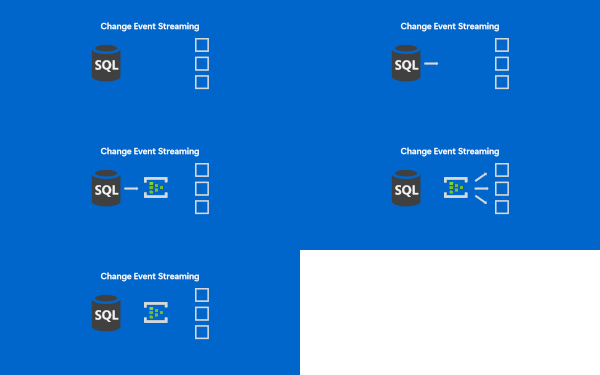
If near-real time integration is something you are looking to implement and you were looking for a simpler way to get the data out of SQL, keep reading. SQL is making it easier to integrate and Change Event Streaming is a feature continuing this trend. Modern applications and analytics platforms increasingly rely on event-driven architectures and real-time data pipelines. As the businesses speed up, real time decisioning is becoming especially important. Traditionally, capturing changes from a relational database requires complex ETL jobs, periodic polling, or third-party tools. These approaches often consume significant cycles of the data source, introduce operational overhead, and pose challenges with scalability, especially if you need one data source to feed into multiple destinations. In this context, we are happy to release Change Event Streaming ("CES") feature into Public Preview for Azure SQL Database. This feature enables you to stream row-level changes - inserts, updates, and deletes - from your database directly to Azure Event Hubs in near real time. Change Event Streaming addresses the above challenges by: Reducing latency: Changes are streamed (pushed by SQL) as they happen. This is in contrast with traditional CDC (change data capture) or CT (change tracking) based approaches, where an external component needs to poll SQL at regular intervals. Traditional approaches allow you to increase polling frequency, but it gets difficult to find a sweet spot between minimal latency and minimal overhead due to too frequent polls. Simplifying architecture: No need for Change Data Capture (CDC), Change Tracking, custom polling or external connectors - SQL streams directly to configured destination. This means simpler security profile (fewer authentication points), fewer failure points, easier monitoring, lower skill bar to deploy and run the service. No need to worry about cleanup jobs, etc. SQL keeps track of which changes are successfully received by the destination, handles the retry logic and releases log truncation point. Finally, with CES you have fewer components to procure and get approved for production use. Decoupling: The integration is done on the database level. This eliminates the problem of dual writes - the changes are streamed at transaction boundaries, once your source of truth (the database) has saved the changes. You do not need to modify your app workloads to get the data streamed - you tap right onto the data layer - this is useful if your apps are dated and do not possess real-time integration capabilities. In case of some 3rd party apps, you may not even have an option to do anything other than database level integration, and CES makes it simpler. Also, the publishing database does not concern itself with the final destination for the data - Stream the data once to the common message bus, and you can consume it by multiple downstream systems, irrespective of their number or capacity - the (number of) consumers does not affect publishing load on the SQL side. Serving consumers is handled by the message bus, Azure Event Hubs, which is purpose built for high throughput data transfers. onceptually visualizing data flow from SQL Server, with an arrow towards Azure Event Hubs, from where a number of arrows point to different final destinations. Key Scenarios for CES Event-driven microservices: They need to exchange data, typically thru a common message bus. With CES, you can have automated data publishing from each of the microservices. This allows you to trigger business processes immediately when data changes. Real-time analytics: Stream operational data into platforms like Fabric Real Time Intelligence or Azure Stream Analytics for quick insights. Breaking down the monoliths: Typical monolithic systems with complex schemas, sitting on top of a single database can be broken down one piece at a time: create a new component (typically a microservice), set up the streaming from the relevant tables on the monolith database and tap into the stream by the new components. You can then test run the components, validate the results against the original monolith, and cutover when you build the confidence that the new component is stable. Cache and search index updates: Keep distributed caches and search indexes in sync without custom triggers. Data lake ingestion: Capture changes continuously into storage for incremental processing. Data availability: This is not a scenario per se, but the amount of data you can tap into for business process mining or intelligence in general goes up whenever you plug another database into the message bus. E.g. You plug in your eCommerce system to the message bus to integrate with Shipping providers, and consequently, the same data stream is immediately available for any other systems to tap into. How It Works CES uses transaction log-based capture to stream changes with minimal impact on your workload. Events are published in a structured JSON format following the CloudEvents standard, including operation type, primary key, and before/after values. You can configure CES to target Azure Event Hubs via AMQP or Kafka protocols. For details on configuration, message format, and FAQs, see the official documentation: Feature Overview CES: Frequently Asked Questions Get Started Public preview CES is available today in public preview for Azure SQL Database and as a preview feature in SQL Server 2025. Private preview CES is also available as a private preview for Azure SQL Managed Instance and Fabric SQL database: you can request to join the private preview by signing up here: https://aka.ms/sql-ces-signup We encourage you to try the feature out and start building real-time integrations on top of your existing data. We welcome your feedback—please share your experience through Azure Feedback portal or support channels. The comments below on this blog post will also be monitored, if you want to engage with us. Finally, CES team can be reached via email: sqlcesfeedback [at] microsoft [dot] com. Useful resources Free Azure SQL Database. Free Azure SQL Managed Instance.684Views0likes0CommentsGeneral Availability announcement of Backup/Restore capabilities in SQL Server 2025
Over the past several months, we’ve heard from countless customers who are eager for more robust options to protect, compress, and safeguard their SQL Server data. Since introducing these features in public preview, organizations of all sizes have validated their value in real-world workloads and provided invaluable feedback. Today, we are thrilled to announce the General Availability (GA) of three powerful SQL Server 2025 features: Backups on Secondary for Always On Availability Groups, ZSTD Compression, and Immutable Backups for Ransomware Protection. These advancements are now ready for production use, built around the needs and requests of the SQL Server customers. Backups on Secondary for SQL Server Always On Availability Groups Previously in preview, this feature now reaches GA, allowing you to offload backup operations to secondary replicas in Always On Availability Groups. This enhancement optimizes resource utilization and minimizes overhead on primary replicas, ensuring better performance for mission-critical workloads. What’s New in GA: Improved reliability and support for production environments. Key Benefits: Comprehensive support: Full, differential, and transaction log backups are now fully supported on secondary replicas—not just COPY_ONLY and transaction logs. Reduced impact on primary replica performance. Simplified high-availability strategies. Learn more from the original announcement: Introducing Backups on Secondary for SQL Server Always On Availability Groups. ZSTD Compression in SQL Server 2025 The GA of ZSTD compression brings modern, efficient data compression to SQL Server. ZSTD compression introduces industry-leading performance and efficiency, letting you save storage and speed up workloads. What’s New in GA: Full production support for ZSTD across key workloads. Key Benefits: Faster compression and decompression compared to legacy algorithms. Lower storage footprint without sacrificing performance. Choose your algorithm: ZSTD is now a standard option right alongside MS_XPRESS for row, page, and backup compression. Tunable compression levels: Administrators can select from LOW, MEDIUM, or HIGH to balance resource use and savings. Ideal for large-scale data environments. Explore the preview details: ZSTD Compression in SQL Server 2025. Backups to immutable storage: A Powerful Shield Against Ransomware Your backups are now safer than ever. Thanks to native support for immutability with Azure Blob Storage, backup files can be rendered tamper-proof—protecting them from ransomware or even accidental deletion. Key Benefits: Strong defense against ransomware and malicious tampering. Compliance with regulatory requirements for data integrity. Peace of mind for critical backup strategies. Read the detailed use-case and how-to: Immutability: A Powerful Shield Against Ransomware in SQL Environments. These features collectively empower organizations to: Optimize performance and resource utilization. Reduce operational costs through efficient compression. Strengthen security posture against evolving threats. Get Started Today These features are available to all SQL Server 2025 customers. Ready to elevate your data protection, efficiency, and compliance posture? Access the official SQL Server 2025 documentation for step-by-step guides via visit Microsoft Learn. Review upgrade guidance and best practices. Explore real-world configurations and FAQs. Upgrade now and unlock the next level of resilience, efficiency, and security for your SQL Server workloads!838Views1like0CommentsGeneral Availability Announcement: Regex Support in SQL Server 2025 & Azure SQL
We’re excited to announce the General Availability (GA) of native Regex support in SQL Server 2025 and Azure SQL — a long-awaited capability that brings powerful pattern matching directly into T-SQL. This release marks a significant milestone in modernizing string operations and enabling advanced text processing scenarios natively within the database engine. What is Regex? The other day, while building LEGO with my 3-year-old — an activity that’s equal parts joy and chaos — I spent minutes digging for one tiny piece and thought, “If only Regex worked on LEGO.” That moment of playful frustration turned into a perfect metaphor. Think of your LEGO box as a pile of data — a colorful jumble of tiny pieces. Now imagine trying to find every little brick from a specific LEGO set your kid mixed into the pile. That’s tricky — you’d have to sift through each piece one by one. But what if you had a smart filter that instantly found exactly those pieces? That’s what Regex (short for Regular Expressions) does for your data. It’s a powerful pattern-matching tool that helps you search, extract, and transform text with precision. With Regex now natively supported in SQL Server 2025 and Azure SQL, this capability is built directly into T-SQL — no external languages or workarounds required. What can Regex help you do? Regex can help you tackle a wide range of data challenges, including: Enhancing data quality and accuracy by validating and correcting formats like phone numbers, email addresses, zip codes, and more. Extracting valuable insights by identifying and grouping specific text patterns such as keywords, hashtags, or mentions. Transforming and standardizing data by replacing, splitting, or joining text patterns — useful for handling abbreviations, acronyms, or synonyms. Cleaning and optimizing data by removing unwanted patterns like extra whitespace, punctuation, or duplicates. Meet the new Regex functions in T-SQL SQL Server 2025 introduces seven new T-SQL Regex functions, grouped into two categories: scalar functions (return a value per row) and table-valued functions (TVFs) (return a set of rows). Here’s a quick overview: Function Type Description REGEXP_LIKE Scalar Returns TRUE if the input string matches the Regex pattern REGEXP_COUNT Scalar Counts the number of times a pattern occurs in a string REGEXP_INSTR Scalar Returns the position of a pattern match within a string REGEXP_REPLACE Scalar Replaces substrings that match a pattern with a replacement string REGEXP_SUBSTR Scalar Extracts a substring that matches a pattern REGEXP_MATCHES TVF Returns a table of all matches including substrings and their positions REGEXP_SPLIT_TO_TABLE TVF Splits a string into rows using a Regex delimiter These functions follow the POSIX standard and support most of the PCRE/PCRE2 flavor of regular expression syntax, making them compatible with most modern Regex engines and tools. They support common features like: Character classes (\d, \w, etc.) Quantifiers (+, *, {n}) Alternation (|) Capture groups ((...)) You can also use Regex flags to modify behavior: 'i' – Case-insensitive matching 'm' – Multi-line mode (^ and $ match line boundaries) 's' – Dot matches newline 'c' – Case-sensitive matching (default) Examples: Regex in Action Let’s explore how these functions solve tricky real-world data tasks that were hard to do in earlier SQL versions. REGEXP_LIKE: Data Validation — Keeping data in shape Validating formats like email addresses or phone numbers used to require multiple functions or external tools. With REGEXP_LIKE, it’s now a concise query. For example, you can check whether an email contains valid characters before and after the @, followed by a domain with at least two letters like .com, .org, or .co.in. SELECT [Name], Email, CASE WHEN REGEXP_LIKE (Email, '^[A-Za-z0-9._+]+@[A-Za-z0-9.-]+\.[A-Za-z]{2,}$') THEN 'Valid Email' ELSE 'Invalid Email' END AS IsValidEmail FROM (VALUES ('John Doe', 'john@contoso.com'), ('Alice Smith', 'alice@fabrikam.com'), ('Bob Johnson', 'bob@fabrikam.net'), ('Charlie Brown', 'charlie@contoso.co.in'), ('Eve Jones', 'eve@@contoso.com')) AS e(Name, Email); We can further use REGEXP_LIKE in CHECK constraints to enforce these rules at the column level (so no invalid format ever gets into the table). For instance: CREATE TABLE Employees ( ..., Email VARCHAR (320) CHECK (REGEXP_LIKE (Email, '^[A-Za-z0-9._%+-]+@[A-Za-z0-9.-]+\.[A-Za-z]{2,}$')), Phone VARCHAR (20) CHECK (REGEXP_LIKE (Phone, '^(\d{3})-(\d{3})-(\d{4})$')) ); This level of enforcement significantly enhances data integrity by ensuring that only correctly formatted values are accepted into the database. REGEXP_COUNT: Count JSON object keys Count how many top-level keys exist in a JSON string — no JSON parser needed! SELECT JsonData, REGEXP_COUNT(JsonData, '"[^"]+"\s*:', 1, 'i') AS NumKeys FROM (VALUES ('{"name":"Abhiman","role":"PM","location":"Bengaluru"}'), ('{"skills":["SQL","T-SQL","Regex"],"level":"Advanced"}'), ('{"project":{"name":"Regex GA","status":"Live"},"team":["Tejas","UC"]}'), ('{"empty":{}}'), ('{}')) AS t(JsonData); REGEXP_INSTR: Locate patterns in logs Find the position of the first error code (ERR-XXXX) in log messages — even when the pattern appears multiple times or in varying locations. SELECT LogMessage, REGEXP_INSTR(LogMessage, 'ERR-\d{4}', 1, 1, 0, 'i') AS ErrorCodePosition FROM (VALUES ('System initialized. ERR-1001 occurred during startup.'), ('Warning: Disk space low. ERR-2048. Retry failed. ERR-2049.'), ('No errors found.'), ('ERR-0001: Critical failure. ERR-0002: Recovery started.'), ('Startup complete. Monitoring active.')) AS t(LogMessage); REGEXP_REPLACE: Redact sensitive data Mask SSNs and credit card numbers in logs or exports — all with a single, secure query. SELECT sensitive_info, REGEXP_REPLACE(sensitive_info, '(\d{3}-\d{2}-\d{4}|\d{4}-\d{4}-\d{4}-\d{4})', '***-**-****') AS redacted_info FROM (VALUES ('John Doe SSN: 123-45-6789'), ('Credit Card: 9876-5432-1098-7654'), ('SSN: 000-00-0000 and Card: 1111-2222-3333-4444'), ('No sensitive info here'), ('Multiple SSNs: 111-22-3333, 222-33-4444'), ('Card: 1234-5678-9012-3456, SSN: 999-88-7777')) AS t(sensitive_info); REGEXP_SUBSTR: Extract and count email domains Extract domains from email addresses and group users by domain. SELECT REGEXP_SUBSTR(Email, '@(.+)$', 1, 1, 'i', 1) AS Domain, COUNT(*) AS NumUsers FROM (VALUES ('Alice', 'alice@contoso.com'), ('Bob', 'bob@fabrikam.co.in'), ('Charlie', 'charlie@example.com'), ('Diana', 'diana@college.edu'), ('Eve', 'eve@contoso.com'), ('Frank', 'frank@fabrikam.co.in'), ('Grace', 'grace@example.net')) AS e(Name, Email) WHERE REGEXP_LIKE (Email, '^[a-zA-Z0-9._%+-]+@[a-zA-Z0-9.-]+\.[a-zA-Z]{2,}$') GROUP BY REGEXP_SUBSTR(Email, '@(.+)$', 1, 1, 'i', 1); REGEXP_MATCHES: Extract multiple emails from text Extract all email addresses from free-form text like comments or logs — returning each match as a separate row for easy parsing or analysis. SELECT * FROM REGEXP_MATCHES ('Contact us at support@example.com or sales@example.com', '[A-Za-z0-9._%+-]+@[A-Za-z0-9.-]+\.[A-Za-z]{2,}'); This query identifies and returns both email addresses found in the string — no need for loops, manual parsing, or external scripting. REGEXP_SPLIT_TO_TABLE: Break down structured text Split a string into rows using a Regex delimiter — ideal for parsing logs, config entries, or form data. SELECT * FROM REGEXP_SPLIT_TO_TABLE ('Name: John Doe; Email: john.doe@example.com; Phone: 123-456-7890', '; '); This query breaks the input string into rows for each field, making it easier to parse and process the data — especially when dealing with inconsistent or custom delimiters. To explore more examples, syntax options, and usage details, head over to the https://learn.microsoft.com/en-us/sql/t-sql/functions/regular-expressions-functions-transact-sql?view=sql-server-ver17. Conclusion The addition of Regex functionality in SQL Server 2025 and Azure SQL is a major leap forward for developers and DBAs. It eliminates the need for external libraries, CLR integration, or complex workarounds for text processing. With Regex now built into T-SQL, you can: Validate and enforce data formats Sanitize and transform sensitive data Search logs for complex patterns Extract and split structured content And this is just the beginning. Regex opens the door to a whole new level of data quality, text analytics, and developer productivity — all within the database engine. So go ahead and Regex away! Your feedback and partnership continue to drive innovation in Azure SQL and SQL Server — thank you for being part of it.177Views0likes0CommentsSecuring Azure SQL Database with Microsoft Entra Password-less Authentication: Migration Guide
The Secure Future Initiative is Microsoft’s strategic framework for embedding security into every layer of the data platform—from infrastructure to identity. As part of this initiative, Microsoft Entra authentication for Azure SQL Database offers a modern, password less approach to access control that aligns with Zero Trust principles. By leveraging Entra identities, customers benefit from stronger security postures through multifactor authentication, centralized identity governance, and seamless integration with managed identities and service principals. Onboarding Entra authentication enables organizations to reduce reliance on passwords, simplify access management, and improve auditability across hybrid and cloud environments. With broad support across tools and platforms, and growing customer adoption, Entra authentication is a forward-looking investment in secure, scalable data access. Migration Steps Overview Organizations utilizing SQL authentication can strengthen database security by migrating to Entra Id-based authentication. The following steps outline the process. Identify your logins and users – Review the existing SQL databases, along with all related users and logins, to assess what’s needed for migration. Enable Entra auth on Azure SQL logical servers by assigning a Microsoft Entra admin. Identify all permissions associated with the SQL logins & Database users. Recreate SQL logins and users with Microsoft Entra identities. Upgrade application drivers and libraries to min versions & update application connections to SQL Databases to use Entra based managed identities. Update deployments for SQL logical server resources to have Microsoft Entra-only authentication enabled. For all existing Azure SQL Databases, flip to Entra‑only after validation. Enforce Entra-only for all Azure SQL Databases with Azure Policies (deny). Step 1: Identify your logins and users - Use SQL Auditing Consider using SQL Audit to monitor which identities are accessing your databases. Alternatively, you may use other methods or skip this step if you already have full visibility of all your logins. Configure server‑level SQL Auditing. For more information on turning the server level auditing: Configure Auditing for Azure SQL Database series - part1 | Microsoft Community Hub SQL Audit can be enabled on the logical server, which will enable auditing for all existing and new user databases. When you set up auditing, the audit log will be written to your storage account with the SQL Database audit log format. Use sys.fn_get_audit_file_v2 to query the audit logs in SQL. You can join the audit data with sys.server_principals and sys.database_principals to view users and logins connecting to your databases. The following query is an example of how to do this: SELECT (CASE WHEN database_principal_id > 0 THEN dp.type_desc ELSE NULL END) AS db_user_type , (CASE WHEN server_principal_id > 0 THEN sp.type_desc ELSE NULL END) AS srv_login_type , server_principal_name , server_principal_sid , server_principal_id , database_principal_name , database_principal_id , database_name , SUM(CASE WHEN succeeded = 1 THEN 1 ELSE 0 END) AS sucessful_logins , SUM(CASE WHEN succeeded = 0 THEN 1 ELSE 0 END) AS failed_logins FROM sys.fn_get_audit_file_v2( '<Storage_endpoint>/<Container>/<ServerName>', DEFAULT, DEFAULT, '2023-11-17T08:40:40Z', '2023-11-17T09:10:40Z') -- join on database principals (users) metadata LEFT OUTER JOIN sys.database_principals dp ON database_principal_id = dp.principal_id -- join on server principals (logins) metadata LEFT OUTER JOIN sys.server_principals sp ON server_principal_id = sp.principal_id -- filter to actions DBAF (Database Authentication Failed) and DBAS (Database Authentication Succeeded) WHERE (action_id = 'DBAF' OR action_id = 'DBAS') GROUP BY server_principal_name , server_principal_sid , server_principal_id , database_principal_name , database_principal_id , database_name , dp.type_desc , sp.type_desc Step 2: Enable Microsoft Entra authentication (assign admin) Follow this to enable Entra authentication and assign a Microsoft Entra admin at the server. This is mixed mode; existing SQL auth continues to work. WARNING: Do NOT enable Entra‑only (azureADOnlyAuthentications) yet. That comes in Step 7. Entra admin Recommendation: For production environments, it is advisable to utilize an PIM Enabled Entra group as the server administrator for enhanced access control. Step 3: Identity & document existing permissions (SQL Logins & Users) Retrieve a list of all your SQL auth logins. Make sure to run on the master database.: SELECT * FROM sys.sql_logins List all SQL auth users, run the below query on all user Databases. This would list the users per Database. SELECT * FROM sys.database_principals WHERE TYPE = 'S' Note: You may need only the column ‘name’ to identify the users. List permissions per SQL auth user: SELECT database_principals.name , database_principals.principal_id , database_principals.type_desc , database_permissions.permission_name , CASE WHEN class = 0 THEN 'DATABASE' WHEN class = 3 THEN 'SCHEMA: ' + SCHEMA_NAME(major_id) WHEN class = 4 THEN 'Database Principal: ' + USER_NAME(major_id) ELSE OBJECT_SCHEMA_NAME(database_permissions.major_id) + '.' + OBJECT_NAME(database_permissions.major_id) END AS object_name , columns.name AS column_name , database_permissions.state_desc AS permission_type FROM sys.database_principals AS database_principals INNER JOIN sys.database_permissions AS database_permissions ON database_principals.principal_id = database_permissions.grantee_principal_id LEFT JOIN sys.columns AS columns ON database_permissions.major_id = columns.object_id AND database_permissions.minor_id = columns.column_id WHERE type_desc = 'SQL_USER' ORDER BY database_principals.name Step 4: Create SQL users for your Microsoft Entra identities You can create users(preferred) for all Entra identities. Learn more on Create user The "FROM EXTERNAL PROVIDER" clause in TSQL distinguishes Entra users from SQL authentication users. The most straightforward approach to adding Entra users is to use a managed identity for Azure SQL and grant the required three Graph API permissions. These permissions are necessary for Azure SQL to validate Entra users. User.Read.All: Allows access to Microsoft Entra user information. GroupMember.Read.All: Allows access to Microsoft Entra group information. Application.Read.ALL: Allows access to Microsoft Entra service principal (application) information. For creating Entra users with non-unique display names, use Object_Id in the Create User TSQL: -- Retrieve the Object Id from the Entra blade from the Azure portal. CREATE USER [myapp4466e] FROM EXTERNAL PROVIDER WITH OBJECT_ID = 'aaaaaaaa-0000-1111-2222-bbbbbbbbbbbb' For more information on finding the Entra Object ID: Find tenant ID, domain name, user object ID - Partner Center | Microsoft Learn Alternatively, if granting these API permissions to SQL is undesirable, you may add Entra users directly using the T-SQL commands provided below. In these scenarios, Azure SQL will bypass Entra user validation. Create SQL user for managed identity or an application - This T-SQL code snippet establishes a SQL user for an application or managed identity. Please substitute the `MSIname` and `clientId` (note: use the client id, not the object id), variables with the Display Name and Client ID of your managed identity or application. -- Replace the two variables with the managed identity display name and client ID declare @MSIname sysname = '<Managed Identity/App Display Name>' declare @clientId uniqueidentifier = '<Managed Identity/App Client ID>'; -- convert the guid to the right type and create the SQL user declare @castClientId nvarchar(max) = CONVERT(varchar(max), convert (varbinary(16), @clientId), 1); -- Construct command: CREATE USER [@MSIname] WITH SID = @castClientId, TYPE = E; declare nvarchar(max) = N'CREATE USER [' + @MSIname + '] WITH SID = ' + @castClientId + ', TYPE = E;' EXEC (@cmd) For more information on finding the Entra Client ID: Register a client application in Microsoft Entra ID for the Azure Health Data Services | Microsoft Learn Create SQL user for Microsoft Entra user - Use this T-SQL to create a SQL user for a Microsoft Entra account. Enter your username and object Id: -- Replace the two variables with the MS Entra user alias and object ID declare sysname = '<MS Entra user alias>'; -- (e.g., username@contoso.com) declare uniqueidentifier = '<User Object ID>'; -- convert the guid to the right type declare @castObjectId nvarchar(max) = CONVERT(varchar(max), convert (varbinary(16), ), 1); -- Construct command: CREATE USER [@username] WITH SID = @castObjectId, TYPE = E; declare nvarchar(max) = N'CREATE USER [' + + '] WITH SID = ' + @castObjectId + ', TYPE = E;' EXEC (@cmd) Create SQL user for Microsoft Entra group - This T-SQL snippet creates a SQL user for a Microsoft Entra group. Set groupName and object Id to your values. -- Replace the two variables with the MS Entra group display name and object ID declare @groupName sysname = '<MS Entra group display name>'; -- (e.g., ContosoUsersGroup) declare uniqueidentifier = '<Group Object ID>'; -- convert the guid to the right type and create the SQL user declare @castObjectId nvarchar(max) = CONVERT(varchar(max), convert (varbinary(16), ), 1); -- Construct command: CREATE USER [@groupName] WITH SID = @castObjectId, TYPE = X; declare nvarchar(max) = N'CREATE USER [' + @groupName + '] WITH SID = ' + @castObjectId + ', TYPE = X;' EXEC (@cmd) For more information on finding the Entra Object ID: Find tenant ID, domain name, user object ID - Partner Center | Microsoft Learn Validate SQL user creation - When a user is created correctly, the EntraID column in this query shows the user's original MS Entra ID. select CAST(sid as uniqueidentifier) AS EntraID, * from sys.database_principals Assign permissions to Entra based users – After creating Entra users, assign them SQL permissions to read or write by either using GRANT statements or adding them to roles like db_datareader. Refer to your documentation from Step 3, ensuring you include all necessary user permissions for new Entra SQL users and that security policies remain enforced. Step 5: Update Programmatic Connections Change your application connection strings to managed identities for SQL authentication and test each app for Microsoft Entra compatibility. Upgrade your drivers to these versions or newer. JDBC driver version 7.2.0 (Java) ODBC driver version 17.3 (C/C++, COBOL, Perl, PHP, Python) OLE DB driver version 18.3.0 (COM-based applications) Microsoft.Data.SqlClient 5.2.2+ (ADO.NET) Microsoft.EntityFramework.SqlServer 6.5.0 (Entity Framework) System.Data.SqlClient(SDS) doesn't support managed identity; switch to Microsoft.Data.SqlClient(MDS). If you need to port your applications from SDS to MDS the following cheat sheet will be helpful: https://github.com/dotnet/SqlClient/blob/main/porting-cheat-sheet.md. Microsoft.Data.SqlClient also takes a dependency on these packages & most notably the MSAL for .NET (Version 4.56.0+). Here is an example of Azure web application connecting to Azure SQL, using managed identity. Step 6: Validate No Local Auth Traffic Be sure to switch all your connections to managed identity before you redeploy your Azure SQL logical servers with Microsoft Entra-only authentication turned on. Repeat the use of SQL Audit, just as you did in Step 1, but now to confirm that every connection has moved away from SQL authentication. Once your server is up and running with only Entra authentication, any connections still based on SQL authentication will not work, which could disrupt services. Test your systems thoroughly to verify that everything operates correctly. Step 7: Enable Microsoft Entra‑only & disable local auth Once all your connections & applications are built to use managed identity, you can disable the SQL Authentication, by turning the Entra-only authentication via Azure portal, or using the APIs. Step 8: Enforce at scale (Azure Policy) Additionally, after successful migration and validation, it is recommended to deploy the built-in Azure Policy across your subscriptions to ensure that all SQL resources do not use local authentication. During resource creation, Azure SQL instances will be required to have Microsoft Entra-only authentication enabled. This requirement can be enforced through Azure policies. Best Practices for Entra-Enabled Azure SQL Applications Use exponential backoff with decorrelated jitter for retrying transient SQL errors, and set a max retry cap to avoid resource drain. Separate retry logic for connection setup and query execution. Cache and proactively refresh Entra tokens before expiration. Use Microsoft.Data.SqlClient v3.0+ with Azure.Identity for secure token management. Enable connection pooling and use consistent connection strings. Set appropriate timeouts to prevent hanging operations. Handle token/auth failures with targeted remediation, not blanket retries. Apply least-privilege identity principles; avoid global/shared tokens. Monitor retry counts, failures, and token refreshes via telemetry. Maintain auditing for compliance and security. Enforce TLS 1.2+ (Encrypt=True, TrustServerCertificate=False). Prefer pooled over static connections. Log SQL exception codes for precise error handling. Keep libraries and drivers up to date for latest features and resilience. References Use this resource to troubleshoot issues with Entra authentication (previously known as Azure AD Authentication): Troubleshooting problems related to Azure AD authentication with Azure SQL DB and DW | Microsoft Community Hub To add Entra users from an external tenant, invite them as guest users to the Azure SQL Database's Entra administrator tenant. For more information on adding Entra guest users: Quickstart: Add a guest user and send an invitation - Microsoft Entra External ID | Microsoft Learn Conclusion Migrating to Microsoft Entra password-less authentication for Azure SQL Database is a strategic investment in security, compliance, and operational efficiency. By following this guide and adopting best practices, organizations can reduce risk, improve resilience, and future-proof their data platform in alignment with Microsoft’s Secure Future Initiative.458Views0likes1Comment